
The best VPNs for PUBG can help reduce the impact of high ping, ISP throttling, and geo-locked server queues that can get in the way of competitive play. You chase chicken dinners in PUBG with sharp reflexes and perfect timing, but latency can turn precise headshots into frustrating misses, making drops into Erangel or Miramar feel pointless.
A VPN can also add protection against players attempting to target your IP address, while helping you navigate regional matchmaking restrictions. Depending on where you are traveling, access to the game may also be restricted by local authorities.
The easy fix? A high-performance VPN. The right service completely masks your connection, flattens your ping spikes, and lets you hop into any international server pool seamlessly so you can focus entirely on ranking up.
In this comprehensive performance guide, we break down how to lower your ping, bypass regional matchmaking blocks, and rank the best VPN for PUBG and PUBG Mobile on PC, consoles, and mobile devices to help your squad secure the next victory.
How a VPN helps your PUBG connection
When players search for a “PUBG VPN,” they’re not after some magical gaming gadget. They want a fast VPN that can help their data take a smoother route to the game server.
Normally, your device connects to PUBG’s servers through your internet service provider (ISP). If that route is congested or takes an inefficient path, your data can take longer to reach its destination, leading to frustrating ping spikes, lag, and mid-match rubberbanding.
A great gaming VPN can take your traffic off a congested ISP route and send it through a high-capacity VPN server instead. The result can be two useful improvements for PUBG:
- Instant virtual relocation: PUBG servers read your physical location through your IP address, locking you into specific regional matchmaking queues. By connecting to a VPN server, the game only sees the server’s IP address. This lets you seamlessly hop into less toxic regional lobbies or access the game if you are traveling through a country with strict firewall bans.
- Flattened latency lanes: Using lightweight, modern protocols like WireGuard or Lightway ensures your encrypted data moves with virtually zero overhead. If your ISP is actively throttling your connection during peak hours, the VPN completely masks your network behavior, forcing your provider to deliver unthrottled, stable speeds.
How to set up a PUBG VPN on a PC
Getting a premium VPN ready for PUBG takes less than two minutes. Just follow these quick steps before you jump into the game:
- Acquire a premium subscription: Sign up for a high-performance gaming provider like NordVPN or Surfshark.
- Download the Windows client: Install the official application installer directly from your provider’s desktop dashboard.
- Switch to a low-latency protocol: Open the app settings menu and manually switch your protocol to WireGuard (or your provider’s custom equivalent like NordLynx) to guarantee the lowest possible ping.
- Select a server location: Choose a server city close to your physical location to flatten ping spikes, or select a foreign country if you are actively trying to jump into international matchmaking lobbies.
- Launch the game: Once the VPN interface displays an active connection, fire up the PUBG desktop client and drop into matchmaking completely protected.
While consoles don’t support VPN apps directly, you can still protect your PS4, Xbox One, or Xbox Series X/S with a few simple workarounds. We’ll show you how later.
Benefits of a PUBG VPN
Beyond fixing basic lag, a premium VPN can give your PUBG connection a boost in four key ways:
- Bypassing regional matchmaking blocks: A VPN can let you connect through another region, giving you more flexibility when playing with international friends or looking for different matchmaking options.
- Neutralizing targeted DDoS attacks: A VPN hides your real IP address, making it much harder for salty opponents to target your home connection with DDoS attacks.
- Defeating ISP bandwidth throttling: If your ISP slows down gaming traffic, a VPN can hide the type of traffic you’re using, making it harder to apply activity-based throttling.
- Evading government censorship bans: If PUBG is restricted where you live or travel, connecting through a VPN server in another country may help you access the game when local network blocks get in the way.
How we rank PUBG VPNs
Finding a great gaming VPN takes more than a quick speed test. We put dozens of providers through rigorous testing based on these must-have criteria:
- Speed: All VPNs have some effect on the speed of your connection. A tiny slowdown won’t be a problem for your gaming experience. But a VPN that seriously slows down your connection is likely to lead to you dying before you even know there is an enemy in front of you. Luckily, we have a list of top no-lag VPNs.
- Lots of servers: The more servers a VPN has, and the more countries those servers are in, the greater the chance that you will find one that gives you access to the PUBG servers you want to use. We recommend only using a VPN with at least 2,000 servers located in at least 50 countries.
- The ability to unblock PUBG servers: If you want to get the most out of this game, you want a VPN that can unblock geo-blocked PUBG servers. This means you want a VPN that will let you log into PUBG servers wherever you’re located. Unblocking servers like this is a specialized skill that most VPNs simply do not possess. But our three PUBG VPNs are great at it.
- Strong no-logs policy: While it may be hard to believe, gamers have been arrested for daring to log into PUBG after their local politicians had declared it illegal. A VPN that has a strong no-logs policy can help you avoid this fate. If the VPN has no records of your online activities, they can’t be compelled to turn over incriminating evidence to the local enforcers.
- Enhanced security features: The sophisticated encryption used by VPNs provides one level of security. But beyond that, features like a network kill switch (which keeps your IP address from getting exposed even if something happens to the VPN connection), ad and malware blocking (to keep those hackers at bay), and diskless VPN servers (ensuring that no incriminating information is available even if a server is physically seized by the authorities) help keep you safe from draconian laws while playing your favorite game.
- Apps for a wide range of devices: Considering that you can play PUBG or PUBG Mobile on everything from game consoles to PCs to smartphones, the best VPN for PUBG needs to have apps for all the devices that you might choose to play on. Note that in some cases, installing the VPN on your home router (a VPN router) instead of directly on your gaming device might be your best bet.
- 24/7 live chat support: While the VPNs we recommend are very reliable, stuff happens. That being the case, you want a VPN that offers fast, reliable technical support whenever you need it. The last thing you want is to miss a battle because you are waiting around for an email from some slow tech support department.
These are also the same core features we looked at when assessing the best VPNs for Warzone as well as the best VPNs for Modern Warfare 3 (MW3).
With this extensive list of characteristics, the best VPNs for PUBG need to possess, only a few VPNs could make the cut. Let’s talk about those right now.
The Best VPNs for PUBG
We’ll take a quick look at each VPN here, focusing only on what matters for PUBG. At the end of each mini-review, you’ll find a link to our full review.
Here are the best VPNs for PUBG:
NordVPN — Best overall VPN for PUBG
| Website | NordVPN.com |
| Based in | Panama |
| Logs | No logs (audited) |
| Price | $3.49/mo. |
| Support | 24/7 live chat |
| Refund | 30 days |
| Deal | 78% Off Coupon |

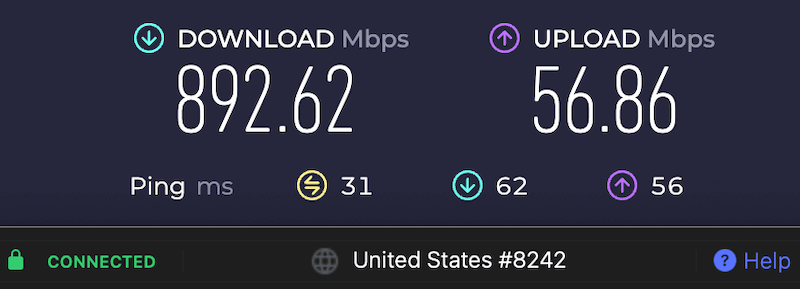
NordVPN is our #1 pick for the best VPN service for PUBG. It meets or exceeds every expectation for this work. Between their high-speed servers and the NordLynx VPN protocol, NordVPN is the fastest VPN we have ever tested. Not only is it super fast, it also excels at unblocking PUBG game servers.
NordVPN offers apps for all the major operating systems, Android and iOS (for PUBG mobile) devices, and even many home routers. We rate it as the best VPN for PC and desktop computers, and it also scores high for mobile devices. This means you can game on whatever gadget you want. NordVPN can also unlock cloud gaming platforms, and we believe it is a great VPN for GeForce Now.
Their apps are secure, user-friendly, and reliable, so you don’t have to worry about crashing out in the middle of a battle. Additionally, NordVPN offers many advanced security features, including DNS leak protection, malware blocking, and kill switches to secure all traffic.
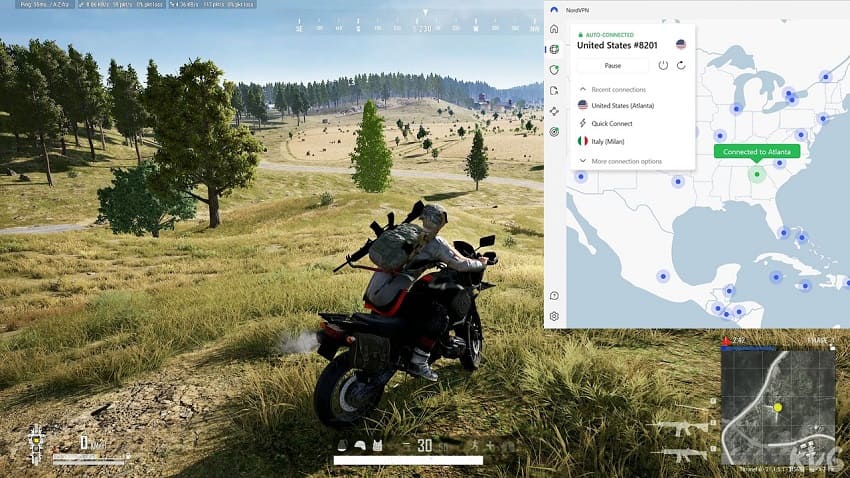
NordVPN has deployed over 7,800 high-speed servers across 126 countries worldwide. This huge network includes a variety of specialized servers you can call on when necessary. These include servers with extra security, the ability to defeat internet censorship, and access to geo-blocked sites like that PUBG server you’ve been dying to play on but are locked out of. This also makes it a great VPN for Call of Duty. NordVPN can also hold 10 simultaneous connections.
Similar to ExpressVPN and Surfshark, NordVPN is a no-logs VPN service that has been audited by outside parties. All servers in NordVPN’s network run on dedicated hardware (no virtual servers) in RAM-disk mode. These RAM servers (no hard drives) ensure no data can ever be stored on a VPN server.
With 24/7 live chat support, we’ve always found their team to be responsive and able to help us with any problem that came up. They also make it easy (and risk-free) to test-drive their service with their free 30-day money-back guarantee.
NordVPN’s Black Friday Deal is Live:
Get 78% Off NordVPN with the coupon below + 3 months extra:
(Coupon is applied automatically; 30-day money-back guarantee.)
For more info on this VPN, check out our NordVPN review and also our NordVPN gaming guide.
Surfshark — Big speed, small price for PUBG
| Website | Surfshark.com |
| Based in | The Netherlands |
| Logs | No logs (audited) |
| Price | $2.49/mo. |
| Support | 24/7 live chat |
| Refund | 30 days |
| Deal | 87% Off Coupon |

Surfshark is one of the newer VPN services, and it continues to grow in popularity. It made our recommendation list as one of the best VPNs for PUBG, and it has a lot to offer. Like NordVPN, Surfshark now supports the WireGuard VPN protocol for extremely fast speeds, which you can see in our NordVPN vs Surfshark comparison. With fast speeds and great features, it’s easily one of the best WireGuard VPNs you’ll find.
And when it comes to defeating the geo-restrictions keeping you off the PUBG server of your choice, Surfshark is a top choice. They have 4,500+ servers in 100 countries around the world. So wherever you happen to be located, connecting to a fast PUBG server is easy with this VPN.
Surfshark offers apps for all popular operating systems, and you can install their app on your router if they don’t have an app for your favorite device. Their apps are very reliable and secure, with VPN split tunneling and a kill switch to secure traffic, built-in leak protection, very strong encryption, and numerous VPN protocols to choose from. It is a great gaming VPN and works well for many different use cases.
Just like NordVPN and ProtonVPN, Surfshark has a hard no-logs policy and runs only RAM servers with no hard drives. Surfshark also offers 24/7 live chat support with an experienced, responsive team. This means you’re never stuck waiting long for an answer to urgent questions.
Two other things to consider when thinking about adding Surfshark to your PUBG VPN experience. First, it is one of the best cheap VPNs for the features and performance it delivers. Second, Surfshark gives you an unlimited number of simultaneous connections to their network. Among other things, that means when you want to play PUBG, you can do so without having to worry about how many other devices in the house are online at the same time.
Add it all up, and Surfshark is definitely worth consideration. Their 30-day money-back guarantee allows you to put the service through its paces. You can use this like a free trial VPN, testing out the service in the first 30 days to see if it meets your needs. Use the coupon below for the best savings.
Surfshark VPN Coupon:
Get 87% off Surfshark VPN plus an additional 3 months extra with the coupon below:
(Coupon is applied automatically; 30-day money-back guarantee)
Want to learn more about Surfshark? Here’s the link to our full Surfshark review and also our updated Surfshark gaming guide.
ExpressVPN — Strong security meets smooth PUBG gaming
| Website | ExpressVPN.com |
| Based in | British Virgin Islands |
| Logs | No logs (audited) |
| Price | $2.99/mo. |
| Support | 24/7 live chat |
| Refund | 30 days |
| Deal | 80% Off Coupon |

ExpressVPN rounds out our list of the best VPNs for PUBG. They too have introduced a new VPN protocol to improve the speed and security they provide. This is the Lightway protocol, and it gave us consistently fast speeds in our tests. However, it’s not quite on par with NordVPN and the WireGuard protocol, as we observed in the ExpressVPN vs NordVPN comparison.
ExpressVPN is still quite fast. And for most Playerunknown’s Battlegrounds situations, it should offer solid performance, particularly if you play PUBG mobile, which is surging in popularity and revenues.
Fortunately for the ExpressVPN crew, speed isn’t the only characteristic a VPN needs for PUBG. ExpressVPN has long been known for extremely reliable, bug-free apps. The apps include a kill switch, private DNS, and they passed all our leak tests. This VPN has a proven ability to defeat the geo-blocking software, unblock websites, and access almost any PUBG or streaming media server you want.
ExpressVPN has the best distribution of servers, with their 3,000+ VPN servers deployed across 214 locations in 113 countries across the globe. Like their competitors, the servers are extremely fast, with unlimited bandwidth and strong 256-bit encryption. All ExpressVPN servers are diskless and run on RAM memory in secure data centers. This also makes it an ideal VPN for PS5.
ExpressVPN can keep your whole gaming crew covered, supporting 10 to 14 simultaneous devices depending on your plan. Its 24/7 live chat support is on hand if you run into connection or matchmaking issues, while the 30-day money-back guarantee gives you plenty of time to test its low-latency network risk-free.
To get the full story on ExpressVPN, read our ExpressVPN review.
IPVanish — Cutting-Edge US PUBG VPN
| Website | IPVanish.com |
| Based in | USA |
| Logs | No logs (audited) |
| Price | $2.19/mo. |
| Support | Email and Chat |
| Refund | 30 days |
| Deal | 83% Off Coupon |

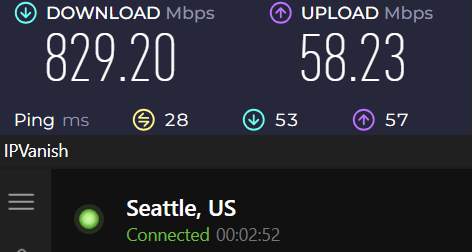
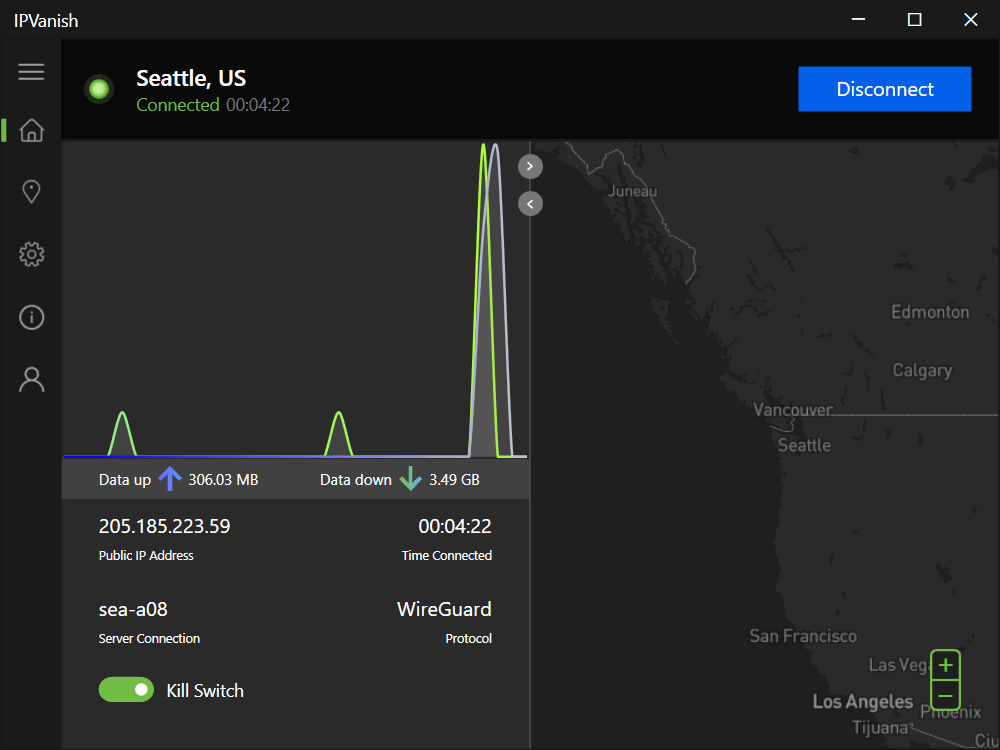
IPVanish is a premium US-based PUBG VPN that offers a network of 3,400+ servers in 110+ countries and relies on 3 VPN protocols: IKEv2, OpenVPN, and WireGuard. WireGuard really impressed us, as we consistently got speeds of over 830 Mbps while using a nearby Seattle VPN server. With speeds like this, it became clear why IPVanish is recommended as a solid VPN for Dota 2.
This was even more than we achieved with NordVPN, so our next step was to compare both services. You can read all about this in our IPVanish vs NordVPN showdown. To keep it brief, we found out that NordVPN still provides a more consistent connection, especially on its remote servers.
IPVanish is equally adept at security and user privacy. It combines AES 256 encryption with a strict no-logs policy to protect you while playing PUBG. At this point, we should note that some users have privacy concerns, as the US is a member of the 5-Eyes alliance. Considering this is an independently audited VPN with an excellent track record, we would still recommend it.
IPVanish brings plenty of security muscle without getting in your way. You get IPv6 and DNS leak protection, an automatic kill switch, and split tunneling to send PUBG traffic through the VPN while leaving other apps on your normal connection. Need to dodge network restrictions? Scramble obfuscation disguises OpenVPN traffic as regular web data. There’s also a SOCKS5 proxy for fast, lightweight routing when you want speed over encryption.
IPVanish apps are available on most platforms, including computers, tablets, and smartphones. You can also set it up on your router, allowing you to protect all of your gaming consoles on which PUBG is available. This is a very good budget VPN that comes with unlimited simultaneous connections. It is one of our favorite VPNs for multiple devices.
For more information, take a look at our IPVanish review. If you encounter any problems, you can immediately get help from a 24/7 professional customer support service that you can contact through live chat. By getting an annual or two-year subscription, you will be eligible for a 30-day refund policy.
Learn more by reading through our complete IPVanish review.
Setting up a PUBG VPN on consoles
Although gaming consoles aren’t directly compatible with VPN apps, we have three workaround methods.
1. Using SmartDNS
In this example, we will be using NordVPN on PS4.
- Log in to NordVPN and go to your dashboard.
- Navigate to Smart DNS > Enable > Activate SmartDNS.
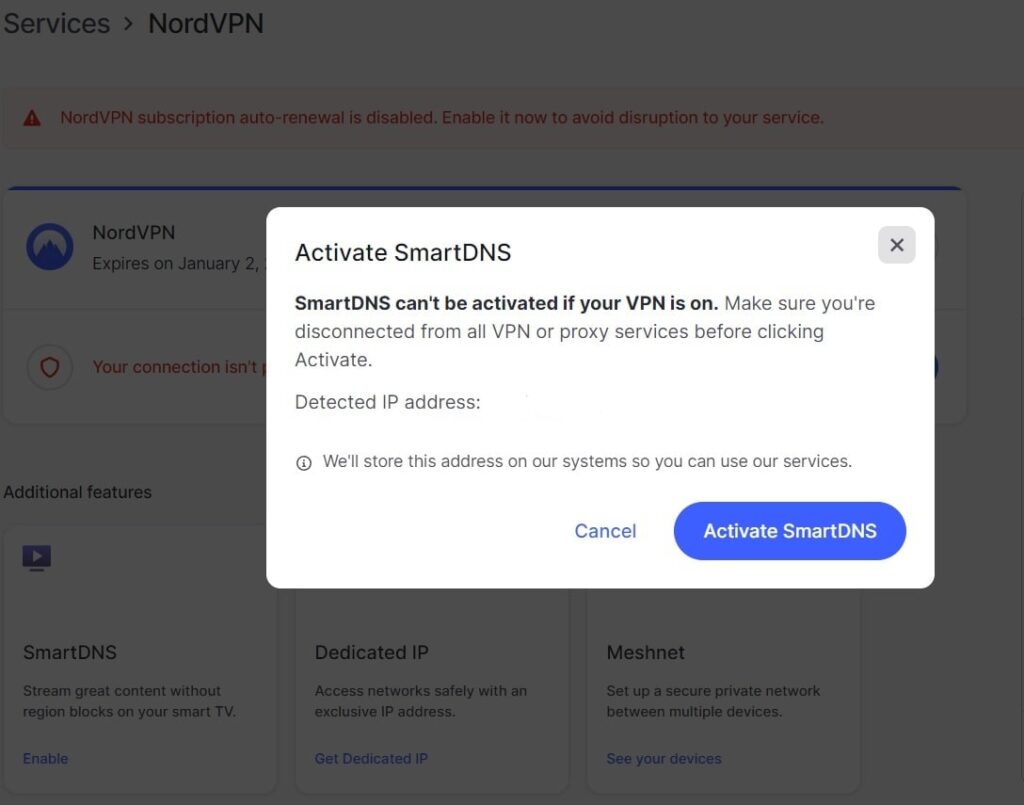
- Copy your Primary and Secondary DNS.
- Start your PlayStation 4.
- Open Settings > Network > Set Up Internet Connection
Choose between LAN and Wi-Fi connection. We will use LAN since it is more stable than wireless.
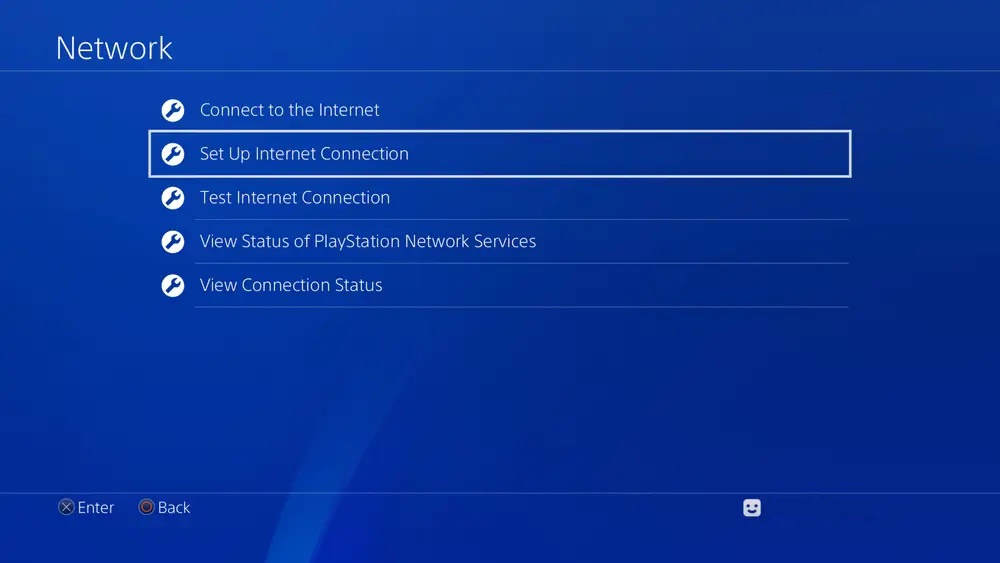
- Select Custom and Automatic under IP address settings.
- For DCHP Host Name, put Do Not Specify.
- Under DNS Settings, select Manual.
- Input the primary and secondary DNS you got from your VPN.
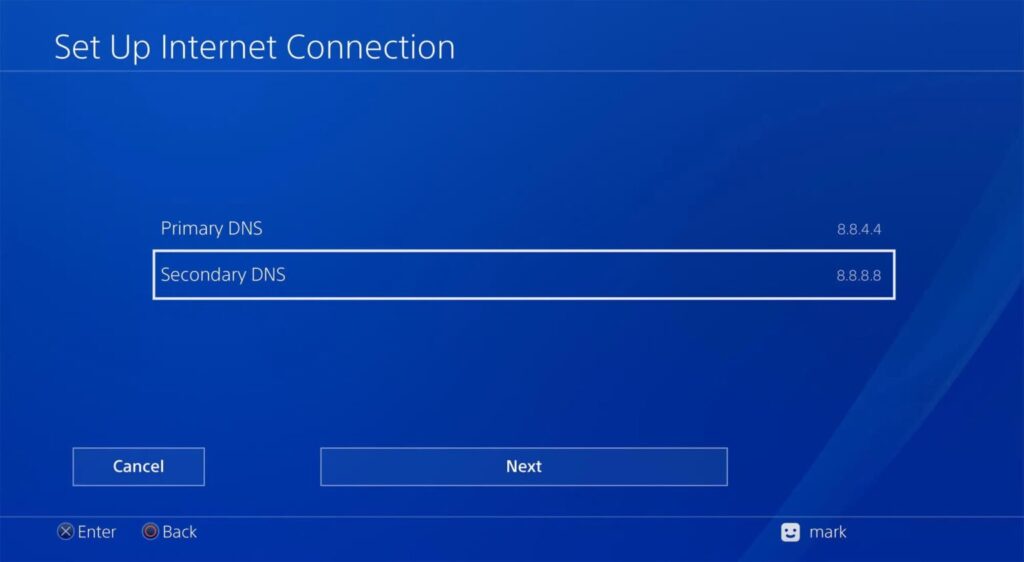
- MTU settings should be Automatic.
- For Proxy Server, select Do Not Use.
- Finally, choose Test Internet Connection.
- Start using PUBG VPN on your PS4.
2. Installing a VPN on your router
Router installation will allow you to protect multiple devices on your network simultaneously.
- Find out if your router is compatible with PUBG VPNs.
We have a list of NordVPN-compatible routers. Surfshark’s router list is nearly identical to models compatible with ExpressVPN. We’ve also found IPVanish router list. - Locate your router’s IP address.
It is usually on a small sticker on the back of your router. You can also Google “control panel IP address for *insert your router model*”. - Copy the IP in your browser tab to open the router’s Control Panel.
- Install a PUBG VPN on your router.
Since this process will differ depending on your router model, you should find detailed instructions on your VPN website. - Restart your router and computer.
- Gain gaming advantage with your PUBG VPN!
3. Creating a virtual router
If your router doesn’t support VPN apps, you can use your PC to create a virtual one. This is easier than it sounds. Here’s how to do this on your Xbox Series X.
- Download and install the premium VPN app on your PC.
- Register and log in with your user credentials.
- Visit Control Panel > Network and Internet > Network and Sharing Center > Change adapter settings.
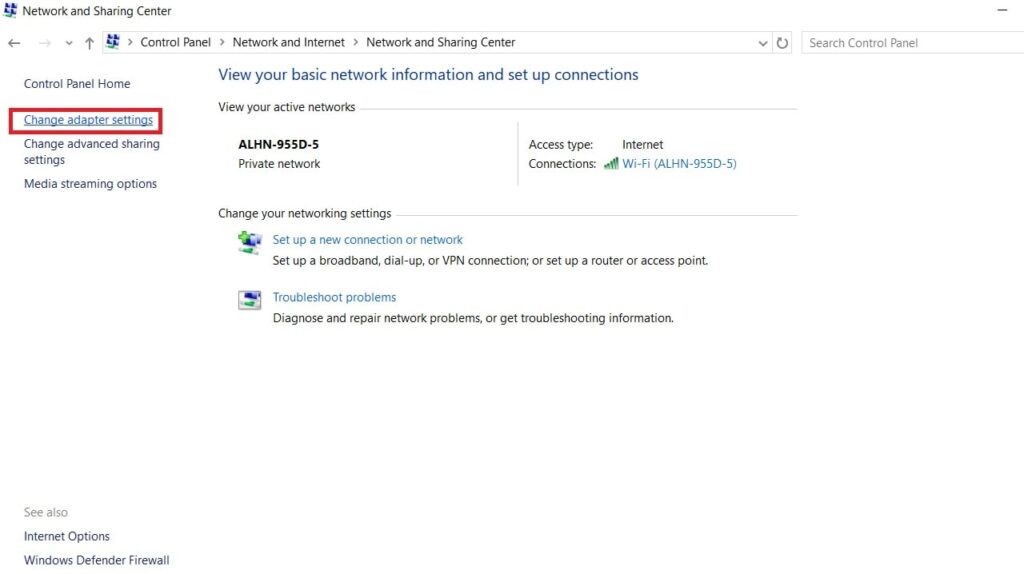
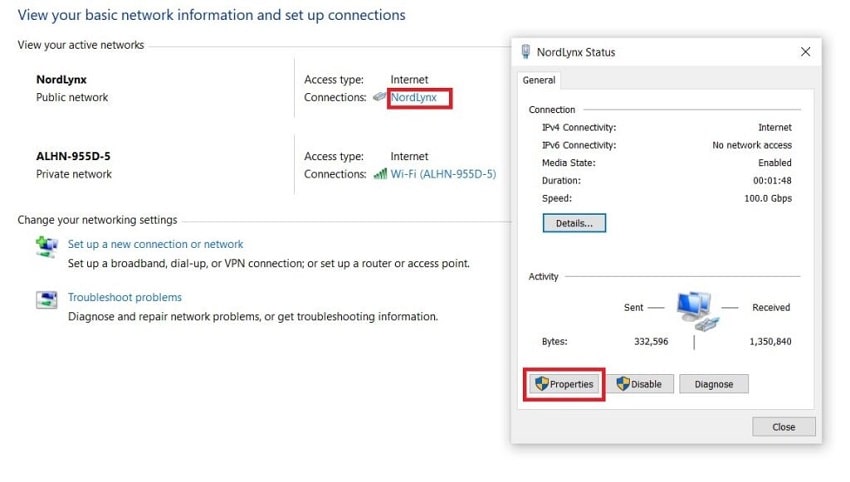
- Right-click on your VPN app and open Properties.
- Go to the Sharing tab and enable the first box.
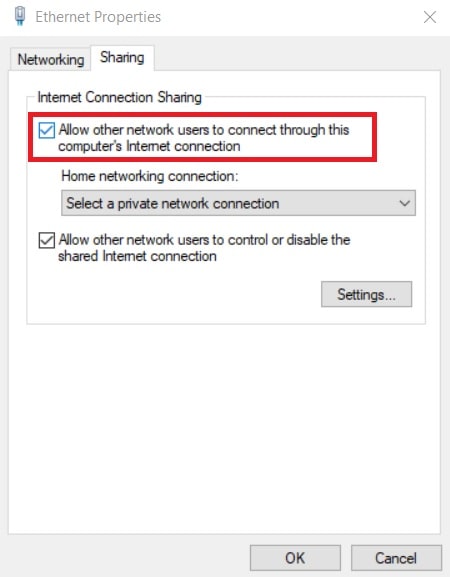
- Under Home Networking Connection, locate your Xbox connection.
- Connect your Xbox to computer via an ethernet cable.
You shouldn’t use Wi-Fi as it is slower and unreliable. - Start your Xbox and go to Network > Test Network Connection.
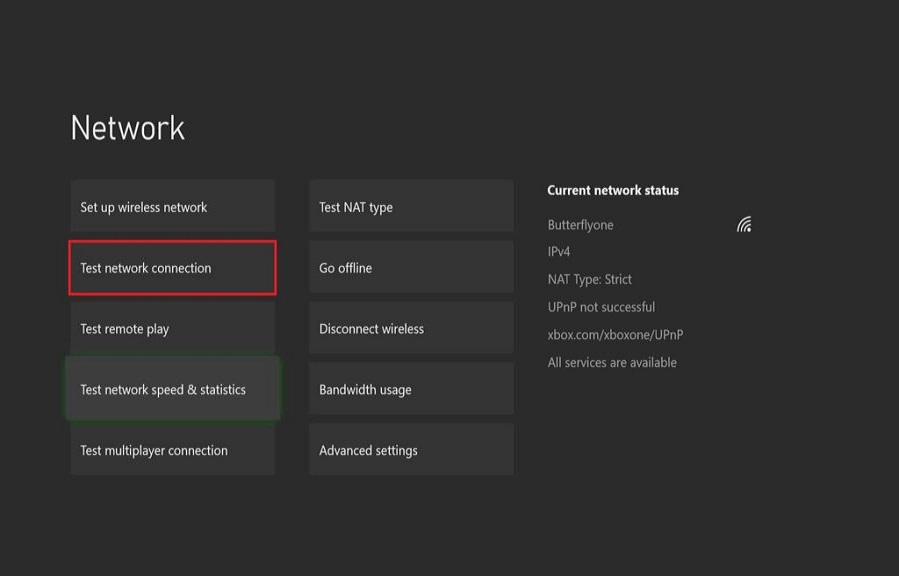
- Start using a VPN for PUBG to improve your gaming and boost security.
Optimizing your PUBG VPN
By following these tips, you can further improve your speed and security:
- Avoid using obfuscated servers: While you may cherish your anonymity, obfuscation will slow down your gaming speed, which can translate into frequent stuttering and high latency. You should only use it if it’s absolutely necessary.
- Find an ideal VPN server: Either connect to one that is near your real location or close to the PUBG gaming server. This will maximize your chances of finding a fast, low-latency server. Before jumping into the game, you should connect to a few different servers and perform a speed test.
- Utilize cutting-edge protocols: For the best in-game performance, you should focus on using Lightway, NordLynx, or WireGuard.
- Disable background applications: They can use a lot of bandwidth without you knowing or inadvertently reveal your true location. We recommend exiting everything that you don’t need when using a VPN for PUBG.
- Frequently update your VPN app: This can fix various security weak points and further boost your connection.
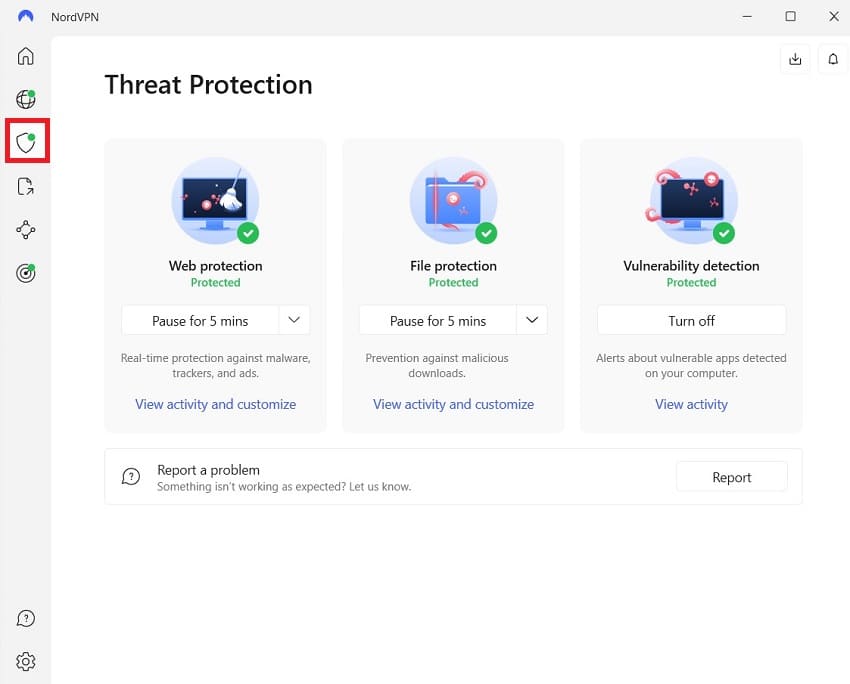
- Use advanced security features: To protect yourself from hackers and infamous DDoS attacks, you should enable every leak protection feature and use a kill switch. If you want to go a step further, you can turn on split tunneling and create an exclusive connection just for playing PUBG.
To get the ultimate gaming performance, we recommend subscribing to one of the recommended VPNs in this guide.
Troubleshooting connection issues
Even if you’re using the best possible VPN, you can still experience some technical difficulties. To help our readers, we’ve compiled all the most common issues and their solutions.
1. Fixing inactive IP addresses
Sometimes, the new IP address provided by the VPN server just won’t work. There are a few common issues that cause this.
You should first go to your VPN settings and check if all Leak Protection features are turned on.
If you haven’t, exit every background app that you’re not using. Some of them might be leaking your actual location.
Using your PUBG VPN for browsing might be problematic due to your browsers’ tracking cookies. These cookies collect user data and then bombard you with targeted ads. This can be helpful when shopping. However, they can only do that if they know your actual location.
You can fix this issue by clearing your browser’s cache and cookies. If you don’t know how, simply follow these guides for Chrome, Edge, and Firefox.
2. Resolving firewall blocks
This is a common issue if you want to play PUBG on your computer. In a majority of cases, it is tied to your firewall. You can temporarily disable it to quickly check if this is the case. If your PUBG VPN now works, it is time to create a firewall exception. To do this on Windows, simply …
- Go to Start > Control Panel > System and Security > Windows Defender Firewall.
- Select Allow an app or feature through Windows Defender Firewall.
- Hit Change Settings and find your VPN for PUBG in the list.
Once you do, tick the Public box. If you can’t find your VPN, select Allow another app and Add it once you locate it. - Click OK to confirm changes.
The process is a bit different on Mac, so just follow this Apple firewall guide.
Why free VPNs fail for PUBG
Free VPNs may save you money, but they can cost you in-game. For competitive gaming, slow servers, data caps, and weak performance can quickly turn a close match into a lag fest:
- Small server networks: Free VPN services have small budgets, which results in small server networks with slow, overloaded servers that lead to a PUBG disaster.
- Limited monthly bandwidth: Most free VPNs set a monthly bandwidth limit, usually between 1 and 5 GB. It won’t take you long to eat that up when playing. When that happens, you will not only be out of the game; you’ll be locked out of using your free VPN for an entire month.
- Obsolete VPN protocols: Free VPN almost always use older, slower, less secure VPN protocols, while all paid services on our list rely on the top protocols available: NordLynx, WireGuard, or Lightway.
- Aggressive IP account blocks: Free VPNs often cram thousands of users onto the same IP addresses, making those addresses more likely to trigger PUBG’s security filters and get blocked.
- Zero DDoS attack defense: With limited server capacity and security features, free VPNs may leave your home connection more vulnerable to DDoS attacks from frustrated opponents.
- Severe data tracking risks: Free VPNs still need to make money, and some do so through ads, tracking, or collecting user data. That can come at the expense of your privacy.
The bottom line
While you don’t usually have to have a VPN to play PUBG, it really helps. Today, we talked about why you might want to use a VPN for playing PUBG, as well as the characteristics that such a VPN should have to be considered one of the best PUBG VPNs. We wrapped it up with short reviews of the three services vying for the title of the “Best VPN for PUBG.”
The best overall VPN for PUBG is NordVPN. Based on our test results, it delivers the best bang for your buck with excellent performance and lots of extra privacy and security features, all at a very reasonable price. Check out the other best VPNs for gaming here. We also have a guide on the best VPNs for Steam you may want to look at.
If any of the use cases we described sound like something you need, then we urge you to download and try out one of these PUBG VPNs and put it to the test. Good luck, and may you be the last person standing!
VPNs for PUBG FAQs
Can using a VPN get your account banned in PUBG?
No, using a premium VPN will not get your account banned because virtual private networks do not violate PUBG’s anti-cheat guidelines. The game’s automated security systems target malicious third-party cheating software, aimbots, and script modifiers, not secure connection privacy tools. However, if you utilize a low-quality VPN to intentionally exploit regional pricing stores or maliciously manipulate your connection matchmaking parameters, you may face developer intervention.
Will a VPN reduce high ping spikes in PUBG?
A VPN can lower your ping if your internet provider is throttling your data or routing your traffic poorly. Under standard conditions, wrapping your connection in encryption adds a tiny bit of latency because your data must travel to an intermediary server. However, if your ISP is using congested or sub-optimal routing paths to reach the PUBG game servers, a premium VPN protocol like NordLynx or WireGuard can establish a more direct line, flattening your latency.
How do you change your matchmaking region in PUBG with a VPN?
You can change your matchmaking region simply by closing the game, launching your VPN, and selecting a server in your target country. Once your VPN connection status reads active, your device inherits a brand-new regional IP address. When you relaunch PUBG, the game’s automated regional placement scans will automatically assign you to the server queues matching your new virtual location, letting you play with international squads.
Why does the game lag when using an obfuscated server setting?
Obfuscated servers cause massive in-game lag because they use heavy processing scripts to scramble your data packets to hide your VPN usage. While obfuscation is excellent for sneaking past strict school networks or corporate firewalls, that extra packaging layer dramatically slows down your transfer speeds and drives up your ping. For competitive gaming, always disable obfuscation and use standard, high-speed protocols like WireGuard or Lightway instead.
Can you use a VPN for PUBG Mobile on iOS and Android?
Yes, you can easily use a premium VPN to protect and optimize PUBG Mobile on both iOS and Android devices. Leading providers offer highly polished, native mobile applications that you can download directly from the Apple App Store or Google Play Store. Running a mobile VPN helps stabilize cellular data connections, protects your phone on public Wi-Fi networks, and lets you access regional mobile events.

Leave a Reply