
Let me guess — you’re searching for the best free VPN because you want reliable privacy protection without paying a dime. That’s a practical choice, especially when premium services can cost $6–$12 per month. And we can help you pull this off.
Most free VPNs, however, force tough trade-offs: strict data caps, sluggish speeds, intrusive ads, or quietly logging your activity to sell to third parties. After hands-on testing dozens of options in 2026, we found only a handful you can actually trust. One offers truly unlimited data with strong no-logs protection, while our overall top pick combines fast performance with proven security that free services can’t match.
What is a free VPN?
A free VPN is a no-cost app that encrypts your internet connection and hides your IP address, helping protect your privacy on public Wi-Fi and access some region-restricted content. Most free VPNs are limited versions of paid services, with restrictions on data, server locations, speeds, or features. They can be a good option for casual users who only need basic privacy or occasional access to blocked content.
However, running a secure VPN network is expensive, so free plans usually come with significant trade-offs. Reputable providers may impose data caps, slower speeds, fewer server locations, and limited features to encourage upgrades.
If you need fast torrenting, smooth 4K streaming, or continuous protection across multiple devices, a low-cost premium VPN is generally a better choice.
Risks of free VPNs
For more than six years, we’ve closely followed the VPN industry, testing and researching hundreds of VPN apps across mobile and desktop platforms. While VPN services come and go, one lesson has remained consistent: free VPNs often come with significant privacy, security, or performance trade-offs.
For instance, Proton VPN’s free plan offers unlimited data but has limitations such as slow speeds during peak hours, lack of usable server locations, and blocks against streaming video.
Here are a few of the drawbacks that you find with most free VPNs. They are:
- Very limited: Fewer servers, bandwidth caps, limited devices, short time windows.
- May collect and sell your data (don’t choose just any free VPN!)
- Can infect your devices with malware (especially dubious free VPN mobile apps)
- Often leak private data (IP address leaks)
Free VPNs have earned a bad name over the years, especially in the privacy and security community. And these issues are widely confirmed by security researchers. One in-depth study examined over 270 free VPN mobile apps and confirmed all of the risks above. Here are some key points from the study:
- Over 38% of free VPNs contain malware
- Over 84% of free VPNs leak user data (IP addresses and/or DNS requests)
- 78% of free VPNs contain tracking libraries
When you are using a VPN to protect your privacy and secure your data, the problems above basically make the VPN useless. After all, what good is a VPN that collects your data or exposes your identity to third parties? In other words, you would be better off with no VPN than using a dangerous free VPN.
But you are here because you are looking for the best free VPN — and we want to help you in that endeavor. With that being said, we will never recommend VPN services that exploit their users, such as by collecting and selling user data to advertisers.
So let’s take a look at the best free VPN services that are safe, secure, and trustworthy — although many of them are also limited.
Are free VPNs safe?
Unfortunately, most free VPNs are not safe. While they may seem like a cost-effective option, they often have major drawbacks. Many free VPNs give users a false sense of security while delivering a subpar experience. Worse yet, some free VPNs sell your data to marketers, defeating the main purpose of using a VPN: privacy.
As the adage goes, “if the product is free, then you are the product.” A VPN’s primary goal is to secure your internet traffic and protect your digital privacy. However, if the VPN provider is the one snooping, it defeats the whole purpose. While some safe free VPNs exist, most pose significant risks to your privacy and security.
Choosing the best free VPN
Choosing the best free VPN can be a daunting task, especially with the numerous options available in the market. However, there are several factors to consider when selecting a free VPN that meets your needs. Here are some tips to help you make an informed decision:
- Security and privacy: Look for a free VPN that prioritizes user security and privacy. Ensure that the VPN uses robust encryption protocols, such as AES-256, and has a strict no-logs policy. This will protect your data from prying eyes and ensure your online activities remain private.
- Server locations: Consider a free VPN that offers a wide range of server locations. This will give you more options to choose from and help you access geo-restricted content. The more server locations available, the better your chances of finding a fast and reliable connection.
- Data limit: Check the data limit offered by the free VPN. Some free VPNs offer unlimited data, while others have limited data caps. If you plan to use the VPN for streaming or other data-intensive activities, an unlimited data option would be more suitable.
- Speed: Opt for a free VPN that offers fast speeds. This is especially important if you plan to use the VPN for streaming or online gaming. Slow speeds can lead to buffering and a poor user experience, so choose a VPN known for its performance.
- Compatibility: Ensure that the free VPN is compatible with your device and operating system. Whether you are using Windows, Mac, Android, or iOS, the VPN should have a user-friendly app that works seamlessly on your device.
- Customer support: Look for a free VPN that offers reliable customer support. This can be in the form of live chat, email, or a comprehensive knowledge base. Good customer support can help you resolve any issues quickly and ensure a smooth VPN experience.
By considering these factors, you can choose a free VPN that meets your needs and provides a secure and private online experience.
The best free VPNs
Based on our testing, these are the free VPN apps we consider the safest and most reliable, with strong privacy protections and no detected data leaks.
Proton VPN — A secure free VPN from Switzerland
| Website | ProtonVPN.com |
| Based in | Switzerland |
| Logs | No logs (audited) |
| Price | $2.99/mo. |
| Support | Email + Chat |
| Refund | 30 days |
| Deal | 70% Off Coupon |
Proton VPN is arguably the best unlimited free VPN on the market. There are no limits on bandwidth, but it still comes with lots of other limitations and restrictions:
- Only 5 server locations to choose from: Japan, Netherlands, and US
- Restricted (slow) speeds
- Only 1 device /connection allowed
- No torrenting
- Does not work with streaming services
The biggest thing going for Proton VPN is that it is a free and unlimited VPN in terms of bandwidth. While Trust.Zone, Windscribe, and TunnelBear all impose data limits on the free plan, Proton VPN takes a different route. You get an unlimited amount of data, but the free VPN comes with the restrictions noted in the list above.
Speeds: Below average
We ran lots of speed tests for the Proton VPN review — and the results were not very good. While some servers were better than others, the speeds with Proton VPN were generally slow. Here was a test that we ran on a 500 Mbps connection:
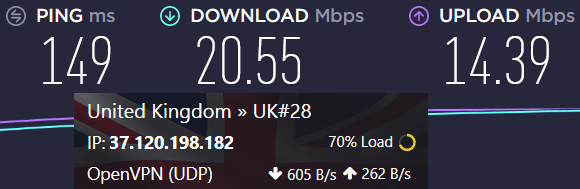
This is really slow when you consider that the baseline connection is 500 Mbps. We also noted the slow speeds in our Proton VPN vs NordVPN comparison. The big drawback here is that this will affect torrenting and also HD streaming, which could suffer from buffering and playback errors.
Another drawback with Proton VPN is that torrenting is not allowed with the unlimited free VPN. Proton VPN monitors traffic and will block connections for those who are found to be torrenting. Check out these best torrenting VPNs instead.
Overall, despite all the drawbacks and limitations, Proton VPN is one of the better options in the free category. And while it can claim to be an “unlimited free VPN” due to no bandwidth limits, it still comes with some restrictions.
Proton VPN pros and cons
+ Pros
- Swiss-based privacy
- Open-source apps audited by independent security firms
- Secure Core servers route traffic through hardened nodes
- VPN Accelerator boosts long-distance US speeds
- Post-quantum encryption in the works
- Subscription plans bundle with Proton Mail, Proton Drive, Proton Sheets, and Proton Pass
- Linux CLI and refreshed GUI
- Smart TV and Apple TV apps now support NetShield
– Cons
- No 24/7 live chat
- Advanced tools have a steeper learning curve
Proton VPN Black Friday Deal is Live:
Get 75% Off Proton VPN (drops the price to only $2.49/month) with the coupon below:
(Coupon is applied automatically; 30-day money-back guarantee)
Check out our Proton VPN review for more info and test results.
PrivadoVPN — Reliable free VPN app for Windows
| VPN | PrivadoVPN.com |
| Based in | Switzerland |
| Logs | No logs |
| Price | $1.11/mo. |
| Support | Live chat; Email |
| Refund | 30 days |
| Deal | 90% Off Coupon |
PrivadoVPN emerged as a promising free VPN service in 2019. It operates on a freemium model, offering both free and paid plans. Despite its low-cost nature, PrivadoVPN is a well-developed VPN provider.
PrivadoVPN’s free plan provides 10 GB of data per month without throttling. Users enjoy fast speeds, although the free plan supports only one device at a time. The service supports Windows, macOS, Android, iOS, and other platforms. PrivadoVPN supports the WireGuard protocol in most apps. Here’s the Windows client tested for this review.
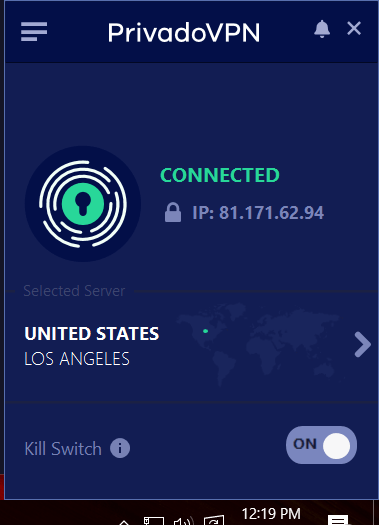
PrivadoVPN offers a decent selection of basic features. All of the VPN apps incorporate a kill switch to block traffic if the connection drops. They also have a split tunneling VPN feature if you want to route certain traffic outside of the encrypted VPN tunnel.
PrivadoVPN is probably the best free VPN for streaming on our list today. Unlike all of the other options, this VPN works with streaming services like Netflix, even on the free plan. While it is not the best VPN for BBC iPlayer (due to blocks), I did find it to work with Netflix and a few other popular streaming services.
Speeds: Fast
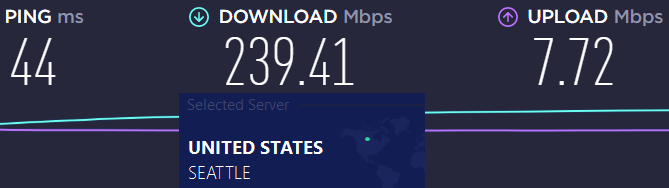
I ran the VPN through lots of speed tests and was able to get 200+ Mbps download speeds on every server in the United States. This is a fast VPN, as you can see in the speed test result below at 239 Mbps:
PrivadoVPN, as the name implies, is also a solid choice for the privacy-conscious user. This VPN is based in Switzerland, which is an excellent privacy jurisdiction. It is also a no-logs VPN service that does not store any user activity. Additionally, PrivadoVPN support anonymous payment options with cryptocurrency payments.
PrivadoVPN pros and cons
+ Pros
- User-friendly and secure VPN apps
- Fast and consistent speeds
- 10 simultaneous connections
- Works with Netflix and other streaming sites
- Affordable prices (with a free plan)
- Strong encryption and security (with WireGuard)
- No logs and based in Switzerland
– Cons
- macOS app needs some work
- Smaller server network
- No obfuscation
PrivadoVPN Coupon:
Get 90% off PrivadoVPN (drops the price to $1.11/month) + 3 months FREE:
(Coupon is applied automatically.)
See the PrivadoVPN review for more information and test results.
Trust.Zone — Free VPN with 1 GB of data
| VPN | Trust.Zone |
| Based in | Seychelles |
| Logs | No logs |
| Price | $1.77/mo. |
| Support | |
| Refund | 10 days |
| Website | Trust.Zone |
Trust.Zone offers a free VPN with 1 GB of data or three days of use, whichever comes first. Based in the Seychelles, a privacy-friendly jurisdiction, Trust.Zone is a no-logs VPN, ensuring user privacy. While monitoring bandwidth for the free trial, it is a decent VPN for streaming. They have dedicated servers that work for Netflix and Hulu streaming, with support for other services as well. And while the network is not as large as Surfshark or NordVPN, Trust.Zone still offers 200+ servers in 98 regions around the world.
Speeds: Medium
Trust.Zone demonstrated solid performance in our Trust.Zone review. While the speeds were decent, they didn’t quite match the top contenders like Surfshark and ExpressVPN. A notable downside is the lack of dedicated VPN apps for macOS, although third-party apps can still be used. For Mac users, we suggest exploring other VPNs for macOS.
We also appreciated some extra features provided by Trust.Zone:
- Dedicated IP addresses are a low-cost feature you can add to your subscription (one of the best VPNs for a static IP)
- Double-VPN servers
- P2P torrenting supported on all servers
- 10% discount for cryptocurrency payments
Overall, Trust.Zone is a good free VPN with a 3-day/1 GB trial. Yes, this trial is short, but they also have a 10 day refund policy. If you want a 30-day refund window, then consider going with NordVPN above.
Trust.Zone pros and cons
+ Pros
- Competitive prices
- Great speeds and reliability
- Good leak protection settings
- Can try the VPN for free
- P2P torrents allowed
- Dedicated IP addresses are available
Cons
- Fewer features than competitors
- No custom VPN clients for Mac OS (but still supported)
- Clunky apps
See our TrustZone review for more info.
Windscribe — Free VPN with 10 GB of data
| VPN | Windscribe |
| Based in | Canada |
| Logs | Timestamps, Bandwidth |
| Price | $4.08/mo. |
| Support | |
| Refund | 3 days |
| Website | Windscribe.com |
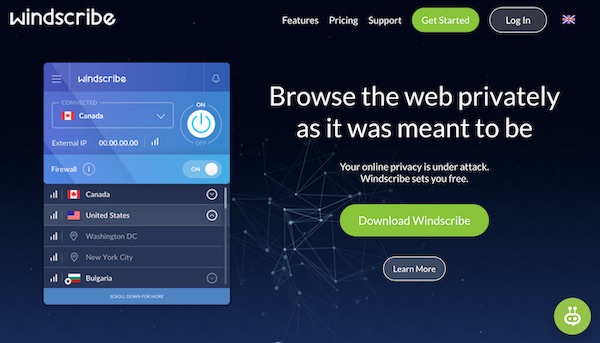
Windscribe is another free VPN on our list, based in Canada, a member of the Five Eyes surveillance alliance, which raises privacy concerns. While many users seek a VPN for Canada, we generally advise caution with VPNs legally based there due to potential privacy issues.
Compared to other free VPNs, Windscribe offers a generous 10 GB of monthly data, more than Trust.Zone and TunnelBear. However, it still has some notable limitations.
Free VPN speeds: Slow
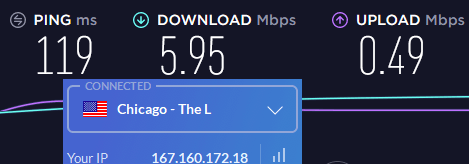
One of the biggest issues we noted in our Windscribe review was the slow speeds. Take for example this Windscribe server in Chicago (USA), which only gave us 5.95 Mbps:
And there are privacy issues with the Canadian jurisdiction. It is not a verified no-logs VPN provider, such as NordVPN (see our Windscribe vs NordVPN comparison). Windscribe keeps some logs, which is is typical for free VPNs that enforce limitations. And even Proton VPN logs timestamps.

Streaming – We tested Windscribe’s ability to stream Netflix. It did not do well and we do not recommend Windscribe for streaming.
Limited refund window – You can only get a refund as long as you do not exceed:
- 10 GB of data
- 3 days of use
Worst of all, Windscribe had a security breach due to leaving servers unencrypted! They lost the private key of those servers, putting Windscribe users at risk.
Windscribe pros and cons
+ Pros
- User-friendly applications
- Good leak protection features
- Ad blocker (ROBERT)
- Free plan with 10 GB of data per month
- Browser extensions
– Cons
- Slow speeds
- Uses IKEv2 as default protocol
- Based in Canada (Five Eyes)
- AI-based support system
- Issues with professionalism
See our Windscribe review for more info.
TunnelBear — Limited free VPN with 500 MB of data
| VPN | TunnelBear |
| Based in | Canada |
| Logs | Connection logs |
| Price | $3.33/mo. |
| Support | |
| Refund | None |
| Website | TunnelBear.com |

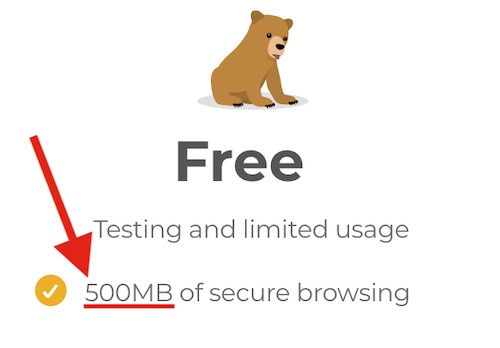
TunnelBear is another free VPN based in Canada, similar to Windscribe, and carries the same privacy concerns due to Canada’s data policies. Unlike an unlimited free VPN, TunnelBear imposes a strict data limit of just 500 MB on its free plan, making it suitable only for minimal use.
Speeds: Slow
TunnelBear is a slow VPN, as you can see in our TunnelBear vs NordVPN comparison. Below is a TunnelBear server we tested in the UK with speeds under 5 Mbps:
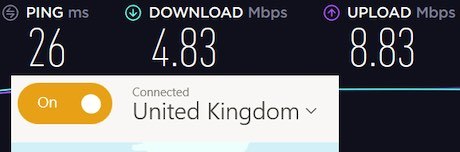
This is definitely not the best UK VPN if you need fast servers. We also observed slow speeds in our tests with TunnelBear servers in the US and Canada.
No refunds – TunnelBear basically has a no-refunds policy. This is a bad sign.

There are other problems. TunnelBear lacks support for routers and Linux, offering no configuration files or dedicated apps, making it challenging to use with devices like Apple TV. The server selection is limited, with only two options in North America. TunnelBear struggles with streaming services and is too slow for acceptable torrenting. TunnelBear is a safe free VPN, but its problems keep us from recommending it.
TunnelBear pros and cons
+ Pros
- User-friendly apps and browser extensions
- Passed a third-party audit in 2018
- Free plan (500 MB of data)
– Cons
- Slow speeds
- Based in Canada (Five Eyes)
- Limited payment options
- No refunds
- Does not work well with Linux or routers
- Small server network
- Not a good choice for Netflix or torrenting
- Limited customer support
Check out our TunnelBear review for more details.
Free VPN for streaming
Using a free VPN for streaming can be a great way to access geo-restricted content and protect your online identity. Here’s a step-by-step guide on how to use a free VPN for streaming:
- Sign up for a free VPN account: Choose a reputable free VPN provider and sign up for an account. Make sure to read the terms and conditions and understand the data limit and server locations offered.
- Download and install the VPN app: Download and install the VPN app on your device. Ensure that the app is compatible with your device and operating system.
- Launch the VPN app: Launch the VPN app and log in to your account.
- Choose a server location: Choose a server location that is closest to the streaming service you want to access. For example, if you want to access Netflix US, choose a server location in the US. This will help you bypass geo-restrictions and access the content you want.
- Connect to the VPN: Connect to the VPN and wait for the connection to establish. Once connected, your IP address will be masked, and you will appear to be browsing from the chosen server location.
- Access the streaming service: Access the streaming service and start watching your favorite shows or movies. The VPN will help you bypass any geo-restrictions and provide a secure connection.
- Monitor your data usage: Monitor your data usage to ensure that you don’t exceed the data limit offered by the free VPN. Some free VPNs have data caps, so keep an eye on your usage to avoid interruptions.
By following these steps, you can use a free VPN to access geo-restricted content and protect your online identity while streaming.
Free VPNs to avoid
Here are some free VPNs that we recommend you avoid:
1. Betternet free VPN (data leaks and malware)
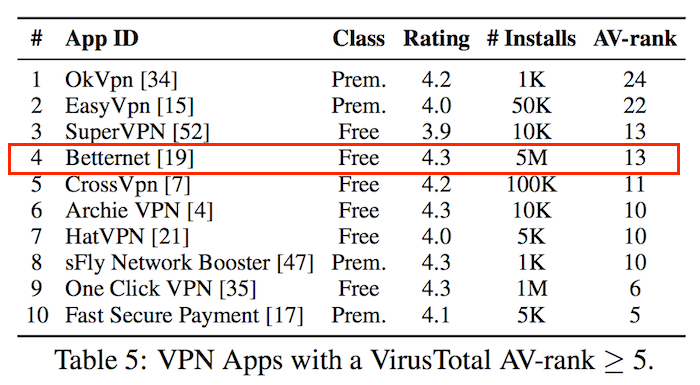
We tested this VPN previously and found some big problems. Slow speeds, IP address leaks, and the free VPN study we noted above called out Betternet for embedding malware in their VPN apps:
2. Hotspot Shield (free VPN apps with tracking)
Hotspot Shield appeared in the free VPN study due to its free version containing tracking libraries. Add slow speeds, leaks, problems with streaming and torrenting, and we recommend you cross this one off your list. See our Hotspot Shield review for details.
3. Opera free VPN (data collection issues)
This is really just a browser proxy that does extensive data collection and shares that data with third parties to deliver ads to your device. Stay far away from this one!
4. All free VPN apps in the Google and Apple stores
Based on all the research and tests we have conducted here at CyberInsider, we recommend that you avoid all free VPN apps. In other words, all of the free VPN apps in the Google and Apple stores should just be avoided.
So now that we covered some free VPNs to avoid, let’s answer a few questions:
Types of free VPN services
Free VPN services can be broken down into two distinct categories: unlimited free VPNs and freemium VPNs.
Unlimited free VPNs
These VPNs offer unlimited access to their free VPN server networks. However, extensive testing and research have found this category to be risky and often malicious. The main concern is that these services monetize users by collecting and selling their data to third parties, essentially making you pay with your privacy.
Discussions on platforms like Reddit also highlight these issues, as seen in threads about the best free VPN apps.
Free VPNs with limited data (freemium VPNs)
Freemium VPNs provide a limited “free sample” to entice users to upgrade to a paid account. Typically, they offer restricted bandwidth over a set period. This model often means that paying customers subsidize the free users, which can strain server networks, speeds, and support staff. As illustrated, both free VPN models come with inherent drawbacks.
Risk-free VPN trial
If you want a safe, secure, and fast VPN service, you will need to pay for it. Free trial VPN services have various limitations, compelling you to either stop using the free version of the VPN or pay for the service. The best approach is to choose a VPN offering a long, risk-free trial period. This allows you to cancel and receive a full refund if the service doesn’t meet your expectations.
Here are two top VPNs with a 30-day risk-free trial. You pay upfront for the subscription, but if you encounter any issues within the first 30 days, you can cancel for a full refund.
- NordVPN – NordVPN is also a good option, and it is quite cheap with the 78% discount coupon. You can get this VPN for only $3.49 per month.
- Surfshark – This is one of the cheapest VPNs on the market, with similar features and performance to NordVPN. You can get this VPN for only $2.19 per month if you use this 87% discount coupon.
Free vs paid VPNs
If you’re debating whether the best free VPN is enough for your daily use or if upgrading unlocks real value, this quick breakdown helps you see the differences clearly.
The table below compares the top free option (Proton VPN) against our overall #1 premium pick (NordVPN), based on hands-on tests in 2026.
| Feature | Proton VPN (Free) | NordVPN (Paid) |
|---|---|---|
| Data limit | Unlimited | Unlimited |
| Server locations | 5 | 7,800+ servers across 126+ countries |
| Simultaneous devices | 1 | 10 |
| Speeds | Medium (often throttled) | Very fast (up to 903+ Mbps) |
| Streaming unblocking | Limited/inconsistent | Reliable (Netflix, Hulu, Disney+, etc.) |
| Torrenting support | No dedicated P2P | Yes, optimized servers |
| Kill switch & extras | Basic | Advanced (Threat Protection, Onion Over VPN) |
| Price | Free | Starts at ~$3.49/mo (with current deal) |
As you can see, Proton VPN gives you solid no-cost privacy for light browsing, but the restrictions add up quickly if you stream, torrent, or connect multiple devices. NordVPN removes those limits entirely, and with its 30-day money-back guarantee, you can test the full experience risk-free before committing.
Alternatives to free VPN services
If you want to skip the idea of using a free VPN and instead go with a safe and secure paid VPN, then below you’ll find our top recommendations. More information is available in our roundup of the best VPNs here and in the list below.
- NordVPN — Best all-around VPN with secure apps, fast speeds, great for streaming, plus extra privacy and security features (with a 78% off coupon)
- Surfshark — Best VPN for many devices (unlimited)
- ExpressVPN — Secure and reliable VPN service
- Proton VPN — Simple, private VPN in Switzerland
- IPVanish — Fast, secure, and audited VPN with excellent support for streaming and torrenting (78% off coupon)
Now that we have covered the best paid VPN services, let’s conclude this article below.
The bottom line
We generally advise against using free VPNs due to their significant risks and limitations. With growing security threats like ransomware and identity theft, it’s vital to prioritize your online safety. This guide recommends NordVPN as a secure, reliable choice, offering a 30-day risk-free trial to test its services.
Even the best free VPNs, such as Proton VPN, have limitations like restricted devices, server options, and throttled speeds. Ultimately, opting for a reputable VPN provider is the best way to ensure your data remains secure.
This concludes our guide on the best free VPN services. Choose wisely to keep your data protected!
Free VPN FAQs
Do free VPNs work for torrenting and P2P?
Almost all reputable free VPNs block torrenting and P2P file sharing on their free tiers. Because torrenting consumes massive amounts of network bandwidth, providers restrict these protocols to prevent free users from overloading their servers.
If you attempt to open a torrent client while connected to a free service, your download will either fail to start or your connection will automatically drop. To download files securely, you will need to upgrade to a premium plan that offers dedicated, uncapped P2P servers.
Can a free VPN steal your bank details and passwords?
A free VPN from a reputable “freemium” provider cannot steal your data because it uses standard AES-256 or ChaCha20 encryption to scramble your traffic. However, dangerous or unverified apps found on mobile app stores can pose a massive risk.
Some malicious free apps use a technique called a “Man-in-the-Middle” attack to intercept unencrypted traffic, inject tracking libraries, or mirror your device activity. To protect your financial accounts, never use a completely anonymous free provider, and always disable your VPN when logging into your online banking app.
Do free VPNs require a credit card to sign up?
Trustworthy freemium providers never ask for a credit card, billing details, or payment information during registration. They only require a valid email address to create your basic account and prevent system abuse. If a free app demands your credit card info upfront under the guise of a “free account setup,” it is likely a trap designed to auto-charge you a high subscription fee the moment a hidden trial period expires.
Can you run a free VPN on a smart TV or gaming console?
No, free VPN tiers do not support smart TVs, Fire TV devices, or gaming consoles like PlayStation and Xbox. Premium providers restrict native TV apps and manual router configurations exclusively to their paid subscribers. Free plans are strictly limited to desktop and mobile apps for Windows, macOS, iOS, and Android. If you want to encrypt your entire home network or bypass geo-restrictions on a big screen, a premium upgrade is necessary.
What are the built-in Windows 11 VPN drawbacks?
The native Windows 11 VPN client is just a basic configuration shell that requires you to manually input server details from an external provider to work. It completely lacks user-friendly automation and fails to provide crucial privacy features, most notably an automatic system-wide kill switch. Without a kill switch, your real IP address and unencrypted internet traffic are immediately exposed to your ISP and websites the exact second your VPN server connection drops.

Proten isn’t available in mainland China anymore.
Please me ko free vpn
TrustZone free vpn is in fact listed in Ublock’s Easylist so that should make not to use it simpler.
Does anyone know what risks are there in NthLink, a VPN that can be used for free without registration ? Anyone who knows about this VPN please tell me the risks of using it, thank you !
It can be used normally in China.