
| VPN | Avast Premium |
| Based in | Czech Republic |
| Logs | Connection Logs |
| Price | $3.99/mo. |
| Support | |
| Refund | 30 days |
| Website | Avast.com |
Avast is a major player in the security field and today we’ll be looking at its VPN, with this Avast Premium VPN review.
The Avast Premium VPN (formerly SecureLine VPN) offers decent performance, along with solid security and ease of use. However, there are some issues that you will want to know about before giving this VPN a try.
In this Avast VPN review, we dig into both the software side of things (performance, security, privacy, and more) along with the external factors (pricing, logs, and so on) that gave us pause. We hope you will find the information useful as you search for the best VPN for your unique circumstances.
Avast Premium VPN Overview
Here’s what we learned about Avast’s VPN during our testing and research. We’ll cover each item in these lists in detail later in the review:
+ Pros
- Easy to use
- No leaky apps
- Strong privacy and security features
- Support for Windows, Mac, iOS, Android
- P2P support
- WireGuard support on Windows and Android
– Cons
- Avast caught selling user data collected through their antivirus products
- Avast keeps connection logs
- Small server network
- No support for Linux
- No anonymous payment options
- High prices and difficult refund policy
- No router support
Additional interesting FACTS:
- Owned by Avast Software s.r.o., which is based in Prague, Czech Republic.
- Speed test results – Mediocre connection speeds
- Mixed results with Netflix
- Okay support
Avast Premium VPN PROs
Here are some great things you should know about Avast VPN:
Easy to use Avast VPN apps
Avast Premium VPN is about as easy to use as you can ask for a VPN to be. Launch it and you will have no problem figuring out how to turn it on.
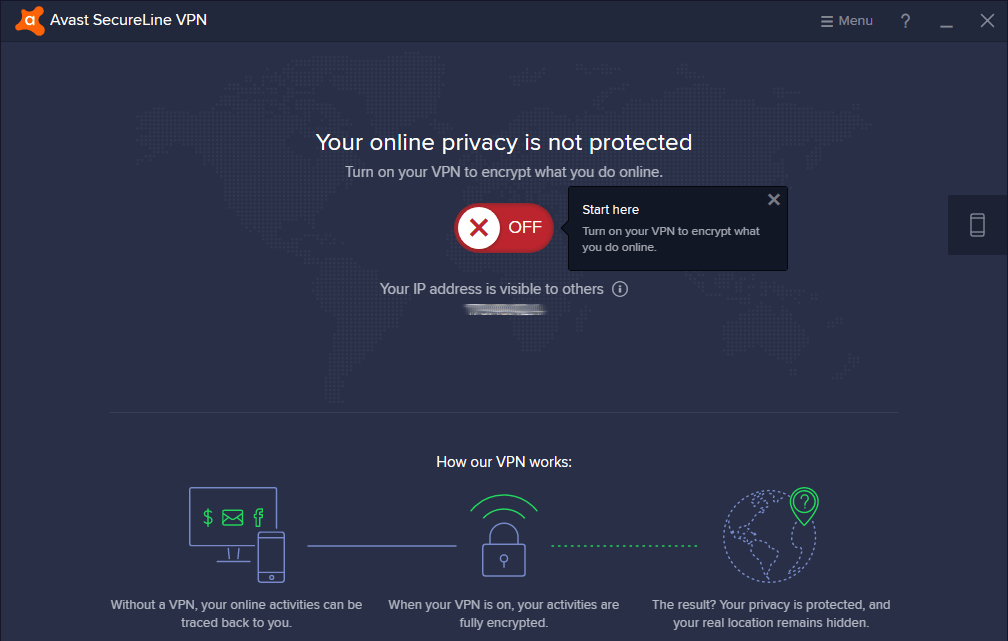
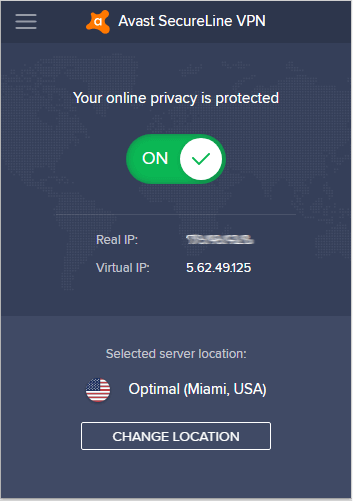
You also won’t need to worry about complicated lists of VPN protocols or server types and locations. Avast calculates the optimal server to connect you to. Once it connects you, the location of the server you are connected to is displayed in the bottom of the VPN client. You can see this in our screenshot below.
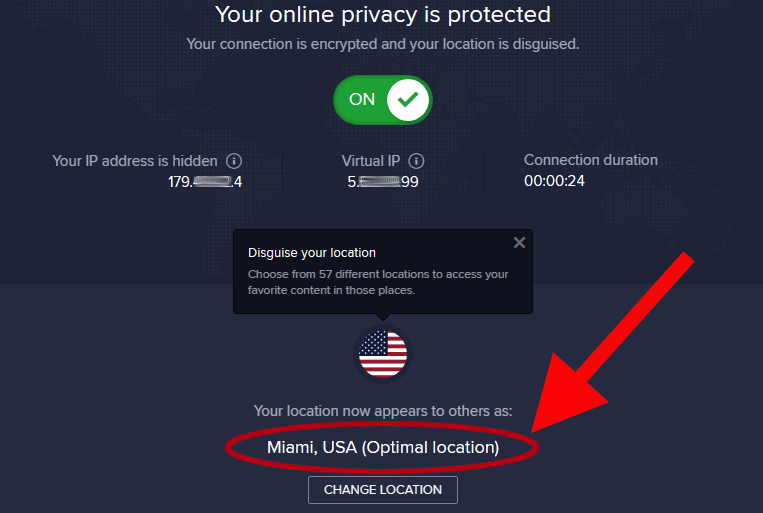
As you can see in the image above, the optimal location the VPN selected was the Miami, USA server location from among 57 possible locations. It doesn’t get much easier than that.
No VPN leaks found in our tests
We ran the Premium VPN through our standard set of VPN tests, looking for things that didn’t work right. The Avast Premium VPN apps didn’t show any problems: no leaks, no crashes.
The VPN protects against DNS leaks by forcing DNS requests to go to the VPN’s own DNS servers through the encrypted VPN tunnel.
The following image shows the Windows VPN in action. If you look closely on the left (circled in red), you can see my Virtual IP address (at the time I was writing this). Look on the right and you will see that my virtual IP address is the one that ipleak.net is seeing.
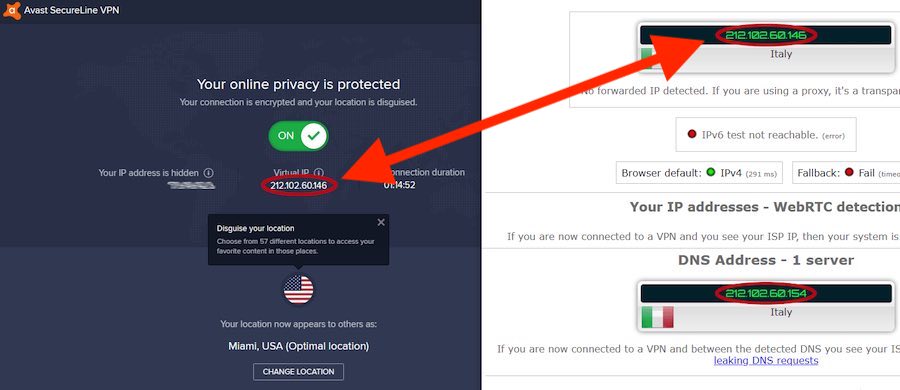
Note: You might have noticed something odd in the image above. Although you can see in the VPN window on the left that I am connected to a server in Miami, USA, ipleak.net on the right is claiming the IP address if the server I am connected to is in Italy. It turns out that the database that ipleak.net uses to map an IP address to a physical location, is not 100% accurate. The Virtual IP address shown in the VPN window does indeed correspond to Miami, FL.
We also tested the Android VPN app. It too passed the leak tests with no problems. See the best VPNs for Android here.
Strong privacy and security features
Avast Premium VPN uses strong, industry-standard privacy and security features.
In keeping with this VPN’s ease-of-use approach, there are no real options to adjust when it comes to privacy and security features. When you use it, your configuration is:
There is currently no support for the WireGuard VPN protocol, IKEv2, or any other protocols. If you want to use WireGuard, two great options for this are NordVPN and Surfshark.
Support for Windows, Mac, iOS, and Android operating systems
A subscription to Avast Premium VPN allows you to install the product on devices running the following operating systems: Windows, Mac, iOS, and Android. The VPN can even protect your Smart TV if it runs Android TV. You can also use a VPN on Apple TV, but this will usually require using a router.
Subscriptions are currently available for 10 simultaneous devices. This is above average for the industry, and better than what we see with most other VPNs.
Your subscription also includes browser extensions for Firefox and Chrome. These extensions add WebRTC leak protection to the VPN’s capabilities, but other than that simply serve as a way to control the VPN from within the browser window.
While it may add some convenience, there is not much else that VPN browser extensions offer, as we explained in our guide on the best VPNs for Chrome.
Note: In comparison to other leading VPNs, the Avast Premium VPN does not offer much support for less-popular devices and operating systems. For example, they do not have a dedicated app in the Amazon store if you want to use a VPN for Firestick. You also will not be able to use Avast VPN on Linux devices, gaming systems, routers, and more.
Avast VPN allows P2P torrents
Avast’s VPN does support P2P file sharing (torrenting) in its network, but only on a limited number of servers. At the time of this Avast VPN review, this was the list of P2P-capable server locations:
- Prague, Czech Republic
- Frankfurt, Germany
- Amsterdam, Netherlands
- New York City, New York
- Miami, Florida
- Seattle, Washington
- London, United Kingdom
- Paris, France
See our list of the best torrent VPNs if you want to consider other options with better P2P support.
Avast Premium VPN CONs
Here are some not-so-great things you should know about Avast Premium VPN:
Avast caught selling user data collected through their antivirus products
In 2019, privacy experts discovered that Avast was harvesting user data through their antivirus products, then selling that data to third parties. According to the company,
The data is fully de-identified and aggregated and cannot be used to personally identify or target you.
The data that was collected did not include the user’s name, email address, or IP address. While we really don’t like the idea of anyone selling user data like this, it doesn’t sound like the data can be used to personally identify anyone.
That is, until you learn that every data record also includes a unique device ID, which persists until the user uninstalls the Avast antivirus from that device. The data that was being collected was extremely detailed, right down to every click the user made, and the exact millisecond that they clicked.
With that level of detail, it wouldn’t be too hard to attach a person’s identity to a device ID. For example, imagine that you have a website that offers a free newsletter. Imagine also that you are a buyer of Avast’s data. You know that I, Heinrich Long, signed up for your newsletter on September 11, 2019, at 9:32:01.
Next, you go look at your Avast data, and see that exactly one person, using a computer with device ID 123abc, clicked the signup button for your newsletter on September 11, 2019, at 9:32:01.
You have just discovered that device ID abc123 is a computer used by me, Heinrich Long. Now you can go through your Avast data and see everywhere I go on the Internet, and everything I do there. And surely, there are algorithms that make identifying people from such data all the more easier.
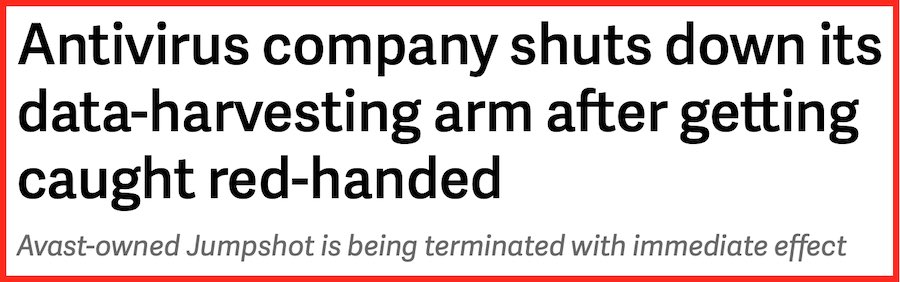
While we do not know who bought this kind of data from Avast, they have reportedly stopped collecting user data in this way.
We haven’t seen any evidence that Avast is, or has, done anything similar with the Premium VPN or other products. But this episode alone would make me nervous about using any of their products.
Avast keeps connection logs
When you visit the Avast Premium VPN webpages, you’ll notice that they state the VPN, “Doesn’t log websites visited or app usage.” A thorough review of the VPN’s Privacy Policy seems to confirm this. Avast Premium VPN doesn’t keep usage logs. That’s great.
However, while they don’t keep usage logs, they do keep connection logs. These connection VPN logs record when you log onto and off of the VPN. But that isn’t all they log. According to the VPN privacy policy, they actually record:
- Timestamps of your VPN connections (when you log on and off).
- The subnet of your originating IP address. An IP address is composed of 4 octets of data. Each octet consists of 8 bits of data, with a range from 0 to 255. The first three octets collectively identify a subnet. The final octet identifies the device. According to Avast, they anonymize the final octet of the address, meaning they don’t identify you directly. But there are a maximum of 255 devices that could be identified by that final octet.
- IP address of the VPN server you are using.
- The amount of data transferred while you are logged on.
While the VPN policy explains the reasons Avast records each of these types of data, these logs make us uncomfortable. Of course, there are many VPNs that keep some basic logs, which we showed in the CyberGhost VPN review, so you really want to read the fine print.
On the positive side, the company states that these logs are automatically deleted after 30 days, unless, “…it is necessary for us to comply with our legal obligations or legal orders, resolve disputes, and enforce our agreements, including in the court of law.”
If this leaves you feeling uncomfortable, check out these VPNs that keep no logs.
No support for Linux
One important thing that is not on Avast VPN’s list of supported platforms is Linux. Even the browser apps will not work on Linux, since they require the desktop app to be installed.
This means that Linux users are left out in the dark. And while most VPN services do not provide a dedicated Linux GUI app, they will still offer basic support for Linux. Sadly, that is not the case with Avast VPN.
See our list of the best Linux VPNs here.
No anonymous payment options
While more and more VPN services are supporting “anonymous” payment options such as Bitcoin, Avast has stuck with the classics, credit or debit card, along with PayPal.
Considering the way their products are designed to make things simple for users, it shouldn’t be a surprise that the payment options should be simple too. However, if you want to pay with Bitcoin, both NordVPN and CyberGhost support this option.
No router support
Avast VPN doesn’t offer router support. This is a drawback we have noted with other VPNs recently as well. For example, see our NordVPN vs PIA VPN comparison.
Given that this VPN seems aimed at the regular person, rather than techies, this is a logical choice. So if installing a VPN on a router is important to you, then Avast VPN isn’t a good choice.
Additional interesting FACTs
Here are additional interesting facts you should know about Avast VPN:
Avast VPN prices and refund policy
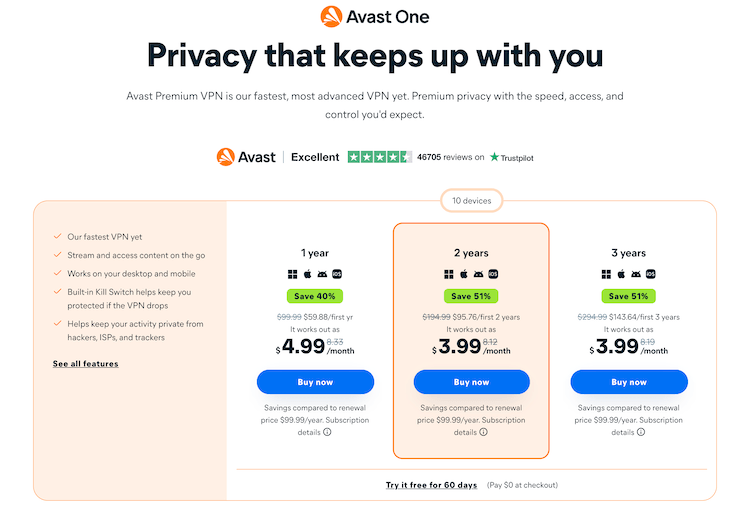
Avast Premium VPN has gone to a more standard VPN pricing model. The feature set stays the same while the price varies depending on the length of your subscription. In their current model, you can choose between 1 year, 2 year, and 3 year subscription, all of which support 10 simultaneous connections.
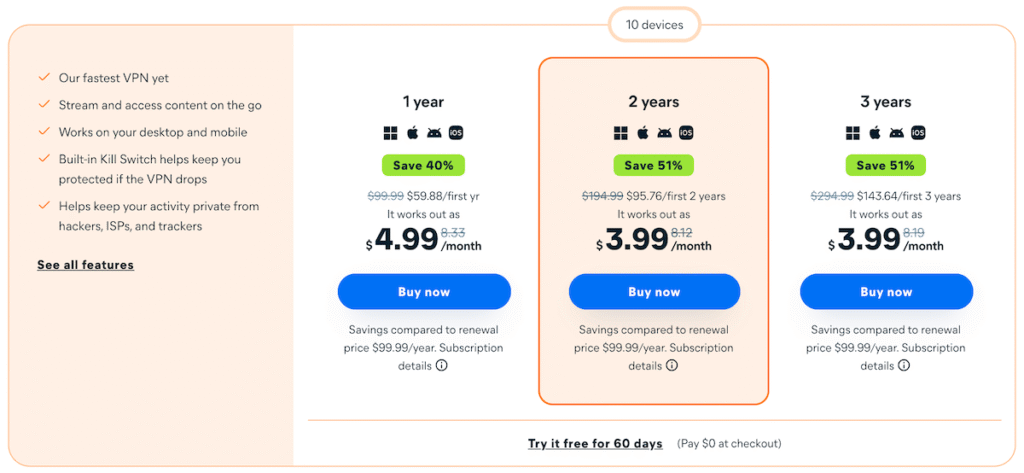
While the initial pricing on the Premium VPN is decent, that is because of the steep discounts given for an initial subscription. Let’s use the 3-year subscription plan.
The initial price for this plan is $143.64. That’s a decent price. But things are very different at renewal time. And this is the same whether you use a VPN coupon or not. If you look carefully at the image above you will see some confusing text.
Note that Avast Premium VPN will renew at $99.99/year at renewal, which is definitely more expensive and something to consider. This is on the more expensive end, but you can find cheaper VPN options here.
Avast VPN free trial
Avast gives you a nice 60-day free trial of the VPN. When you sign up for the free trial, you need to put your payment details in at checkout, but you will not be charged until the expiration of the 60-day trial.
If you want to go this route, there are also other free trial VPNs here to consider.
Avast refund policy
Avast offers a 30-day money back guarantee, on the Premium VPN. This is comparable to Proton VPN and NordVPN. However, like the subscription pricing, you need to be a bit careful. Avast makes you jump through some hoops to get the refund.
To find out if you are eligible for a refund, you must follow a convoluted process with numerous exceptions and clauses.
Then you need to go to a different page to determine if you meet all the refund criteria stated in the Avast Cancellation and Refund Policy, and on and on. We’re sure you could eventually get to the end of all this, but we gave up at this point. This is a difficult refund policy.
For comparison, most leading VPN services offer a 30 day hassle-free money back guarantee, such as we saw in the ExpressVPN review. Avast Premium VPN, however, makes you jump through hoops to get the refund.
Avast VPN server network
At the time of this Avast VPN review, the Premium server network has servers in 74 countries. While this isn’t the smallest VPN server network out there, we see both ExpressVPN and NordVPN offers ervers in more locations.
Avast has done a good job of locating servers in key countries around the world. Even so, the Premium VPN has some catching up to do when it comes to the size of their network. There are several reasons having a large server network is beneficial. More servers in more locations can give your overall network more bandwidth, reducing the risk of slowdowns.
More servers can also help when it comes to unblocking websites. Finally, when an individual VPN server fails or a natural disaster strikes, more servers means more redundancy to the overall network. When it comes to VPNs, more is generally better.
Premium VPN and Avast Software s.r.o. (background info)
The Premium VPN is a product of Avast Software s.r.o. Avast Software is based in the Czech Republic. The country is not part of any of the major international intelligence gathering organizations such as FVEY (Five Eyes), but it does reportedly cooperate with them to some extent.
We would rate this an average location for a security and privacy company to be based. Better than say the United States or Great Britain, and worse than places like Panama, Switzerland, or the British Virgin Islands (BVI).
Note: The parent company, Avast, also owns and operates AVG Secure VPN. Check out our AVG VPN review for more info.
Avast VPN speed test results (not fast)
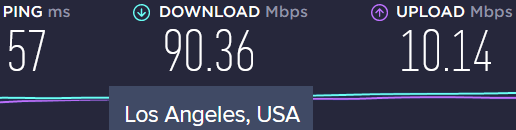
For this Avast VPN review, I ran speed tests on a handful of different servers in the US, Canada, and Europe. All tests were done using the Windows client and the OpenVPN protocol and AES-256 encryption on a 100 Mbps (baseline) VPN connection.
First I tested the “Optimal location” server, which happened to be in Seattle: 76 Mbps.
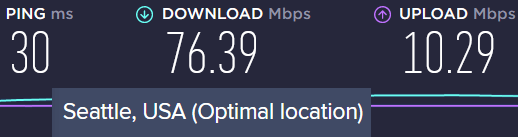
Not too bad, but also not amazing.
Next up was a server in Los Angeles: 90 Mbps.
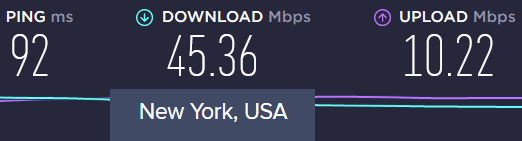
Then I tested a New York server. The speeds were not very good at 45 Mbps.
Next up was a server in Montreal, Canada. Download speeds were 55 Mbps, again not great.
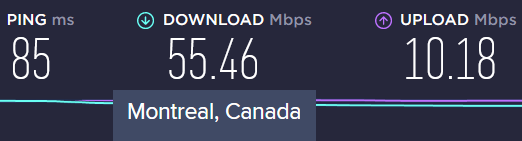
While these aren’t horrible speeds, Avast Premium VPN is not what I’d consider to be the best VPN for Canada.
Lastly, I tested a server in the UK.
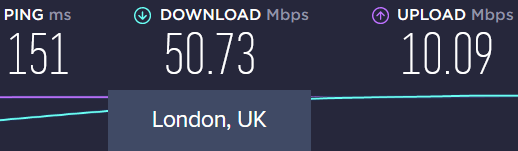
Again, not great, but also not horrible.
The Avast Premium VPN speed test results were about average, not good enough to be in the Pro category, but also not bad enough to be a Con. It is not the fastest VPN we have tested, but also not the slowest.
Mixed Netflix results, not great for streaming
Netflix is in a continual war with VPN services. Netflix tries to keep people from connecting to their service using a VPN, while the VPNs are continually coming up with new ways to get around the Netflix defenses. The VPN isn’t particularly known for success in this war. We did some basic testing and found that on this particular day, some Avast servers were able to get through, while others were not.
If connecting to Netflix or other streaming services is a priority, we suggest NordVPN or Surfshark, which our testing shows to be the best Netflix VPN services. These two VPNs give you access to 15+ Netflix libraries. And with this level of access, they make it easy to change your Netflix region.
But what about streaming in general?
Well, unlike many other VPNs, it does not appear that Avast VPN caters much to the streaming crowd. And the service did not do well with accessing streaming sites in our tests.
Average technical support
Support for many Avast products is available from the same page. So the first step in getting support is to find your way to the VPN-specific help page here. You’ll have access to a number of help topics and FAQs for do-it-yourself troubleshooting. If that isn’t enough to get the job done you can also click your way through the Contact us help ticket system, where you will have the option to chat with a rep or exchange email messages.
Once again, things get complicated quickly. To complete a help ticket, you will need to find the confirmation letter email you received when you bought the product. Then you need to find your Avast order number, the exact location of which depends on which service fulfilled your order originally. Once you have that, you will be able to complete the contact form and wait for someone from Avast to contact you. Like we said, it’s complicated.
According to the Avast website,
Avast Support usually responds within 2 business days, however, response times can vary depending on the support workload, language, and category of your issue.
Avast VPN FAQ
Here are several questions we ran into while researching the Avast Premium VPN:
Does Avast VPN work in China?
Using a VPN in China is a tricky endeavor simply because most VPNs are blocked. However, there are a few VPNs that get around these blocks. For example, VyprVPN utilizes a technique that hides VPN traffic to make it appear like regular HTTPS encryption. This is called obfuscation.
It does not appear that Avast VPN offers any kind of obfuscation features. Therefore it is not a good VPN to use in China.
The same can be said for other regions that are blocked, such as using a VPN in UAE and Dubai.
Does Avast VPN work for gaming?
A good VPN for gaming needs to have the following:
1. A large server network
2. Fast speeds
3. Low ping to minimize gaming playback issues
Avast does not do well here because we have already seen that it has a smaller server network and mediocre speeds. There are many variables with ping, such as your ISP and proximity to a VPN server. Nonetheless, it’s clear that Avast VPN is not the best VPN for gaming that we’ve seen.
Is Avast VPN trustworthy?
If by trustworthy you mean will the Avast VPN protect you while you use the internet, then yes it is trustworthy.
Unfortunately, they do log a lot of information about when, where, and how you connect to their service. This is more information than we feel comfortable with. Whether this is an issue for you depends on your specific circumstances.
Is Avast VPN good for Netflix?
Avast VPN is not a particularly good VPN for Netflix. During our testing we got very mixed results, with some VPN servers being able to connect to Netflix properly and others failing to do so. If streaming Netflix is a priority, this VPN is not a good choice.
Avast Premium VPN review conclusion
The Avast Premium VPN is a decent product that is hampered by a lot of externals. The VPN itself is user-friendly and provides strong security without any data leaks that we could find. But there is nothing here that makes it stand out from the crowd. The performance is mediocre, access to Netflix is marginal, and the server network is on the small side.
Now add in that the price is on the high side after the initial discount wears off, the 30-day refund would be a headache, the company keeps fairly extensive VPN connection logs, and Avast was caught selling user data gathered by their antivirus apps.
While VPN itself works just fine, and Avast is a well-known name in the Internet security world, we can’t really recommend this product.
Alternatives to Avast Premium VPN
Click the VPN name below to read our full review – or grab the discount for the best savings. All three of these VPNs have a 30-day money-back guarantee.
See also our guide on the Best VPN Services for more info on our top recommendations.

No P2P servers!
Be warned! As of late 2025, Avast has removed P2P servers from their Secureline VPN product and without any notice. If you don’t require P2P servers, then the product works fine.
Thanks for pointing this out AD.