
Our updated NordVPN review covers what you need to know about its speeds, network, pricing, and advanced privacy features.
Powered by the NordLynx protocol, NordVPN delivers seriously fast speeds and did a great job unblocking popular streaming platforms in our tests. It also adds extra protection with advanced post-quantum encryption.
The provider backs up its premium pricing with a huge network of audited RAM-only servers, which are designed to wipe stored data when rebooted. That said, renewal prices jump after the promotional period, and the desktop map can feel a little cramped on smaller screens.
Need the highlights? Here’s what impressed me most and what could still be better:
| What we like | What we don’t like |
| Lightning-fast NordLynx: Kept up to 95% of my regular internet speeds on local servers. | The auto-renewal price hike: Your monthly price spikes significantly once your promo plan ends. |
| Flawless geo-unblocking: Easily sneaks past blocks on Netflix, Max, Disney+, and BBC iPlayer. | No shared port forwarding: Standard servers block inbound connections. A dedicated IP is required for advanced setups. |
| Quantum-resistant: Built-in tech that stops futuristic supercomputers from cracking your data. | Clunky map UI: The classic server map is still a bit of an awkward, crowded mess on small screens. |
How I tested NordVPN
At CyberInsider, we put every service through hands-on testing instead of relying on marketing copy. Here’s the testing methodology used for this evaluation:
- Worldwide speed tests: Testing local and long-distance server performance with NordLynx and OpenVPN.
- Privacy leak checks: Checking desktop and mobile apps for IPv4, IPv6, and DNS leaks.
- Kill switch trials: Simulating network drops to see how well the kill switch stops traffic and protects your IP address.
- Streaming binge-tests: Testing geo-unblocking with Netflix, Max, Disney+, and BBC iPlayer.
- Specialty server stress: Checking stability and latency on Double VPN, obfuscated, and Onion over VPN servers.
- The Price vs value: Comparing subscription tiers, fine print, and auto-renewal pricing after promotional periods.
What is NordVPN?
| Website | NordVPN.com |
| Based in | Panama |
| Logs | No logs (audited) |
| Price | $3.49/mo. |
| Support | 24/7 live chat |
| Refund | 30 days |
| Deal | 75% Off Coupon |
Today’s internet isn’t just about speed but also about privacy. A reliable VPN protects you from cyber threats, defeats geo-blocks, unlocks global streaming libraries, and keeps your browsing history out of the hands of advertisers, ISPs, and anyone else trying to track you.
NordVPN wants to lead the VPN market with more than just fast, encrypted connections. From dedicated IPs and torrenting support to Threat Protection and post-quantum encryption, it promises an impressive feature set.
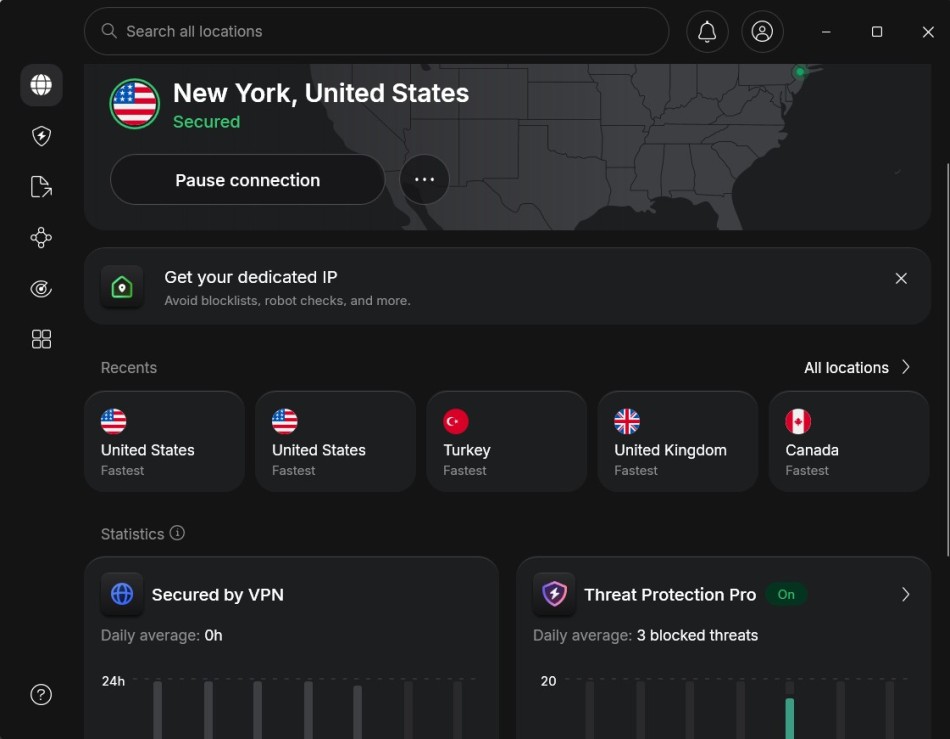
Here’s what the NordVPN Windows desktop app looks like in everyday use:
If you’re short on time, here’s a quick summary of NordVPN’s biggest strengths and weaknesses:
NordVPN pros and cons
+ Pros
- User-friendly and reliable apps
- Double VPN and Onion Over VPN servers
- Passed numerous 3rd-party audits
- Strong encryption standards with full support for WireGuard
- Works with Netflix and many streaming sites
- Threat Protection feature to block ads, trackers, and malware
- Professional 24/7 live chat support
- Consistently fast speeds
- Dedicated RAM-only servers with 10 Gbps bandwidth channels
- Post-quantum encryption
– Cons
- Best discounts only available with 2-year plans
NordVPN core features
NordVPN is a top-tier VPN provider that has performed well in our tests year after year. It has also earned lots of praise in the industry for its range of features and impressive security measures. Here are some key features of NordVPN:
- Over 9,500+ servers across 149+ countries (covering 224 locations and all 50 US states).
- Outstanding performance benchmarks consistently peaking over 900 Mbps.
- Custom protocols including NordLynx and the fire-wall-bypassing NordWhisper.
- Advanced layers like Threat Protection Pro, automated data breach scanning, and real-time dark web alerts if your emails or passwords leak.
- Dedicated obfuscated servers, P2P-optimized torrent lines, and dedicated IPs.
- Unlimited bandwidth capabilities for completely unrestricted streaming and P2P torrenting.
- Seamlessly designed apps supporting Windows, macOS, Android, iOS, Linux, and smart TVs.
Now, let’s go a layer deeper into the single most popular question that lands in our inbox: “Is NordVPN fast?”
Speed tests
A premium VPN is completely useless if it slows your connection down to a crawl. To see how much of a performance hit you take, I put NordVPN through rigorous benchmark testing.
For these tests, I kept the app settings on Auto (Recommended). On modern networks, NordVPN’s automatic setting defaults to NordLynx, its lightning-fast proprietary protocol built on WireGuard architecture.
My baseline internet speed before turning the VPN on was a blazing 1,000 Mbps. Here is exactly how NordVPN performed across the globe:
| NordVPN server location | Speed (Mbps) |
| Seattle | 903 |
| Los Angeles | 868 |
| New York | 825 |
| London, UK | 658 |
| USA-Canada (Double VPN) | 511 |
North American speeds
The closest server to my physical location was in Seattle, where my download speeds topped out at 903 Mbps. Honestly, that is the fastest VPN speed test result we have ever recorded here at CyberInsider.

Next, I moved down the coast to Los Angeles. The connection held incredibly strong, delivering excellent download speeds right around 868 Mbps. Moving across the country to New York yielded another lightning-fast result at 825 Mbps.

With speeds like this, it’s clear that NordVPN belongs in the “fastest VPNs” category. It also came out on top in the NordVPN vs ExpressVPN comparison.
Next, I tested a server in New York, and it was again very fast at 825 Mbps.

Results like these explain why NordVPN consistently ranks among the fastest VPNs, and why it beat ExpressVPN in our head-to-head comparison.
International and double VPN speeds
Next, I jumped across the Atlantic to test a server in London, UK. Even with the massive physical distance, NordVPN pulled a highly impressive 658 Mbps:

Finally, I tested a double VPN connection. These specialty servers chain your traffic through two separate encrypted locations. Normally, double encryption and increased latency result in terrible lag, but the results completely blew me away. Chaining a USA > Canada server combination retained a shocking 511 Mbps!
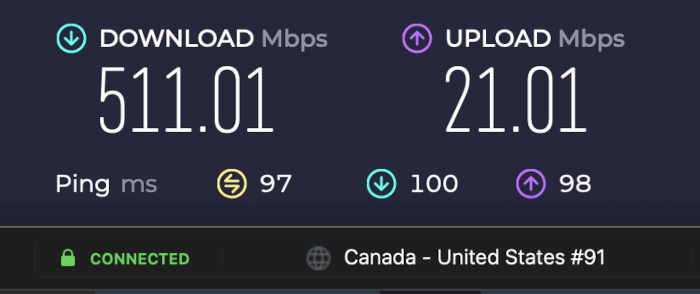
NordVPN significantly outperforms competing services when handling multi-hop routing, a trend you can read more about in our NordVPN vs Proton VPN analysis.
NordLynx advantage
We’ve tracked NordVPN’s performance for years, and the results speak for themselves. Its infrastructure upgrades and NordLynx protocol continue to deliver industry-leading speeds.
Our testing shows NordLynx leaves legacy protocols like OpenVPN far behind. But not all WireGuard-based VPNs perform the same. NordVPN consistently outpaces the competition thanks to its optimized server network.
Network reliability
Raw download capacity doesn’t mean much if your line constantly drops out. Here is my honest take on everyday performance stability:
- Reliability: Throughout dozens of tests, the network proved to be exceptionally stable. I experienced zero connection drops, random stalls, or sudden server blackouts.
- Connection speed: When utilizing NordLynx, the app establishes a secure handshake almost instantly. Legacy protocols like OpenVPN can take up to 5 or 10 seconds to authenticate, which quickly becomes an absolute headache if you are jumping between public Wi-Fi hotspots on your phone.
The performance bottom line? NordVPN delivers arguably the fastest, most consistent speeds in the entire consumer privacy space. It routinely dominates rival networks, which you can see highlighted in our NordVPN vs IPVanish breakdown.
Security features
At its core, a virtual private network (VPN) creates a secure, encrypted tunnel to shield your online data from corporate surveillance, network trackers, and sketchy public Wi-Fi hackers. But NordVPN doesn’t just stick to standard encryption; it’s piled on advanced defense layers that easily put most white-label VPN services to shame.
Encryption protocols
NordVPN protects your connection with AES-256-GCM encryption and HMAC SHA256 authentication, two of the most trusted security standards in the VPN industry. While it still supports established protocols like OpenVPN and IKEv2, its biggest advantage is NordLynx, NordVPN’s custom implementation of the WireGuard protocol that delivers excellent speeds without compromising privacy.
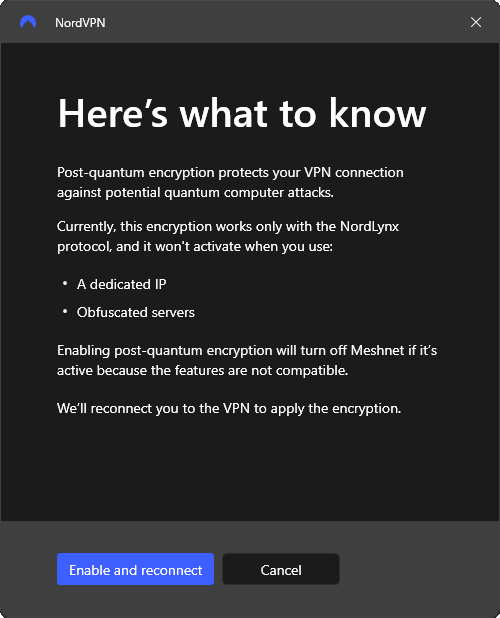
NordVPN has also added two newer technologies designed to improve security and accessibility. The first is post-quantum encryption (PQE), available on NordLynx connections. It helps protect sensitive data against future quantum computing threats, although it currently isn’t compatible with obfuscated servers or dedicated IP addresses.
The second is NordWhisper, a protocol built to disguise VPN traffic as regular web browsing. This makes it much easier to connect on restrictive networks, such as universities, hotels, airports, or corporate Wi-Fi that often block traditional VPN protocols.
Threat Protection Pro
While a normal VPN only encrypts your active data pipeline, NordVPN includes an active antivirus and defense layer called Threat Protection Pro. The system is split into two distinct tiers depending on your operating system:
Standard features
Available on Android, iOS, Linux, and NordVPN’s Chrome, Firefox, and Edge extensions, the standard Threat Protection feature blocks ads, trackers, unsafe connections, and malicious websites when connected to a VPN server.
Note that NordVPN’s browser extensions protect only browser traffic, not your entire system’s internet activity. In our tests, it effectively eliminated ads and trackers, making NordVPN a top choice for ad-blocking VPNs.
Pro features
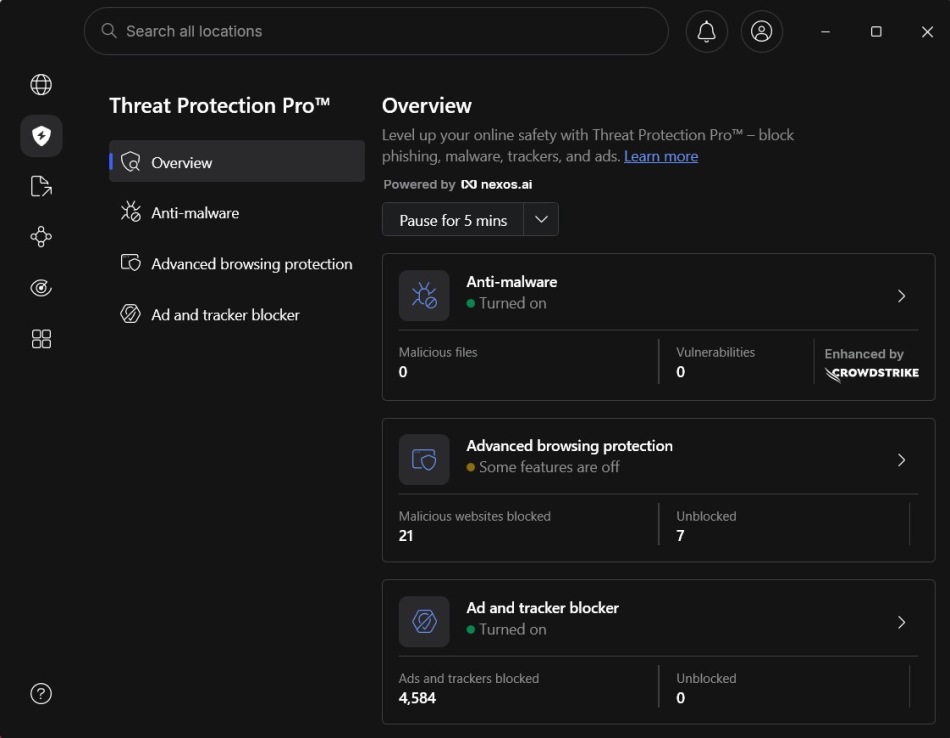
Exclusive to Windows and macOS, Pro builds on the standard version by scanning downloaded files and deleting harmful ones before they can cause damage. It works even without a VPN connection, offering continuous protection. By blocking intrusive ads and trackers, it boosts privacy and reduces online distractions.
Threat Protection Pro also shields against malicious websites and malvertising, alerts you to scams and frauds, looks for vulnerabilities in your installed apps, and more, making your online experience safer.
Specialty servers
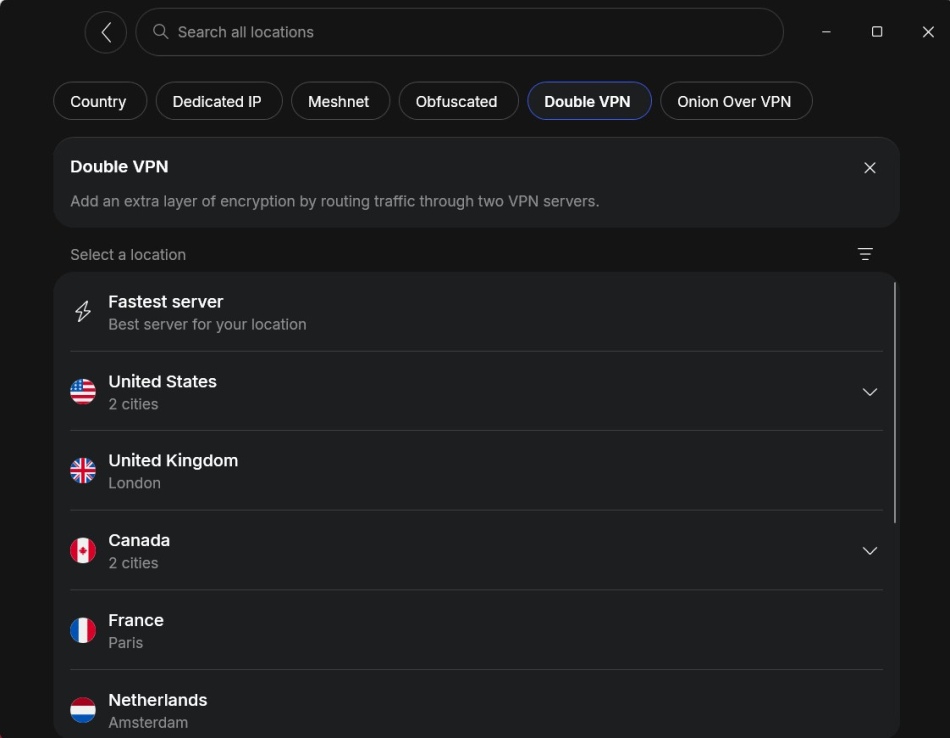
NordVPN offers several specialty server options, each designed for a different type of online activity:
| Total servers | 9,500 |
| Total countries | 118 |
| Double VPN server | ✅ |
| Tor-Over-VPN servers | ✅ |
| P2P servers | ✅ |
- Double VPN: Routes your traffic through two VPN servers for an extra layer of encryption.
- Onion over VPN: Combines VPN encryption with routing through the Tor network for added privacy.
- Obfuscated nodes: Disguises VPN traffic as regular HTTPS traffic to help bypass VPN blocks and network restrictions.
- Dedicated IP: Gives you a static, unique IP address, which can help reduce CAPTCHAs and make secure remote access easier.
- P2P Lines: Uses servers optimized for file sharing and torrenting without artificial bandwidth limits.
NordVPN kill switch
A VPN kill switch is designed to act as an automated emergency brake, instantly severing your network data stream if the VPN connection unexpectedly drops. NordVPN handles this beautifully by giving you two flexible configurations:
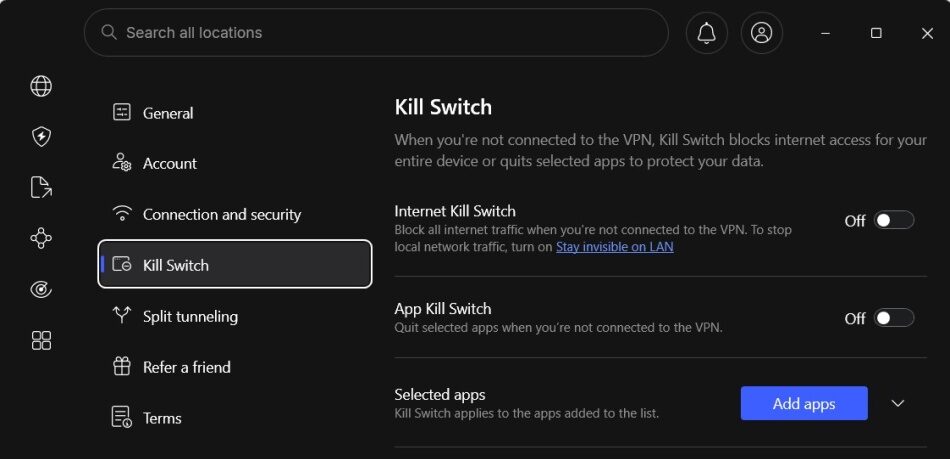
- Internet kill switch: Blocks all inbound and outbound web traffic the split second a connection failure occurs. You can even set it to block data during intentional, manual disconnections.
- App kill switch: Instead of locking down your entire internet connection, this option target-terminates specific sensitive apps (like your torrent client or browser) while leaving the rest of your computer online.
Dark web monitor
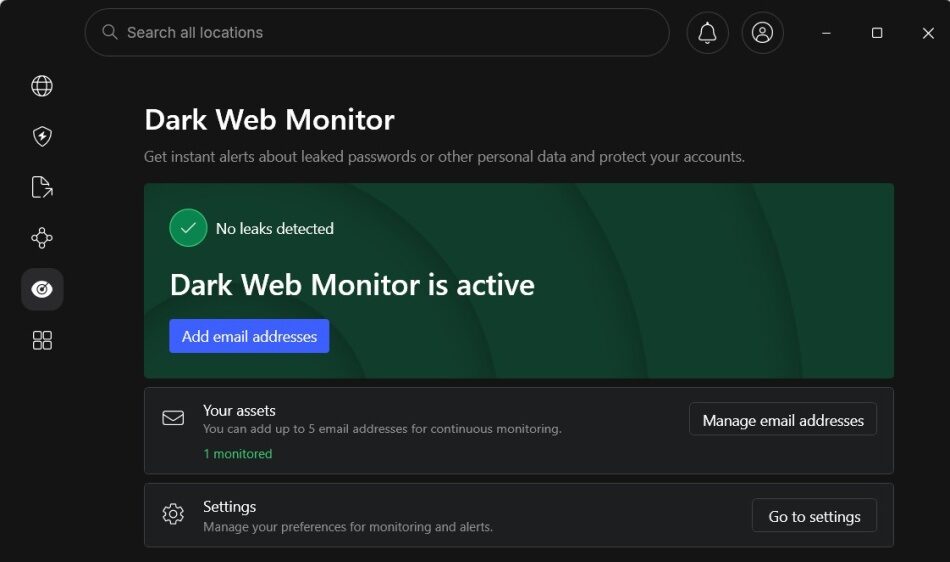
To round out its utility, NordVPN includes an integrated data breach scanner known as the Dark Web Monitor. Think of it as an automated, hands-free version of services like Have I Been Pwned. It continuously scours the deep web for your registered email address and credentials, dropping an instant alert into your lap the moment your personal details surface in a corporate data breach.
Built-in next-gen antivirus
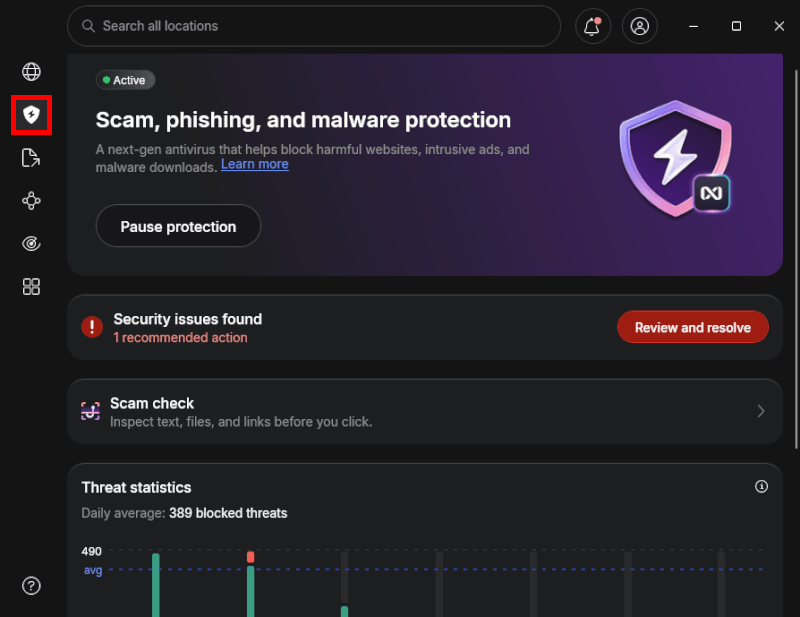
NordVPN’s Windows and macOS apps now include built-in antivirus protection alongside their VPN features. Instead of simply blocking malicious websites, it can also detect and quarantine suspicious downloads. Independent security testing has shown strong phishing protection with a very low false-positive rate.
Global scam call protection
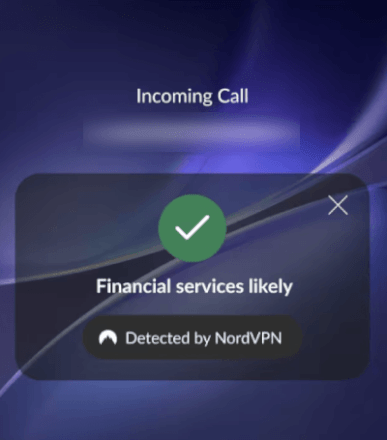
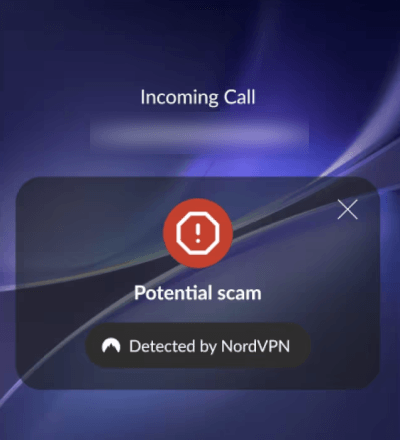
This is a game-changing 2026 expansion. Available globally on both Android and iOS apps, NordVPN’s Scam Call Protection actively analyzes incoming calls from unknown numbers. It flashes an instant warning on your screen if the caller matches a known telemarketing database or scam profile.
They even launched an AI-powered voice detector via their Chrome extension that gives you a real-time verdict on whether the person talking to you online is a real human or an AI-generated deepfake clone.
Meshnet: NordVPN’s private network feature
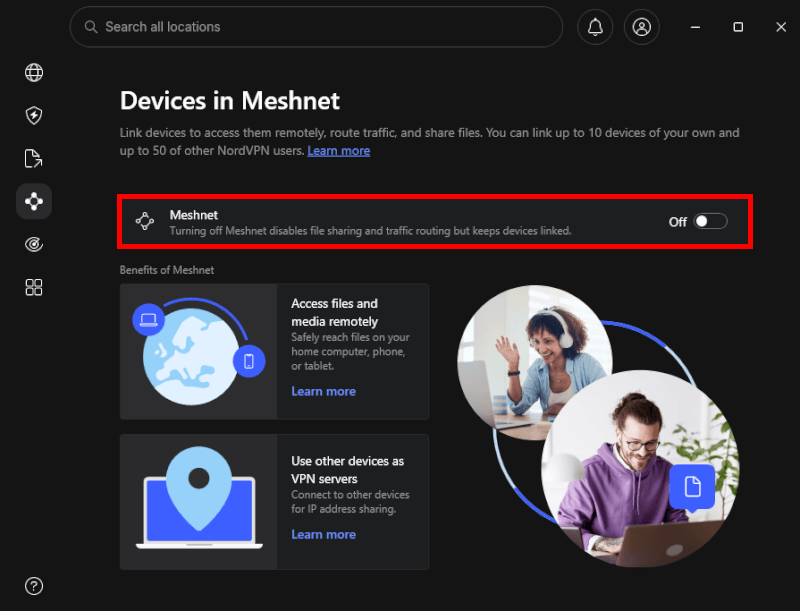
Unlike a standard VPN, NordVPN Meshnet creates a secure, encrypted virtual LAN that connects up to 60 devices directly through NordLynx-powered tunnels. Best of all, it’s free to use, even without an active NordVPN subscription.
By changing how your devices connect over the internet, Meshnet unlocks several practical everyday uses:
- Secure remote file access: You can safely log into your home computer or storage drive from a laptop while traveling across the world without risking data exposure on sketchy public Wi-Fi hotspots.
- Virtual LAN gaming parties: Gamers can link PC rigs or mobile devices together seamlessly to host multiplayer servers for games like Minecraft or Call of Duty without dealing with complicated, frustrating port-forwarding setups.
- Bypassing streaming restrictions: By routing your smartphone or laptop traffic directly through your home computer’s IP address, Meshnet allows family members to bypass strict streaming password-sharing restrictions while away from home.
Port forwarding
Advanced users have criticized NordVPN for years regarding its lack of port forwarding. While their standard shared server network still blocks inbound connections, NordVPN rolled out a major upgrade: an isolated virtual private server.
As a premium add-on, you get completely isolated physical server hardware, a static IP address, and full native support for port forwarding. This makes it an exceptional option for remote workers, home automation enthusiasts, and advanced seeders who need secure, reliable inbound routing.
NordVPN leak test results
Even the fastest VPN is useless if it leaks data outside the encrypted tunnel. To verify NordVPN’s security, I ran its desktop and mobile apps through multiple leak tests, looking for IP, DNS, WebRTC, and other hidden vulnerabilities.
For these tests, I connected to multiple international NordVPN servers and analyzed each connection using trusted leak-testing tools like ipleak.net.
Windows and macOS desktop app results
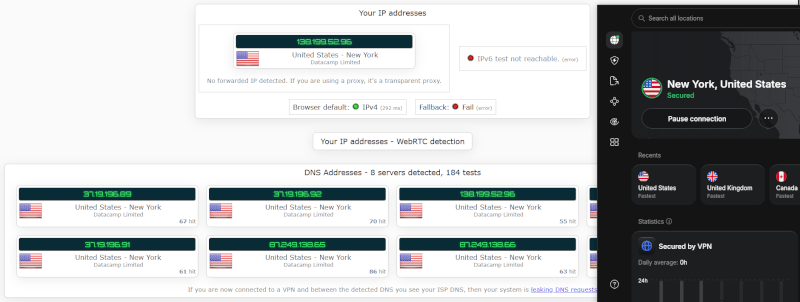
Across my Windows and macOS testing, NordVPN delivered airtight protection. I found no IP, DNS, or WebRTC leaks, and every connection remained fully encrypted throughout testing.
Here’s what I verified:
- No IPv4 leaks: The visible IPv4 address completely matched the selected VPN server location.
- No IPv6 leaks: NordVPN’s desktop applications actively block IPv6 traffic at the engine level to prevent accidental background exposure.
- No WebRTC leaks: Real-time communication protocols were fully contained, preventing browsers like Chrome or Firefox from leaking my true local network data.
- Airtight DNS protection: Every single DNS request was intercepted and safely resolved inside NordVPN’s proprietary, private DNS infrastructure.
I also simulated multiple network drops to test NordVPN’s Internet kill switch and app kill switch on Windows and macOS. Both features worked flawlessly, instantly blocking all traffic until the VPN connection was restored.
Android and iOS mobile app testing
Because smartphone operating systems handle Wi-Fi-to-cellular transitions constantly, mobile apps are usually highly prone to data leakage. I pushed the NordVPN Android client through the same diagnostic gauntlet, and it passed with absolute flying colors.
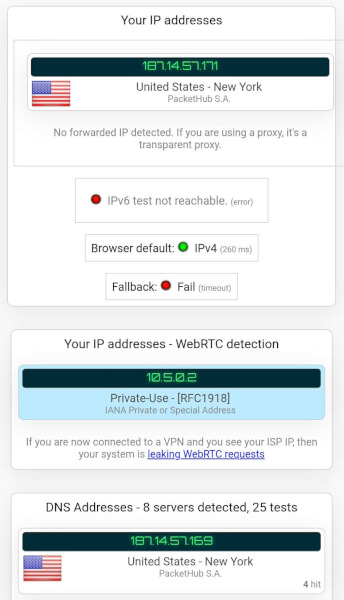
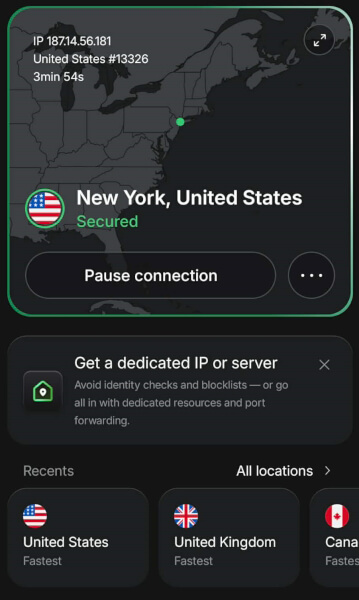
The Android and iOS apps handle mobile data handoffs seamlessly, ensuring your real IP address is never accidentally broadcast to your internet service provider or public hotspots.
The privacy leak verdict? NordVPN remains one of the most reliable, leak-resistant VPN architectures in the consumer privacy space. To see how it compares against other premium providers, check out our Surfshark vs NordVPN comparison and ExpressVPN vs NordVPN breakdown.
User experience
NordVPN also offers a nice lineup of native apps (clients) for all major operating systems and devices, ensuring security and user-friendliness across platforms:
- Windows
- Mac OS
- Linux
- Android and iOS (mobile)
- Android TV
- Apple TV
- Fire TV Stick
I put NordVPN’s Windows and macOS apps through weeks of real-world use, from daily work to gaming and streaming. Here’s how the desktop experience held up:
- Fully-featured interface: Despite its extensive feature set, NordVPN never feels cluttered. Specialty servers, auto-connect options, and security controls are all just a click away.
- Intuitively easy to use: NordVPN strikes the perfect balance between simplicity and control. Connect in seconds by clicking a location on the interactive map or searching for a city in the sidebar.
- Rock-solid security: Beyond AES-256-GCM encryption, NordVPN protects your traffic with a reliable VPN kill switch that instantly blocks all internet activity if the connection drops, preventing IP leaks.
Testing the NordVPN Windows app
The Windows VPN app is where NordVPN showcases its latest innovations. Alongside a polished interface, it includes advanced features like Threat Protection Pro and native post-quantum encryption.
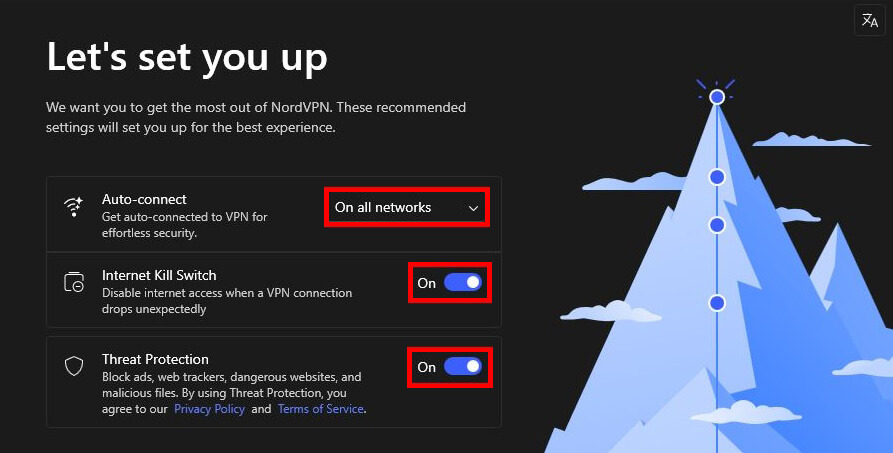
The quick installation process
NordVPN’s installation process is incredibly straightforward. Native client applications are available for leading platforms, including Windows, macOS, Linux, Android, iOS, Android TV, and Apple TV. They also provide lightweight, secure browser extensions for Chrome, Firefox, and Edge.
To get protected, download the appropriate app for your device, follow the automated on-screen installation instructions, and log in with your secure NordAccount credentials to get started.
Navigating the redesigned app UI
In their most significant layout overhaul to date, NordVPN completely removed the old interactive global map from the main screen. The app interface now uses a search-first navigation system, making the dashboard feel much cleaner and less crowded on laptop displays.
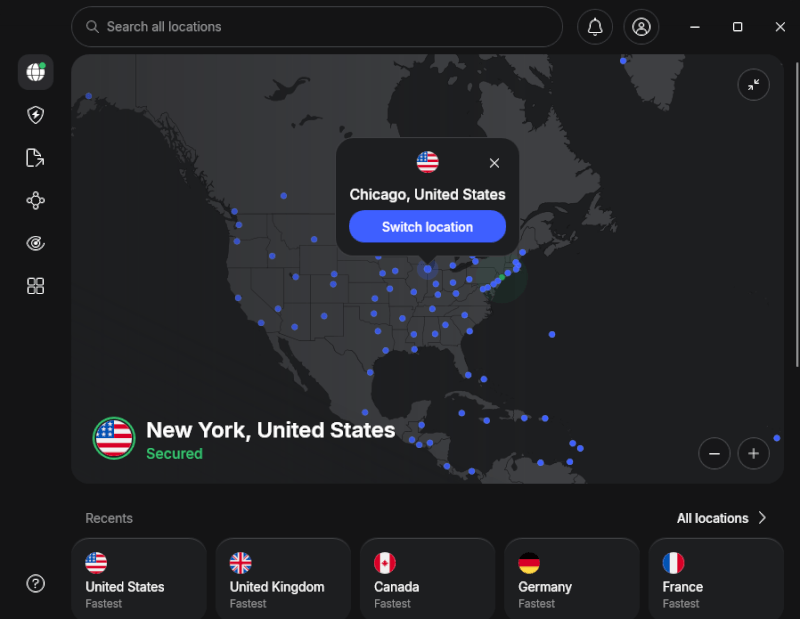
The app design is organized around three central structural pillars:
- Connect: Your primary landing space. Instead of a long, clunky country list, it features a prominent unified search bar at the top alongside a list of immediate smart server recommendations based on your local network latency.
- Protect: This tab houses your active, network-level antivirus tools, ad blocker shields, and the newly upgraded Threat Protection Pro configurations.
- Monitor: A dedicated privacy dashboard that contains your automated data breach scanner and the Dark Web Monitor alert panel.
Tunneling protocols
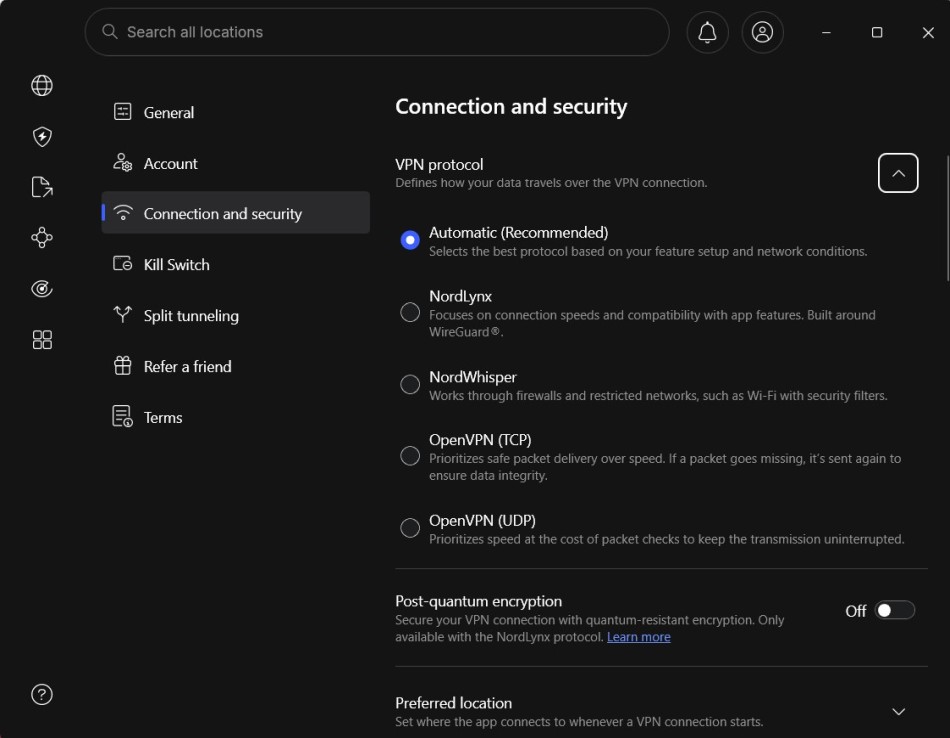
When you open up the app connection settings, the Windows client gives you complete control over your encryption traffic. You can manually cycle between three core tunneling protocols, or leave the app set to “Auto” to let the software handle network optimization for you:
- NordLynx (WireGuard-based): NordVPN’s fastest and most efficient protocol. It’s also the only option that supports post-quantum encryption, adding an extra layer of protection against future quantum computing threats.
- NordWhisper: A specialized protocol that disguises VPN traffic as regular HTTPS web traffic, making it ideal for bypassing VPN restrictions on workplace, school, and public Wi-Fi networks.
- OpenVPN (UDP/TCP): The trusted open-source classic. While slower than NordLynx during connection setup, it remains highly reliable on older or unstable networks.
Testing NordVPN app for Mac users
The macOS VPN app mirrors the same search-first dashboard layout as Windows, but it keeps a couple of fantastic, Apple-exclusive features for power users:
- The favorites system: Lets you pin your most reliable international server locations to the sidebar for one-click access.
- Custom presets: Automatically launch secure tunnels or change configurations the second you boot up specific apps like Safari or your Apple TV stream.
Under the hood, the client supports OpenVPN, IKEv2, and the WireGuard-powered NordLynx protocol (which unlocks post-quantum encryption). Unlike the dual setup on Windows, the Mac version utilizes a single, ironclad system-wide VPN kill switch built directly into Apple’s native network architecture. It’s an incredibly sleek, low-latency setup that easily secures its spot as a top premium Mac VPN.
NordVPN for Linux power users
For years, NordVPN Linux users relied on the command-line CLI. While fast and powerful, it wasn’t the most beginner-friendly experience. The new native Linux GUI app changes that by adding a clean interface and making the fully open-source code available on GitHub for security audits.

The visual dashboard adds a sleek layer on top of NordVPN’s trusted CLI foundation, with light and dark modes plus one-click access to key features:
- Next-gen protocols: Full toggle support for the WireGuard-powered NordLynx protocol (enabling post-quantum encryption) alongside the censorship-busting NordWhisper web tunnel.
- Specialty server menu: Easily click to connect to Double VPN routing paths, privacy-focused Onion Over VPN lines, and high-bandwidth P2P torrenting servers.
- Ironclad safety nets: Houses the classic system-wide VPN kill switch and network-level Threat Protection to squash malicious tracking scripts and ads before they launch.
NordVPN Android and iOS apps
NordVPN’s Android and iOS apps deliver a consistent, user-friendly VPN experience across mobile devices. The redesigned interface mirrors the desktop apps with simple Connect, Protect, and Monitor tabs, while supporting NordLynx, post-quantum encryption, and Threat Protection.
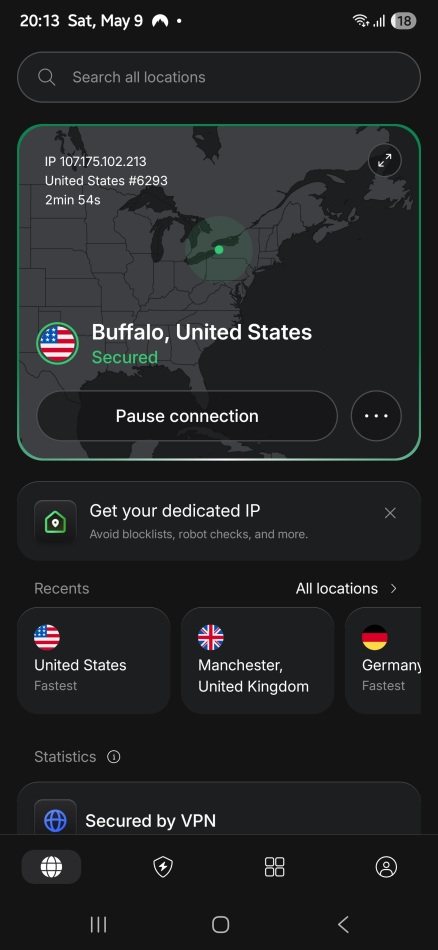
However, testing revealed a few highly impressive, mobile-exclusive security layers:
- Global scam call protection: Available natively on both Android and iOS apps, it automatically scans incoming unknown numbers and warns you about telemarketers or potential phone fraud.
- Tapjacking protection (Android exclusive): Prevents malicious background applications from overlaying faint, invisible screens on top of the NordVPN mobile app to trick you into accidentally disabling your secure tunnel.
Across smartphones and tablets, NordVPN’s mobile apps provide a reliable experience with smooth performance and strong security.
Server network
NordVPN’s network includes over 9,500 servers spread across 149+ countries (covering 224 global server locations), giving you plenty of options to unblock content and find fast, low-latency servers. The client’s ‘Quick Connect’ feature auto-selects the fastest server based on your location and server load, or you can manually choose a server to optimize speed and performance.
Key features of the network include:
- Colocated servers: NordVPN controls much of its own server infrastructure, including custom-built colocated data centers. Unlike VPNs that rely heavily on third-party rentals, this approach provides greater hardware control and stronger deployment security.
- RAM-only servers: All servers run on diskless RAM architecture, eliminating physical data storage for enhanced user privacy.
- 10 Gbps bandwidth: Popular global server locations offer dedicated 10 Gbps channels, boosting raw data speed, reducing traffic congestion, and maximizing connection performance.
This huge, high-speed network sets NordVPN apart for reliable, secure connectivity.
See all NordVPN server stats here >
Streaming performance
NordVPN shines at unblocking streaming platforms like Netflix, Hulu, and Amazon Prime, delivering an excellent viewing experience. In tests, US servers accessed American Netflix flawlessly.
NordVPN supports Netflix regions including the US, UK, Canada, France, Germany, the Netherlands, Spain, Japan, Australia, India, and Italy, with other regions likely compatible.
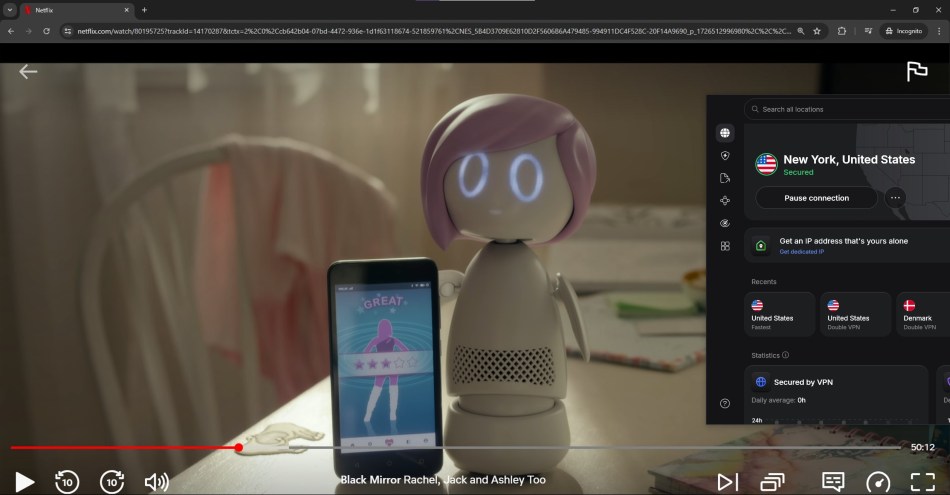
To bypass geo-restrictions on devices without a native NordVPN app, SmartPlay technology does the heavy lifting. Unlike traditional Smart DNS tools, it combines location spoofing with full VPN encryption to unblock content securely.
If Netflix gives you trouble, NordVPN’s 24/7 live chat support can point you toward the best streaming servers. They can also explain how Meshnet helps connect devices through your home network setup.
NordVPN also works with most other major streaming networks, including Hulu, Amazon Prime Video, Disney+, Max, and many more. In our most recent testing, NordVPN remains one of the only premium VPNs that works with BBC iPlayer without triggering connection blocks.
Torrenting support
NordVPN is a top choice for torrenting, offering dedicated, high-speed P2P support on hundreds of specialized servers, fast speeds, and robust security to keep your downloads safe and anonymous.
While they have phased out traditional, manual SOCKS5 proxy configurations for better security, they replaced them by embedding automated SOCKS5 traffic routing directly inside their WireGuard-powered NordLynx protocol.
Our most recent testing showed that NordVPN remains the best VPN for torrenting, keeping your identity safe from prying eyes while delivering a secure, high-speed P2P experience free of any bandwidth throttling.
Dedicated IP addresses
NordVPN also provides dedicated IP addresses. These are static IP addresses that are assigned to a single user. Ideal for accessing restricted networks, bypassing CAPTCHAs, and avoiding blacklists on shared VPN IPs, dedicated IPs provide many benefits. Each address supports up to 10 simultaneous device connections, but only a maximum of one NordLynx connection, and the rest must be OpenVPN.
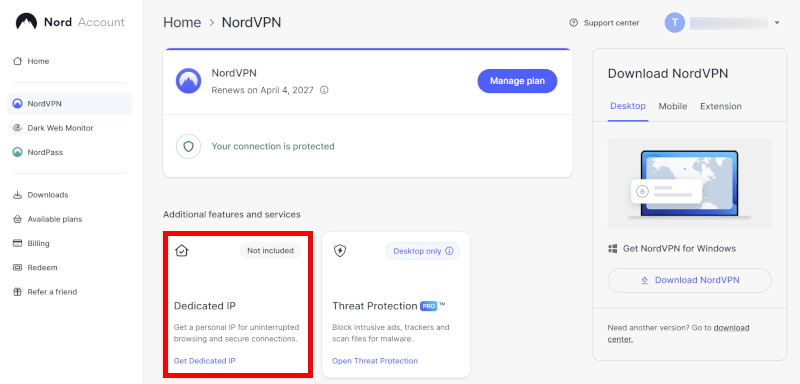
NordVPN has expanded its footprint to offer dedicated IP addresses in over 35 countries, including:
- United States
- Germany
- The United Kingdom
- The Netherlands
- France
- Canada
- and many more
Be aware that there is an additional cost for a dedicated IP address.
Privacy jurisdiction
NordVPN benefits from its Panama base. Panama is a country outside surveillance alliances like the Five Eyes and free from mandatory data retention laws. This prime jurisdiction bolsters privacy, giving NordVPN a clear advantage over other VPN services, as highlighted in our NordVPN vs PIA comparison.
While Nord Security is headquartered in the Netherlands, the NordVPN service itself is legally registered as NordVPN S.A. in Panama. This places its user data operations under Panama’s privacy-focused legal framework rather than foreign jurisdictions.
This structure gives NordVPN a strong privacy advantage compared with VPN providers operating under stricter data retention or surveillance laws.
Plans and pricing
| NordVPN plans | Basic | Complete | Prime |
|---|---|---|---|
| 1-month | $14.99/month | $19.99/month | $29.99/month |
| 1-year | $5.49/month | $6.49/month | $9.49/month |
| 2-year | $3.49/month | $4.49/month | $7.49/month |
Deal: Get 75% OFF NordVPN + 3 Months Extra >
A NordVPN subscription grants access to the full range of features, including its extensive server network and advanced security tools. NordVPN offers competitive pricing and subscription plans, catering to a wide range of users and budgets. The three main plans available are highlighted below:
- Basic: Provides access to NordVPN’s core features.
- Complete: Includes additional services such as NordPass password manager and Coveron encrypted cloud storage.
- Prime: Includes everything in the plans above, as well as Coveron, the new identity theft protection service from Nord Security.
All NordVPN plans allow up to 10 simultaneous connections. Given all its benefits and its low base price, a NordVPN subscription could well be the best cheap VPN on the market today.
Subscription renewal policies
The introductory price can be a great deal, but keep in mind that promotional rates usually apply only to your initial term. Once your 1-year or 2-year plan ends, it will typically renew at the provider’s standard rate. To avoid surprises, check your renewal price and turn off auto-renewal in your account settings before the renewal date.
NordVPN’s refund policy
To ensure user satisfaction, NordVPN provides a comprehensive 30-day money-back guarantee with each purchase. In our experience, the refund process was efficient and straightforward, with helpful customer service representatives. We experienced no difficulty in obtaining a full refund within a few days.
However, there are two rules you need to keep in mind before buying:
- Initial purchases only: The 30-day window applies strictly to your first subscription plan. Once your account hits its automatic renewal date, those subsequent charges are non-refundable.
- Third-party app store restrictions: If you subscribe to NordVPN directly through the Apple App Store, Amazon Appstore, or a third-party reseller, NordVPN’s support team cannot issue you a refund. You will have to request your money through Apple or Amazon’s customer service channels.
Support and security audits
NordVPN has a 24/7 live chat support system, and the representatives are quite helpful. Chat support is always available through the NordVPN website in the bottom-right corner. You don’t have to log in; simply click on the chat icon, and you’ll be connected with a representative. You may need to go through a chatbot to get to a real person, but I did find the chatbot was good at pointing me to helpful support articles.
NordVPN is one of the most heavily audited VPN providers in the industry. Its latest no-logs assessment by Deloitte, one of the “Big Four” auditing firms, reviewed its server infrastructure, including standard, double VPN, and obfuscated servers, and confirmed that no user-identifying data, IP addresses, or timestamps are stored.
NordVPN’s security reputation goes beyond no-logs claims. A comprehensive app and infrastructure audit by independent cybersecurity firm Cure53 confirmed its strong defenses, helping secure its place among the best no-logs VPNs.
Other Nord apps
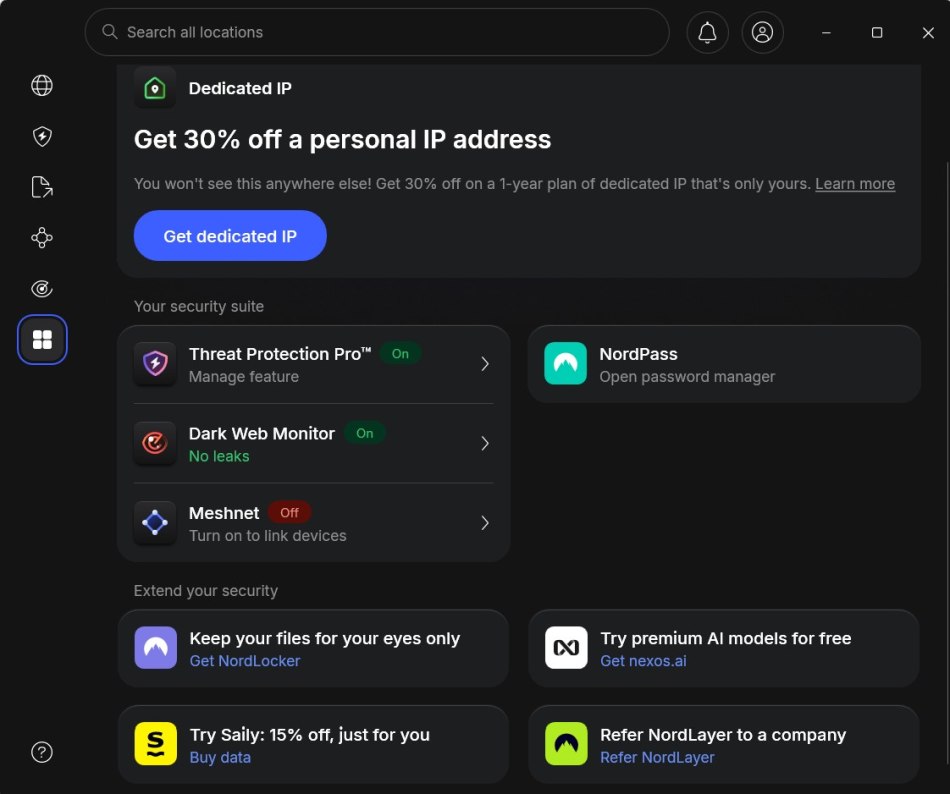
NordVPN is probably the most famous product developed by the Nord Security team, but it certainly isn’t the only one. Here’s a bit of info about their other standalone cybersecurity products:
- NordPass: A secure cross-platform password manager for safely storing and managing passwords, ensuring easy and safe access to online accounts. Recent feature updates have enhanced its strong performance in our review.
- NordLocker: An encrypted cloud storage solution for securely storing and sharing files. It performed strongly in our review, offering robust cross-platform protection for your data.
- Saily: An eSIM app you can use to get prepaid mobile data plans anywhere you go. Stay protected when on the move with Saily and NordVPN.
- Coveron (formerly NordProtect): An insurance-backed identity theft protection service for US residents that looks for data leaks, scans dark web databases, and monitors your credit activity across major credit bureaus. It is now available as a standalone app featuring up to $2 million in identity recovery coverage.
- Incogni: A specialized data privacy service that works continually to send automated opt-out deletion requests to get your personal data off various data broker markets. Available in select countries.
Put these products all together with NordVPN for a comprehensive shield around your online life and finances.
Router setup
Unlike ExpressVPN or VyprVPN, NordVPN lacks a dedicated router app, but installing NordVPN on a router can secure all connected devices, including Apple TV. The installation process typically involves choosing a compatible router, downloading NordVPN’s configuration files, and following step-by-step installation guides by NordVPN.
Here are three ways to use NordVPN on a router:
- Pre-configured routers: Purchase a router pre-set for NordVPN from vendors like Sabai Technology or FlashRouters. These are pricier but ready to use out of the box.
- Native firmware integrations: Choose modern routers, like those from Asus featuring VPN Fusion, which let you log into your router dashboard, select NordVPN directly from a drop-down menu, and activate protection using a simple account token.
- Flash your router: Manually configure your existing router with open-source firmware like DD-WRT or Tomato, but proceed cautiously, as this risks bricking the device. Difficulty varies heavily by router model.
Gaming performance
Online gaming demands speed, stability, and security. NordVPN delivers a reliable VPN connection designed for gamers, helping maintain fast speeds while protecting your connection.
NordVPN’s gaming performance focuses on these essentials:
- Impressive speeds and minimal latency: Powered by the custom NordLynx protocol, it prevents unexpected ping spikes and lag.
- Smooth and enjoyable gaming experience: It also provides robust DDoS protection to keep you safe from sore losers trying to crash your network connection.
- No sacrifice in security: Includes their decentralized Meshnet feature, which allows you to link devices directly over an encrypted virtual LAN connection, making it perfect for secure multiplayer gaming without port forwarding.
- Compatibility with consoles, computers, and mobile devices: Securely links with PC rigs, mobile apps, and gaming consoles via your router setup.
Whether you’re playing on a console, computer, or mobile device, NordVPN has you covered. It is one of the best VPNs for gaming available, especially considering the performance.
Post-quantum encryption
If you’re worried about futuristic supercomputers eventually cracking your data, NordVPN is already one step ahead. NordLynx secures your VPN tunnel with a hybrid key exchange that combines proven classical methods (like Curve25519 elliptic curves) with quantum-resistant alternatives. This dual approach ensures your session keys remain protected even if one system falls to future attacks.
The quantum-resistant component relies on ML-KEM, a NIST-standardized algorithm derived from the former CRYSTALS-Kyber. ML-KEM is a lattice-based Key Encapsulation Mechanism: your device generates an ephemeral public key, the server encapsulates a shared secret using it, and only you can decapsulate it securely. Lattice problems resist both classical and quantum algorithms like Shor’s algorithm.
Because the hybrid setup derives the final session key from both exchanges, attackers would need to break both simultaneously, which is extremely unlikely. You gain this layered defense with minimal overhead, preserving NordLynx’s signature speed while future-proofing your privacy against evolving cybersecurity threats. It is the best approach anyone has come up with so far.
Competitor comparisons
| VPN provider | NordVPN | Surfshark | ExpressVPN |
| Connections | Up to 10 devices | Unlimited | Up to 10 to 14 devices |
| Privacy jurisdiction | Panama (audited) | Netherlands (audited) | British Virgin Islands |
| Key feature | Post-quantum encryption, Threat Protection Pro | Multi-hop, CleanWeb ad-blocking | Dedicated router app, Lightway protocol |
| Value | Great promo pricing, high renewal | Best budget pick for large families | Premium pricing, easy for beginners |
While NordVPN is currently my top overall recommendation for 2026, it might not be the absolute perfect fit for every single user. If you are looking for unlimited device connections or a completely different interface setup, these are the two best alternatives to consider:
budget alternative
If NordVPN’s 10-device limit feels too restrictive for your household, Surfshark is an incredible alternative. It allows unlimited simultaneous connections under a single plan, meaning you can protect every gadget you own. It shares the same parent company as NordVPN, so you still get excellent speeds and an audited no-logs policy, but at a cheaper monthly rate.
Best for beginners
If you find NordVPN’s feature-packed app dashboard a bit overwhelming, ExpressVPN offers an incredibly streamlined, “one-click” interface. It lacks advanced built-in features like a data breach scanner, but it excels at beginner-friendly router setups and maintains ultra-stable streaming connections.
The verdict
I’ve been testing NordVPN for about seven years now, as both a personal user and also for comprehensive VPN reviews. Once again, our 2026 test results show that NordVPN continues to heavily improve its service.
By scaling up to a massive fleet of over 9,500 servers across 149+ countries and deploying cutting-edge post-quantum encryption, they have future-proofed their infrastructure ahead of the competition. With this elite level of performance and extensive security toolsets, NordVPN remains a premium VPN at a very reasonable price. While there are a few minor drawbacks (such as its auto-renewal price increases), NordVPN remains a great, reliable choice for virtually any user.
Convinced? Get the current NordVPN offer and enjoy up to 75% off your plan:
NordVPN’s Cyber Deal is live:
Get 75% Off NordVPN with the coupon below + 3 months extra:
(Coupon is applied automatically; 30-day money-back guarantee.)
NordVPN FAQs
Yes, NordVPN is highly secure. It uses military-grade AES-256 encryption alongside post-quantum encryption via the NordLynx protocol to protect your sensitive data against future supercomputer-based decryption attacks. Because it is legally registered under the privacy-friendly jurisdiction of Panama and operates on a 100% RAM-only server network, it cannot physically store your data logs or browsing activities.
No, NordVPN has a strict, zero-logs privacy policy. They do not track, collect, or log your browsing history, connection timestamps, or bandwidth usage. To verify this, NordVPN has successfully passed six independent, third-party no-logs audits conducted by world-class auditing firms like Deloitte, proving their privacy claims are completely legitimate.
A standard NordVPN subscription allows you to connect up to 10 devices simultaneously under a single account. The software features native applications for Windows, macOS, Android, iOS, Linux, Android TV, and native apps for Apple TV. If you need to secure more devices, you can set up NordVPN directly on a compatible Asus home router to protect your entire Wi-Fi network.
Yes, NordVPN includes a specialized network protection suite called Threat Protection Pro on its Windows and macOS apps. It actively blocks intrusive pop-up advertisements, prevents web tracking cookies from following you across the internet, and automatically scans your file downloads for hidden malware, even when the core VPN tunnel is completely turned off.
NordVPN offers three streamlined subscription tiers: Basic, Complete, and Prime. Basic grants you full access to the high-speed VPN and 9,500+ servers. Complete bundles the core VPN with the NordPass password manager and NordLocker encrypted cloud storage. Prime includes everything above plus Coveron, which adds advanced dark web data breach scanning and identity theft recovery insurance.

Just going to be brief and mention that I, along with many other users, have noticed increasing issues over the last several months with NordVPN being blocked by websites, more so than in the past.
There also seems to be a lot of discontent among long-time NordVPN users whose subscriptions are approaching expiry or renewal. Speeds have become an issue as well.
Both NordVPN and Surfshark are receiving a lot of criticism, so there is no agenda here to push another VPN provider. The discussions I’m seeing are overwhelmingly about NordVPN and whether it is still worth using.
I encourage everyone to do their own due diligence and look through consumer forums and social media discussions before renewing or signing up.
Dear cyberinsider team,
With respect to privacy I think it is also important to mention ownership structures so users can make an informed decsion not only about the technical capabilities (which are very good) but on the complete picture. Nord VPN is owned by Nord Security and is part of Tesonet in Lithuania. Tesonet also owns Oxylab who’s business is web scraping / data harvesting.
The main founders / owners of this corporate structure are Tomas Okmanas and Eimantas Sabaliauskas.
Oxylabs was founded using the Tesonet founders’ own resources. The shared leadership creates a conflict of interest: one business sells privacy protection, while another harvests internet data, which raises serious questions about independence and incentives.
Best regards,
Mark
NordVPN have so a very good smartdns service included with basic subscription for some US streaming services.
I built my personal android app for using it, because for some geoblocked services are better than classic nord vpn service.
Hi
How is it this year about their owner, do they have same owner as before? I remember few years ago when I had express vpn and they got new owner that was not good. Company known for maleware and viruses and maaybe even selling information. You wrote about it yourself then.
And nordvpn killswitch, are you sure it looks like on your picture here in article now? I dont have the option to chose between “kille all internet no matter what” or “kill only if connection drop UNexpectedly. It was before like that but not anymore. Even they say it themself. You might wanna double check this. Maybe you need reinstall app to get update?
The article has been updated with the latest screenshots for the NordVPN client.
When you start receiving spam emails from accounts that falsely claim to be from NordVPN, you know that VPN has saturated the VPN market. The latest one I received was from an email address: NordVPNSavings.
I already subscribe to NordVPN promotional emails, so I know these ones are fake especially since they end up in my Junk mail as opposed to the official NordVPN emails I receive.
Has anyone else had issues with Google Authenticator suddenly not working with NordVPN? I couldn’t even receive the OTP. After a lot of frustration, I managed to access my account and disabled MFA, but support was absolutely inept and incompetent, as usual.
It’s disappointing because Nord has made some improvements in speed, and I do like their Android TV app. However, it’s still extremely slow on Firestick, Onn, and Google Streamer, just like with other VPN clients I’ve tried. The only workaround is using a VPN router, but not all routers have that feature.
I also never managed to get SmartDNS or Mesh to work. Once again, their support was completely unhelpful seemingly engaging like a bot and unable to resolve anything, pasting scripted templates never understanding the issue.
Add me to the list of frustrated NordVPN customers – I no longer believe this service is worth the cost or long-term commitment.
My NordVPN subscription expires in a few months, and I plan to uninstall it for good. Fortunately, I have a backup VPN that has become my primary choice, especially after dealing with constant glitches and slow speeds unique to NordVPN.
One major issue I’ve faced is with NordVPN’s Firefox extension, which frequently disconnects or refuses to connect, regardless of server location. In my experience, browser extensions tend to work better than the main client when there are problems, but that’s not the case here.
I’m considering trying out Proton VPN’s trial since it’s been heavily advertised lately. However, I’m skeptical. VPNs that are heavily promoted online often don’t live up to the hype. We’ll see if this one breaks the trend.
I really like your reviews. They are very thorough and go over most of the points you need to consider before subscribing to a VPN. I am looking for one for my iPads (iPadOS) and given your review of Nord, I was ready to pull the trigger. But then I decided to take a look at the Apple App Store reviews and man, there are a lot of folks people that are unhappy with the product. I realize that people generally only post when they are unhappy with a product, but there are a lot from what I can see. The complaints range from connections failing, slowness of connection, problems with customer support, etc. And the way I look at reviews is I always change to the most recent review so I can see what’s been going on lately. So, if there’s anything you can address it would be appreciated. I realize not all apps are perfect. And it would be great if they had a straight 30 day trial without a longer commitment so you could see if it actually works. Anyway, thanks.
Hey NightRider, I would recommend testing it out for yourself because you have a full 30-day refund window on ALL subscription plans. So you could sign up for one of the plans with the holiday deal here, and mark your calendar 30 days from now. If you aren’t happy testing it out yourself, then simply cancel for a 100% refund. This is the good thing about Nord, you have 30 days to test it out risk-free on all subscriptions, even a monthly plan.
Thanks, Alex. Appreciate the reply. I will give it a try.
Ok this true as it replaces the dedicated IP details above.
2-year plan Dedicated IP
Save 38% $4.19/mo vs the
$162.96 on 2yrs.
$100.56for the first 24 months
VAT may apply
That Guy