
Finding the best VPNs for privacy is about more than hiding your IP address. With tracking, data collection, and surveillance all part of everyday internet use, it pays to know what your virtual private network is actually doing behind the scenes. We look for the things that matter, from independently audited no-logs policies and privacy-friendly jurisdictions to RAM-only servers that don’t hang on to your data after a reboot.
We compare leading privacy-focused VPNs based on their logging practices, leak protection, and security features such as double VPN and stealth obfuscation. The goal is to help you see what each service offers before you hand over your internet traffic.
How we test
We run adversarial tests on every provider to confirm they actually keep your identity hidden. Our evaluation protocol uses real-world tracking simulations to verify structural security:
- Adversarial leak probing: We use automated packet sniffers during simulated network drops to catch any fleeting DNS or WebRTC packets trying to bypass the active tunnel.
- Jurisdiction tracking: We map out shell companies and corporate parent organizations to verify that your data isn’t secretly tied to invasive legal jurisdictions.
- Live server power cuts: We inspect provider infrastructure logs during sudden server reboots to confirm that the hardware runs entirely on volatile RAM cells that leave no forensic data trail.
- Kill switch failure straining: We use custom scripts to abruptly crash the VPN software background process, forcing the network adapter to prove it can block raw internet traffic instantly.
- Tracker blockade benchmarks: We load scripts loaded with known tracking pixels, data brokers, and malvertising strings to calculate the exact capture rate of the VPN’s native filters.
- Audit document verification: We review the raw technical reports from third-party security audits (like Cure53 or PwC) to ensure their zero-log claims are structurally verified.
Top VPNs for privacy
Privacy takes more than a convincing no-logs promise. We’ve looked at how these VPNs handle encryption, data storage, leak protection, and jurisdiction to see what’s happening behind the scenes — and which services put real effort into protecting your data.
NordVPN – Best VPN for privacy
| Website | NordVPN.com |
| Based in | Panama |
| Logs | No logs (audited) |
| Price | $3.49/mo. |
| Support | 24/7 live chat |
| Refund | 30 days |
| Deal | 78% Off Coupon |
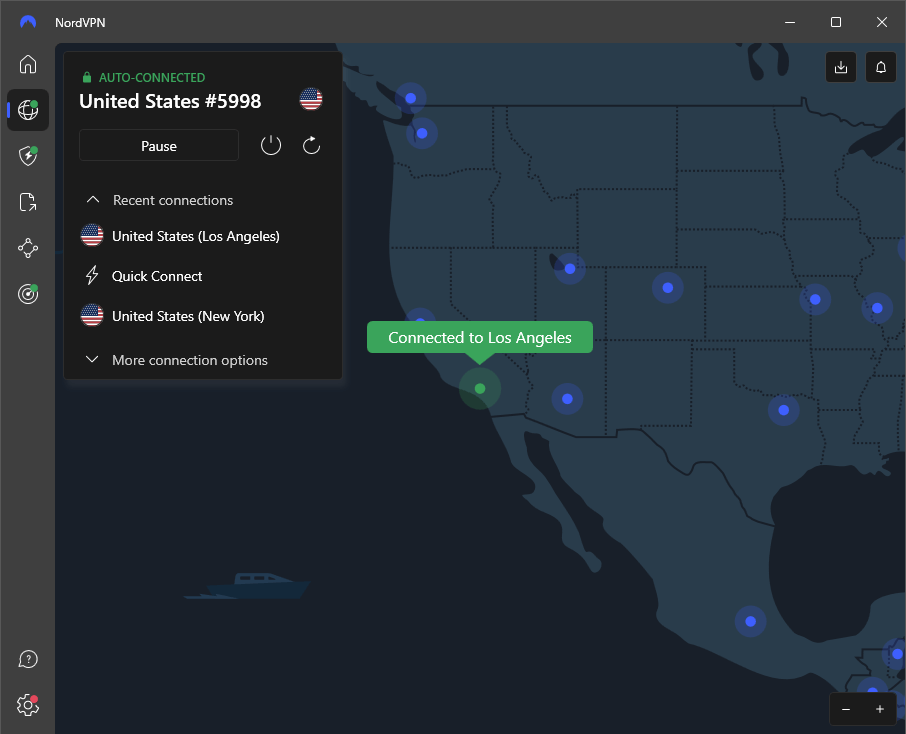
If you’re looking at the best VPNs for privacy, NordVPN is hard to overlook. It performs well in our comparison tests and packs plenty of extras beyond its VPN. You can use it to block online threats, scan downloaded files for malware, check the dark web for compromised accounts, and spot apps with known security issues.
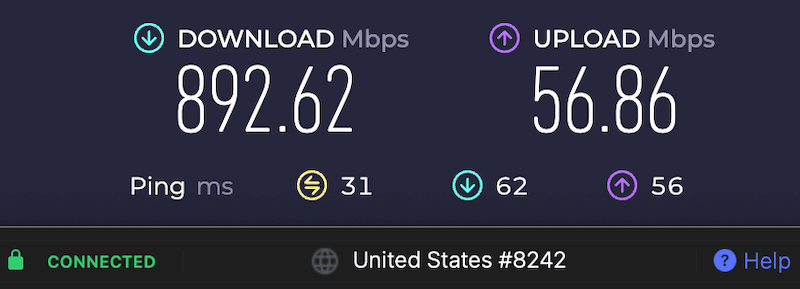
Security and privacy are strong points, but speed is where this VPN really stands out. It ranks among the fastest VPNs we’ve tested, hitting more than 892 Mbps in our latest download speed test, with consistently fast results overall.
Privacy features
Every VPN encrypts your internet traffic, and all VPNs hide your IP address by swapping it for the address of the VPN server you’re using. That’s the basics. NordVPN adds a few more privacy tools on top, including:
- Private DNS servers: Routes your DNS requests through NordVPN’s own encrypted DNS servers, helping keep your browsing activity away from your ISP and other third parties.
- DNS leak protection: Keeps DNS requests inside the VPN tunnel to help prevent your browsing data from being exposed outside the connection.
- Audited zero-logs framework: NordVPN follows a no-logs policy that has been independently audited by firms including PwC and Deloitte.
- Threat Protection Pro: Works alongside the VPN on Windows and macOS to block trackers, malicious websites, and malware in downloaded files.
- Kill switch: Cuts your internet connection if the VPN drops, helping prevent your real IP address from being exposed.
- Advanced split tunneling: Lets you choose which apps use the VPN while allowing others to connect directly to the internet.
- Automatic network protection: Can automatically connect the VPN when you join public Wi-Fi or other untrusted networks.
- Dark web monitoring: Checks for your information in leaked databases and alerts you if linked account details appear in a data breach.
- Panama jurisdiction: NordVPN is based in Panama, outside the jurisdiction of the US and EU and their data-retention requirements.
- Post-quantum encryption: They rolled out quantum-resistant hybrid keys across their proprietary NordLynx protocol for all major platforms
- 10 simultaneous connections: Lets you connect up to 10 devices at the same time on a single account.
See all NordVPN privacy features here >
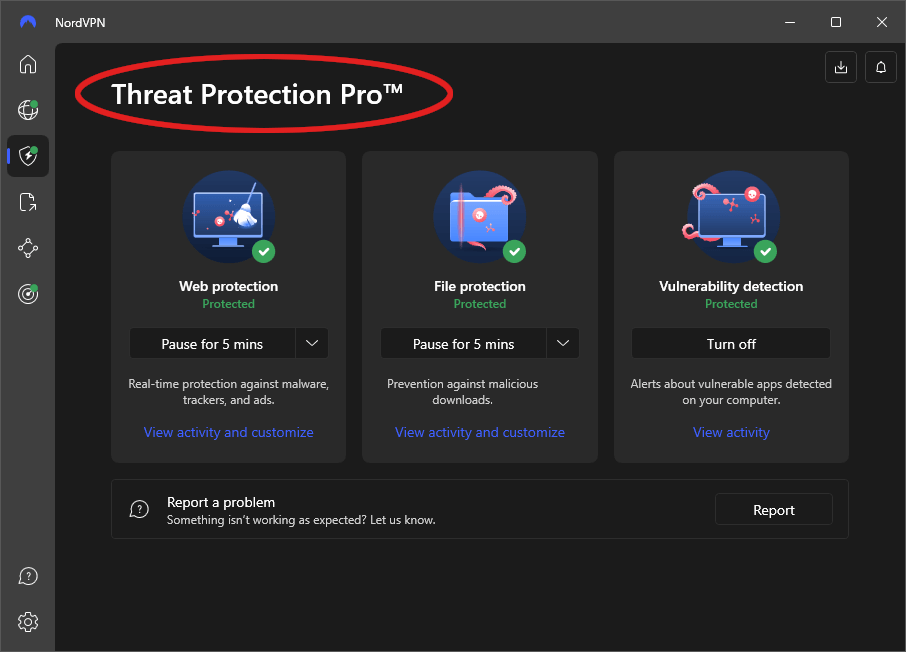
One feature that caught our attention is Threat Protection Pro. It adds another layer of protection beyond the VPN itself, blocking ads, trackers, malicious websites, and malware. It can:
- Block intrusive ads and web trackers
- Block connections to malicious websites
- Scan downloads for malware before you open them
- Alert you to zero-day phishing attacks
- Warn you about potential scams and fraud
- Protect all internet traffic on your device, not just traffic passing through the VPN tunnel
Threat Protection Pro is currently available on NordVPN’s Windows and macOS apps. Other apps include the standard Threat Protection, which has fewer features and only covers traffic passing through the VPN tunnel.
Network capacity
NordVPN has a large network of 9,500+ VPN servers across 149 countries. Its servers use RAM-only, diskless technology and high-speed connections, helping keep speeds consistent while adding an extra layer of privacy.
Because RAM doesn’t retain data when the server loses power, there’s no hard drive left behind for forensic analysis. Diskless servers also load a fresh version of the VPN software when they restart, making it easier to apply security updates and fixes.
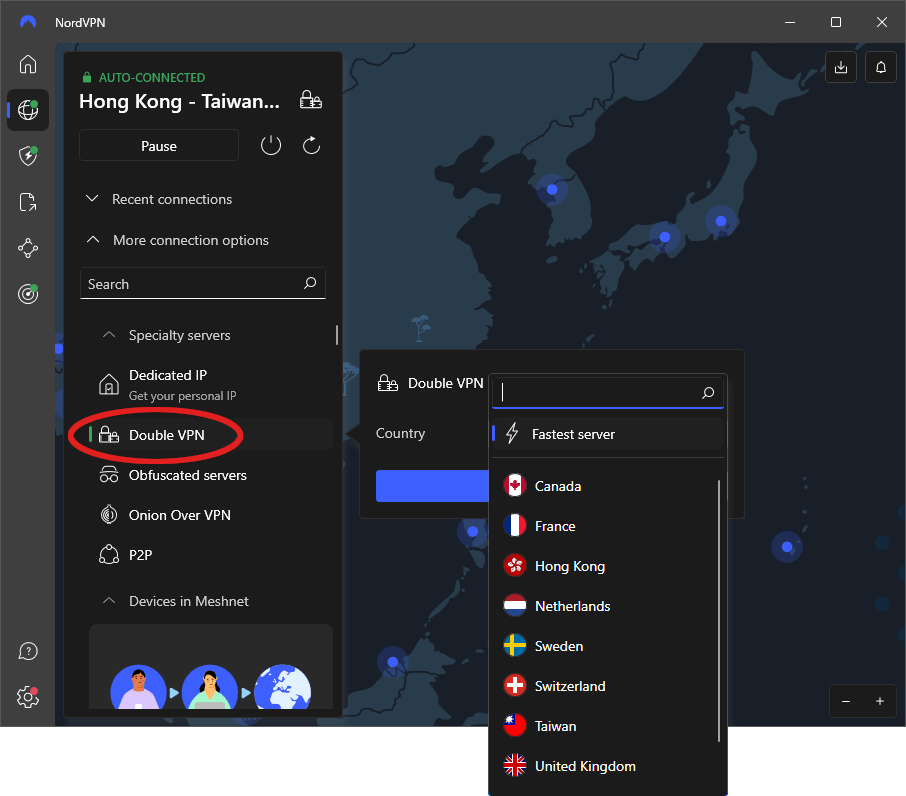
NordVPN has a few tricks up its sleeve beyond regular VPN servers. Its specialized options are designed for everything from extra privacy to smoother file sharing:
- Double VPN: Sends your traffic through two VPN servers in different countries, adding an extra layer of encryption and changing your IP address along the way.
- Obfuscated servers: Make VPN traffic look like regular internet traffic, helping you get around networks that block or restrict VPN connections.
- Onion over VPN: Combines VPN protection with the Tor network, so you can use Tor without installing the Tor Browser separately.
- P2P servers: Built for peer-to-peer file sharing and torrenting, helping keep file transfers smooth and reliable.
- Dedicated IP: Gives you an IP address of your own, which can mean fewer annoying CAPTCHAs while keeping your traffic encrypted.
VPN protocols
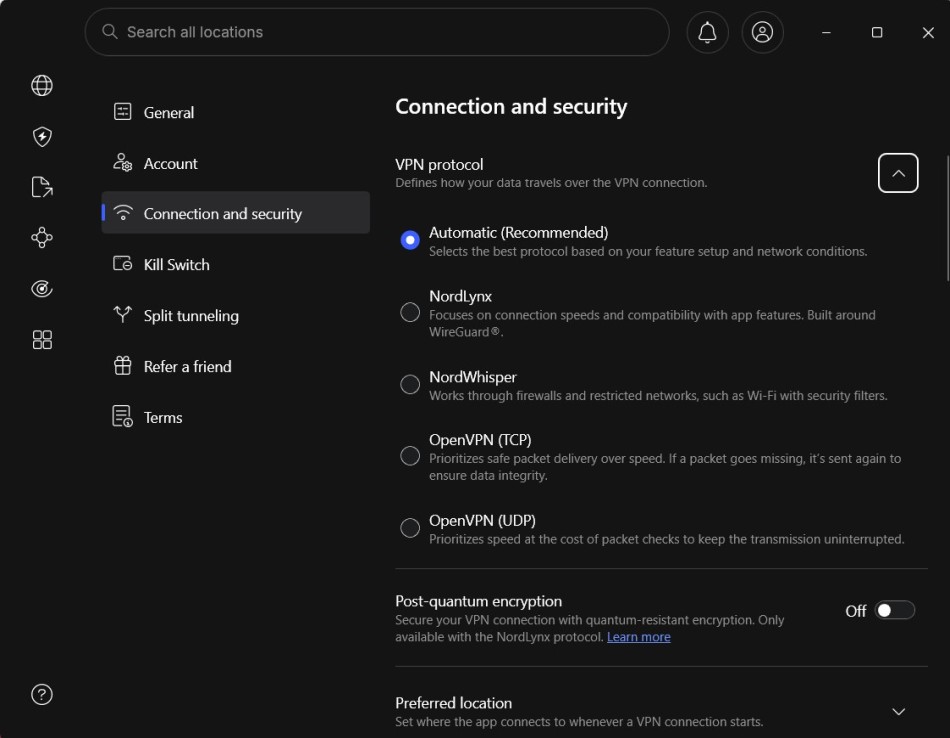
Specialized servers are only part of the picture. The VPN protocol running in the background also plays a big role in speed, security, and privacy. NordVPN offers a few options worth knowing about:
- NordLynx: NordVPN’s own protocol, built around WireGuard for fast, efficient connections. It also uses a double-NAT system to add an extra layer of privacy.
- Double-NAT architecture: Addresses WireGuard’s use of static IP addresses by assigning temporary IP addresses for each session.
- ChaCha20 encryption: Protects your data with modern encryption while keeping performance overhead low.
- OpenVPN: A trusted alternative that uses AES-256 encryption and works with a wide range of devices, including many routers.
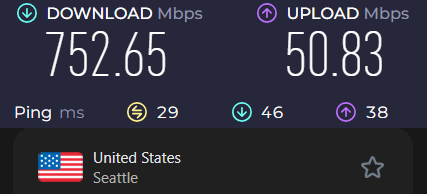
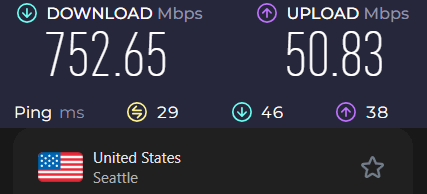
The Seattle server delivered another strong result in our Surfshark speed test, reaching 752 Mbps and showing that the VPN can maintain fast US connections.
Every NordVPN plan comes with a 30-day money-back guarantee, so you can try it out without a long-term commitment. If you need a hand, 24/7 live chat support is available through the website, along with plenty of guides and videos to help you get the most out of the service.
NordVPN pros and cons
+ Pros
- User-friendly and reliable apps
- Double VPN and Onion Over VPN servers
- Passed numerous 3rd-party audits
- Strong encryption standards with full support for WireGuard
- Works with Netflix and many streaming sites
- Threat Protection feature to block ads, trackers, and malware
- Professional 24/7 live chat support
- Consistently fast speeds
- Dedicated RAM-only servers with 10 Gbps bandwidth channels
- Post-quantum encryption
– Cons
- Best discounts only available with 2-year plans
NordVPN’s Black Friday Deal is Live:
Get 78% Off NordVPN with the coupon below + 3 months extra:
(Coupon is applied automatically; 30-day money-back guarantee.)
Surfshark – Multi-device privacy
| Website | Surfshark.com |
| Based in | The Netherlands |
| Logs | No logs (audited) |
| Price | $2.49/mo. |
| Support | 24/7 live chat |
| Refund | 30 days |
| Deal | 87% Off Coupon |
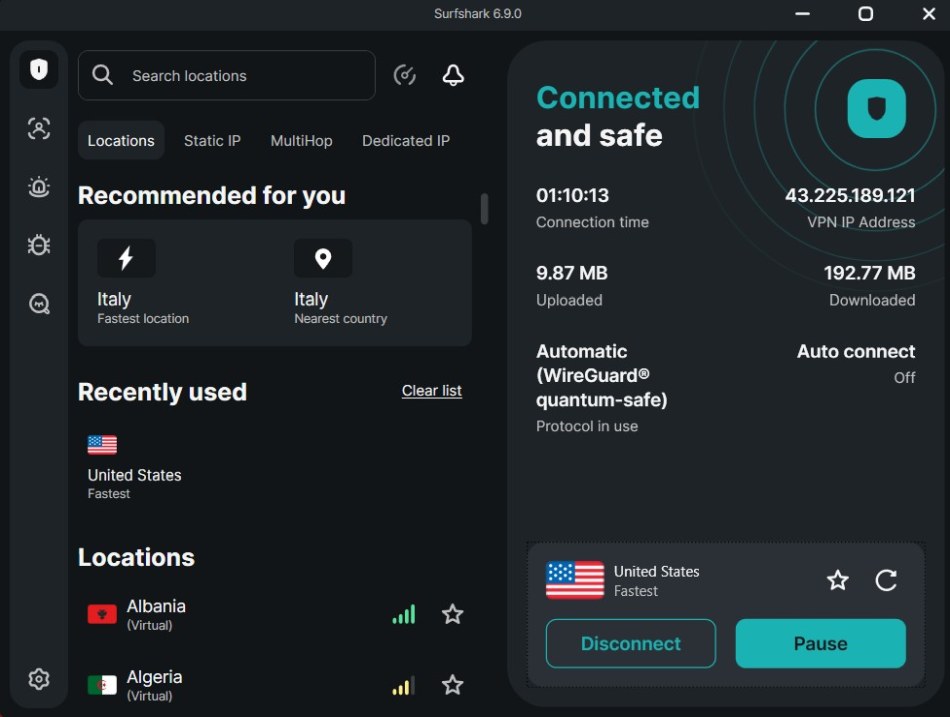
Surfshark covers the privacy basics well, with WireGuard support and several specialized server options. Where it gets interesting is the extras, including a few features you won’t find in quite the same package elsewhere.
Privacy features
Surfshark packs a lot into its privacy toolkit, from the basics like DNS leak protection to extras such as IP rotation and identity protection:
- Private DNS & DNS leak protection: Keeps DNS requests inside the VPN connection, helping prevent your ISP or other networks from seeing your browsing activity.
- Audited no-logs policy: Surfshark’s no-logs policy has been independently audited, including by Deloitte.
- CleanWeb: Blocks ads, trackers, and malicious websites to make browsing a little cleaner and safer.
- Kill switch & Bypasser: Cuts your connection if the VPN drops and lets you choose which apps use the VPN.
- Nexus IP rotator: Changes your IP address periodically without dropping your VPN connection.
- Automatic protection: Can automatically connect the VPN when you join public or untrusted Wi-Fi.
- Surfshark Alert: Monitors for leaked personal information, including email addresses, passwords, and credit card details.
- Surfshark Antivirus: Adds real-time protection against malware and other online threats.
- Netherlands jurisdiction: Surfshark is based in the Netherlands, a 14-Eyes country, so jurisdiction is worth keeping in mind alongside its privacy policies.
- Unlimited VPN connections: Lets you connect as many devices as you like under one subscription.
- Alternative ID: Creates an alternative online identity and email address to help keep your real details private.
See all Surfshark VPN features here >
Network capacity
The Surfshark server network is comprised of over 4,500 RAM-only servers in 100 countries. with an ever-growing number of fast port connections between them. The network also contains several specialized server types, with some that are specifically useful for boosting privacy:
- Dynamic MultiHop routing: Lets you create custom double VPN connections by choosing both the entry and exit server locations.
- P2P support: All servers support peer-to-peer sharing, so you don’t need to hunt for designated torrent servers.
- Camouflage obfuscation: Helps disguise VPN traffic as regular HTTPS traffic, making it harder for networks to detect and block your VPN connection.
- Dedicated IP: Available as an add-on in selected locations, a dedicated IP gives you a static address that isn’t shared with other users. This can help reduce CAPTCHA checks and issues with shared-IP blacklists.
VPN protocols
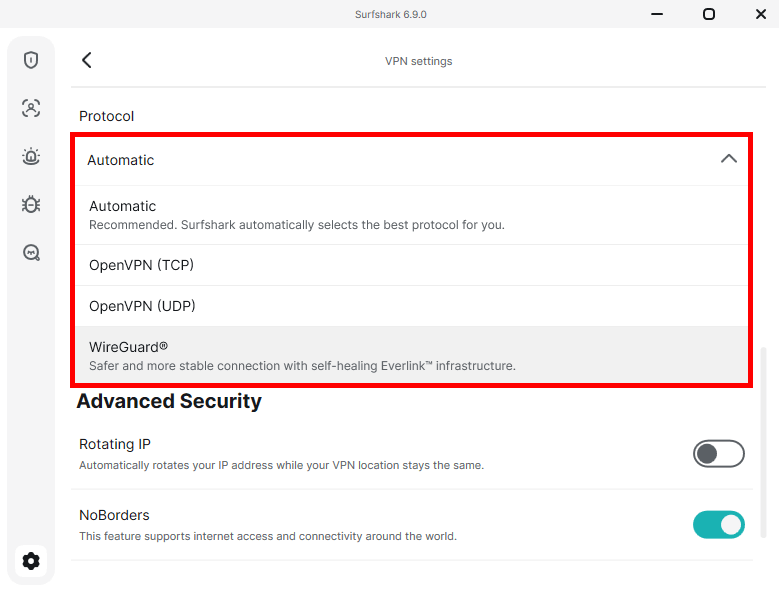
VPN protocols work behind the scenes to secure your connection and move data through the encrypted tunnel. Surfshark keeps things simple with a few options:
- WireGuard: Surfshark’s go-to protocol, built for fast, efficient connections.
- OpenVPN: A flexible alternative with UDP for speed and TCP for more stable connections on restrictive networks.
- IKEv2: Available on iOS and Android, it’s designed to reconnect quickly when you switch networks. It isn’t available on Windows desktop.
Surfshark offers a lot for the price. You get strong privacy features, solid performance, and unlimited simultaneous connections, while a long-term plan costs well under $3 per month. It’s also one of our picks for the best cheap VPNs.
All plans include a 30-day money-back guarantee, giving you plenty of time to try the service before committing. 24/7 live chat support is also available if you need a hand along the way.
Surfshark pros and cons
+ Pros
- Unlimited connections
- User-friendly apps for all devices and operating systems
- CleanWeb feature to block ads, trackers, and malware
- Works great with Netflix and many other streaming services
- 24/7 live chat support
- Strong encryption and security features (audited)
– Cons
- Limited support for VPN routers
- Above-average monthly prices
Surfshark VPN Coupon:
Get 87% off Surfshark VPN plus an additional 3 months extra with the coupon below:
(Coupon is applied automatically; 30-day money-back guarantee)
ExpressVPN – Reliable privacy protection
| Website | ExpressVPN.com |
| Based in | British Virgin Islands |
| Logs | No logs (audited) |
| Price | $2.99/mo. |
| Support | 24/7 live chat |
| Refund | 30 days |
| Deal | 80% Off Coupon |
ExpressVPN has built its reputation on reliable performance, strong privacy, and solid security. It keeps things relatively straightforward, focusing on the core VPN features rather than piling on extras you may never use.
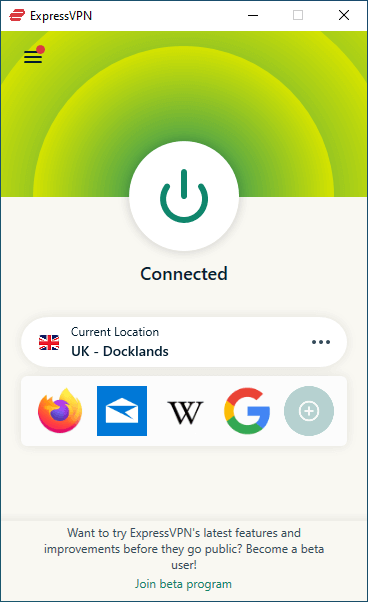
Privacy features
ExpressVPN covers the core privacy features well, with a few extras that are worth knowing about:
- Lightway protocol: ExpressVPN’s proprietary protocol is designed to deliver fast, reliable connections while keeping the codebase lightweight.
- Private DNS: Routes DNS requests through ExpressVPN’s own encrypted DNS servers, helping keep your browsing requests away from your ISP and other third parties.
- Network lock kill switch: Blocks internet traffic if the VPN connection drops, helping prevent your real IP address or other data from leaking.
- TrustedServer technology: Runs VPN servers entirely in RAM, so data isn’t stored on hard drives and is wiped when servers reboot. The technology has also undergone independent audits.
- Advanced protection: Blocks malicious websites, trackers, and ads to make browsing safer and less cluttered.
- Split tunneling: Lets you choose which apps use the VPN and which connect directly to the internet.
- Post-quantum ready: Fully implemented. Their custom Lightway protocol features native, built-in post-quantum hybrid key exchange setups across all user applications.
- 10 simultaneous connections: Supports up to 10 devices at the same time on the Basic plan.
- British Virgin Islands jurisdiction: ExpressVPN is based in the British Virgin Islands, which has no mandatory data-retention laws applying to VPN providers.
See all ExpressVPN features here >
Network capacity
ExpressVPN operates 3,000+ RAM-only servers across 214 locations in 113 countries. Its network includes several useful options for different connection needs:
- Obfuscated servers: Help disguise VPN traffic as regular HTTPS traffic, making it harder for networks using deep packet inspection to detect VPN use.
- Virtual locations: Provide IP addresses for selected regions while routing traffic through physical servers in other countries.
- P2P support: All servers support peer-to-peer sharing, so you don’t need to search for dedicated torrenting locations.
- RAM-only servers: Run entirely on volatile memory, so data is wiped when a server reboots.
VPN protocols
ExpressVPN supports both its proprietary Lightway protocol and OpenVPN, giving users a choice between a lightweight, speed-focused option and a well-established alternative. Lightway is designed for quick connections and smooth switching between networks, while OpenVPN offers more flexibility for users who prefer a widely supported protocol.
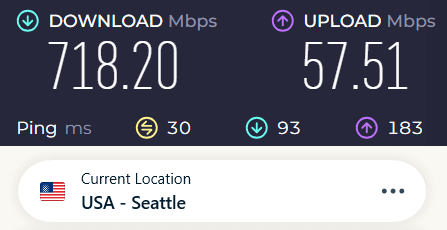
ExpressVPN may not top every speed test, but it delivers reliable performance for everyday browsing, streaming, and other common tasks. Its speeds are more than enough for most users.
ExpressVPN offers a custom router app for supported models, letting you protect every device on your home network through a single VPN connection. You can also use its Aircove router, which comes with ExpressVPN preinstalled and ready to go.
ExpressVPN includes 24/7 live chat support and a 30-day money-back guarantee, giving you time to test the service before committing. Its pricing is above average, but the combination of reliable performance and straightforward privacy protection makes it worth considering if those are your priorities.
ExpressVPN pros and cons
+ Pros
- User-friendly and secure apps for virtually any operating system or device
- Proprietary Lightway VPN protocol for advanced performance
- Post-quantum version of the WireGuard protocol for enhanced privacy and security
- Split tunneling feature (for macOS, Windows, and routers)
- Works with Netflix and most streaming services
- 24/7 live chat support
- Passed independent third-party audits for security and no-logs
- Extensive network of diskless servers
– Cons
- Fewer features than other leading VPNs
ExpressVPN Coupon:
Sign up for the 2-year plan and get 4 months added to your subscription for free.
(Coupon is applied automatically)
Proton VPN – Simple Swiss privacy
| Website | ProtonVPN.com |
| Based in | Switzerland |
| Logs | No logs (audited) |
| Price | $2.49/mo. |
| Support | Email + Chat |
| Refund | 30 days |
| Deal | 75% Off Coupon |
Proton VPN keeps things privacy-focused without making the apps feel complicated. Based in Switzerland, it offers clean apps, a map-based interface, and a strong lineup of security features. Independent audits of its privacy practices add another layer of confidence.
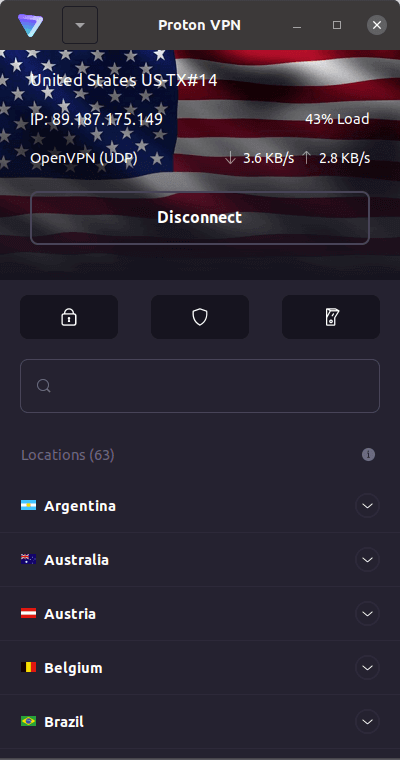
Privacy features
Proton VPN keeps privacy front and center, with a useful set of tools that go beyond basic encryption. Here’s what you get:
- Private DNS and leak protection: Uses encrypted DNS to help keep your browsing requests private and prevent DNS leaks.
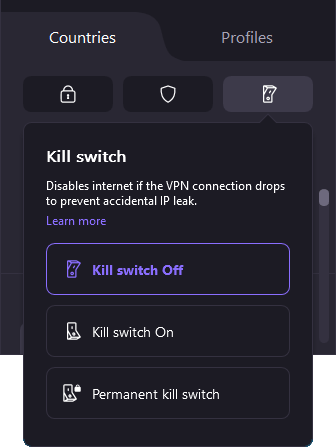
- Three-way kill switch: Offers several levels of protection, including a Permanent Kill Switch that blocks internet access unless the VPN is connected.
- Audited zero-logs policy: Follows an independently audited no-logs policy, adding extra reassurance that your online activity isn’t being recorded.
- Advanced split tunneling: Lets you choose which apps use the VPN and which connect directly.
- NetShield filtering: Uses DNS filtering to block ads, trackers, and malicious domains before they load.
- Swiss jurisdiction: Based in Switzerland, Proton VPN benefits from strong privacy laws and sits outside the 5/9/14 Eyes alliances.
See all Proton VPN features here >
Network capacity
Proton VPN has a seriously large network, with 20,600+ servers across 195+ locations in 148 countries. But size isn’t the only thing worth a look. It also offers specialized servers for extra privacy, anonymity, and speed.
- Secure Core nodes: Route your traffic through multiple VPN servers, starting with hardened servers in privacy-friendly countries.
- Tor-over-VPN routing: Send your traffic directly through the Tor network, letting you access onion sites without installing separate software.
- High-speed Plus clusters: Premium servers with high-capacity 10 Gbps connections, designed for faster, smoother performance.
Your plan determines which servers you can use. Free users get access to a smaller network across 10 countries, with fewer features and no P2P support. Paid plans unlock the full 148-country network.
Proton VPN’s Secure Core network adds another layer of protection by routing traffic through 125 servers housed in high-security facilities in Switzerland, Iceland, and Sweden before it reaches its final destination. It also offers Tor-optimized servers for browsing onion sites directly through a standard browser.
VPN protocols
Your VPN protocol affects how your connection balances speed, security, and the ability to get around network restrictions. Proton VPN offers a few options:
- WireGuard: A fast, modern protocol available across Proton VPN’s desktop apps, designed to deliver strong security without slowing things down.
- Stealth: Proton VPN’s custom, open-source protocol, built to disguise VPN traffic as regular HTTPS traffic and help bypass network restrictions.
- OpenVPN: A well-established option known for its strong security and broad compatibility, including with routers and older devices.
- IKEv2: No longer available in Proton VPN’s desktop apps, which now focus on protocols such as WireGuard and Stealth.
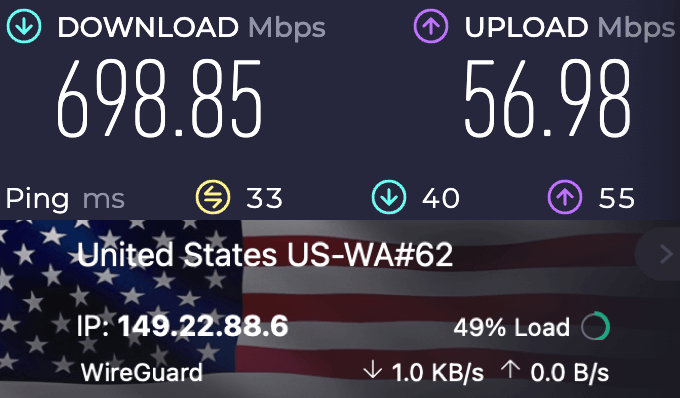
Proton VPN’s paid plans start at $2.99/month, making it a more affordable option than some premium competitors, including ExpressVPN. Plans come with a 30-day money-back guarantee. For help, users can contact support through live chat or email.
Proton VPN pros and cons
+ Pros
- Swiss-based privacy
- Open-source apps audited by independent security firms
- Secure Core servers route traffic through hardened nodes
- VPN Accelerator boosts long-distance US speeds
- Post-quantum encryption in the works
- Subscription plans bundle with Proton Mail, Proton Drive, Proton Sheets, and Proton Pass
- Linux CLI and refreshed GUI
- Smart TV and Apple TV apps now support NetShield
– Cons
- No 24/7 live chat
- Advanced tools have a steeper learning curve
Proton VPN Black Friday Deal is Live:
Get 75% Off Proton VPN (drops the price to only $2.49/month) with the coupon below:
(Coupon is applied automatically; 30-day money-back guarantee)
Mullvad VPN – No-nonsense privacy
| VPN | Mullvad |
| Based in | Sweden |
| Logs | No logs |
| Price | $5.86/mo. |
| Support | |
| Refund | 30 days |
| Website | Mullvad.net |
Mullvad VPN keeps the bells and whistles to a minimum. Instead, it puts privacy front and center, with some clever features that make it stand out from the usual VPN crowd.
Privacy features
Mullvad VPN keeps things simple, with a few standout privacy features:
- Zero-data account system: No name, email, or password required. Mullvad gives you a random 16-digit account number instead.
- Anonymous cash payments: You can pay by mailing cash directly to Mullvad, keeping your payment separate from your personal details.
- Quantum-resistant tunnels: Uses post-quantum cryptography to help protect your traffic against future attacks from quantum computers.
- Mullvad browser: Built with the Tor Project, this open-source browser is designed to reduce fingerprinting and make users harder to track.
- DAITA traffic masking: Changes traffic patterns such as packet sizes and timing to make VPN activity harder to analyze.
- Content filtering: Blocks ads, trackers, tracking pixels, and known malware domains before they reach your device.
Network capacity
Mullvad VPN has 569+ physical servers across 91 cities in 50 countries. The network is built around privacy rather than sheer size, with a few specialized options:
- WireGuard infrastructure: Mullvad’s servers run on WireGuard, its sole VPN protocol.
- Bridge servers: Help disguise VPN traffic and bypass restrictive networks and DPI.
- DAITA servers: Use traffic-analysis protection to make VPN activity harder to identify.
VPN protocols
Mullvad keeps things simple with a WireGuard-only network, using its custom GotaTun engine for fast, efficient connections. There’s no OpenVPN here, which helps keep the setup streamlined.
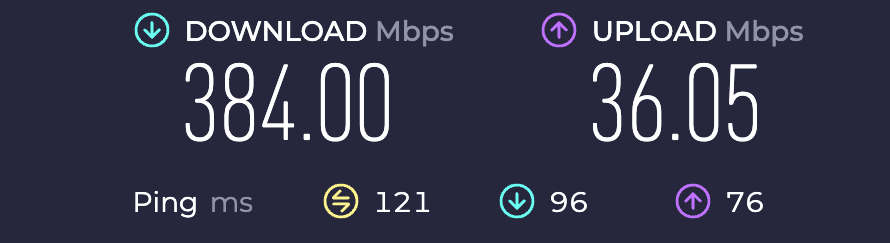
Streaming is a different story. Mullvad isn’t built around unblocking streaming services, so platforms such as Hulu, BBC iPlayer, and Amazon Prime may not work reliably. Its Swedish base also puts it within the 14-Eyes network, although Mullvad’s privacy-focused infrastructure is designed to minimize the data available to authorities.
Mullvad VPN pros and cons
+ Pros
- Strong privacy and security features
- Dedicated apps for Windows, macOS, Linux, Android, and iOS
- No IP address or DNS leaks detected
- Audited
- Accepts private payments
– Cons
- Smaller server network
- Above average prices
- Captcha issues affect usability
- Does not work well for streaming
Free vs paid privacy VPNs
Free VPNs can be useful, but they often come with more restrictions and fewer privacy features than paid plans. Server capacity, speeds, device limits, and advanced security tools can all vary, so it’s worth checking what you actually get before signing up.
| Free VPNs | Paid VPNs | |
| Data logging risk | 🔴 Policies vary by provider | 🟢 Independently audited zero-logs |
| Server infrastructure | 🔴 Traditional hard drives prone to seizure | 🟢 Diskless, RAM-only hardware networks |
| Speed and data | 🔴 Strict daily caps and heavy throttling | 🟢 Unthrottled, unlimited data allowances |
| Advanced features | 🟡 Outdated protocols or weak key bitrates | 🟢 Post-quantum cryptography |
Proton VPN offers a free plan with no data cap, but it comes with some limitations. You can connect one device at a time and choose from servers in a limited number of countries. Features such as Secure Core, Tor over VPN, and some advanced controls are reserved for paid plans.
Technical deep dive
Understanding what happens inside your VPN tunnel can help you spot privacy gaps that basic encryption alone doesn’t address.
How Obfuscation works
Regular VPN traffic can have recognizable patterns that ISPs and network administrators may identify using deep packet inspection (DPI). Obfuscation adds another layer by disguising those patterns so the connection looks more like ordinary internet traffic:
- Disguising VPN traffic: Obfuscation changes or masks traffic characteristics that can reveal you’re using a VPN, making the connection harder to identify.
- Censorship circumvention: Stealth protocols can help VPN traffic get through restrictive corporate networks, school firewalls, and heavily censored networks.
- Reducing VPN blocking: By making VPN traffic harder to detect, obfuscation can help prevent networks from blocking or restricting connections simply because they recognize VPN use.
RAM-only vs full-disk encryption
VPN providers take different approaches to protecting data stored on their physical servers. Two common methods are RAM-only infrastructure and full-disk encryption.
| RAM-only (diskless) servers | Full-disk encryption | |
| Storage medium | 🟢 Volatile memory strips (no hard drives) | 🟡 Encrypted physical hard drives |
| Power-loss state | 🟢 100% of data evaporates instantly | 🟡 Data remains locked in ciphertext |
| Physical seizure risk | 🟢 Zero forensic data left on hardware | 🟢 Safe via off-site key management |
| Software updates | 🟢 Loads fresh OS image on every reboot | 🟡 Patched manually or via standard root |
| Primary examples | NordVPN, Surfshark, ExpressVPN, Mullvad | Proton VPN |
RAM-only servers rely on volatile memory rather than persistent storage. When a server loses power or restarts, data held in RAM disappears, leaving no local session data sitting on a hard drive. This can reduce the amount of information available if a physical server is compromised or seized.
Full-disk encryption (FDE) takes a different approach by encrypting data stored on physical drives, typically using technologies such as LUKS and AES-256. Some providers also keep encryption keys separate from the servers themselves, so even if a machine is physically seized, the encrypted data remains unreadable without the keys.
Why cookies outsmart VPNs
Even the best VPN for privacy can hide your IP address and encrypt your internet traffic, but it can’t make you completely anonymous online. Other tracking methods can still connect your activity to you.
Tracking cookies, browser fingerprinting, and device-level signals can follow you across the web even when your VPN is working as intended. And if you’re logged into accounts such as Google, Apple, or Amazon, websites can still connect your activity to your real identity regardless of the IP address your VPN provides.
For stronger privacy, it helps to pair your VPN with tools such as anti-fingerprinting browsers like Mullvad Browser and tracker-blocking features that prevent unwanted scripts from running in the first place.
Privacy tweaks
A VPN covers a lot, but a few simple settings can tighten things up further:
- Use an anti-fingerprinting secure browser: Tor Browser and Mullvad Browser can make your device harder to identify through browser fingerprinting.
- Check WebRTC: WebRTC can expose your real IP address in some situations. If you don’t need it, consider disabling it in your browser.
- Enable DNS and tracker blocking: Use your VPN’s built-in blocking tools to stop ads, trackers, and malicious domains before they load.
- Keep your browser updated: Security fixes matter, especially when you’re relying on your browser for privacy.
- Limit browser permissions: Review which sites can access your location, camera, microphone, and notifications, and remove permissions you don’t need.
Privacy metrics compared
Choosing a privacy VPN doesn’t have to be complicated. This quick comparison puts the key privacy and security features side by side.
| Feature | NordVPN | Surfshark | ExpressVPN | Proton VPN | Mullvad |
|---|---|---|---|---|---|
| Jurisdiction | 🟢 Panama | 🟡 Netherlands | 🟢 British Virgin Islands | 🟢 Switzerland | 🟡 Sweden |
| No-logs policy | 🟢 Audited | 🟢 Audited | 🟢 Audited | 🟢 Audited | 🟢 Audited and court-tested |
| RAM-only servers | 🟢 Diskless | 🟢 Diskless | 🟢 Diskless | 🔴 Full-disk encryption | 🟢 Diskless |
| Simultaneous devices | 10 | Unlimited | 10 – 14 | 10 | 5 |
| Post-quantum ready | 🟢 NordLynx engine | 🟡 Desktop and Android only | 🟢 Lightway protocol | 🔴 In development | 🟢 WireGuard |
| Starting price | $3.49/month | $1.99/month | $2.99/month | $2.99/month | €5/month |
NordVPN adds tools such as Double VPN and Onion over VPN, while Surfshark offers Dynamic MultiHop and rotating IPs. Meanwhile, ExpressVPN combines post-quantum protection with fast 10 Gbps servers, and Proton VPN puts extra emphasis on routing privacy with Secure Core and Tor over VPN.
Then there’s Mullvad, which takes the minimalist route with anonymous account numbers, cash payments, and DAITA traffic protection. None of these VPNs approaches privacy in exactly the same way, so the right fit comes down to which features and level of anonymity matter most to you.
The bottom line
When it comes to the best VPNs for privacy, the interesting part is what happens behind the VPN connection. Logging policies, server security, independent audits, and privacy extras can make a real difference in how much of your online activity stays private.
- NordVPN: A strong all-rounder, combining fast speeds with tools such as double VPN and Threat Protection. Be sure to use the latest coupon for the best prices >
- Surfshark: Built for device-heavy households, with unlimited connections plus Dynamic MultiHop and Nexus IP rotation.
- Mullvad VPN: Keeps the privacy philosophy front and center, with anonymous account numbers, cash payments, and DAITA traffic protection.
And while a free VPN can be tempting, check the fine print first. Data limits, logging practices, and missing security features can make that $0 price tag less attractive than it looks.
Private VPN FAQs
No. A VPN encrypts your network traffic and masks your location, but it can’t stop other forms of tracking, such as browser fingerprinting and cookies, or hide activity when you’re logged into personal accounts like Google or Amazon.
Yes, but the difference is usually small with a good VPN. Modern protocols such as WireGuard and NordLynx are designed to keep connections fast, with speed drops often staying around 5% to 10% on standard connections.
Yes. While your traffic passes through the VPN’s servers, the provider could technically see it. That’s why independent third-party audits matter: they help verify that the VPN actually deletes connection data instead of storing it on disk.
The Five Eyes alliance includes the US, UK, Canada, Australia, and New Zealand and is known for extensive intelligence sharing. The Nine Eyes and 14 Eyes groups expand that cooperation to include additional countries, including European members such as Sweden and the Netherlands.
Not necessarily, but open-source VPNs offer greater transparency. Their source code is publicly available, allowing independent security researchers and the wider privacy community to inspect it for vulnerabilities, suspicious code, or potential backdoors.

I’m not an expert myself but I do read about privacy and recently I came accross another article that threw a shadow of doubt over Nord VPN. The reasons they mentioned are:
* it’s not open source
* you need email for creating an account (which is often traceable)
* they don’t accept privacy friendly ways of paying (so your data are traceable again)
* their mother company (NordSecurity) is part of the WEF’s ‘Partnership against Cybercrime’ (https://initiatives.weforum.org/partnership-against-cybercrime/organizations) and the World Economic Forum is not really known for privacy protection
Their favorite is Mullvad VPN but I haven’t looked into that.
So just my input, sharing information that I found elsewhere.