
QNAP is urging NAS owners to update Plex Media Server immediately after receiving reports of possible compromises involving Plex2Shell.
The company says anyone who exposed a vulnerable Plex server to the internet should treat their NAS as potentially compromised, even if they have since installed the patch.
In a November 6 notice, QNAP said its support team is assisting users who reported signs of compromise. Plex disclosed widespread attacks on October 19, three days after public proof-of-concept code appeared. Plex says attackers have used compromised servers to mine cryptocurrency and run proxy software that routes other people’s traffic through victims’ internet connections.
Plex Media Server lets users stream their own media libraries from devices such as a network-attached storage (NAS) system. The flaws affect Plex Media Server 1.43.2 and earlier. QNAP confirmed that QTS and QuTS hero, the operating systems that run its NAS devices, are unaffected.
The four flaws, tracked as CVE-2026-96652, CVE-2026-96654, CVE-2026-96655, and CVE-2026-96656, let an attacker who has no account on the server chain together access to internal functions, disclosure of the server owner’s administrator token, and a file write to Plex’s Codecs folder. The chain allows the attacker to run code remotely with the same permissions as the Plex Media Server process.
What QNAP owners should do
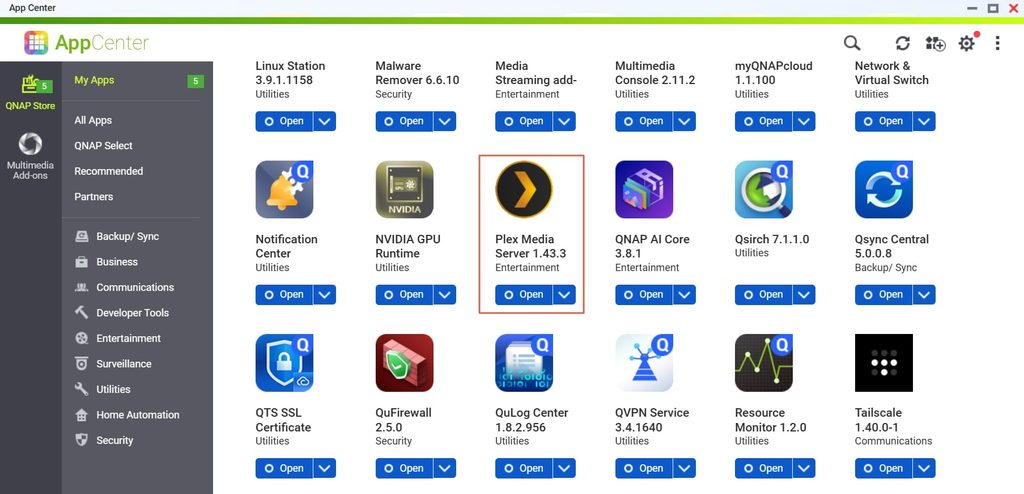
Open App Center > My Apps on the NAS and update Plex Media Server to version 1.43.3 or later. Then open Settings > General in Plex Web and verify that the installed build is 1.43.3.10861 or newer.
If the vulnerable server was reachable from the internet, the update closes the entry point but leaves any software attackers may have installed. Check whether Plex Remote Access was enabled or whether port 32400 was opened manually, through UPnP, or through myQNAPcloud router configuration.
QNAP advises owners of exposed servers to perform a clean reinstall, check for signs of compromise, and reset credentials. If you want QNAP support to investigate, copy the Plex Logs folder before uninstalling. Reinstall from App Center without restoring the old Codecs folder. Signs of compromise include unfamiliar files in that folder, outbound connections to proxystream.st, and sustained high CPU usage when nothing is playing.
Sign out all devices from your Plex account before changing its password, since the administrator token may have been exposed. QNAP also advises changing NAS account passwords and rotating credentials stored on the device, including those used for backups or cloud connections. Disable Plex Remote Access and remove any port forwarding for Plex if you only stream at home. If you need remote access, QNAP recommends connecting through a VPN.



Leave a Reply