

Mozilla has released Firefox 161 with per-site rules for its free built-in VPN on desktop.
Users can now route selected websites through the VPN even when the browser’s main VPN switch is off, or have specific sites bypass it whenever it’s on.
Firefox previously let users exclude websites from VPN protection. The latest release adds the option to keep it on for individual sites and automatically converts existing exclusions into Always off rules. Sites without a rule follow the main VPN switch.
The rules apply to a whole website. A user could keep the VPN on for a forum they want to visit without exposing their IP address and bypass it for a streaming service that blocks VPN connections. To add a rule, open the VPN panel in the toolbar, select Manage VPN rules, enter the site’s address, and choose Always on or Always off. The panel also shows which rule applies to the site currently open.
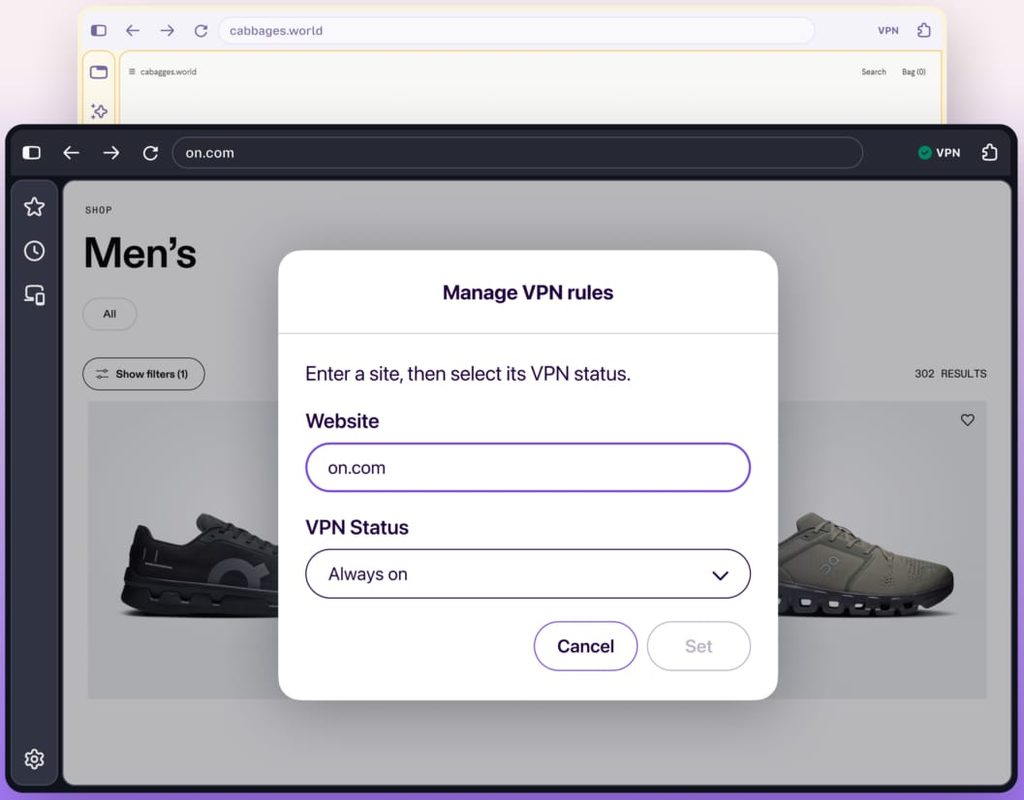
If the VPN fails to connect on a site with a rule, selecting Continue without VPN pauses every site rule, including those set to Always on. Mozilla says restarting Firefox restores the rules.
The free VPN masks users’ IP addresses by routing Firefox traffic through a secure proxy. It requires a Mozilla account and is still rolling out in supported regions. The VPN is also available on Android, but website rules are currently desktop-only. As reported earlier this month, Mozilla has suspended the usual 50 GB monthly cap through January 31, 2027, to allow users traveling during the holidays to enjoy unrestricted, private, and safe browsing.
Firefox brings the Fire button to regular windows
Mozilla is also adding the Fire button to the toolbar in regular desktop windows. It gives users a shortcut to clear browsing and download history, cookies, cached files, saved form data, and site permissions. Clearing everything signs users out of websites and replaces the current window with a fresh one, while choosing individual categories keeps the window open.
Firefox for Android is also getting read-aloud playback in Reader View. It uses on-device voices so the page text and audio stay on the device, and playback can continue with the screen off. Firefox is also available through Google Play in cars with Google built-in for use while parked, and Mozilla says it will keep browsing history private from vehicle manufacturers.
On desktop, Firefox 161 also makes tab groups accessible from the main menu and adds a configurable shortcut to copy the current tab’s URL. The update patches several high-severity security flaws, including sandbox escapes.



Leave a Reply