

Mozilla has released Firefox 153, introducing built-in Containers as a native browser feature alongside HDR video playback on Windows, new PDF editing capabilities, and several security improvements.
Firefox 153 is now rolling out to users on the browser’s Release channel. The update expands Firefox’s long-standing privacy and workflow capabilities by integrating Containers directly into the browser, removing the need for Mozilla’s Multi-Account Containers extension for basic functionality.
Containers become a native Firefox feature
Containers allow users to isolate browsing sessions into separate, color-coded environments, such as Work, Personal, Shopping, or Banking. Each container maintains its own cookies and site storage, allowing users to stay signed into multiple accounts on the same website simultaneously without sessions interfering with one another.
For example, a user can remain logged into a personal Reddit account in one container while accessing a work account in another, without repeatedly signing in and out. Cookies and site data remain isolated between containers, preventing websites in different containers from sharing session information. However, device characteristics such as IP address and operating system are still shared across containers.
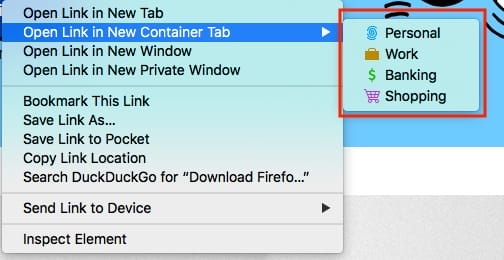
Mozilla
The feature was previously available through Mozilla’s Multi-Account Containers extension, which continues to offer advanced capabilities including automatic site assignments, cross-device synchronization, and integration with Mozilla VPN or custom proxies.
Last year, Mozilla redesigned Firefox Profiles, bringing profile management into the main browser interface. Unlike Containers, profiles create fully separate browsing environments with isolated bookmarks, extensions, history, settings, and logins. Mozilla positions Containers as a lightweight solution for separating identities within a single browser window, while Profiles provide complete data separation for work, personal, or shared use.
The move also comes weeks after Brave introduced its own built-in Containers feature. Brave describes Containers primarily as a workflow tool because its existing storage partitioning already limits cross-site tracking by default. Firefox, meanwhile, continues to position Containers as both a productivity feature and an additional layer of browsing isolation.
Other highlights
Firefox 153 also introduces several usability improvements, including HDR video playback on supported Windows systems with HDR displays enabled, QR code generation for sharing webpages, image insertion and PDF merging in the built-in PDF editor, and a new color picker that can be launched directly from the address bar using quick actions.
The browser now highlights the location permission icon in red whenever a website is actively accessing a user’s location and adds support for Apple’s system-wide Globe+F fullscreen keyboard shortcut. Mozilla has also added experimental JPEG XL image support through Firefox Labs, where users can manually enable the next-generation image format.
On the security side, Firefox now blocks extensions from accessing local files by default unless users explicitly grant the new “Access local files on your computer” permission. The browser also enables Local Network Access restrictions for all users, requiring websites to request permission before connecting to devices or services on a local network.
Mozilla also removed legacy cookie settings from the browser, directing users toward its default cross-site cookie isolation model instead.
Firefox 153 fixes dozens of security vulnerabilities, including multiple high-severity flaws affecting the browser’s DOM, WebAssembly, WebRTC, JavaScript engine, graphics, and networking components. The update also addresses several memory safety issues that Mozilla says could potentially be exploited to achieve arbitrary code execution if successfully abused.
Users can install Firefox 153 by navigating to Menu > Help > About Firefox, where the browser will automatically download and apply the update.



Leave a Reply