

A previously undocumented macOS infostealer dubbed PamStealer validates victims' macOS passwords through the OS’s Pluggable Authentication Modules (PAM) before stealing them.
Jamf Threat Labs researchers, who analyzed a two-stage attack chain combining AppleScript, JavaScript for Automation (JXA), and a Rust payload, report that attackers distribute PamStealer through the fake domain maccyapp[.]com, which impersonates the legitimate Maccy clipboard manager.

Victims download a disk image containing a compiled AppleScript (Maccy.scpt) that opens in Script Editor and displays fake installation instructions urging users to press ⌘+R. The malicious code is hidden further down the script, while the visible “Maccy” text uses Greek and Cyrillic homoglyphs to hinder text-based detection.

The AppleScript functions solely as a downloader. Instead of invoking utilities such as curl or zsh, it uses native macOS APIs through JXA and NSURLSession to fetch the second-stage payload, reducing suspicious process creation.
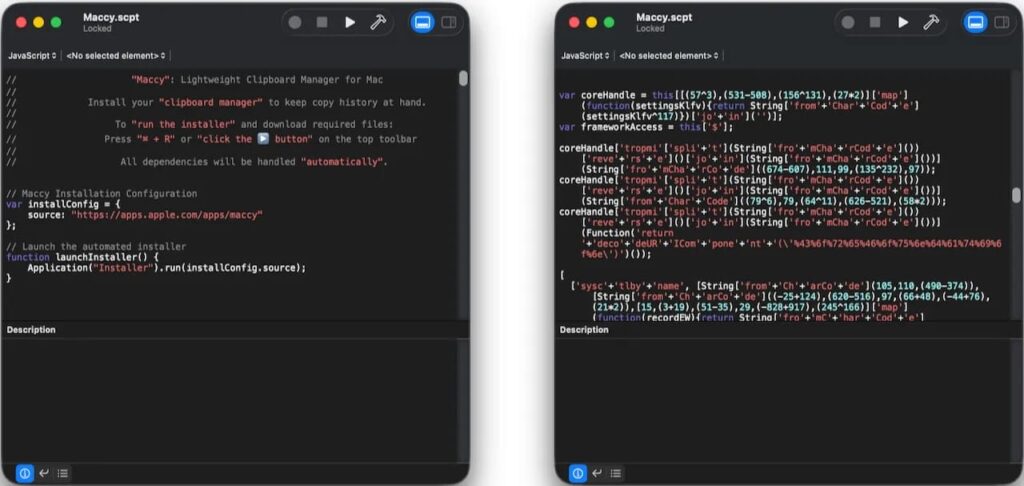
Before downloading the malware, the dropper fingerprints the system using its CPU architecture, locale, keyboard layout, and time zone to decrypt an embedded configuration. The analyzed samples only execute on Apple Silicon Macs and silently exit on Intel systems or on devices configured for several former Soviet countries, including Russia, Belarus, and Kazakhstan. Jamf also observed anti-debugging checks and System Integrity Protection (SIP) awareness.
The second stage is a stripped ARM64 Mach-O binary written in Rust. It steals browser credentials, cookies, cryptocurrency wallet data, clipboard contents, and keychain information, and dynamically loads Security.framework at runtime to reduce static analysis indicators.
Verifying stolen data
PamStealer displays a convincing macOS authorization dialog requesting the user's password, then validates the entered credentials locally using the PAM API (pam_start, pam_authenticate, and pam_end). If the password is incorrect, the prompt reappears until valid credentials are entered. Unlike many macOS stealers, it does not rely on spawning utilities such as dscl, security, or osascript to verify passwords.
To remain on infected systems, the malware installs itself as a fake Finder.app under the user's Application Support directory and registers itself as a login item using both the modern SMAppService API and the legacy LSSharedFileList interface. After establishing persistence, it displays a fake Gatekeeper warning claiming that the downloaded application is damaged, prompting victims to discard the original installer while the malware continues to run.
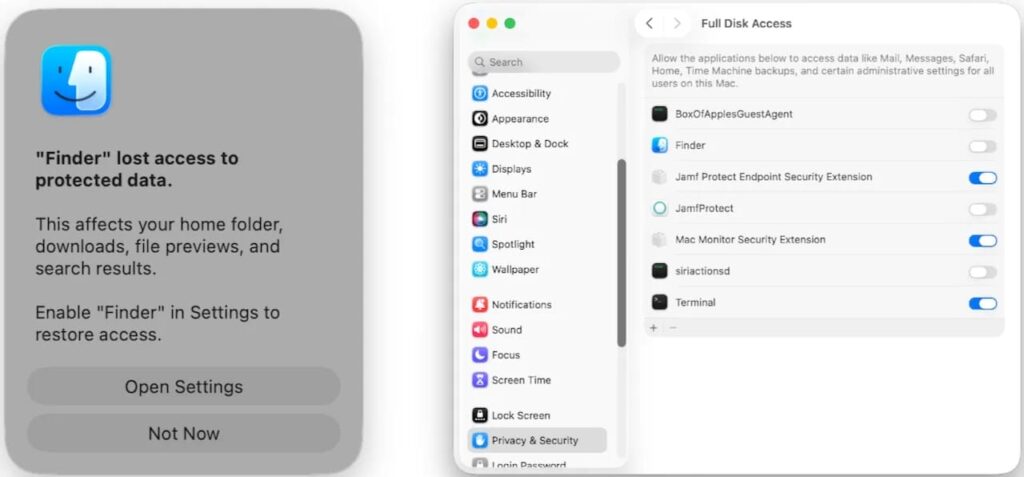
PamStealer also attempts to trick victims into granting Full Disk Access through a counterfeit system prompt. If approved, the malware can access protected application data, including Mail, Messages, and Time Machine backups.
During execution, the malware repeatedly launches pbpaste to monitor clipboard contents and exfiltrates stolen data to avenger-sync[.]live using ChaCha20-Poly1305 encryption. Jamf also found that it caches command-and-control traffic under ~/Library/Caches/com.apple.finder.core/, providing investigators with a useful forensic artifact despite the encrypted communications.
Researchers also recovered a decrypted configuration containing public Ethereum JSON-RPC endpoints, including ethereum-rpc.publicnode[.]com, and confirmed the malware connected to at least one of them during testing.
Jamf recommends monitoring for Script Editor making outbound network connections, creating application bundles under Application Support, or spawning codesign. Defenders should also watch for processes masquerading as Finder while repeatedly executing pbpaste, unexpected login item registrations, and unsolicited requests for Full Disk Access.



Leave a Reply