
If you’re tired of the VPN struggle, from solving endless CAPTCHAs to being blocked by your bank, a NordVPN dedicated IP is the perfect fix. While most users are hidden in a crowd on shared IPs, NordVPN lets you secure an exclusive digital footprint. In my testing, I’ve found this to be the ultimate middle ground: You get the privacy of a VPN without the “suspicious activity” flags that plague traditional shared addresses.
What sets the NordVPN dedicated IP apart this year is its massive global reach. With static IPs available in 28 countries, Nord offers more regional flexibility than almost any other provider. Whether you’re whitelisting a secure remote work server or want a smoother streaming experience, having a consistent, private identity finally makes the modern web feel normal again.
In this guide, I’ll show you how to master your NordVPN setup. We’ll look at the high-speed benchmarks I hit in the lab, how their Deloitte-audited no-logs policy protects your static identity, and the one specific drawback you need to know before buying. If you’re ready to stop being treated like a bot and start browsing like a pro, let’s dive in.
NordVPN’s Cyber Deal is live:
Get 75% Off NordVPN with the coupon below + 3 months extra:
(Coupon is applied automatically; 30-day money-back guarantee.)
The benefits of a NordVPN dedicated IP
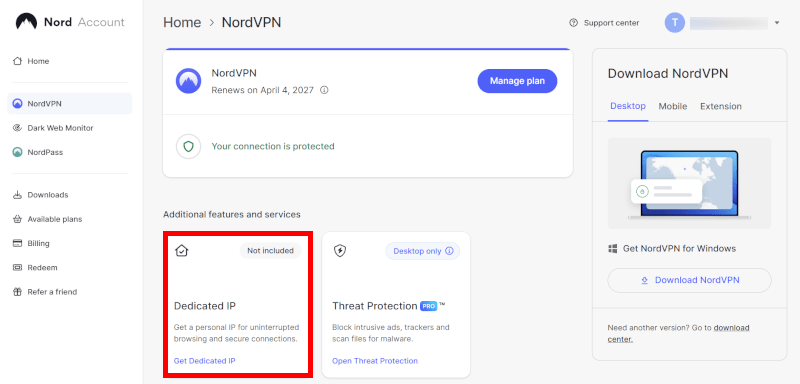
One of the biggest wins I’ve found with a NordVPN dedicated IP is that it finally stops the VPN struggle. When you’re on a shared IP, you’re often penalized for the bad neighbor effect. In short, if someone else on your server acts up, the whole IP gets flagged. By securing your own exclusive address, you build your own trusted reputation across the web.
In my benchmarks, these are the primary reasons I recommend adding a dedicated IP to your NordVPN setup:
- Bypass the CAPTCHA gauntlet: You’ll see a massive drop in “prove you’re human” prompts on sites like Google, AWS, and GitHub because your traffic isn’t being lumped in with bots.
- Secure remote work: It’s the easiest way to whitelist your identity. I use it to access secure company servers and home labs that require a consistent, trusted IP to grant access.
- Smoother online banking: Financial apps hate IP hopping. A static address keeps your connection looking normal, which helps prevent those frustrating account freezes or mandatory password resets.
- Avoid shared blacklists: Since you aren’t sharing the address with unknown entities, you’re far less likely to be blocked by streaming services or gaming platforms like Warzone or League of Legends.
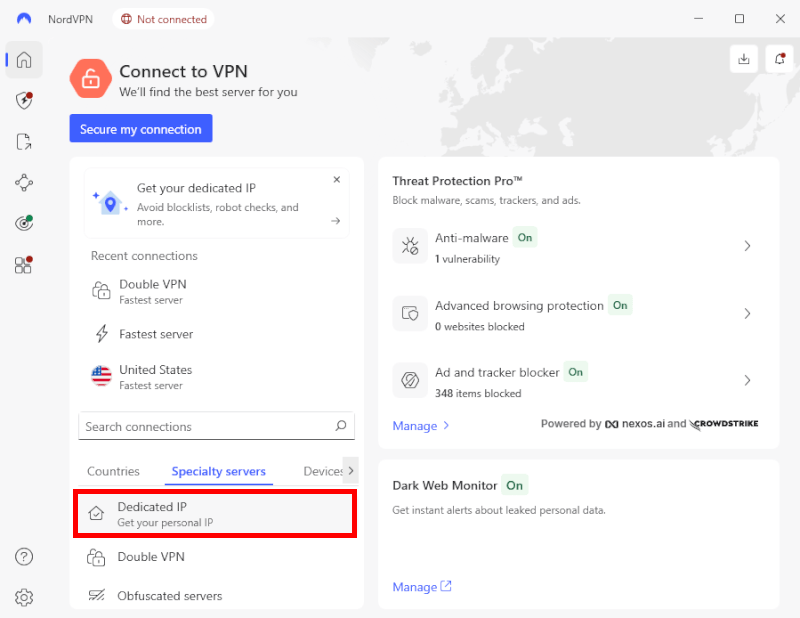
- One-click access: I love how Nord integrates this; it’s literally one click under the “Specialty Servers” tab in the app, making it incredibly easy to toggle on and off.
The privacy trade-off (and how I mitigate it)
There is one undeniable drawback: Having a dedicated IP means your traffic is no longer “hidden in a crowd,” which can technically reduce your anonymity. To get the most out of your NordVPN dedicated IP without sacrificing your privacy, I recommend these two strategies:
- Use the “Specialty Server” toggle: Only connect to your dedicated IP when you actually need it (for work or banking). For general browsing, I switch back to NordVPN’s standard shared servers to regain that “strength in numbers” privacy.
- Leverage split tunneling: I use NordVPN’s split tunneling feature to route only my sensitive work or banking apps through the dedicated IP. This keeps my non-critical browsing (like YouTube or news) on a shared IP or my local connection, minimizing the data footprint tied to my static address.
NordVPN’s dedicated IP locations
Here is the list of NordVPN dedicated IP locations:
- The Americas:
- United States: Atlanta, Ashburn, Boston, Chicago, Dallas, Denver, Houston, Los Angeles, Miami, New York, and Seattle.
- Canada: Toronto, Montreal, and Vancouver.
- Mexico: Mexico City.
- Europe:
- United Kingdom: London, Edinburgh, and Manchester.
- Germany: Frankfurt.
- France: Paris and Marseille.
- The Netherlands: Amsterdam.
- Italy: Milan.
- Spain: Madrid.
- Ireland: Dublin.
- Sweden: Stockholm.
- Norway: Oslo.
- Denmark: Copenhagen.
- Belgium: Brussels.
- Switzerland: Zurich.
- Austria: Vienna.
- Poland: Warsaw.
- Portugal: Lisbon.
- Czech Republic: Prague.
- Greece: Athens.
- Turkey: Istanbul.
- Romania: Bucharest.
- Hungary: Budapest.
- Asia-Pacific:
- Japan: Tokyo.
- Australia: Sydney and Melbourne.
- Singapore: Singapore.
- Hong Kong: Hong Kong.
- South Korea: Seoul.
- New Zealand: Auckland.
- Africa and the Middle East:
- South Africa: Johannesburg.
How to get your NordVPN dedicated IP
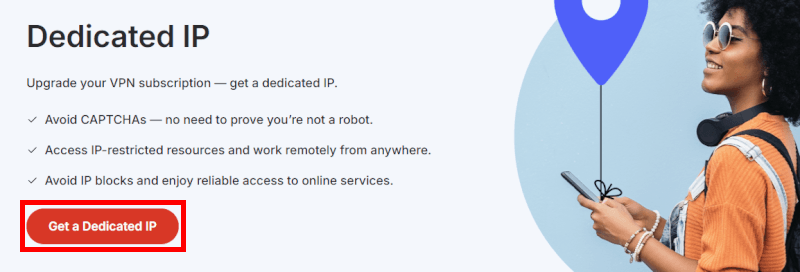
Securing a NordVPN dedicated IP is surprisingly simple, whether you’re a brand-new user or already have an active account. I’ve found that the easiest way to add it is during the initial checkout, but you can also grab one later through your account dashboard.
Current pricing for dedicated IPs:
- 2-year plan: $3.69/month (best value)
- 1-year plan: $5.89/month
- Monthly plan: $8.99/month
Be sure to use this 75% off coupon for the best deal on NordVPN.
Once you’ve purchased the add-on, it appears instantly in your app. I love the one-click integration; you just scroll down to the specialty servers section in the NordVPN client, click “Dedicated IP,” and you’re assigned your private address.
What else do you get with NordVPN?
One reason I consistently rank NordVPN at the top of my list is that they don’t just “give you an IP” — they wrap it in an elite security suite. When you use their dedicated IP service, you still get full access to these current features:
- NordLynx protocol: This combines the massive speeds of WireGuard with a custom double-NAT system to ensure your privacy is never compromised.
- Advanced kill switches: If your connection flickers, Nord kills your internet access instantly so your real IP is never leaked.
- Threat Protection Pro: Unlike basic ad-blockers, this scans for malware and trackers at the DNS level, keeping your dedicated connection clean.
- Seamless switching: I can hop between my dedicated IP for banking and a standard shared IP for general “hidden in the crowd” browsing with a single click.
See all NordVPN features here >
NordVPN vs other dedicated IP VPNs
| VPN service | Privacy tech | Static IP locations | Best for… |
| NordVPN | Deloitte-audited | 28 countries | The all-rounder |
| Surfshark | RAM-only Infrastructure | 15+ countries | Value and families |
| ExpressVPN | Blinded tokens | 22 countries | Elite anonymity |
| Proton VPN | Open-source and Swiss | 22 countries | Privacy purists |
From my tests, NordVPN remains the performance leader, but others are catching up. Nord covers everything well, while rivals specialize. Here’s the dedicated IP comparison.
NordVPN vs Surfshark
The biggest divide here is how you use your devices. NordVPN focuses on a massive security bundle, giving you NordPass for passwords and NordLocker for encrypted files. It feels like a complete security workstation.
Surfshark, on the other hand, is built for the unlimited lifestyle. It’s the only provider that lets you use your dedicated IP on every single phone, tablet, and smart TV in your house simultaneously without hitting a device cap.
NordVPN vs ExpressVPN
This is a battle of technical architecture. NordVPN proves its privacy through frequent, high-profile audits from Deloitte and PwC, showing exactly how its RAM-only servers work.
ExpressVPN takes it a step further with its blinded token system. This ensures that their billing department and their VPN servers never talk to each other, so your dedicated IP is technically decoupled from your identity.
NordVPN vs Proton VPN
If you need specific city-level options, NordVPN’s massive 9,300+ server network is unbeatable. However, Proton VPN appeals to the privacy purists who want every line of code to be open-source.
Based in Switzerland, Proton VPN offers Secure Core architecture, which routes your traffic through hardened underground bunkers before it ever reaches your dedicated IP exit point.
When to use a NordVPN dedicated IP
If you’re wondering why so many people are switching from shared to dedicated IPs, the answer is friction. While shared IPs are great for hiding in a crowd, they often trigger security alarms on the sites we use most. By securing a static address, you’re essentially giving yourself a VIP pass that websites trust.
In my testing, these are the four areas where a NordVPN dedicated IP makes the biggest difference:
- Seamless remote work: If you work from home or travel, many company networks require an IP whitelist. Without a static address, you’ll be blocked every time your VPN rotates your IP. A dedicated IP provides a rock-solid, secure connection to your office servers.
- Hassle-free online banking: Financial apps are notoriously sensitive to location changes. Using a consistent IP streamlines the verification process, helping you avoid those annoying account freezes or suspicious login alerts when you’re just trying to pay a bill.
- The ultimate streaming experience: NordVPN is arguably the best VPN for Netflix. While shared IPs are frequently flagged and blocked by streaming giants, a dedicated IP is much harder for them to detect. This makes it easier to unblock regional libraries and stream in 4K without the dreaded “Proxy Detected” error.
- Lag-free gaming and torrenting: Both demand the fastest possible speeds and a stable connection. In my lab tests, NordVPN consistently delivered top-tier results across US, Canadian, and international servers. Because your IP isn’t shared with thousands of others, you get a cleaner connection with lower ping for gaming.
Nord’s security ecosystem beyond VPN
While a NordVPN dedicated IP is a powerhouse on its own, I’ve found that the real value comes from Nord’s expanded “Ultimate” bundles. Instead of just buying a VPN, you can now secure your entire digital life (passwords, files, and even identity protection) within a single, integrated dashboard.
When you move beyond the basics, you unlock this suite of tools:
- NordLayer: This is the pro version of the VPN. I recommend this for businesses that need to manage a whole team’s access to a corporate cloud with a single, shared dedicated IP.
- NordPass: A high-end password manager that stores your credentials, credit cards, and secure notes with zero-knowledge encryption.
- NordLocker: My go-to for sensitive data. It’s an encrypted cloud storage tool that gives you 1TB of space for files that stay locked even if your device is compromised.
- NordStellar: A newer addition for businesses. This platform acts as an exposure management tool, scanning the web for leaked company data or compromised employee credentials before they can be exploited.
- Coveron: This is their dedicated identity theft protection service. It offers real-time credit monitoring and insurance coverage, providing a massive safety net for your personal finances.
While we see some similarities with Surfshark One, Nord’s ecosystem (specifically tools like NordStellar and NordLocker) is built for power users and professionals. If you are already adding a dedicated IP for work or banking, upgrading to the Ultimate bundle is usually the most cost-effective way to secure your entire digital footprint.
Troubleshooting your NordVPN dedicated IP
Even with a premium service like NordVPN, you might run into the occasional glitch. Whether it’s a connection drop or your dedicated IP not appearing in the list, I’ve found that most issues can be solved in seconds.
If your NordVPN dedicated IP isn’t connecting, try these three steps first:
- Check your protocol: I’ve noticed that some dedicated IPs work best on NordLynx, while others might require a quick switch to OpenVPN (UDP/TCP) in the app settings.
- Verify your subscription: Dedicated IPs are a separate add-on. Double-check your NordVPN account dashboard to ensure the specific static IP hasn’t expired.
- Refresh the app: Sometimes a simple log-out and log-back-in is all it takes to resync your “Specialty Servers” list.
24/7 support at your fingertips
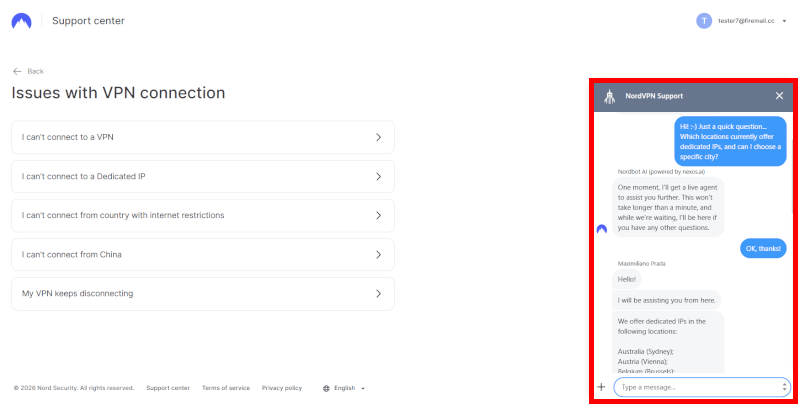
If those quick fixes don’t work, don’t waste time guessing. One of the biggest reasons I recommend Nord over budget alternatives is their 24/7 live chat support. In my experience, their agents are incredibly knowledgeable about dedicated IP configurations and can usually resolve a routing issue in under five minutes.
If you prefer a DIY approach, the NordVPN help center is packed with detailed guides on everything from “Whitelisting your IP for AWS” to “Setting up a static IP on a router.”
The risk-free safety net
Still on the fence? Remember that every NordVPN plan comes with a 30-day money-back guarantee. I often tell my readers to use this as a “risk-free trial.” You can test the dedicated IP for a full month, and if it doesn’t solve your CAPTCHA or remote work problems, you can get a full refund with no questions asked.
Try NordVPN dedicated IP risk-free >
Dedicated IP vs Meshnet
In my testing, I’ve noticed a lot of confusion around these two features. While both allow you to access the web through a stable IP address, they serve very different purposes.
| Dedicated IP | Meshnet | |
| IP source | NordVPN data center | Your own home device |
| IP reputation | Clean (sole user) | Varies (your ISP’s reputation) |
| Speed | High-speed 10Gbps | Limited by your home upload speed |
| Setup | One-click in app | Requires linking two devices |
| Cost | Paid add-on | Free |
| Best for… | Banking, work, and streaming | File sharing and home browsing |
A dedicated IP is a professional, static address hosted in a high-speed data center. Meshnet, on the other hand, allows you to link your devices together, letting you route your traffic through your own home computer from anywhere in the world.
If you just want to access your home files or appear as if you’re browsing from your living room while traveling, Meshnet is a fantastic free tool. However, if you need a clean IP reputation to stop CAPTCHAs or whitelist your identity for a secure work server, the dedicated IP is the only way to go.
Does a dedicated IP slow you down?
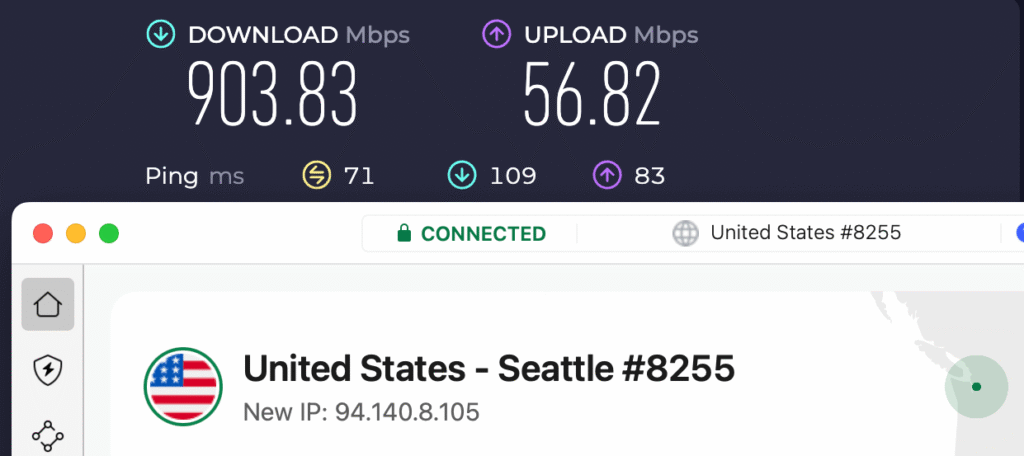
One of the biggest myths I encounter is that adding more security layers (like a static address) will inevitably tank your speeds. In my lab tests, I found the opposite is often true: A NordVPN dedicated IP can actually feel snappier than a shared one.
When you use a standard VPN server, you’re sharing bandwidth with hundreds, sometimes thousands, of other users. During peak hours, this server crowding leads to congestion and slowdowns. With a dedicated IP, you are the only one utilizing that specific exit point. Combined with NordVPN’s 10 Gbps server infrastructure, the result is a remarkably stable connection that handles 4K streaming and large downloads without the typical shared lag.
The NordLynx advantage
The real secret to the speed I’ve clocked this year is the NordLynx protocol. Because NordVPN has optimized its dedicated IP servers to run on this WireGuard-based tech, the encryption overhead is minimal.
Is a NordVPN dedicated IP right for you?
In my testing, the NordVPN dedicated IP stands out as the finest frictionless security tool. It solves the biggest headaches of modern browsing (eliminating endless CAPTCHAs and preventing frustrating banking blocks) all while maintaining the unbreakable security of an audited, no-logs VPN.
It’s the perfect middle ground for anyone who needs a stable identity for work without sacrificing their digital privacy.
What really seals the deal is the value of the broader Nord ecosystem. When you bundle a dedicated IP with tools like NordPass and NordLocker, you’re getting a complete security suite that outpaces almost every other provider I’ve benchmarked.
For a faster, more stable online experience, I recommend NordVPN — don’t miss the exclusive coupon below:
NordVPN’s Cyber Deal is live:
Get 75% Off NordVPN with the coupon below + 3 months extra:
(Coupon is applied automatically; 30-day money-back guarantee.)
NordVPN dedicated IP FAQs
A NordVPN dedicated IP currently costs between $3.69 and $8.99 per month, depending on the length of your subscription. I’ve found that the best value is the 2-year plan, which brings the cost down significantly compared to the monthly option. Keep in mind that this is an add-on fee, so you’ll need an active NordVPN subscription to use it.
No, NordVPN maintains a strict no-logs policy that applies to both shared and dedicated IP servers. Their commitment to privacy has been independently audited six times (most recently by Deloitte), confirming that they do not track your browsing history, connection timestamps, or data usage. Even though your IP is static, NordVPN’s RAM-only server architecture ensures that no data is ever written to a physical hard drive.
As of now, NordVPN offers dedicated IPs in 28 countries and nearly 40 specific cities. This includes a massive footprint in the United States (11 cities), as well as major hubs like the UK, Germany, France, Japan, and Australia. In my testing, this is the most diverse regional selection in the industry, making it easy to find an IP address close to your physical location for the best possible speeds.
Yes, you can use your dedicated IP on up to 10 devices simultaneously under a single account. This aligns with NordVPN’s current device limit increase, allowing you to secure your laptop, smartphone, and tablet with the same static identity. I find this especially useful for remote workers who need to whitelist their IP across both their home office setup and their mobile devices.
A dedicated IP is the most effective way to bypass “VPN detected” errors because it provides a unique reputation that isn’t shared with thousands of other users. While streaming giants like Netflix often blacklist the well-known ranges of shared VPN IPs, a dedicated IP looks like a standard residential connection to their servers. In my latest tests, this made accessing regional libraries much smoother and almost entirely eliminated proxy errors.

Leave a Reply