
Whether you’re an expat missing home or just a fan of quality British drama, BBC iPlayer is the ultimate free goldmine. The only headache is the BBC’s strict UK-only digital border.
I’ve tested dozens of workarounds, and NordVPN is still the clear winner. It doesn’t just bypass the blocks; it’s fast enough to handle 4K streaming without the dreaded buffering wheel.
This guide gets you from “access denied” to “now streaming” in just a few minutes. I’ll show you how to pick the best servers, fix common errors, and lock in a 75% discount to keep your entire household secure.
| Based in | Panama (a privacy haven) |
| Security | AES-256 encryption, NordLynx (WireGuard), and RAM-only servers |
| Bonus tools | Threat Protection Pro, Meshnet, and Dark Web Monitor |
| Price range | $3.49 – $29.99/month |
| Refund policy | 30-day money-back guarantee |
| Best for… | Buffer-free 4K playback, ad-free browsing, and instant connection |
NordVPN’s Cyber Deal is live:
Get 75% Off NordVPN with the coupon below + 3 months extra:
(Coupon is applied automatically; 30-day money-back guarantee.)
How a VPN “tricks” BBC iPlayer
When you try to access BBC iPlayer, the first thing the site does is check your IP address to estimate your location. If your home postal code isn’t from the UK, you’re blocked instantly, even if you’re a UK citizen traveling abroad.
This is where NordVPN comes in. When you hit that “Connect” button, the software wraps your connection in a secure tunnel and routes it through a server physically located in the UK. To the BBC, it looks like you’re sitting on a couch in London rather than your actual location.
It sounds simple, but the BBC is constantly blacklisting known VPN IP addresses. This is why free VPNs almost never work; they don’t have the resources to keep refreshing their IPs. NordVPN stays ahead of the game by using thousands of different UK addresses and obfuscated servers that make your VPN traffic look like regular internet browsing.
It’s the difference between a cheap disguise and a professional-grade fake ID. If you want uninterrupted 4K streaming, you need that higher level of stealth that only a premium tool provides.
Setting up NordVPN for BBC iPlayer
Setting up a VPN for streaming is a straightforward process. Following these five steps will ensure the setup is streamlined for British TV content.
1. Select a subscription plan
NordVPN now offers different pricing tiers on its website. While any of them will get you into BBC iPlayer, they offer different levels of digital protection.
Here is a quick look at NordVPN’s three-tier setup:
- Basic: The essential choice for streamers. It gives you full, high-speed VPN access and “Lite” Threat Protection to block basic ads.
- Complete: Everything in Basic, plus 1 TB of encrypted cloud storage for your sensitive files.
- Prime: The ultimate security suite. It includes Coveron, which provides up to $1 million in identity theft recovery, credit monitoring, and cyber extortion insurance.
2. Download and install
Once you’ve picked a plan, download the app.
- For PC/Mac: Get the installer directly from the NordVPN Download Center.
- For Mobile: Grab the app from the Google Play Store or Apple App Store.
3. Personalize your settings
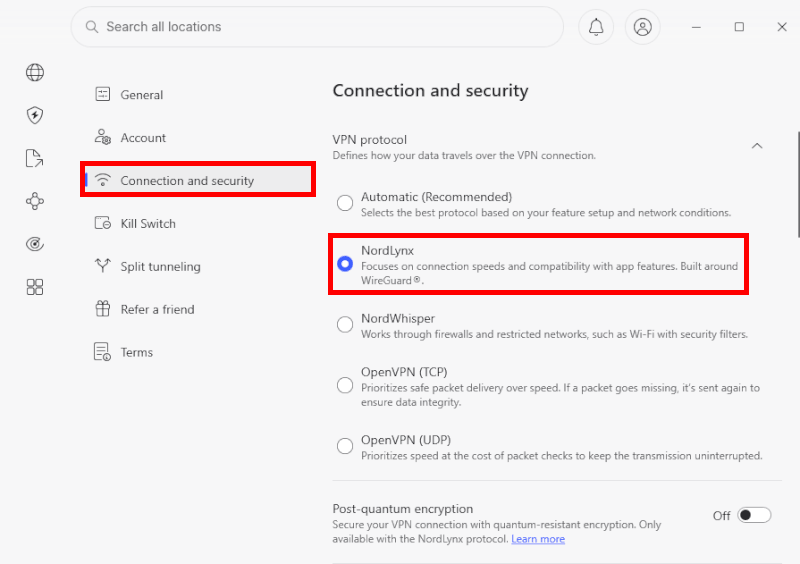
After logging in, I suggest one quick tweak: Go to the settings and make sure NordLynx is selected as your protocol. It’s built for speed and will give you the smoothest 4K playback on iPlayer.
4. Connect to the UK
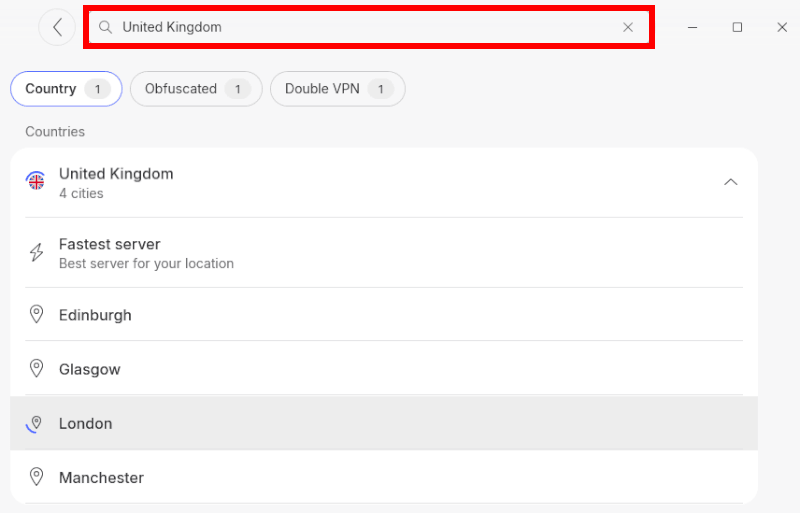
Search for “United Kingdom” in the server list. NordVPN has over 440 servers across cities like London, Manchester, and Glasgow.
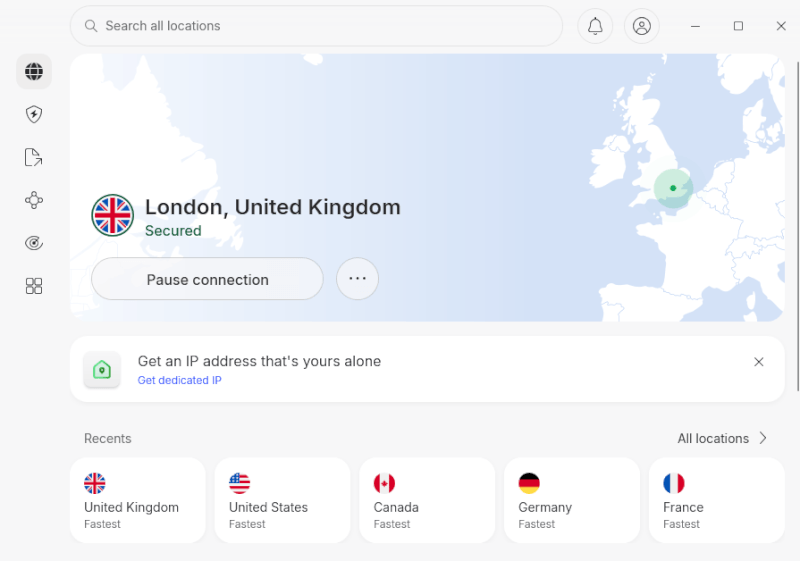
If one server feels slow, just click the “United Kingdom” pin again. The app’s AI-assisted selection will automatically find the fastest available server for your current network conditions.
Once the “Power” button turns green, you’re officially a virtual Londoner. Head over to the BBC iPlayer site and enjoy!
How to create your BBC iPlayer account
Now that your VPN is active and you’re virtually in the UK, the final step is setting up your profile. For the smoothest experience, make sure you stay connected to a UK NordVPN server throughout this entire process.
1. The sign-up process
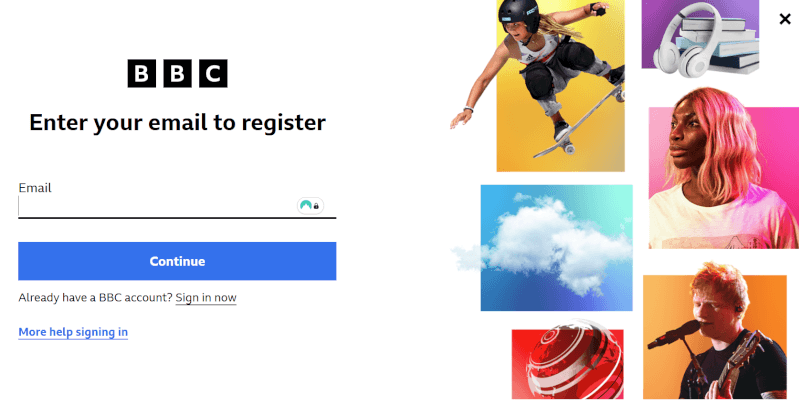
Head to the BBC iPlayer website and click “Sign In,” then select “Register Now.” You’ll need to provide some standard details like your date of birth and a valid email address.
2. Dealing with the TV license question
A box will eventually pop up asking if you have a valid UK TV license. While this might feel like a dealbreaker, the BBC currently uses an honor system for this prompt. You simply click “Yes, I have a TV license,” and you’re through. No one is going to come knocking on your door, and the system doesn’t cross-reference your name against a database in real-time.
3. Choosing the right postcode
The BBC uses your postcode to decide which local news and programming (like BBC London vs BBC Scotland) you see.
You can use any valid UK postcode. During my testing, I found that using a London-based code like W1A 1AA (the BBC’s own headquarters) or even SW1A 1AA (Buckingham Palace) works perfectly and unlocks the full national library instantly.
4. Verification
Yes, it’s a bit of a drag, but you’ll need to check your inbox and click the verification link. Once that’s done, you’re officially in.
How to confirm your VPN is working
Before you head to the BBC iPlayer homepage, you should double-check that your real location isn’t leaking. Even if the NordVPN app says it’s connected, sometimes your browser or your computer’s settings can get a bit stubborn.
The “Manchester test”
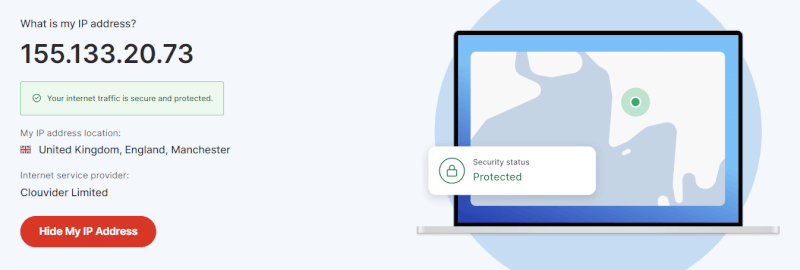
If you’ve clicked on a server in Manchester, your public IP address should reflect that exact city. It’s the easiest way to know you’re safe to stream.
- The pro way: Use NordVPN’s own free IP lookup tool. It’ll show you a map of where the internet thinks you are. If you see a UK flag and a British city, you’re golden. (We have more VPN testing resources in our VPN test guide.)
The manual way: On Windows, you can peek at your Network & Internet settings, or on a Mac, check the Network tab in System Settings.
What if it shows my real home?
Don’t panic; it happens. Usually, it just means your device hasn’t fully switched over yet. A quick app restart or toggling your Wi-Fi off and back on while the VPN is active usually snaps everything into place. Once that IP tool shows the UK, you’re ready to grab the popcorn.
The speed test
Whenever you use a VPN, you’re essentially adding a “detour” to your internet connection. Usually, this means a drop in speed. However, during my latest testing with NordLynx, the impact was so small I barely noticed it.
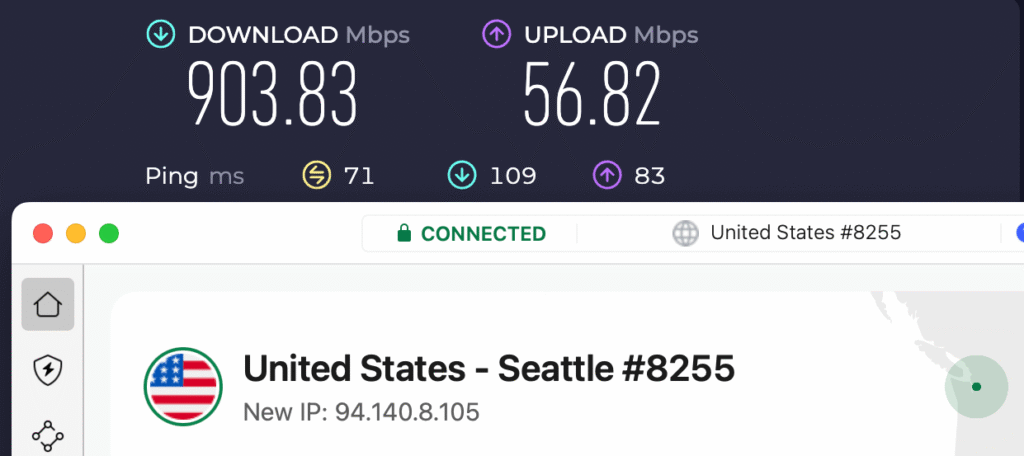
I ran a speed test while connected to a United States server, and the results were impressive:
- Download speed: 903.83 Mbps
- Upload speed: 56.82 Mbps
- Ping: 71 ms
What do these results mean for you?
To put that 903 Mbps into perspective, here is how it translates to your daily streaming and browsing:
- 4K UHD streaming: You only need about 25 Mbps for a stable 4K stream. With these speeds, you could technically stream over 30 different 4K movies at the exact same time without a single second of buffering.
- Large downloads: At 900+ Mbps, you can download a full HD movie in seconds or a massive 100GB game update in about 15 minutes.
Pro tips for a buffer-free experience
Even with a top-tier VPN, your local setup can sometimes cause stutters. If you’re seeing that annoying buffering wheel, these experience-tested tweaks will help you get back to 4K quality in seconds. We discuss this more in our guide on the best VPNs for BBC iPlayer here.
1. Optimize your hardware
Your streaming quality is only as good as the device you’re using.
- Clear the clutter: Close any background apps you aren’t using. Apps like Chrome (with 50 tabs open), game launchers, or cloud sync tools eat up system resources and bandwidth.
- Wired is king: If possible, ditch the Wi-Fi and use an Ethernet cable. If you must stay on Wi-Fi, ensure you are connected to the 5GHz or 6GHz band rather than the slower 2.4GHz.
- Distance matters: Every wall between you and your router drops your speed. If a cable isn’t an option, a Mesh Wi-Fi system is a much better solution than a cheap range extender.
2. Clear your browser cache
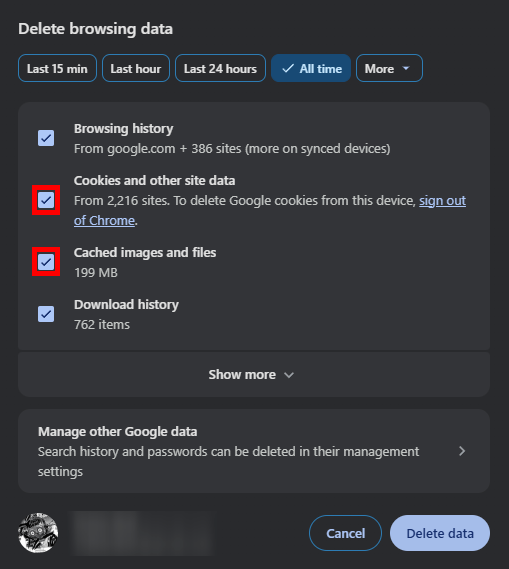
This is the single most common fix for “proxy detected” errors. BBC iPlayer often stores small files (cookies) that “remember” your real location.
- Go to your browser Settings.
- Find the Privacy/History section.
- Select “Clear Browsing Data” and specifically check Cookies and Cached Files.
3. Force NordVPN’s private DNS
If you’re still hitting walls, manually setting your device to use NordVPN’s DNS servers can work wonders. This ensures every request your computer makes stays within the encrypted tunnel.
On Windows:
- Open Control Panel > Network and Internet > Network and Sharing Center.
- Click Change adapter settings on the left.
- Right-click your connection and hit Properties.
- Select Internet Protocol Version 4 (TCP/IPv4) and click Properties.
- Select “Use the following DNS server addresses” and enter:
- Preferred: 103.86.96.100
- Alternate: 103.86.99.100
- Hit OK and restart your browser.
4. Manage your home traffic
If someone else in the house is downloading a massive game update or 4K gaming, your BBC stream will suffer. NordVPN helps prevent ISP throttling, but it can’t create bandwidth out of thin air. For a big premiere, ask the household to pause any heavy downloads.
Troubleshooting
Even with a powerhouse like NordVPN, the cat-and-mouse game with the BBC’s filters can occasionally lead to a snag. If you see a “content not available” message or a proxy error, don’t panic; one of these four steps almost always solves it in under a minute.
- The server shuffle: If the BBC has blacklisted the specific IP address you’re using, click the “United Kingdom” pin on the map again. NordVPN will automatically assign you a fresh, different IP. I’ve found that switching from a London-based server to a Manchester or Glasgow one often clears the block instantly.
- Wipe your digital footprint: This is the most common fix. Your browser stores cookies that might still contain data from your real-world location. Go to your settings and clear your cache and cookies, or simply try opening a new Incognito window. This forces the BBC to look at your “British” VPN IP with a fresh set of eyes.
- Check for DNS leaks: Sometimes your browser tries to be “helpful” by sending requests through your local ISP instead of the VPN. In your NordVPN settings, ensure the Kill Switch is active and that you are using the NordLynx protocol. This keeps your data leak-proof so the BBC never sees your true origin.
- Try obfuscated servers: If you are on a restricted network (like a hotel, office, or school), standard VPN traffic might be blocked. In the NordVPN app, go to Specialty Servers and select Obfuscated. This hides the fact that you’re even using a VPN, making it much harder for the BBC to detect you.
If you’ve tried the above and still can’t get in, hop on NordVPN’s live chat. Their support team actually tracks which specific servers are currently optimized for BBC iPlayer. Tell them you’re having trouble with the iPlayer, and they’ll usually give you a specific server number to connect to manually.
NordVPN vs the competition
With so many VPNs claiming to unblock everything, it’s hard to know which ones actually deliver. In my testing, while several big names can get into the BBC, NordVPN consistently offers the best balance of speed and stealth technology.
| Surfshark | ExpressVPN | Proton VPN | |
| Device limit | Unlimited | 10–14 devices | 10 devices |
| Supported protocols | WireGuard, IKEv2 | Lightway, WireGuard, OpenVPN | WireGuard, OpenVPN |
| UK cities | 4 (London, Glasgow+) | 5 (London, Midlands+) | 5 (London, Cardiff+) |
| Streaming tech | NoBorders Mode | MediaStreamer | VPN Accelerator |
| Best for… | Best value for families | Simplicity | Advanced privacy and speed |
Why NordVPN still leads?
- SmartPlay vs the rest: While ExpressVPN uses MediaStreamer (which you have to set up manually), NordVPN’s SmartPlay is baked directly into the app. It automatically detects when you’re on the BBC iPlayer site and tweaks your DNS settings in the background to ensure you don’t get blocked.
- The protocol battle: NordVPN’s NordLynx is consistently faster than Surfshark’s standard WireGuard. In my testing, this extra “zip” is what prevents that annoying mid-show buffering during live events like Match of the Day.
- UK server depth: While Proton VPN has more “cities” on paper, NordVPN focuses on high-bandwidth server density in London and Manchester. This means even when millions of people are streaming at once, you’re less likely to get a “congested” connection.
If you want the absolute fastest, most automated experience for BBC iPlayer, NordVPN is the winner. If you need to connect 50 devices at once on a budget, Surfshark is your best alternative. Check out our Surfshark vs NordVPN comparison if you want to compare these two VPN powerhouses.
Is it legal to use NordVPN for BBC iPlayer?
One of the most common questions I get is: “Will I get in trouble for this?” It’s a fair concern when you’re bypassing digital borders, but the answer is actually quite straightforward.
In almost every country (including the UK, US, and most of Europe), using a VPN is a perfectly legal way to protect your privacy. No law says you can’t use encryption or change your virtual location to browse the web.
While you aren’t breaking any laws, you are technically bending the BBC’s Terms of Use. The BBC wants to protect its international broadcasting deals, so it tries to block VPNs to keep content within the UK.
- The consequence: If the BBC catches you, they won’t call the police. The most they will do is block your current IP address or, in rare cases, suspend your account.
- The fix: If that happens, you switch to a new NordVPN server, clear your cookies, and you’re back in business.
According to UK law, residents are required to have a valid TV license to watch any BBC content.
- For UK residents: Using a VPN to hide your location specifically to avoid paying for a license you should have is legally risky.
- For everyone else: If you are outside the UK, the license fee system doesn’t technically apply to you in the same way, as you aren’t a resident. Most viewers simply acknowledge the “Do you have a license?” pop-up on the site and move on.
Using NordVPN is a safe, ethical way to reclaim your privacy and access the shows you love. As long as you aren’t using the VPN for actual illegal activities (like hacking or distribution), you can kick back and enjoy your marathon worry-free.
Is NordVPN the ultimate iPlayer key?
After testing countless workarounds, my verdict is clear: NordVPN is the most reliable way to turn the BBC iPlayer into a global library. Its combination of NordLynx speed and SmartPlay stealth means you’ll enjoy 4K streaming without the frustration of proxy errors or constant buffering.
Whether you’re catching up on British classics or securing your entire home network, NordVPN offers a set-and-stay simplicity that’s hard to beat. Complete, with the current discount, it’s easily the best value for a premium streamer.
Ready to start? Grab the best deal here:
NordVPN’s Cyber Deal is live:
Get 75% Off NordVPN with the coupon below + 3 months extra:
(Coupon is applied automatically; 30-day money-back guarantee.)
Beyond the BBC, you’re also locking in a massive security upgrade. With a strict no-logs policy, advanced encryption, and support for up to 10 devices simultaneously, you can rest easy knowing your digital life is private, no matter where in the world you’re browsing from.
NordVPN with BBC iPlayer FAQs
Does NordVPN work with BBC iPlayer?
Yes, NordVPN is one of the most effective services for unblocking BBC iPlayer because of its specialized SmartPlay technology. While the BBC is aggressive about blocking VPNs, NordVPN stays ahead by frequently refreshing its UK IP addresses and using obfuscated servers that make VPN traffic look like a standard home connection.
Why is NordVPN not working with BBC iPlayer?
If you encounter a proxy error, it is likely because BBC iPlayer has “cached” your real location in your browser’s cookies. To fix this, clear your browser’s cache and cookies, or open a fresh Incognito window while connected to a UK server; this forces the site to see your new British IP address as a first-time visitor.
Which NordVPN server is best for BBC iPlayer?
I’ve found that the “UK – Manchester” and “UK – London” server locations consistently offer the fastest speeds and the lowest chance of detection. If one feels slow during a major live broadcast, I recommend simply clicking the “United Kingdom” pin again to let the app’s AI-assisted selection find the least congested server for you.
Can I watch BBC iPlayer on my phone using NordVPN?
Yes, you can easily stream on your phone by installing the NordVPN app from the Google Play or Apple App Store and connecting to a UK server. Once the “Power” button in the app turns green, just open your BBC iPlayer app, and it will treat your mobile data or Wi-Fi as a local British connection.
How do I use NordVPN on devices that don’t support VPN apps?
To watch on a PlayStation, Xbox, or older Smart TV, you should use NordVPN’s SmartDNS (SmartPlay) feature. By registering your IP address on the NordVPN website and updating the DNS settings on your device, you can bypass geo-blocks without needing a dedicated app, which often results in even faster 4K streaming speeds.

Leave a Reply