
Protecting your online privacy has become as routine as locking your front door, and IPVanish for Android is designed with that reality in mind. With ongoing updates, it delivers a fast, streamlined one-tap experience built around privacy.
Recent updates have introduced RAM-only servers to their global network, ensuring that no data is ever written to a hard drive and is wiped completely with every reboot. Backed by a verified no-logs audit, IPVanish continues to be a top pick for simple privacy with strong performance.
Whether you need better streaming access or safer public Wi-Fi use, this guide highlights what sets IPVanish apart. I’ll walk you through the setup and show you the features I found most useful.
IPVanish Coupon:
Get 83% off IPVanish on 2-year plans with the coupon below:
(Coupon is applied automatically)
| Based in | United States (5-Eyes jurisdiction) |
| Security | AES-256 and ChaCha20 encryption, WireGuard, and RAM-only servers |
| Bonus tools | Threat Protection (ad/tracker blocker), Link Checker, and QR Code Checker |
| Price range | $2.19 – $12.99/month |
| Refund policy | 30-day money-back guarantee (only for 1-year or 2-year plans) |
| Best for… | Large households, unlimited device connections, and high-speed mobile use |
Is IPVanish a powerhouse for Android security?
Over the past few years, IPVanish successfully transitioned from a legacy VPN into a modern, high-performance tool. Now, it’s a sophisticated security hub optimized for the speed of 5G and the hardware of the latest Android 15 and 16 devices.
By leaning heavily into the WireGuard protocol, IPVanish provides a connection that is not only faster but also much lighter on your battery than the older OpenVPN standards.
Core features include:
- WireGuard integration: The industry-standard protocol for high-speed performance, offering faster downloads and better battery efficiency than traditional OpenVPN.
- Split tunneling: Customize your traffic by selecting specific apps to bypass the VPN while keeping the rest of your data encrypted.
- Verified no-logs policy: Independently audited to prove that your browsing history, connection timestamps, and IP addresses are never recorded.
- Automatic startup: Configure the app to launch and connect instantly whenever your Android device powers on or joins an untrusted Wi-Fi network.
- SOCKS5 proxy: An advanced tool for users who need to mask their IP address at the application level without the encryption overhead of a full VPN.
- Unlimited device connections: Unlike many competitors, IPVanish allows you to secure every Android device in your household under a single subscription.
- Kill switch: Provides a fail-safe that cuts your internet connection if the VPN drops, preventing accidental data exposure.
The specs look great, but it’s the real-world pros and cons that show if IPVanish fits your daily use.
IPVanish for Android pros and cons
+ Pros
- Secure every Android in your home, simultaneously
- Best-in-class performance for Android TV and Fire Stick
- WireGuard speeds
- Split tunneling
- Increased security via a self-managed server network
- Independently verified no-logs policy
– Cons
- Headquartered within a 5-Eyes jurisdiction.
- No streaming labels
- The data-heavy interface can feel overwhelming
To put these performance claims to the test, we ran IPVanish through our lab benchmarks to see how it handles high-bandwidth tasks.
Speed test breakdown
Our latest testing shows that IPVanish has officially entered the speed demon category, delivering fiber-like performance that rivals even the most established competitors.
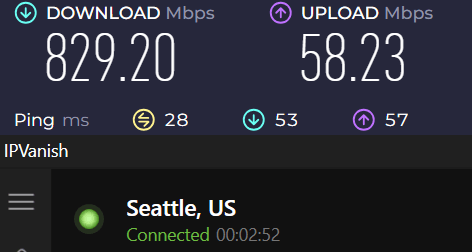
- Superb download speeds: Clocking in at 829.20 Mbps, IPVanish proves it can handle 8K streaming, massive file downloads, and data-heavy multitasking without breaking a sweat.
- Solid upload performance: An upload speed of 58.23 Mbps ensures smooth video calls and fast social media uploads, even while the VPN is active.
- Low latency (ping): With a ping of just 28 ms, this connection is ideal for competitive mobile gaming where every millisecond counts.
- Seattle server performance: Testing from a US-based server highlights the efficiency of the WireGuard protocol, maintaining nearly 90% of a standard gigabit connection’s potential.
Taken together, these results show IPVanish is built for high-performance, everyday use.
How to install IPVanish on Android
Getting IPVanish up and running on your Android phone is a breeze. I’ve tested it on several devices, and as long as you’re running Android 5.1 or higher, you’re good to go. Whether you’re on a brand-new Samsung Galaxy or an older Android tablet, the setup process is identical.
You can grab the app directly from the Google Play Store, and you can even handle your subscription and free trial right through Google’s billing if you want to keep things simple.
Installing IPVanish (step-by-step)
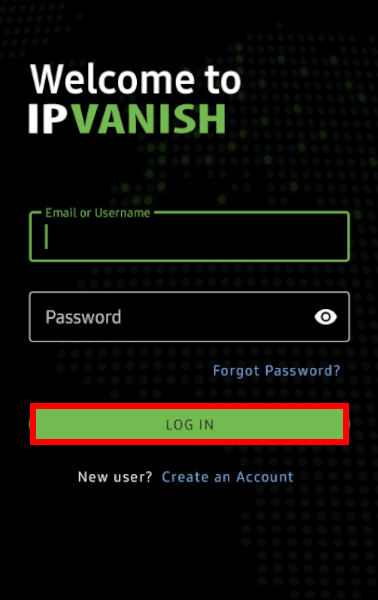
Ready to get started? Here is exactly how I set it up:
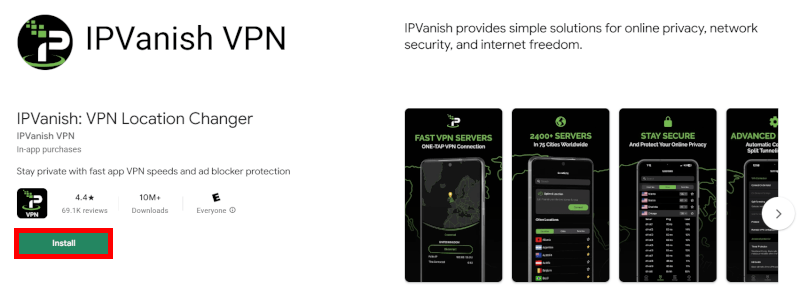
- Find the app: Open the Google Play Store and search for “IPVanish Android VPN app.”
- Install: Hit that install button and wait a few seconds.
- Launch: You’ll find the icon right on your home screen.
- Log in: Enter your username and password (or sign up for that free trial we mentioned!).
Once you’re in, you have your pick of over 3,200 servers in 150+ locations. Just tap a server to go online instantly.
Picking your protocol
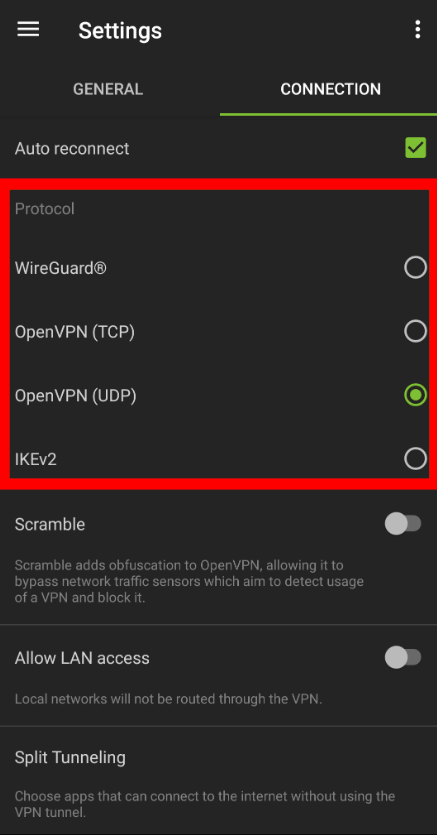
This is where the magic happens. IPVanish doesn’t just give you one way to connect; they give you options based on what you’re doing:
- WireGuard: This is the new standard in the VPN world. It’s significantly faster and more battery-efficient than older options, perfect if you’re streaming on the go.
- OpenVPN: The gold standard for security. It’s a bit heavier than WireGuard, but famously reliable.
- IKEv2: Great for mobile users because it handles switching between Wi-Fi and cellular data without dropping your connection.
Everything you do is wrapped in AES 256-bit encryption, which is essentially unhackable. It’s the same level of protection used by banks and government agencies.
Mastering split tunneling
I can’t talk about the Android app without mentioning split tunneling. If you’ve ever had your banking app block you because you were on a VPN, this is your solution.
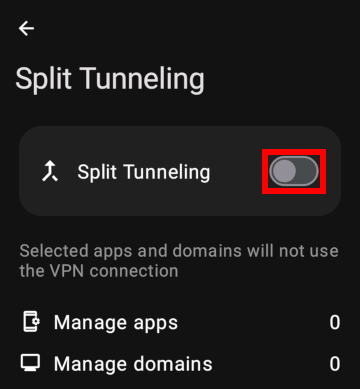
Inside the IPVanish settings, you can whitelist certain apps (like Google Maps or your banking app) so they use your regular internet, while everything else stays encrypted by the VPN.
Navigating your IPVanish Android app
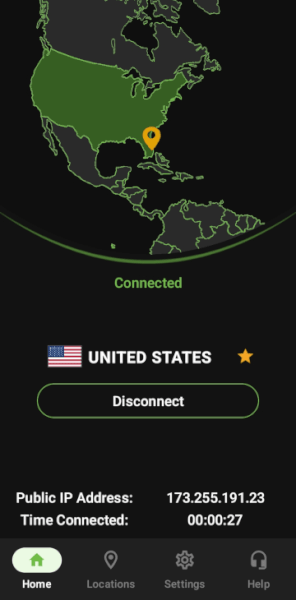
The latest version of the IPVanish Android app features a major overhaul that makes it feel much more modern and intuitive. The home screen is designed for speed: You get a one-touch “Quick Connect” button that automatically finds the fastest server for you, along with a visual map that gives you a clear sense of your connection status.
The locations screen
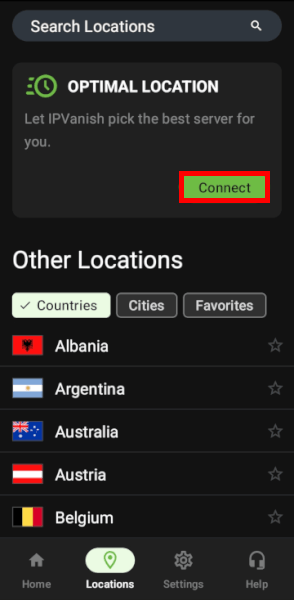
While the auto-connect is great, I usually prefer picking my own server via the locations screen. If you want the best performance, look for two things:
- Low ping and load: The app displays these stats next to each server. A lower ping means less lag.
- Favorites: You can heart the servers that work best for you (like a specific US city for streaming) to save them to a personalized list for next time.
Threat Protection and Double Hop
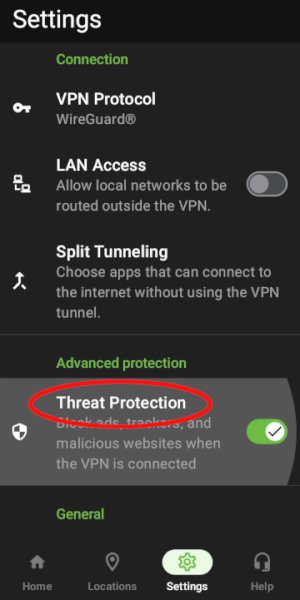
IPVanish has evolved beyond basic encryption with the addition of Threat Protection, which acts as a built-in guard for your browsing. It blocks malicious sites, trackers, and intrusive ads at the source, making your mobile experience cleaner and safer without needing extra plugins.
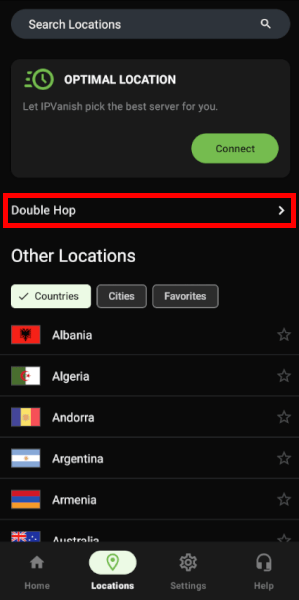
For those who prioritize maximum anonymity, the new Double Hop feature is a standout. It routes your traffic through two separate VPN servers instead of one, adding a second layer of encryption. While it might slightly dip your speeds, it makes your connection significantly harder to trace, providing a massive privacy boost for sensitive tasks.
Customizing your protection
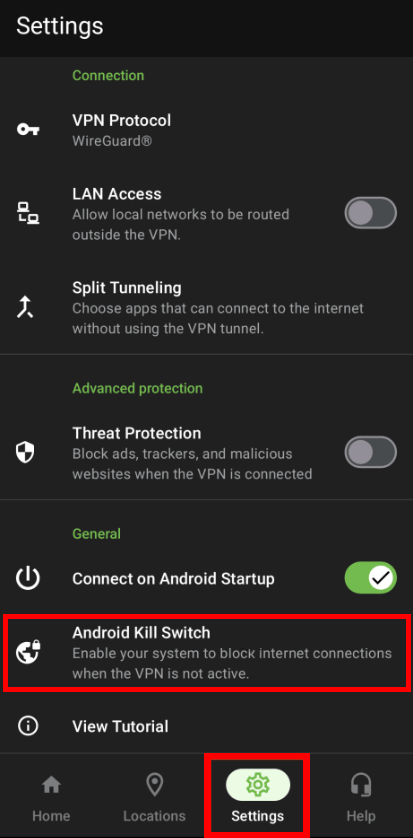
The navigation bar at the bottom makes it easy to jump into the Settings menu without losing your place. Here are the three things I recommend adjusting immediately:
- Protocol selection: You can switch between WireGuard (best for speed), OpenVPN, or IKEv2.
- The kill switch: On Android 8.0 or higher, the “Kill Switch” now integrates directly with your system settings. You’ll need to enable “Always-on VPN” and “Block connections without VPN” in your phone’s settings (the app will guide you there) to ensure no data leaks if the VPN drops.
- Auto-connect: You can set the app to protect you automatically the moment your phone boots up or whenever you join an untrusted Wi-Fi network.
Protecting your online privacy with IPVanish
With auto-connect, IPVanish ensures your VPN is always active, adding an extra layer of privacy, which is particularly useful when using unsecured public Wi-Fi networks.
Public Wi-Fi security
Public Wi-Fi networks in airports, hotels, and cafes are essentially open hunting grounds for cybercriminals. Because these networks are often improperly configured or unencrypted, your personal data is essentially broadcast to anyone nearby with the right tools. Common vulnerabilities include:
- Evil twin hotspots: Hackers set up fake Wi-Fi networks with names like “Airport_Free_WiFi” to trick you into connecting directly to their hardware.
- Man-in-the-middle (MITM) attacks: An attacker sits between your device and the router, intercepting every piece of data you send, including passwords and banking details.
- Packet sniffing: Using sniffer software, bad actors can capture and analyze unencrypted data packets moving across the shared network.
How IPVanish defends your connection
IPVanish provides an essential layer of armor for these situations. Wrapping your traffic with AES-256 encryption makes your data unreadable to anyone trying to sniff it.
Even better, the latest version of the app includes Threat Protection, which actively blocks malicious websites, trackers, and intrusive ads before they can even load on your screen. This is a massive upgrade for public Wi-Fi users because it helps prevent “malvertising” and silent malware downloads that are becoming more common on unsecured networks.
Bypassing blocks and censorship
Internet censorship can be a major hurdle, whether you’re dealing with restrictive workplace filters or government-level firewalls. IPVanish helps you regain access to the open web by rerouting your connection through its global network of over 3,200 servers.
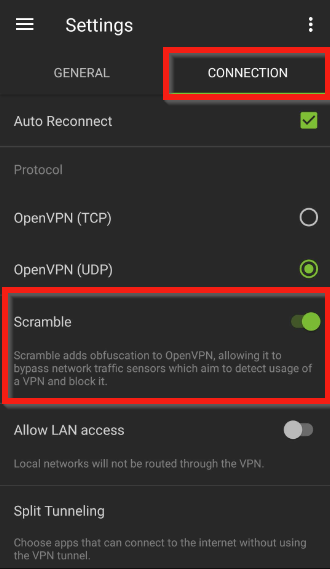
The standout tool here is the OpenVPN Scramble (obfuscation) feature. It’s designed to disguise your VPN traffic as regular HTTPS web browsing, which helps bypass Deep Packet Inspection (DPI) used by network admins to block VPN protocols.
More than unblocking
Beyond dodging censorship, IPVanish offers a few more perks for power users:
- Zero logs, verified: Their no-logs policy has been independently audited, meaning not even your ISP can see what you’re doing or which sites you’re visiting.
- P2P Optimization: Unlike some VPNs that throttle heavy traffic, IPVanish is very torrent-friendly, offering the speeds needed for fast, private downloads.
- Global Access: With servers in over 150 locations, you can easily bypass regional restrictions to access news, social media, and media libraries from back home.
Unblocking your favorite shows with ease
The demand for streaming is at an all-time high, but so are the geo-blocks that stop you from watching your favorite content while traveling. These restrictions are based on your location, often leaving you locked out of the libraries you pay for back home.
In my recent testing, IPVanish has proven it can now hang with the heavyweights like ExpressVPN and Surfshark. In fact, it was recently recognized as the best VPN for streaming because it consistently handles 4K video without the dreaded buffering wheel.
What can you actually unblock?
IPVanish now works reliably with:
- Netflix: Easily unlocks popular libraries like the US, UK, and Japan.
- Hulu and Disney+: Flawless access on US-based servers.
- BBC iPlayer: A big win for fans of UK telly, though you might need to try a couple of different UK cities to find the best connection.
- Amazon Prime Video: While historically tricky, the newer “streaming-optimized” IPs have made this much more reliable
A proven and audited no-logs VPN
In the world of VPNs, saying you “don’t keep logs” is one thing, but proving it is another. For years, users were cautious because IPVanish is based in the United States (a Five Eyes jurisdiction). However, they have completely rebuilt that trust by undergoing rigorous, independent third-party audits.
In April 2025, IPVanish completed its most recent audit through Schellman Compliance, LLC. This wasn’t just a paperwork check; the auditors were given unrestricted access to IPVanish’s physical servers, internal configurations, and engineering teams. The findings confirmed that IPVanish does not collect, store, or monitor your:
- Browsing history: No record of the sites you visit.
- Connection timestamps: No logs of when you connect or disconnect.
- IP addresses: Your real-world location is never recorded.
- DNS queries: Your private search requests remain private.
The move to RAM-only servers
To back up these claims with actual hardware, IPVanish has transitioned much of its network to RAM-only servers. Unlike traditional servers that store data on hard drives, RAM-only infrastructure wipes every bit of information the moment the server is rebooted. This means even if a server were physically seized, there would be absolutely no data to recover.
Transparency you can track
To keep things honest between audits, IPVanish now publishes quarterly transparency reports in its Trust Center. These reports detail exactly how many legal requests for data they receive and, more importantly, confirm that they had zero data to provide because it simply doesn’t exist.
While industry giants like NordVPN (audited by Deloitte) and Proton VPN (audited by Securitum) set the bar for transparency, IPVanish has officially joined their ranks as a verified, zero-knowledge provider.
IPVanish customer support
One of the most reassuring things about IPVanish is that you’re never left in the dark. Whether you’re having trouble with a specific server or need help tweaking your WireGuard settings, their support team is actually easy to reach.
Live chat, phone, and email
Before reaching out for full support, I tried IPVanish’s AI chatbot. It handled quick questions really well and pointed me to the right settings fast. It’s a great first step, and if it can’t help, it smoothly connects you to a live agent.
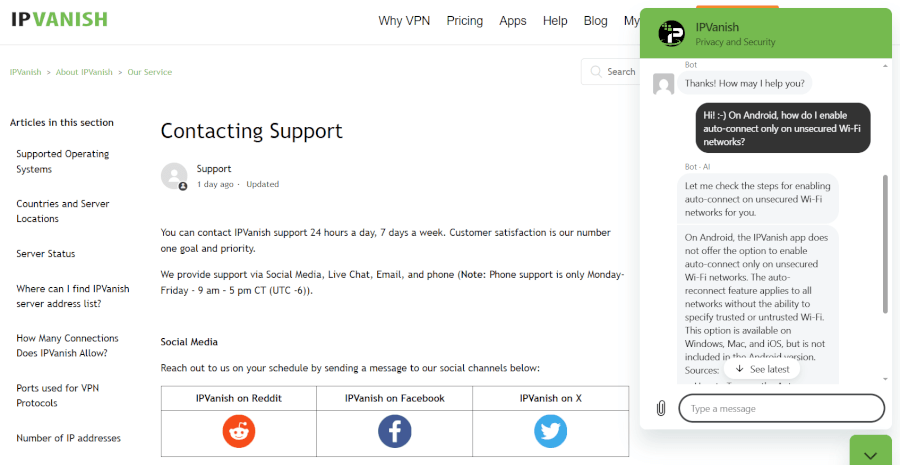
They’ve really expanded their Support Center recently. Here is the best way to get help depending on your situation:
- 24/7 live chat: This is my go-to. You can access it directly through the Android app or the website. In my experience, you’re usually connected to a real person in under two minutes.
- Phone support: This is a rare find in the VPN world. IPVanish offers phone support during standard business hours (CST) for the US, UK, Mexico, Spain, Australia, and Brazil. It’s perfect if you prefer talking through a technical setup.
- Email ticketing: For less urgent issues, you can drop them an email. They usually get back to you within 24–48 hours, so make sure to check your spam folder, as their replies sometimes end up there.
- The knowledge base: If you’re a DIY type, their in-app help section is packed with step-by-step tutorials and troubleshooting guides that cover everything from split tunneling to router setups.
Money-back guarantee
If you’re on the fence, the 30-day money-back guarantee is your safety net. It essentially acts as a full-access free trial. You can sign up for a yearly or two-year plan, test the speeds, unblock your favorite streaming sites, and see if it fits your workflow.
If it’s not for you, getting your money back is refreshingly simple. As long as you cancel through your account control panel within those first 30 days, IPVanish processes the refund automatically. You don’t even have to jump through hoops with a support agent. The funds typically show back up in your account within three business days.
Is IPVanish the right Android VPN for you?
IPVanish for Android is a powerhouse for anyone needing a mix of speed and heavy-duty security. By pairing the WireGuard protocol with new tools like Threat Protection and Double Hop, it’s evolved into a much more comprehensive privacy suite. Whether you’re dodging trackers on public Wi-Fi or streaming 4K content, the app’s revamped design makes it feel effortless.
While it’s a top-tier choice, it isn’t the only player in the game. If your main goal is bypassing the Great Firewall of China, NordVPN or ExpressVPN are more reliable for that task. If you’re on a strict budget and need a free-forever option, Proton VPN is worth a look. However, IPVanish wins big by offering unlimited simultaneous connections, allowing you to protect every device in your home under one account.
All in all, IPVanish earns its spot as a top Android VPN because it’s fast, independently audited, and backed by 24/7 human support. With the 30-day money-back guarantee, you can test the full version risk-free. For a simple, reliable privacy solution, IPVanish is well worth considering.
Take advantage of this exclusive IPVanish offer while it lasts:
IPVanish Coupon:
Get 83% off IPVanish on 2-year plans with the coupon below:
(Coupon is applied automatically)
IPVanish for Android FAQs
Yes, IPVanish is one of the top-rated VPNs for Android thanks to its dedicated app, high-speed WireGuard support, and user-friendly interface. It’s particularly popular because it offers a straightforward experience with superb perks like auto-connect, which keeps your data encrypted the moment you join a public Wi-Fi network.
You can get a 7-day free trial of IPVanish if you sign up directly through the Google Play Store on your Android device. Additionally, if you prefer to sign up via their website for better long-term pricing, you are covered by a 30-day money-back guarantee, which effectively lets you test the full service risk-free for a month.
IPVanish offers unlimited simultaneous connections, meaning you can protect every Android phone, tablet, and Fire Stick in your home at the same time. This is an important advantage over competitors like ExpressVPN or NordVPN, which typically limit you to around 10 devices per account.
While all VPNs have some impact on speed, IPVanish is built for performance and usually shows negligible slowdowns when using the WireGuard protocol. Because it uses lightweight encryption standards, you can stream in 4K or play mobile games without the frustrating lag associated with older VPN technologies.
Absolutely, IPVanish is considered very safe because it uses AES 256-bit encryption and has an independently audited no-logs policy. This ensures that your browsing history isn’t just hidden from hackers and ISPs. It’s also never recorded by IPVanish itself.

Leave a Reply