
Signal has expanded its backup system to let users create encrypted local backups on iOS and desktop, add cross-platform restore support, and add new ways to manage stored media.
The changes are available across supported platforms following the release of Signal for iOS 8.30.
The update completes several features Signal outlined when it began testing encrypted cloud backups in 2025. Those backups let users recover conversations after losing a device, but the initial rollout was limited to Android. Signal says both its hosted Secure Backups and its on-device backups can now be created and restored across Android, iOS, Linux, macOS, and Windows.
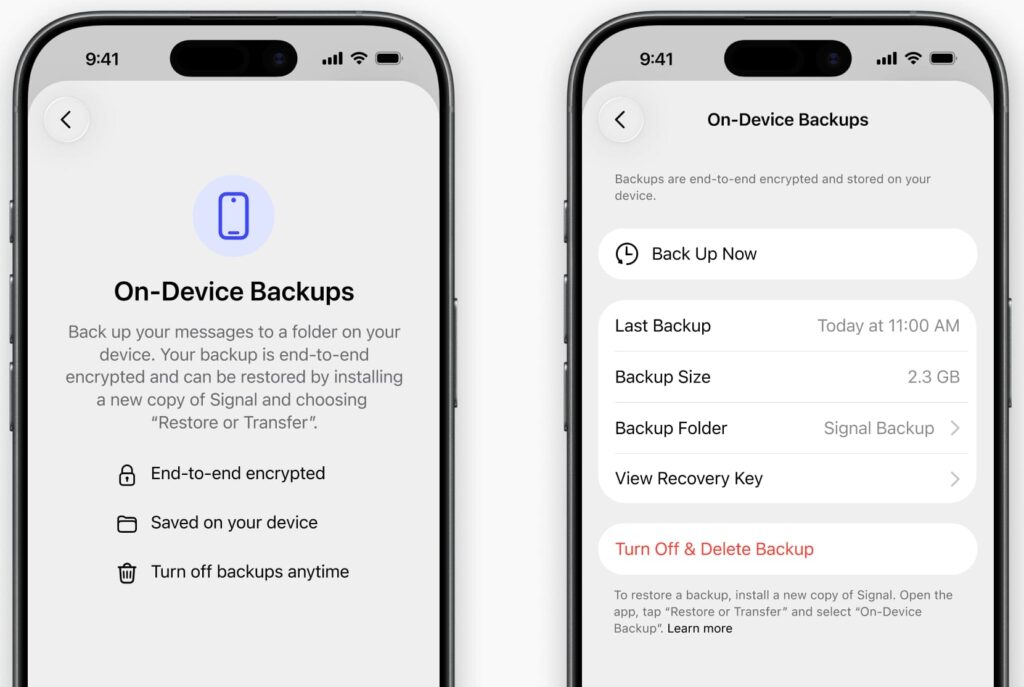
On-device backups give users an encrypted copy they can store wherever they choose, such as an external drive or a home network server. The option is new to iOS and desktop. Android has supported local backups for years, but Signal has rebuilt them around the same cross-platform format.
Media is now stored separately from the main archive, and duplicate files within a backup are saved only once, reducing the space needed to keep or synchronize repeated snapshots.
Media recovery and storage
Signal also introduced an option for paid Secure Backups subscribers to offload older photos and videos from their devices. A thumbnail stays in the conversation, while the full-size attachment remains in the encrypted backup and is retrieved when opened. Signal estimates that 5 GB of unused media could occupy about 600 MB on a device after optimization.
The free hosted backup plan covers messages and the most recent 45 days of media, while the paid plan supports up to 100 GB of media. For a newly linked computer missing an older attachment, Signal Desktop can now request an encrypted copy directly from the primary device with a tap. This depends on the attachment still being available on that device. Very long messages are treated as attachments, and those over 128 KB are subject to the free plan’s 45-day media limit.

Signal has also described a security distinction between the two backup methods. Hosted backups use a supplemental key held in a trusted execution environment and rotated daily. According to Signal, this adds forward secrecy alongside the user’s recovery key, which is still needed to decrypt the backup. Local backups cannot use that mechanism because they may be stored anywhere. Their recovery key can decrypt previous backup copies that a user has retained, so deleting old copies may matter when storing them on a USB drive or other external storage.
Both backup methods exclude messages set to disappear within 24 hours. Signal says it skips expired disappearing messages found in a local backup during restoration, although it doesn’t automatically remove old backup files from a user’s chosen storage location.
The iOS update separately improves transfers between iPhones using a local encrypted wireless connection over Wi-Fi Aware. Users enabling backups should keep their recovery key somewhere secure and never provide it in response to a message claiming to be from Signal Support.



Leave a Reply