
LineageOS has introduced a browser-based flashing tool that significantly lowers the barrier to installing the popular aftermarket Android operating system.
The new feature makes it easier for users to install LineageOS on supported devices, helping extend the life of smartphones and tablets that no longer receive official Android updates, security patches, or new privacy features from their manufacturers.
LineageOS is one of the largest aftermarket Android distributions, providing community-maintained releases for hundreds of smartphones and tablets after manufacturers discontinue official support. For owners of older devices, the streamlined installation process makes upgrading to a modern Android version considerably more accessible.
Browser-based flashing
Installing a custom Android ROM has traditionally required downloading platform-specific utilities, configuring drivers, and using command-line tools. LineageOS’ new web flasher simplifies that process by allowing users to perform much of the installation directly from a supported web browser.
Available through the LineageOS download portal, the tool supports Fastboot, ADB, Samsung’s Odin protocol, and Amlogic’s burn mode. Users still need to follow the device-specific installation instructions on the LineageOS wiki, as steps such as unlocking the bootloader vary by model.
The implementation builds on several open-source projects, including fastboot.js by kdrag0n, ya-webadb by yume-chan, and libmjolnir by r3pwn, with LineageOS contributors integrating the tools into the project’s download portal and contributing improvements upstream.
Security and other improvements
The project also outlined how it is adapting to Google’s revised Android security update model introduced with Android 16, which bundles many platform security fixes into quarterly releases.
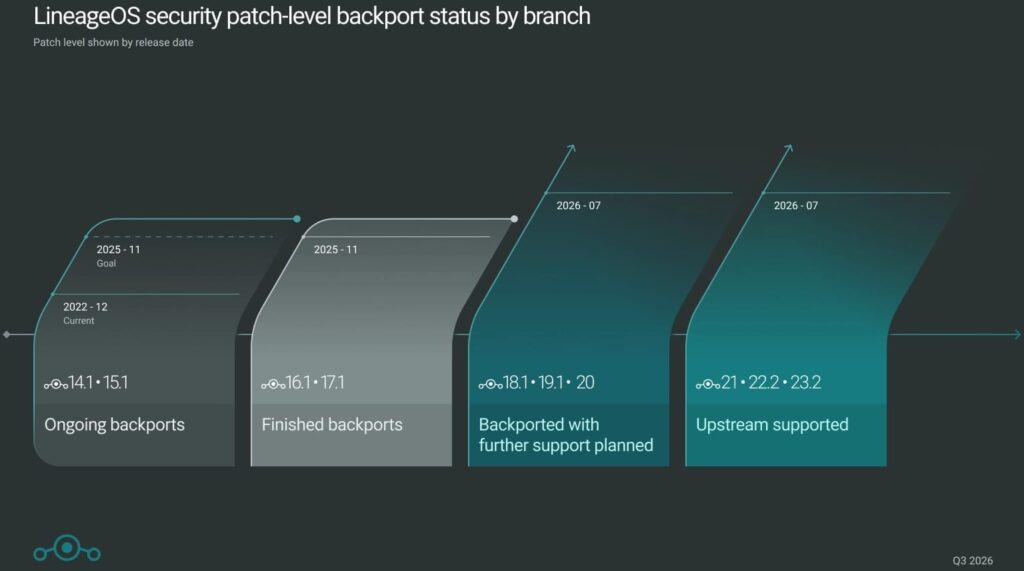
LineageOS says versions 21, 22, and 23 receive monthly security bulletin patches as they are released, while older supported branches continue to receive backported fixes where possible. The redesigned Updater app now also displays the Android Security Bulletin (ASB) level included in each available update before installation, making it easier for users to verify which security patches they will receive.
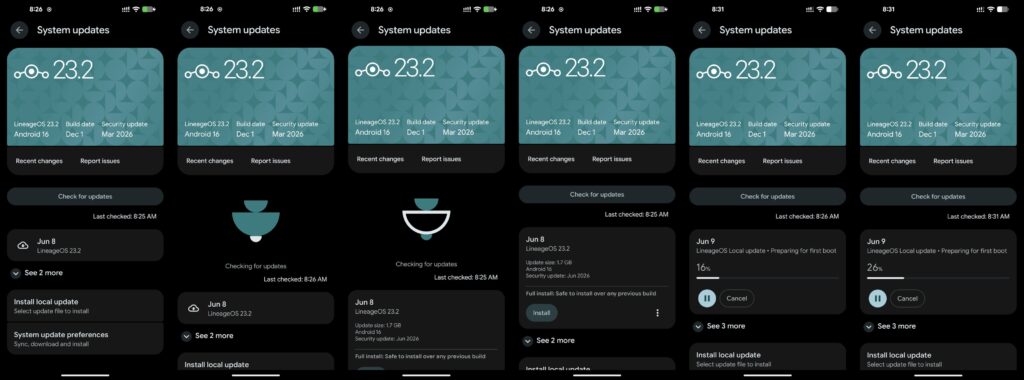
The update also includes a redesigned Updater app with faster A/B OTA streaming, a migration of the project’s issue tracker from GitLab to GitHub, GitHub login support for its Gerrit code review platform, and updated default applications.
Looking ahead, the project confirmed that development of LineageOS 24, based on Android 17, is underway, although no release timeline has been announced.
By making installation considerably simpler, LineageOS is lowering one of the biggest barriers to keeping older Android hardware secure, functional, and up to date. Check out the announcement for a full list of supported devices.



Leave a Reply