
Identity theft strikes millions every year, turning stolen personal details into fraudulent loans, drained accounts, and credit damage that lingers for years. LifeLock and Coveron (formerly NordProtect) both fight back with dark web scans, fraud alerts, restoration support, and million-dollar insurance, yet they build their defenses around very different priorities.
LifeLock emphasizes higher insurance limits up to $3 million, family plans with child monitoring, and dedicated specialists for recovery, while Coveron bundles a top-rated VPN, antivirus, password manager, and data removal tools at lower starting prices. This comparison dives into their monitoring depth, extras, costs, and real-world setup so you can select the protection that matches your risks and budget.
We tested them side by side, looked at pricing, explored support, and took a close look at what you get. Whether you’re picking your first service or thinking of switching, this guide will help you make a smart, secure choice — without the guesswork.
| LifeLock | Coveron | |
| Website | LifeLock.Norton.com | Coveron.com |
| Supported platforms | Windows, macOS, Android, and iOS | Windows, macOS, Android, and iOS |
| Starting price | $10.42/month | $4.74/month |
| Money-back guarantee | 60 days | 30 days |
| 3-bureau credit monitoring | ✅ (Experian, TransUnion, and Equifax; top-tier plan only) | ✅ (Experian, TransUnion, and Equifax; top-tier plan only) |
| Identity theft insurance | Up to $3 million | Up to $2 million |
| Best deal | 16% Off Coupon > | 66% Off Coupon > |
Key highlights
LifeLock and Coveron both pack a punch in terms of identity theft protection (ITP), but they take different approaches — LifeLock leans into credit monitoring and extra cybersecurity perks, while Coveron puts a big focus on hands-on identity restoration.
Both services offer solid protection at competitive prices, but the best choice depends on what you need.
Keep your identity safe without breaking the bank — check out the top discounts on LifeLock and Coveron, featuring Coveron’s amazing 66% off two-year plan deal!
How to select the right ITP service
Picking the best identity theft protection is like assembling your ultimate security squad. LifeLock and Coveron each bring different strengths — so which one’s the MVP for you?
Identity theft insurance: Both services provide generous financial protection if the worst happens, with LifeLock offering up to $3 million in coverage and Coveron providing up to $2 million to help with stolen funds and identity recovery.
Credit monitoring: Keeping an eye on all three major credit bureaus is a big deal since identity theft can show up anywhere. Both LifeLock and Coveron include three-bureau credit monitoring in their higher-tier plans.
Family protection: If you’re safeguarding more than just yourself, LifeLock offers family plans with coverage for kids, while Coveron is more geared toward individual users.
Bang for your buck: Both services are competitively priced, but Coveron’s top-tier plan takes things further, bundling in NordVPN, Threat Protection, and Incogni for a complete cybersecurity package. While LifeLock focuses on identity protection, Coveron offers all-in-one digital defense.
Risk-free trials: LifeLock backs its annual plans with a 60-day money-back guarantee, letting you try it without pressure. Coveron also includes a 30-day money-back guarantee, giving you plenty of time to see if it’s the right fit.
With hackers getting smarter, your security needs to be smarter too. Find the right identity protection to keep your digital life locked down and worry-free.
LifeLock vs Coveron: Head-to-head
In the battle for top-tier identity protection, LifeLock and Coveron take different paths. LifeLock goes all-in on credit monitoring and cyber defense, while Coveron offers a budget-friendly bundle of security tools.
Let’s see how they stack up:
| LifeLock | Coveron | |
| Pricing | $10.42 – $29.17/month | $4.74 – $9.49/month |
| Family-focused plans and features | ✅ | ✅ |
| 3-bureau credit monitoring and reports | ✅ (Experian, TransUnion, and Equifax) | ✅ (Experian, TransUnion, and Equifax) |
| Dark web monitoring and alerts | ✅ | ✅ |
| Identity theft insurance | Up to $3 million | Up to $2 million |
| Social media account alerts | ✅ | ❌ |
| Credit lock | ✅ | ✅ |
| Lost wallet remediation | ✅ | ❌ |
| Antivirus and VPN | ✅(for an extra fee) | ✅(on higher tiers) |
| Password manager | ❌ | ✅ |
| 24/7 customer support | ✅ | ✅ |
| Best deal | 16% Off Coupon > | 66% Off Coupon > |
Now, let’s examine both services more closely to determine which one is worthy of our trust and which one isn’t.
Which company is more trustworthy?
When talking about identity theft protection, trust is everything. So, which service — LifeLock or Coveron — truly earns your confidence? Let’s dig into the details!
LifeLock overview
| Starting price | $10.42/month |
| Supported platforms | Windows, macOS, iOS, and Android |
| Three-bureau credit monitoring | ✅ (top-tier plans) |
| Identity theft insurance | $1M – $3M |
| Best deal | 16% off coupon > |
LifeLock, under the umbrella of Gen Digital, is one of the pioneering companies in identity theft protection services. It includes comprehensive identity theft protection services, such as credit monitoring and restoration, ensuring that users are promptly alerted to potential identity theft incidents.
Looking at customer feedback, LifeLock holds a solid 4.9/5 rating on Trustpilot, based on 16,000+ reviews. A whopping 84% of users gave it a 5-star rating, highlighting its strong identity protection features and responsive alerts. However, some users have noted false alarms or occasional customer service hiccups — so while it’s a top-tier service, it’s not without its quirks.
Overall, LifeLock remains a powerful contender in the identity theft protection space, offering robust security for individuals and families alike. Its user-friendly dashboard and 60-day money-back guarantee for annual plans provide customers with a chance to evaluate the service risk-free.
LifeLock pros and cons
Before you decide, let’s unpack the pros and cons of LifeLock:
+ Pros
30-day free trial period (recently added)
A VPN with family plans
Comprehensive identity theft protection service
Can be combined with Norton 360 antivirus software
Up to $3 million insurance for certain costs incurred from identity theft
User-friendly interface and easy setup
Stolen wallet protection
Simple-to-use mobile apps
– Cons
Confusing paid plan structure
Higher cost compared to some competitors
Coveron overview
| Starting price | $4.74/month |
| Supported platforms | Windows, macOS, Android, and iOS |
| Three-bureau credit monitoring | ✅ (highest tier only) |
| Identity theft insurance | $2M |
| Best deal | 66% Off Coupon > |
Coveron is the new kid on the block in identity theft protection, but don’t let that fool you — it’s backed by Nord Security, the brains behind NordVPN, one of the biggest names in online privacy. If you trust Nord to keep your internet activity under wraps, you might be wondering: Can Coveron do the same for your identity?
Well, it sure looks promising. Coveron keeps a constant watch with 24/7 dark web monitoring, credit tracking, and data breach alerts. If trouble strikes, expert case managers and up to $1 million in recovery coverage have your back.
Coveron shines as part of Nord Security’s ecosystem. With the top-tier plan, you get NordVPN, Threat Protection, and Incogni bundled in, giving you privacy, identity protection, and device security all in one. Easy setup and real-time alerts make staying safe a breeze.
While Coveron is still gaining traction, Nord Security’s track record speaks volumes. NordVPN boasts a 4.2/5 Trustpilot rating from over 49,000 reviews, with 72% of users giving it 5 stars. NordPass isn’t far behind, scoring 4.0/5 with 80% of users loving it. Backed by Nord Security’s expertise, Coveron is a rising star in the identity protection world.
Coveron pros and cons
Before making a choice, let’s see where Coveron shines and where it falls short:
+ Pros
$2M identity theft recovery
Cyber extortion coverage
24/7 dark web monitoring
Effortless to set up and use
Criminal record and malware breach alerts
3-Bureau credit monitoring
Highest tier comes with a VPN and a password manager
Accepts a range of payment methods
- Frequent deep discounts on long-term plans
30-day money-back guarantee
– Cons
Pricey premium plans
SSN required for credit monitoring (but that’s typical)
Availability and insurance coverage
| LifeLock | Coveron | |
| Identity theft insurance amount | From $1M up to $3M | Up to $2M |
| Stolen funds reimbursement | From $25,000 up to $1M | Up to $2M |
When it comes to coverage, LifeLock and Coveron both offer solid protection — but there’s a twist. Coveron isn’t available in New York or Washington, which could be a deal-breaker if you live there. LifeLock, on the other hand, covers the entire US, including territories — no exceptions.
Now, let’s talk about the big bucks. LifeLock doesn’t hold back, with its top-tier plan covering up to $3 million — split between stolen funds, personal expenses, and legal fees. Even its lower-tier plans start at $25,000 and scale up to $100,000, so there’s a decent safety net no matter which plan you choose.
With Coveron, you’re covered for up to $2 million in identity theft recovery — plus $10K for online fraud and $10K in cyberattack insurance. Higher subscription tiers add another $50K for cyber extortion insurance. The one thing to know? Reimbursement isn’t instant. Since claims go through HSB, their insurance partner, you’ll need to fill out some forms to get your payout.
Core identity protection capabilities
A good identity theft protection service isn’t just about fancy features — it’s about how well it actually protects you. Let’s look closer at LifeLock and Coveron in key areas like credit monitoring, dark web alerts, and identity recovery.
Credit monitoring capabilities
When it comes to credit monitoring, both LifeLock and Coveron now offer three-bureau tracking — but only on their higher-tier plans, so the level of protection depends on what you subscribe to.
Coveron monitors credit activity across TransUnion, Equifax, and Experian, sending alerts for suspicious events such as new accounts or unexpected credit inquiries. This is a major upgrade from its earlier single-bureau approach — but it’s limited to the highest-tier plan. It also provides updates on key changes to your credit score. Activation can still take a few days, meaning monitoring isn’t always instant, but the coverage is now much broader for premium subscribers.
LifeLock also delivers three-bureau credit monitoring, tracking TransUnion, Equifax, and Experian, but again, only on its upper-tier plans. Its lower-cost tiers scale back coverage, so not all users get full bureau visibility by default.
To sum it up? Both LifeLock and Coveron provide a similar offering with 3-bureau credit monitoring and credit locking on TransUnion, but only for subscribers on their higher tiers.
Dark web monitoring
The dark web is like the internet’s sketchy underground market, where stolen data gets passed around like a hot commodity. If your private info ends up there, you’ll want to know ASAP — and that’s where dark web monitoring comes in. Both LifeLock and Coveron claim to have your back, but let’s see which one does it better.
LifeLock acts like a detective scanning the dark web for leaks of your Social Security number, emails, passwords, and more. If your data pops up somewhere shady, you’ll get an alert so you can take action before things spiral out of control. The only catch? LifeLock doesn’t specify how often these scans happen, so you might not get updates in real time.
Coveron, on the other hand, takes a 24/7 always-on approach — scanning hacker forums, black-market sites, and data dumps in real time. You can register up to five email addresses and five phone numbers, and if anything leaks, Coveron doesn’t just sound the alarm — it also gives you a step-by-step game plan to lock things down. No guesswork, just action. And with the highest-tier plan, you also get Incogni for added privacy protection.
When you want instant alerts and 24/7 surveillance, Coveron and alternatives like IDShield are your go-to for top-notch protection.
Identity restoration services
Getting your identity stolen is like waking up to find out someone threw a wild party in your name — and you’re stuck with the cleanup. Thankfully, both LifeLock and Coveron step in to help, but they do things a little differently.
LifeLock acts like your identity crisis management team. If someone swipes your personal info, their specialists help you dispute fraudulent transactions, replace important documents, and even recover stolen funds. Depending on your plan, you could be covered for up to $1 million in legal fees and personal expenses, which is a huge relief when you’re trying to fix a mess you didn’t make.
Oh, and if your wallet gets stolen, they’ll help cancel and replace your credit cards, driver’s license, and even 401(k) accounts — because losing your wallet shouldn’t mean losing your sanity.
On the other hand, Coveron takes a more personal approach. If identity theft strikes, you’re assigned a dedicated case manager who guides you through everything — from fixing your credit to replacing stolen documents. The insurance coverage is solid, too: higher-tier plans include up to $2 million for identity theft recovery, $50K for cyber extortion, and $10K for online fraud.
There’s a $100 deductible, but considering the damage identity theft can cause, that’s a small price to pay. And if you choose the top-tier plan, you’ll also get Incogni for added privacy protection.
Additional security features
| LifeLock | Coveron | |
| Antivirus | ✅ | ✅ |
| VPN | ✅ | ✅ |
| Password manager | ❌ | ✅ |
| Ad blocker | ❌ | ✅ |
| Parental controls and child safety | ✅ | ❌ |
| Personal data cleanup | ❌ | ✅ |
| 2FA login | ✅ | ✅ |
| File-sharing network searches | ✅ | ❌ |
| Social media monitoring | ✅ | ❌ |
If you’re looking for a complete digital defense package, Coveron pulls ahead with its seamless integration of NordVPN and NordPass. This combo covers both network and device security, all at a more affordable price than LifeLock’s Norton-powered antivirus and VPN. For a fully-rounded solution without the extra cost, Coveron takes the win.
Let’s dive deeper into all the extra security perks these two heavyweights offer.
VPN protection
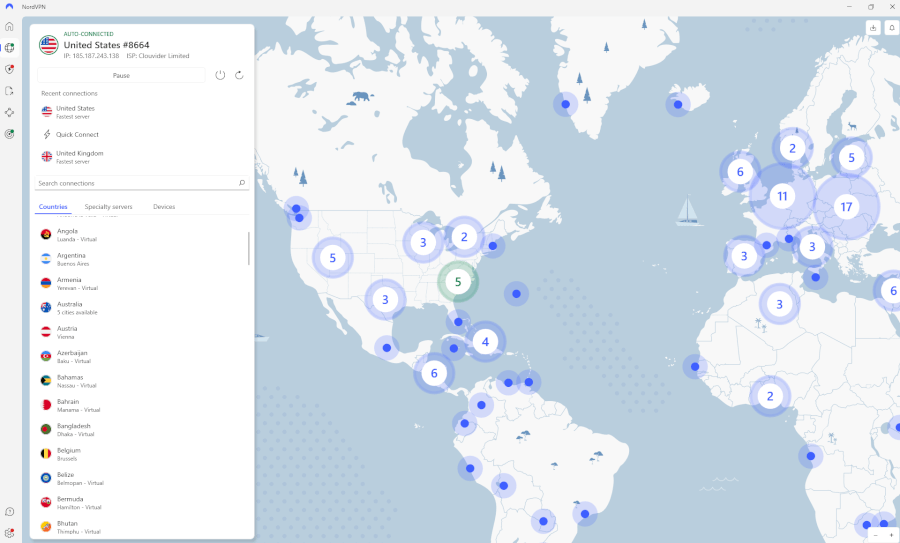
When it comes to VPN protection, Coveron is like the VIP of the digital privacy world, thanks to its integration with NordVPN. It’s not just any VPN — we’re talking about one of the fastest and most secure in the game. With over 8,600 servers across 126 countries, you can browse, stream, and shop without anyone peeking over your shoulder.
And for the privacy fanatics, NordVPN even throws in specialty servers, like double VPN, Tor-over-VPN, and P2P, which are perfect if you’re looking to hide out from trackers, torrent safely, or just stay off the radar completely. It’s privacy on steroids — and it’s all bundled into your Coveron subscription, provided you pick the highest subscription tier.
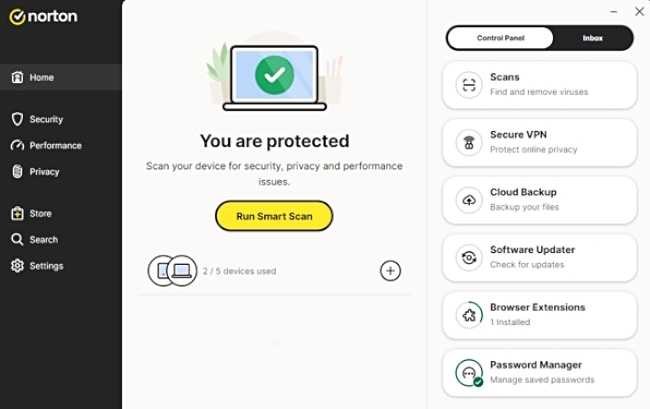
Now, LifeLock doesn’t come with its own built-in VPN, but don’t worry — you can still up your game by pairing LifeLock with Norton 360. Norton’s Secure VPN adds an extra shield around your online activities, encrypting your data and giving you a more private browsing experience. It’s a decent add-on, but it’s not quite as smooth as Coveron’s all-in-one VPN solution. Plus, with Norton’s anti-malware tools, you’ll also get solid real-time protection from digital threats like ransomware and viruses. It’s like a digital bodyguard for your devices.
Antivirus software
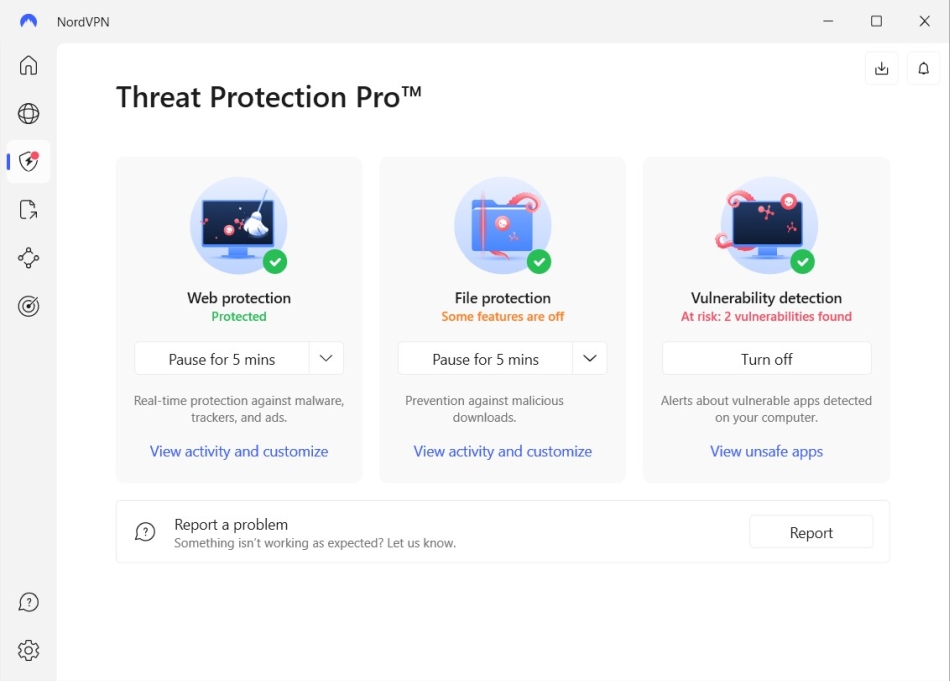
When you think of serious protection, think Coveron — its Threat Protection Pro comes included with the higher-tier plans, and it’s packed with tools to keep your devices clean and secure. It blocks phishing attempts, wipes out annoying ads before they pop up, and scans downloaded files for threats — all while running quietly in the background. You’ll barely notice it’s there, but your security will be rock solid.
Meanwhile, LifeLock doesn’t come with built-in antivirus software, but no worries — you can easily pair it with Norton 360 for a double whammy of security. Norton 360 adds proactive real-time threat protection against malware, ransomware, and all those digital nasties lurking around. Plus, it throws in a secure VPN to keep your browsing private, a password manager to guard your logins, and even dark web monitoring to alert you if your info is being sold in the digital underworld. Pretty sweet, right?
While LifeLock paired with Norton 360 is a solid combo, Coveron includes features like Threat Protection Pro built into upper-tier plans — no extra setup or cost needed. So if you want top-tier protection without the hassle, upgrading to one of Coveron’s higher plans might be your best move.
Password manager

In terms of password management, Coveron takes the crown with its trusty sidekick, NordPass. Think of it as your digital safe, where your passwords are locked away with the best security out there — XChaCha20 encryption and a zero-knowledge architecture. That means even Coveron can’t peek inside, and only you hold the keys to your vault.
What makes NordPass stand out is how easy it is to use. It syncs across all your devices, so no matter where you are, your passwords are ready to go. It also acts like a digital detective, spotting weak or reused passwords and helping you keep your accounts on lockdown. And if you need to share a password with someone, NordPass makes it secure and simple.
Now, if you’re a LifeLock user, it doesn’t come with its own password manager — but again, you can pair it with Norton 360. Norton 360’s password manager does a great job of securing your logins, creating strong passwords, and encrypting your data. While it’s a solid backup, it’s not as seamlessly integrated as NordPass with Coveron, which offers a smoother, all-in-one experience.
Parental controls and child safety
When it comes to keeping your kiddos safe online, LifeLock’s Family plans are like your digital sidekick. Not only do they protect your personal information, but they also watch over your children’s details, scanning for any signs of fraud or suspicious activity. And if things do go sideways, LifeLock has your back with stolen funds reimbursement — so your family’s finances stay safe and sound.
Now, Coveron? It’s pretty solid when it comes to general protection, but it’s not quite the go-to for child-specific security. While family plans are available, they lack advanced parental controls or child-focused monitoring features.
2FA login
Both LifeLock and Coveron have your back with two-factor authentication (2FA). LifeLock requires you to verify your identity with a second factor after entering your password, whether it’s a one-time code sent via text or email, or generated by an authentication app. For added security, LifeLock also supports biometric authentication, such as fingerprints or facial recognition, providing an extra safeguard against unauthorized access.
Coveron, on the other hand, goes beyond 2FA by offering multi-factor authentication (MFA), allowing users to combine multiple authentication methods for even stronger security. In addition to requiring a password and a secondary code, Coveron supports additional verification steps, such as security keys or device-based approvals. With both LifeLock and Coveron, your accounts benefit from extra layers of protection to keep your sensitive information secure.
File-sharing network searches
Think of LifeLock as your personal protector, scanning file-sharing networks to keep your private info safe from P2P platforms. If it detects your data floating around where it shouldn’t be, it promptly alerts you, allowing you to take swift action to protect your identity. This proactive approach helps prevent unauthorized use of your sensitive information.
On the other hand, Coveron does not offer this specific feature. While NordVPN provides secure file-sharing capabilities through its Meshnet feature, it does not actively monitor P2P networks for unauthorized sharing of your personal information. Therefore, if monitoring file-sharing networks for your data is a priority, LifeLock’s feature may be more aligned with your needs.
Social media monitoring
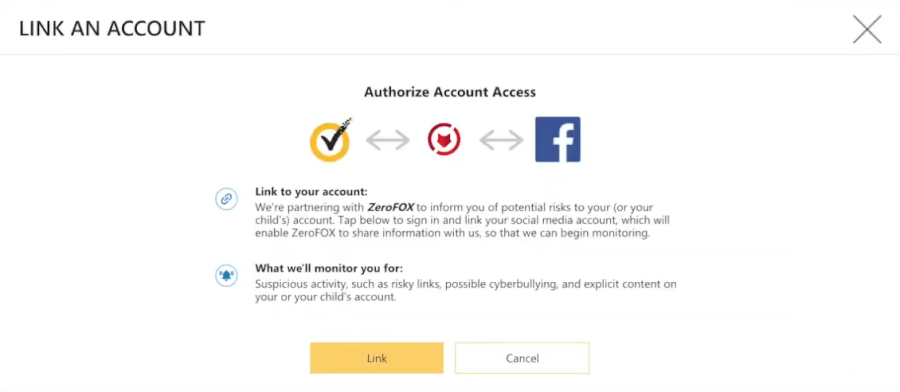
LifeLock adds a twist to online security with social media monitoring. It watches your accounts on platforms like Facebook, Instagram, and TikTok for any shady activity — think account takeovers or random changes — so you can jump into action fast.
It even keeps an eye on your kids’ accounts to protect them from cyberbullying and other online dangers. Setting it up is super easy — just add your accounts, and LifeLock does the rest. Coveron is great for security, but LifeLock is the only one offering this level of social media protection.
Additional digital defenses
With NordVPN keeping your privacy locked down, Threat Protection Pro blocking phishing and malware, plus criminal records alerts and malware breach notifications built into their plans, Coveron brings the full package. Add cyberattack coverage up to $10,000 and the privacy boost from Incogni, and you’ve got a security powerhouse. LifeLock puts up a fight, but without these built-in extras, it can’t match Coveron’s digital muscle!
Ease of use and support
A clunky dashboard or hard-to-reach customer support can turn any great service into a frustrating experience. So, does LifeLock or Coveron make managing your identity protection a breeze? Let’s break down their navigation, features, and support options to see which one is right.
Getting started
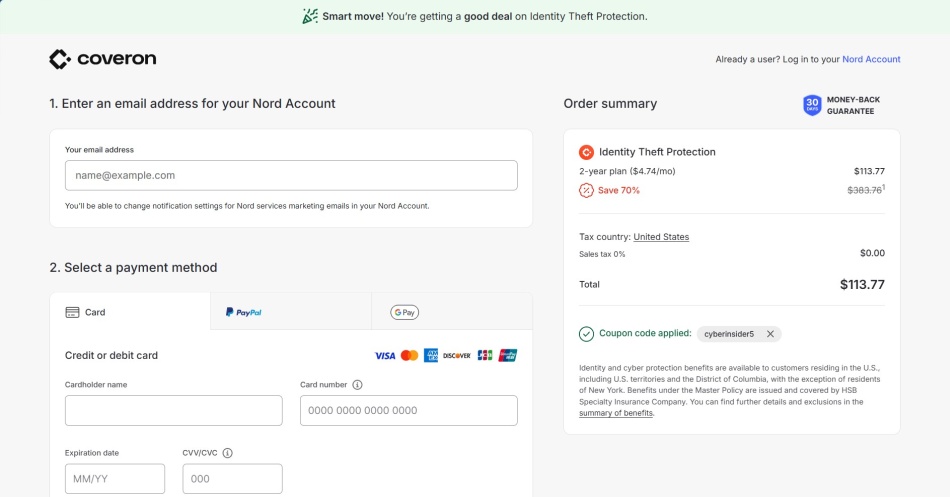
Setting up Coveron was refreshingly simple. Since it doesn’t have a standalone app (unlike its siblings, NordVPN and NordPass), everything runs through the NordAccount website. That means no extra downloads — just log in from any device, and you’re good to go.
The dashboard laid out all the essential tools clearly, so adding personal details for monitoring was a breeze. However, full protection requires enabling multi-factor authentication and verifying your identity, including your SSN for credit monitoring, which adds an extra step.
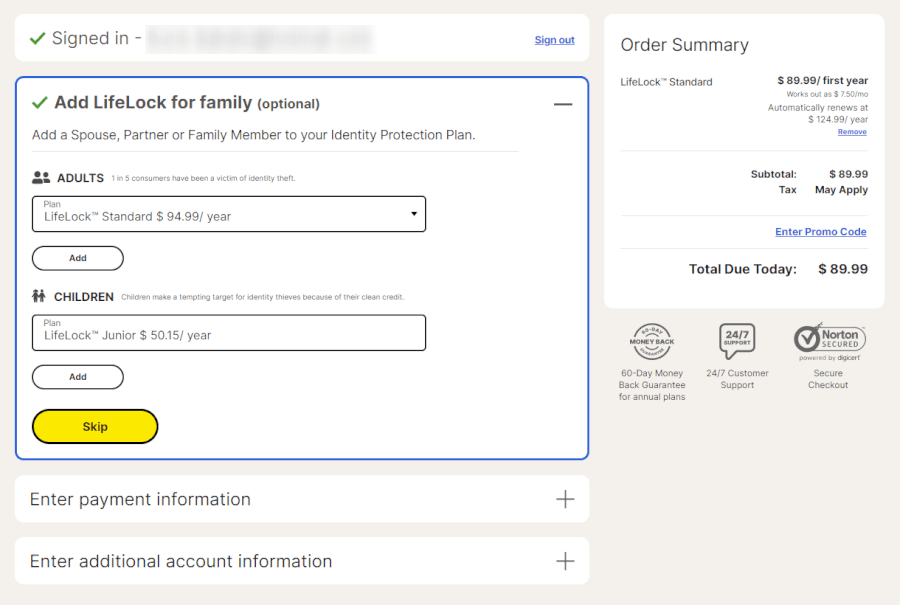
LifeLock, on the other hand, felt more traditional. You start by entering all your key details — name, SSN, address, phone number, and email — followed by payment information to finalize your subscription. From there, you can link financial and social media accounts for monitoring, though setting up multiple accounts can take a while.
Ultimately, if you like a quick and hassle-free setup, Coveron gets the edge since everything runs smoothly through one portal.
Dashboard and navigation
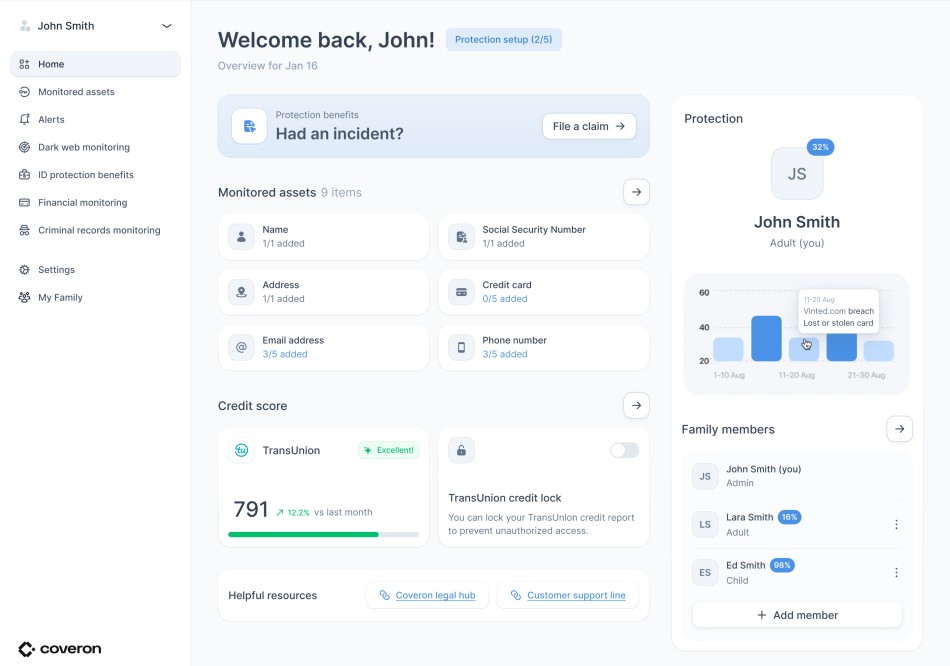
Coveron’s dashboard is sleek and minimalistic, following the same clean design we’ve seen in other Nord products. Categories like “Monitored Assets”, “Dark Web Monitoring”, and “Credit Monitoring” are clearly labeled, so you always know where to go. No endless clicking through submenus — everything is where you’d expect it to be.
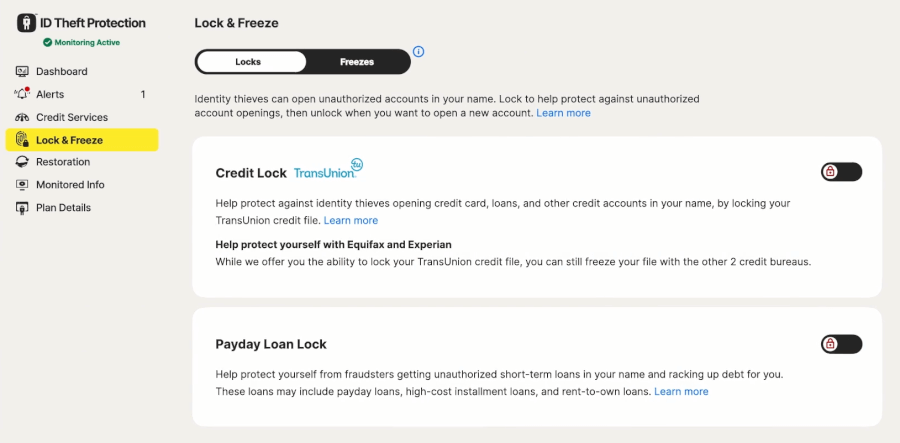
LifeLock’s interface is also well-organized, but with a bit more depth. You get quick access to alerts, credit scores, and monitored information, all neatly tucked under top-level tabs. Plus, clickable icons throughout the dashboard give extra insights, which is great if you’re new to identity protection.
Both dashboards let you manage alerts efficiently, but LifeLock’s app-based approach might feel more polished to users who prefer a dedicated mobile experience.
Mobile experience: Who wins on the go?
Coveron lacks a dedicated mobile app — you’ll need to log in via your browser. While the mobile site is well-optimized, having an actual app would make things a lot more convenient.
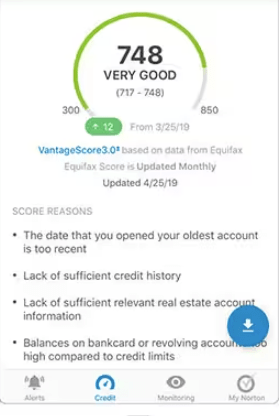
Meanwhile, LifeLock’s mobile app comes in handy for those who like to keep an eye on things while out and about. We tested the LifeLock Identity app, and it felt smooth and responsive, with instant alerts to keep you updated in real time.
Customer support and resources
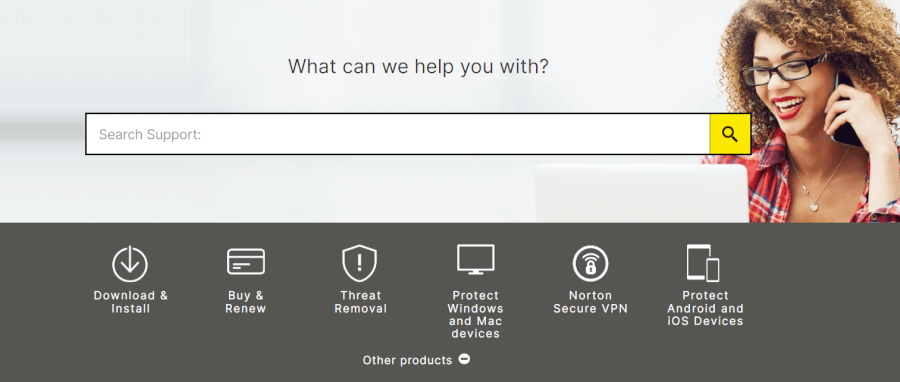
LifeLock boasts 24/7 customer support via phone, which is a big plus. We called in to check how helpful they are. The good news? We got through quickly, and the support agent was friendly and eager to assist. The not-so-good news? They seemed way more comfortable talking about Norton’s antivirus than LifeLock’s identity protection services. So, if you have a complex issue, you might get bounced around a bit before finding someone who really knows their stuff.
LifeLock also offers priority support for top-tier plan subscribers, but if you’re on a lower-tier plan, there’s no live chat or email option — just phone support. The help center is decent, with FAQs and articles, but we’ve seen better.
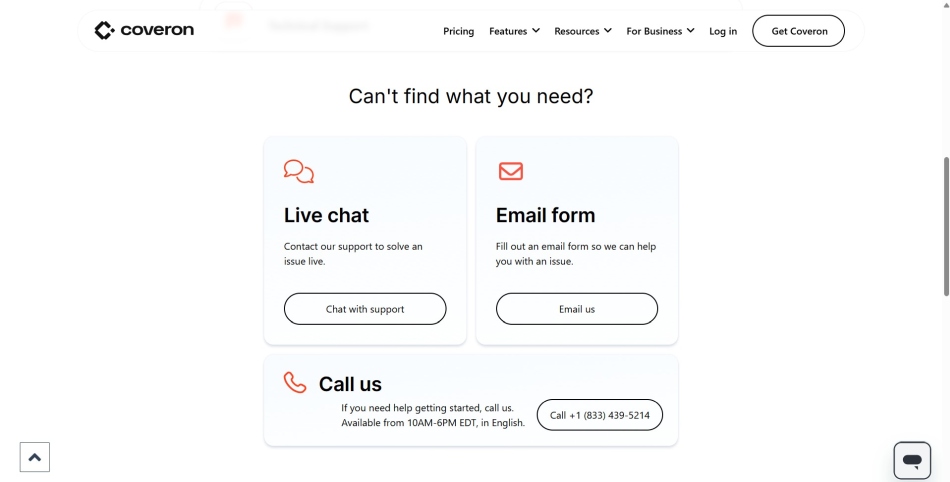
Coveron takes a well-rounded approach, offering both live chat and phone support alongside email. We tested their channels and found that if you need immediate help, you can get it quickly. Across the board, the team is professional, helpful, and straight to the point.
Where Coveron really stands out is in recovery assistance. If your identity gets stolen, you’re assigned a dedicated case manager who helps with everything — legal fees, lost wages, even mental health support (which, let’s be real, is a nice touch if you’re dealing with a nightmare situation).
The self-help resources? Not so great. The knowledge base is a bit thin, and we’d love to see more step-by-step guides and screenshots.
So, who makes identity protection easier?
If you love a clean, clutter-free interface, Coveron’s web-based design keeps things minimal and intuitive — perfect for those who prefer a no-fuss experience. But if you want dedicated apps, deeper customization, and a more mobile-friendly approach, LifeLock takes the lead.
Financial health: Credit reports and scores
Credit monitoring is essential, and LifeLock and Coveron now take a similar approach — but the value still depends on the plan you choose.
LifeLock offers three-bureau credit monitoring (Experian, Equifax, and TransUnion), daily credit score updates, and a TransUnion credit lock/unlock feature, but only on its higher-tier plans. Subscribers on lower-cost plans get reduced bureau coverage, meaning full visibility isn’t standard unless you upgrade, and additional freezes may still be needed for maximum control.
Coveron also provides 3-bureau credit monitoring, tracking Experian, Equifax, and TransUnion, as well as credit locking. And like LifeLock, it’s only included on its premium plan. It continues to offer real-time fraud alerts for credit changes, plus identity theft insurance that covers legal fees, recovery costs, and lost wages if fraud causes income disruption.
Security and privacy
Both LifeLock and Coveron bring solid defenses — but one goes the extra mile for privacy.
LifeLock locks down your data with two-factor authentication, encryption, and Norton’s security suite, which includes a VPN and malware protection. It’s a strong setup, but LifeLock has had its share of privacy concerns in the past, including data-sharing policies that might not sit well with privacy-focused users.
Coveron is all about privacy done right. With rock-solid AES-256 encryption, NordVPN for safe browsing, and Incogni helping you take control of your data, it’s got your back. Every plan includes malware breach alerts and dark web monitoring, so hackers and snoopers don’t stand a chance. Plus, Coveron plays by the rules with strict GDPR and CCPA compliance, meaning your data stays locked down and never sold or shared. Privacy, meet peace of mind.
Plans and pricing
If you’re weighing LifeLock against Coveron, it’s not just about cost — it’s about how much protection (and extra features) you get for the price.
LifeLock offers multiple plans, with prices increasing as you add features like three-bureau credit monitoring and higher identity theft insurance. The entry-level plan is affordable, but premium plans can get pricey — especially after the first-year discount disappears. Family plans are available, but they’re on the expensive side.
| LifeLock plans | Subscription length | Standard | Advantage | Ultimate Plus |
|---|---|---|---|---|
| Individual | 1-month | $11.99/month | $23.39/month | $34.99/month |
| 1-year | $7.50/month | $14.99/month | $19.99/month | |
| Family (two adults) | 1-month | $22.09/month | $45.99/month | $69.99/month |
| 1-year | $12.49/month | $22.09/month | $33.39/month | |
| Family with kids (two adults and up to five kids) | 1-month | $35.99/month | $57.99/month | $79.99/month |
| 1-year | $18.49/month | $29.99/month | $38.99/month |
Deal: Get 52% discount on LifeLock’s yearly plans >
Let’s check out Coveron’s plans and see how they hold up against LifeLock.
| Coveron plans | Scam Protection | Identity Theft Protection | Full Protection |
|---|---|---|---|
| 1-month | $12.49/month | $18.49/month | $30.49/month |
| 1-year | $5.99/month | $6.99/month | $10.99/month |
| 2-year | $4.74/month | $5.69/month | $9.49/month |
Deal: Get 66% off Coveron plans here >
Starting at $4.74 per month, Coveron isn’t just about identity theft protection — it’s part of the broader Nord Security ecosystem. Alongside dark web monitoring, credit freeze assistance, and criminal records alerts, you also get powerful extras like Threat Protection Pro that stops malware and phishing in their tracks. Plus, with NordVPN for online privacy and Incogni to tackle data brokers, it’s a full digital shield all wrapped into one. And with a 30-day money-back guarantee, testing the waters is risk-free.
LifeLock vs Coveron: Which one wins?
When deciding between LifeLock and Coveron for identity theft protection, several key factors come into play. Here’s a concise overview of how each service measures up in the critical areas we explored:
- Trustworthiness: Coveron — Built on NordVPN’s trusted tools, Coveron provides a powerful cybersecurity backbone to safeguard your digital privacy.
- Availability and insurance coverage: LifeLock — If you want the broadest coverage, go with LifeLock. For eligible states, Coveron offers a powerful, simpler option.
Core identity protection capabilities: Tie — For personalized support, Coveron’s case managers shine. But for extra financial monitoring and wallet protection, LifeLock takes the lead.
Additional digital defenses: Coveron — It edges ahead with its bundled security suite, including NordVPN and Incogni, providing a holistic approach to digital security and privacy without additional costs.
Ease of use and support: Coveron — Coveron offers a seamless setup and intuitive web-based interface, making it easy to navigate and manage your protection. Its efficient customer support ensures prompt assistance when needed.
Financial health: LifeLock — LifeLock’s premium plans provide extensive financial monitoring and alerts, safeguarding your credit and financial accounts with comprehensive coverage.
Security and privacy: Coveron — Coveron prioritizes privacy with AES-256 encryption and strict data protection policies, ensuring your personal information remains confidential and secure.
Plans and pricing: Tie — Both services offer competitive pricing structures, but Coveron’s bundled package delivers added value with its all-in-one security solution. LifeLock, however, provides more standalone plan options for identity theft protection.
Looking for rock-solid identity protection? Both LifeLock and Coveron deliver, but Coveron wins extra points for bundling privacy and security tools into one neat package. LifeLock still holds its ground with deep credit monitoring — perfect for those keeping a close eye on their finances.
When to pick Coveron
While Coveron was our overall winner, there are some situations where you might still choose to go with LifeLock:
| Your Top Priority | Why LifeLock Fits Better |
|---|---|
| Higher insurance limits and dedicated recovery specialists | Up to $3M coverage in top plans with expert restoration support |
| Family or child credit monitoring | Stronger household plans including minors |
| Broadest credit and alert depth | More established monitoring across bureaus |
In these circumstances, LifeLock could well be the best option for you.
Step-by-step recovery from stolen identity
Identity theft is a nightmare, but don’t worry — taking action right away can make all the difference. Follow these essential steps to get your life back on track:
Contact the companies and banks where the fraud occurred: Alert your bank, credit card issuers, and any other affected companies immediately to stop any further fraudulent transactions.
Place fraud alerts with the three credit bureaus: Notify Experian, Equifax, and TransUnion to place a fraud alert on your credit reports. This helps prevent further identity theft.
Ask for copies of your credit reports: Get your credit reports from all three bureaus to identify any unauthorized accounts or activities.
Place a security freeze on your credit report: Freeze your credit with the bureaus to stop new accounts from being opened in your name.
Reach out to debt collectors and block fraudulent information: Contact any debt collectors handling fraudulent accounts and ensure they do not report any fraudulent information on your credit.
Report identity theft to the FTC: File an official report with the Federal Trade Commission through IdentityTheft.gov to document the theft and begin the recovery process.
Reach out to local law enforcement: File a police report to help further investigate the crime and to provide credibility when dealing with credit bureaus or financial institutions.
Contact the IRS: If tax fraud is suspected, inform the IRS and file a report of identity theft.
Alert your insurance and medical providers: Notify your health insurance company and medical care providers about the identity theft to protect your medical records.
Reach out to your state’s DMV or licensing agency: Contact your local DMV or licensing agency to alert them about potential fraudulent activity with your driver’s license or other state-issued IDs.
Check your devices for malware: Make sure your computer, phone, and other devices are free from malware that could be used to steal your personal information.
Secure your online accounts: Change passwords on all your online accounts, and enable two-factor authentication wherever possible to secure your digital life.
Following these steps will arm you with the tools to tackle the aftermath of identity theft, restore your security, and protect against any future breaches.
ITP comparisons on CyberInsider:
- Aura vs LifeLock
- Aura vs Experian IdentityWorks
- IDShield vs Aura
- LifeLock vs IDShield
- Aura vs Incogni
- Aura vs IdentityIQ
- Aura vs IDShield
- Aura vs McAfee
- Aura vs Coveron
- Identity Guard vs Aura
- Identity Guard vs LifeLock
- Identity Guard vs Coveron
- LifeLock vs Experian Identity Works
LifeLock vs Coveron FAQ
Is there a better option than LifeLock?
LifeLock stands out as a solid pick for anyone wanting thorough credit monitoring and identity protection. But if you’re after a package that goes beyond identity, including privacy boosters like a VPN, malware protection, and Incogni’s data broker takedown, Coveron could be the smarter all-in-one choice.
Is Coveron worth it?
Absolutely, Coveron delivers strong identity protection, but it doesn’t stop there — it also bundles in digital security essentials like NordVPN, Threat Protection Pro, and Incogni for data privacy. It’s a great pick if you want a full-on security package, not just basic ID protection.
Does LifeLock provide better credit monitoring than Coveron?
No. LifeLock and Coveron now offer the same core credit monitoring coverage — 3-bureau tracking (Experian, Equifax, and TransUnion) is available only on their higher-tier plans. Both services also include a TransUnion credit lock/unlock feature on their top plan, making credit file control equally convenient at the premium level. In terms of bureau visibility and locking tools, neither service has a clear advantage.
Is LifeLock’s mobile app better than Coveron’s web-based platform?
LifeLock provides dedicated mobile apps for on-the-go monitoring, which some users may find more convenient. Coveron, on the other hand, offers a seamless web-based experience without the need for downloads, which appeals to those who prefer a streamlined setup.
Can I use LifeLock and Coveron together for enhanced protection?
While it’s technically possible to use both services, it might be an unnecessary overlap. Each service offers strong identity protection, but choosing one based on your specific needs — whether it’s comprehensive credit monitoring with LifeLock or a bundled security suite with Coveron — could be more cost-effective and efficient.

Leave a Reply