

Kaspersky detected an increase in Android devices with preinstalled malware this year, with the backdoor Keenadu found on more than 220,000 devices between January and October.
Kaspersky researchers report that several large organizations found Keenadu or another backdoor, Triada, on brand-new Android devices after installing the company’s security software.
The cases involved company-owned devices, which organizations often buy in bulk and configure centrally. Malicious code can enter the software supply chain through a firmware contractor or a compromised component that a manufacturer incorporates into its own software.
Two backdoors account for most detections
Kaspersky detected more than 2.5 times as many devices carrying malware in their firmware or system apps in October 2026 as it did in November 2025. Triada and Keenadu accounted for 88% of devices flagged for preinstalled malware from January through October 2026. The company detected Keenadu on more than 220,000 devices in that period across its broader telemetry.
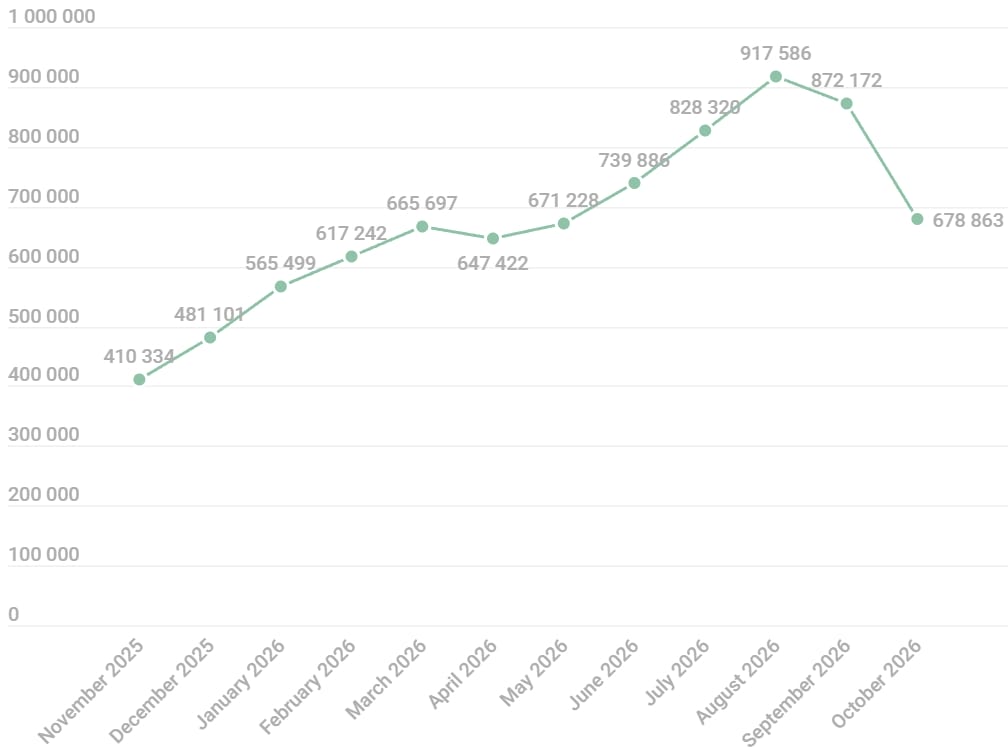
Kaspersky
Both backdoors can load additional code and run it inside other apps, including those installed after purchase. Known Triada modules can intercept calls and text messages, steal messaging and social media credentials, or divert cryptocurrency payments. Another module can turn the device into a proxy that relays someone else’s internet traffic.
Keenadu has mostly been observed generating fake ad clicks. Their operators’ servers told the versions Kaspersky analyzed to wait about two and a half months before activating. The researchers suspect the delay helps the malware escape notice while owners set up their devices and install the apps they use every day.
Earlier research also found Keenadu arriving through over-the-air firmware updates on some devices, leaving them open to infection after deployment.
What to do if your device is infected
A factory reset wipes your apps and personal data, but malware built into the device’s system software can survive it.
Kaspersky recommends running a security app to scan your devices, noting that such tools can flag the infection even when they can’t remove it.
If a scan flags preinstalled malware on a new phone or tablet, stop using it and contact the retailer to request a return or refund. If you’ve already signed in, use another device you trust to change the passwords for those accounts, starting with your email.



Leave a Reply