
Want to stream Crave from a beach in Mexico, access your Canadian bank account without triggering fraud alerts abroad, or just lock down your digital privacy? You need a Canadian IP address, and luckily, getting one is incredibly simple.
The simplest and safest way to change your virtual location to Canada is with a premium virtual private network (VPN). By routing your internet traffic through a local Canadian server, a VPN instantly tricks websites into thinking you are browsing from Toronto, Vancouver, or Montreal, even if you are halfway across the world.
To save you the guesswork, I personally tested the market’s top services for speed, streaming power, and reliability. If you want to grab a Canadian IP address in seconds, these are the absolute best providers for the job:
- NordVPN: The ultimate performance king. It features the largest Canadian server fleet for maximum speeds and unblocking reliability (with a 78% off coupon)
- Surfshark: A perfect budget-friendly pick. It offers blazing-fast 10 Gbps servers in Canada and lets you protect unlimited devices under one account.
- ExpressVPN: The most beginner-friendly choice. It connects instantly via its custom Lightway protocol and runs beautifully on any device.
- Proton VPN: The privacy champion. Operating under strict Swiss laws, it offers military-grade security nodes and a neat UI.
What is a Canadian IP address?
Think of an IP (Internet Protocol) address as your device’s digital home address. It is a unique string of numbers assigned to you by your internet service provider (ISP). The catch? This digital address is permanently tied to your real-world geographic location and your identity, meaning advertisers, ISPs, and network snoopers can easily track your online footprint.
A VPN works quietly in the background to protect your online activity. Here is how it happens in three easy steps:
- The secure tunnel: The moment you click connect, the VPN builds an encrypted, private digital tunnel between your device and a remote server in Canada.
- The data scramble: All your personal info, banking data, and search histories are heavily scrambled, making them unreadable to your ISP or local network admins.
- The location swap: The VPN hides your true location and routes your internet traffic through a server with a Canadian IP address.
In seconds, the internet sees you as browsing from Toronto or Vancouver, giving you more privacy and access to region-restricted content.
3 ways to get a Canadian IP address
Using a premium VPN is the simplest way to get a virtual Canadian location, but you can also use proxies or the Tor Browser. The catch? Some methods offer far better privacy protection than others.
Quick comparison: VPN vs proxy vs Tor
| Premium VPN | Proxy server | Tor Browser | |
| Security and encryption | ✔️(military-grade AES-256) | ❌ (data is unencrypted) | ✔️(multi-layered routing) |
| Connection speed | Ultra-fast up to 10 Gbps) | Moderate to slow | Extremely slow (expect heavy lag) |
| Setup difficulty | Super simple (1-click app) | Complex (manual configuration) | Hard (requires editing text files) |
| Streaming and torrenting | Excellent (bypasses geo-blocks) | Poor (constantly blocked) | Terrible (unusable for video) |
| Device compatibility | All devices (iOS, Android, PC) | Browser-specific or manual OS | Desktop and Android only |
Let’s dive into each method to uncover their biggest strengths and weaknesses.
1. Using a VPN (the best all-around choice)
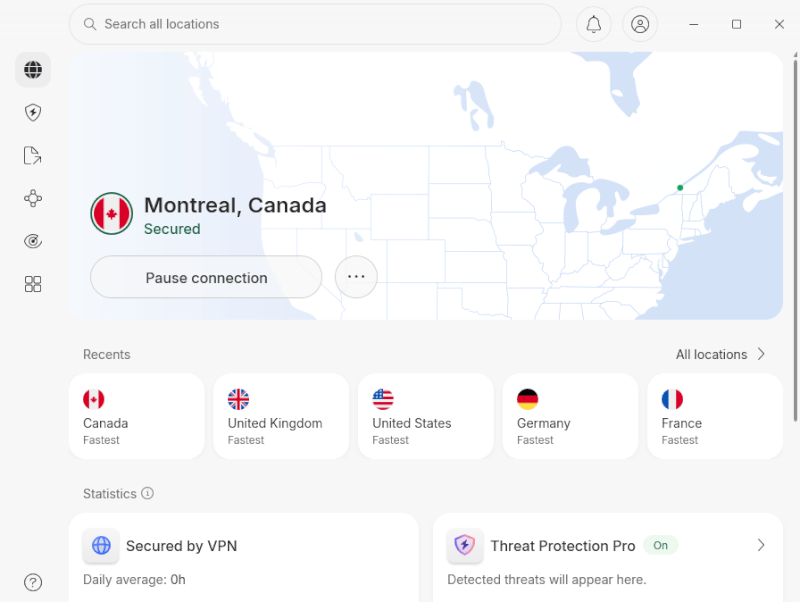
A VPN is hands-down the fastest, safest, and most beginner-friendly way to grab a Canadian IP address. You don’t need any technical skills. You just download an app, click on a Canadian city, and let the software handle the rest.
The setup? Simply open your chosen VPN app, type “Canada” into the search bar, and hit connect. It takes less than five seconds.
The perks? VPNs provide high-speed, military-grade encryption that completely hides your online activities from your ISP and hackers. Premium services like NordVPN and Surfshark offer native apps for Windows, macOS, Linux, Android, and iOS, allowing you to protect every device you own.
This is the only method that offers the massive bandwidth required for high-speed torrenting or streaming geo-blocked content. If entertainment is your main goal, be sure to browse my list of the best VPNs for streaming.
2. Setting up a proxy server
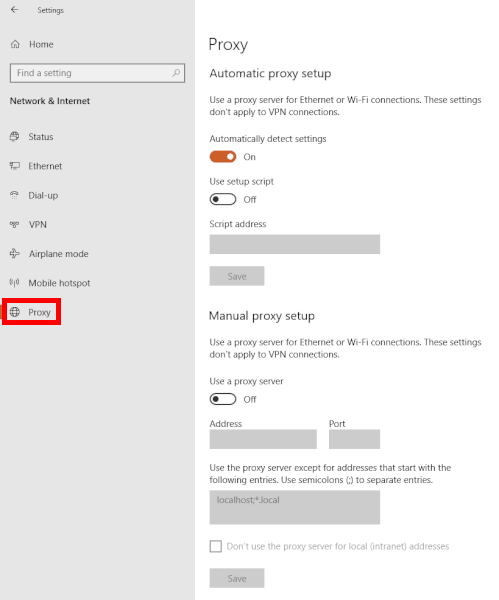
A proxy server acts as a middleman between your device and the internet. It catches your traffic, swaps your real location with a Canadian IP address, and sends you on your way.
The setup? Setting up a proxy is a manual chore. On Google Chrome, you have to dig into Settings > System > Open your computer’s proxy settings. This opens up your operating system’s network configuration panel, where you must manually paste in a Canadian proxy IP address and port number found online.
The hidden risk? Proxies do not encrypt your traffic. While a proxy changes your visible IP address in a pinch, your data flows over the web completely naked. Your ISP can still track every site you visit, and you are left wide open to data identity theft and malware injection.
Fine for changing your location for a quick web search, but completely unreliable and dangerous for banking, streaming, or logging into personal accounts.
3. The Tor Browser
The Tor network is an open-source privacy tool that achieves extreme anonymity by bouncing your internet traffic through a decentralized chain of volunteer-run nodes scattered across the globe.
The setup? To get a specific Canadian IP address, downloading the Tor Browser isn’t enough. You have to manually configure it. You must locate your system’s core “torrc” file inside the software folder, open it with a text editor, and manually input specific command lines to force the browser to use a Canadian “Exit Node.”
The hidden risk? Because your data is being encrypted and bounced across multiple global servers like a pinball machine, Tor will absolutely destroy your internet speeds.
Tor is a brilliant tool for political activists and whistleblowers hiding from oppressive government censorship. However, its crawling speeds make it completely unusable for gaming, downloading files, or watching video streams.
The best VPNs to snag a Canadian IP address
The VPN market is crowded, but only a handful of providers truly deliver strong speeds, privacy, and dependable Canadian connections.
After hands-on testing, here are the services that impressed me the most and why they stood out.
1. NordVPN: The best overall VPN for Canada
For speed, privacy, and overall performance, NordVPN remains one of the strongest options available. My latest Canada tests confirmed why it is so highly rated.
| Website | NordVPN.com |
| Based in | Panama |
| Logs | No logs (audited) |
| Price | $3.49/mo. |
| Support | 24/7 live chat |
| Refund | 30 days |
| Deal | 78% Off Coupon |
NordVPN boasts a massive fleet of over 9,400 diskless, RAM-only servers worldwide, including massive 10 Gbps bandwidth channels across three major Canadian hubs: Toronto, Vancouver, and Montreal.
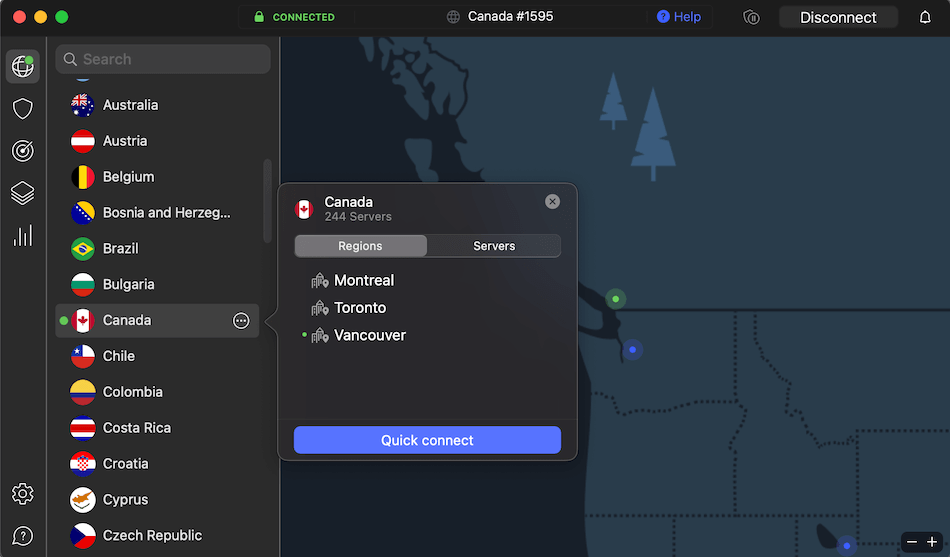
Powered by their custom NordLynx protocol (built on top of WireGuard), NordVPN is insanely fast. When I connected to their Montreal infrastructure from my lab, my baseline 1,000 Mbps line barely took a hit:
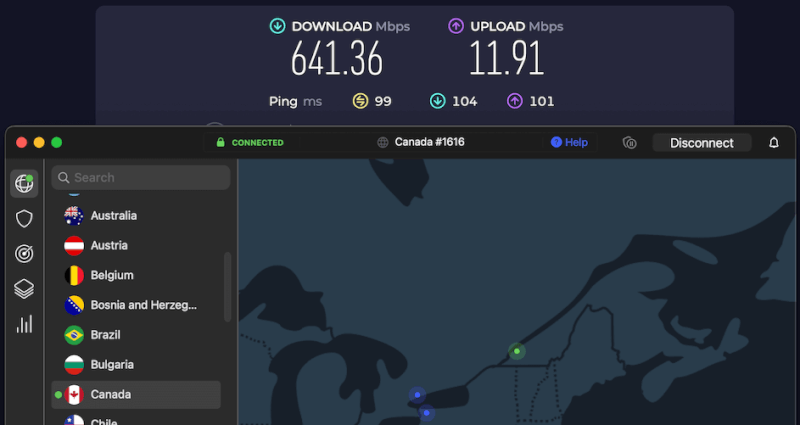
With speeds consistently clearing the upper hundreds of Mbps, it can handle competitive gaming, P2P torrenting, and unblocking Netflix Canada simultaneously without a single drop of lag.
Advanced security tech you’ll actually use
NordVPN doesn’t just swap your IP address; it wraps your connection in a fortress of advanced cybersecurity features:
- Post-quantum encryption: NordVPN has officially rolled out post-quantum secure encryption over its NordLynx protocol to protect your data against advanced, future decryption threats.
- Double VPN and Onion over VPN: Route your data through two separate encrypted servers or plug straight into the anonymous Tor network for maximum privacy.
- Obfuscated servers: Disguise your VPN traffic as normal web browsing, making it the perfect tool to smash through strict workplace firewalls or network censorship.
- Threat Protection Pro: An AI-powered tool built directly into the app that vaporizes annoying website ads, blocks malicious tracking scripts, and quarantines malware downloads before they hit your hard drive.
- SmartPlay tech: Integrated directly into their servers, this feature quietly bypasses streaming geo-blocks in the background so you can watch Crave and CBC Gem effortlessly.
- App availability: Simple, gorgeous apps are available for Windows, macOS, Linux, iOS, and Android, alongside lightweight proxy extensions for Chrome, Edge, and Firefox.
+ Pros
- User-friendly and reliable apps
- Double VPN and Onion Over VPN servers
- Passed numerous 3rd-party audits
- Strong encryption standards with full support for WireGuard
- Works with Netflix and many streaming sites
- Threat Protection feature to block ads, trackers, and malware
- Professional 24/7 live chat support
- Consistently fast speeds
- Dedicated RAM-only servers with 10 Gbps bandwidth channels
- Post-quantum encryption
– Cons
- Best discounts only available with 2-year plans
Looking for a discount? This NordVPN coupon can help lower the price significantly:
NordVPN’s Black Friday Deal is Live:
Get 78% Off NordVPN with the coupon below + 3 months extra:
(Coupon is applied automatically; 30-day money-back guarantee.)
2. Surfshark: The budget powerhouse
If you want a premium tool to swap your location without paying premium prices, Surfshark is an absolute steal. It is widely famous for its wallet-friendly price tag, but it packs the punch of a service double its cost.
| Website | Surfshark.com |
| Based in | The Netherlands |
| Logs | No logs (audited) |
| Price | $2.49/mo. |
| Support | 24/7 live chat |
| Refund | 30 days |
| Deal | 87% Off Coupon |
Don’t let the low price fool you, Surfshark doesn’t make a single sacrifice under the hood. It features a robust network of over 4,500 RAM-only servers globally, with high-speed 10 Gbps hubs across Montreal, Toronto, and Vancouver.
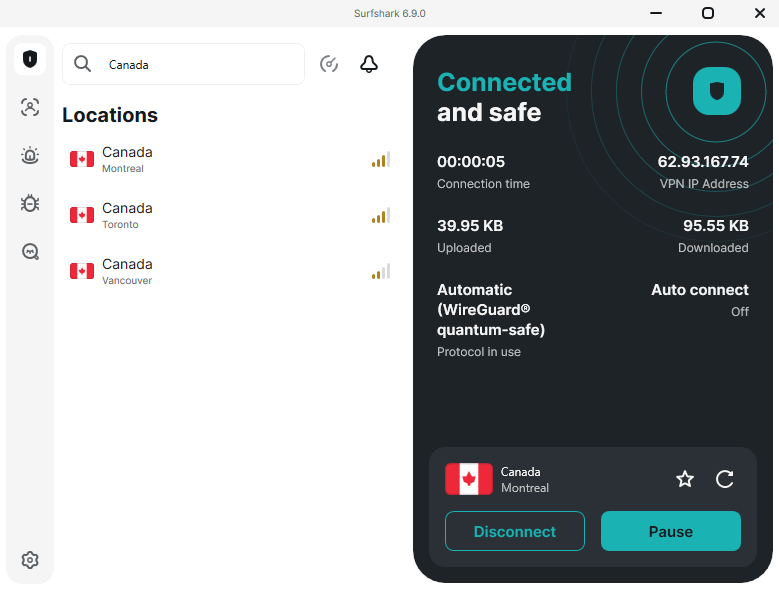
Its biggest advantage is support for unlimited simultaneous connections. While most providers cap you at 5 to 10 devices, a single Surfshark account lets you change the IP address on every smartphone, laptop, tablet, and smart TV in your household at the same time.
When running my long-distance performance tests using the WireGuard protocol, Surfshark proved it can easily hold its own. It typically tracks just a minor 30 to 60 Mbps behind NordVPN, which is an incredibly impressive feat considering NordVPN is the fastest service on earth.
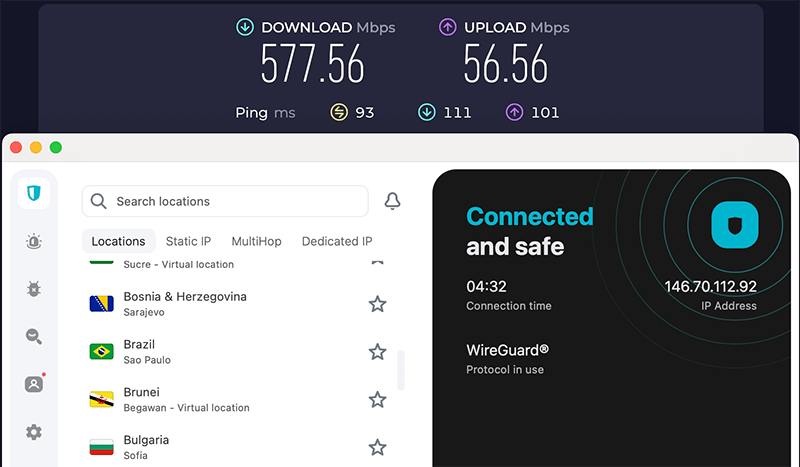
A download speed hovering around 577 Mbps in Montreal means you can stream global content, play games, and download files simultaneously without an ounce of lag.
A stacked dashboard of privacy tools
Surfshark comes out of the box with a beautiful, user-friendly app interface and a massive arsenal of privacy features:
- Dynamic MultiHop: A customizable double VPN that lets you manually select your entry and exit servers across different countries for layered data encryption.
- Camouflage mode: Stealth obfuscation that disguises your VPN packets as normal internet traffic to slip past aggressive network blocks.
- CleanWeb: A built-in ad blocker that vaporizes annoying browser pop-ups, tracking cookies, and malicious websites before they load.
- Bypasser (split tunneling): Gives you the freedom to choose exactly which applications use the local Canadian IP address and which run over your regular connection.
- Everlink technology: A smart, self-healing server system that prevents momentary disconnections during automated backend network maintenance.
If you want premium VPN protection for less, this Surfshark coupon is worth a look:
Surfshark VPN Coupon:
Get 87% off Surfshark VPN plus an additional 3 months extra with the coupon below:
(Coupon is applied automatically; 30-day money-back guarantee)
3. ExpressVPN: The polished security powerhouse
ExpressVPN stands out for its long-running reputation, clean privacy record, and easy-to-use apps that work smoothly right away.
| Website | ExpressVPN.com |
| Based in | British Virgin Islands |
| Logs | No logs (audited) |
| Price | $2.99/mo. |
| Support | 24/7 live chat |
| Refund | 30 days |
| Deal | 80% Off Coupon |
With over 3,000 servers worldwide, ExpressVPN offers broad global coverage alongside multiple Canadian locations. Its TrustedServer infrastructure runs entirely on RAM-only systems for added privacy.
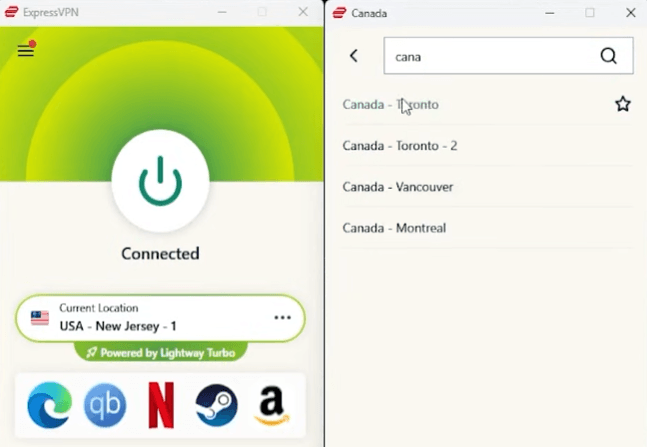
The dashboard comes stacked with everyday essentials: Network Lock (an airtight Kill Switch), automatic server-side obfuscation for stealth browsing, split tunneling, and Threat Manager to wipe out tracking scripts and malicious ads.
Custom protocols and future-proof encryption
Instead of just relying on off-the-shelf software, ExpressVPN spent years developing its own open-source connection protocol called Lightway. It connects to Canadian nodes almost instantly and doesn’t drain your device’s battery.
They have also introduced massive, cutting-edge upgrades to protect your data against advanced cyber threats:
- Post-quantum Lightway protection: Enabled by default, this hybrid setup wraps your data in the latest NIST-approved ML-KEM algorithms. This stops hackers from archiving your encrypted traffic today to decrypt it later when quantum computers mature.
- Next-gen WireGuard integration: They completely rebuilt the industry-standard WireGuard protocol from scratch. Their custom blueprint introduces ephemeral session keys, short-lived tokens, and dynamic internal IPs to completely fix WireGuard’s traditional privacy gaps.
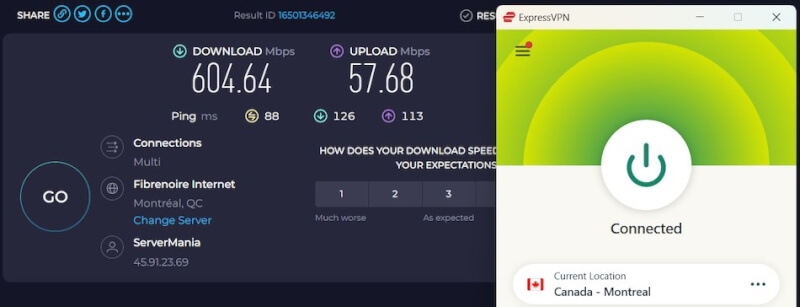
While it generally ran slightly slower than NordVPN or Surfshark during my long-distance testing, ExpressVPN still packs plenty of horsepower to handle 4K streaming, stable torrent downloads, and online gaming.
+ Pros
- User-friendly and secure apps for virtually any operating system or device
- Proprietary Lightway VPN protocol for advanced performance
- Post-quantum version of the WireGuard protocol for enhanced privacy and security
- Split tunneling feature (for macOS, Windows, and routers)
- Works with Netflix and most streaming services
- 24/7 live chat support
- Passed independent third-party audits for security and no-logs
- Extensive network of diskless servers
– Cons
- Fewer features than other leading VPNs
Ready to test the veteran? Grab our exclusive ExpressVPN coupon today:
ExpressVPN Coupon:
Sign up for the 2-year plan and get 4 months added to your subscription for free.
(Coupon is applied automatically)
4. Proton VPN: The hardcore Swiss privacy shield
Developed by the creators of Proton Mail, Proton VPN focuses on strong privacy, open-source principles, and user control.
| Website | ProtonVPN.com |
| Based in | Switzerland |
| Logs | No logs (audited) |
| Price | $2.49/mo. |
| Support | Email + Chat |
| Refund | 30 days |
| Deal | 75% Off Coupon |
Proton VPN is headquartered in Switzerland, a country famous for staying completely outside the surveillance reaches of the US, EU, and 14-Eyes intelligence alliances. Unlike almost every other provider on the market, 100% of Proton VPN’s apps are completely open-source. This means anyone can publicly view their code to verify that your data is never being intercepted, tracked, or logged.
Historically, privacy-first VPNs were notoriously sluggish. However, Proton VPN recently underwent a massive server infrastructure overhaul, and my speed tests on their Ontario network completely blew me away.
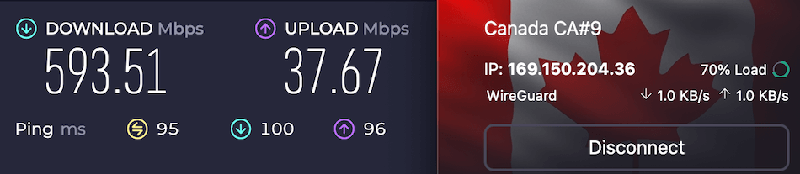
Hitting a staggering 593 Mbps means Proton VPN sat just a single, measly megabit behind Surfshark, and it completely obliterated ExpressVPN’s Toronto score by over 130 Mbps. If you are located in Central Canada or Ontario, this performance proves that Proton’s high-speed network is the real deal for 4K streaming and zero-lag gaming.
Advanced security you can trust
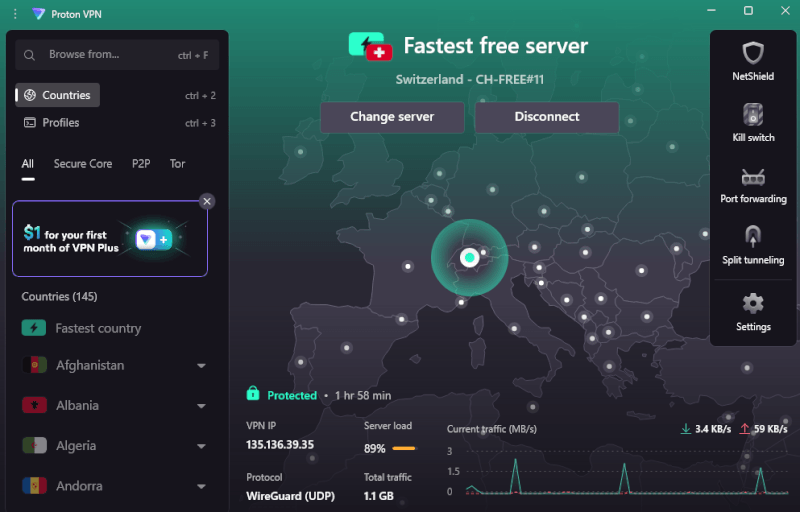
The clean, dark-mode app dashboard features a highly organized, tabbed layout that gives you instant access to extreme security tools:
- Secure Core servers: This unique feature bounces your internet traffic through high-security underground military bunkers in Switzerland or Iceland before routing it to Canada. If a hacker tries to monitor the Canadian server, they only see a trail leading back to an impenetrable Swiss bunker.
- Tor over VPN: Easily connect straight to the anonymous Tor network with a single click, completely eliminating the need to download or configure separate browsers.
- NetShield AdBlocker: A server-side tool that intercepts and vaporizes tracking scripts, malicious domains, and intrusive website advertisements before they ever load onto your screen.
- Leakproof infrastructure: During my intensive lab testing, the built-in Kill Switch held up flawlessly, revealing absolutely zero IPv6, WebRTC, or DNS leaks.
+ Pros
- Swiss-based privacy
- Open-source apps audited by independent security firms
- Secure Core servers route traffic through hardened nodes
- VPN Accelerator boosts long-distance US speeds
- Post-quantum encryption in the works
- Subscription plans bundle with Proton Mail, Proton Drive, Proton Sheets, and Proton Pass
- Linux CLI and refreshed GUI
- Smart TV and Apple TV apps now support NetShield
– Cons
- No 24/7 live chat
- Advanced tools have a steeper learning curve
Ready to lock down your data behind Swiss walls? Claim your Proton VPN discount today to secure premium protection:
Proton VPN Black Friday Deal is Live:
Get 75% Off Proton VPN (drops the price to only $2.49/month) with the coupon below:
(Coupon is applied automatically; 30-day money-back guarantee)
Troubleshooting your Canadian IP connection
Even the best VPN services are not perfect all the time. With providers like NordVPN or ExpressVPN, you may still occasionally encounter connection problems or streaming errors.
Before you close your laptop in frustration, let’s look at the absolute fastest ways to fix the most common VPN glitches in seconds.
1. My connection is getting blocked or rejected
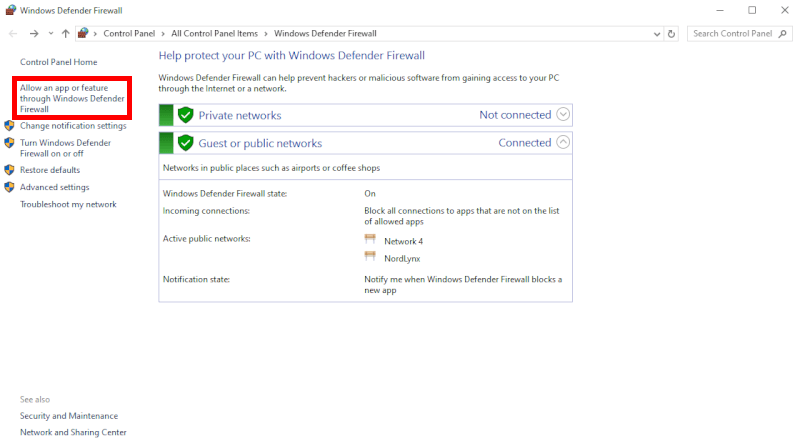
If your app keeps spinning or your computer flat-out rejects the VPN tunnel, your operating system’s built-in firewall is likely treating the software like an intruder:
- The Mac whitelist fix: Go to System Settings > Network > Firewall > Options and make sure your VPN app is toggled to “Allow incoming connections.”
- The quick fix: To quickly test this, temporarily disable your firewall. If the VPN instantly connects, you just need to whitelist it.
- The Windows whitelist fix: Open your Windows search box and type “Windows Defender Firewall.” Click on “Allow an app or feature through Windows Defender Firewall.” Hit “Change Settings,” click “Allow another app,” and pick your VPN from the list. Click save, and you are good to go!
2. Streaming sites are detecting my Canadian IP address
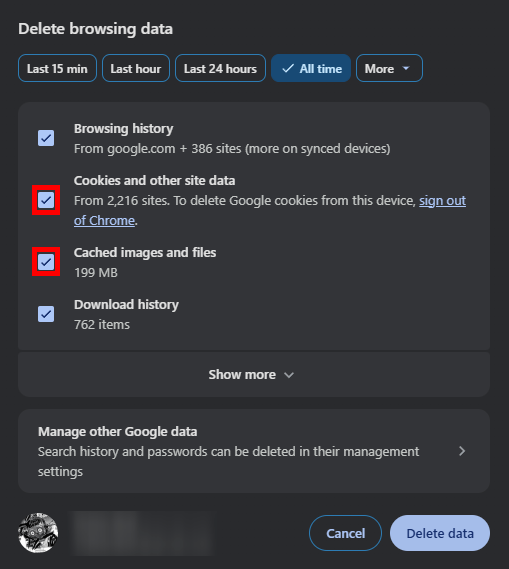
Streaming platforms like Netflix, Crave, and Disney+ aggressively scan for VPNs and will occasionally lock you out with a “Proxy Error” screen. This happens because hundreds of people might be using the exact same server IP as you, triggering a fraud alert on the streaming platform’s end.
- The quick fix: Do not give up! Simply open your VPN app, pull up the server list, and disconnect and reconnect to a different Canadian server. This hands you a fresh, unblocked IP address.
- Clear your clues: If that fails, clear your web browser’s cookies and cache. Streaming sites love to hide trackers in your browser data that reveal your true location, completely contradicting your active VPN tunnel.
3. My internet speeds are suddenly crawling
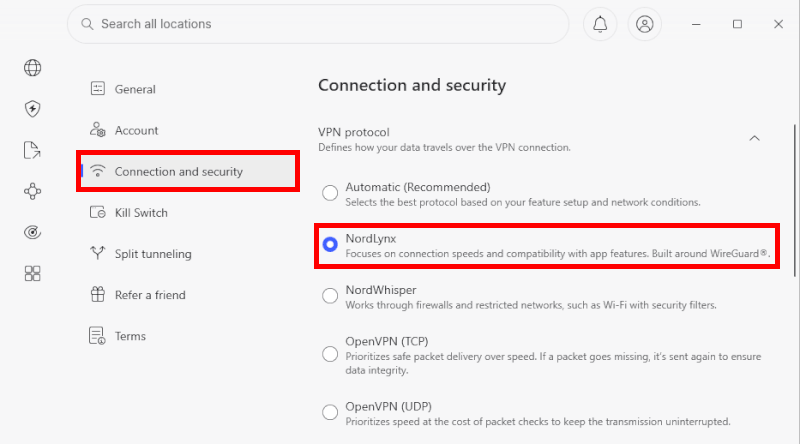
While every premium VPN causes a tiny speed drop due to background encryption, it should never turn your high-speed fiber line into a sluggish dial-up connection.
- The Protocol swap: Open your VPN’s settings menu and look for the connection protocol. If it is set to OpenVPN or “Automatic,” manually force it to use WireGuard (or NordLynx on NordVPN). This instantly triggers a massive, lightweight speed boost.
- Kick off the leeches: Disconnect any idle devices or close heavy background tabs (like open torrent clients or automatic software updates) that are quietly hogging your local bandwidth.
- Move closer: Distance kills speeds. If you are physically on the East Coast, connect to Montreal or Toronto. If you are out West, click on Vancouver. Shorter data travel times equal instantly snappier page loads.
Are VPNs safe for Canadians?
Using a VPN is a smart move for privacy, though choosing the right provider matters just as much. Unfortunately, some low-quality VPNs can create more privacy risks than they solve.
When it comes to staying safe online, here are the most important privacy factors I pay attention to:
- The no-logs rule is everything: If a provider does not use a strictly audited no-logs framework, avoid it. Shady VPNs (especially “free” mobile apps) frequently log your browsing history, track your location, and sell your private data to the highest-bidding advertising network. Stick to verified services like NordVPN or Surfshark that have passed real independent audits.
- Never skip the kill switch: If your local Wi-Fi blinks or drops out for even a millisecond, your VPN tunnel snaps. Without an active VPN kill switch, your device instantly defaults back to your public network, immediately exposing your real IP address to your ISP and any websites you are visiting. Always verify that this feature is toggled on inside your app settings.
A VPN is not an antivirus: While encryption makes your traffic completely invisible to prying eyes, it cannot stop you from downloading a malicious file or falling for a phishing email. A VPN hides your digital identity, but you still need to practice basic web vigilance and avoid clicking on sketchy, unverified links.
Is changing your IP to Canada legal?
In most parts of the world, including Canada and the US, using a VPN is completely legal. Millions of people rely on VPNs daily for privacy, encryption, and safer browsing.
However, there are a few important nuances you should keep in mind to stay on the right side of the law:
- Your VPN isn’t a free pass: it hides your traffic, but it doesn’t change the law. Anything illegal without a VPN is still illegal on a Canadian server too.
- Streaming fine print matters: using a VPN to unlock Netflix, Crave, or Disney+ libraries isn’t a crime, but it can violate their Terms of Service.
- Worst-case scenario? Most streaming sites block playback with a proxy error message. In rare cases, repeated use could risk account restrictions.
- Location still matters: in countries with strict internet rules like China, Russia, Iran, or the UAE, VPN use may be restricted or banned, so setup needs extra caution.
Can I use a free VPN to get a Canadian IP address?
It is incredibly tempting to download a completely free app from the app store, but when a cybersecurity service is free, you are usually the product.
Here is why cheap or free-tier apps are highly risky:
- Severely throttled speeds: Free networks deliberately choke your bandwidth, making them completely unusable for data-heavy 4K video streaming or online gaming.
- Data caps: Most free options limit you to a tiny 2 GB to 5 GB of data per month, which disappears after watching just one or two movies.
- Shady data logging: To pay for their server maintenance, many sketchy free providers actively log your browsing history, track your location, and sell your personal information to third-party advertising companies.
Rather than rolling the dice on a sketchy free app, you’re better off checking out premium free trial VPNs to test services like Surfshark and NordVPN completely risk-free.
How to get a Canadian IP address in 60 seconds
Getting a virtual Canadian footprint is incredibly straightforward. Follow this quick blueprint to swap your location on any device:
- Pick a trusted VPN: Sign up for a verified provider with high-speed Canadian infrastructure.
- Download the software: Install the native app onto your device (Windows, Mac, iOS, Android, or Firestick).
- Log in: Launch the application and enter your account credentials.
- Choose a Canadian city: Type “Canada” into the server search bar. Manually select Toronto, Vancouver, or Montreal to grab the best local speeds.
- Hit connect: Wait two seconds for the status bar to turn green. Your real digital identity is now fully shielded behind a fresh Canadian IP address.
Grab that Canadian IP and start exploring
At the end of the day, snagging a Canadian IP address opens up an awesome world of digital possibilities. Whether you are traveling abroad and want to stream your favorite home turf shows on Crave, protect your online banking sessions, or hunt for better retail deals, changing your virtual location is an absolute game-changer.
While you can technically cosplay as a Canadian online using proxies or Tor, a premium VPN is hands-down the best tool for the job. It doesn’t just hand you a shiny new digital identity; it wraps your entire connection in a fortress of military-grade encryption to keep you completely safe from snooping ISPs and hackers.
If you want the absolute best performance, NordVPN is the undisputed king of Canadian speeds. That said, you will be in excellent hands if you opt for the budget-friendly unlimited power of Surfshark or the bulletproof simplicity of ExpressVPN. Every provider brings something unique to the table, so pick the one that matches your vibe, activate a risk-free 30-day trial, and enjoy your new borderless internet freedom.
How to get a Canadian IP address FAQs
Can I get a Canadian IP address for free?
Yes, you can get a Canadian IP address for free by leveraging the 30-day money-back guarantees of premium providers like Surfshark and NordVPN. While completely free no-name apps exist on app stores, they usually throttle your speeds, cap your data, or secretly log and sell your browsing history to advertisers. Using a premium refund window gives you unlimited speeds and airtight security, completely risk-free.
Will a Canadian IP address let me watch Crave and CBC Gem abroad?
Yes, a Canadian IP address will instantly unlock Crave, CBC Gem, STACKTV, and CTV from anywhere in the world. Streaming platforms use geo-blocking technology to restrict their content to viewers physically located within Canada. The second you connect to a VPN server in Toronto, Montreal, or Vancouver, you fool these platforms into thinking you are browsing from home, giving you instant streaming access.
Is it legal to change my IP address to Canada?
Yes, it is 100% legal to change your IP address to a Canadian one using a VPN. Millions of people use VPNs every day to secure their remote work data, protect their public Wi-Fi connections, and maintain digital privacy. Just keep in mind that while changing your virtual location is legal, doing things that are already against the law (like downloading copyrighted, pirated software) remains illegal.
How do I know if my IP address actually changed to Canada?
You can verify your location change instantly by visiting a free IP tracking website like whatismyip.com or iplocation.net. Before turning on your VPN, these sites will display your actual city and country. Once you connect to a Canadian VPN server, refresh the page. If the tool displays a Canadian city like Toronto or Vancouver, your new digital identity is successfully locked in.
Can I use a Canadian IP address on my smartphone?
Yes, you can easily use a Canadian IP address on both iOS and Android smartphones. Premium VPN providers like NordVPN, Surfshark, and ExpressVPN offer dedicated, lightweight mobile apps directly in the Apple App Store and Google Play Store. You just download the app, log in, and tap a Canadian server to secure your cellular or mobile Wi-Fi data on the go.

Leave a Reply