

A malicious Windows installer masquerading as LetsVPN deploys a remote access trojan (RAT) alongside the legitimate VPN software.
The malware, dubbed GoodPersonRAT, grants attackers full control over infected systems and employs multiple stealth techniques to evade detection.
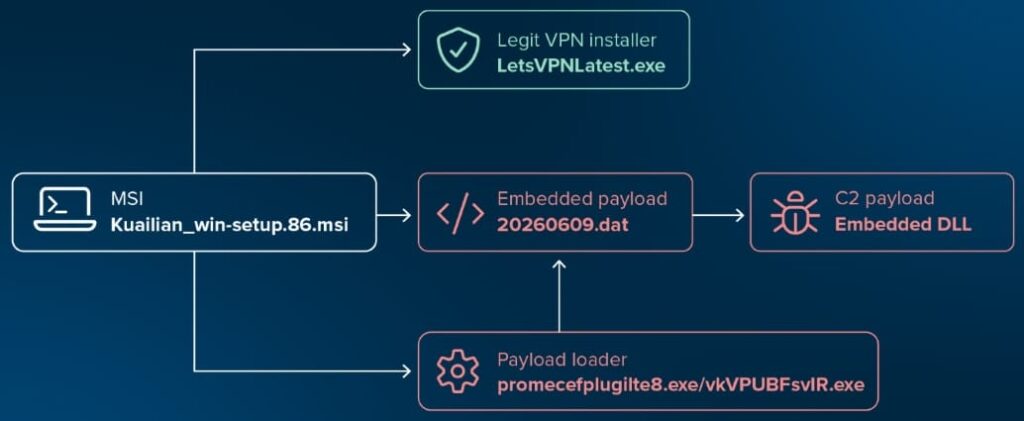
The campaign was uncovered by ThreatLocker Threat Intelligence researchers William Pires and John Moutos, who identified the trojanized installer being distributed in the wild. Their analysis found that the malicious MSI installs the authentic, signed LetsVPNLatest.exe application after first deploying the malware, making the installation appear legitimate to unsuspecting users.
LetsVPN is a widely used VPN service that helps users bypass China's Great Firewall, making it an attractive lure for threat actors targeting people seeking unrestricted internet access. This is not the first time the VPN has been abused for malware distribution. Last year, Rapid7 reported a separate campaign in which trojanized LetsVPN installers delivered the Winos v4.0 malware through a different multi-stage, memory-resident infection chain.
The malicious package, Kuailian_win-setup.86.msi, contains three embedded files: the legitimate LetsVPN installer, a loader named promecefplugilte8.exe, and an encrypted payload stored as 20260609.dat. The loader decrypts and reflectively loads the final payload directly into memory, leaving little evidence on disk and making the malware more difficult to detect.
ThreatLocker
ThreatLocker named the malware GoodPersonRAT after one of its command-and-control domains, nishihaoren8[.]top, with “nishihaoren” translating to “you are a good person” in Chinese. The RAT contains dozens of hardcoded command-and-control server configurations and can dynamically switch between them using local configuration files.
Once connected to its command-and-control server, GoodPersonRAT provides attackers with an extensive set of capabilities, including remote desktop control, file upload and download, command execution through cmd.exe, SOCKS5 and HTTP proxying, browser manipulation, keylogging, clipboard monitoring, and automatic malware updates.
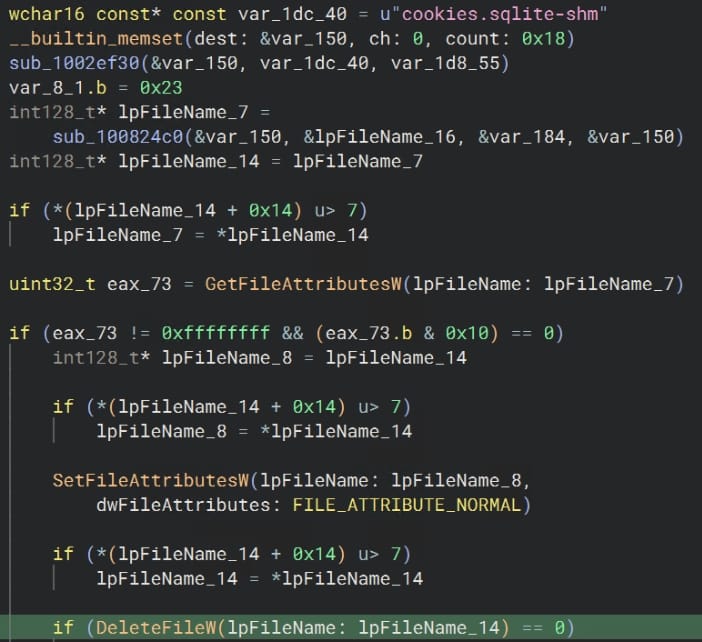
One of the malware's more unusual features is its handling of web browsers. Instead of immediately stealing stored credentials, it clears cookies and login sessions, forcing victims to re-enter usernames and passwords, which are then captured by the built-in keylogger. The malware also continuously monitors clipboard contents and exfiltrates newly captured data to the attacker.
ThreatLocker
Telegram Desktop users are specifically targeted as well. The RAT archives Telegram's tdata directory, which contains account session information, and modifies the application's proxy settings to route traffic through attacker-controlled infrastructure. It also patches telegram.exe to suppress notifications that would normally alert users when proxy settings change.
To maintain long-term access, the malware establishes persistence using Windows services and scheduled tasks. It also profiles installed security software and, when possible, weakens Microsoft Defender by creating directory exclusions and disabling cloud-based protection features through PowerShell commands.
ThreatLocker notes that while the bundled LetsVPN installer is legitimate and digitally signed, the surrounding MSI package is unsigned and contains the malicious loader and payload. Users should download LetsVPN and other software only from official sources, verify digital signatures before executing installers, and avoid software packages obtained from third-party websites or file-sharing services.



Leave a Reply