
DuckDuckGo has added built-in YouTube ad blocking to its privacy-focused browser, allowing users to watch most YouTube videos without pre-roll or mid-roll advertisements.
The feature is now enabled by default on Windows, macOS, and iPhone, while Android users can enable it manually ahead of a broader rollout.
The feature was announced by DuckDuckGo as the latest addition to the browser’s privacy toolkit, which already includes tracker blocking, cookie consent management, and Global Privacy Control (GPC) support.
Founded in 2008, DuckDuckGo is best known for its privacy-focused search engine and browser, which are designed to reduce online tracking without requiring extensive user configuration. The company has gradually expanded its browser with built-in privacy features instead of relying on third-party extensions.
YouTube Ad Blocking works on the YouTube website within the DuckDuckGo browser, removing most ads that appear before and during videos while preserving the standard YouTube experience, including viewing history, playlists, and resume playback.
To detect and block ads, DuckDuckGo uses community-maintained filter lists from the open-source uBlock Origin project, supplemented with its own rules to improve compatibility. As with other filter-based ad blockers, the company notes that videos may take slightly longer to begin playing, but advertisements should no longer interrupt playback once the video starts.
DuckDuckGo also emphasized that YouTube Ad Blocking is separate from Duck Player, its built-in privacy-focused video player. Duck Player isolates YouTube viewing activity by preventing tracking cookies and personalized recommendations from influencing a user’s account, while the new ad blocker leaves the standard YouTube website intact. Users can enable both features simultaneously.
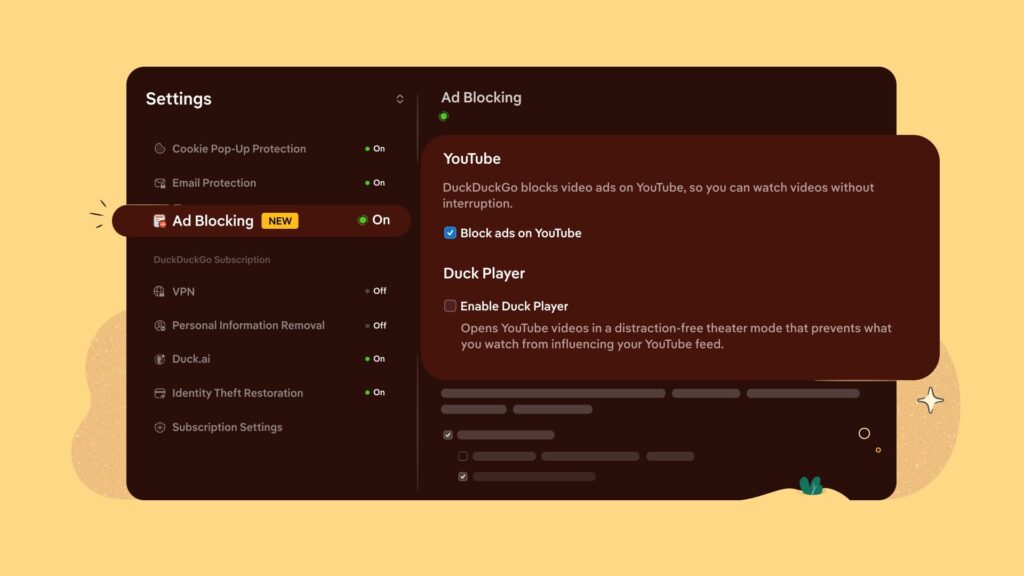
The rollout is automatic for users running the latest version of the DuckDuckGo browser on Windows, macOS, and iPhone. Android users can enable the feature from Settings > Ad Blocking until it becomes the default. Users can also temporarily disable YouTube Ad Blocking from the same settings menu or while watching a video, and optionally submit anonymous feedback if they encounter playback issues.
DuckDuckGo joins a growing number of browsers and extensions offering built-in YouTube ad blocking, although the long-term effectiveness of such features depends on keeping pace with YouTube’s evolving ad delivery mechanisms. The company says it will continue updating its filtering rules as the underlying community-maintained lists evolve.



Why does YouTube Algorithms prefer Russia and Uzbekistan: two dictatorships where human rights and freedom of expression are violated?
While YouTube platform is said to be blocked in Russia, channel visitors and bots from Russia overwhelmingly dominate YouTube stats. How is it possible? What is going on?
Is YouTube secretly working for Russia? Or are it the employees of YouTube who are originally from Russia doing work for Russia?
Are YouTube algorithms promote Russian conspiracy and propaganda?
“If you watch a cooking show, for example, and a thousand other people watch a video on the same topic, and if some of them watch Russian propaganda, then all the people who watch cooking shows will be fed Russian propaganda. This is how the algorithm works—it is tailored to human interests, it is not tailored to watch propaganda,” explained Roman Kulchynsky, editor-in-chief of Texty.org.ua.
Russia critical videos and channels are being massively downgraded, while all creators are confronted with harsh YouTube community standarts, the creators from Russia enjoy full freedom. Who is doing all that on YouTube?
What’s the point of blocking ads in Youtube, whereas all other garbage stays visible, like chats, comments, etc., and DuckDuckGo does not allow using extensions to address that issue. For me the bottomline is: DuckDuckGo: nice try, but unusable.