

WhatsApp is rolling out support for multiple passkeys, stronger two-step verification passwords, and additional information for calls from unknown numbers.
The changes, announced today, are intended to make account authentication harder to compromise while giving users more context before answering potentially suspicious calls.
Passkeys let WhatsApp users verify their identity using the security method already protecting their device, such as a fingerprint, Face ID, or screen-lock code. This removes the need to enter a separate verification code or PIN when authenticating with a passkey.
WhatsApp, owned by Meta, is one of the world’s largest messaging platforms and provides end-to-end encrypted messaging and calling by default. Because WhatsApp accounts are closely tied to phone numbers, stronger authentication can help limit account takeover attempts involving stolen verification codes or other social engineering techniques.
The main passkey change this time is support for adding more than one passkey to the same WhatsApp account. This is particularly useful for people who use both Android and iOS devices and want to authenticate securely across them.
Passkeys can be configured from Settings > Account > Passkeys.
WhatsApp is also strengthening its two-step verification system. Until now, the feature relied on an additional six-digit PIN that users could set to protect account registration even if someone obtained their one-time verification code.
That PIN can now be replaced with a longer password supporting letters, numbers, and special characters. The change increases the number of possible credential combinations and makes short, predictable PINs less effective targets for guessing attacks.
A third update affects calls from unknown numbers. On Android, WhatsApp will now show more information when an incoming call comes from someone who is not saved in the recipient’s contacts.
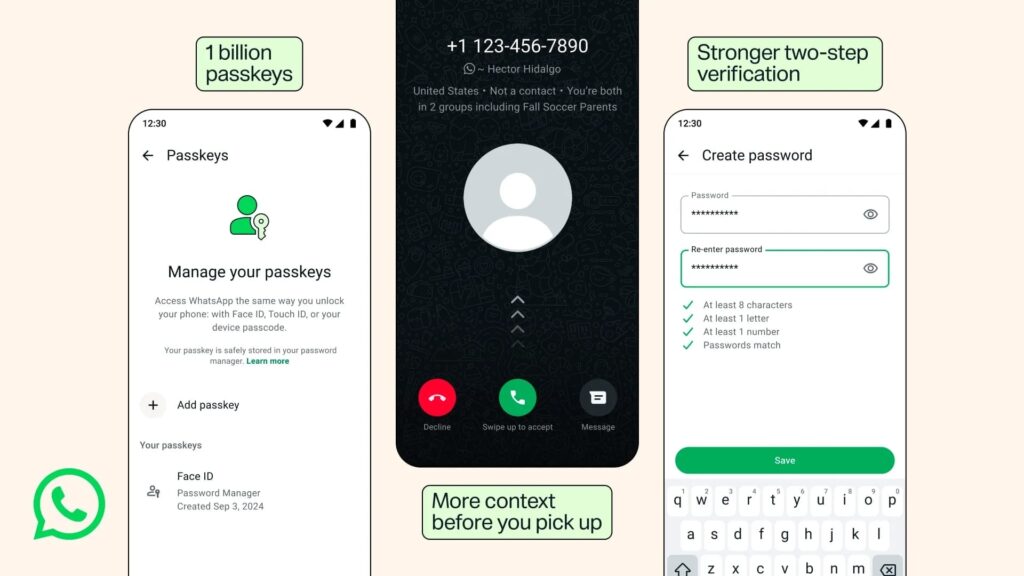
This can include whether the number is from another country and whether the caller shares any WhatsApp groups with the recipient. The extra context may help users identify unexpected or suspicious calls before answering.
Users should remain cautious about unsolicited calls and requests for verification codes, passwords, money, or personal information. Enabling passkeys and using a strong, unique two-step verification password can provide additional protection against account takeover attempts.



Leave a Reply