

Brave has added a desktop privacy feature that automatically strips hidden identifiers Meta embeds in Facebook and Instagram photos.
The browser removes the marker when users save a tagged image or upload one to a website, reducing the risk that the file can be used to link activity across accounts.
Brave detailed the feature in a post by Shivan Kaul Sahib, its vice president of privacy and security, crediting senior software engineer Rohit Agarwal for the work. The feature is available starting with desktop version 1.98, and Brave’s changelog lists it in version 1.98.60.
The change targets a value beginning with FBMD that Meta stores in a photo’s “Special Instructions” field. The field is part of the International Press Telecommunications Council (IPTC) metadata standard, which publishers and photographers use to embed information such as captions, credits, and copyright details in image files.
How a photo can carry a link between accounts
In 2019, the IPTC found that the FBMD value persisted after one Facebook user saved a photo and another uploaded it to their own account. Brave repeated the test in July 2026 and found that the identifier was still present.
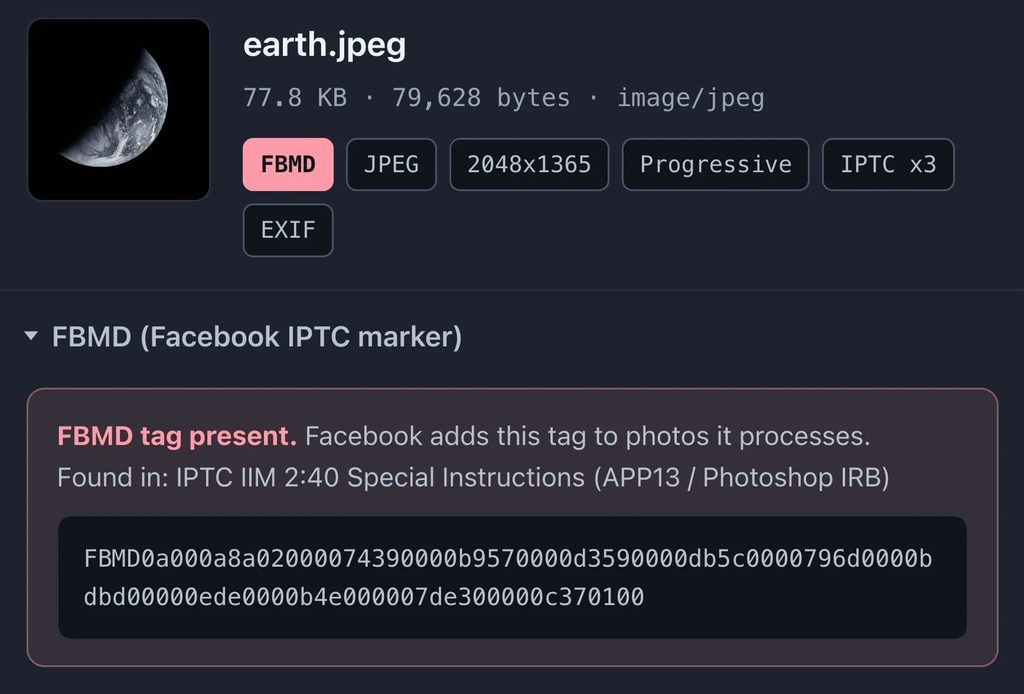
A person who saves an image from Facebook and reposts it to a pseudonymous Instagram account could carry the same marker into the new post. Brave says the value could allow Meta to associate the Instagram post with the original Facebook upload. Meta’s purpose for the marker remains publicly undocumented, according to Brave. The tests show that the value survives a repost on Facebook. Whether Meta uses it to connect accounts remains unconfirmed.
What Brave removes
Brave strips the marker before an image download finishes, so the saved file can be shared later through another browser or app without carrying that tag. For uploads through Brave, the browser sends a copy with the marker removed and leaves the original file on disk intact.
Brave plans to bring the feature to Android and iOS. It also wants to add controls for removing other types of photo metadata, including location, device information, and timestamps.
Desktop users can check their Brave version at brave://settings/help. To verify that a saved Facebook photo was stripped, open the file in a metadata viewer and check the IPTC “Special Instructions” field for a value beginning with FBMD.



Leave a Reply