
Your iPhone packs impressive built-in security, but it can’t shield you from ISP snooping, public Wi-Fi risks, or stubborn geo-blocks on streaming apps. The bigger problem? Many VPNs designed for the iPhone actually undermine your privacy through VPN app data leaks, while others drag speeds to a crawl or crash mid-session.
This guide cuts through the VPN noise with our four best iPhone picks for 2026, backed by real-world speed tests, iOS features, and easy comparisons. Find the one that fits your iPhone best.
Why use an iPhone VPN?
Your iPhone carries plenty of personal information, from your location to your browsing habits. A VPN adds a layer of privacy whether you’re using mobile data or public Wi-Fi.
Here are three good reasons to use one:
1. Hide your IP and location
Your public IP can reveal your general location and ISP to websites and online services. A VPN replaces it with the VPN server’s IP address, making it harder to track your location or build a profile around your browsing activity. It can also help with location-based blocks.
2. Secure public Wi-Fi
Coffee shops, hotels, airports, and gyms all offer convenient Wi-Fi, but not every network is trustworthy. A VPN encrypts your connection, helping prevent others on the same network from snooping on your traffic or grabbing sensitive information.
3. Keep your browsing private
Your mobile carrier can see that you’re using the internet, but a VPN encrypts your traffic before it reaches the carrier. This generally prevents it from seeing the specific websites you visit through the VPN.
How we test iPhone VPNs
We install each app, put it through its paces, and see how it performs in real-world use. Here’s what we look at:
- Speed: Measuring download and upload speeds across different servers.
- Encryption: Checking that your connection uses strong, secure encryption.
- Leak protection: Testing for IP and DNS leaks that could expose your data.
- App stability: Checking for crashes, dropouts, and battery drain.
- Support: Testing how quickly and effectively customer support responds.
Best iPhone VPNs in 2026
Based on our tests, these are the top VPNs for iPhone:
NordVPN — Best VPN for iPhone
| VPN | NordVPN |
| Based in | Panama |
| Logs | No logs (audited) |
| Price | $3.49/mo. |
| Support | 24/7 live chat |
| Refund | 30 days |
| Website | NordVPN.com |
NordVPN regularly comes out on top in our recommendations, simply because it delivers in all the important categories for iPhone users. Whether you are looking for privacy and security, or you are trying to unblock content and stream movies, NordVPN is the top VPN for iOS (iPhone).
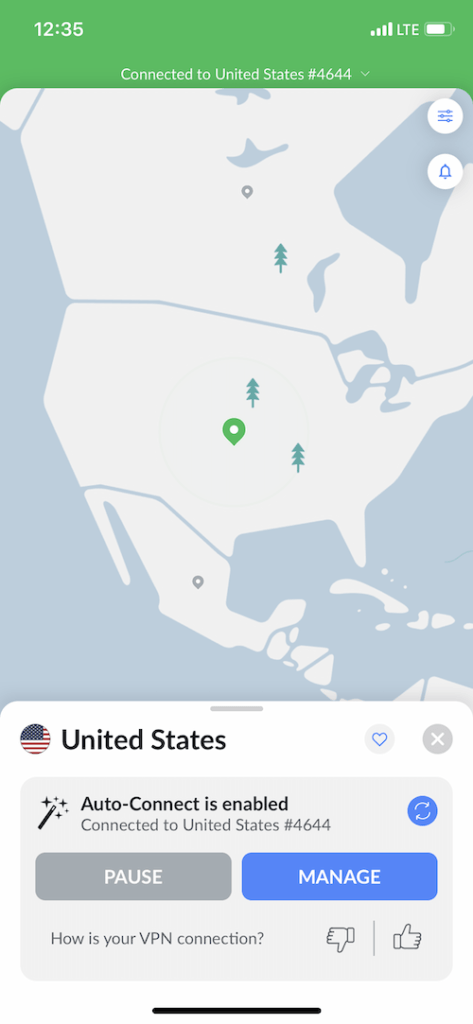
The NordVPN iPhone app performed very well in our tests. Below you can see we are connected to a NordVPN server in the US on our iPhone, with the Auto-Connect feature enabled.
Performance
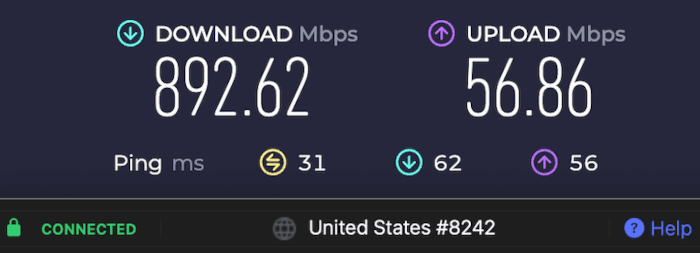
One big area that makes NordVPN the best iPhone VPN in 2026 is performance. NordVPN fully supports the WireGuard VPN protocol on all platforms (including iPhone and iPad), and this delivers the fastest speeds and best security. NordVPN’s implementation of WireGuard is called the NordLynx protocol, which is fully supported on iPhones. In our VPN tests using NordVPN with the NordLynx protocol, we were able to hit download speeds of 892 Mbps!
Fast and consistent speeds give NordVPN an edge over other leading services, as you can see in the Mullvad vs NordVPN comparison. Nord also came out on top in speed tests for the CyberGhost vs NordVPN report.
NordLynx takes advantage of the speed and security of WireGuard while enhancing that protocol’s privacy. NordLynx does this through a double NAT (Network Address Translation) system which ensures that user IP addresses are not visible on the VPN servers. The result is a fast, secure, and private VPN connection that is ideal if you need a VPN for gaming, streaming, torrenting, or any other high-bandwidth activity.
iPhones features (and more)
NordVPN checks all the boxes for security and privacy. They currently have over 9,500 servers in 149 locations around the world. All servers run in RAM-disk mode (no hard drives), which means no user data can ever be stored on servers or accessed by third parties. Most of their servers have fast, 10 Gbps data channels that eliminate the risk of data traffic congestion. The company continues to convert its servers to colocated servers. Once complete, NordVPN will own and maintain all their servers, regardless of where those servers are physically located.
When using NordVPN on an iPhone, you have access to all the major privacy and security features, as well as iOS-specific features like Siri shortcuts:
- Threat Protection, which blocks ads, trackers, and malware domains from loading on your iPhone. It protects all traffic that passes through a NordVPN server. Threat Protection Pro is available for macOS, so if you get NordVPN for your iPhone you will also end up with even better protection for your Mac. NordVPN tops our list of the best VPNs with ad blocking.
- NordLynx VPN protocol (described above) delivers all the benefits of WireGuard on your iOS device (the best VPN speeds and the most secure encryption standards, along with enhanced privacy protection).
- Split tunneling to control which apps use the secure, encrypted VPN connection and which connect directly to the internet connection.
- Double VPN servers encrypt traffic over two different hops for double the encryption.
- Obfuscated servers that conceal VPN traffic and also allow you to get around VPN blocks (useful if you need a VPN for China, school, or work networks that block VPNs).
- Onion over VPN servers pass your traffic through the Tor network as well as through the VPN for additional security and privacy.
- VPN Kill switch that will block internet traffic on your iPhone if the connection drops
- Private DNS prevents anyone from tracking your online activity by spying on your DNS queries.
- Smart Play, NordVPN’s name for SmartDNS. Allows you to change your apparent IP address to gain access to websites and resources on devices that don’t support VPN apps.
- Dedicated IP addresses give you a static IP address that is not shared with anyone else. If you need to remotely connect to your corporate network or home computing resources, you may well find that NordVPN is the best VPN with dedicated IP addresses.
- Dark Web Monitor continually scans dark web sites looking for signs that your credentials have been leaked or stolen.
- Siri shortcuts let you control NordVPN with your voice for hands-free protection.
- 24/7 live chat support so you can always get help if you need it.
- Full 30-day money-back guarantee giving you plenty of time to test NordVPN for yourself.
- Ten (10) simultaneous connections means you can protect your iPhone and all your other devices at the same time.
You can see all NordVPN features here >
You can easily enable both Threat Protection and NordLynx (WireGuard) directly in the VPN app’s settings on your iPhone. We recommend enabling these two features for higher levels of privacy and security, while also getting the best performance.
If you plan to stream video on your iPhone with a VPN, NordVPN has you covered. It is a great VPN for Netflix and will unblock 17+ Netflix regional libraries around the world, including all of the most popular ones. NordVPN also works with BBC iPlayer, Amazon Prime, Hulu, Disney Plus, DAZN, and many other streaming sites. Finally, they even provide dedicated streaming apps for some other types of devices, such as the Firestick VPN app.
Aside from movie streaming, NordVPN is also a great option if you need a VPN for ESPN or other sports channels. It allows you to unblock a variety of content from anywhere. We have also found it to be a popular VPN for Canada to stream geo-restricted content.
Policies and audits
NordVPN is a verified no-logs VPN service, having passed multiple audits by outside firms. It has also undergone numerous third-party security audits. Those audits show that NordVPN is secure and keeps no logs of your online activities.
NordVPN iPhone setup
Installing and using NordVPN on your iPhone is quite simple. Just follow these steps:
- Purchase a discounted NordVPN subscription here
- Install the NordVPN app on your iPhone
- Open the NordVPN app on your iPhone and log in with your credentials
- Click the Quick Connect button to connect to the fastest VPN server available.
When you connect to a VPN server on your iPhone for the first time, you will likely be asked if you want to allow the VPN app to add configurations to your device. Simply confirm that you Allow this to enable quick and easy VPN connections on your iPhone.
NordVPN pros and cons
+ Pros
- User-friendly and reliable apps
- Double VPN and Onion Over VPN servers
- Passed numerous 3rd-party audits
- Strong encryption standards with full support for WireGuard
- Works with Netflix and many streaming sites
- Threat Protection feature to block ads, trackers, and malware
- Professional 24/7 live chat support
- Consistently fast speeds
- Dedicated RAM-only servers with 10 Gbps bandwidth channels
- Post-quantum encryption
– Cons
- Best discounts only available with 2-year plans
NordVPN’s Cyber Deal is live:
Get 75% Off NordVPN with the coupon below + 3 months extra:
(Coupon is applied automatically; 30-day money-back guarantee.)
For more info, check out our new and updated NordVPN review.
Surfshark — Speed, security, and savings
| Website | Surfshark.com |
| Based in | The Netherlands |
| Logs | No logs (audited) |
| Price | $2.49/mo. |
| Support | 24/7 live chat |
| Refund | 30 days |
| Deal | 87% Off Coupon |
Surfshark is probably NordVPN’s greatest competition. It offers many similar features and also performs well. It also offers a couple of unique benefits that you will like.
If you are looking for an easy-to-use iPhone VPN that is affordable, then Surfshark is one of the best cheap VPNs to consider. A Surfshark subscription costs less than a subscription to NordVPN. Surfshark has the bonus of giving you unlimited simultaneous connections. That means that you can have all your internet-connected devices protected by a single Surfshark subscription at the same time. This makes Surfshark a great VPN for multiple devices.
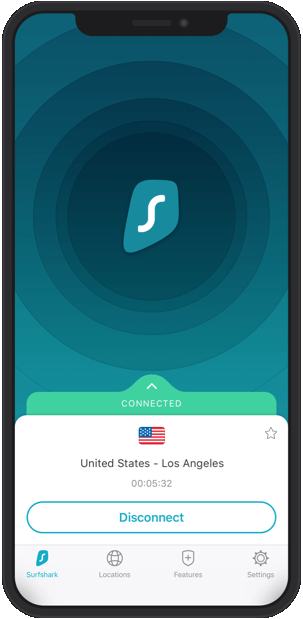
The Surfshark app for iPhone also performed well in our tests and is full of useful features.
Performance
In terms of speed, Surfshark performs well thanks in part to its support of the WireGuard protocol on iPhones, Windows, macOS, and Android devices. Like NordVPN, Surfshark uses a double NAT system to boost the privacy of the WireGuard protocol.
With the Surfshark app for iPhone, the IKEv2 protocol is used by default, but this is easy to change. You can select the WireGuard protocol in the Settings section of the app.
We also tested out speeds with Surfshark with an iPhone to determine how its performance compared to other top VPNs. Our tests determined that Surfshark offers excellent speeds with iPhones, as well as excellent reliability, with no dropped connections or crashes.
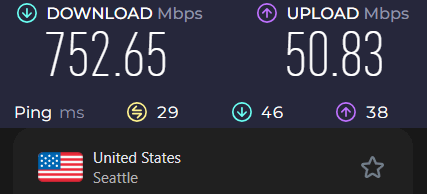
Fast speeds also give Surfshark an edge over most competitors, as you can see in our ExpressVPN vs Surfshark comparison. The combination of strong security and high speed makes Surfshark a great choice if you need the best VPN for torrenting.
iPhones features (and beyond)
Surfshark currently boasts over 4,500 servers in 100 countries around the world. Like NordVPN, Surfshark runs all servers in RAM-disk mode for maximum data security. The company has upgraded its servers to use 10 Gbps data channels and is moving toward 100% colocated servers.
Important Surfshark features to note include:
- CleanWeb is a feature that will block ads, trackers, and malware domains, protecting all traffic that passes through a Surfshark server location.
- Rotating IP is a feature that automatically changes your IP address every 5 to 10 minutes and makes it extremely difficult for hostile entities to track your online activities.
- WireGuard VPN protocol gives Surfshark very fast and secure connectivity. Privacy is ensured by a double NAT system.
- Bypasser is Surfshark’s name for its split tunneling feature.
- MultiHop is Surfshark’s name for their Double VPN feature which lets you pass traffic through preassigned pairs of servers.
- Chameleon mode is Surfshark’s name for its obfuscation feature. It is automatically activated if you switch to the OpenVPN protocol.
- Dedicated IP servers for when you need a static IP address that is not shared with others.
- VPN Kill switch that prevents VPN traffic from being exposed on the internet, even when your VPN connection fails.
- Private DNS to shield your DNS queries from snoops, even your internet service provider.
- Smart DNS is Surfshark’s SmartDNS implementation.
- Antivirus add-on to combine your VPN with antivirus, Surfshark has options for that, too.
You can see all Surfshark VPN features here >
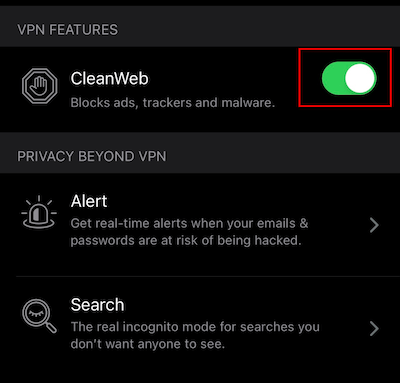
Like NordVPN, Surfshark offers a VPN ad blocker feature. It is called CleanWeb and it will block ads, trackers, and malware domains. I recommend that you always enable CleanWeb on your iPhone. Why?
Today many ads double as tracking tools. Blocking ads prevents that type of tracking. It will also speed up page load times and reduce the amount of mobile data consumed by the web pages you visit. To activate CleanWeb, simply go to the VPN Features tab, and toggle it on.
Surfshark does great with streaming and unblocking streaming media sites. It supports 15+ Netflix libraries and is currently one of the best VPNs for Netflix. And of course, it also works very well with Amazon Prime Video, Hulu, and other leading streaming media services.
Policies and audits
Surfshark’s no-logs policy has been confirmed by auditing firm Deloitte. In addition, its server infrastructure has been audited by Cure53.
Surfshark iPhone setup
Setting up Surfshark on iPhone is fast and easy if you follow these steps:
- First, get a discounted Surfshark subscription (use the coupon below for the best savings).
- Download the Surfshark iPhone app from the Surfshark website or Apple store.
- Open the app and log in to your VPN account.
- Click the Connect button to connect to a nearby server.
- Click Allow to let Surfshark Add VPN Configurations to your device so connections are smooth and fast.
Remember that Surfshark has 24/7 live chat support and a 30-day money-back guarantee in case you have problems or simply decide this VPN is not for you.
Surfshark pros and cons
+ Pros
- Unlimited connections
- User-friendly apps for all devices and operating systems
- CleanWeb feature to block ads, trackers, and malware
- Works great with Netflix and many other streaming services
- 24/7 live chat support
- Strong encryption and security features (audited)
– Cons
- Limited support for VPN routers
- Above-average monthly prices
Surfshark VPN Coupon:
Get 87% off Surfshark VPN plus an additional 3 months extra with the coupon below:
(Coupon is applied automatically; 30-day money-back guarantee)
To learn more about Surfshark, check out our Surfshark VPN review here.
ExpressVPN — Reliable protection at a premium
| Website | ExpressVPN.com |
| Based in | British Virgin Islands |
| Logs | No logs (audited) |
| Price | $2.99/mo. |
| Support | 24/7 live chat |
| Refund | 30 days |
| Deal | 80% Off Coupon |
ExpressVPN checks all the right boxes that make for a great VPN for iPhone. It is fast, secure, and reliable. It works well for all use cases, from streaming to torrenting to standard web browsing. However, of all the iPhone VPNs on this list, ExpressVPN is the most expensive. Additionally, it has fewer features than our other recommendations, as we’ll show you in detail below.
Let’s start with the positives. ExpressVPN is fast and reliable. Unlike most leading VPN services, the ExpressVPN team chose to develop their own VPN protocol, called Lightway, rather than supporting WireGuard.
Performance
ExpressVPN developed Lightway to give users a faster, more secure, and more reliable VPN connection. It uses a state-of-the-art cryptographic algorithm and needs less processing power than older protocols like OpenVPN. Lightway incorporates a unique connection process that is more efficient and makes connections faster. These characteristics make Lightway ideal for mobile devices like iPhones since it uses less power than older protocols while improving overall performance.
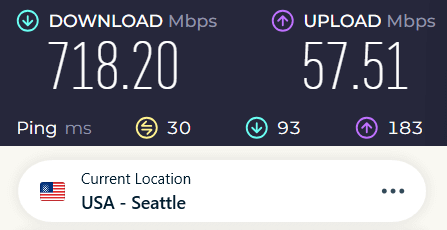
While Lightway is similar to WireGuard, it’s not quite as fast as WireGuard, and it’s only used by ExpressVPN. In our NordVPN vs ExpressVPN speed tests, we found that NordVPN using NordLynx (WireGuard) is significantly faster than ExpressVPN using Lightway.
iPhones features (and extras)
Now let’s discuss features. In comparison to other iPhone VPN services, ExpressVPN has fewer features. There are no Double VPN servers, no Obfuscated servers, or anything out of the ordinary. The VPN does have a kill switch (called Network Lock). It also has an ad blocker called Threat Manager.
The ExpressVPN server network is comprised of over 3,000 servers in 113 countries. All of these servers run in RAM-only (diskless) mode, and most of them have already been upgraded to 10 Gbps connections.
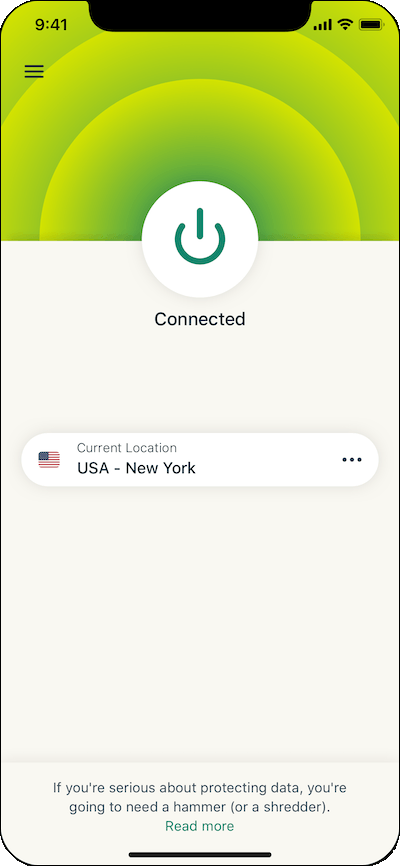
ExpressVPN boasts a large selection of apps for all types of devices, from computers and tablets to phones and routers. The ExpressVPN iPhone app we tested performed well. It was reliable, fast, and very easy to use.
In terms of streaming, ExpressVPN unblocks a variety of streaming services, although not quite as many as NordVPN or Surfshark. ExpressVPN did a great job of unblocking streaming content during our testing. It unblocks a wide range of Netflix libraries, allowing you to easily change Netflix regions from anywhere.
ExpressVPN also worked well as a VPN for BBC iPlayer, Amazon Prime, Disney Plus, and a few other services. For those devices that cannot run a standard ExpressVPN app, you can use the MediaStreamer app. In sum, ExpressVPN is a great VPN for streaming.
ExpressVPN provides exceptional support for routers, including their router offering, called Aircove. Installing ExpressVPN on a router (or using an Aircove router) can be useful if you need a VPN for Apple TV or any other device that does not natively support VPNs.
Policies and audits
Like NordVPN and Surfshark, ExpressVPN is a no-logs VPN. Also like those two competitors, ExpressVPN has had its no-logs policy audited by outside several times. In addition to multiple no-logs audits, ExpressVPN had published more than a dozen other audits of every aspect of its service. When it comes to getting the VPN audited, ExpressVPN has no peer. This gives it an advantage over many competing services.
ExpressVPN iPhone setup
- Get an ExpressVPN subscription using the discount coupon below.
- Download the ExpressVPN iPhone app.
- Open the VPN app on your iPhone and log in.
- Connect to a VPN server.
Like the other iPhone VPNs we recommend, ExpressVPN has 24/7 live chat support in case you need it, and a 30-day money-back guarantee in case you decide ExpressVPN is not for you.
ExpressVPN pos and cons
+ Pros
- User-friendly and secure apps for virtually any operating system or device
- Proprietary Lightway VPN protocol for advanced performance
- Post-quantum version of the WireGuard protocol for enhanced privacy and security
- Split tunneling feature (for macOS, Windows, and routers)
- Works with Netflix and most streaming services
- 24/7 live chat support
- Passed independent third-party audits for security and no-logs
- Extensive network of diskless servers
– Cons
- Fewer features than other leading VPNs
ExpressVPN Coupon:
Sign up for the 2-year plan and get 4 months added to your subscription for free.
(Coupon is applied automatically)
Check out our ExpressVPN review for more info and test results.
Proton VPN — Swiss security, iPhone ready
| Website | ProtonVPN.com |
| Based in | Switzerland |
| Logs | No logs (audited) |
| Price | $2.99/mo. |
| Support | Email + Chat |
| Refund | 30 days |
| Deal | 70% Off Coupon |
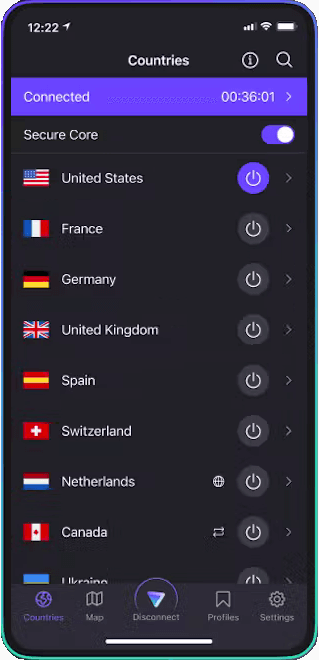
Proton VPN is the latest addition to our list of recommended iPhone VPNs. Built by the same Switzerland-based team that created Proton Mail, Proton VPN offers a blend of security, speed, and user-friendly features tailored for iOS devices. Like our other recommendations, Proton VPN is an audited no-logs VPN with strong security, meaning your online activities will remain private. The Proton VPN apps are interesting to look at and easy to use, as you can see below:
iPhones features (plus more)
All Proton VPN apps use strong encryption and reliable VPN protocols. This includes WireGuard which gives the service faster performance than in the past. The apps also passed all of our leak tests and include useful features like:
- NetShield ad, tracker, and malware blocker
- Tor over VPN routing for enhanced privacy
- Secure Core (Double VPN) servers that increase security
Proton VPN has greatly expanded its network, providing over 20,500 VPN servers spread across 148 countries. The network works well for torrenting, and the service has enhanced its ability to stream content from across the planet.
Performance
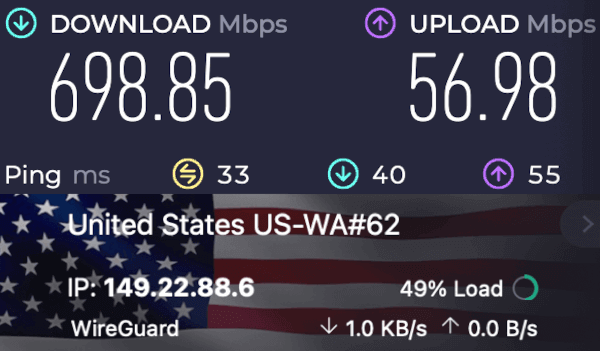
The service has upgraded to support the WireGuard protocol, which further boosts its speed and security. That said, our testing for the NordVPN vs Proton VPN comparison article showed that NordVPN is significantly faster.
Policies and audits
Proton VPN backs its privacy claims with a clear privacy policy and a no-logs approach that doesn’t track or store your browsing history or IP address. Based in Switzerland, the provider also keeps its apps open source and regularly puts its privacy practices through independent audits.
Most recently, European cybersecurity firm Securitum completed an independent no-logs audit, providing additional assurance that Proton VPN’s logging practices match its privacy claims.
Proton VPN iPhone setup
Getting Proton VPN running on your iPhone takes just a few steps:
- Download the app – Find Proton VPN in the App Store and install it.
- Log in – Sign in or create an account.
- Allow permissions – Tap Allow when prompted to add the VPN configuration.
- Choose a server – Pick a country from the map or server list.
- Connect – Tap the power icon to encrypt your connection and hide your IP.
Proton VPN gives you a pro-rated 30-day money-back guarantee, putting it behind the other VPNs profiled here. Also, the service only provides live chat support during Swiss business hours, which can result in slower support. Even so, Proton VPN is a worthy option for iPhone users.
Proton VPN pros and cons
+ Pros
- Swiss-based privacy
- Open-source apps audited by independent security firms
- Secure Core servers route traffic through hardened nodes
- VPN Accelerator boosts long-distance US speeds
- Post-quantum encryption in the works
- Subscription plans bundle with Proton Mail, Proton Drive, Proton Sheets, and Proton Pass
- Linux CLI and refreshed GUI
- Smart TV and Apple TV apps now support NetShield
– Cons
- No 24/7 live chat
- Advanced tools have a steeper learning curve
Proton VPN Coupon:
Get 70% Off Proton VPN (drops the price to only $2.99/month) with the coupon below:
(Coupon is applied automatically; 30-day money-back guarantee)
Learn more about this service in our complete Proton VPN review.
How iPhone VPNs work
An iPhone VPN creates an encrypted tunnel between your iPhone and a secure VPN server. It hides your public IP address, protects your data from snoopers, and reroutes your traffic in four simple steps:
- Download and install: First, you download and install a VPN app on your iPhone from a reputable VPN provider.
- Launch and connect: Open the VPN app and select a VPN server to connect to. This server could be located anywhere in the world.
- Establish secure connection: The VPN app establishes a secure connection with the VPN server using secure and reliable VPN protocols such as WireGuard or Lightway.
- Route internet traffic: Once connected, all your internet traffic is routed through the VPN server. This process masks your IP address and location, making it difficult for anyone to track your online activities or intercept your data.
- Forward requests: The VPN server forwards your internet traffic to its final destination, such as a website or online service.
- Receive data: The website or online service responds to your request and sends the data back to the VPN server.
- Decrypt and display: The VPN server forwards the data back to your iPhone, where it is decrypted and displayed on your screen.
By using a VPN app on your iPhone, you ensure that your internet connection is secure and private, protecting your data from prying eyes.
How to choose the best iPhone VPN
The best iPhone VPN isn’t necessarily the one with the longest feature list. It’s the one that fits how you actually use your phone. Keep these points in mind when comparing VPN providers:
- Start with your needs: Streaming, gaming, torrenting, or everyday browsing all have different demands.
- Check the privacy basics: Look for strong encryption, a kill switch, and a clear no-logs policy.
- Look at server coverage: A broad server network gives you more options for connecting to different regions.
- Test the speeds: Modern VPN protocols can make a big difference when streaming or downloading on mobile.
- Try before you commit: A money-back guarantee gives you time to test the VPN on your own iPhone before signing up long term.
Not keen on doing all the VPN homework yourself? Fair enough. Trust our recommendations and we’ll point you in the right direction.
Community consensus on iOS VPNs
If you want an honest look at real-world performance, there are highly active discussions on Reddit regarding the best VPN for iPhone in 2026.
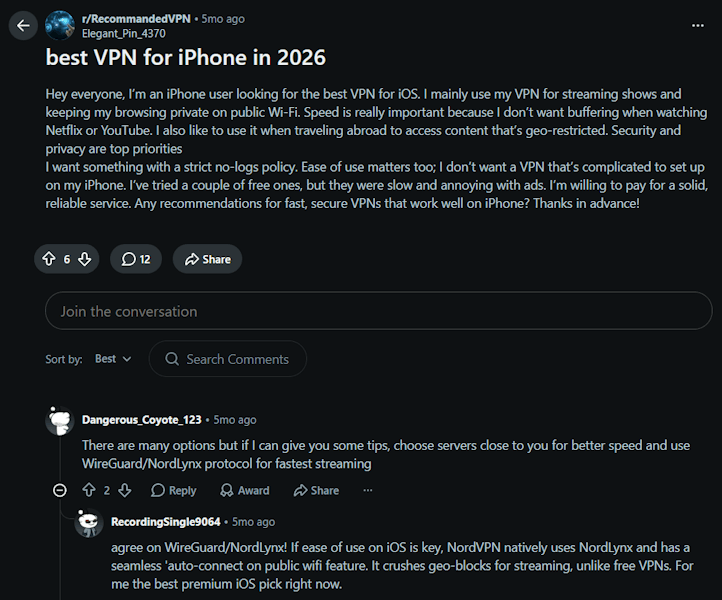
While sponsored blogs offer different top picks, everyday mobile power users in the community look at metrics that matter on the go, like battery consumption, background connection dropouts, and connection speed. A review of the top choices on the popular r/VPN_Question iPhone Hub shows that the collective consensus heavily favors premium apps over free tools.
Reddit users frequently point to NordVPN for its native iOS integration and its specialized NordLynx protocol that maintains top speeds without destroying battery life. For larger households looking to secure multiple smartphones and mobile devices under one roof, community members on the r/ios Discussion Feed routinely recommend Surfshark due to its budget-friendly pricing and its allowance for unlimited simultaneous device connections.
Free iOS VPN risks
Free VPN apps can look like an easy win, but some come with serious privacy and performance trade-offs. Research has found tracking libraries, DNS leaks, and other security issues in free mobile VPNs. After all, running a VPN network costs money, and some providers make that money by collecting data or showing ads.
Drawbacks include:
- Data logging and sharing: Some free VPNs log browsing activity or share user data with advertisers and other third parties.
- Ads and security risks: Certain apps rely on aggressive advertising or contain trackers that can compromise your privacy.
- Slow speeds and data limits: Free plans often restrict bandwidth, server access, or monthly data, making streaming frustrating.
- Battery drain and dropouts; Poorly optimized apps can use more power and suffer from unstable connections.
If privacy matters, a reputable paid VPN with a clear, independently audited no-logs policy is generally the safer bet.
Speed up your iPhone VPN
To eliminate video buffering, playback errors, and slow-loading web pages, your mobile privacy network must be configured for maximum throughput. Achieving optimal performance on iOS requires pairing a high-speed provider with a modern, lightweight connection protocol.
Switch to the WireGuard protocol
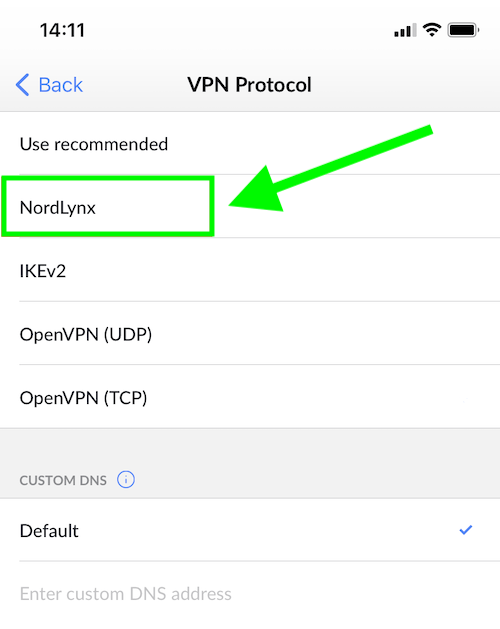
If your VPN feels sluggish on iPhone, switching to WireGuard can often help. NordVPN uses its own version, NordLynx, while Surfshark also supports WireGuard.
It can improve the experience in a few key ways:
- Faster speeds – WireGuard is designed for efficient, high-speed connections, making it a good choice for streaming.
- Quicker connections – Its lightweight design can help your VPN connect faster.
- Smoother switching – It can handle changes between Wi-Fi and mobile data more efficiently.
- Better efficiency – WireGuard uses less processing power than some older protocols, which can help reduce battery use.
To try it, open your VPN app’s Settings, find the VPN protocol option, and select WireGuard or NordLynx, depending on your provider.
iPhone security tips
A VPN can cover a lot of privacy gaps, but it shouldn’t be your only line of defence. A few simple iPhone security habits can go a long way:
- Apply instant iOS updates: Always install the latest apple security patches immediately to close dangerous zero-day exploits.
- Deploy a secure browser: Switch your default mobile browser to a privacy-focused alternative like DuckDuckGo or Brave to block tracking scripts.
- Activate a content blocker: Use a robust ad blocker to cut data consumption, stop invasive tracking pixels, and neutralize malicious redirect scripts.
- Utilize an encrypted password manager: Secure your online account credentials using premium cross-platform managers like NordPass or 1Password.
- Block phishing attempts: Stay alert against deceptive SMS text links, unsolicited authentication requests, and malicious email attachments designed to harvest your personal data.
Best iPhone VPNs compared
You’ve read the details. Here we have the key characteristics stacked up side-by-side. This quick table highlights the differences that matter most when choosing protection for daily browsing, streaming, and security.
| Feature | NordVPN | Surfshark | ExpressVPN | Proton VPN |
|---|---|---|---|---|
| Best for | Overall speed & features | Budget + unlimited devices | Reliability & ease of use | Maximum privacy |
| Devices | 10 | Unlimited | Up to 14, depending on the subscription version | 10 |
| Servers / Locations | 9,500+ / 224 | 4,500+ / 100+ | 3,000+ / 214 | 20,500+ / 195 |
| Tested speed | Up to 903 Mbps | Very fast | Fast | Good (but slower) |
| Streaming Unblocking | Excellent (all platforms) | Excellent | Excellent | Good |
| Key extras | Threat Protection, Siri shortcuts | CleanWeb ad blocker | Lightway protocol | Secure Core servers |
| Money-back guarantee | 30 days | 30 days | 30 days | 30 days (pro-rated) |
If speed, streaming, and built-in threat blocking top your list, NordVPN delivers the best balance for most iPhone users. On a tight budget? Surfshark gives you premium performance without limits.
The bottom line
Whether you are using the latest iPhone 15, or perhaps an older iPhone model, running a premium VPN service on your iPhone will provide you with numerous advantages.
Our top iPhone VPN recommendation remains NordVPN. It offers the speeds, security features, reliable apps, and unparalleled support for streaming to propel it to the top of our list.
Nonetheless, Surfshark, ExpressVPN, and Proton VPN certainly aren’t very far behind and are also great VPNs for iPhones.
Lastly, if you are on a tight budget, you may want to consider our VPN coupons page, which highlights the latest industry deals and discounts.
iPhone VPN FAQ
NordVPN is our top pick for iPhone in 2026, thanks to its fast NordLynx protocol, easy-to-use iOS app, Siri shortcuts, and automatic protection on public Wi-Fi. If you want to cover lots of devices under one subscription, Surfshark is a strong alternative with unlimited simultaneous connections.
Yes, you can use a free VPN on your iPhone, but there are important trade-offs. Some free VPNs have limited data, slower speeds, fewer server locations, intrusive ads, or weaker privacy protections. Others may collect more user data than you’d expect, so it’s worth checking the provider’s privacy policy before connecting.
If privacy and reliable performance are your priorities, a reputable VPN with an independently audited no-logs policy is generally the better choice.
A VPN hides your public IP address, which can prevent websites and online services from seeing your approximate location based on your IP. However, it cannot stop apps from accessing your iPhone’s GPS-based location services or using other device-level location signals.
For more control, go to Settings > Privacy & Security > Location Services and review which apps have access to your location. You can disable access entirely or set permissions for individual apps.
A VPN can use some extra battery because your iPhone has to encrypt and decrypt traffic while the connection is active. For most users, the impact is fairly small, but it can be more noticeable during long sessions or when using slower protocols.
If battery life is a concern, choose a VPN that supports modern, lightweight protocols such as WireGuard or ExpressVPN’s Lightway, which are designed to deliver a good balance of speed, security, and efficiency.
The main difference is coverage and control. iCloud Private Relay is designed primarily to protect Safari browsing and hide your IP address, while a VPN can protect traffic from apps across your iPhone.
A VPN also gives you more control over your connection, including the ability to choose a server location. This can be useful when accessing region-specific content or services. Private Relay, by contrast, does not let you manually select a VPN-style server location.
VPN disconnects can happen when your iPhone switches between Wi-Fi and mobile data, experiences a weak signal, or limits background activity to save battery. App or protocol issues can also cause connection problems.
Start by checking that your VPN app is up to date and enable its Auto-Connect feature if available. You can also try switching VPN protocols or connecting to a different server. If the problem continues, restarting your iPhone or contacting the VPN provider’s support team may help.

Great article. Many users assume Apple’s built-in privacy features are enough, but a VPN still adds an extra layer of protection for public Wi-Fi and network privacy. It would be helpful to include a side-by-side comparison of DNS leak protection and Kill Switch behavior on iOS.