
Want to stream without restrictions and browse more privately? An IPVanish free trial gives you a risk-free way to test the service. During my testing, IPVanish impressed me with speedy WireGuard performance, unlimited device connections, and rock-solid security tools that safeguard your data from prying eyes.
When I first looked into starting an IPVanish free trial, I found two ways to test the service without risk. You can use the mobile free trial or take advantage of the money-back guarantee available through the website. Personally, I’d begin with the mobile option to get a feel for the VPN before signing up for a paid plan.
Not sure which IPVanish trial to choose? The comparison below breaks down the main differences, including costs, devices, and cancellation terms.
| 7-day mobile trial | 30-day money-back guarantee | |
| Upfront cost | $0.00 (free) | Requires upfront plan payment |
| Device support | iOS and Android devices only | All devices (PC, Mac, Apple TV, routers) |
| Simultaneous connections | 1 mobile device only | Unmetered (unlimited devices) |
| How to cancel | Via Apple App Store or Google Play | Via the online customer portal dashboard |
| Best deal | Start free phone trial > | Save big on premium plans > |
How to start an IPVanish free trial
Testing IPVanish is simple and risk-free, with two choices: A 7-day free mobile trial or a 30-day money-back guarantee. Either way, you get access to premium features like WireGuard, split tunneling, and unlimited connections across your devices.
How to activate the 7-day mobile free trial
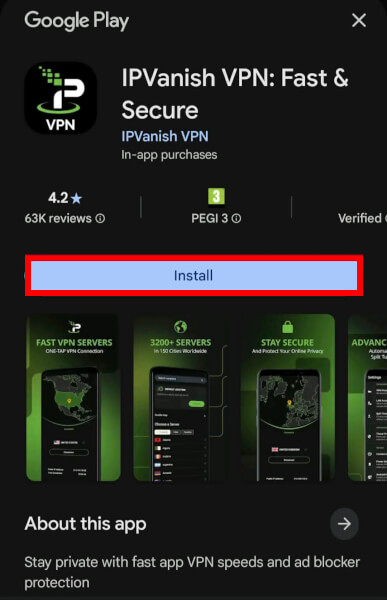
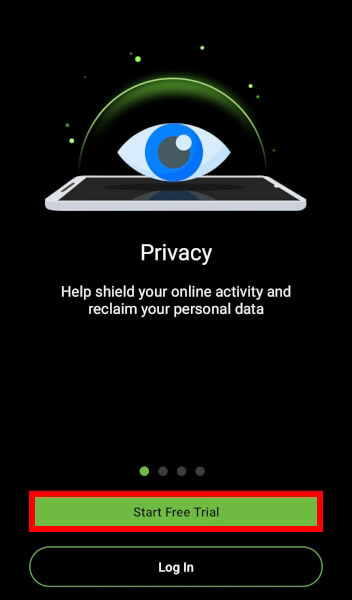
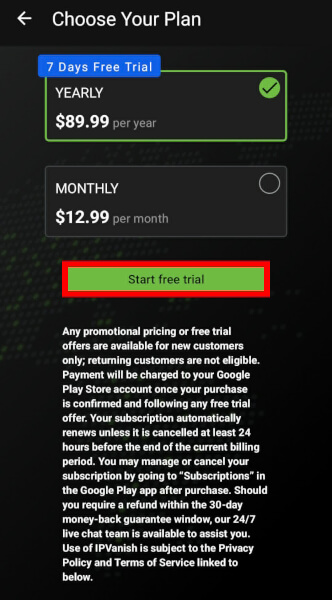
If you want to test the service without spending a single penny upfront, you must use a smartphone or tablet.
- Download the app: Navigate to the Apple App Store or Google Play Store and install the official app.
- Set up your account: Open the app, agree to the terms, and create your new user profile.
- Select the yearly tier: Choose the annual subscription option to trigger the hidden 7-day trial screen.
- Avoid charges: To ensure you do not get billed, go to your phone’s native subscription settings and cancel at least 24 hours before the 7th day ends.
Unlocking the 30-day money-back guarantee
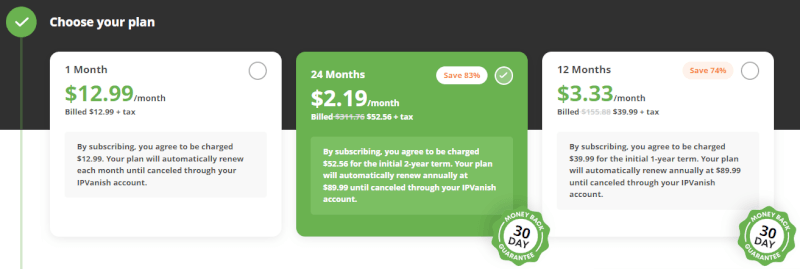
To test the VPN extensively across desktop operating systems, smart TVs, or routers, the website-based refund policy is your best option.
- Visit the site: Head directly to the official IPVanish pricing page.
- Choose a long-term plan: Select either the yearly or 2-year package; keep in mind that rolling monthly plans are strictly excluded from refunds.
- Complete the checkout: Pay for the subscription upfront using your preferred payment method.
- Claim your refund: Test the software completely unrestricted. If you are not satisfied, log in to your customer portal dashboard before day 30, click “Subscriptions,” and initiate the cancellation process for a hassle-free, automatic refund.
Things to check before your IPVanish trial renews
An IPVanish free trial is only the beginning. The true insight comes from how it performs in real use. With full access to its premium network, you can test it properly across different scenarios during your 7- or 30-day trial period.
1. Toggle WireGuard and run speed tests
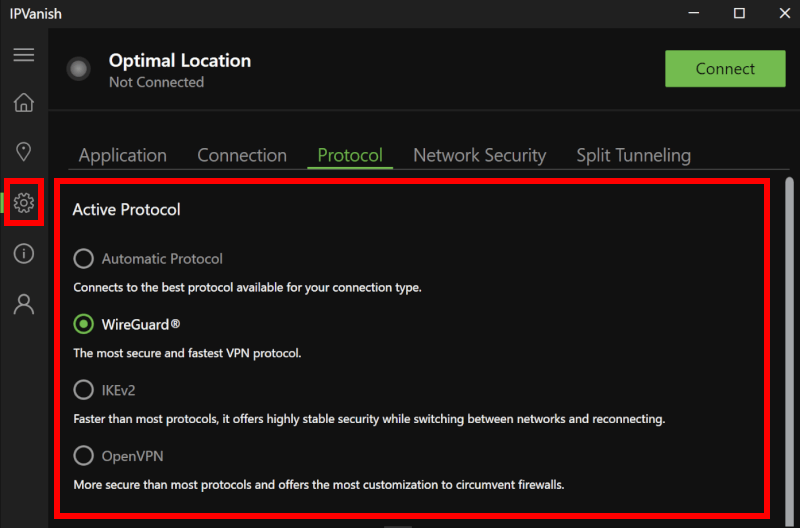
Do not just take their word for it. Switch your protocol to WireGuard in the settings menu right away. Run independent speed tests on local and distant servers to ensure your connection remains fast enough for lag-free gaming and 4K browsing. While heavy hitters like NordVPN or Surfshark often win raw benchmark races, IPVanish holds its own with incredibly low latency.
2. Unblock streaming hubs and fire up torrents

Put the unmetered bandwidth to work by opening Netflix, Hulu, or BBC iPlayer to see how quickly regional geo-blocks disappear. Next, launch your preferred torrent client to test the integrated SOCKS5 proxy. This ensures your heavy P2P file-sharing transfers smoothly, without your internet service provider throttling your bandwidth.
3. Force a network drop to test the kill switch
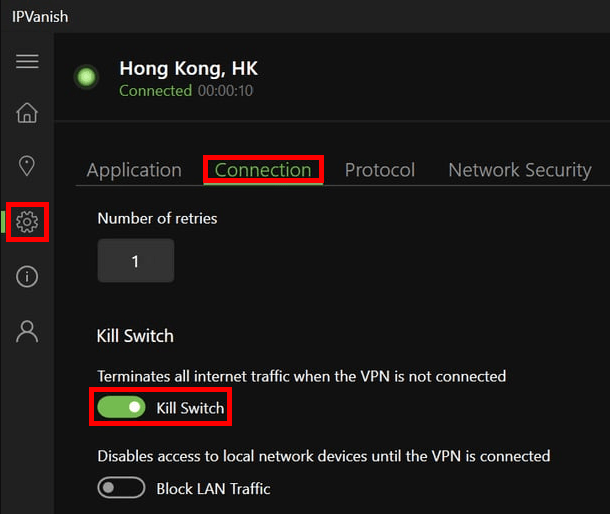
Pull the plug on your internet connection or disconnect from Wi-Fi while the VPN is running to stress-test the VPN kill switch. Verify that your device immediately cuts all internet traffic to prevent data leaks. Run a quick external leak test online to confirm your actual IP address, DNS requests, and WebRTC data stay completely hidden.
4. Hop across global server locations
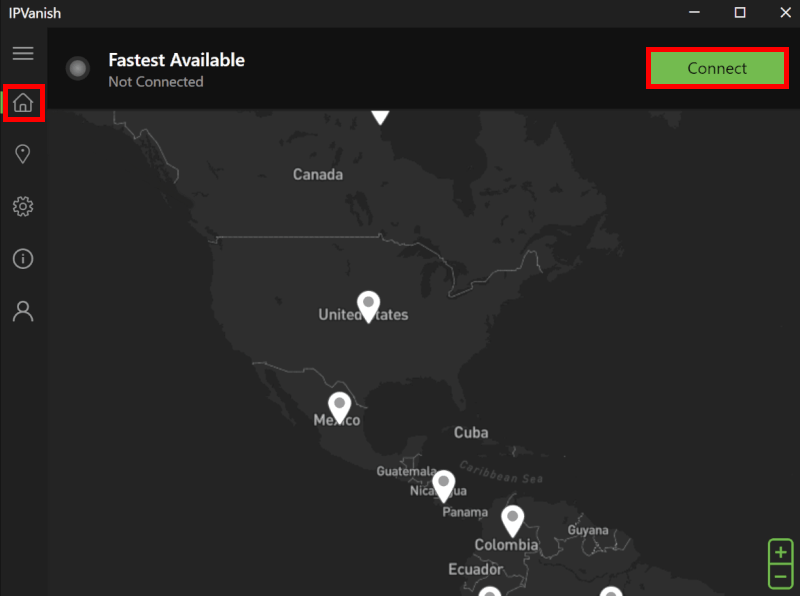
Open the built-in network map and browse through their pool of over 3,400 servers spread across more than 110 countries. Actively switch between nearby cities and overseas regions to evaluate the connection handshake speed. A premium VPN should lock in a secure server connection within just a few seconds.
5. Install the software on every device
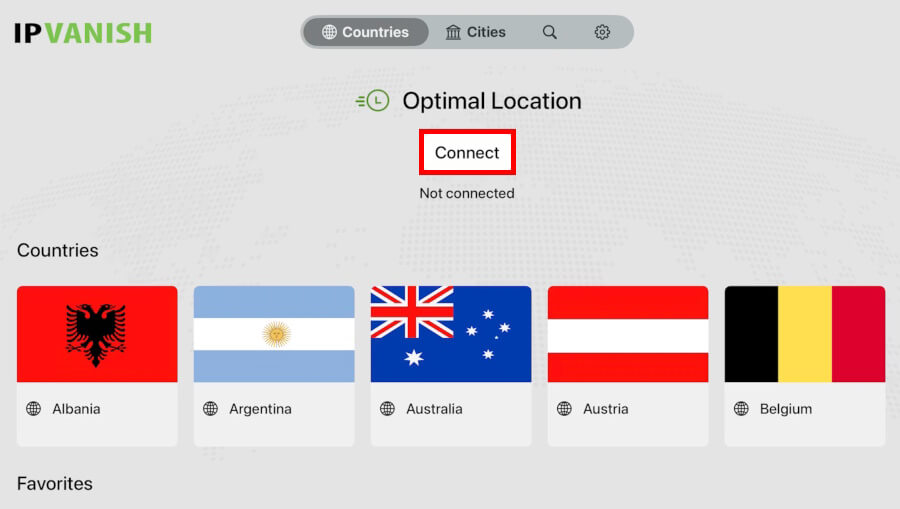
Take full advantage of the unmetered connection allowance by downloading the app onto your Windows PC, Mac, Fire TV Stick, and mobile phones all at once. Navigate through the interface on each platform to evaluate how intuitive it feels. You want to ensure the software remains stable and easy to manage when running across your entire household tech setup.
6. Message 24/7 support with a technical question
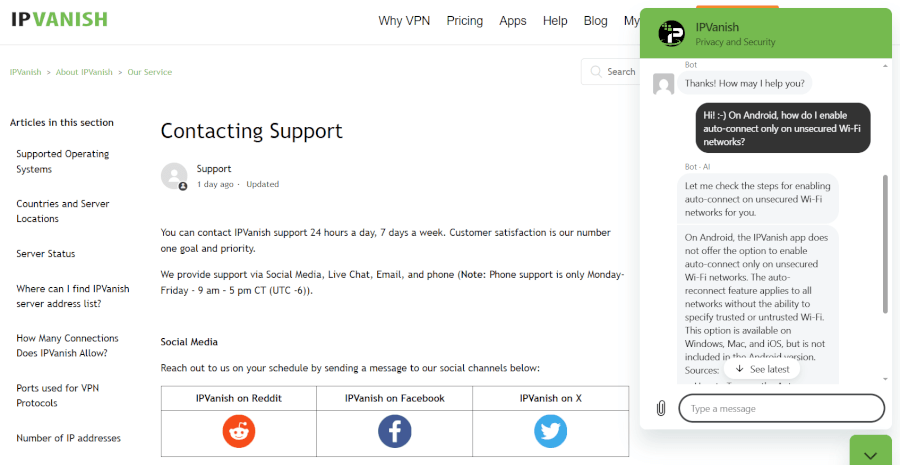
Open the live chat widget or open a ticket on the website to test their customer service responsiveness before you really need it. Toss them a technical question about router setups or server issues to see how fast they reply. Knowing you can reach a helpful human in minutes provides massive peace of mind before you get billed.
Going premium: From IPVanish trial to paid
After testing IPVanish, moving to a paid plan takes only a few clicks. Your apps, settings, and connections stay the same, so you can enjoy uninterrupted privacy protection across all your devices.
How to lock in the best IPVanish deals
The provider offers three standard billing cycles: Rolling monthly plans, annual subscriptions, and a heavily discounted two-year package.
| IPVanish plans | IPVanish Essential | IPVanish Advanced |
|---|---|---|
| 1-month | $12.99/month | $14.99/month |
| 1-year | $3.33/month | $4.49/month |
| 2-year | $2.19/month | $3.29/month |
Deal: Get 83% OFF IPVanish 2-year plans >
To get the most value for your money, always skip the monthly option and head straight for a long-term commitment — purchasing a multi-year bundle unlocks massive savings. Plus, sticking with the annual or two-year tiers ensures you stay fully covered by the 30-day money-back guarantee, a safety net that monthly users do not get.
Perks of upgrading your account
- Zero service interruptions: Your secure encrypted tunnel stays active around the clock, keeping your data hidden from your internet service provider and ad trackers.
- Unmetered device allowance: You can protect every phone, tablet, PC, smart TV, and router in your home simultaneously on a single account.
- Blazing-fast premium speeds: Upgraded accounts retain permanent priority access to their WireGuard server infrastructure for buffer-free 4K streaming.
- All-in-one security toolkit: Your paid subscription ensures your kill switch, split tunneling, and secure SOCKS5 proxies remain fully functional on all platforms.
How to cancel your IPVanish free trial
If IPVanish isn’t the right fit, canceling is simple. As long as you’re within the trial or refund period, you can walk away without any hassle or extra cost.
Step-by-step cancellation
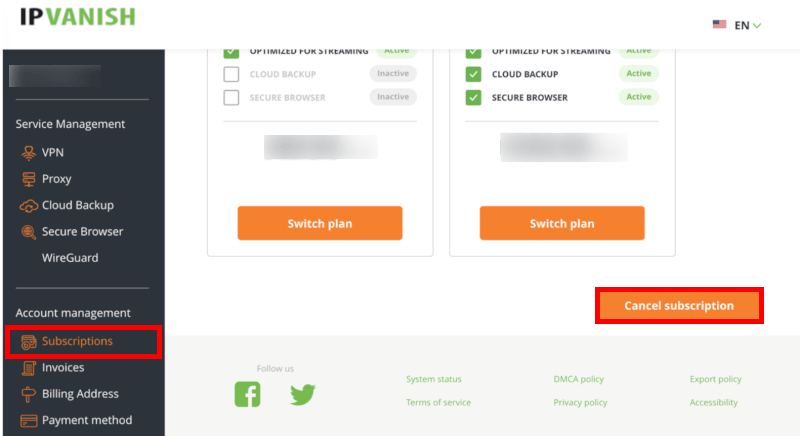
- Access your dashboard: Head directly to the official website and use your secure IPVanish login credentials to enter your customer portal.
- Locate account settings: Click on the Subscription tab located in the primary navigation menu on the left side of your screen.
- Trigger the cancellation: Click the link that says Cancel subscription and follow the brief automated prompts to confirm your choice.
- Get your money back: If you are within the 30-day money-back guarantee window on a long-term plan, the system will process your refund automatically. You do not even need to open a separate support ticket or explain your reasoning to an agent.
What happens next?
Once your refund is approved, the money goes straight back to your original payment method. While the refund works its way through the banking system, you’ll usually keep access to IPVanish until your billing period officially ends.
IPVanish and the competition
If you’re not completely sold on IPVanish yet, it’s worth seeing how it compares with other top VPNs. While IPVanish stands out for its unlimited device connections, providers like NordVPN and Surfshark offer their own mix of security features, performance tools, and trial options. A quick comparison can help you find the best fit for your needs.
| IPVanish | NordVPN | Surfshark | |
| Mobile free trial | ✅ 7 days (Android/iOS only) | ✅ 7 days (Android/iOS only) | ✅ 7 days (Android/iOS/macOS) |
| Money-back guarantee | ✅ 30 days | ✅ 30 days | ✅ 30 days |
| Maximum risk-free period | 30 days | 30 days | Up to 37 days (stacked trial) |
| Device caps on trials | 1 device (mobile) / Unlimited (30-day guarantee) | Full device limit active (10) | Limited to 3 devices during mobile trial |
For users looking to protect an entire household without overspending, IPVanish stands out. Its unlimited device connections are a rare feature, and even after the trial ends, the service remains competitively priced while offering advanced tools like a kill switch and SOCKS5 proxy support.
NordVPN free trial
If speed and security are at the top of your list, the NordVPN trial is worth a look. Its NordLynx protocol consistently delivers excellent performance, while extras like double VPN and Threat Protection add another layer of privacy and security.
Surfshark free trial
If you like the idea of unlimited device connections but want a few extra tools, the Surfshark trial is worth considering. It combines flexible app features with one of the longest risk-free testing periods available, plus extras like split tunneling and automatic IP rotation.
How to fix common IPVanish trial issues fast
While IPVanish is generally easy to set up, minor technical issues can sometimes get in the way. A few simple troubleshooting steps are often all it takes to get things back on track.
1. Fix login failures
Double-check your credentials for accidental spaces, which sometimes happen when using mobile autofill. If the system still rejects your password, log in to the web portal to confirm that Apple or Google has officially activated your trial subscription.
2. Bypass app download freezes
If your smartphone’s app store loops or throws an error code, clear your app store cache in your phone’s system settings. For desktop users, temporarily disable your native Windows Defender or Mac firewall, as they occasionally flag secure VPN installers by mistake.
3. Resolve server connection drops
Switch your active protocol from OpenVPN to WireGuard inside the app’s connection settings menu. If a specific city refuses to connect, manually pick a different server location from the list to bypass temporary localized server congestion.
4. Track down a delayed refund
Keep in mind that website-initiated refunds take 5 to 7 business days to reach your bank account. If your money hasn’t returned after a full week, grab your original invoice number from your signup email so an agent can track it down.
Get help 24/7
If you hit a wall that you can’t bypass on your own, do not panic. Much like competitors NordVPN and ExpressVPN, IPVanish provides 24/7 live chat support directly on their website. Their support agents can manually verify your account status or guide you through complex router configurations in real time, helping you get back online securely.
Is the IPVanish trial worth your time?
An IPVanish free trial is a no-brainer if you want stronger online privacy without spending a cent upfront. Whether you choose the free 7-day mobile trial or the 30-day money-back guarantee, you’ll get full access to its fast WireGuard network. While it lacks extras like a dedicated IP, unlimited simultaneous connections make it a standout choice for busy households.
A risk-free trial is the easiest way to see whether IPVanish fits your browsing and streaming needs. You’ll have plenty of time to test its features, and if you’re not satisfied, you can cancel hassle-free and switch to another VPN.
For budget-conscious users, the current IPVanish promotion offers excellent value without sacrificing premium tools:
IPVanish Coupon:
Get 83% off IPVanish on 2-year plans with the coupon below:
(Coupon is applied automatically)
IPVanish free trial FAQs
Does IPVanish have a 100% free trial?
Yes, but only on mobile devices. You can get a completely free 7-day trial by downloading the official IPVanish app through the Apple App Store or Google Play Store. To test the VPN on your desktop, smart TV, or router, you must use their website-based 30-day money-back guarantee, which requires an upfront payment but offers a full, hassle-free refund.
How do I cancel my IPVanish trial before getting billed?
For the 7-day mobile trial, you must cancel through your phone’s native subscription settings (Apple ID or Google Play account) at least 24 hours before the trial ends. For the 30-day website trial, log in to your dashboard on the official IPVanish website, navigate to the “Subscription” tab, and click “Cancel Subscription.”
Does the IPVanish free trial limit my data or speeds?
Not at all. Unlike basic free VPN utilities that throttle your internet or cap your monthly data bandwidth, the IPVanish free trial gives you 100% unrestricted access to their entire premium network. You get the same blazing-fast WireGuard speeds, unlimited data, and security features as a fully paid premium member.
Will IPVanish charge me automatically when the trial ends?
Yes, if you do not cancel in time. Both the mobile trial and the 30-day guarantee will automatically transition into a paid annual subscription if you do not initiate a cancellation before your specific testing window closes. Mark the date on your calendar so you can evaluate the service without any surprise charges.
Can I use the IPVanish trial on multiple devices at once?
If you sign up for the 7-day mobile trial, your testing is restricted to that specific smartphone or tablet. However, if you opt for the 30-day risk-free window via their website, you unlock IPVanish’s standout feature: Unmetered simultaneous connections, allowing you to protect every single PC, Mac, phone, and Fire TV Stick in your household at the same time.

Leave a Reply