
Microsoft has released its April 2026 Patch Tuesday updates for Windows 11 versions 24H2 and 25H2, to fix security bugs across the operating system.
The security release addresses 165 flaws, including one actively exploited SharePoint spoofing flaw and multiple “more likely to be exploited” Windows bugs affecting core components.
The April security updates were published as part of Microsoft’s regular Patch Tuesday cycle. The release bundles fixes across Windows, Office, Azure, and developer tools to address privilege escalation and remote code execution vulnerabilities.
The most urgent issue this month is CVE-2026-32201, a spoofing vulnerability in Microsoft Office SharePoint that Microsoft confirms is actively exploited. The flaw is caused by improper input validation and can be triggered remotely without authentication or user interaction. Successful exploitation allows attackers to access limited sensitive data and modify content, though it does not impact system availability. Microsoft classifies the exploit status as “Exploitation Detected,” making it the top priority for organizations running on-premises SharePoint servers.
Other notable fixes that landed with this month’s update include CVE-2026-33824, a critical remote code execution flaw in the Windows IKE Extension (CVSS 9.8), and CVE-2026-26149 in Microsoft Power Apps (CVSS 9.0). Several other flaws rated 8.8 impact Windows Push Notifications, Remote Desktop Client, and core platform services.
Microsoft also flagged multiple Windows vulnerabilities as “Exploitation More Likely,” indicating increased risk of future attacks. These include flaws in the Windows Boot Loader (CVE-2026-0390), Remote Desktop (CVE-2026-26151), Windows Kernel Memory (CVE-2026-26169), BitLocker (CVE-2026-27913), Windows Search (CVE-2026-27909), Desktop Window Manager (CVE-2026-32152, CVE-2026-32154), Windows COM (CVE-2026-32162), Windows Shell (CVE-2026-32225), and Microsoft Defender (CVE-2026-33825). These bugs primarily enable privilege escalation or code execution and affect widely used system components, increasing their practical risk.
Beyond security fixes, KB5083769 introduces targeted improvements to Windows 11. Remote Desktop now displays all connection settings in .rdp files before connecting, with options disabled by default to reduce phishing risk. Microsoft also resolved a bug that could cause “Reset this PC” to fail after recent updates, and improved SMB over QUIC reliability to reduce connection timeouts.
The update includes changes related to Secure Boot certificates ahead of their scheduled expiration starting June 2026. Windows now displays certificate status in the Windows Security app, and Microsoft has refined the certificate rollout logic. A related issue that could trigger unexpected BitLocker Recovery after Secure Boot updates has also been fixed.
Apply the Windows update now
As with all Patch Tuesday releases, Windows users are advised to install the latest updates as soon as possible to reduce exposure to known vulnerabilities.
On Windows 11, updates can be installed by navigating to Settings → Windows Update → Check for updates.
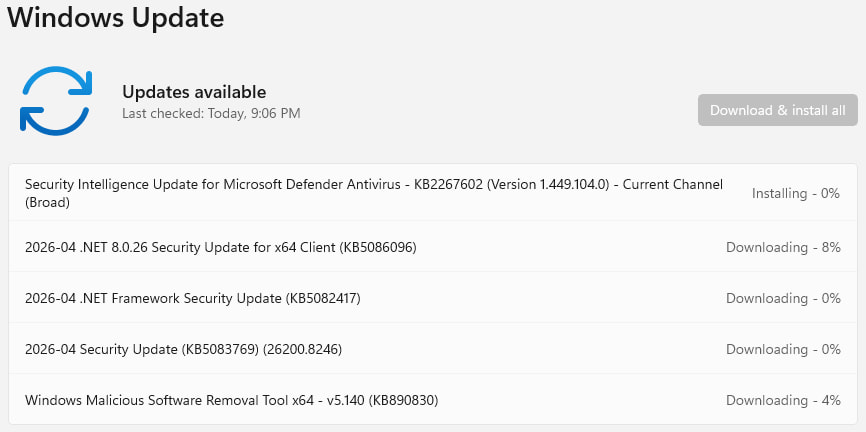
Security updates are typically downloaded and installed automatically on most systems, but a restart is required to complete the installation. As a precaution, users should back up important data before applying updates to avoid potential data loss in the event of an unexpected failure.



>As with all Patch Tuesday releases, Windows users are advised to install the latest updates as soon as possible to reduce exposure to known vulnerabilities.<
MicroShaft is simply not living in the same universe as their users!