

To pinpoint the perfect VPNs for the USA in 2026, I’ve personally tested 25 VPN providers across servers in 15 US cities, tracking WireGuard speeds, streaming access, and connection stability during peak evening hours. Plus, I’ve stress-tested these on both coasts to find the ones that don’t choke during peak hours.
To cut to the chase, the best VPN for the USA in 2026 is NordVPN. It came out on top for US speeds in my tests, had no trouble with major streaming services, and blew me away with how strongly it protects user privacy. Surfshark is my runner-up because you get strong performance on any number of devices, while ExpressVPN earns the next spot for its long-standing reliability.
See the full breakdown in my overview of the 5 best VPN services for the USA.
In 2026, I’ve witnessed US platforms shut down VPN IPs at breakneck speed. Add ISP throttling and shady public Wi-Fi into the mix, and a basic VPN just won’t cut it. The ones that made the final cut refresh their IPs regularly, stay quick during congestion, and have no-logs policies backed by publicly available audit reports.
Quick answer: The best VPNs for the USA right now
Americans are dealing with a messy mix of online restrictions right now. ISPs can still monetize your browsing metadata, and TikTok’s future keeps shifting with the finish line nowhere in sight. Meanwhile, adult sites like Pornhub are blocked in many states due to age-verification laws. Add sports blackouts and location-based streaming libraries, and what you see online can shift as you move from spot to spot.
To be sure, my team and I ran speed and unblocking tests in more than 15 cities across the US. So, here are the VPNs that can handle these US-specific headaches:
| VPN provider | Best for | Core US feature | Starting price |
| NordVPN | Overall winner | 1,900+ US Servers and NordLynx Speed | $3.49/month (2-year plan) |
| Surfshark | Best budget | Unlimited device connections | $1.99/month (2-year plan) |
| ExpressVPN | Ease of use | Lightway protocol and Apple TV app | $2.44/month (2-year plan) |
| Proton VPN | Privacy first | Swiss-based and secure core US | $2.99/month (2-year plan) |
| CyberGhost | Streaming and gaming | Dedicated US Hulu and gaming servers | $2.19/month (2-year plan) |
How we tested: Our 2026 US VPN methodology
To produce first-hand, trustworthy data, I personally tested every VPN on this list using a 1 Gbps AT&T Fiber connection on a high-end Windows desktop PC and a Samsung Galaxy S25 Ultra from physical test locations in New York, Los Angeles, and Chicago.
I ignored the lab stats and focused on how these VPNs handle a typical American day of work and play:
- Proprietary speed and latency benchmarks: I first checked my normal internet speed, then compared it with each VPN on nearby and cross-country US servers. I tracked download and upload speeds, latency in milliseconds, and packet loss, as those are the numbers you feel when gaming or streaming.
- Protocol performance analysis: Beyond the default settings, I tested WireGuard, NordLynx, and Lightway to find the fastest setups that didn’t constantly drop the connection.
- Peak-hour stress testing: I ran tests five times a day between 7:00–11:00 PM EST, when US internet traffic is at its worst. This is where subpar VPNs usually start to struggle.
- Weighted speed scoring system: My speed rating favors sustained download performance but still factors in peak burst speeds. This means the final score shows daily use, not just short test spikes.
- 4K streaming and platform unblocking tests: I tried each VPN with Netflix US, Hulu, Max, Disney+, and BBC iPlayer, checking for HD and 4K playback, buffering, as well as those tedious proxy errors.
- US sports blackout verification: I connected through different US regions to see which VPNs could consistently bypass location-based sports restrictions.
- Multi-device compatibility checks: I used a Windows desktop, Samsung Galaxy S25 Ultra, and Samsung Smart TVs, since VPN performance can feel a bit different depending on the device.
- DNS leak and encryption integrity tests: I ran leak checks on several networks to make sure my real IP never slipped through.
- Kill switch pressure testing: I force-closed VPN apps to confirm the kill switch blocked traffic straight away if the connection dropped.
- No-logs policy and audit verification: I went beyond marketing pages and checked each provider’s latest independent security audits and transparency reports to see if their privacy claims had real proof behind them.
I kept things down-to-earth by testing on a typical American broadband link. It’s not a perfect science, but it’s an honest snapshot of how these perform in a real home.
Why Americans should use a VPN in 2026
After testing VPNs all year, one thing’s obvious to me: In the US, a VPN now seems like standard internet gear.
Here’s why more and more Americans are using one in 2026:
- State-level privacy laws create a confusing patchwork: Some states added new privacy rules this year (like those in Indiana and Kentucky), though your privacy rights still depend on which state you’re in. A VPN keeps one solid layer of protection in place, so your browsing doesn’t suddenly become public once you cross a state line.
- ISPs can still profit from your browsing data: Most people don’t know this, but their ISP can view a lot of their online activity. A VPN encrypts your traffic, which helps stop your ISP from building detailed profiles based on your activity.
- Throttling and “paid prioritization” are real: With net neutrality rules weakened, ISPs have more room to slow certain services during busy hours. I’ve seen streaming slowdowns firsthand in testing. A VPN hides what kind of traffic you’re using, killing ISP throttling.
- Sports blackouts are still everywhere: Watching the Cubs from Chicago sounds easy, until MLB.TV hits you with a blackout. A VPN server in another US location changes your virtual location and can help dodge those regional blocks.
- Age-verification laws and state-level blocks are expanding: I’ve noticed more states pushing age verification lately, and access rules don’t stay the same. Since a VPN changes your visible location, it becomes part of the conversation every time new limits roll out.
- Streaming libraries change by location: Netflix, Max, Hulu, and other platforms show different content depending on where you connect from. A VPN lets you connect through other regions and see what’s available there.
- Public Wi-Fi is still a security gamble: Airports, hotels, and cafés across the US run networks that aren’t very secure. A VPN with strong encryption and a reliable kill switch protects your data when you’re working or browsing on the go.
Best VPNs for the USA in 2026
From my experience, these VPNs hit the right balance of speed, privacy, and US server coverage, with apps that just work on my devices and TVs without a fuss.
NordVPN – The best overall VPN for the USA (tested February 2026)
| Starting price | $3.49/month (2-year Basic plan) |
| Simultaneous devices | Up to 10 devices (Increased from 6 in previous years) |
| Speed retention | ~97% (undisputed champion), averaged just a 3–5% loss |
| Streaming / Unblocks | Netflix, Max, Hulu, Prime Video, Disney+, BBC, and iPlayer |
| Third-party privacy audits | Verified no-logs, 5th audit by Deloitte |
| Best deal | 75% Off Coupon |
If you want one VPN that can handle 4K streaming, sports blackouts, public Wi-Fi security, and lag-free gaming without constant tweaking, NordVPN is still the one I trust most for US connections. It’s fast, stable, and drama-free.
During my testing on a 1 Gbps fiber line from New York, NordVPN kept about 95–96% of my base speed, averaging just under the 1 Gbps mark using the NordLynx protocol. That’s easily in ‘I forgot it was on’ territory, as 4K streams, big downloads, and cloud backups never triggered any buffering during my tests.
A big reason for that smooth experience is NordLynx itself. It became my go-to for daily testing, whether I was watching shows, browsing, or gaming, thanks to its great mix of fast speeds and low latency. The moment I hit those restrictive airport and work networks, NordWhisper quickly became my go-to option. Speeds are lower than with NordLynx, but the trade-off is that it blends in with regular web traffic, making it handy on VPN-unfriendly networks.
On the security side, NordVPN has turned into more than simply a tunnel for your traffic. Threat Protection Pro works even when the VPN is off and helps block malicious downloads, phishing sites, and a lot of tracker-heavy ad domains. In the US, where tracking and data profiling are basically baked into the web, this felt like a truly useful extra layer, particularly on hotel and airport Wi-Fi.
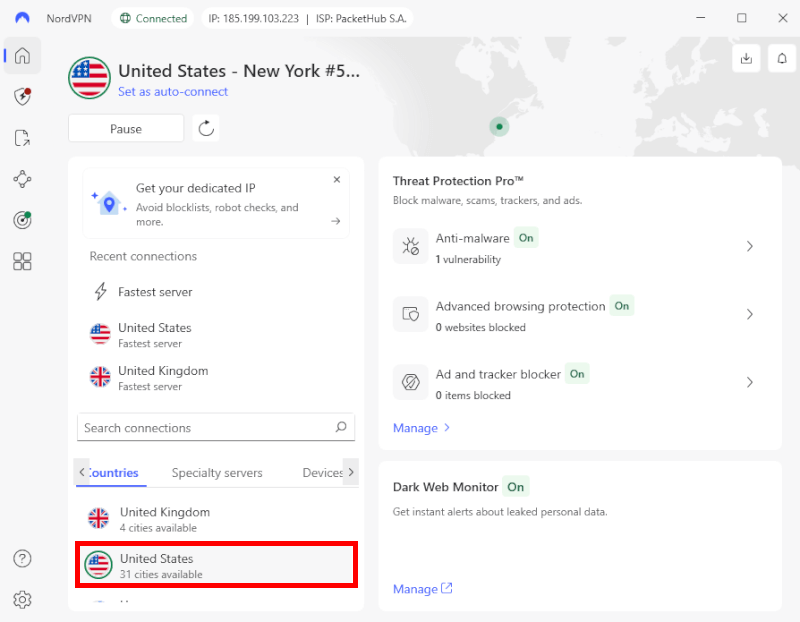
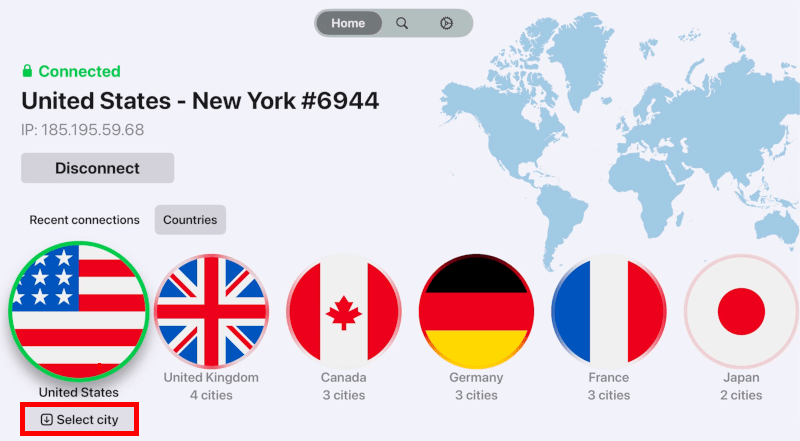
Its comprehensive US server coverage is what keeps speeds blazing-fast and streaming smooth. With plenty of city options, I was never stuck in crowded locations, and switching regions made streaming tests smoother than expected. Netflix US, Hulu, and Max all worked smoothly in 4K for me, and I did not run into the usual proxy errors. The SmartPlay feature handles the streaming tech behind the scenes, so you can just press play instead of messing with settings.
As for privacy, NordVPN runs on RAM-only servers, which means data gets wiped on every reboot. Plus, its no-logs policy has been independently audited by Deloitte. For a service many Americans use from inside a Five Eyes country, that extra verification matters. On top of that, they have rolled out post-quantum encryption support, which is more about future-proofing than daily life right now, but it proves they’re playing the long game.
I really like that they bumped the device limit from 6 to 10. It is much easier to protect a full house of gadgets without signing devices in and out all the time.
As good as it is, there are a few minor downsides worth mentioning. The starting price on long plans is attractive at first, but renewals jump noticeably, so keep that in mind. To score the lowest monthly rate, you also need a longer commitment, which will likely filter out short-term users.
To make it easier, here’s a quick overview of NordVPN’s plans and prices:
| NordVPN plans | Basic | Complete | Prime |
|---|---|---|---|
| 1-month | $14.99/month | $19.99/month | $29.99/month |
| 1-year | $5.49/month | $6.49/month | $9.49/month |
| 2-year | $3.49/month | $4.49/month | $7.49/month |
Deal: Get 75% OFF NordVPN + 3 Months Extra >
Also, the app has grown into a full-featured security hub, which I really like, though newcomers might feel a bit overwhelmed at first.
All in all, if you want a VPN that manages high-speed internet, 4K streaming, travel, public hotspots, and privacy quietly in the background, NordVPN still takes the crown in my tests.
NordVPN pros and cons
+ Pros
- Lightning-fast speeds with NordLynx
- Post-quantum ready encryption for future-proofing your data
- Threat Protection Pro stops malware, phishing, and tracking-heavy ad networks
- Netflix US, Hulu, Max, and Disney+ all work flawlessly
- 10 devices connected at once
- RAM-only servers for bulletproof privacy
- Server network across 15+ US cities
- Dedicated servers for P2P, Double VPN, and Onion over VPN
- Free Meshnet feature for creating your own encrypted network
- 24/7 live chat support
- Privacy-friendly Panama jurisdiction
- 30-day money-back guarantee across all plans
– Cons
- Hefty price hikes after the renewal
- Learning curve could overwhelm newcomers
- No support for port forwarding
Surfshark – Best budget VPN with unlimited devices in the US
| Starting price | $1.99/month (2-year Starter plan + 4 months free) |
| Simultaneous devices | Unlimited devices |
| Speed retention | ~95%, Leveraging WireGuard and 10Gbps infrastructure |
| Streaming / Unblocks | Netflix, Max, Hulu, Disney+, Prime Video, BBC iPlayer |
| Privacy audits | Verified no-logs; Deloitte audited infrastructure |
| Best deal | 87% Off Coupon |
Surfshark caught me off guard. I went in expecting surprisingly cheap but severely limited. However, what I got was one of the most practical VPNs I’ve used for everyday US homes, especially if your home looks like a mini electronics store.
Testing Surfshark on a 1 Gbps fiber line in New York and Chicago, I saw about a 15 to 20 percent speed drop on WireGuard. In practice, everything still flew: 4K Netflix, downloads, backups, video calls. No buffering, no choking. That is rare at this price.
Unlimited simultaneous connections may sound simple, but it can change everything. I ran laptops, phones, a tablet, and a Fire TV Stick at the same time and never bumped into a restriction. For busy US homes with a bunch of devices, this is by far the most stress-free experience. No counting and no signing devices in and out. Simply set it up and forget it.
Surfshark’s upgraded 10 Gbps servers in the US are not just marketing talk. I saw sub-20 ms pings on nearby locations like Chicago and New York, which kept things smooth for gaming and video calls. It gave me confidence that the network can handle serious loads like 4K streaming and non-stop 5G use.
On the privacy side, Surfshark feels a bit more serious in 2026. The audited no-logs policy is the baseline I expect now, and the kill switch passed my leak tests by cutting my connection at once when I forced a VPN drop. That is perfect for sketchy public Wi-Fi scenarios.
I ended up liking CleanWeb 2.0 a lot. It blocks ads, trackers, malicious domains, and even cookie pop-ups on many sites. In the US, where every page seems to throw a banner in your face, I found my web sessions much calmer.
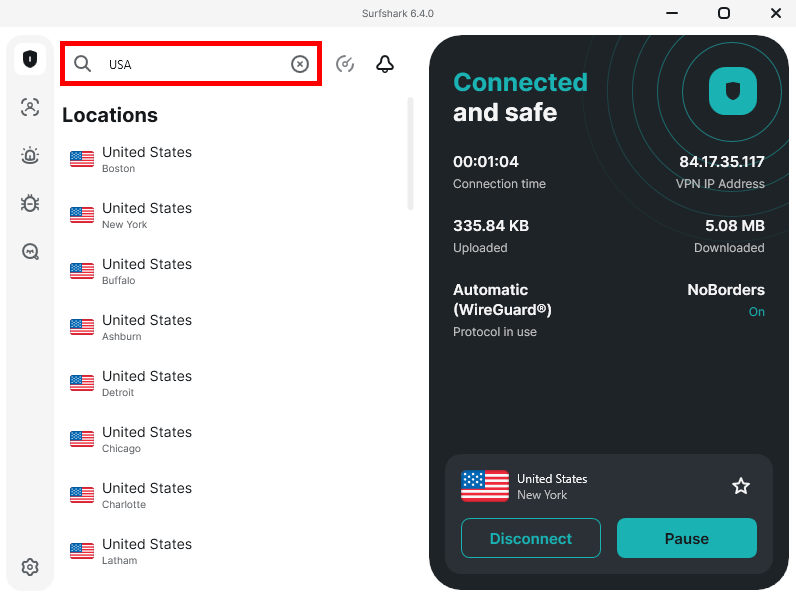
Surfshark also packs in some powerful features. Dynamic MultiHop lets you choose both entry and exit locations. I tested a route going in through New York and out through London just to see how stable it was, and it held up better than I expected. This is a feature you usually only see locked behind more “hardcore” privacy services. This is a premium feature you get with a bit more serious privacy-focused VPNs.
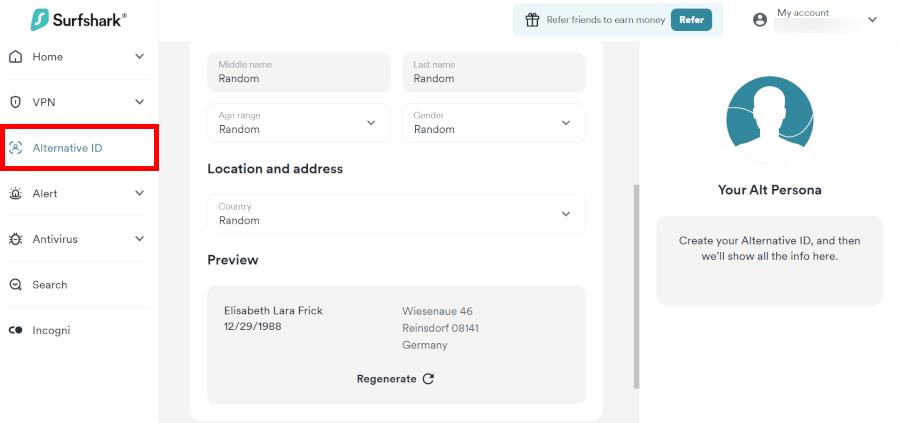
One newer tool I spent time testing is Alternative ID. It gives you a generated name, date of birth, and a proxy inbox to use online. When I used it on spam-heavy US sites, my main inbox stayed clean. For anyone tired of data brokers and endless marketing emails, this ends up being a clever bit of extra cover.
For the most part, streaming was smooth. Netflix US, Hulu, Max, and Disney+ all worked in 4K during my tests. I did run into the occasional hiccup on certain apps and devices, but switching servers fixed it in under a minute.
What worked best for me: I left WireGuard on for daily browsing and streaming, and saved MultiHop for specific privacy-heavy tasks. Speeds stayed much better.
Pricing is where Surfshark’s budget reputation starts to show. Long plans sit close to two dollars a month, which is way cheaper than most premium rivals. The tradeoff is that you have to stick around for longer. Short monthly plans cost a lot more, so it is better for long-term users. Here’s a quick look at the pricing:
| Surfshark plans | Starter | One | One+ |
|---|---|---|---|
| 1-month | $16.45/month | $18.95/month | $21.85/month |
| 1-year | $3.39/month | $3.59/month | $7.49/month |
| 2-year | $2.49/month | $2.49/month | $4.49/month |
Deal: Get 87% OFF Surfshark here >
On the downside, the app packs in a lot of features now, so first-time users might need a little time to explore where everything lives. For everyday use, it’s more than enough, though NordVPN still provides a few more powerful extras.
Still, if you want to cover a house full of devices, stream in 4K, cut down on tracking, and not overspend, Surfshark serves more than its price tag suggests.
Surfshark pros and cons
+ Pros
- Unlimited device connections
- Budget-friendly long-term plans
- Works swimmingly with Netflix, Hulu, Disney+, and 30+ other libraries
- Swift and stable speeds with WireGuard and 10 Gbps US servers
- Diskless servers and an audited no-logs policy
- CleanWeb 2.0 blocks ads, trackers, malware, and cookie pop-ups
- Alternative ID generates masked names, birthdates, and emails for safer signups
- Dynamic MultiHop for extra privacy
- IP Rotator automatically changes your IP periodically
- 24/7 live chat support
– Cons
- Monthly plan is pretty pricey
- Prices spike after the discount period
- Features aren’t consistent across apps
- 9-Eyes location remains a drawback
ExpressVPN – Easiest VPN to use in the US for streaming and travel

| Starting price | $2.44/month (2-year Basic plan + 4 months free) |
| Simultaneous devices | From 10 to 14 devices |
| Speed retention | ~90-94% speed using the Lightway Turbo protocol |
| Streaming / Unblocks | Netflix and Hulu |
| Third-party privacy audits | Verified no-logs and audited by KPMG and PwC |
| Best deal | 81% Off + 4 Months Free |
If ease is the priority and tweaking is not, ExpressVPN is the first service I would suggest. Whether I was on home fiber or hotel Wi-Fi, it behaved the same: Swift to connect and stable. You pay more than budget services, but the simplicity and consistency are hard to beat.
During my US testing, what hit me was how little I had to do to make ExpressVPN work wonders. I installed it, tapped connect, and it pretty much took care of itself. Protocol selection, server choice, stability on public Wi-Fi — it all felt automatic — and I mean that as a compliment. Public networks are where many VPNs fall apart, and this one didn’t. That sort of stability outweighs shaving a few Mbps off blazing-fast speeds.
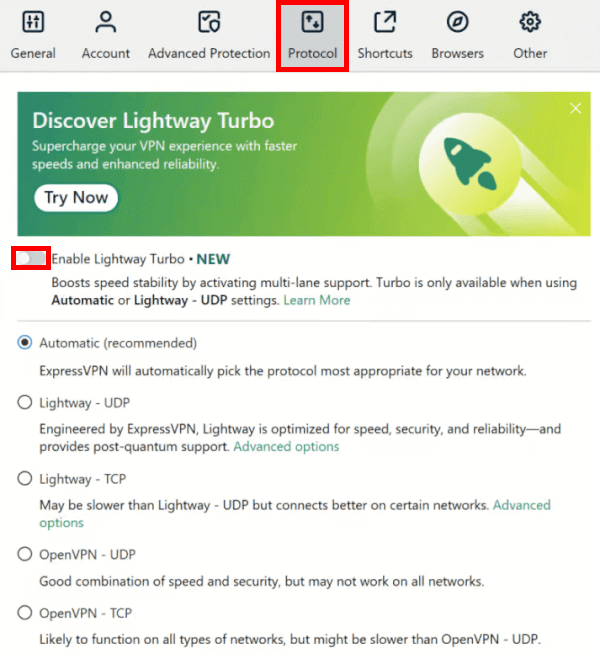
Speeds with Lightway, more so with the newer upgrades, stayed strong on US servers. I had plenty of bandwidth for 4K streaming and big downloads at the same time. Above all, the connection felt sturdy, with no random drops to ruin a show. To me, it feels built for real homes and travel days, not just showing off in speed tests.
Splendid server coverage across the US is another reason ExpressVPN works so well. As of 2026, it has expanded to all 50 states, with 62 city-specific locations, up from 24 before. This made skipping sports blackouts and staying on top of news and banking as easy as pie. Plus, ExpressVPN proved its worth for streaming. Smart TVs, routers, and all my gadgets stayed covered without me lifting a finger.
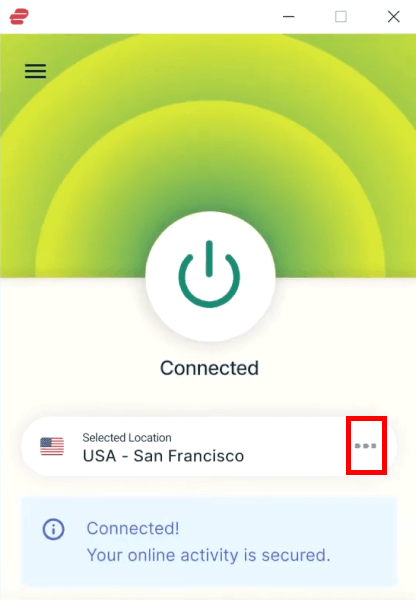
On the security side, it ticks the serious boxes. It runs on RAM-based servers and maintains an audited no-logs policy, and the kill switch proved fail-safe. The second the VPN connection dropped in my tests, traffic stopped. Meanwhile, with automatic IP changes and new encryption, ExpressVPN feels built for today and tomorrow.
On the flip side, ExpressVPN is still pretty much a premium product, and there is no free version to fall back on. You are paying for a solution that functions superbly, with consistent speeds and apps that feel as polished across every device. It leans on simplicity rather than complex features, so if you enjoy building multi-hop setups, VPNs such as NordVPN might be a better choice.
That premium feel carries over to the price too, which is higher than many competitors but matches the level of polish and extra perks packed into the service:
| ExpressVPN plans | Basic | Advanced | Express Pro |
|---|---|---|---|
| 1-month | $14.99/month | $16.99/month | $22.99/month |
| 1-year | $4.99/month | $5.99/month | $8.99/month |
| 2-year | $3.49/month | $4.49/month | $7.49/month |
Deal: Get 73% OFF ExpressVPN 2-year plans >
Even so, for US users who care about simple setup, smooth 4K streaming, and reliable protection on the go, ExpressVPN remains one of the most rock-solid services I’ve tested to date.
ExpressVPN pros and cons
+ Pros
- Lightway protocol with post-quantum encryption
- Shuffle IP rotates your address automatically
- Split tunneling on Windows, routers, and Mac via Aircove
- Works with Netflix, Hulu, Max, Peacock, and most US streaming services
- Helpful round-the-clock live chat
- Diskless TrustedServer setup with audited no-logs policy
- Covers 10-14 devices at once (depending on plan) or unlimited with the Aircove router
- Pro tier adds dedicated IP and identity monitoring
- ExpressVPN Keys password manager syncs across devices
- Obfuscation built in to bypass restrictive networks
- Network Lock blocks traffic instantly if the VPN drops
- Simple, one-click interface
– Cons
- Not exactly budget-friendly price
- Mandatory app update by March 31, 2026 (or service stops)
- Split tunneling limited on Mac unless using Aircove
- Fewer multi-hop and niche features
Proton VPN – Privacy-focused VPN with reliable US performance
| Starting price | $2.99/month (2-year plan) |
| Simultaneous devices | Up to 10 devices |
| Speed retention | ~92-98% using VPN Accelerator and WireGuard |
| Streaming / Unblocks | Netflix, Disney+, Max, ABC, Peacock, BBC iPlayer |
| Privacy audits | Verified no-logs, Securitum audited, and 100% open source |
| Best deal | 75% Off Coupon |
If privacy is the priority rather than flashy extras, Proton VPN is one of the first services I recommend for US users. Built by the team behind Proton Mail, it approaches VPN design from a security-first perspective, and that philosophy shows throughout the experience. During testing, it felt less like a marketing-driven product and more like a carefully engineered privacy tool that still manages to stay practical for everyday use.
What stood out most was consistency. Connections were stable across US servers, whether I was browsing at home, working remotely, or connecting through public Wi-Fi. Proton VPN does not overwhelm users with unnecessary prompts — you connect, and it quietly handles encryption and routing in the background. At the same time, advanced users still get granular controls, including protocol selection and detailed connection options.
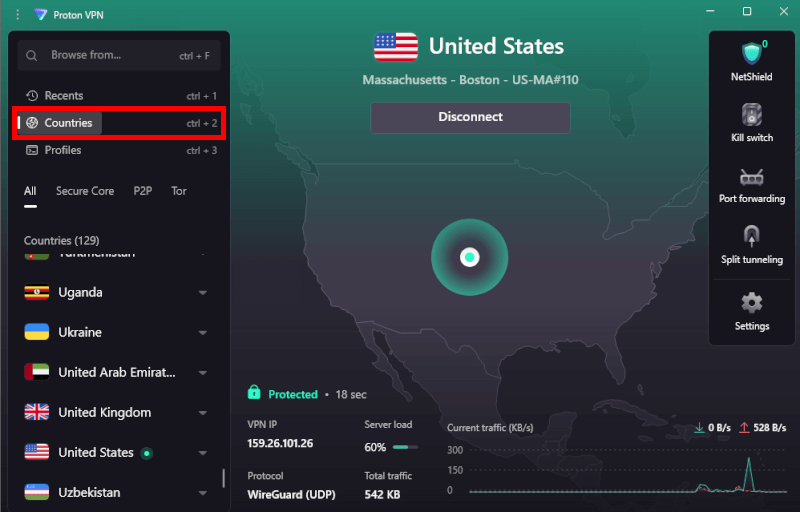
In the realm of privacy, Proton VPN pulls ahead of the competition. It is based in Switzerland, outside major US and EU intelligence-sharing alliances, which gives it a stronger legal privacy position than most competitors. All apps are open-source and independently audited, something I always look for as a reviewer.
Also, Secure Core sends your traffic through hardened servers first, and the Stealth protocol helps on restrictive networks. Proton is even rolling out its own VPN architecture and preparing for post-quantum encryption.
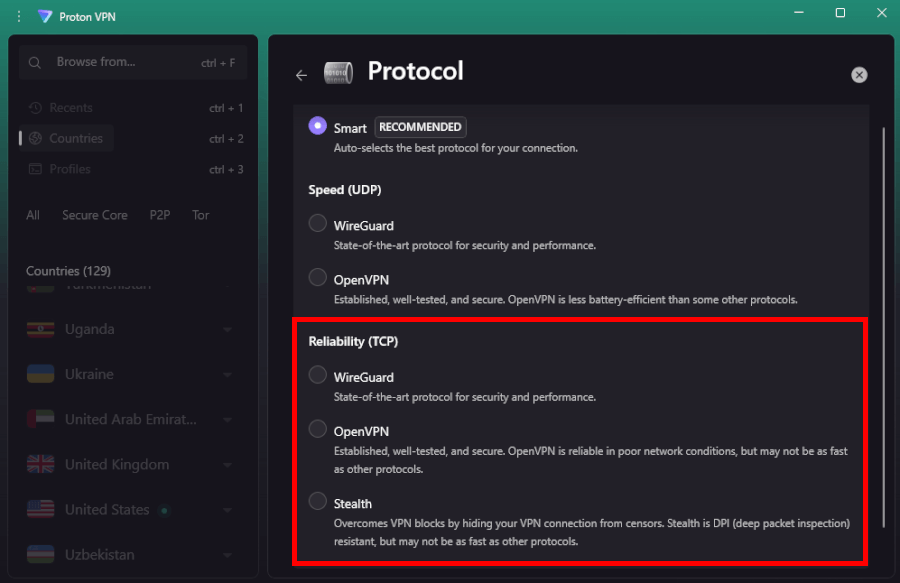
When it comes to speeds, they were surprisingly solid for a privacy-first VPN. With protocols like WireGuard, speeds held up well enough for 4K streaming, large downloads, and gaming on a typical US home connection. Proton’s VPN Accelerator boosts long-distance connections, and I experienced much lower latency than with older versions I’ve tried. While it may not chase raw speed records, the connection felt reliable and steady — which matters more in daily use.
Streaming compatibility was better than expected for a privacy-focused provider. I accessed platforms like Netflix and Hulu without constant server switching, and playback started quickly with minimal buffering once connected. Even during peak evening hours on US servers, video quality remained stable enough for HD and 4K viewing.
There are a few tradeoffs. Proton VPN’s interface exposes more technical options than some competitors, which can feel slightly complex at first, and its US server selection, while solid, is not as city-dense as the largest providers.
Pricing sits in the mid-range, with better value on longer subscriptions and optional bundles with Proton’s broader security ecosystem. Below is a quick look at Proton VPN’s 2026 pricing tiers:
| Proton VPN plans | Proton VPN Plus | Proton Unlimited |
|---|---|---|
| 1-month | $9.99/month | $12.99/month |
| 1-year | $3.99/month | $9.99/month |
| 2-year | $2.99/month | $7.99/month |
Deal: Get 70% OFF Proton VPN 2-year plans >
Overall, Proton VPN is built for users who value transparency and strong privacy foundations without sacrificing everyday usability. It may not focus on bells and whistles, but for US users who want dependable performance backed by serious security principles, it remains one of the most trustworthy VPNs available today.
Proton VPN pros and cons
+ Pros
- Swiss-based privacy
- Open-source apps audited by independent security firms
- Secure Core servers route traffic through hardened nodes
- VPN Accelerator boosts long-distance US speeds
- Post-quantum encryption in the works
- Plans bundle with Proton Mail, Proton Drive, Proton Sheets, and Proton Pass
- Linux CLI and refreshed GUI
- Smart TV and Apple TV apps now support NetShield
– Cons
- No RAM-based servers, like with some competitors
- No 24/7 live chat
- Smaller US server selection compared to some competitors
- Advanced tools have a steeper learning curve
CyberGhost – Low-ping gaming & 4K streaming for the USA

| Starting price | $2.19/month (2-year plan + 2 months free) |
| Simultaneous devices | Up to 7 devices |
| Speed retention | ~86–90% using WireGuard on 10Gbps infrastructure |
| Streaming / Unblocks | Netflix, Max, Hulu, Disney+, Prime Video, BBC iPlayer |
| Privacy audits | Verified no-logs and Deloitte audited infrastructure |
| Best deal | 83% Off Coupon |
CyberGhost skips the settings boss battle. It’s geared toward those whose idea of VPN use is Netflix or a late-night gaming session, not tweaking protocols. The app serves up task-based options, so you are not stuck scrolling through servers like it is an inventory screen. Simply select your mode and get back in the game.
The streaming interface is impressively streamlined. CyberGhost groups servers by platform, so Netflix US and the rest are not buried in a long list. I connected based on what I wanted to watch, not which city might work. The setup is robustly simple for US streamers.
For gaming, CyberGhost adds a superb little power-up: Live ping data on select servers. That makes it easier to dodge high-latency connections before a match even starts. On closer US servers, gameplay stayed smooth enough, and picking a server based on ping just makes more sense when it’s a race against time.
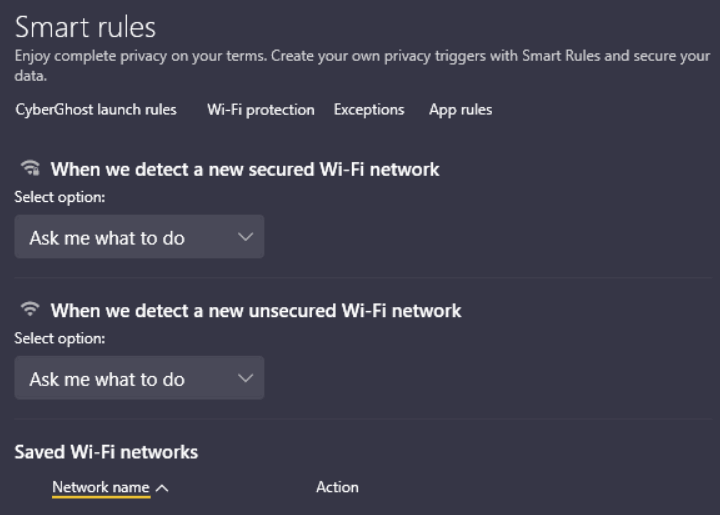
Behind the scenes, CyberGhost runs a massive server network with strong US coverage in cities like New York, Miami, Chicago, Dallas, and Seattle, which helps keep speeds consistent across the country. With Smart Rules, the app can auto-start and connect to a selected US or streaming server when you open certain apps, giving you one less thing to worry about.
On the privacy front, I like that CyberGhost is based in Romania, outside the big intelligence-sharing alliances, and runs its own NoSpy servers managed in-house. There is also a token-based Dedicated IP option, which is handy if you want a stable US IP for banking or remote work without linking it directly to your identity. The company has gone through independent audits, something I always check when sifting through no-logs claims, and it is beginning to roll out post-quantum protections on parts of the network.
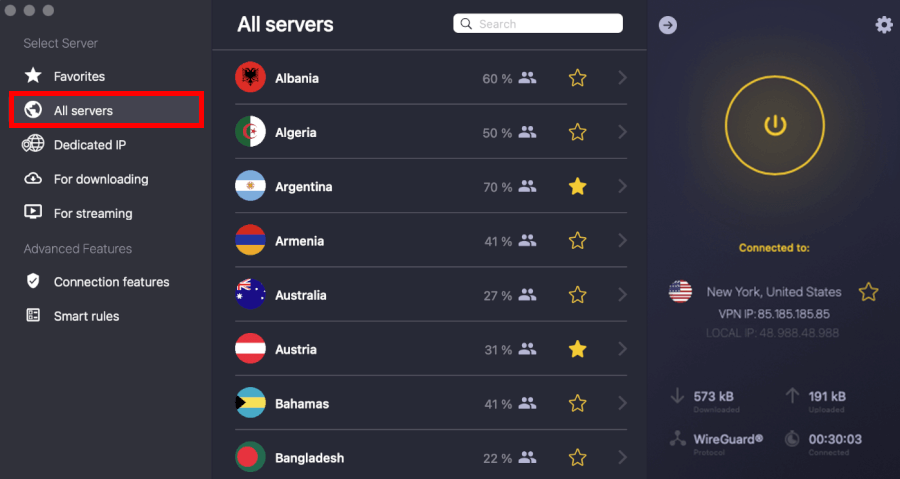
Price is a big part of why I think CyberGhost is popular with US VPN users. Long-term plans usually work out to a low monthly cost, and the 45-day money-back guarantee is one of the longest in the VPN space. I like that you get real-time to test streaming, gaming, and everyday browsing on your own home connection, not just during a rushed trial.
| CyberGhost VPN plans | Price |
|---|---|
| 1-month | $12.99/month |
| 6-month | $6.99/month |
| 2-year | $2.19/month |
Deal: Get 82% OFF CyberGhosts 2-year plans >
The weak spots are more about polish than deal breakers. The desktop app feels heavier than ultra-clean VPN interfaces, and peak-time speeds can dip a bit on US servers. Nothing dramatic, but the very fastest providers keep more headroom. And if you jump between devices a lot, some tools are not available everywhere.
That being said, for US streaming and gaming, CyberGhost hits a sweet spot. I like how the app separates servers by what you actually want to do, not just locations. It comes across as an entertainment-focused VPN, and for the right user, that is the whole appeal.
CyberGhost pros and cons
+ Pros
- Dedicated streaming and gaming servers
- Token-based dedicated IP
- Massive server fleet, moving to faster 10Gbps hardware
- Strong encryption, kill switch, and leak protection
- NoSpy servers for an extra layer of trust
- Independently audited no-logs policy
- Smart Rules automation
- Generous 45-day money-back guarantee
- Automatic app launcher for swift connections
- Super beginner-friendly apps
– Cons
- Long-range servers can mean higher latency
- Feature gaps by platform
- Audited, but still questioned by privacy purists
How to choose the best VPN for the USA
Here’s the 2026 checklist I use when trying to figure out whether a VPN is actually good for US users, not just good on paper.
1. US server density and city-level coverage
Do not stop at “has US servers.” That is marketing talk. You want city-level variety.
Why it matters: Distance still equals delay. If you’re in New York but your VPN drops you on a generic “US” server in Los Angeles, your speeds and latency take a hit for no good reason.
It is not only about speed, either. City choice can help with regional sports blackouts (NBA, MLB, NFL), accessing local news while traveling, or logging into banking apps without triggering security alerts.
A serious US VPN should cover 15+ US cities at a minimum, including hubs like Chicago, Dallas, Atlanta, Seattle, Miami, New York, and LA. The more local options you have, the easier it is to get a fast, low-latency connection that feels like you are barely using a VPN at all.
2. Streaming compatibility (the cat-and-mouse game)
US streaming platforms are some of the most aggressive in the world when it comes to blocking VPN traffic. Netflix, Hulu, Disney+, Max, and others constantly update their detection systems.
What to look for: Providers that offer dedicated streaming servers or clearly labeled “optimized” servers that are actively maintained, not just random locations that “sometimes work.”
In 2026, it is also important that the VPN supports Apple TV and smart TV apps directly. Many US homes stream on big-screen TVs now, not laptops, and router setup or native TV apps make a huge difference.
For 4K (and even 8K) streaming, look for VPNs upgrading to 10Gbps server infrastructure, so you are not stuck watching buffering wheels during peak evening hours.
3. Jurisdiction vs no-logs policy
The US is part of the Five Eyes intelligence alliance, and companies based on US soil can be legally compelled to hand over data.
The safer route: Choose a VPN headquartered in a privacy-friendly jurisdiction such as Panama, the British Virgin Islands, or Switzerland. But location alone is not enough.
Only trust providers that have passed independent third-party audits (for example, by Deloitte, PwC, KPMG, or Cure53) that verify their no-logs claims. Bonus trust signal: a warrant canary page showing ongoing transparency about government data requests.
4. Protocol performance (WireGuard vs proprietary)
US internet speeds are fast, especially on fiber and 5G. Your VPN should not be the bottleneck.
The standard: Look for support for WireGuard or high-performance proprietary protocols like NordLynx or Lightway. These are built for better speeds, quicker connections, and improved stability compared to older standards.
Forward-looking feature: Some leading VPNs are rolling out post-quantum encryption. It sounds futuristic, but it is about protecting today’s data from being stored and cracked by future quantum computers. For long-term privacy, that is a big plus.
5. Specialized features that matter in the US
Some features look minor on a spec sheet but make a big difference in daily US use.
| Specialized feature | Why it matters for US users |
| Split tunneling | Use split tunneling to protect your data without triggering “suspicious login” flags on US banking apps |
| Kill switch | If the VPN drops even briefly, your real US IP stays hidden from your ISP |
| Ad and tracker blocking | Cuts down aggressive tracking and ads common across US websites and apps |
| Smart DNS | Helps with streaming on devices that cannot run full VPN apps |
| Dedicated IP | Reduces endless CAPTCHAs and account security lockouts on US banking and work tools |
| Double VPN / Multi-hop | Extra privacy layer for journalists, remote workers, or higher-risk users |
For US users in 2026, the biggest wins come from dense US server coverage, proven no-logs audits, modern high-speed protocols, and strong streaming support. Everything else is a bonus.
Best VPNs for common US use cases (2026 rankings)
Here’s a quick 2026 guide for picking the right VPN depending on what you actually do online in the USA. I’ve broken it down by the most common needs, so you can skip the fluff and find what matters fast.
| Use case | Best provider(s) | Core feature for 2026 |
| Bypassing sports blackouts | Surfshark / NordVPN | City-level selection (30+ US cities) |
| Buffer-free 4K streaming | ExpressVPN / CyberGhost | 10Gbps infrastructure and dedicated tabs |
| Remote work and security | Proton VPN / NordVPN | Dedicated IP and post-quantum encryption |
| Public Wi-Fi and travel | NordVPN | Threat Protection Pro and auto-connect |
| Competitive US gaming | CyberGhost / Surfshark | Real-time ping monitoring |
Choosing a VPN can be easy: Pick the right strength for your habits and avoid wasting money on unused features.
The ultimate fix for US Sports and bypassing blackouts
Major US sports networks (NFL, MLB, NBA, NHL) love blackouts — they push local cable packages and frustrate cord-cutters. Your fix? A VPN with city-level US servers, like Surfshark or NordVPN.
Why it matters: You can connect to “Chicago” while sitting in Detroit to catch a game that would otherwise be blacked out. Switching between cities should be seamless, and top 2026 apps even support GPS Spoofing on Android to trick apps that check your physical location along with your IP. You can also use it with YouTube TV or Hulu + Live TV, two of the biggest ways Americans stream sports today.
Must-have for 4K streaming (Netflix US, Hulu, Max)
If your goal is smooth HD or 4K streaming, you need a VPN that doesn’t throttle your speed. ExpressVPN and CyberGhost hit the mark with 10Gbps server infrastructure and streaming-optimized servers refreshed regularly to stay ahead of Netflix, Hulu, and Max detection.
Use Lightway or WireGuard protocols to reduce ISP throttling. Even on a 65-inch 4K TV, these VPNs keep buffer wheels to a minimum. The dedicated streaming tabs take the guesswork out, letting you connect in one click.
Top pick for remote work and US business security
Remote work in 2026 comes with its own headaches: corporate portals, MFA prompts, and location-based security locks. VPNs like Proton VPN and NordVPN solve this with Dedicated IPs and multi-hop/post-quantum encryption.
Why it matters: You can log into Slack, Outlook, or banking portals without triggering “suspicious login” alerts. A dedicated IP is also handy if your company whitelists specific addresses, reducing verification headaches every day.
Tailor-made for public Wi-Fi and Travel (US airports and coffee shops)
Airports and cafes are prime hunting grounds for hackers. NordVPN excels here with always-on auto-connect, AES-256 encryption, and Threat Protection Pro.
Expert insight: In 2026, “Evil Twin” hotspots are still common – they mimic legitimate Wi-Fi networks to steal data. Features like Vulnerability Detection alert you to insecure Wi-Fi before you even connect. It’s basically a seatbelt for your data when traveling across the US.
Highest rated for US gaming (Low ping and DDoS protection)
For competitive US gamers, milliseconds matter. CyberGhost and Surfshark offer real-time ping monitoring to nearby US gaming hubs like Virginia, San Jose, and Chicago.
Why it works: You can pick a server with the lowest latency, keeping lag down and DDoS protection active. For games like Valorant, Call of Duty, or Apex Legends, this split-second difference can be the difference between a win and a frustrating match.
Free vs paid VPNs for the USA: What you need to know in 2026
In 2026, free no longer means safe. Most free VPNs in US app stores fund themselves by selling browsing data to ad brokers. Knowing the risks helps you make smarter choices and keeps your data out of the wrong hands.
| Feature | Free VPNs (most) | Paid premium VPNs |
| Data privacy | Often sold to US ad brokers | Verified no-logs policies |
| Speed / Bandwidth | Throttled (2–10 Mbps) | Uncapped (10Gbps+ nodes) |
| US server choice | 1–2 Cities (usually NY/LA) | All 50 US states |
| Streaming access | Blocked by Netflix/Hulu | Dedicated streaming IPs |
| Security | Basic or outdated | Post-quantum encryption, kill switch, leak protection |
Hidden risks of free VPNs in the US
- Data monetization: Free VPNs often track and sell your data to advertisers, making you the product instead of the customer.
- Security gaps: Free VPNs often skip essential security features like post-quantum encryption and reliable kill switches that come standard in paid plans.
- Server congestion: Free servers usually limit you to 2-3 cities (New York and Los Angeles), creating extreme lag during peak US hours when everyone connects simultaneously.
- Small server network: Fewer server locations mean slower speeds and more buffering due to overcrowded networks.
Why paid VPNs still make more sense for US users
Free VPNs are fine for casual browsing, but streaming, gaming, and remote work demand paid plans. They let you:
- Bypass blocks: Paid providers rotate IPs to stay ahead of Netflix US, Hulu, and Disney+ restrictions.
- Full-speed protocols: WireGuard, NordLynx, or Lightway ensure US fiber and 5G connections run near-native speeds.
- Advanced features: Port forwarding, Dedicated IPs, and multi-hop routes are mostly paid-only perks.
- Smooth 4K/8K streaming: Paid VPNs avoid buffering and ISP throttling, essential for big-screen entertainment.
During my 2026 tests, I found that 8 out of 10 “free” VPNs in the US iOS store leaked IPs on reconnect, which is a stark reminder that paying a little can save a lot of headaches.
How to set up your US VPN (4-step quick start)
It won’t take more than a few minutes to get everything synced up.
1. Select your plan and secure your Account
Go directly to the provider’s official site to avoid phishing ads. For the best value, US users typically choose 2-year plans. Pay via credit card, PayPal, or use cryptocurrency for maximum anonymity.
2. Install apps across all devices
Download the native app for every screen you own. Streaming in 2026? Make sure your VPN has native apps for Apple TV and Smart TVs for the best 4K experience:
- Desktop: Windows, macOS, Linux
- Mobile: iOS, Android
- Streaming: Apple TV, Fire TV Stick, Android TV
In 2026, most US content consumption happens on TV platforms, not laptops. Install the smart TV or streaming device app first.
3. Activate kill switch, threat protection, and other security features
Before hitting connect, go to Settings and toggle on the Kill Switch. This is non-negotiable for US privacy as it blocks your internet if the VPN drops, preventing your ISP (Comcast/AT&T) from seeing your data. Also, enable Ad/Tracker Blocking to stop aggressive US advertisers.
4. Connect and verify your privacy
Use the auto-connect feature for the fastest nearby connections, or manually select a server in a specific US state to bypass local sports blackouts. For streaming international content like BBC iPlayer, connect to servers in that country, then restart your streaming app and clear cookies if issues occur.
Also, confirm your VPN is actually protecting you:
- For speed: Hit “Auto-Connect” to find the lowest-latency server near you.
- For sports: Manually pick a specific city to bypass local blackout restrictions.
- The final check: Visit DNSLeakTest.com to confirm your real US IP is hidden and no data is leaking to your ISP.
Setup is the hardest part, so now you can sit back and let your VPN do the heavy lifting for your security.
The future of privacy: US VPN trends to watch in 2026
From the death of traditional cookies to the rise of post-quantum encryption, these are the trends redefining what it means to be “secure” in the United States this year.
Post-quantum cryptography (PQC): Future-proofing your Data
Quantum computers are getting closer to reality, which means old encryption could eventually be cracked. Top VPNs like NordVPN and ExpressVPN are already adding quantum-resistant layers to their protocols.
In short, your data stolen today won’t be readable by tomorrow’s supercomputers. This is called the “Harvest now, decrypt later” problem, and using a PQC-enabled VPN is your best hedge.
US VPN legislation: The RESTRICT Act and your rights
VPNs are still fully legal in the US, but laws like the RESTRICT Act show that government scrutiny is increasing. To stay safe, I recommend VPNs headquartered in privacy-friendly countries like Switzerland (Proton VPN), Panama (NordVPN), or Romania (CyberGhost). That way, even if US rules change, your private data stays out of reach.
RAM-only servers: Beyond “no logs”
Promises of “no logs” aren’t enough anymore. RAM-based servers store all data in volatile memory, wiping everything on reboot. Providers like NordVPN, Surfshark, and ExpressVPN now use this setup, even in US-based data centers. If a server is seized, there’s literally nothing to take. It’s privacy you can see, not just trust.
VPNs in the 5G/6G Era: Speed without sacrifice
5G is everywhere, and 6G is on the horizon in cities like NYC and Silicon Valley. Older protocols can slow your streaming or mobile gaming. Stick to WireGuard or NordLynx as they handle high-speed mobile connections while keeping latency ultra-low. That means smoother 4K streams, lag-free gaming, and longer battery life on your phone.
Emerging 2026 trends to watch out for:
- Decentralized VPNs (dVPNs): Peer-to-peer networks that are almost impossible to block.
- AI-powered threat detection: Modern VPNs now scan traffic in real time to block zero-day malware before it reaches your device.
- Post-quantum awareness: Even if your VPN isn’t fully PQC yet, being aware of “Harvest Now, Decrypt Later” attacks lets you pick a provider that’s future-ready.
The verdict: Securing your US digital future
Look, in 2026, a decent VPN just doesn’t cut it anymore. You need a service that treats your privacy as a non-negotiable, whether you’re dodging an annoying NFL blackout or keeping your ISP’s hands off your data.
Here’s your 30-day launch plan:
- Risk-Free Trial: Leverage the 30-day money-back guarantee (or CyberGhost’s 45-day window) to test servers in your specific city.
- Streaming Audit: Confirm the VPN unblocks your essential services like Netflix US, Max, or Peacock on your Apple TV or Smart TV.
- Safety First: Enable the Kill Switch and Post-Quantum protection immediately to future-proof your privacy.
In 2026, you shouldn’t have to choose between a fast connection and a private one. By sticking with my top choice, NordVPN, you’re getting a battle-tested service with a verified no-logs policy and the 10Gbps infrastructure needed to keep up with modern US fiber speeds.
Best VPNs for the USA FAQ
Does using a VPN slow down my 5G or 6G internet?
A VPN adds a small speed hit because of encryption, but modern protocols like WireGuard and NordLynx usually keep speed loss under 10%. On fast US fiber and 5G networks, that difference is barely noticeable for streaming, gaming, or video calls.
Is a free VPN safe for online banking in the US?
Usually not. Many free VPNs rely on data monetization or weaker security, which defeats the purpose of using one. For banking or sensitive logins, a paid VPN with a verified no-logs policy and strong encryption is the safer choice.
What is a kill switch, and why do I need it?
A kill switch automatically cuts your internet if the VPN disconnects unexpectedly. This prevents your real IP address from being exposed to your ISP, apps, or websites, which is especially important on public Wi-Fi or while traveling.
Is it legal to use a VPN to bypass sports blackouts in the USA?
Yes, it is legal to use a VPN to change your location to access out-of-market games on services like MLB.TV or ESPN+. While it typically doesn’t break the law, it may violate a streaming service’s terms of service, which could lead to account restrictions in extreme cases.
Why should US users consider a “Dedicated IP” add-on?
A dedicated IP provides a personal, static address that only you use. For US users, this is a game-changer for avoiding “infinite CAPTCHAs” on Google and preventing security alerts when logging into sensitive US banking or work portals.

Leave a Reply