
DuckDuckGo has added chat sharing to Duck.ai, allowing users to send encrypted conversations through links that expire after 48 hours by default.
Recipients can read, save, or continue the shared conversation without creating an account.
The new feature encrypts chats on the sender’s device before uploading them, with the decryption key stored in the shared link. DuckDuckGo says this design prevents it from reading the stored conversations.
The update replaces copying and pasting chat text with a way to share an interactive conversation, including AI-generated images. Uploaded files are excluded, while follow-up messages added by either the sender or recipient remain private to their respective conversations.
Duck.ai is the privacy-focused search and browser company’s service for accessing third-party AI models. DuckDuckGo says it routes requests on users’ behalf to hide their IP addresses from model providers, prohibits using chats for training, and keeps chat history on users’ devices.
Encryption keys stay in the link
Each share link contains an identifier that locates the encrypted conversation on DuckDuckGo’s servers and a key that unlocks its contents.
The key sits in the URL fragment, the portion after the ‘#’ character, which browsers normally exclude from requests sent to servers. This lets the recipient’s browser decrypt the chat without sending the key to DuckDuckGo. The company says it also tested the implementation to ensure keys do not enter telemetry, error reports, or other logs.
Links use long, random values to make them impractical to guess. Shared pages also carry instructions against search indexing in both the page itself and the server’s response, and users cannot opt into making conversations discoverable.
DuckDuckGo says it studied incidents in which shared ChatGPT and Claude conversations appeared in search results, sometimes exposing names and other personal information, before designing the feature.
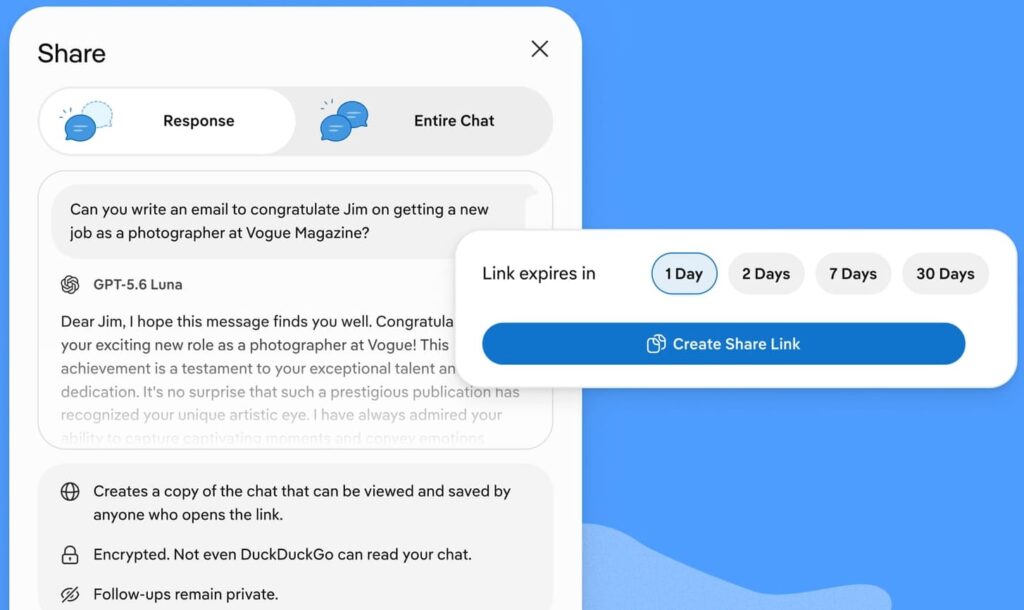
The default expiration is two days, with alternatives of one, seven, or 30 days. Once a link expires, the corresponding shared chat is deleted from DuckDuckGo’s servers.
Sharing controls and limitations
Users can generate a link through the share icon beneath a response, choosing either that response alone or the conversation up to that point. Entire conversations can also be shared through the three-dot menu in the chat list.
Active links and their expiration dates are listed under Settings > Shared Chats, where users can delete them early. Duck.ai’s Fire Button also supports clearing shared links alongside chats.
However, encryption and expiration do not prevent recipients from copying, saving, or forwarding the content. Anyone who saves a chat before the link expires or is deleted keeps a copy, and anyone with the full link can access the shared conversation while it remains available.
Users should therefore treat the full link as sensitive, send it directly to intended recipients, and review conversations for personal information before sharing. Choosing a short expiration or deleting the link once recipients have viewed it reduces the access window, but cannot retract copies already made.



Leave a Reply