
Want to watch BBC iPlayer outside the UK but keep running into geo-restrictions? After plenty of testing, I’ve found that Surfshark remains one of the easiest and most affordable ways to access British TV. With just a few clicks, you can connect to a UK server and start streaming.
What makes Surfshark stand out is how simple the experience feels once everything is set up. Features like CleanWeb help block ads, while Bypasser lets you route only specific apps through the VPN. Combined with unlimited device connections, it works smoothly across phones, laptops, streaming devices, and smart TVs.
In this guide, I’ll show you exactly how to use Surfshark with BBC iPlayer, improve streaming speeds, and fix the occasional connection issue. If you’re ready to get started, you can also grab the latest discount with the coupon below.
| Based in | Netherlands (strict privacy standards) |
| Security | AES-256-GCM, WireGuard, and RAM-only servers |
| Bonus tools | CleanWeb (Ad-block), Bypasser, and Dynamic MultiHop |
| Refund policy | 30-day money-back guarantee |
| Best for… | Families (unlimited devices) and budget-friendly 4K streaming |
Surfshark VPN Coupon:
Get 87% Off Surfshark with the coupon below + 3 months extra:
(Coupon is applied automatically; 30-day money-back guarantee.)
Setting up Surfshark for BBC iPlayer
The process of setting up Surfshark is incredibly straightforward. In fact, you’ll need about ten minutes to go from blocked to watching Peaky Blinders (or Blackadder if you’re in the mood for a classic).
To get started, you just need a Surfshark account, the app for your preferred device, and a quick connection to a UK server. Here is exactly how to do it.
1. Pick your subscription plan
I’ve broken down the current tiers below so you can see exactly how much each plan costs. While the higher tiers are great for overall privacy, I’ve found that the lowest-tier plan is all you really need for a perfect BBC iPlayer experience:
| Surfshark plans | Starter | One | One+ |
|---|---|---|---|
| 1-month | $16.45/month | $18.95/month | $21.85/month |
| 1-year | $3.39/month | $3.59/month | $7.49/month |
| 2-year | $2.49/month | $2.49/month | $4.49/month |
Deal: Get 87% OFF Surfshark here >
2. Sign up and secure your account
Enter your email and choose a payment method. Surfshark is very flexible here. They accept credit cards, PayPal, Google Pay, and even cryptocurrency if you want to keep your payment completely private. Once your order is processed, you’ll receive an email with your login details.
3. Download and install the app
Navigate to the “Apps” section on the Surfshark website. They have dedicated software for almost everything: Windows, Mac, Linux, Android, and iOS.
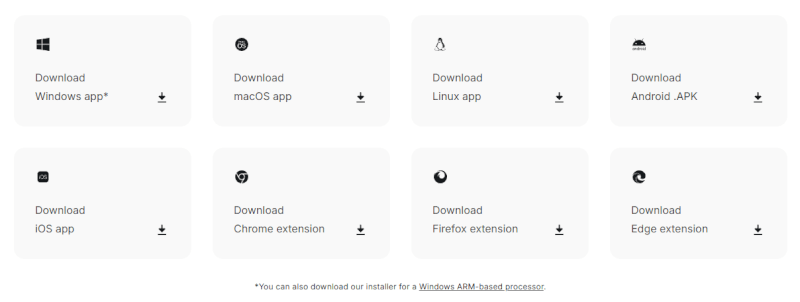
- On desktop: Download the .exe or .dmg file, double-click it, and let the installer do its thing.
- On mobile: It’s even faster to just grab it from the Google Play or Apple App Store.
4. Log in and optimize for speed
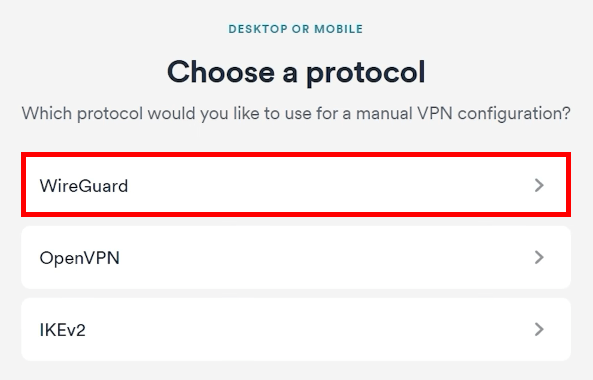
Open the app and log in. Before you connect, I recommend one quick tweak: Go to Settings > VPN Settings > Protocol and select WireGuard. It’s significantly faster than the older protocols and ensures your 4K stream doesn’t buffer.
5. Connect to a UK server
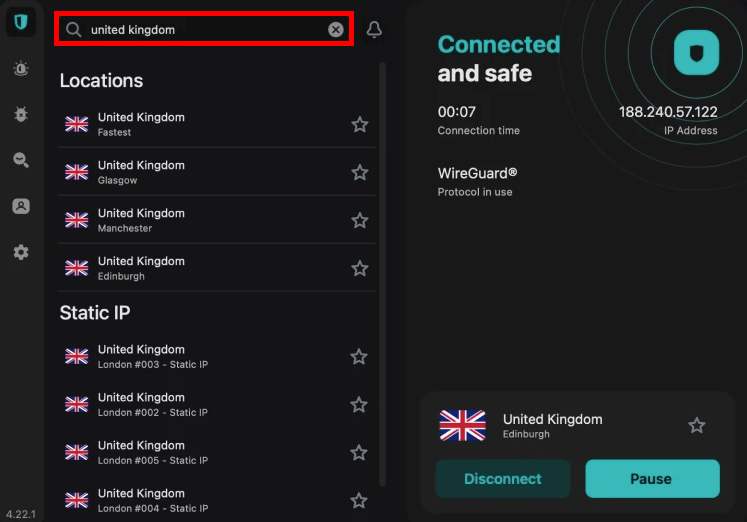
Use the search bar at the top of the app and type “United Kingdom.” Surfshark has servers in London, Manchester, Glasgow, and Edinburgh.
If one city feels a bit slow, try another. London is usually the fastest, but Manchester is a superb “secret” backup for busy streaming nights.
Once the “Power” button turns green, your IP address is officially British. You’re now ready to head over to the BBC iPlayer site and start your marathon.
How to create your BBC iPlayer account
Now that your Surfshark digital disguise is active, you’re officially ready to step through the door. For the smoothest experience, make sure you stay connected to a UK server throughout the registration process.
1. Start the registration
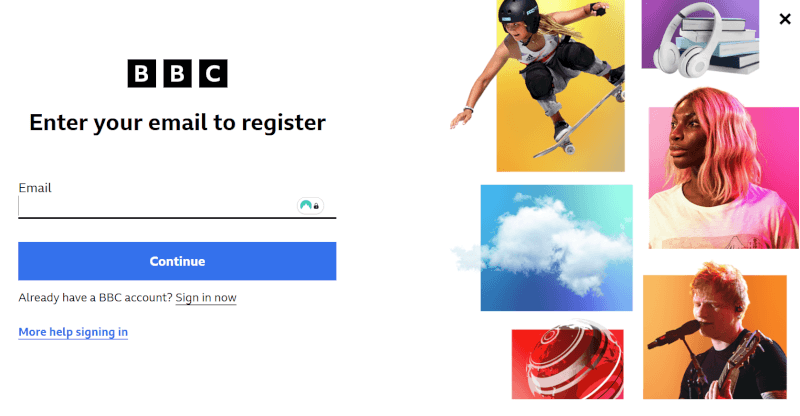
Head over to the BBC iPlayer homepage and click “Sign In,” then select “Register Now.” You’ll need to provide a few standard details like your date of birth and a valid email address.
2. The TV license prompt
During the process, a box will ask if you have a valid UK TV license. While this is a legal requirement for UK residents, the BBC website currently operates on an honor system. To proceed to the content, click “Yes, I have a TV license.” The system doesn’t cross-reference your name or email against a database at this stage.
3. Picking a UK postcode
The final step is entering a postcode. This tells the BBC which regional programming (like local news) to show you.
The quick fix? You can use any valid UK postcode. I recommend using the BBC’s own London headquarters postcode: W1A 1AA. It’s easy to remember and works every time.
4. Verify and stream
Check your email, click the verification link from the BBC, and you’re officially a member. You can now browse thousands of hours of content without seeing a single geo-block.
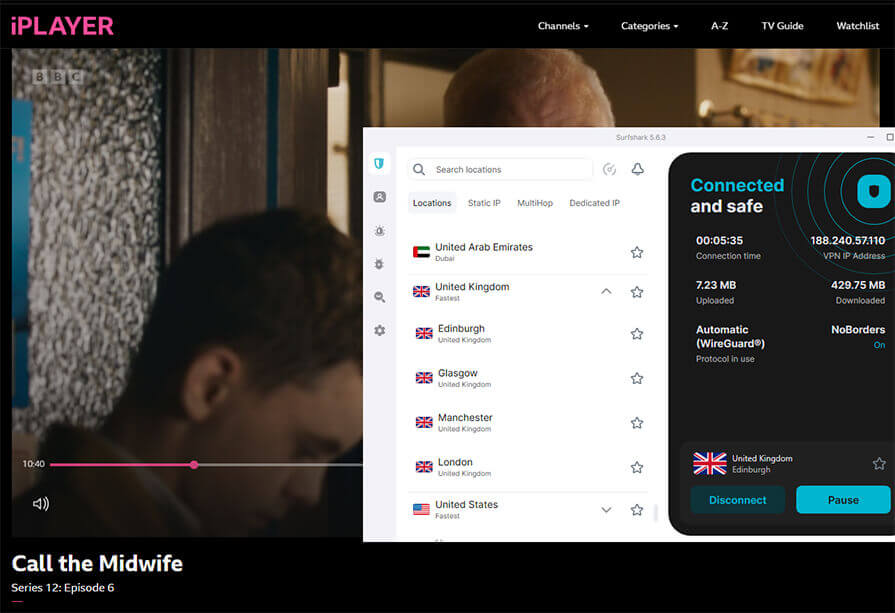
If the registration page gives you an error, it’s likely because your browser remembers your true location through cookies. I highly recommend opening a New Incognito Window (while Surfshark is active) to create your account. It’s the tried-and-true method to ensure the BBC sees you as a UK visitor.
Optimizing Surfshark for a buffer-free experience
Surfshark is famously fast, often outperforming much more expensive competitors like ExpressVPN in raw speed tests. While you only need about 25 Mbps for a stable 4K UHD stream, Surfshark’s infrastructure consistently clocks in at over 750 Mbps.
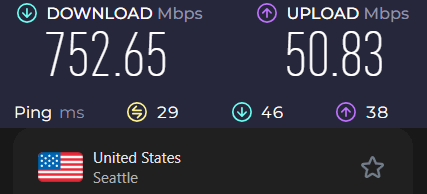
This headroom ensures that even if your local network is busy, your BBC iPlayer stream stays crisp and uninterrupted.
However, a VPN is only as good as its configuration. Here’s how to optimize your setup for the best results. If speed is your priority, check out the fastest VPNs I’ve tested.
1. Pick the best UK server
For the fastest speeds, you’d usually connect to the server closest to your physical house. Since you must use the UK for BBC iPlayer, your next best bet is to use Surfshark’s high-bandwidth locations in London, Manchester, Glasgow, or Edinburgh.
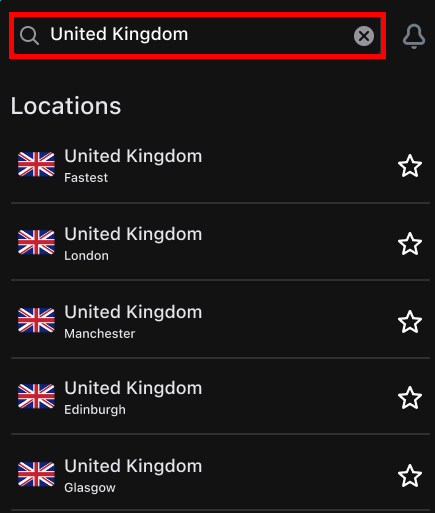
If you notice lag on a London server during a big football match, switch to Manchester. With over 440 UK servers available, a fresh connection usually clears up any congestion.
2. Clear your browser’s “location memory”
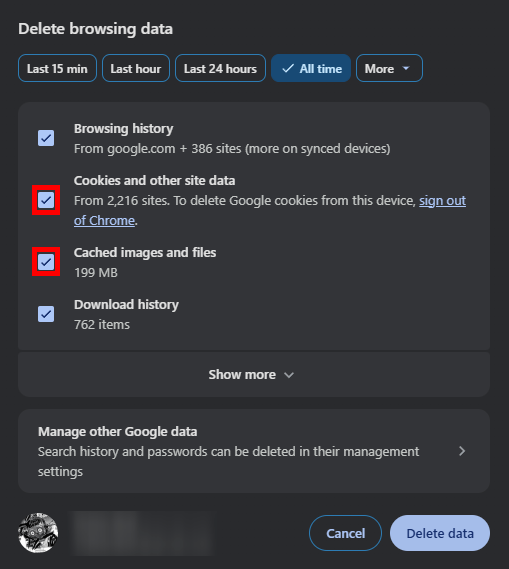
If you’ve connected to the UK but the BBC still blocks you, it’s likely your browser cache. Browsers store cookies that can leak your real-world location.
The fix? Go to your browser Settings > Privacy > Clear Browsing Data. Specifically, clear your cached images and files.
3. Fine-tune your device and network
To get the best streaming performance, it’s worth making a few quick adjustments to your device and network setup.
- Close background apps: Every open app, especially cloud backups or game launchers, uses part of your bandwidth. Close these before streaming.
- Ethernet vs Wi-Fi: If you’re using a Smart TV or PC, Ethernet is usually faster and more stable than Wi-Fi. If you’re on Wi-Fi, stick to the 5GHz band and stay close to the router when possible.
- Device updates: Keep your operating system and the Surfshark app updated. New updates often include performance improvements for WireGuard, Surfshark’s fastest protocol.
4. Use Bypasser (split tunneling)
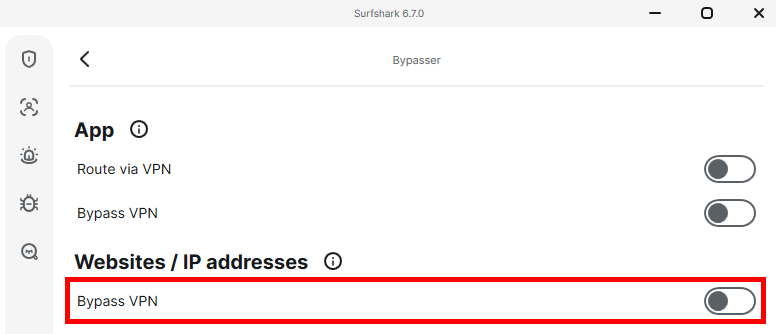
This is one of Surfshark’s best features. Bypasser lets you choose exactly which apps use the VPN.
The benefit? You can set your browser to use the UK VPN for the BBC, while your banking app or local food delivery services use your regular connection. This prevents you from getting flagged for suspicious logins from your own bank while you’re virtually in London.
5. Activate CleanWeb and private DNS
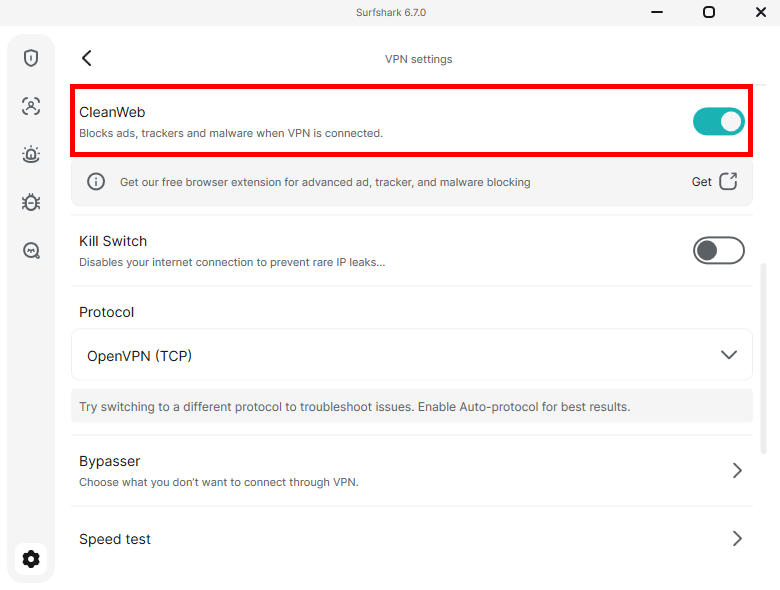
For better privacy and smoother browsing, it’s worth enabling a few extra security and performance features.
- CleanWeb: Turn this on in settings to block ads, trackers, and malicious domains. It can also help pages load faster by reducing unwanted content.
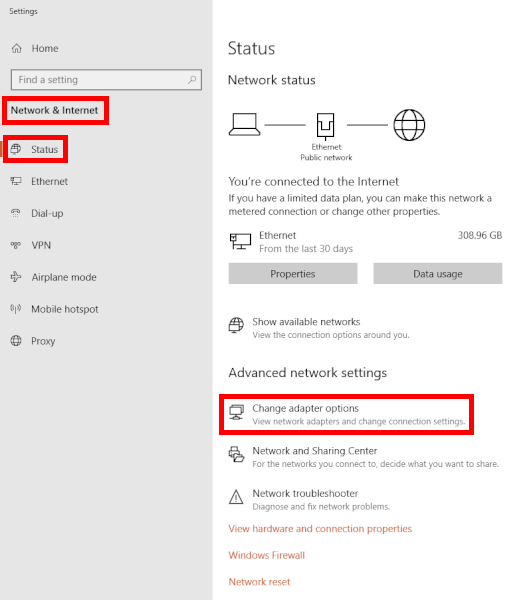
- Manual DNS: Advanced users can manually set Surfshark’s private DNS addresses in Windows (162.252.172.57 and 149.154.159.92) to help prevent DNS leaks through a local ISP.
What to do if the BBC blocks you
Even top-tier VPNs like Surfshark can sometimes hit a roadblock when the BBC refreshes its filtering methods. A proxy or location error can happen occasionally, but it’s usually easy to fix with a few quick adjustments.
- The server shuffle: If the BBC has blacklisted the specific IP address you’re using, simply click the “United Kingdom” location again or pick a different city like Manchester or Glasgow. Surfshark rotates its IPs frequently, and a fresh connection usually clears the block instantly.
- Wipe your digital footprint: This is the most common fix. Your browser stores cookies that might still contain data from your real-world location. Go to your settings and clear your cache and cookies, or simply try opening a New Incognito Window. This forces the BBC to look at your British VPN IP with a fresh set of eyes.
- Activate NoBorders mode: If you are on a restricted network (like a hotel, office, or school), standard VPN traffic might be blocked. In the Surfshark app, go to Settings > VPN Settings and ensure NoBorders is toggled on. This hides the fact that you’re even using a VPN, making it much harder for the BBC to detect you.
- Flush your DNS cache: If the app says you’re connected, but the site won’t load, your computer might be remembering old, non-UK data. On Windows, open the Command Prompt, type ipconfig /flushdns, and hit Enter. This clears the pipes and lets the VPN do its job correctly.
- Try a different protocol: Sometimes the fastest protocol isn’t the stealthiest. If you’re having trouble, go to settings and switch from WireGuard to OpenVPN (UDP or TCP). OpenVPN is often better at mimicking regular web traffic to slip past tougher firewalls.
Still stuck? Use the 24/7 live chat
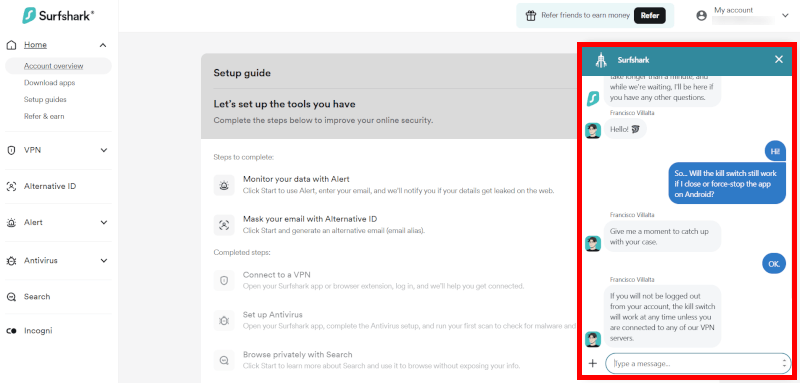
If you’ve tried the DIY fixes and the BBC is still being stubborn, don’t waste your time guessing. One thing I like about Surfshark is how actively it works to stay ahead of streaming restrictions.
During my testing, whenever I hit a rare wall, I hopped on their live chat. I found that their agents track, in real time, exactly which UK server numbers are currently optimized for BBC iPlayer. If you tell them you’re having trouble with the iPlayer, they can usually give you a specific server to connect to manually that will get you in instantly.
More ways to get help:
- The help center: If you prefer a self-serve approach, Surfshark’s support site is packed with specific, up-to-date guides for iPlayer troubleshooting on different devices like Firestick or Android TV.
- Email support: If it’s not an emergency, you can drop them an email. In our experience, they usually get back to you within a few hours with a detailed solution.
- Video tutorials: Their YouTube channel is actually surprisingly helpful for visual learners who want to see exactly where to toggle the NoBorders or Bypasser settings.
Surfshark beyond streaming
While getting into the BBC iPlayer is likely your main goal, it’s worth noting that Surfshark is a serious security tool. It uses military-grade AES-256-GCM encryption to wrap your data in a virtual vault, making it unreadable to hackers, advertisers, and even your own ISP.
Here are a few bonus features I regularly rely on:
- Unlimited simultaneous connections: This is Surfshark’s biggest selling point. Unlike other VPNs that limit you to 5 or 10 devices, Surfshark lets you protect every single gadget in your home — phones, tablets, PCs, and Smart TVs — on one single account.
- NoBorders mode for tough networks: If you’re trying to watch the BBC from a restrictive environment like a school, office, or a country with heavy censorship (like China or the UAE), NoBorders is your best friend. It automatically detects network restrictions and switches to a specialized stealth mode to slip past blocks undetected.
- MultiHop for double the privacy: If you’re extra cautious, MultiHop routes your traffic through two different servers in two different countries. It’s like wearing two disguises at once, making it virtually impossible for anyone to trace your digital footprint back to you.
- Rotating IP technology: Most VPNs keep you on one IP until you disconnect. Surfshark’s Rotating IP feature changes your address every 5–10 minutes without dropping your connection. This makes it incredibly difficult for tracking bots or websites to build a profile on your browsing habits.
- Independently audited no-logs policy: Surfshark doesn’t just promise privacy; they’ve proved it. Their strict no-logs policy has been audited by external firms like Deloitte, confirming that they never store your browsing history, IP address, or session data.
You’re essentially getting a high-end security suite that happens to be amazing at unblocking British TV. For more on how these features stack up, check out our guide to the best no-logs VPNs.
Surfshark vs the competition
With dozens of VPNs claiming to “unlock the world,” it’s hard to tell which ones actually work when the BBC updates its filters. I’ve put the top four through their paces, and while each has its strengths, Surfshark consistently wins on the bang-for-your-buck scale.
| Surfshark | NordVPN | ExpressVPN | |
| Device limit | Unlimited | 10 devices | 10–14 devices |
| Supported protocols | WireGuard, OpenVPN, IKEv2 | WireGuard, OpenVPN, IKEv2 | Lightway, WireGuard, OpenVPN |
| UK cities | 4 (London, Glasgow+) | 4 (London, Manchester+) | 4 (London, Manchester+) |
| Streaming tech | NoBorders Mode | SmartPlay | MediaStreamer |
| Best for… | Families | All-round performance | Hassle-free everyday use |
If you want the absolute fastest raw speeds, NordVPN is a beast. If you want the most user-friendly interface, ExpressVPN is great. But if you want a high-speed, reliable connection that covers every device you own for the lowest price, Surfshark is the clear winner.
Why Surfshark holds its own
- Unlimited connections vs the rest: This is Surfshark’s killer feature. While ExpressVPN and NordVPN limit you to a handful of devices, Surfshark lets you protect your entire household on one account. You can stream the BBC on your TV while the kids use the same VPN on their tablets, and no one gets kicked off.
- NoBorders mode: While NordVPN uses SmartPlay, Surfshark employs NoBorders. This tech automatically kicks in if the app detects network restrictions, making your VPN traffic look like a regular webpage. It’s incredibly effective at slipping past the BBC’s detection.
- The price point: Streaming should be affordable. Surfshark offers nearly the same speeds as NordVPN but usually at a much lower monthly price. It’s the “budget king” that doesn’t actually feel like a budget service.
Surfshark vs free VPNs for BBC iPlayer
| Surfshark | Free VPNs | |
| Streaming access | Reliable for BBC iPlayer | Frequently blocked by BBC |
| UK server choice | 440+ servers in 4 UK cities | Very few (if any) UK servers |
| Data and speed | Unlimited and 4K-ready | Throttled with strict data caps |
| Privacy and security | Audited no-logs policy | May sell your data or contain ads |
The BBC employs some of the toughest geo-blocking tech in the world. Because free VPNs have limited budgets, they can’t afford to refresh their IP addresses constantly. Once the BBC identifies and blacklists a free server’s IP, that’s it; you’re stuck with a “Proxy Error”.
In contrast, Surfshark invests heavily in its infrastructure, maintaining high-speed 10Gbps ports and rotating its IPs to stay one step ahead of the VPN detectors.
The hidden cost of free services
Remember, if you aren’t paying for the product, you are the product. Many free VPNs make money by:
- Selling your data: Tracking your browsing habits and selling them to advertisers.
- Intrusive ads: Bombarding you with pop-ups that slow down your device.
- Security risks: Using outdated encryption that leaves your personal info vulnerable to leaks.
Accessing other UK streaming services
While BBC iPlayer is the crown jewel of British TV, it’s far from the only treasure you can unlock. Once your Surfshark UK server is active, you effectively have a VIP pass to the entire British streaming landscape.
Here are the other major platforms I’ve found work with Surfshark:
- ITVX (formerly ITV Hub): Home to Love Island, Broadchurch, and massive live sports events. Surfshark’s fast speeds (up to 950+ Mbps in tests) mean you won’t miss a second of live action due to buffering.
- My5: Channel 5’s streaming wing is also fully accessible. It’s perfect for catching up on documentaries and soaps like Home and Away.
- Channel 4 (All 4): This is the place for cult classics and edgy new dramas. During my testing, the “UK – Manchester” server was a standout for bypassing Channel 4’s strict VPN filters.
- Sky Go: If you have a Sky subscription, you can use Surfshark to stream Sky Go abroad. Using Camouflage Mode is a top pro tip here, as it makes your VPN traffic look like a regular internet connection, helping you dodge Sky’s tough detection.
Is Surfshark the right choice for your BBC iPlayer stream?
After spending a lot of time testing Surfshark, I can see why it’s become such a popular choice for streaming. Sure, a few competitors may edge it out in raw speed tests, but Surfshark hits the sweet spot between performance, reliability, and price. Being able to stream BBC iPlayer in 4K while covering every device in the house with one subscription makes it an easy recommendation for me.
What stood out most during testing was how little maintenance it needed. Features like WireGuard and NoBorders keep things running smoothly in the background, so you can spend more time watching and less time troubleshooting.
Ready to start? Lock in the best current deal below:
Surfshark VPN Coupon:
Get 87% off Surfshark VPN plus an additional 3 months extra with the coupon below:
(Coupon is applied automatically; 30-day money-back guarantee)
I like that Surfshark combines strong privacy protections with reliable access to UK platforms like the BBC and ITVX, without the high price tag.
How to use Surfshark for BBC iPlayer FAQs
Can Surfshark unblock BBC iPlayer?
Yes, Surfshark is currently one of the heavy hitters that consistently cracks the BBC’s digital border. While the BBC regularly refreshes its VPN blocking measures, Surfshark stays ahead of the curve by rotating its UK servers and using high-speed 10Gbps ports. So you can binge Peaky Blinders in 4K without the dreaded buffering wheel.
Why is Surfshark not working with BBC iPlayer?
If you’re seeing a proxy error, it’s usually because your browser is leaking your real location via old cookies. To fix this, hop into a New Incognito Window or clear your browser cache; it’s like giving the BBC a fresh pair of glasses that only see your British VPN identity. If that fails, swap from London to Manchester in the app; a new IP usually does the trick instantly.
Which Surfshark server is best for BBC iPlayer?
I’ve found that London and Manchester are the MVPs for speed and reliability. If everyone in the UK is watching a big match and those cities feel a bit sluggish, try Glasgow or Edinburgh. They’re often the “secret backups” that are less crowded but just as good at dodging geo-blocks.
Can I watch BBC iPlayer on my Firestick using Surfshark?
Yes, and setup is very straightforward because Surfshark offers a dedicated app through the Amazon Appstore. Download it, log in, and hit a UK server. Once that “Connect” button turns green, your Fire TV Stick is officially on British soil, and you’re ready to stream directly on the big screen.
Is it legal to use Surfshark for BBC iPlayer?
Yes, using a VPN is perfectly legal for protecting your privacy and staying encrypted. While the BBC might wag its finger at you for bypassing geo-blocks (it technically goes against their Terms of Use), it’s not a crime. The worst that happens is your current VPN IP gets blocked, which is why having Surfshark’s massive server list is such a lifesaver.

Leave a Reply