
The best Android VPNs strike a balance between fast speeds, ease of use, and reliable unblocking. After testing it on the latest Android 16 builds, ExpressVPN remains one of the most polished apps available. Many VPNs feel clunky on mobile, but this app is purpose-built for phones with a fast, one-tap connection.
In this guide, we’ll see how the Lightway protocol handles switching between 5G and Wi-Fi, a major battery-saver. We also put its 105-country network to the test for unblocking Netflix and Hulu. Whether you’re a privacy purist or a heavy streamer, this review helps you decide if the premium cost is worth it.
ExpressVPN’s tiered pricing makes its high-end security more accessible. While NordVPN or Surfshark might win in raw speed tests, ExpressVPN’s instant-on connection and zero-knowledge DNS often feel snappier for daily mobile browsing.
| Based in | British Virgin Islands |
| Security | AES-256 and ChaCha20 encryption, post-quantum protection, and Lightway protocol |
| Bonus tools | ExpressKeys (password manager), Threat Manager (ad/tracker blocker), and Identity Defender (US only) |
| Refund policy | 30-day money-back guarantee |
| Best for… | Beginners, streaming, and high-speed mobile security |
ExpressVPN Coupon:
Sign up for the 2-year plan and get 4 months added to your subscription for free.
(Coupon is applied automatically)
ExpressVPN for Android: Core features
The ExpressVPN Android app feels native to your phone. It manages to balance one-tap simplicity with deep technical security. While most VPNs drain your battery by constantly re-establishing connections, ExpressVPN’s proprietary Lightway protocol is designed for mobile life. It stays connected even when you’re switching from a dead 5G zone to your home Wi-Fi.
Core features include:
- Protocol choice: Choose between OpenVPN (UDP/TCP), IKEv2, or the superior Lightway protocol for better speed and battery life.
- Post-quantum protection: One of the first Android VPNs to shield your data against future quantum computing threats.
- App-level kill switch: Automatically blocks your internet if the VPN drops, ensuring your real IP never leaks.
- Built-in password manager: Includes ExpressVPN Keys to secure your logins directly within the app.
- Threat manager: A system-wide blocker that stops Android apps from calling home to trackers or malicious sites.
- 105-country network: High-speed 10 Gbps servers that make geo-blocking a thing of the past.
While the feature list is impressive, it’s important to weigh those high-end tools against the actual daily user experience.
ExpressVPN pros and cons for Android users
+ Pros
- Blazing 5G performance via Lightway
- Sleek mobile interface
- Reliable Netflix and Hulu unblocking
- Excellent battery efficiency on mobile
- Native support for Android 16
- Automatic protection on public Wi-Fi
- Strongest BVI-based privacy jurisdiction
- Helpful 24/7 in-app live chat
– Cons
- Device limits trailing behind Surfshark
- No integrated APK for firewalls
- Limited features on older Android OS
- Renewals jump to full price quickly
A closer look at signature features
While many VPNs offer a long list of features, ExpressVPN focuses on making those features work perfectly in a mobile environment. Here is a breakdown of the core tech that actually changes how you use your phone.
The Lightway advantage
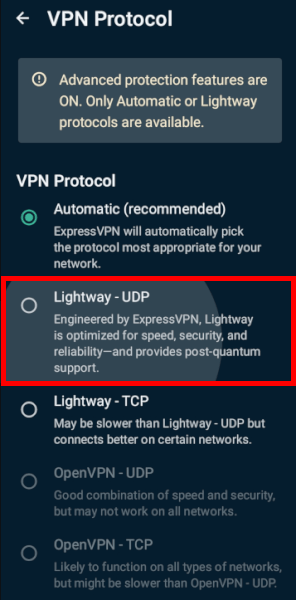
Most VPN protocols were designed for desktop computers on stable lines. Lightway, however, was built by ExpressVPN to handle the chaos of mobile life. Whether you’re losing signal in an elevator or switching from 5G to public Wi-Fi, Lightway reconnects almost instantly. It’s significantly leaner than OpenVPN, meaning it won’t drain your Android battery or cause your phone to overheat during long streaming sessions.
Hardened security and “TrustedServer” tech
ExpressVPN doesn’t just use standard AES-256 encryption; it has recently implemented post-quantum protection to future-proof your data against next-generation cyber threats. Your privacy is further protected by TrustedServer technology, where every server runs on RAM only. Since RAM requires power to store data, every single bit of information is permanently wiped the second the server reboots. Like Proton VPN and NordVPN, ExpressVPN’s no-logs claims aren’t just marketing; they have been verified by multiple independent audits.
The streaming heavyweight
If your main goal is unblocking content, ExpressVPN remains the most reliable choice for Android. Its network spans 105 countries, allowing you to bypass geo-restrictions on every major platform, including:
- Netflix, Hulu, and Disney+
- BBC iPlayer and Amazon Prime Video
- HBO Max and international sports apps
It’s also one of the best tools for casting content. If you have the VPN running on your phone, you can easily mirror or cast blocked content to your Smart TV, even if the TV itself doesn’t have a VPN app installed.
Optimized for raw speed
ExpressVPN has recently upgraded its backbone to 10 Gbps server connections, significantly reducing congestion during peak hours. To get the most out of your connection on Android, I recommend using the “Smart Location” feature. It doesn’t just look at distance; it analyzes latency and server load in real-time to pick the absolute fastest tunnel for your specific 5G or Wi-Fi network. If the network conditions change, the app can even automatically swap protocols in the background to ensure you never lose your high-speed status.
Setting up ExpressVPN on your Android device
Setting up ExpressVPN on Android is one of the smoothest experiences in the industry. Whether you have the latest Samsung Galaxy or a specialized tablet, you can be up and running in under two minutes.
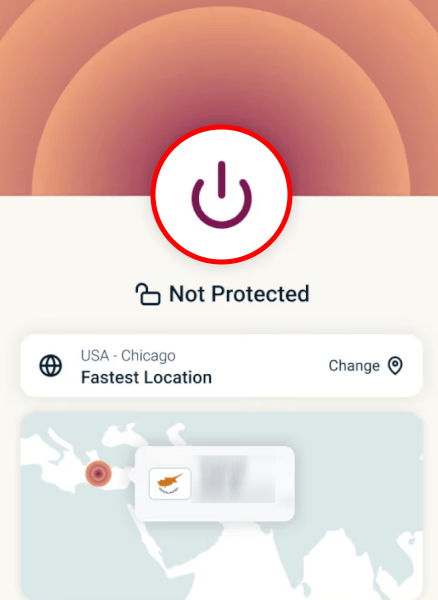
Once you’ve installed the app, follow these steps to secure your connection:
- Launch the app: Open ExpressVPN and sign in with your credentials.
- Set up the tunnel: Follow the on-screen prompts to “OK” the Android connection request.
- Connect instantly: Tap the large power button to use Smart Location for the fastest possible speeds.
- Go custom: To change your region, tap the location bar and browse the 105-country list.
Installation: Google Play vs direct APK
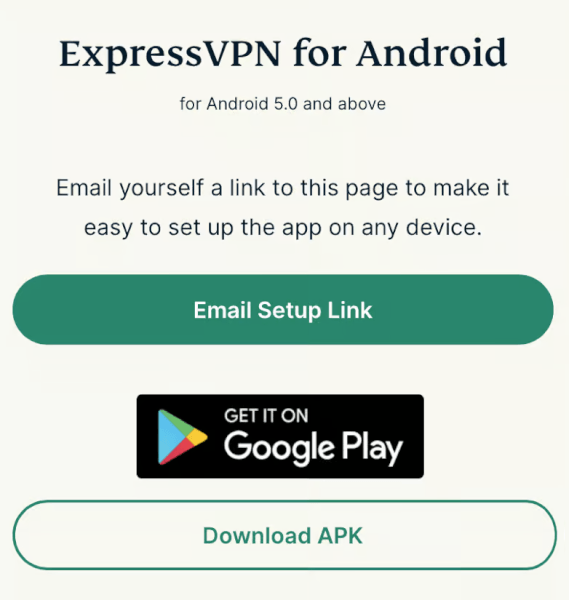
For most users, the easiest path is the Google Play Store. Just search for ExpressVPN and hit install. If you haven’t subscribed yet, make sure to grab a discounted account here first to lock in the best rate.
If you don’t have access to the Play Store or prefer to skip it, ExpressVPN is one of the few top-tier providers that offers a direct APK download on its official site. If you go this route, remember to toggle “Install from Unknown Sources” in your Android security settings so the system allows the installation.
Fast activation (no typing required)
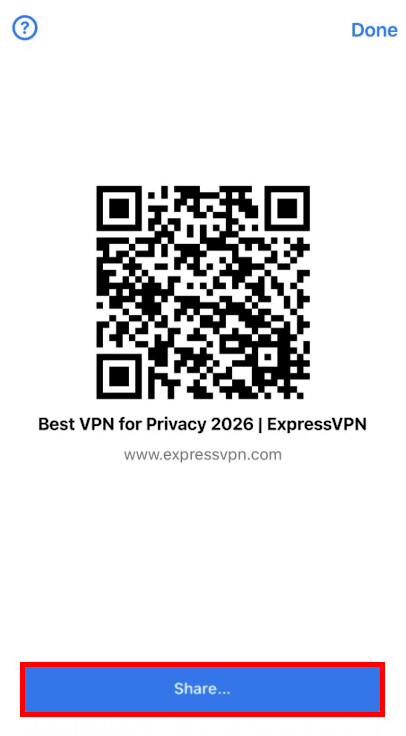
One of my favorite features is the easy login system. You don’t have to struggle with your TV remote to type in a long password. Instead, you can:
- Scan a QR code: Use your phone to instantly link your TV to your account.
- Use an 8-character code: Enter a short code on the ExpressVPN website to authorize the device.
- Sign in manually: The traditional email and password method is still there if you need it.
Optimizing your mobile connection
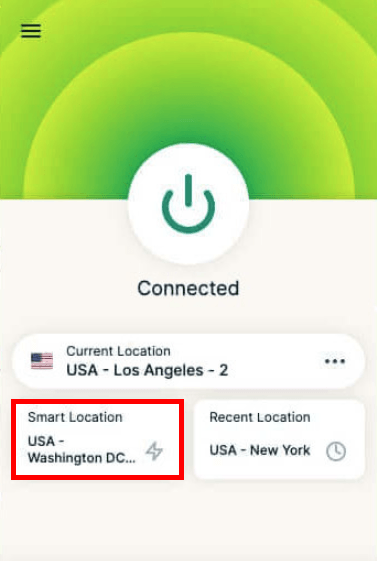
The ExpressVPN interface is built for speed. Once you’re in, you can use the Smart Location feature to automatically find the best server based on your current 5G or Wi-Fi signal. If you find your speeds lagging, you can manually switch protocols in the settings. However, for 99% of Android users, leaving it on “Automatic” or “Lightway” will provide the best balance of speed and battery life.
One pro feature I always recommend is the App Shortcuts. You can add your most-used apps (like Netflix or your banking app) directly to the ExpressVPN home screen, so they appear the moment you connect. It’s a small detail that makes a massive difference in your daily workflow.
Using ExpressVPN with Android TV
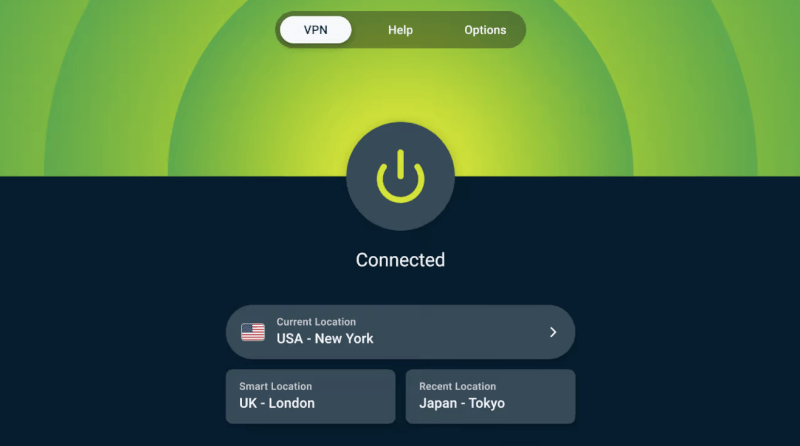
ExpressVPN is one of the few providers that actually builds a dedicated app for Android TV, meaning you aren’t just using a clunky mobile version on a big screen. It’s optimized for remote controls and works seamlessly on popular brands like Sony, Hisense, and TCL, as well as dedicated devices like the Nvidia Shield and Chromecast with Google TV.
Simple installation: Play Store vs sideloading
The fastest way to get started is via the Google Play Store directly on your TV. Just search for ExpressVPN and hit install. If your TV doesn’t have access to the Play Store, you can still sideload the app. To do this, download the APK file from the ExpressVPN website onto a USB drive and use a file manager app on your TV to run the installer.
Optimized streaming performance

Once you’re in, click the “On” button to let the Smart Location feature pick the fastest server for your region. This is especially useful for 4K streaming, where you need every bit of bandwidth to avoid buffering. If you’re looking to unlock international content, you can manually browse their 105-country network to access regional libraries on Netflix, Disney+, or BBC iPlayer directly from your couch.
Advanced Protection: Your system-wide guard
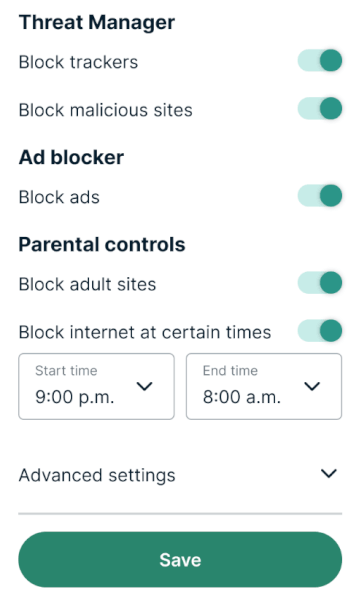
Beyond the browser, ExpressVPN’s Advanced Protection acts as a system-wide filter for your entire Android device. By toggling these features, you can proactively stop threats before they even reach your screen:
- Threat Manager: Prevents apps and websites from communicating with known trackers and malicious third parties.
- Ad blocker: Automatically strips away intrusive display ads, which not only cleans up your browsing but also saves data and improves page load speeds.
- Parental controls: Includes dedicated toggles to block adult sites, gambling content, and even AI tools or social media platforms.
These protections are highly customizable, allowing you to turn individual categories on or off depending on your needs.
The move to ExpressKeys
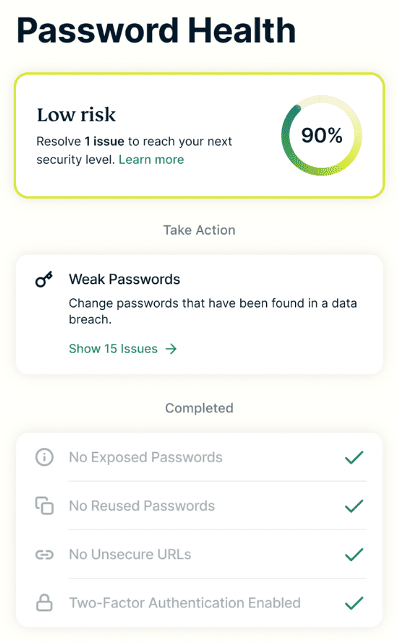
In 2026, ExpressVPN transitioned the built-in password manager to a dedicated, standalone app called ExpressKeys.
While the features were previously housed in the main VPN app, they have now been given their own space to enable a more focused user experience:
- Seamless migration: If you were already using the “Keys” feature, all your saved passwords, credit cards, and notes will sync automatically once you log into the new ExpressKeys app.
- Zero-knowledge security: Your vault is protected by 256-bit AES encryption that only you can unlock; not even ExpressVPN has access to your master password.
- Password health and breach alerts: The app continuously monitors your credentials for weaknesses and checks if your email or passwords have appeared in known data breaches.
- Built-in authenticator: ExpressKeys now doubles as a 2FA authenticator, generating time-sensitive one-time codes directly within the app so you don’t have to switch between tools.
Take control with split tunneling
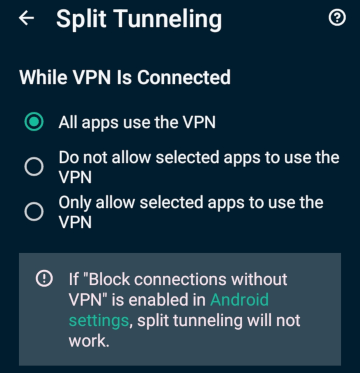
One of the most useful features for mobile users is split tunneling. This allows you to choose exactly which apps route their data through the VPN and which stay on your regular local connection.
Why use it? You might want your banking app and browser to stay encrypted for security, while letting high-bandwidth apps like mobile games or local food delivery services run on your standard ISP for better performance.
It’s also essential if you need to access local devices on your home network, like a wireless printer or a Chromecast, while the rest of your phone remains protected by the VPN.
Smart automation for seamlessness
To make your security truly effortless, ExpressVPN includes several automation tools designed specifically for the mobile lifestyle:
- Auto-connect on public Wi-Fi: You can set the app to instantly establish a secure tunnel the moment your phone joins an untrusted network (like at a coffee shop or airport).
- Boot-start: For maximum protection, you can ensure ExpressVPN launches and connects as soon as your Android device is powered on.
- Custom app shortcuts: Inside the app, you can create a personalized “dashboard” of shortcuts. This allows you to launch your favorite apps—like Netflix or your secure email—the second your VPN connection is live.
Customize your VPN to run smoothly without draining battery or data.
ExpressVPN pricing
ExpressVPN offers a flexible subscription model structured to fit different budgets and security needs. Committing to a longer term provides significant overall savings compared to month-to-month billing, while higher-tier options bundle extra cybersecurity tools like password management, breach monitoring, and increased device limits. Every option is backed by a risk-free 30-day money-back guarantee, allowing you to test the service on your devices with zero commitment.
| ExpressVPN plans | Basic | Advanced | Express Pro |
|---|---|---|---|
| 1-month | $14.99/month | $16.99/month | $22.99/month |
| 1-year | $4.99/month | $5.99/month | $8.99/month |
| 2-year | $3.49/month | $4.49/month | $7.49/month |
Deal: Get 73% OFF ExpressVPN 2-year plans >
ExpressVPN vs other Android VPNs
| NordVPN | Surfshark | Proton VPN | |
| Price point | Mid-range | Budget-friendly | Mid-range |
| Core mobile tool | Tap-to-connect map | Unlimited devices | Stealth mode |
| Android UI | Map-based and feature-rich | Modern and scannable | Tech-focused with graphs |
| Android TV app | Very good | Good | Average |
| Security audit | Industry leader | High transparency | Fully open-source |
| Battery impact | Moderate (NordLynx) | Low (WireGuard) | Moderate (WireGuard) |
In my latest testing, NordVPN consistently takes the lead as the fastest VPN on Android. Its NordLynx protocol (built on WireGuard) typically retains about 87% of your original internet speed, while ExpressVPN’s Lightway averages around 82%. Surfshark is a very close second to Nord, making it an excellent choice for 4K streaming or mobile gaming on 5G. Proton VPN, while stable, generally falls slightly behind the other three in raw download speeds.
While all four use AES-256 encryption, they each have a different specialty. NordVPN is packed with advanced tools like dedicated P2P servers and a more robust ad-blocker. Proton VPN is the choice for privacy purists, offering open-source apps and Secure Core servers that route your data through hardened Swiss bunkers. ExpressVPN keeps things simpler, focusing on “Post-Quantum” protection to future-proof your data against next-gen hackers.
If you have a household full of Android devices, Surfshark is the clear winner because it’s the only one that allows unlimited simultaneous connections. It’s also the most budget-friendly, often dropping below $3.00/mo on long-term plans. ExpressVPN was historically on the pricier side, but with much more competitive current rates and an ultra-simple, “one-tap” interface, it remains the easiest option for beginners who don’t want to mess with complicated settings.
Which one should you pick? Choose NordVPN if you want the best speed, Surfshark if you’re on a budget with many devices, Proton VPN for maximum privacy, or ExpressVPN for the most effortless Android experience.
Final verdict: Is it worth it?
To wrap things up, ExpressVPN for Android remains one of the most polished and reliable ways to secure your mobile life. While the market is more competitive than ever, ExpressVPN’s commitment to a mobile-first experience, battery-efficient Lightway protocol, and post-quantum protection makes it a standout choice.
Whether you are trying to unblock global Netflix libraries on your 5G connection or seeking a set-and-forget privacy shield for public Wi-Fi, this app delivers a level of consistency that is hard to beat. The inclusion of the ExpressKeys password manager and a system-wide Threat Manager further transforms the app from a simple VPN into a comprehensive security hub for your phone, tablet, and Android TV.
While you might find cheaper alternatives like Surfshark or faster raw benchmarks from NordVPN, ExpressVPN wins on user experience.
Get a better deal on ExpressVPN with this special coupon:
ExpressVPN Coupon:
Sign up for the 2-year plan and get 4 months added to your subscription for free.
(Coupon is applied automatically)
ExpressVPN Android FAQs
Is ExpressVPN good for Android?
Yes, ExpressVPN is widely considered one of the best VPNs for Android because its Lightway protocol is specifically optimized for mobile battery efficiency and fast 5G connectivity. Unlike desktop-focused VPNs, the Android app is incredibly intuitive, offering a “one-tap” connection that works seamlessly across phones, tablets, and Android TV devices.
How many devices can I connect to ExpressVPN on Android?
Depending on your plan, you can connect between 10 and 14 devices simultaneously. While standard tiers typically support 10 devices, higher-tier options expand this limit, allowing you to protect your entire household’s Android ecosystem under a single subscription.
Does ExpressVPN for Android have a kill switch?
Yes, the Android app features a “Network Protection” tool that acts as a system-wide kill switch, instantly blocking your internet traffic if the VPN connection drops. This ensures that your real IP address and sensitive data are never exposed to your ISP or hackers, even for a split second.
Can I use ExpressVPN on Android TV?
Yes, ExpressVPN offers a native Android TV app that can be downloaded directly from the Google Play Store on Sony, Hisense, and TCL TVs, as well as Nvidia Shield devices. The TV interface is specifically designed for remote controls and is optimized for 4K streaming on platforms like Netflix, Disney+, and Hulu.
Does ExpressVPN for Android drain my battery?
In my testing, ExpressVPN has one of the lowest battery impacts of any mobile VPN, provided you use the Lightway protocol. Because Lightway is “leaner” than traditional protocols like OpenVPN, it requires less CPU power to maintain your encryption, making it ideal for older Android devices or long travel days.

Leave a Reply