
NordVPN and Surfshark are close matches, but the differences in price, speed, and features are worth a closer look. Both are top VPNs with audited no-logs policies, RAM-only servers, and strong streaming and unblocking capabilities. But our latest hands-on testing found some clear differences in speed, features, and everyday performance.
NordVPN reached 903 Mbps on nearby servers and includes system-wide malware protection. Surfshark, meanwhile, lets you connect an unlimited number of devices on one subscription and costs less.
Below, we compare the two in terms of speed, streaming, torrenting, security, and customer support to see which VPN comes out on top.
| NordVPN | Surfshark VPN | |
| Website | NordVPN.com | Surfshark.com |
| Location | Panama | The Netherlands |
| Servers | 9,500+ | 4,500+ |
| Countries | 149 | 100 |
| Logs | No logs (audited) | No logs (audited) |
| Torrenting | All servers | All servers |
| Support | Knowledge base; 24/7 chat | Knowledge base; 24/7 chat |
| Apps for | Windows, macOS, Linux, Android, iOS | Windows, macOS, Linux, Android, iOS |
| Price | $3.49 (with coupon) | $2.49 (with coupon) |
| Coupon | 75% Off Coupon > | 87% Off Coupon > |
How we test
We put both providers through hands-on testing across 12 core categories to see how they perform in real-world use:
- Apps: Interface, ease of use, and platform compatibility.
- Features: Built-in extras such as ad blockers, dedicated IPs, and split tunneling.
- Connections: How many devices can connect at the same time.
- Security: IP, DNS, and WebRTC leak testing.
- Logging: No-logs policies and independent third-party audits.
- Jurisdiction: Where each VPN is based and the privacy implications.
- Speed: Download and upload speeds across servers in North America and Europe.
- Streaming: Netflix library access and 4K streaming performance.
- Torrenting: P2P support, privacy, and download speeds.
- Support: 24/7 live chat and technical support guides.
- Pricing: Plan options, long-term discounts, and renewal costs.
- Value: Overall features and performance compared with the price.
VPN apps
| NordVPN | Surfshark VPN | |
| Desktop | Windows, macOS, Linux | Windows, macOS, Linux |
| Mobile | iOS, Android | iOS, Android |
| Browser | Chrome, Firefox, Edge | Chrome, Firefox, Edge |
| Smart TV and console | Android TV, Fire TV, Apple TV, Xbox | Android TV, Fire TV, Apple TV, Xbox |
Both providers use modern map-based interfaces on desktop, but they take slightly different approaches.
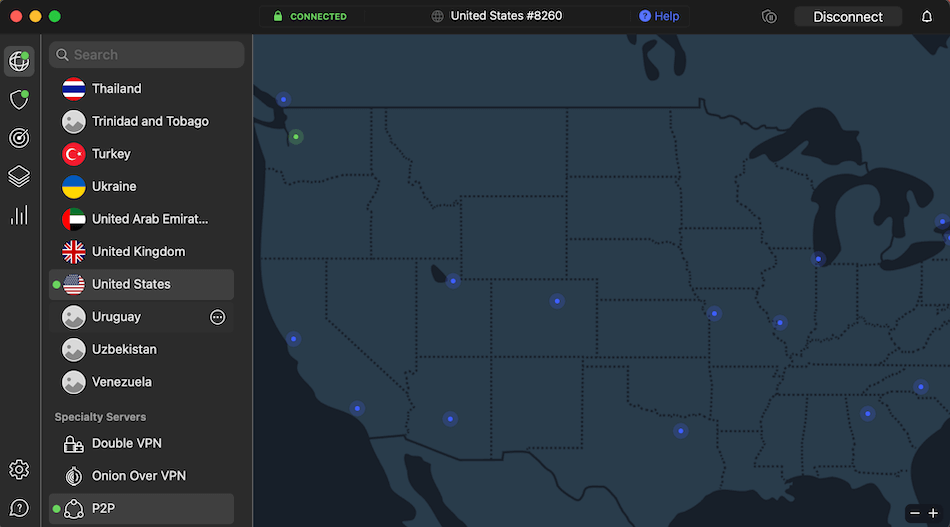
NordVPN keeps everything in one main dashboard, with specialty servers, settings, and protocol options easy to access without digging through multiple menus. It’s a straightforward setup that keeps the more advanced controls close at hand.
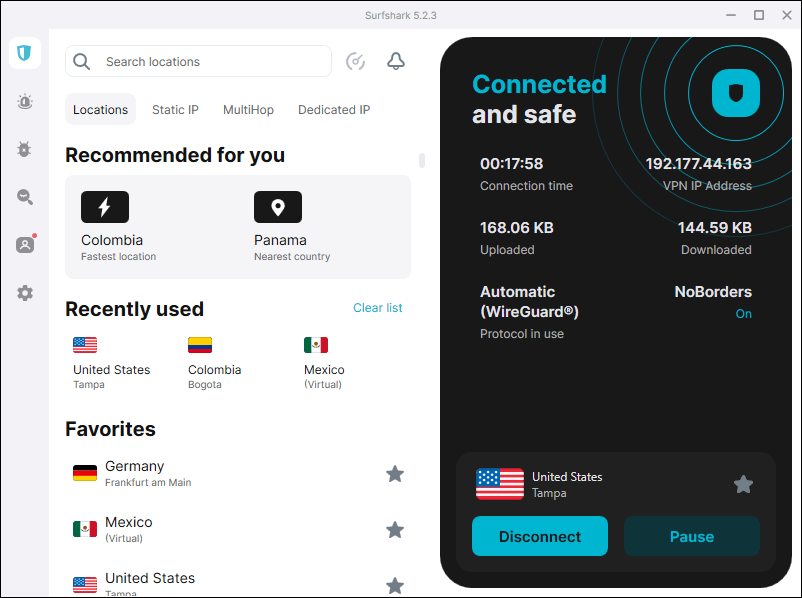
Surfshark offers a little more flexibility. Its expandable three-column layout lets you hide the world map and switch to a simple, alphabetical server list instead. That makes it a good fit if you prefer a cleaner, less cluttered desktop interface.
Mobile and smart DNS
Surfshark has a useful advantage on Android with GPS spoofing, which can make your phone report the VPN server’s location instead of your actual GPS coordinates. This can help prevent location-based apps from accessing your real whereabouts.
NordVPN and Surfshark VPN mobile apps look and work much like their desktop counterparts. However, the Surfshark Android app has an interesting trick for anyone who wants to keep their location private.
NordVPN, meanwhile, integrates its SmartPlay technology directly into the VPN experience. It automatically combines VPN protection with SmartDNS to make streaming services easier to access on devices that don’t support VPN apps.
Both providers deliver easy-to-use apps across major platforms, including optimized layouts built explicitly for media boxes, which consistently rank them among the best VPN for Firestick environments on the market.
Other devices
Both providers offer SmartDNS for devices such as older smart TVs and gaming consoles that may not support full VPN apps. NordVPN’s SmartPlay combines VPN and SmartDNS technology and works automatically, while Surfshark requires you to activate SmartDNS through your account and add your home IP address.
VPN features
| NordVPN | Surfshark | |
| Split tunneling | ✅ Bypasser | ✅ Bypasser |
| RAM-only network | ✅ Diskless | ✅ Diskless |
| Kill switch | ✅ Dual-type | ✅ Standard |
| Audited no-logs | ✅ 6 assurances | ✅ 3 assurances |
| Multi-hop / Chaining | ✅ Double VPN | ✅ Dynamic MultiHop |
| Obfuscated servers | ✅ Custom toggle | ✅ Camouflage mode |
| Dedicated IP | ✅ Paid Add-on | ✅ Paid Add-on |
| Automated IP rotation | ❌ | ✅ Nexus |
| System malware scanning | ✅ Threat Protection Pro | ❌ CleanWeb (DNS only) |
NordVPN features
NordVPN isn’t short on features. Alongside the usual VPN essentials, it offers a good selection of specialty servers and privacy tools for users who want a little more control over how their connection works:
- Double VPN servers: Route your traffic through two VPN servers instead of one, adding an extra layer of encryption and privacy.
- Obfuscated servers: Hide the fact that you’re using a VPN, which can be useful on networks that restrict or block VPN traffic.
- Dedicated IP: Give you a unique, static IP address that isn’t shared with other VPN users. It’s available as a paid add-on.
- Onion over VPN: Routes your traffic through the VPN before sending it through the Tor network, without requiring the Tor Browser.
- P2P-optimized servers: Designed for torrenting and other file-sharing traffic, with high-capacity connections to help keep downloads moving.
One of the more interesting additions is NordWhisper, a protocol built for networks where VPN traffic doesn’t always get a warm welcome. It disguises VPN traffic as regular HTTPS traffic, helping NordVPN stay connected on restrictive networks where conventional VPN protocols may struggle.
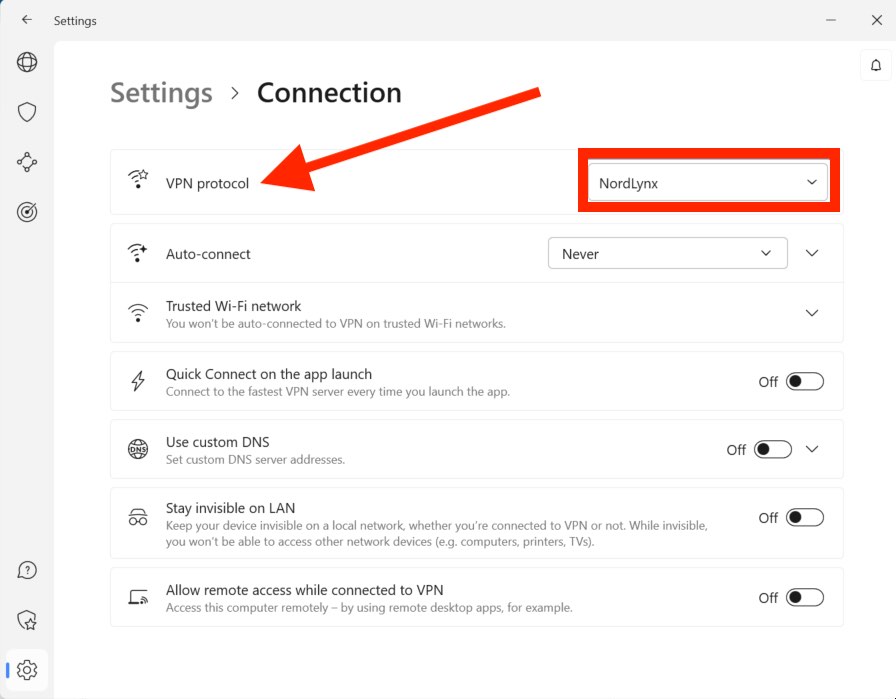
Then there’s Threat Protection Pro, available on Windows and macOS. This makes the desktop app a useful security tool and a strong choice for anyone looking for a VPN with ad blocking and device-level protection.
Even better, it continues working when the VPN itself is turned off, giving your device an extra layer of protection throughout the day. And other platforms get a lighter version called Threat Protection, which focuses on blocking ads and trackers across Linux, Android, iOS, and mobile browser extensions.
Surfshark features
Surfshark packs plenty of privacy and security features into its apps, including several useful tools that go beyond the basics. It covers the familiar VPN essentials while adding a few clever extras to make your online identity harder to track:
- Dynamic MultiHop: Routes your traffic through two VPN servers, with the option to choose your preferred entry and exit locations for more control over your connection.
- Camouflage mode: Hides the fact that you’re using a VPN, helping you get around VPN blocks and deep packet inspection on restrictive networks.
- Static IP: Gives you the same IP address each time you connect, although it’s shared with other Surfshark users.
- Dedicated IP: Provides a unique static IP VPN address reserved for you. It’s available as a paid add-on.
- CleanWeb: Blocks ads, trackers, malicious domains, and other unwanted content at the DNS level.
- Bypasser: Surfshark’s split-tunneling VPN feature lets you choose which apps use the VPN and which connect directly to the internet.
- Rotating IP: Automatically changes your public IP address every few minutes without disconnecting the VPN, making it harder for websites and trackers to follow you.
Surfshark also bundles several additional security tools with its Surfshark One subscription. These are handy if you want more than VPN protection in a single package:
- Surfshark Alert: Monitors for exposed personal information and alerts you if your email addresses, passwords, or other credentials appear in known data breaches.
- Surfshark Antivirus: Scans your device for malicious files and other potential threats.
- Surfshark Search: A private, ad-free search engine designed to keep your searches separate from your online profile.
- Overall, Surfshark’s feature set is broad, but its Rotating IP, Bypasser, and Dynamic MultiHop features are particularly useful for users who want more control over their privacy without having to configure everything manually.
CleanWeb vs Threat Protection Pro
| Surfshark CleanWeb 2.0 | NordVPN Threat Protection Pro | NordVPN basic Threat Protection | |
| Ad & tracker blocking | ✅ | ✅ | ✅ |
| Malicious domain block | ✅ | ✅ | ✅ |
| Live download scanning | ❌ | ✅ | ❌ |
| Works offline | ✅ | ✅ | ❌ |
| Plan availability | All subscriptions | Complete and up | Basic tier |
Security and encryption
| NordVPN | Surfshark VPN | |
| Encryption | AES-256-GCM / ChaCha20 | AES-256-GCM / ChaCha20 |
| Handshake/authentication | RSA-4096 / SHA-256 | RSA-4096 / SHA-512 |
| Infrastructure | 100% RAM-only | 100% RAM-only |
| Server ports | Upgraded 10 Gbps channels | Upgraded 10 Gbps/100 Gbps |
| Post-quantum ready | ✅ NordLynx | ✅ WireGuard & Dausos |
| Independent audits | App, infra, & no-logs (Deloitte) | App, infra, & no-logs (Deloitte/SecuRing,) |
| Jurisdiction | Panama | Netherlands |
NordVPN security
NordVPN uses AES-256-GCM encryption with OpenVPN, while its NordLynx protocol uses ChaCha20 alongside a double-NAT system designed to keep user identities separate from VPN activity. Its apps also include a kill switch, which can block internet access if the VPN connection unexpectedly drops.
Its server network runs on RAM-only infrastructure, so data stored in memory is wiped when a server restarts. NordVPN has also been expanding its network with high-capacity 10 Gbps servers, helping it handle demanding activities such as streaming and large downloads.
NordVPN has also introduced post-quantum protection into its NordLynx protocol, adding another layer of security against future threats such as “harvest now, decrypt later” attacks.
Surfshark security
Surfshark takes a similar approach, using AES-256-GCM with OpenVPN and ChaCha20-Poly1305 with WireGuard. It also offers Dausos, its newer proprietary protocol, which uses AEGIS-256X2 encryption and is designed to improve performance on compatible hardware.
Like NordVPN, Surfshark uses RAM-only servers across its network. It has also expanded its infrastructure with high-capacity 10 Gbps and 100 Gbps servers in selected locations, giving it plenty of bandwidth for high-speed connections.
Surfshark has also added post-quantum encryption to its WireGuard and Dausos connections, helping protect against emerging threats that could eventually put conventional encryption at risk.
Independent audits
Both VPNs have had their privacy and security claims audited by independent third parties. NordVPN has undergone repeated no-logs audits by Deloitte, along with additional testing of its apps and infrastructure. Surfshark has also worked with Deloitte on its no-logs verification and uses Cure53 for security testing of its applications.
Privacy and logs
Both NordVPN and Surfshark have strict no-logs policies backed by independent audits. In practice, neither VPN should keep records of your browsing activity, connection timestamps, or real IP address.
| NordVPN | Surfshark | |
| No-logs policy | Audited & verified | Audited & verified |
| Infrastructure auditor | Deloitte | Deloitte |
| Total no-logs audits | 6 completed | 3 completed |
| RAM-disk enforcement | ✅ 100% wiped on reboot | ✅ 100% wiped on reboot |
| Warrant canary tracking | ✅ Real-time portal | ✅ Real-time portal |
NordVPN privacy and logs
NordVPN has built a strong track record when it comes to independently verifying its no-logs claims. The service has completed six independent no-logs audits, starting with two reviews by PwC before switching to Deloitte for its third, fourth, fifth, and sixth audits.
These reviews go beyond simply reading NordVPN’s privacy policy. Auditors examine server configurations, interview employees, and inspect the systems used to handle VPN traffic across standard, Double VPN, and obfuscated servers. The goal is simple: verify that the infrastructure isn’t quietly storing the activity NordVPN says it doesn’t collect.
Surfshark privacy and logs
Surfshark takes a similar approach, running its network on RAM-only servers. Because these servers don’t use permanent storage for operational data, anything held in memory is wiped when the hardware is restarted.
Surfshark has also commissioned Deloitte to independently assess its no-logs practices and server infrastructure. In addition, the provider has passed an intensive network penetration test and Infrastructure security audit by SecuRing, which put its infrastructure through simulated attacks designed to uncover potential weaknesses.
Both providers also maintain warrant canaries, which can alert users to certain government requests or legal orders where disclosure is legally permitted.
Jurisdiction
Where a VPN is based can make a difference to privacy. The company still has to follow local laws, so its jurisdiction can affect what authorities may legally ask it to do.
NordVPN: Panama
NordVPN is based in Panama, which is generally considered a privacy-friendly jurisdiction. Panama isn’t part of the Five Eyes, Nine Eyes, or 14 Eyes intelligence-sharing alliances, and it doesn’t have mandatory data-retention rules for VPN providers.
For a VPN that puts privacy first, that’s a useful advantage. There’s simply less local legal pressure around data retention than you’ll find in some other countries.
Surfshark: The Netherlands
Surfshark is based in the Netherlands, where its parent company, Surfshark B.V., is registered. The country doesn’t currently require VPN providers to retain users’ browsing data, which is good news for privacy.
However, the Netherlands is part of the Nine Eyes intelligence-sharing alliance, giving Surfshark a different legal backdrop from NordVPN. That doesn’t mean Surfshark logs your activity, but its jurisdiction is less privacy-friendly on paper.
Simultaneous connections
| NordVPN | Surfshark VPN | |
| Simultaneous connections | 10 | unlimited |
Surfshark VPN connections
Surfshark has a big advantage here: unlimited simultaneous connections on a single subscription. You can connect phones, laptops, tablets, TVs, and other devices without having to keep track of how many are already connected.
That makes Surfshark particularly handy for larger households or anyone with a lot of connected devices.
NordVPN connections
NordVPN allows 10 simultaneous connections, which should be plenty for most users. It’s enough to cover your main phones, computers, tablets, and a few other devices, but you can hit the limit if you’re managing a larger collection of hardware.
Both providers can also be set up on a compatible VPN router, letting you protect devices across your home network through a single VPN connection.
Plans and pricing
Price is another consideration for most people when selecting a VPN. In terms of price, both Surfshark and NordVPN are on our list of the best cheap VPNs, with prices under $4 per month.
Here is a brief breakdown of the pricing for both NordVPN and Surfshark:
| NordVPN plans | Basic | Complete | Prime |
|---|---|---|---|
| 1-month | $14.99/month | $19.99/month | $29.99/month |
| 1-year | $5.49/month | $6.49/month | $9.49/month |
| 2-year | $3.49/month | $4.49/month | $7.49/month |
Deal: Get 75% OFF NordVPN + 3 Months Extra >
| Surfshark plans | Starter | One | One+ |
|---|---|---|---|
| 1-month | $16.45/month | $18.95/month | $21.85/month |
| 1-year | $3.39/month | $3.59/month | $7.49/month |
| 2-year | $2.49/month | $2.49/month | $4.49/month |
Deal: Get 87% OFF Surfshark here >
NordVPN’s Basic plan covers the essentials, including encrypted VPN connections. Moving up to Complete adds features such as Threat Protection Pro, data breach alerts, and a password manager. The top-tier Prime plan also includes identity protection features.
Surfshark takes a more budget-friendly approach. Its Starter plan includes the full VPN service along with an alternative ID, which lets you create an additional online identity for signing up for services. Surfshark One adds antivirus protection, webcam protection, and breach alerts, while One+ adds automated personal-data removal through Incogni.
Renewal warning
Those tempting introductory prices come with a catch: the lowest rates generally require a longer subscription paid upfront, and they don’t last forever. When the initial term ends, the subscription typically renews at a higher standard rate.
Both providers offer 24/7 customer support and a 30-day money-back guarantee, giving you some breathing room to test the service before committing long term.
Speed tests
All NordVPN and Surfshark speed tests were run over a 1,000 Mbps gigabit connection in the same standardised testing environment. Both VPNs were tested using their fastest WireGuard-based protocols, including NordLynx for NordVPN, through their official apps for a fair, like-for-like comparison.
| NordVPN (NordLynx) | Surfshark (WireGuard) | Speed gap | |
| Los Angeles (US) | 868 Mbps | 653 Mbps | NordVPN is 32% faster |
| Seattle (US) | 903 Mbps | 752 Mbps | NordVPN is 20% faster |
| New York (US) | 825 Mbps | 637 Mbps | NordVPN is 29% faster |
| London (UK) | 658 Mbps | 556 Mbps | NordVPN is 18% faster |
Test #1: Los Angeles, USA
First up was a NordVPN server in Los Angeles: 868 Mbps.

At over 868 Mbps, this is great result for NordVPN.
Here was the Surfshark VPN server in Los Angeles: 653 Mbps.
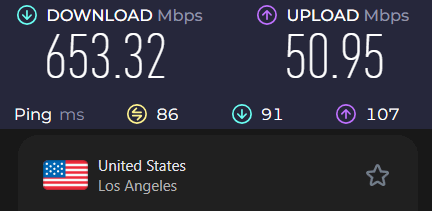
NordVPN has quite an edge over Surfshark for this location, but both are quite fast at over 600 Mbps.
Test #2: Seattle, USA
Here was the NordVPN server in Seattle: 903 Mbps.
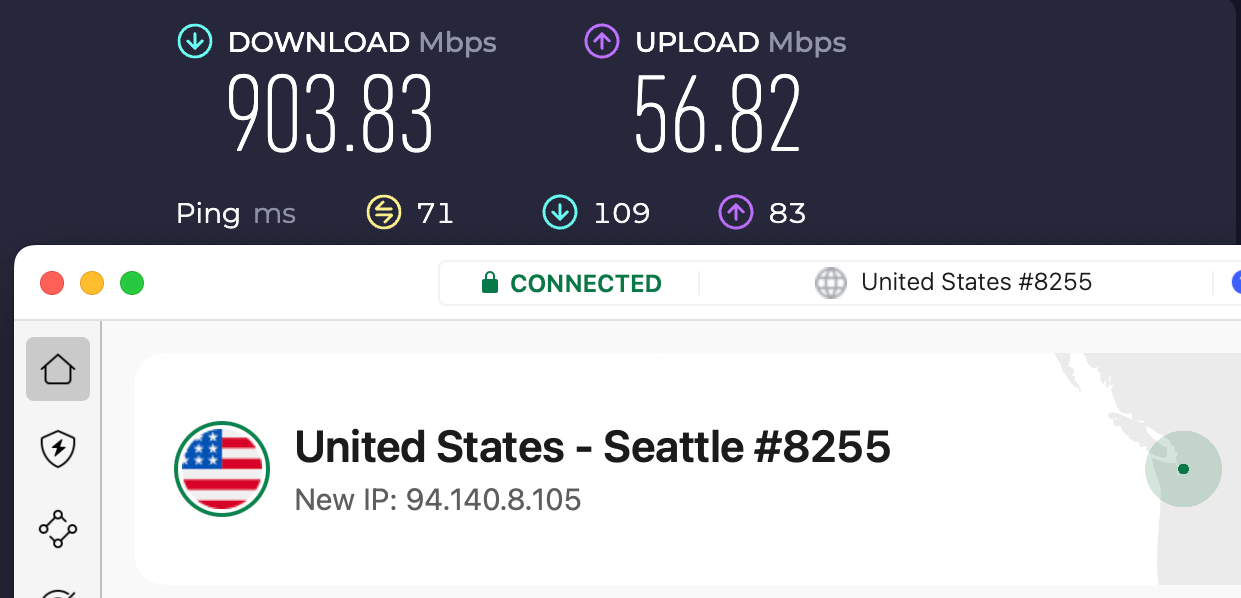
This is the fastest result we have clocked since we upgraded to the 1,000 Mbps connection. Hats off to NordVPN!
And here was the Surfshark server in Seattle: 752 Mbps.
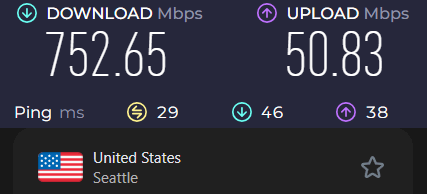
Another impressively fast result for both VPN services!
Test #3: New York, USA
Here was the NordVPN server in New York: 825 Mbps.

For this test, NordVPN turned in a respectable result, on par with the other locations tested.
And here was the Surfshark server in New York: 637 Mbps.
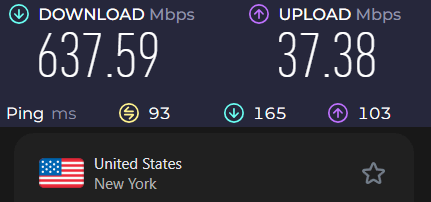
Surfshark had a big drop-off when connecting to New York, unlike NordVPN.
Test #4: London, UK
For this final test, we are going to find out how well these two contenders handle a long-distance, trans-oceanic connection.
Here was the NordVPN server in London: 658 Mbps.

Not surprisingly, connecting all the way to the UK slowed things down a bit for NordVPN.
And here was the Surfshark server in London: 556 Mbps.
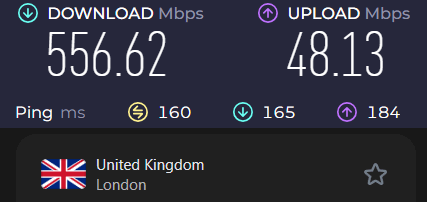
What can we conclude from all this testing? Both of these VPNs are fast when you use the WireGuard VPN protocol. However, NordVPN had a significant edge in our tests, with an average speed drop of only 18.6%.
Surfshark VPN is slower with OpenVPN
Surfshark VPN seems to have a problem with OpenVPN. In our tests, Surfshark had trouble getting above 100 Mbps. For example, here was the Surfshark OpenVPN server in Los Angeles, getting about 81 Mbps download speeds.
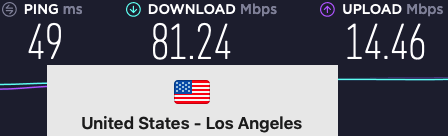
Most of our Surfshark OpenVPN speed test results were in the 70 to 90 Mbps range. This is not very good.
In contrast, NordVPN OpenVPN speeds were typically from 200 to 270 Mbps. Even NordVPN’s double-hop servers could get over 200 Mbps with OpenVPN, as you can see below:
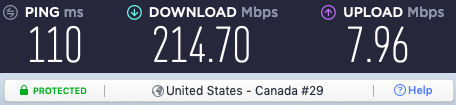
NordVPN delivers excellent speeds with the OpenVPN protocol as well as with WireGuard.
Streaming
Both NordVPN and Surfshark are strong choices for streaming, with broad platform support and access to a wide range of international content.
Streaming service compatibility
| Streaming Service | NordVPN | Surfshark VPN |
| Netflix | ✅ 15+ regions | ✅ 15+ regions |
| Amazon Prime Video | ✅ | ✅ |
| BBC iPlayer | ✅ | ✅ |
| Disney+ | ✅ | ✅ |
| Max (HBO) | ✅ | ✅ |
| Hulu | ✅ | ✅ |
Both VPNs performed well in our streaming tests, unblocking 15+ international Netflix libraries, including popular regions such as the US, UK, Canada, Japan, and Germany.
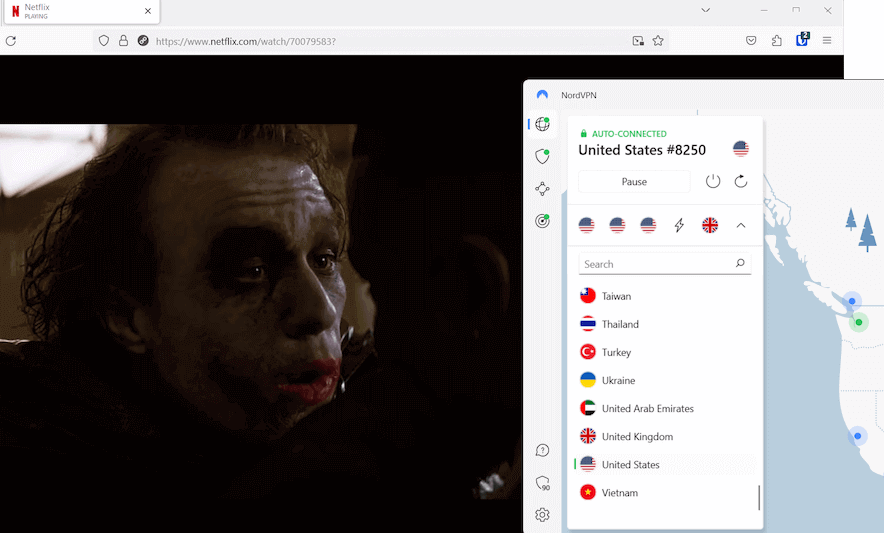
They also worked reliably with other major streaming services, including Amazon Prime Video, BBC iPlayer, Disney+, Max, and Hulu.
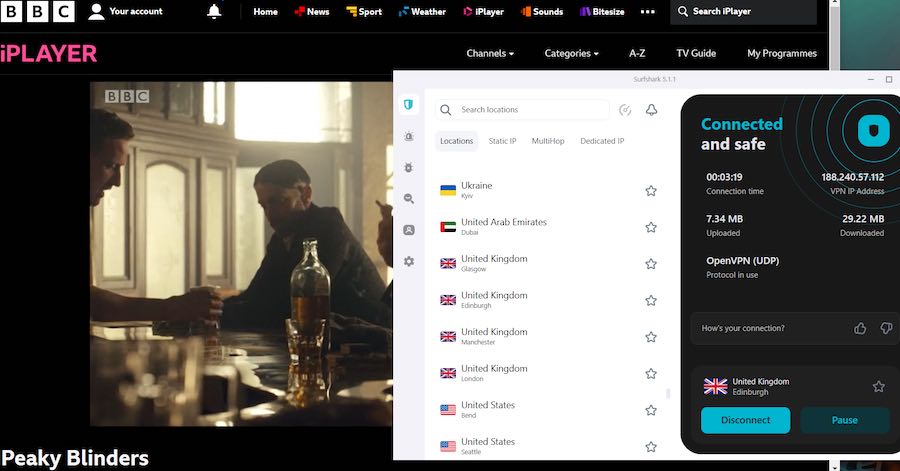
TV and streaming devices
Both providers offer dedicated apps for popular streaming devices, making it easy to use a VPN directly on your TV rather than relying on a computer or router.
NordVPN has SmartPlay, which combines VPN and SmartDNS technology to help access streaming services on devices that don’t support traditional VPN apps.
Surfshark offers dedicated apps for devices including Amazon Fire TV, Apple TV, and Android TV, giving it broad coverage across popular streaming platforms.
Both NordVPN and Surfshark regularly update their server IPs to stay ahead of streaming blocks, making them strong choices among the best VPNs for Netflix.
Torrenting and P2P
Both NordVPN and Surfshark support torrenting and use no-logs policies and leak protection to help keep your P2P activity private. The main differences come down to server selection and performance.
| NordVPN | Surfshark | |
| P2P support | ✅ | ✅ |
| Dedicated P2P servers | ✅ | ❌ Automatic P2P routing |
| Download performance | Very fast | Fast |
| Port forwarding | ❌ | ❌ |
NordVPN P2P performance
NordVPN has a dedicated group of P2P servers, which are clearly labelled in its apps. This makes it easy to find a server optimised for torrenting without having to guess which location to use.
Combined with its NordLynx protocol and high-capacity server network, NordVPN delivered excellent download speeds in our testing. Its P2P servers are also covered by the same no-logs and leak protection features as the rest of the network.
Surfshark P2P performance
Surfshark supports P2P traffic across its network, but it doesn’t provide a separate list of P2P servers. Instead, the service can automatically redirect torrent traffic to a suitable server when needed.
This keeps things simple, although you have less control over the server you’re connected to. Surfshark also doesn’t support port forwarding, just like NordVPN.
Customer support
Both NordVPN and Surfshark offer several ways to get help, including 24/7 live chat and extensive online support resources.
| NordVPN | Surfshark | |
| 24/7 live chat | ✅ | ✅ |
| Email support | ✅ | ✅ |
| Multilingual support | ✅ | ✅ |
| Knowledge base | ✅ | ✅ |
Both providers have extensive online help centers with setup guides, troubleshooting articles, and instructions for configuring VPNs on routers and other devices.
For more immediate help, both offer 24/7 live chat, which makes it easy to get assistance with account issues, setup problems, or streaming access.
Value
The better value depends on what you need from a VPN. Surfshark focuses on keeping costs low and allowing unlimited devices, while NordVPN puts more emphasis on speed, security features, and overall performance.
Surfshark offers strong value for households with lots of devices. Its unlimited simultaneous connections mean you can protect phones, laptops, tablets, TVs, and other devices under one subscription without worrying about hitting a connection limit.
NordVPN costs a little more, but it packs in more advanced features. In our testing, it delivered 900+ Mbps speeds and includes tools such as Threat Protection Pro, which can scan downloaded files for malware and continue working even when the VPN is disconnected.
NordVPN also performed better for streaming and torrenting, while its broader range of specialty servers adds more flexibility for users who want more than basic VPN protection.
Conclusion
Our testing shows that both Surfshark VPN and NordVPN are among the best VPN services that we recommend in many different categories. However, in this NordVPN vs Surfshark VPN comparison, NordVPN came out on top as the better general-purpose VPN.
Here is a brief overview of the findings with the winner for each category:
| Testing category and scope | Winner |
| Apps | Tie |
| Features | NordVPN |
| Connections | Surfshark |
| Security | Tie |
| Logging | NordVPN |
| Jurisdiction | NordVPN |
| Speed | NordVPN |
| Streaming | Tie |
| Torrenting | NordVPN |
| Support | Tie |
| Pricing | Tie |
| Value | Tie |
For most users, NordVPN is the better all-around choice. It delivered faster speeds in our testing, offers strong streaming and torrenting performance, and includes useful security features such as Threat Protection Pro. Its Panama-based jurisdiction and 30-day money-back guarantee add further peace of mind.
Want to try our overall winner? You can get 75% off NordVPN, plus 3 extra months free:
NordVPN’s Cyber Deal is live:
Get 75% Off NordVPN with the coupon below + 3 months extra:
(Coupon is applied automatically; 30-day money-back guarantee.)
Surfshark is the better option if you have lots of devices or want to keep costs down. Its unlimited simultaneous connections, IP rotation, and Android GPS spoofing make it particularly useful for larger households.
Looking for a budget-friendly VPN with unlimited connections? You can get 87% off Surfshark, plus 3 extra months free:
Overall, NordVPN takes the win, but Surfshark remains an excellent choice if unlimited connections and lower pricing are your priorities.
NordVPN vs Surfshark FAQs
Yes, NordVPN is the better choice for overall speed, security, and advanced features. In our testing, NordVPN was around 20% faster on WireGuard and significantly faster with OpenVPN. It’s also based in Panama and includes Threat Protection Pro, which can scan downloaded files for malware even when the VPN is turned off.
No, both VPNs offer strong security with AES-256 and ChaCha20 encryption, plus RAM-only server infrastructure. NordVPN has a longer track record of independent audits, while Surfshark has also undergone third-party no-logs and infrastructure security audits, including reviews by Deloitte and SecuRing. Overall, there’s little to separate the two on core VPN security.
NordVPN is based in Panama, while Surfshark is based in the Netherlands. Panama isn’t part of the Five, Nine, or 14 Eyes intelligence-sharing alliances and doesn’t impose mandatory data-retention requirements on VPN providers. The Netherlands is part of the Nine Eyes alliance, giving NordVPN a more privacy-friendly jurisdiction on paper. That said, both providers have audited no-logs policies, so jurisdiction is only one part of the overall privacy picture.
Yes, but Surfshark is the better choice if you need to connect lots of devices. Surfshark allows unlimited simultaneous connections, while NordVPN supports up to 10 devices per account. That makes Surfshark a better fit for larger households or anyone with lots of phones, laptops, TVs, and other connected devices.
NordVPN is faster for torrenting, while both VPNs performed well for streaming. In our testing, both providers unlocked 15+ international Netflix libraries and worked with services such as Disney+, Max, and Hulu. For P2P, however, NordVPN delivered faster speeds, making it the better choice for downloading large files quickly.
Neither provider offers a completely free plan, but both offer a 30-day money-back guarantee. You’ll need to pay upfront, but you can cancel and request a refund within the first 30 days if you decide the service isn’t for you. Both also offer 24/7 customer support to help with cancellations and refunds.

I presume soon after this article must have been posted, NordVPN removed their worldmap view from selecting servers. It was convenient when searching randomly for countries to choose a VPN to use. Now a useful feature axed. For me this was the main feature to use NordVPN. I may go to some other like ExpressVPN or Surfshark if there’s going to be no map in any of them now. Whichever performs best to download torrents. NordVPN seems to struggle with getting torrents connected well to seeders sometimes. I would have kept with them if it wasn’t for them inconveniently removing the map however.
ExpressVPN also does not have a world map server list, nor does Surfshark.
I switched over to NordVPN from Surfshark a few days ago. The biggest differences are speeds and streaming. NordVPN is noticeably faster than Surfshark. Also, with NordVPN I have better luck unblocking remote Netflix regions. So far I’m very happy with it, but there is plenty of time left in the 30 day window to test it out.
well after using SurfShark for many years they have blocked me , I reached around 20 devices and got a ban all behind same ISP IP adress , no idea how I broke their TOS
somehow Broke it 2 days in a row now perminate ban still had a years worth of subscription
One of Surfshark’s streghts is their customer service.
You always get a response in less than 12hrs depending on your timezone (they respond right away if you are closer to whatever their timezone is) and they do follow up properly and they don’t have any attitude at all. Zero!
Surfshark I recomend if you have money to spend and don’t wait if you see the discounts. It is a good pricy vpn compared to big or small competitors except Nordvpn. They are more expensive but I don’t have experience with them except PW manager nordpass
Now that NordVPN has dropped its prices with the holiday special, I think it’s got Surfshark beat.
https://nordvpn.com/black-friday/
It’s still $25 more for the 2+ yr deals. I tried Nord once and for some reason they were slower but that’s just me.
I’m still thinking, though, that you are right. I’m trying surfshark again but having issues and for the life of me can’t get support. We’ll see, maybe another couple days.
(I pd $55.72 for 28 months on surfshark)
Anywho. Cheers
“Our servers store information about your connection to a particular VPN server (user ID and/or IP address and connection time stamps). Still, this information is automatically deleted within 15 minutes after the termination of your session.” https://support.surfshark.com/hc/en-us/articles/360003068834-Do-you-keep-any-logs-of-my-internet-activities
That is 1 of 3 sort of different privacy info statements from Surfshark’s website.
Did you by chance have a look at this?
——-
Another thing, for me, I never disconnect from my vpn so Does this mean Surfshark would retain my data ‘forever’?
Sorry but it is a bit confusing. Your article, I think, suggests no logs.
Sorry…but curious.
Yes, they need that information from a technical standpoint. No logs means no data is stored long term on the server.
Well, until now I considered Surfshark to be one of the best, until I found out that Surfshark is unable to access Bet365 sites from Slovakia. Even if I use OpenVpn with obfuscated servers, and noborders, and Bet365 security software detects it and throws a message that the software has detected a Proxy and therefore this connection has been blocked. The same with NordVPN. The only one that managed to bypass the Bet365 security software out of the 10 I tested was ExpressVpn, and it connected without problems, and it was also possible to log into the Bet365 account without problems.
And it is still not entirely clear to me whether the UDP or TCP protocol was used in your tests with OpenVPN, which is significantly slower. My results from Slovakia are as follows. My original optical Internet speed without VPN: download: 620 Mbit/s, Upload: 320 Mbit/s, Ping: 3 ms, Measurements are with cable connection, not wifi.
Surfshark connection: TCP, local server: DW: 130 Mbit/s. U: 55 Mbit/s, Ping: 11 ms, UK server about 1300 km away: DW: 120 Mbit/s, U: 45 Mbit/s, Ping: 30 ms, TDP connection, local server: DW: 370 Mbit/s , U: 65 Mbit/s, Ping: 7 ms, UK server 1300 km away: DW: 320 Mbit/s, U: 45 Mbit/s, Ping: 25 ms
I think those values for both versions of the OpenVPN protocol considering my speed without VPN are very good.
In the NordVPN measurements, my DW results were about 25% better, Upload about 20% better, and Ping was about the same. But as I already mentioned, I justify my lower Surfshark measured values with a modified version of Surfshark’s OpenVPN protocol for foggy servers. But even with that in mind, these measurements from my location are excellent, and there isn’t as much of a difference in measurements as your results, so a lot of things are pretty individual. For the past two months, I have tested about 10 VPN providers from my location just for that individuality. And my overall results are similar to yours, NordVPN and Surfshark were also at the very top, I just gave the first place, and in the end I chose Surfshark, as it has the things I mentioned, which are more important to me.
I just wanted to add that Surfshark offers the function of anonymizing the Dedicated IP address through tokens, but NordVPN does not offer this service. In the previous post from me it sounded like they both don’t offer this service. So with Surfshark you can fully anonymize your dedicated IP address, and it will no longer be linked to your registered Surfshark account.
Good review, I just think that comparing the speed of OpenVpn on Surfshark, and NordVpn is not possible in my opinion, and fair for a simple no reason: Surfshark has OpenVpn modified directly to activate the obfuscated servers function, but NordVpn has it a little differently. Although it also needs the OpenVPN protocol for the function of obfuscated servers, but then you still have to choose from the item of obfuscated servers, so it is clear that NordVPN’s OpenVPN protocol applied to standard servers will be significantly faster. And another shortcoming for NordVPN is that you cannot anonymize the dedicated IP, similar to Surfshark through tokens, but it remains linked to your registered email. NordVPN has already been alerted to this shortcoming by several users, but nothing has changed yet. And another thing, NordVPN automatically assigns you a new dedicated IP with a different number after the subscription ends and renews for another period, but Surfshark just automatically extends the period for another year on the same dedicated IP address, which I consider an advantage. Another thing that was not mentioned here is that NordVpn cannot open onion sites via the onion over VPN feature, despite the misleading name of the feature, so this feature is completely useless. Support is aware of this, but does not address it, and continues to promote this feature as useful. Another shortcoming of NordVPN is that you can’t apply the obfuscated server function to a dedicated IP address, but Surfshark can do it, as the obfuscated server function is applied automatically by changing the protocol to OpenVPN, and the Noborders function is just the icing on the cake for even more perfect VPN network security in strictly censored areas. So after deducting these rather serious shortcomings for me, I would definitely not put NordVPN in the number one position. Surfshark has improved significantly over the past two years, and its connections and speeds are perhaps the most consistent of all VPN.
I used Surfshark for two weeks and found it was very inconsistent. Videos would inexplicably lag. I cancelled and switched to NordVPN and find it superior.
Utilizzo Surfshark almeno da cinque anni. Anche a me agli inizi funzionava piuttosto lento. Ma sono in informatica dagli anni 90 e so che il reindirizzamento di dati su servers migliorerà col tempo. In pratica, più li utilizzi, più funzioneranno bene.
infatti oggi la mia Surfshark è molto più veloce!
Sono soddisfatto di Surfshark!
Sven,
A lot of vpn privacy/security tests (correction most) are literally invalid, when they dont consider that nearly every vpn (including Nord) uses mostly 3rd party servers (proven & tested). All of which are registered where? In the 5/9 eyes alliances. I notice you fail to mention/adress this glaring security/privacy issue?
Why?
First of all, using third-party servers is not necessarily a security or privacy risk on its own. In the case of NordVPN, much of its network consists of self-owned colocated servers, see here:
https://nordvpn.com/blog/nordvpn-colocated-servers/
Thanks to RP for evaluating such a large selection of privacy products. You provide a great service. I rely heavily on your recommendations because I do not have the resources to conduct these studies myself. That does not mean I am any less interested in online privacy, though.
Recently I purchased and started using NordVPN on all my devices partially because of your strong endorsement; it worked great for a couple of months. Lately, however, I have seen a preponderance of connection issues and even failures to connect. Granted this could be my own service and not NordVPN’s fault, but nothing else on my network appears to be affected. More disturbingly, The exodus project reports four trackers and a huge collection of permissions required to run NordVPN on my android phone—way more than any other app on my phone—which is typically only seen from apps with data-harvesting intentions. Is this typical of other VPN apps? Should I care? In your evaluation of VPN services, would it make sense to also include trackers and permissions in the apps? My trust in NordVPN is slowly eroding, but I don’t know where to turn for answers or how to evaluate alternatives.
No these are not trackers, they simply collect usage and app stability stats.
Thanks for the reassurance. I wish I knew how to distinguish between nefarious trackers and innocuous app behavior.
Thanks for the content.
I have being researching, apparently NordVPN doesn’t support WireGuard on router, and Surfshark does, there are some videos on their website on how to do it. I have not tested yet,( I am using an ASUS GT-AX11000, it will probably work) but if this is true, this is super valuable. With NordVPN, my connection drops from 600mb to 200mb via OPENVPN on router.
What’s wrong with WireGuard? Did you perform any speed tests with Wireguard with Surfshark and Nordlynx.
I get the impression people should use OpenVPN for torrenting. I know many have had no issue with Wireguard.
Let’s put things into perspective. The cost is more with NordVPN especially if you factor in the commitment (2 years). Has Surfshark changed to a two-year model too?
I’m troubled by Surfshark’s lack of transparency. While Surfshark indicates which server countries it has, they won’t reveal any more than that eg. how many data centres in a particular city. NordVPN claims to have the most, but in reality they only have a few that are working at a given time, so perhaps they have no more than one or two data centres in a given city. I find this misleading.
I find the GPS spoofing (GPS Override) to be ineffective when using a VPN on an Android device. Despite changing your location settings (turning them off), many apps, like WeChat, Line and more know your actual location. Unlike with iOS, Android leaks your actual location even if it’s toggled off in your Location Services.
My TV provider via app only allows viewing in my country and despite using a VPN, it won’t allow me to watch outside my country despite spoofing the location GPS Override.
Anyhow, it seems many people are getting blocked by websites if they’re using a VPN, especially when they use it to access financial institutions and chat sites.
I have not encountered this issues with surfshark with the GPS location leaking. However, you need to run it in developer mode which of course means enabling developer mode. then you can choose which ones to leak so your driving so works properly, Uber etc.
I had the same issue with Surfshark. I work in a big university here in Atlanta with an open guest wifi but for some reasons I can’t get SS to work. I think IT is blacklisting VPN connections.
From my experience it is not that Surfshark doesn’t work, it’s all about the protocol. I had the same issue with NordVPN and it’s NordLynx. If you switch the protocol to a simpler IKEV2 (TCP or UDP) it might work out. Try different protocols and see which one bypasses the firewall. Certain protocols are new and there might be issues when going through the firewalls regardless of the brand of the VPN.
It would be nice if Surfshark or Nord have ways to buy through Amazon like Mullvad.
I’m a surfshark user (v 4.4.1). yesterday I discovered a very big trouble in p2p security. Just for fun, during my test of rotating IP feature, I went in ipleak.com and checked torrent address detection. In the related box, I saw my isp ip and surfshark ip! I tested different pc, I disabled ip rotation but my isp ip is still there. I changed nation and server but nothing changed. And live support 24/7 is missing. Bye bye surfshark.
PS please Sven, stress vpn much more during your test. Your site is very interesting
With the latest version of Surfshark apps on Windows and Android, we did not find any leaks.
Sven and team, thanks for reply. Please how have you verified leak in p2p session?
I found the solution (thanks reddit). In qbittorrent, I went in setting – advanced – network interface and set surfshark wireguard. Only in this case, my true IP is not exposed. I haven’t seen this procedure in any vpn review. I think that there a lot of people absolutely sure to be anonymous with vpn during p2p session.
No procedure is available in surfshark site.
I can attest that some Netflix servers do work with Surfshark (US, UK, Canada, France, Italy, Turkey), but Surfshark DOESN’T UNBLOCK BBC iPlayer, and I have tried all the servers and all the possible protocols, which took a lot of time.
NordVPN is still working with BBC iPlayer as of last month (last time I tested it).
Hi Steven, I am subscribed to both Nord VPN and Surfshark VPN. Both are great VPNs with fast speeds. Cheaper Surfshark is surprisingly good. Nord although has a slightly higher price offers some powerful additional features like Threat protection on Windows while Surfshark’s antivirus is a paid Addon for a little extra cost, so Nord more than makes up for the slight extra price when compared to Surfshark VPN.
My subscription to Nord will remain fixed at 3 USD per year for life and will most likely remain fixed at 2.3 USD per year for Surfshark VPN for life (early subscriber benefit). So a great value for money for my simple usage and online security and privacy. No toxic Netflix and No illegal torrenting.
I’ve been using Surfshark for almost 2 years now and I am quite dissatisfied with it: no way to connect to Netflix (even when connected physically and virtually via VPN to the same region – Netflix simply won’t load when connected to a VPN server), friendly but incompetent support (still cannot use WireGuard from my home wireless network on Win10 but no problem with cable or with macOS or from another network), more and more websites just don’t load or react (even with CleanWeb deactivated), no auto-update of the app on Win10, difficulty to turn off auto-renewal of subscription, and several trials are often necessary to connect to a VPN server.
So I’ll give NordVPN a try!
I forgot to mention that Surfshark did not implement its bypass (whitelisting) feature on macOS/iOS:
https://surfshark.com/features/split-tunneling
Also, a true kill switch is not available on macOS; it is actually more like an “auto-reconnect” option. This can be seen in the description of the function in the screenshot here:
https://support.surfshark.com/hc/en-us/articles/360016978413-How-to-use-Kill-Switch-#h_01ETEC7Z5S2BFE9NA2J5B8ME9V
It seems to be a true kill switch on Win10, Android and iOS at least. I was told by the chat support that installing from the DMG file (rather than from the App Store) enables a true kill switch on macOS (but I haven’t tested it).
Now I have tested it: no true kill switch on macOS, whatever installer (DMG or App Store) used. The DMG installer actually has no advantage: openVPN protocols are not available anymore!