
The best VPNs for Hulu can help you access its massive library of shows, movies, and live TV when you’re outside the regions where the service is available. Strict geo-blocks and aggressive VPN detection can shut you out the moment you leave the US, while buffering, black screens, and proxy errors can turn what should be relaxing viewing into constant frustration.
Hulu has some excellent content, but it is normally only available to users in the United States and Japan. If you are physically outside of those areas, you will be blocked, even if you are a paying subscriber and a resident of the US or Japan.
If you are not physically located in the geographic region covered by your Hulu subscription, only the right VPN (virtual private network) can reliably solve the problem. VPNs have the ability to make it appear that you are connecting from a different geographic location than where you are physically located.
How we test Hulu VPNs
Here are the criteria we used when deciding which VPNs make the grade:
The ability to defeat Hulu’s geo-blocking technology.
A global server network that can deliver streaming content in HD without interruptions worldwide.
Easy-to-use apps that work across the range of devices where you might want to stream Hulu content.
The ability to serve as a great general-purpose VPN, not simply stream Hulu content, ensuring versatile VPN usage for activities like streaming, gaming, and torrenting while maintaining strong privacy and security features.
A strong technical support team that will help you get connected to Hulu if you have issues and also deal with any general problems you might have.
Best VPN for Hulu
Without further delay, here are the best VPNs for Hulu:
NordVPN — Best overall VPN for Hulu
| Website | NordVPN.com |
| Based in | Panama |
| Logs | No logs (audited) |
| Price | $3.49/mo. |
| Support | 24/7 live chat |
| Refund | 30 days |
| Deal | 75% Off Coupon |
NordVPN is a well-known VPN service that consistently ranks as one of the best in the world. In our testing, NordVPN also ranks as the best VPN for Hulu users. NordVPN has over 9,500 fast VPN servers spread across 149 countries, including nearly 3,000 servers in the USA, and over 130 in Japan. This Panama-based service can definitely deliver the goods when it comes to streaming Hulu (and virtually any other service as well).
While testing out NordVPN with Hulu, we were impressed with the service’s ability to deliver movies without any problems, blocks, or buffering, despite the fact that we were connecting from over 2,000 miles away.
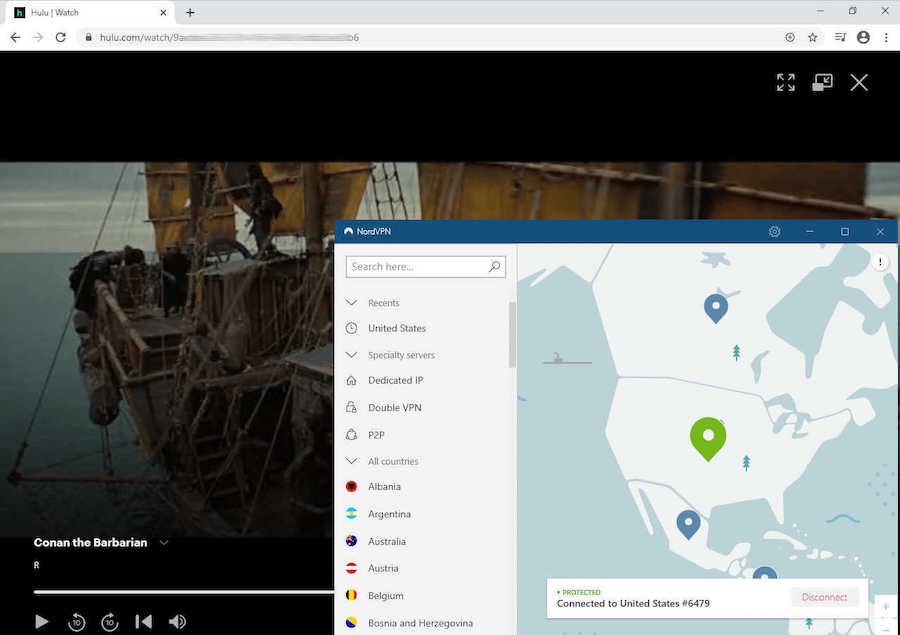
NordVPN is the best VPN to unblock Hulu without any buffering or problems. It effectively handles the Hulu VPN ban by bypassing Hulu’s proxy detection, ensuring uninterrupted access even when other VPNs fail.
NordVPN is consistently one of the fastest VPNs with the NordLynx VPN protocol. NordLynx is a custom implementation of the new, super-fast, super-secure WireGuard VPN protocol. This protocol delivers the fastest speeds possible, instant connections, and cutting-edge encryption.
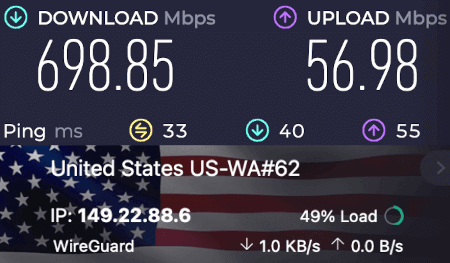
We found NordVPN with NordLynx to have a huge performance advantage over other VPNs. You can see this in recent tests for the NordVPN vs ExpressVPN comparison. Below is the result we got on a recent speed test using a NordVPN server in Seattle (USA). At 903 Mbps, NordVPN is the fastest VPN we have ever seen:
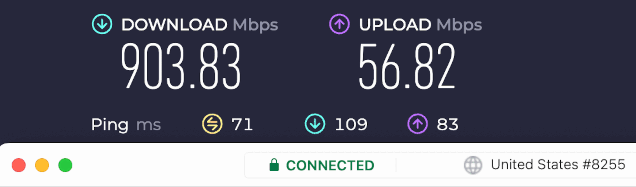
This makes it ideal for streaming Hulu without interruptions. It sits on both our list of the fastest VPNs and the best VPNs with WireGuard.
NordVPN supports a wide range of devices beyond computers and smartphones. If you want to watch Hulu on some particular device, NordVPN probably has an app for it. And if your particular interest is watching Hulu or doing other unblocking activities on Amazon devices, then you’ll want to check out our guide on the best VPNs for Firestick and Fire TV.
NordVPN ticks all the boxes for a general-purpose VPN too. They are one of the best no-logs VPNs, a fact that has been verified multiple times by companies like PWC AG and Deloitte. This VPN really excels in the area of advanced privacy and security features. Here are some advanced features:
Threat Protection Pro is an advanced security feature that blocks ads, malware, and dangerous domains. The desktop version (Windows and macOS) additionally can remove tracking parameters from links, and protect you against malicious downloads. Threat Protection functions even if you are not connected to a VPN server. This is the most capable VPN ad blocker currently available.
Kill Switch secures your data by blocking data flow if the connection to a VPN server is lost. Most NordVPN apps have an Internet Kill Switch, which disables all traffic when the connection is lost. The Windows version of NordVPN also includes an App Kill Switch, which quits selected apps when there is no VPN connection.
Split tunneling lets you control which apps use the VPN tunnel and which connect directly to the internet.
Meshnet is a NordVPN service that allows you to access trusted devices as if they were connected through a secure LAN (Local Area Network). It provides a high-speed, low-latency, encrypted, direct connection between devices. It is ideal for activities such as collaboration, file sharing, and playing LAN games.
See all NordVPN features here >>
NordVPN server network
NordVPN servers all run on dedicated hardware in RAM-disk mode. This type of diskless operation is a major privacy boost as it secures your data against the threat of someone physically removing a VPN server or disk drives. An audit by VerSprite confirmed that their network and apps really are secure.
Another way the company is boosting the privacy and security of the server network is by transitioning to colocated servers. Most VPN providers lease servers from third-party data centers in countries around the world. This means that some entity other than the VPN provider owns and operates the VPN servers. And that is a potential security problem.
Nord Security (the parent company of NordVPN) is dealing with this problem by moving to colocated servers. Colocated servers are servers that are housed in third-party data centers, but are owned and operated by personnel from the VPN company, not the data center owner.
With such a large network of VPN servers, NordVPN has room for a variety of specialized servers. NordVPN also manages IP addresses to avoid detection by services like Hulu, which monitor and block IP addresses associated with VPN traffic.
And there’s more to NordVPN’s server network than sheer size. You’ll also find several specialized server types, each designed for a different job:
Double VPN servers pass your traffic through two servers located in two different countries. This slows your connection a bit but makes it much more difficult for even state-level entities to track your online activities.
Onion over VPN servers add the anonymity of the Tor network to the security and privacy of NordVPN.
Obfuscated servers make your VPN traffic look like regular HTTPS encrypted traffic. This hides your VPN traffic from internet censors. Obfuscation is an important feature if you need a VPN for China, the UAE and Dubai, or for Russia).
Dedicated IP servers are an extra cost feature. A dedicated IP server gives you a static IP address that is dedicated to your sole use. If you need this capability, a NordVPN dedicated IP may be the solution.
P2P servers are servers that are optimized for peer-to-peer operations like file sharing and torrenting.
NordVPN offers top-notch customer service with 24/7 live chat support through their website. They also back all subscriptions up with a 30-day money-back guarantee. This gives you plenty of time to test-drive the VPN with any streaming sites.
Non-Hulu streaming services unblocked: Netflix (US, UK, Canada, France, Germany, Netherlands, Spain, Japan, Australia, India, Italy, and possibly other regions), BBC iPlayer, Amazon Prime, HBO, DAZN, SkyGo, Hotstar, and many more.
NordVPN pros and cons
+ Pros
- User-friendly and reliable apps
- Double VPN and Onion Over VPN servers
- Passed numerous 3rd-party audits
- Strong encryption standards with full support for WireGuard
- Works with Netflix and many streaming sites
- Threat Protection feature to block ads, trackers, and malware
- Professional 24/7 live chat support
- Consistently fast speeds
- Dedicated RAM-only servers with 10 Gbps bandwidth channels
- Post-quantum encryption
– Cons
- Best discounts only available with 2-year plans
NordVPN’s Cyber Deal is live:
Get 75% Off NordVPN with the coupon below + 3 months extra:
(Coupon is applied automatically; 30-day money-back guarantee.)
Want to learn more? Check out our full NordVPN review.
Surfshark — Cheap VPN for Hulu streaming
| Website | Surfshark.com |
| Based in | The Netherlands |
| Logs | No logs (audited) |
| Price | $2.49/mo. |
| Support | 24/7 live chat |
| Refund | 30 days |
| Deal | 87% Off Coupon |
Surfshark holds the second spot on our list of the best VPNs for the Hulu streaming platform. As a relative newcomer in the VPN world, Surfshark is something of a prodigy. Coming from nowhere, it has quickly vaulted to the top tier of VPN providers across a wide range of use cases. Defeating Hulu’s geo-blocking is just one of this VPN’s skills. Below is the Surfshark app we tested on Windows:
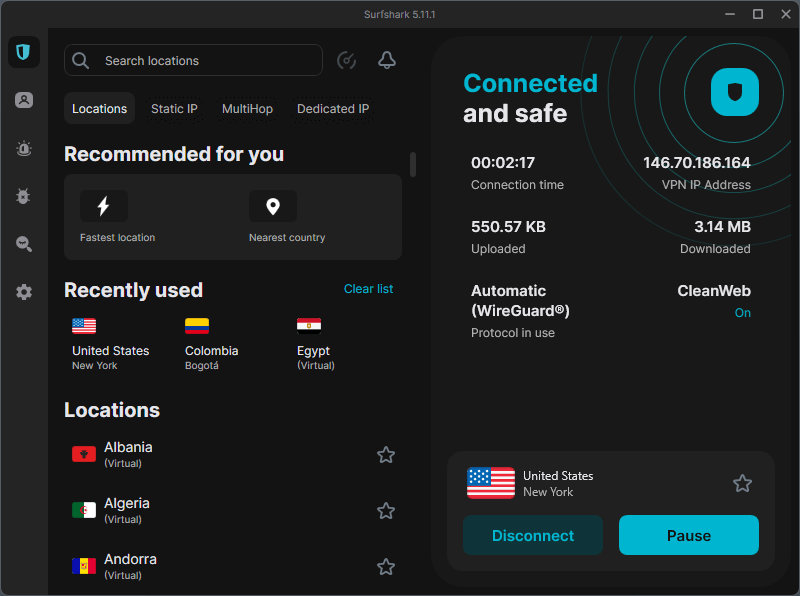
Surfshark has a network of 4,500+ servers spread across 100 countries, with 80+ servers in Japan and over 600 servers in the United States. This gives you a good selection of servers for unblocking Hulu, Netflix, Amazon Prime, or nearly any other streaming service. Surfshark runs as an audited no-logs VPN service with all servers operating in RAM-disk mode for more data security. Their no-logs status was confirmed through an audit by Deloitte.
Surfshark supports the WireGuard VPN protocol, and when you select WireGuard instead of OpenVPN, Surfshark is faster than the competition (see our ExpressVPN vs Surfshark comparison), and second only to NordVPN in raw speed. You will want to take advantage of WireGuard whenever possible, because Surfshark running OpenVPN is relatively slow.
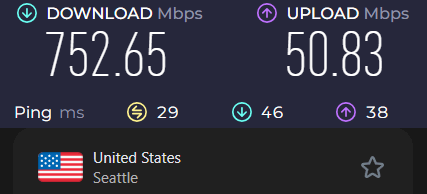
Surfshark offers quality apps for all popular devices and operating systems, including computers, tablets, phones, gaming systems, and more. They also have browser extensions that have been audited by Cure53 and are ranked as the best Chrome VPN extension.
As you would expect for any service that made this list, Surfshark handles regular VPN tasks with ease. They use industry-standard encryption and are based in the Netherlands, a safe and privacy-friendly jurisdiction.
And like NordVPN, Surfshark also offers some great privacy and security features:
CleanWeb 2.0 is Surfshark’s newest security feature. It incorporates all the capabilities of CleanWeb, and adds a pop-up blocker, data breach alerts, and malware alerts. You can use CleanWeb 2.0 with Surfshark’s Chrome, Firefox, and Edge browser extensions.
MultiHop servers are the Surfshark equivalent of NordVPN’s Double VPN servers. The entry and exit server in each MultiHop server are predefined by Surfshark.
Dynamic MultiHop servers work the same as standard MultiHop servers, except that you specify the entry and exit servers when you define a new Dynamic MultiHop connection.
Camouflage mode is Surfshark’s method of obfuscation. Camouflage mode is automatically activated when you use the OpenVPN protocol.
Static IP servers are servers that will assign you the same IP address every time you connect to them. It is important to note that while you get the same IP address every time, that address is not reserved for your sole use. You will likely end up sharing that IP address with other Surfshark users.
Dedicated IP servers also give you the same IP address every time you connect to the server. But here, the IP address is reserved for your sole use. Dedicated IP servers are available for an additional cost.
Bypasser is Surfshark’s split tunneling feature.
See all Surfshark VPN features here >>
If you have a lot of devices to connect to Hulu (or the internet in general), you’ll be interested to know that each Surfshark account supports an unlimited number of simultaneous internet connections in a single account. And with the low price, Surfshark is one of the best cheap VPNs on the market.
Surfshark support staff also performed well in our tests and interactions, especially when using a VPN router like Aircove. They have 24/7 live chat support and a 30-day money-back guarantee if for some reason the service doesn’t meet your needs.
Non-Hulu streaming services unblocked: Netflix (US, UK, Australia, Canada, Singapore, Italy, South Korea, Germany, Japan, Norway, and working on more), Amazon Prime, BBC iPlayer, HBO Max, SlingTV, and more.
Surfshark pros and cons
+ Pros
- Unlimited connections
- User-friendly apps for all devices and operating systems
- CleanWeb feature to block ads, trackers, and malware
- Works great with Netflix and many other streaming services
- 24/7 live chat support
- Strong encryption and security features (audited)
– Cons
- Limited support for VPN routers
- Above-average monthly prices
Surfshark VPN Coupon:
Get 87% off Surfshark VPN plus an additional 3 months extra with the coupon below:
(Coupon is applied automatically; 30-day money-back guarantee)
Want more information about Surfshark? Read our full Surfshark review.
ExpressVPN — Reliable Hulu streaming VPN
| Website | ExpressVPN.com |
| Based in | British Virgin Islands |
| Logs | No logs (audited) |
| Price | $2.99/mo. |
| Support | 24/7 live chat |
| Refund | 30 days |
| Deal | 80% Off Coupon |
ExpressVPN is the third service on our list of the best VPNs for Hulu. Like our other top recommendations, ExpressVPN has a large network of fast global servers. This includes over 3,000 servers in 113 countries. The network includes 62 server locations in the United States and 4 in Japan. This provides enough servers for unblocking Hulu, as well as Amazon Prime, Disney Plus, and more. ExpressVPN is also a great VPN for Netflix with consistent access to numerous regions.
ExpressVPN is based in the British Virgin Islands and is an audited no-logs VPN service. They run all servers in RAM-disk mode and utilize strong encryption standards with all apps. Unlike NordVPN and Surfshark, however, ExpressVPN offers their custom-designed Lightway protocol. ExpressVPN running Lightway is faster and more security than when it is running OpenVPN, but it isn’t as fast as NordVPN or Surfshark when they are running WireGuard.
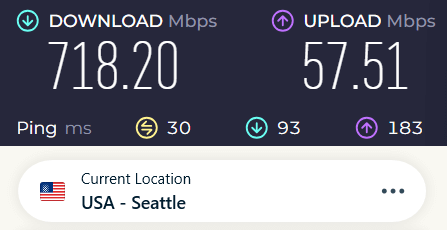
ExpressVPN supports a large number of operating systems and devices with secure and reliable VPN apps. This is a great VPN for gaming systems, and TV Boxes, and even has a dedicated app for Firestick. It is one of the best VPNs for BBC iPlayer and Amazon Prime Video and unblocks numerous services with ease. Additionally, ExpressVPN can be configured on a VPN router to work with devices that lack native apps, such as Apple TV, ensuring you can access your favorite streaming platforms without geographical restrictions.
Below is the ExpressVPN Windows VPN app. You can see that the VPN app is simple and user-friendly, with a clean and minimal design.
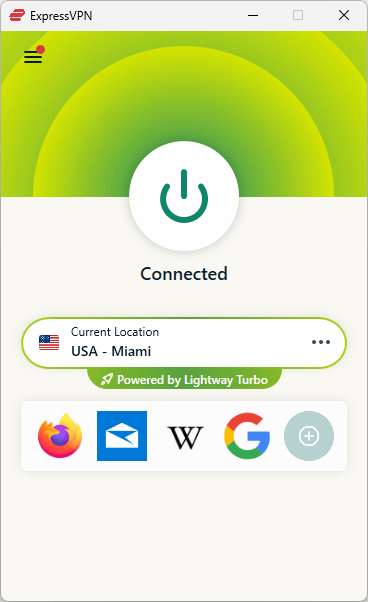
You can also see that ExpressVPN is running in a new mode: Lightway Turbo. Lightway Turbo and OpenVPN DCU (Data Channel Offload). Both of these new modes are available in the ExpressVPN Windows app. These modes came live as we were getting ready to publish this comparison. We’ll give you more info on these modes once we get a chance to thoroughly test them.
And like Surfshark and NordVPN, ExpressVPN also offers 24/7 live chat support. Additionally, they have lots of guides and videos on their website to help you get the VPN set up correctly for Hulu. You can feel safe giving ExpressVPN a good, thorough trial since they offer you a 30-day money-back guarantee.
Non-Hulu streaming services unblocked: Netflix (US, UK, Canada, Australia, France, Italy, Japan, Germany, the Netherlands, and more), BBC iPlayer, Amazon Prime, ESPN, HBO, SlingTV, and many other streaming services.
ExpressVPN pros and cons
+ Pros
- User-friendly and secure apps for virtually any operating system or device
- Proprietary Lightway VPN protocol for advanced performance
- Post-quantum version of the WireGuard protocol for enhanced privacy and security
- Split tunneling feature (for macOS, Windows, and routers)
- Works with Netflix and most streaming services
- 24/7 live chat support
- Passed independent third-party audits for security and no-logs
- Extensive network of diskless servers
– Cons
- Fewer features than other leading VPNs
ExpressVPN Coupon:
Sign up for the 2-year plan and get 4 months added to your subscription for free.
(Coupon is applied automatically)
Want to learn more? Check out our full ExpressVPN review for more details.
Proton VPN — Privacy-focused VPN for Hulu
| Website | ProtonVPN.com |
| Based in | Switzerland |
| Logs | No logs (audited) |
| Price | $2.99/mo. |
| Support | Email + Chat |
| Refund | 30 days |
| Deal | 70% Off Coupon |
Proton VPN is an easy-to-use option for streaming Hulu. It has an attractive user interface and apps for most any operating system or device you might want to use with Hulu.
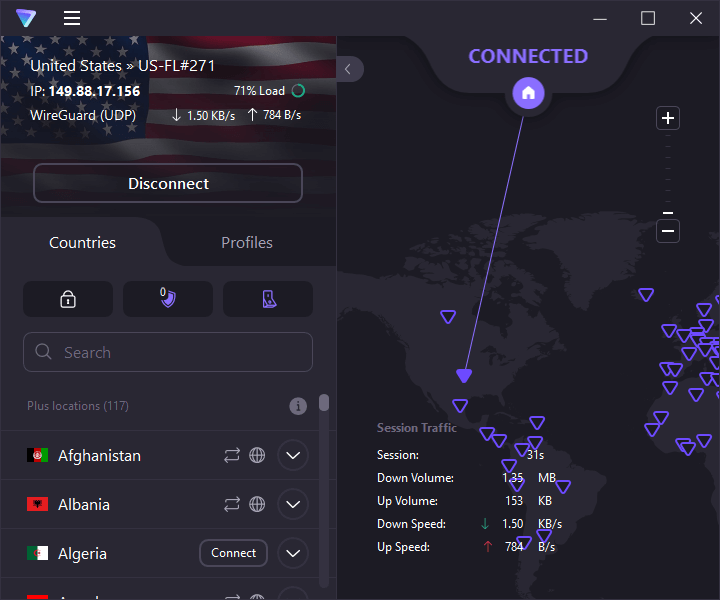
There are several reasons Proton VPN is a good Hulu VPN. It delivers robust privacy and security, along with the ability to unblock virtually any geo-restricted content. Proton VPN’s huge (20,500+ servers in 148 countries, including over 4,000 servers in the USA and 79 servers in Japan) network includes a number of streaming-optimized servers in the USA, perfect for viewing Hulu.
In our tests, Proton VPN worked well, without any hiccups or glitches. This isn’t the fastest VPN on the market (NordVPN and Surfshark are faster), but it has plenty of speed for streaming all types of HD content.
Proton VPN’s strong security makes streaming on various streaming platforms, including Hulu, a private experience. The service’s OpenVPN protocol (with AES-256 encryption) and WireGuard protocol (with ChaCha20 encryption) mean you can rest assured that your viewing habits won’t be recorded by online snoops. Other important security and privacy features include a built-in kill switch and an audited no-logs policy. Proton VPN also offers multi-hop VPN features and a VPN ad blocker. These characteristics also make Proton VPN one of the best VPNs for Canada.
Support – Proton VPN offers email support (no live chat) and usually responds within 1 or 2 days. This is a drawback if you need immediate help with streaming issues. In this case, you may want to opt for another VPN provider recommended above. Proton VPN plans come with a 30-day money-back guarantee.
Non-Hulu streaming services unblocked: Netflix (US, UK, Canada, Australia, France, Italy, Japan, Germany, and more), Amazon Prime, ESPN, SlingTV, and more.
Proton VPN pros and cons
+ Pros
- Swiss-based privacy
- Open-source apps audited by independent security firms
- Secure Core servers route traffic through hardened nodes
- VPN Accelerator boosts long-distance US speeds
- Post-quantum encryption in the works
- Subscription plans bundle with Proton Mail, Proton Drive, Proton Sheets, and Proton Pass
- Linux CLI and refreshed GUI
- Smart TV and Apple TV apps now support NetShield
– Cons
- No 24/7 live chat
- Advanced tools have a steeper learning curve
Want more info on this VPN service? See our Proton VPN review now.
Troubleshooting Hulu VPN blocks
Connected to a US VPN server but still blocked by Hulu? If you’re seeing the “You appear to be using an anonymous proxy” message, your VPN’s IP may have been detected. Try these quick fixes before giving up on your stream:
- Switch to a different US server: Hulu aggressively blocks known VPN IPs. The top providers rotate fresh IPs constantly, so a new server almost always works.
- Enable obfuscated/stealth mode: NordVPN, Surfshark, ExpressVPN, and Proton VPN all offer this feature to disguise VPN traffic as regular browsing data.
- Clear browser cache and cookies (or reinstall the Hulu app): leftover location data can trigger detection even with a good VPN.
- Use the provider’s dedicated streaming servers: many label specific US servers as optimized for Hulu, Netflix, and Disney+ for reliable unblocking.
Apply one of these steps, and you’ll be back to binge-watching without interruptions. If the problem persists, 24/7 live chat support will get you connected again fast.
The bottom line
If you are a Hulu fan, finding the best Hulu VPN is surely a priority for you. Not only will a VPN help you stream content, but it also offers an added layer of security and privacy. This is particularly important if you are using public wi-fi, or if you want to keep your viewing habits safe from prying eyes.
By subscribing to one of the best Hulu VPNs in this guide, you will be able to:
Stream Hulu content no matter where in the world you happen to be located in the world
Stream great content from other services like Netflix, Amazon Prime, and BBC iPlayer, and who knows how many of the little services that are popping up everywhere
Protect your online privacy in a world where nearly everything you do online is tracked by various third parties. In the US, your internet service provider has been able to track your online activities for years.
NordVPN remains our top Hulu pick. It comes with a 30-day money-back guarantee and a 75% off coupon, so you can try it without much risk.
Keep in mind: VPNs and Hulu are always playing a game of cat and mouse. The servers we tested worked today, but that can change. If you hit a block, reach out to 24/7 customer support, and they can usually recommend a server that works.
Hulu VPN FAQs
Why is Hulu blocked outside the United States and Japan?
Hulu’s geo-blocks are mainly a licensing issue. Copyright holders sell streaming rights by region, meaning Hulu can’t simply make its entire library available worldwide. To enforce those agreements, Hulu checks your IP address and restricts connections from outside the US and Japan.
What content can I stream on Hulu when using a VPN?
Connect to a US or Japanese VPN server, and you can access the Hulu library available in that region, including Hulu Originals, movies, TV shows, and live TV. Popular titles such as The Handmaid’s Tale are among the content you may be able to stream, with picture quality depending on your VPN and internet connection.
Which VPN is best for watching Hulu?
Based on our extensive network testing, NordVPN is the absolute best VPN for watching Hulu due to its custom NordLynx protocol and superior proxy-bypass capabilities. That being said, all four providers profiled in this guide (NordVPN, Surfshark, ExpressVPN, and Proton VPN) are exceptional choices that successfully clear Hulu’s active firewalls. We highly recommend utilizing their respective 30-day money-back guarantees to test their low-latency US server networks completely risk-free on your home hardware.
How do I stream Hulu from another country?
You can stream Hulu from any country in the world by following these four steps:
1. Acquire a Premium VPN: Sign up for an audited, high-speed provider like NordVPN or Surfshark.
2. Install the Application: Download and install the native VPN client software onto your desktop computer, mobile device, or streaming stick.
3. Connect to a US Server: Launch the VPN app and connect to a server city inside the United States (or Japan, depending on where your billing account was registered). Choose a city physically closest to your current location for the fastest possible response times.
4. Log In and Stream: Once your virtual connection displays an active status, open your web browser or native Hulu application, log in with your credentials, and stream completely unhindered.
Does Hulu block VPNs?
Yes, Hulu aggressively detects and blocks virtual private networks to strictly enforce regional copyright laws and exclusive licensing agreements. Movie studios and television networks license their broadcasting rights to different media platforms in different global territories to maximize corporate profits. Because Hulu only holds legal distribution rights within US and Japan, they deploy advanced deep-packet inspection filters to identify shared VPN server signatures and block those IP footprints entirely.
Can I use a free VPN for Hulu?
No, you should never use a free VPN for Hulu because their limited, overcrowded server networks are permanently blacklisted by the platform. Free tier services lack the massive financial resources required to constantly buy, rotate, and deploy fresh US residential IP addresses to outpace Hulu’s active blockades.
More importantly, independent cybersecurity audits prove that many free utility apps actively compromise your personal data by tracking your browsing habits, leaking your real IP address, or embedding malicious tracking scripts directly into the software installer.

Leave a Reply