
Secure a Proton VPN dedicated IP, and you aren’t just getting a static address but also a professional-grade gateway. Unlike the cheap add-ons offered by most competitors, Proton reserves its dedicated IPs exclusively for business and high-priced “Visionary” accounts. This is built specifically for organizations that need to whitelist remote access without compromising the standard of Swiss-based privacy.
In my testing, Proton VPN’s exclusive model delivers a more hardened experience than standard VPNs. By combining dedicated IPs with Secure Core, it maintains stability without increasing tracking risk — a refined setup from Proton AG for users looking for a highly private static identity.
This guide breaks down why Proton VPN uses a business-only model for dedicated servers, how they perform in real-world testing, and which alternatives offer similar benefits for individual users.
Proton VPN Coupon:
Get 70% Off Proton VPN (drops the price to only $2.99/month) with the coupon below:
(Coupon is applied automatically; 30-day money-back guarantee)
Top alternatives for a personal dedicated IP
- NordVPN – My top recommendation. Offers dedicated IPs in 28 countries with elite speeds. Get 75% Off NordVPN >
- Surfshark – The best value. Perfect for a static IP on unlimited devices for a low monthly cost.
- ExpressVPN – The privacy leader. Their blinded token system is the closest you can get to Proton’s anonymity level.
What’s the deal with dedicated IPs?
When I first started testing VPNs, I realized that most of us share an IP address with thousands of other people. It’s like living in a massive apartment complex with one mailbox. A dedicated IP, however, is like having your own private front door.
In short, it’s a unique static identifier assigned only to you (or your team). It doesn’t change every time you hit “connect,” which solves a lot of those annoying “prove you’re a human” CAPTCHA loops.
Why you’d actually want one
After putting several dedicated IPs to the test, here’s why they actually matter in the real world:
- No “bad neighbor” effect: Since you aren’t sharing the IP, you won’t get blacklisted because some stranger on the same server was acting sketchy.
- Whitelisting power: You can set your company’s sensitive resources (like a private server or database) to only allow your specific IP.
- Consistency: Your online identity stays the same. No more getting locked out of your bank account because it thinks you’re logging in from a new city every hour.
Why Proton VPN says no to consumer dedicated IPs
If you’re looking for a dedicated IP on a personal Proton VPN account, you won’t find a “buy” button. After testing dozens of providers, I’ve found that while most chase the extra revenue, Proton is stubbornly committed to one thing: Anonymity.
If you’re a privacy geek, it makes a lot of sense.
- The “static breadcrumb” problem: A dedicated IP is a unique identifier that stays with you. If you use the same IP every day, a snoop or a sophisticated tracker can link your activities over time to that specific static point of reference.
- Strength in numbers: By default, Proton uses shared IP addresses. You’re essentially hiding in a crowd of thousands of other users. This makes it nearly impossible for a website or government to correlate a single action back to you.
As a strict no-logs VPN service, Proton doesn’t want to create any technical link between your identity and your traffic, and a dedicated IP is, by definition, a link.
Is change coming?
While Proton has historically viewed dedicated IPs for individuals as an expensive placebo, things are shifting.
- The CAPTCHA struggle: Shared IPs often trigger endless CAPTCHAs or get blocked by sites like Netflix because so many people use them.
- Community pressure: Because of this, Proton recently mentioned it is open to reconsidering dedicated IPs for prosumers (advanced home users), though likely with strict guardrails to prevent abuse.
Why businesses actually use dedicated IPs
While a dedicated IP might be a privacy risk for an individual, it’s a productivity powerhouse for a company. After testing Proton VPN for business against competitors, I’ve found its real value lies in control rather than just simple connectivity.
The big wins for business teams:
- Bulletproof remote access: The biggest headache for IT teams is whitelisting. With a dedicated IP, you can set your private company servers or payroll systems to only allow traffic from that one specific address.
- Granular control (private gateways): One feature I found impressive in Proton’s Professional plans is the ability to segment access. You can give your developers access to one gateway and your marketing team another, ensuring people only see the data they actually need for their jobs.
- Fewer “robot” tests: Because no one else is using your IP, you won’t get flagged for “suspicious activity” or buried in CAPTCHAs just because someone else on your server was acting like a bot.
- Reliable emailing: Shared IPs often get blacklisted by mail servers. Using a dedicated IP for business communication ensures your important client emails actually land in the inbox instead of the spam folder.
How VPNs anchor modern business
A business VPN isn’t just about hiding; it’s about building a secure, invisible bridge between a global team and their data. Here is how Proton VPN’s infrastructure handles the heavy lifting.
1. Hardened security
Most VPNs stop at AES-256. While Proton uses that (and ChaCha20), they’ve recently pushed into post-quantum protection.
Why? Standard encryption could eventually be cracked by future quantum computers. Proton is one of the first to implement post-quantum algorithms to future-proof your company’s data.
For my tests, I always recommend sticking with WireGuard. It’s leaner and faster than OpenVPN, which is crucial when you have 50+ employees trying to sync large files simultaneously.
2. Scaling without the speed tax
One of the biggest fears for a growing business is that a VPN will throttle their growth.
- 10 Gbps backbone: Proton has been aggressively upgrading its server network to 10 Gbps. This means even if your team doubles in size, the pipe is wide enough to handle the traffic.
- VPN Accelerator: This is a proprietary bit of tech I’ve found actually works. It uses multi-core processing to overcome some of the CPU limitations that usually slow down VPN speeds, especially over long-distance international connections.
3. Global market access
While people love using a VPN for Netflix to catch shows from other regions, for a business, geo-hopping is a strategic tool.
If you’re launching an ad campaign in Tokyo, you need to see exactly what a local user sees. Proton’s 20,000+ servers across 145+ countries make this seamless.
At the same time, if you have employees traveling to high-risk regions, Proton’s Stealth protocol is a lifesaver. It disguises VPN traffic as regular web traffic, allowing your team to stay connected even in countries with strict internet firewalls.
4. The dedicated IP advantage for teams
As we discussed earlier, the business-focused dedicated IP is the glue here. By combining a dedicated IP with Gateway features, an admin can create a software-defined perimeter (SDP).
Your employees can work from a coffee shop in Berlin or a home office in New York, but to your company server, they all look like they are sitting inside your secure office building.
Proton’s strategy for businesses
After testing their business-tier features, I’ve found that their security isn’t just about encryption. It’s also about physical infrastructure control.
1. The Secure Core advantage
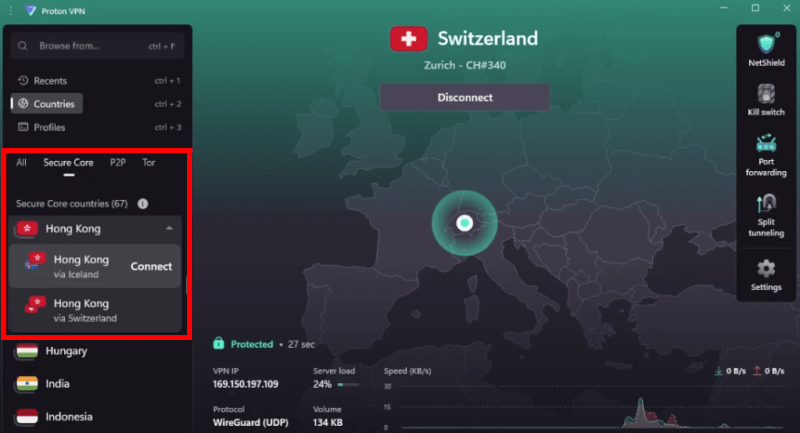
A major part of this is their Secure Core network. Unlike standard VPNs that route your data through a single server, Secure Core bounces your traffic through a hardened middleman server in a privacy-friendly country like Switzerland, Sweden, or Iceland first.
This double-hop makes it nearly impossible for anyone to find your real IP, even if the final server in your path is compromised. However, a word of advice from my testing: Don’t use this for gaming or high-def video calls.
2. Private gateways
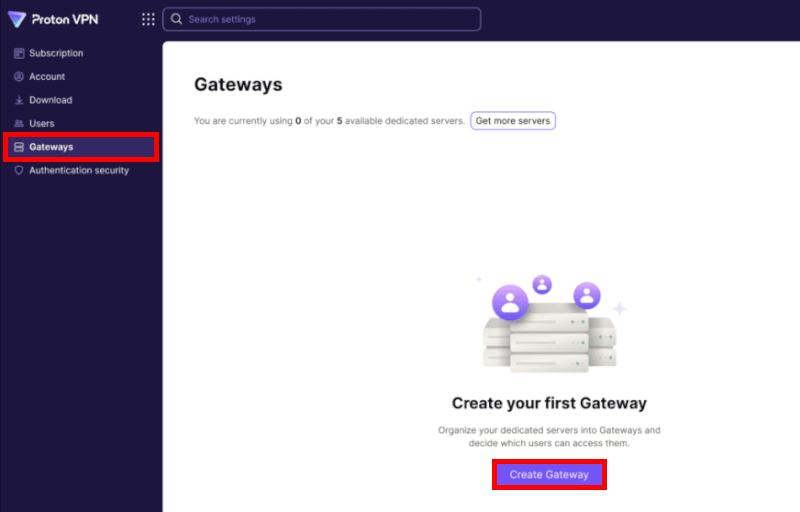
For business owners, the real power lies in Private Gateways. Instead of all your employees sharing a generic server, you can create dedicated digital front doors for different teams.
You could set up one gateway specifically for your finance department and another for your developers. This segmentation ensures that if one employee’s credentials are stolen, the hacker doesn’t get a master key to your entire company network.
3. The Swiss privacy shield
Everything is backed by Proton’s location in Geneva, Switzerland. Being under Swiss jurisdiction means they aren’t subject to the same data-sharing laws as companies in the US or UK. They don’t just ask you to “trust them” on this, either.
Their strict no-logs policy is regularly audited by Securitum, an independent security firm, which gives a level of transparency that’s hard to find with other providers.
4. Proton VPN infrastructure update
Proton has recently expanded its server fleet to over 20,000 servers globally. For a business, this means more exit points and less congestion. If you’re a global company, you now have better coverage in emerging markets across Asia and South America than ever before.
Making the most of Proton VPN without a dedicated IP
Even though Proton VPN doesn’t offer dedicated IPs for individuals, you can still get a very similar level of stability and security by tweaking a few settings. In my experience, most users don’t actually need a dedicated IP if they know how to optimize the shared environment.
Finding the right server for performance
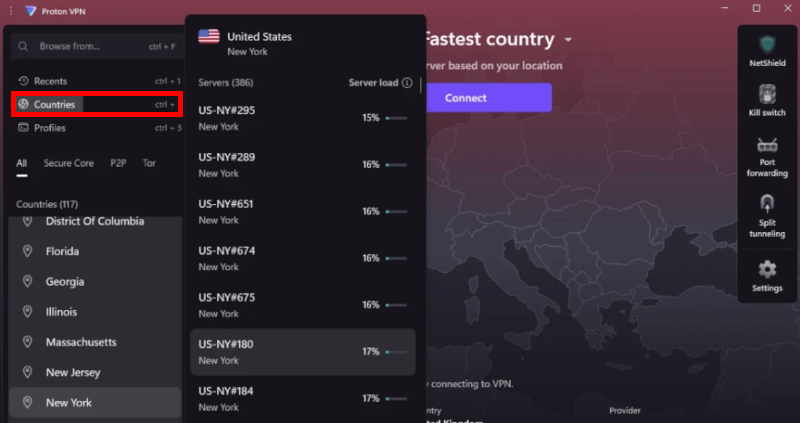
Choosing the right server is the biggest factor in your connection speed. Generally, I recommend picking a server as close to your physical location as possible for the best results. However, if your goal is to bypass geo-blocks, you’ll obviously want to hop onto a server in the specific region you’re trying to access.
Proton VPN now boasts over 20,000 servers across 145 countries, which is a massive jump from their earlier days. Not only does this trump the server count of the likes of NordVPN and ExpressVPN, but the quality of these “Plus” servers is also top-tier. Keep in mind that Plus servers are the ones that unlock the full 10 Gbps speeds and features like Secure Core, so you’ll need a Plus subscription to really see what Proton can do.
Utilize the kill switch as your safety net
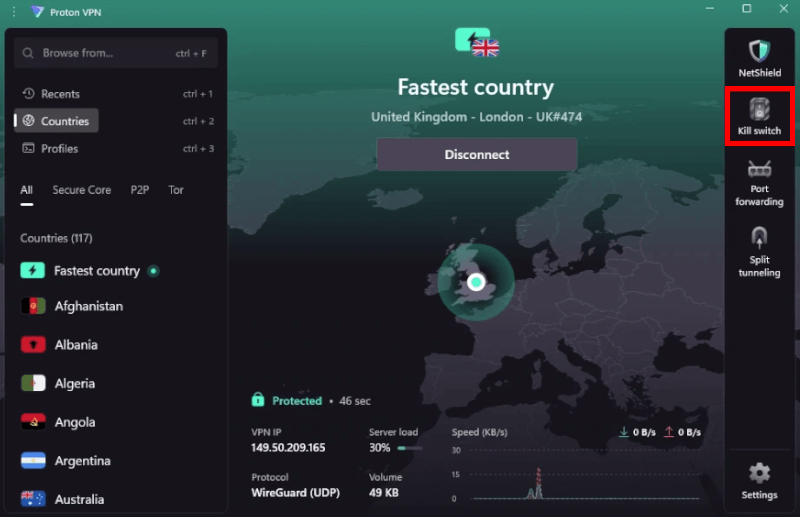
If you’re worried about your real IP leaking because you don’t have a static one, the Kill Switch is your best friend. If your VPN connection drops for even a second, it instantly cuts your internet traffic so your data is never exposed to the “open” web.
In the Windows app, I usually recommend turning on the Permanent Kill Switch. You can find this by clicking the Kill Switch icon in the Quick Settings Bar. Unlike the regular version, the permanent setting ensures your device can’t connect to the internet at all unless the VPN is active. It’s a simple step, but it provides a massive layer of peace of mind.
Alternatives to Proton VPN for a dedicated IP
| NordVPN | Surfshark | ExpressVPN | |
| Dedicated IP target | Consumers and teams | Consumers and teams | Consumers and teams |
| Pricing strategy | Monthly add-on | Monthly add-on | Included in Pro or paid add-on |
| Core advantage | Best speed and most locations | Best value (unlimited devices) | Zero-knowledge privacy |
| Ease of use | Very simple | Very simple | Best for beginners |
If you are running a team, Proton is the winner. Their dedicated IPs aren’t just about a “static address”; they are about building a Private Gateway. This allows you to manage who has access to what, backed by Swiss laws that are much stricter than those in the US or UK. It’s a specialized tool for people who prioritize high-level security over simplicity.
For personal use, NordVPN is the one to beat. During my speed tests, their dedicated IPs felt almost identical to my “naked” ISP speeds. They offer dedicated IPs in 28 countries, which is perfect if you’re traveling and need to look like you’re still sitting in your home office to avoid triggering security alerts on your bank or email accounts.
I recommend Surfshark if you have a lot of devices. While Proton and Nord have device limits, Surfshark allows unlimited simultaneous connections. Their dedicated IP setup is incredibly straightforward. It shows up right in your main server list after you buy the add-on. It’s the most “user-friendly” of the three if you just want to get it working and move on with your day.
If you’re a privacy purist who wants a dedicated IP without the typical paper trail, ExpressVPN is your best bet. They recently launched a unique zero-knowledge dedicated IP system that uses blinded tokens, meaning even they can’t link that static IP to your account — ideal if you want a stable identity with strong privacy.
Is a Proton VPN dedicated IP right for you?
After digging into the specs and testing the alternatives, the conclusion is pretty clear: Proton VPN isn’t trying to be everything to everyone.
If you are an individual user looking for a personal static IP to avoid Netflix blocks or CAPTCHAs, Proton isn’t your match. In that case, you’ll be much happier (and save a lot of time) going with NordVPN for its speed or Surfshark for its value.
However, if you are a business owner or a remote team lead, Proton VPN is in a league of its own.
Why Proton wins for business:
- The Swiss shield: You aren’t just getting an IP; you’re getting the protection of the world’s strongest privacy laws.
- Complete control: The ability to segment your team into Private Gateways is a “pro” feature that consumer-grade VPNs just can’t match.
- Future-proofing: With their push into post-quantum encryption, you’re securing your company’s data against the threats of tomorrow, not just today.
Choose Proton VPN if security and professional infrastructure are your top priorities. Choose the alternatives if you just need a simple, personal static IP for daily browsing.
Don’t miss this exclusive Proton VPN coupon for extra savings:
Proton VPN Coupon:
Get 70% Off Proton VPN (drops the price to only $2.99/month) with the coupon below:
(Coupon is applied automatically; 30-day money-back guarantee)
Proton VPN dedicated IP FAQs
Currently, no. Proton VPN offers dedicated IPs only to users on its Business and Enterprise plans. This is an intentional privacy choice, as Proton believes shared IPs provide better anonymity for individuals by letting them hide in a crowd.
If you are an individual user, you basically have to choose an alternative like NordVPN or Surfshark. These providers allow you to buy a dedicated IP as a simple monthly add-on for a few dollars. They are better suited for bypassing CAPTCHA on personal devices or accessing your home bank account while traveling.
While people often use the terms interchangeably, there is a slight difference. A static IP just means the address doesn’t change. A dedicated IP means that a static address is reserved exclusively for you. With Proton VPN’s business plans, you get a dedicated IP that isn’t shared with any other organizations.
Since Proton’s dedicated IPs are for businesses, they are optimized for secure access to company servers, not for unblocking Netflix. If your main goal is streaming, you are actually better off using Proton’s standard Plus Servers, which are specifically optimized to bypass geo-blocks on platforms like Netflix, Disney+, and Amazon Prime.
Not necessarily. While a dedicated IP can feel smoother because you aren’t competing with other users for bandwidth on that specific address, the raw speed still depends on your base internet connection and the VPN protocol (like WireGuard). In my tests, the biggest speed benefit of a dedicated IP is actually avoiding the slowdown caused by constant security checks and blocks on shared IPs.

Leave a Reply