

Security researchers Talal Haj Bakry and Tommy Mysk have disclosed a macOS weakness that allows malware already running under a user's account to silently replace the executable of trusted applications downloaded from the web and relaunch them without triggering Gatekeeper warnings.
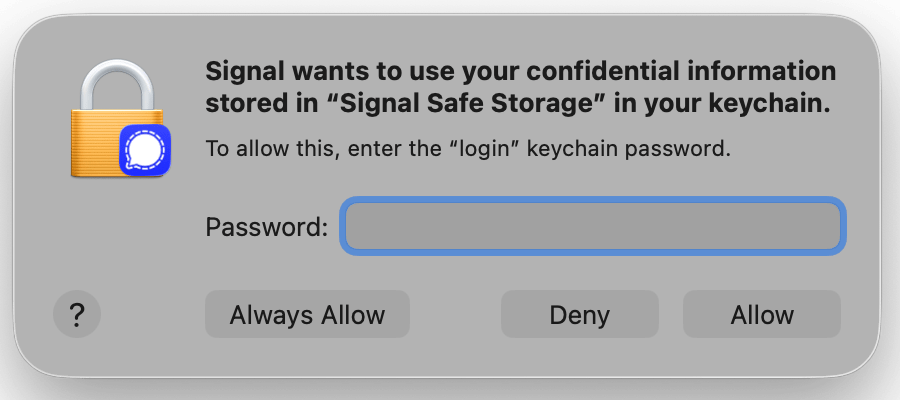
Although the technique does not bypass macOS security protections, it can cause legitimate permission dialogs to display the trusted application's name and icon, potentially convincing users to approve access to sensitive data.
The researchers published the findings after Apple reviewed the report and determined the behavior does not require a security fix. According to Mysk's disclosure timeline, the issue was reported privately in June before Apple closed the case on July 14.
The technique affects applications installed outside the Mac App Store that are owned by the current user and have already been launched at least once. Mac App Store applications are not affected because they are typically owned by the root account. Mysk tested the issue on macOS Tahoe 26.x and Golden Gate beta releases, noting that earlier versions are likely affected as well.
According to the researchers, an attacker who already has code execution privileges as the logged-in user can archive and restore an application's bundle, after which macOS no longer prevents the bundle's main executable from being replaced. The modified application then launches normally without displaying new Gatekeeper or code-signature warnings.
Mysk demonstrated the technique using Signal as an example, emphasizing that Signal is not inherently vulnerable and that it simply serves as a representative target. The researchers observed the same behavior with numerous other applications distributed outside the Mac App Store, including Brave Browser, Cursor, Mullvad Browser, Proton Mail, Slack, Visual Studio Code, and Xcode.
The replacement executable does not inherit the legitimate application's code-signing identity, entitlements, or previously granted Transparency, Consent, and Control (TCC) permissions. Instead, macOS correctly displays authorization prompts when the modified application attempts to access protected resources such as the Desktop, Documents folder, or Keychain.
Mysk
The researchers argue that the problem is how those prompts are presented. Because the malicious executable resides inside the trusted application's bundle, macOS displays the legitimate application's name and icon, making the request appear to originate from software the user already trusts. A user who approves the prompt could unintentionally grant the attacker's code access to protected data.
Apple concluded that the reported behavior does not constitute a security vulnerability because the attack requires malware to already be running as the current user, does not bypass Gatekeeper or TCC, and still requires users to approve permission requests. The company also noted that Gatekeeper is designed to verify downloaded applications before their first launch rather than monitoring files that users already own and can modify.
Mysk disagrees with that assessment, arguing that macOS should revalidate an application's code signature after its bundle changes, and that authorization prompts should identify the code-signing identity or Team ID of the executable requesting access rather than displaying only the application's name and icon.
Users should remain cautious when approving requests for access to sensitive files or Keychain data, even when those prompts appear to originate from familiar applications.



Leave a Reply