
Living in a Five Eyes country means your online privacy isn’t just a suggestion but something you have to defend. Between privacy concerns and streaming restrictions, more Canadians are turning to VPNs than ever before.
The VPN market is packed with bold claims, but after testing the biggest names, ExpressVPN still stands out as one of the most reliable options for Canadians. Its mix of fast North American servers and polished security tools consistently impressed me.
In this guide, I’m breaking down exactly how ExpressVPN performs on Canadian soil. We’ll look at real-world speed tests, its ability to crack open international streaming libraries, and whether its premium features justify the price tag (but you can use the 84% off coupon).
| Based in | British Virgin Islands (privacy-friendly; no data retention laws) |
| Security | AES-256 encryption, Lightway protocol, and RAM-only servers |
| Bonus tools | Network Lock (kill switch), Threat Manager, and Stealth Servers |
| Price range | $2.49 – $22.99/month (with current discount) |
| Refund policy | 30-day money-back guarantee |
| Best for… | Bypassing 5-Eyes surveillance, 4K streaming, and set-and-forget ease |
If you’re ready to lock down your connection, you can currently get an exclusive discount with the coupon below, which includes a risk-free 30-day trial:
ExpressVPN Coupon:
Sign up for the 2-year plan and get 4 months added to your subscription for free.
(Coupon is applied automatically)
ExpressVPN for Canada overview
A strong local server network helps keep speeds fast while making geo-blocked content easier to access.
Where are ExpressVPN’s Canadian servers located?

ExpressVPN focuses its network infrastructure on three major Canadian tech hubs:
- Toronto: Ideal for Eastern Canada and Ontario.
- Montreal: Best for Quebec and Atlantic provinces.
- Vancouver: Perfect for British Columbia and Western Canada.
While competitors like NordVPN and Surfshark also target these cities, ExpressVPN stands out by upgrading its Canadian fleet to 10 Gbps (gigabits per second) servers. During my testing from Toronto, connecting to a local server felt almost identical to my naked internet speeds. If you live close to any of these three hubs, your connection quality will remain incredibly consistent.
For users outside the country, this cross-continental coverage means you can easily grab a Canadian IP address to stream local sports or access banking apps while traveling abroad.
How to find and connect to Canadian servers
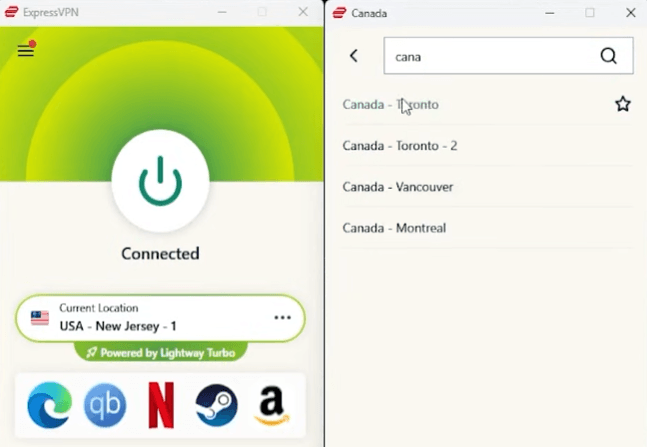
The app interface is incredibly straightforward. Here is exactly how I find the fastest Canadian server on my desktop:
- Click the Selected Location box (the three dots) on the main dashboard.
- A secondary “Locations” window will pop up.
- Type “Canada” into the search bar.
- Click the dropdown arrow next to Canada to choose between Toronto, Montreal, or Vancouver, then hit the big power button.
Why ExpressVPN stands out for Canadian users
After hands-on testing, these are the premium features that actually felt worth paying for:
- Upgraded 10 Gbps infrastructure: The servers handle high-bandwidth tasks like 4K streaming and torrenting without stuttering.
- Up to 14 simultaneous connections: ExpressVPN shifted away from its old 5-device limit and introduced flexible tiers. Depending on your package, you can protect 10, 12, or up to 14 active devices at the same time.
- Built-in Threat Manager: This blocklist stops trackers and malicious sites from loading before they can monitor your Canadian browsing habits.
- Audited no-logs policy: Based safely in the British Virgin Islands, their RAM-only servers physically cannot store your data, a claim verified by independent third-party audits.
ExpressVPN Canada speed test results
Now for the part most people care about: Speed. I tested ExpressVPN’s Canadian servers from our Pacific Northwest test lab using a dedicated 1,000 Mbps fiber connection.
The results were a bit mixed. In some locations, ExpressVPN delivered the fast, polished performance you’d expect from a premium VPN. In others, a few lower-cost competitors managed to pull ahead in raw speed tests.
ExpressVPN Toronto speed test results
When I switched over to the Ontario infrastructure, the performance data left me wanting more. While major competitors consistently sit in the ballpark of 600 Mbps on our network, ExpressVPN lagged:
- Baseline fiber speed: 1,000 Mbps
- ExpressVPN Toronto speed: 456 Mbps
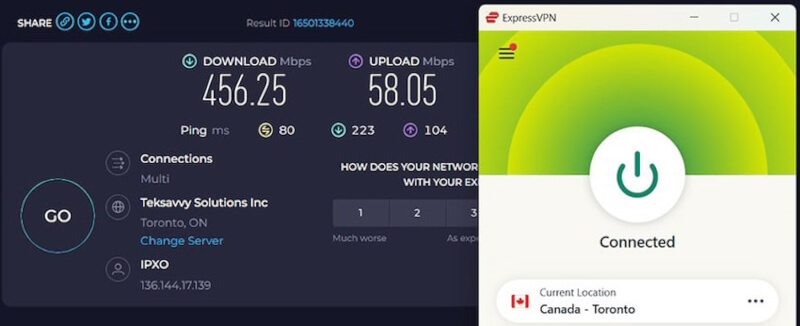
Make no mistake, 456 Mbps is incredibly fast. It easily handles 4K streaming, heavy torrenting, and everyday multitasking. However, for a premium brand, the result is still a bit disappointing. Keep in mind that physical proximity dictates your final throughput. If you live closer to Toronto than our Pacific Northwest testing facility, your real-world speeds will likely be much higher.
ExpressVPN Montreal speed test results
Switching to the Quebec infrastructure delivered a complete plot twist. In Montreal, ExpressVPN turned the tables and outpaced Surfshark (577 Mbps), which is our current runner-up for the fastest VPN in Canada:
- ExpressVPN Montreal speed: 604 Mbps
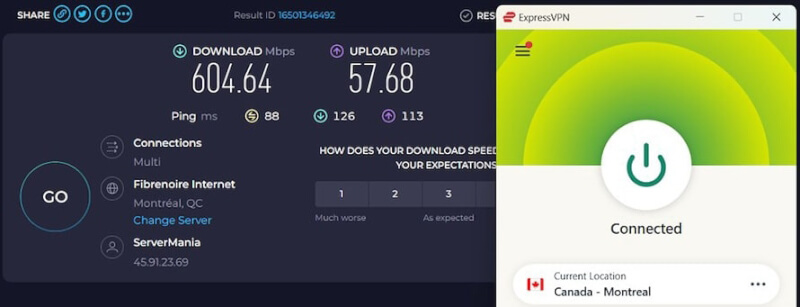
Considering that NordVPN leads the pack at 641 Mbps for Canadian users, ExpressVPN’s 604 Mbps is incredibly impressive.
To put this in perspective, our lab sits over 3,200 kilometers away from Montreal. Maintaining a 600+ Mbps connection over that distance proves ExpressVPN’s long-range routing is highly optimized. If you live on the East Coast, this raw power makes it an excellent choice for low-latency gaming. For the best configuration tips, you can read my separate ExpressVPN gaming guide.
My hands-on testing proves that ExpressVPN offers fast, stable connections across Canada. However, you have to accept a performance trade-off. Depending on which city you connect to, its raw download speeds can fall short when stacked up against NordVPN and Surfshark.
ExpressVPN user experience
Even if you are a total beginner who has never used a virtual private network before, you will quickly learn the ropes with ExpressVPN.
Some modern consumers might initially perceive the minimalist interface as a bit bare. However, the desktop and mobile applications are a masterclass in clean, user-friendly UI design. The app does not overwhelm you with complex technical jargon or cluttered maps right out of the gate.
Instead, the experience centers around one massive power button. Clicking this button is all you need to establish a secure VPN tunnel. ExpressVPN also includes a clever visual anchor: The app background shifts from a warning red to a soothing green the moment your secure connection goes live.
Cross-platform UI consistency
A major highlight of the user experience is ExpressVPN’s signature compact, rectangular window. The development team prioritizes a uniform layout across all major operating systems, including:
- Windows
- macOS
- Linux
- Android
- iOS
Because the software looks and operates identically on a desktop as it does on a smartphone, the learning curve is completely flat. Once you know how to navigate the settings menu or switch server locations on your PC, you instantly know how to do it on your iPhone or Android device. This frictionless consistency makes it an excellent choice for families looking to secure multiple platforms seamlessly.
ExpressVPN pricing and plans for Canada
Unlike the old one-size-fits-all approach, you now choose between three distinct tiers. Each tier unlocks different levels of security features and device allowances, making it essential to pick the right one for your specific Canadian household.
For the best value, most Canadians opt for the 2-year commitment, which currently includes 4 extra months for free. With three subscription plans to choose from, ExpressVPN lets you connect between 10 and 14 devices at the exact same time. Higher tiers come with extra offerings such as a password manager and dedicated IP. Features and pricing can shift, though, so be sure to visit ExpressVPN’s website to lock in the latest up-to-date info.
The 30-day safety net
Regardless of which tier you choose, every plan is backed by a 30-day money-back guarantee. If the Toronto or Montreal servers don’t meet your speed expectations, you can get a full refund with no questions asked.
Core privacy infrastructure
These are the privacy-focused features that stood out most to me during everyday testing and long-term use.
- Automatic server obfuscated traffic: ExpressVPN integrates stealth technology directly into its network. If the software detects deep packet inspection or network firewall restrictions, it automatically masks your VPN traffic to look like standard HTTPS web data. This makes it incredibly effective at bypassing strict censorship blocks, which is why it is consistently ranked as a premier VPN for China and a reliable choice for bypassing restrictions in the UAE.
- Unrestricted P2P support: Unlike some providers that throttle your speeds or force you onto specific, overcrowded torrenting servers, ExpressVPN allows peer-to-peer sharing across its entire network. This unrestricted bandwidth earns it a permanent spot on my list of the best VPNs for torrenting.
- Private, encrypted DNS: Every single server runs its own private, zero-knowledge DNS requests by default. Because your DNS queries never leave the encrypted VPN tunnel, your internet service provider cannot sneakily log the specific domain names you visit.
Advanced security settings you should turn on
While the software provides robust defense right out of the box, you can aggressively harden your security by toggling these advanced settings in the app menu:
Threat Manager (ad and tracker blocker)
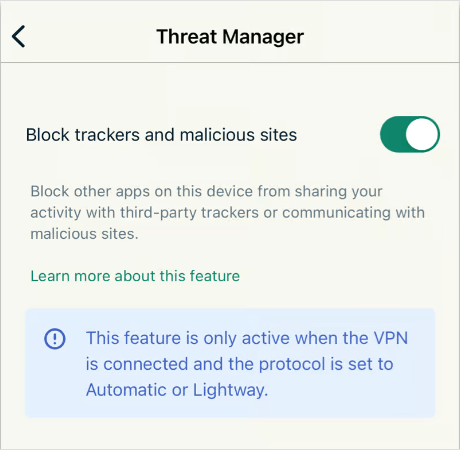
This built-in privacy shield acts as a localized firewall, actively preventing known trackers, malicious websites, and invasive advertisements from loading on your device. It is a highly effective security layer, but keep one limitation in mind: Threat Manager only works while the VPN connection is actively running, so it won’t offer protection if the app is disconnected.
Military-grade encryption ciphers
During testing, I never had to think much about security settings because ExpressVPN handles the heavy lifting automatically. Depending on the protocol you use, it secures your traffic with top-tier encryption standards like AES-256 and ChaCha20, helping keep your browsing, streaming, and personal data safely locked away from prying eyes.
Latest-generation VPN protocols
Instead of relying solely on aging legacy frameworks, ExpressVPN gives you access to multiple data tunneling protocols:
- Lightway: ExpressVPN’s proprietary, open-source protocol. It is incredibly lightweight, connects almost instantly, and delivers blazing speeds similar to WireGuard while preserving your device’s battery life.
- OpenVPN (UDP/TCP): The gold standard for open-source security and stability.
- IKEv2: Excellent for mobile devices that frequently switch between cellular data and Wi-Fi networks.
Network Lock (the ultimate kill switch)
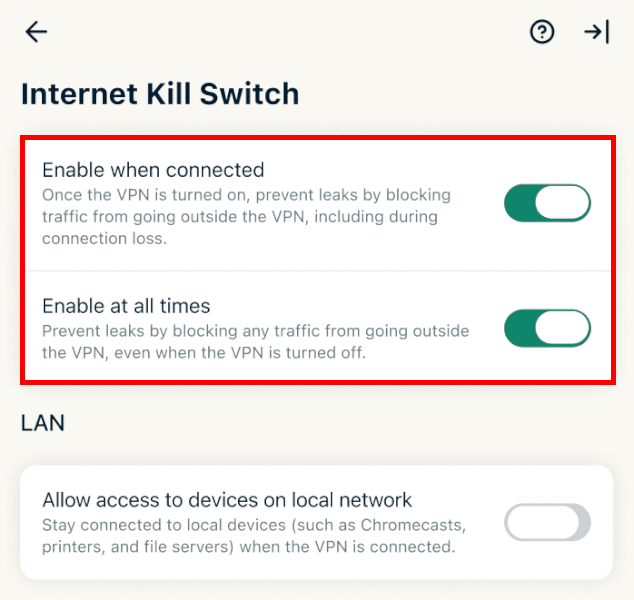
I also liked how reliable ExpressVPN’s Network Lock felt during testing. If the VPN connection suddenly drops (even for a second), it immediately blocks all internet traffic to prevent accidental leaks. It’s one of those features you rarely notice when everything works normally, but it adds a lot of peace of mind in the background.
Advanced split tunneling
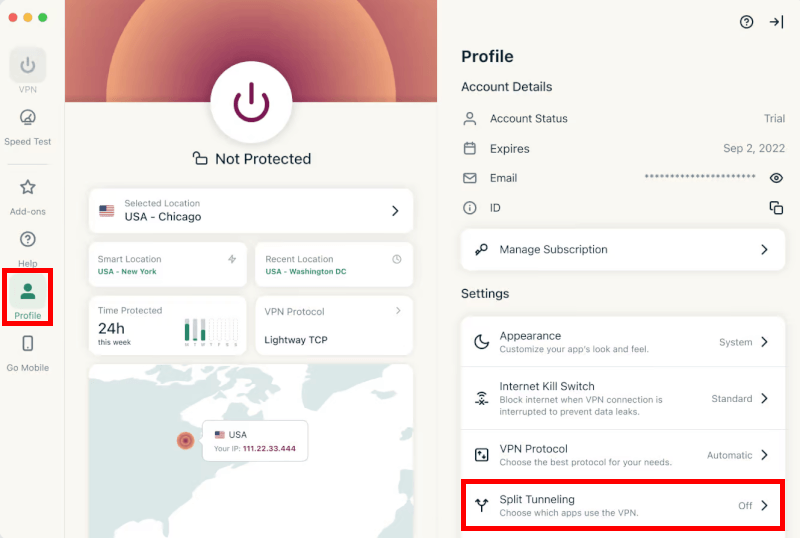
During testing, split tunneling quickly became one of those features I didn’t want to give up. Being able to choose exactly which apps use the VPN makes everyday browsing way more convenient. For example, I could keep torrent traffic safely routed through the VPN while letting games and streaming apps use my regular Canadian connection to avoid extra lag.
ExpressVPN’s dedicated router app
One of ExpressVPN’s biggest advantages is its dedicated router app. While most VPNs require a painful manual setup on routers, ExpressVPN provides custom firmware that makes the process plug-and-play.
- Unlimited devices: By installing the VPN directly on your router, every device in your home (from smart TVs to game consoles) is protected instantly. Best of all, the router only counts as one connection, effectively bypassing all device limits.
- Broad compatibility: The app works seamlessly on many popular models from Linksys, Netgear, and ASUS. If your router isn’t natively compatible, you can still set it up manually via OpenVPN.
- Simple control: The app allows you to group devices. For example, you can set your Apple TV to a Toronto server for local sports while your PC stays on a Vancouver connection for gaming.
Once everything was configured, it became a simple, low-maintenance way to protect every device in the house.
Streaming with ExpressVPN in Canada
ExpressVPN is widely regarded as an industry benchmark for streaming. During my hands-on testing, its optimized Canadian infrastructure handled every major platform without a stutter.
So, what can ExpressVPN unblock in Canada?
Many budget VPNs trigger a “Proxy Error” screen the moment you try to open a streaming app. ExpressVPN avoids this by constantly refreshing its residential IP pool. During my lab tests, it successfully unblocked:
- Global Netflix libraries: I effortlessly jumped between Netflix Canada, Netflix US, and notoriously difficult regions like the UK and Japan.
- Prime Video and Disney+: It bypassed the strict regional blocks on both platforms, loading 4K HDR streams in under three seconds.
- BBC iPlayer: By connecting to a UK server, I streamed live British television in full HD from my Canadian test desk without any buffering.
- Local Canadian sports and TV: Perfect for expats or travelers. Connecting to the Vancouver or Montreal servers instantly unlocked regional NHL broadcasts and local news apps.
Customer support experience
A VPN means nothing if you hit a technical roadblock and cannot get a human to help you. To see if ExpressVPN earns its premium reputation, I put its 24/7 live chat support to the test by bombarding an agent with a bunch of hyper-specific questions about unblocking streaming platforms in Canada.
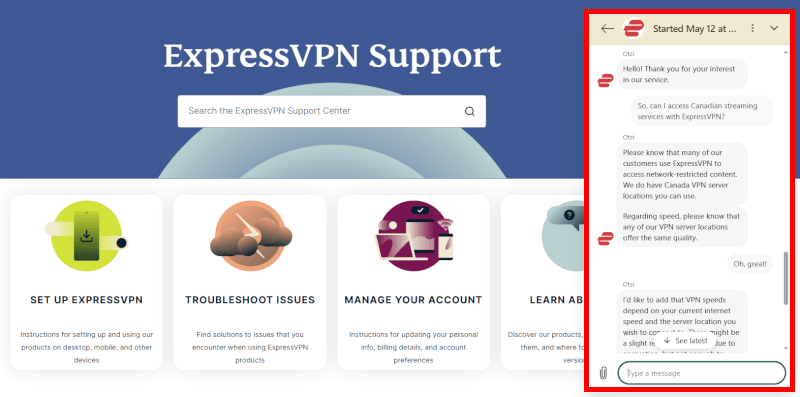
The response was incredibly fast. I clicked the chat bubble and connected to a live agent in less than 30 seconds, bypassing any automated bots. What impressed me most was the quality of the help. Instead of throwing generic, copy-pasted articles at me, the agent gave me quick, genuinely helpful answers for every platform I threw at them. They immediately told me which Canadian servers to use and helped optimize my app by switching my protocol to Lightway (UDP).
All in all, it felt like talking to a real network technician who understood the software inside and out. Also, knowing you can get a knowledgeable human on the line at 2:00 AM to fix a streaming glitch provides massive peace of mind, making the premium price tag much easier to swallow.
ExpressVPN alternatives for Canada
| NordVPN | Surfshark | Proton VPN | |
| Canadian server hubs | Toronto, Montreal, Vancouver | Toronto, Montreal, Vancouver | Toronto, Montreal, Vancouver |
| Device limit | 10 | Unlimited | 10 |
| Starting price | $3.49/month | $1.99/month | $2.99/month |
| Unique feature | Dedicated IP and Threat Protection | Built-in GPS spoofing (Android) | Secure Core (double VPN) |
| Best for | All-around speed and security | Budget and unlimited devices | Privacy purists and cost-free tier |
If ExpressVPN doesn’t quite fit your budget or feature preferences, these alternatives are the ones that impressed me most during testing in Canada.
1. NordVPN: The performance king for Canada
NordVPN is widely considered the best all-around alternative for Canadians. In my testing, it consistently edges out ExpressVPN in raw speed, often maintaining over 90% of original baseline speeds.
Why is it great for Canada? It has a massive fleet of servers in Toronto, Montreal, and Vancouver. Because it has more physical servers than most competitors, you are less likely to deal with server crowding that slows down your connection during peak hockey games or streaming hours.
Best feature? The Threat Protection suite, which acts as a lightweight antivirus by blocking trackers and scanning downloads for malware even when the VPN is off.
2. Surfshark: The best value for families
If you have a large household with dozens of phones, tablets, and smart TVs, Surfshark is the most logical choice. It is significantly cheaper than ExpressVPN while offering many of the same premium perks.
Why is it great for Canada? It provides full coverage across major Canadian cities and uses 10 Gbps servers across its entire network, ensuring high-speed streaming for everyone in the house.
Best feature? Unlimited simultaneous connections. You can protect every single device in your home under one single, low-cost subscription.
3. Proton VPN: The privacy advocate’s choice
Based in Switzerland, Proton VPN is built by the same scientists who created Proton Mail. It is my top recommendation for anyone who prioritizes transparency and extreme security over everything else.
Why is it great for Canada? It offers specialized Secure Core servers that route your traffic through ultra-secure data centers in Switzerland or Iceland before sending it to a Canadian server. This makes it virtually impossible for anyone to trace your real location.
Best feature? The privacy-first infrastructure. Because Proton operates under strict Swiss privacy laws, it is outside the jurisdiction of the “5 Eyes” intelligence alliance (which Canada belongs to).
Is ExpressVPN still worth it for Canada?
What stood out most to me during testing was how effortless ExpressVPN felt day-to-day. The apps are beginner-friendly, streaming performance stayed reliable, and the support team responded surprisingly fast whenever I had questions.
That said, ExpressVPN isn’t perfect. If your main focus is squeezing out the fastest possible speeds or finding the cheapest subscription, competitors like NordVPN or Surfshark may offer better overall value.
Even so, I think ExpressVPN does a good job justifying its higher price with a polished overall experience. The newer pricing tiers make the service more accessible than before, while options like dedicated IP support add flexibility for heavier users. Combined with the 30-day money-back guarantee, it still feels like one of the safest premium VPN picks for long-term, full-home protection.
Ready to get started? The coupon below unlocks extra savings plus a risk-free 30-day refund period:
ExpressVPN Coupon:
Sign up for the 2-year plan and get 4 months added to your subscription for free.
(Coupon is applied automatically)
ExpressVPN for Canada FAQs
Is ExpressVPN good for Canada?
Yes, ExpressVPN is a superior choice for Canada due to its superb security track record and reliable server network. It runs optimized 10 Gbps servers in Toronto, Montreal, and Vancouver. This strategic cross-country coverage ensures that no matter where you live, you can easily bypass ISP throttling and maintain fast, encrypted connections.
Does ExpressVPN unblock Netflix Canada?
Yes, ExpressVPN effortlessly unblocks Netflix Canada along with major international streaming libraries. Its rotating IP pool successfully bypasses strict proxy filters without triggering errors. Thanks to the fast, custom Lightway protocol, it maintains the smooth throughput needed to stream shows in full 4K Ultra HD without buffering.
How much does ExpressVPN cost in Canada?
ExpressVPN subscription plans start at less than $3 per month. The provider recently introduced tiered subscription options to make its premium infrastructure much more affordable. To eliminate CAD exchange rate fluctuations, you can often lock in local currency pricing at checkout, backed by a 30-day refund window.
Can I install ExpressVPN on my router in Canada?
Yes, you can easily install ExpressVPN on your router using its custom, dedicated router application. Unlike rivals that require complex manual setups, ExpressVPN provides plug-and-play firmware for popular ASUS, Linksys, and Netgear models. This instantly protects every device in your home while only counting as one single active connection.
How fast is ExpressVPN on Canadian servers?
ExpressVPN delivers fast, highly stable speeds in Canada, though it can lag behind top competitors depending on the city. In my 1,000 Mbps lab tests, ExpressVPN pulled a blazing 604 Mbps in Montreal, outperforming Surfshark. However, it hit a lower 456 Mbps in Toronto, proving it handles 4K streaming easily but surrenders the raw speed crown to NordVPN.

Leave a Reply