

While a run-of-the-mill VPN is a great start, it’s no longer the final boss of online anonymity. As AI-driven tracking and state-sponsored surveillance get smarter, more privacy enthusiasts are upgrading to multi-hop (or double) VPNs to stay a step ahead. By chaining your connection through two or more encrypted servers in different countries, you make it virtually impossible for anyone to trace the data back to your front door.
While a single hop is fine for Netflix, a multi-hop is for those who want next-level security. Even if one server were somehow compromised, your true IP remains buried under another layer of encryption in a completely different legal jurisdiction. It’s the ultimate fail-safe for your digital identity.
In my guide, I’ll help you figure out if your specific threat model actually requires this extra muscle or if it’s overkill for your daily habits. If you’re ready to disappear from the radar, these are the top-rated services I’ve tested that offer verified, high-speed multi-hop features.
The best multi-hop and double VPN services in 2026
Before we start, it’s worth noting that double VPN usually uses fixed server pairs, while multi-hop often lets you choose your own entry and exit points.
Double-hop VPN services (fixed locations, not self-configurable)
- NordVPN: Features high-speed double VPN in 10 countries across a network of 6,400+ servers.
- Proton VPN: Uses Secure Core technology to route traffic through hardened servers in privacy-friendly countries before hitting a second hop.
- VPN.ac: A technical favorite providing over 30 different double-hop locations for users who prioritize expert-grade encryption.
Self-configurable and advanced multi-hop services:
- Surfshark: Features Dynamic MultiHop, allowing you to manually pair any two servers in their 100+ country network.
- OVPN: Uses high-end, RAM-only hardware to support cascading connections with a verified no-logs history.
- IVPN: Offers a pro plan that lets you easily toggle between one or two hops for maximum tactical privacy.
Surveillance and online anonymity
At this point, the stakes for online anonymity have never been higher. While a single-hop VPN is a solid shield against your ISP and local snoopers, it’s not invincible against targeted surveillance or sophisticated traffic analysis. If you’re a journalist, activist, or just someone who refuses to be a data point, understanding the server-side risk is crucial.
Here is the reality of VPN server security today.
The data center dilemma
Most VPN providers don’t own the physical buildings where their servers sit; they rent space in third-party data centers. Even though your provider fully encrypts the server, the data center host (or a government with a warrant) can still see the timing and volume of traffic moving in and out of that box.
Why multi-hop is the solution

While a single-hop VPN is usually enough, it has a theoretical weakness: Traffic correlation. If a powerful adversary monitors both your home connection and the VPN server’s exit point, they could technically use statistical analysis to match your patterns and de-anonymize you.
Multi-hop kills this threat by:
- Splitting the trail: Your data enters in one country and exits in another. No single data center has the full picture.
- Mixing the signal: Top-tier providers now use RAM-only servers and shared IP addresses, meaning your traffic is mixed with hundreds of other users, making it impossible to “pick you out” of the crowd.
- Legal protection: By using servers in two different jurisdictions (like Switzerland and Panama), an agency would need legal orders in both countries simultaneously to even try to track you.
The reality of server seizures
History shows that even when authorities physically seize servers (as they did with Perfect Privacy in the Netherlands or ExpressVPN in Turkey), they come up empty-handed because no logs exist. However, some budget VPNs have been caught quietly handing over data when pressured. This is why I only recommend providers with verified, third-party audited no-logs policies.
Multi-hop VPN cascade
Think of the cascade method as a relay race where your data is handed off from one server to another, gaining a fresh layer of encryption at each stop. By the time your traffic hits the open internet, your original IP address is buried under multiple layers of noise from different corners of the globe.
While some older providers have faded away, NordVPN and Proton VPN have doubled down on this tech:
- NordVPN’s double VPN: This is my favorite one-click security shield. They offer 31 pre-configured pairs that route your data through two separate countries (like Sweden to the USA). Because Nord uses diskless (RAM-only) servers, even if a server were physically seized in one country, there is no data to find.
- Proton VPN’s Secure Core: I consider this the citadel of multi-hopping. Proton owns and operates its own high-security servers in privacy-friendly vaults (Switzerland, Iceland, and Sweden). Your traffic hits one of these hardened servers first before jumping to a second exit node. This protects you even if the exit server in a high-risk country is compromised.
- The jurisdiction shield: By hopping from a server in Switzerland (Proton) or Panama (Nord) to a second location, an investigator would need to coordinate legal orders in two different countries simultaneously just to begin an investigation. In the real world, that’s a massive legal hurdle that most agencies won’t clear.
Double VPN services
A double VPN IS a specialized feature where your provider pre-selects two high-performance servers to act as a tag team for your data.
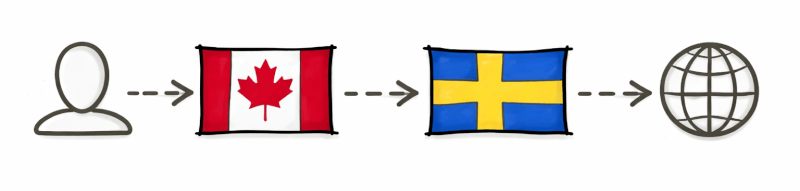
Here is the magic behind the double-hop: The first server knows your real IP address but has no clue where you’re going. The second server (the exit node) sees your destination but only knows the IP of the first VPN server. Neither server ever has the full picture of who you are and what you’re doing.
While adding a second hop usually slows things down, this infrastructure has made the speed hit almost unnoticeable for daily browsing. You get a massive jump in privacy without the spinning wheel of death.
Can you get fast speeds with double VPN?
It’s a common concern, but in my own tests, I’ve found that you can still get excellent speeds with certain providers, though performance varies significantly across the board.
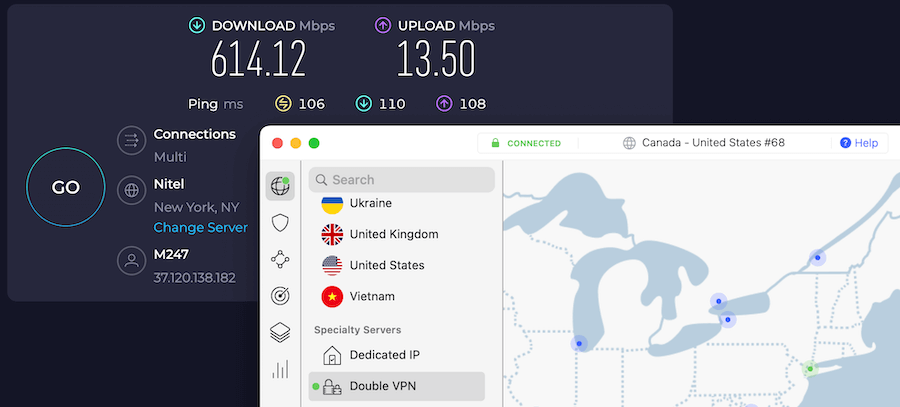
The fastest double VPN we’ve tested was NordVPN using a USA-Canada server configuration. It reached an impressive 614 Mbps download speed, proving that a multi-hop setup doesn’t have to mean a slow connection.
When choosing a provider, you’ll generally encounter two types of configurations:
- Fixed configurations: The VPN provider pre-selects the server pairs. While you can’t customize the route, these are often optimized for stability.
- Self-configurable setups: These allow you to manually choose both your entry and exit servers, giving you greater control over your connection path and latency.
Self-configurable multi-hop VPNs
A self-configurable multi-hop VPN allows you to individually select the servers in the VPN cascade from the whole server network of a provider. Here are a few VPN services offering this feature.
Surfshark – Dynamic multi-hop with custom routing

| Total number of servers | 4,500+ (in 100 locations) |
| Server speed | 10Gbps to 100Gbps ports |
| Double VPN type | Fixed and dynamic multi-hop |
| Customizability | Manual entry/exit server selection |
| Simultaneous connections | Unlimited devices |
Surfshark has significantly upgraded its network to over 4,500 servers globally, focusing on high-speed infrastructure with 10Gbps and 100Gbps ports to minimize the performance hit of double encryption. Its unique MultiHop feature offers two distinct ways to double your privacy: Standard MultiHop (fixed pairs) and Dynamic MultiHop (complete control).
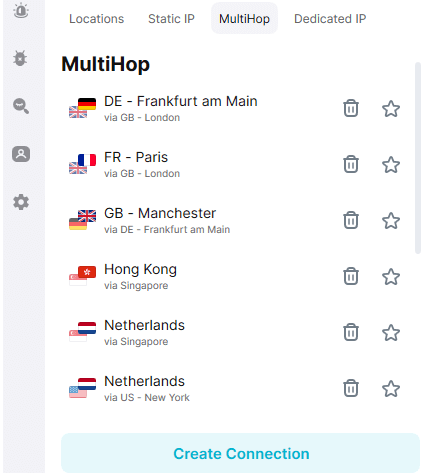
By default, Surfshark provides a list of pre-selected server pairs optimized for stability. In this setup, your traffic follows a fixed path, such as the USA via the Netherlands. This is the out-of-the-box solution for users who want instant double encryption without manually configuring the route.
For those who need maximum flexibility, the Dynamic MultiHop feature allows you to build your own custom connection. You can manually select any two servers from Surfshark’s network in over 100 countries.
- Speed optimization: You can choose two servers that are geographically close to you (e.g., London to Paris) to reduce latency, which is often much faster than pre-set pairs that might jump across continents.
- Geoblocking mastery: You can select a specific entry point to bypass local censorship and a specific exit point to appear in a target country for streaming or browsing.
- Advanced Nexus technology: This feature runs on the Surfshark Nexus network, which uses Software Defined Networking (SDN) to route your data more efficiently across its entire global infrastructure.
Proton VPN – Secure core with custom exit

| Total number of servers | 20,000+ (hardened infrastructure) |
| Server speed | 10Gbps to 20Gbps ports |
| Double VPN type | Secure Core (multi-hop) |
| Customizability | Fixed entry (hardened) and manual exit |
| Simultaneous connections | 10 devices |
Proton VPN’s Secure Core architecture provides its own spin on double encryption. Instead of just bouncing your data between any two standard servers, Secure Core routes your traffic through high-security, hardened servers in privacy-friendly countries like Switzerland, Iceland, and Sweden before it reaches your final destination.
What makes Proton VPN unique is that they physically own and operate their Secure Core servers. These are housed in underground data centers and former military bunkers, ensuring that no third-party data center staff can tamper with the hardware. This setup is designed to protect users against advanced network attacks that could potentially deanonymize a single VPN hop.
While the entry server is chosen from Proton’s hardened list to ensure a secure foundation, you have the flexibility to manually select any exit server in their global network.
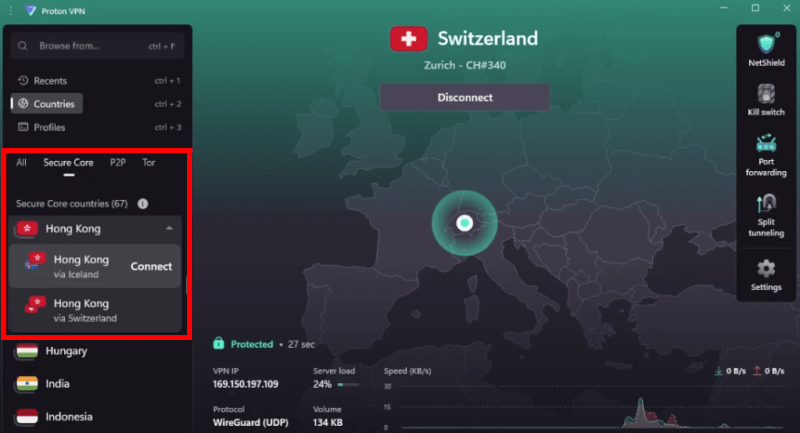
You can pair a Secure Core entry with a nearby exit server to maintain better performance. Proton also includes a unique VPN Accelerator technology, which uses multi-core processing to overcome CPU limitations and can increase speeds by over 400% on long-distance connections.
OVPN – Swedish high-security multi-hop

| Total number of servers | 96 (exclusively self-owned hardware) |
| Server speed | 10Gbps infrastructure |
| Double VPN type | Configurable 2-hop setups |
| Customizability | Manual selection on Pro plans |
| Simultaneous connections | 10 devices |
OVPN is a boutique, privacy-first provider based in Sweden that prioritizes hardware integrity over sheer server count. While their network is smaller than giants like NordVPN or Surfshark, OVPN offers one of the most secure multi-hop implementations on the market.
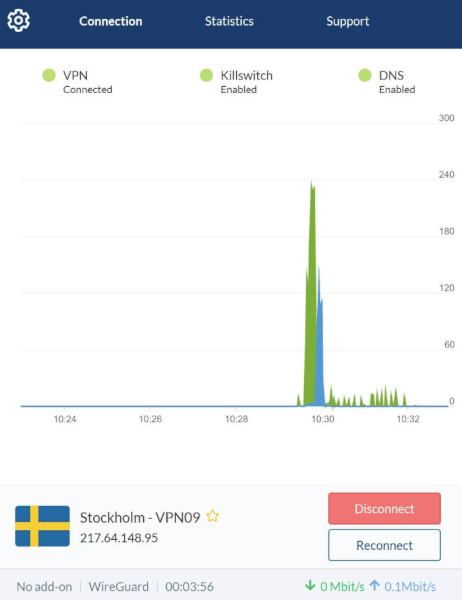
The biggest advantage of OVPN is that they own every single server in their network. Most VPNs rent “virtual” or “dedicated” space in third-party data centers, but OVPN installs its own physical hardware in locked racks.
- RAM-only infrastructure: Every server runs entirely on RAM (diskless), meaning no logs or data can ever be stored on a hard drive. If a server is seized or unplugged, all data instantly vanishes.
- Full IPv6 support: OVPN is one of the very few providers that offer native IPv6 support, even when using a multi-hop configuration, preventing potential IP leaks that occur on other services.
With an OVPN subscription (available on 12-month and 36-month plans), you can manually configure your double VPN route. This allows you to chain two servers together to create a custom tunnel.
Operating out of Sweden, OVPN benefits from strong local privacy protections, and they famously won a court battle in 2020 proving they do not store any user logs.
Also, OVPN publishes monthly transparency reports and even carries insurance to cover legal fees in case they are ever pressured to hand over user data (which their no-log policy makes impossible).
IVPN – Highly customizable multi-hop (2 hops)

| Total number of servers | 166 (high-performance network) |
| Server speed | 10Gbps infrastructure |
| Double VPN type | Custom Multi-hop |
| Customizability | Manual entry/exit server selection |
| Simultaneous connections | 7 devices (with IVPN Pro plan) |
Based in Gibraltar, IVPN is a top-tier choice for privacy purists who want granular control over their connection. Its multi-hop feature allows you to manually select both the entry and exit nodes from its entire network, which is excellent for optimizing speed by choosing servers that are geographically closer together.
While IVPN does not currently support IPv6, it is a pioneer in implementing the WireGuard protocol. This significantly reduces the speed loss typically associated with double encryption, as WireGuard is much more efficient than older protocols like OpenVPN.
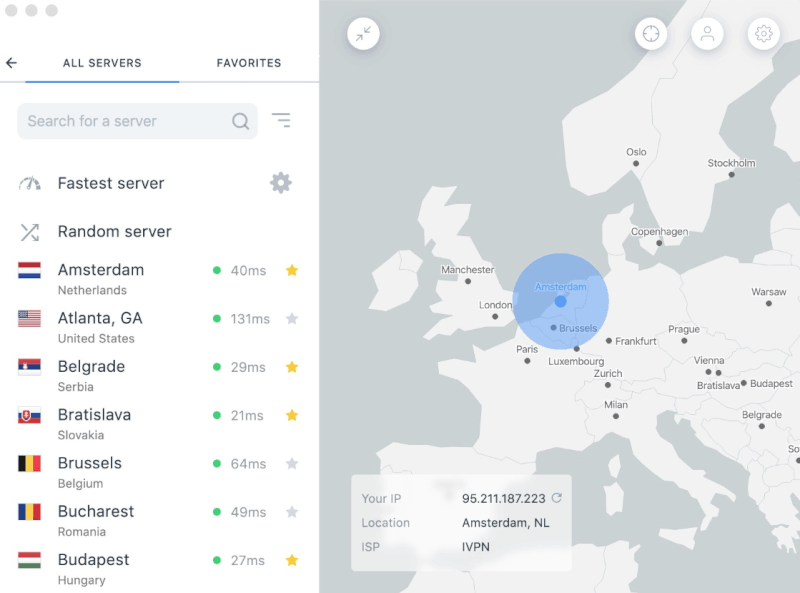
IVPN’s key privacy features include:
- Verified security: IVPN undergoes regular, independent security audits by Cure53 and publishes the full results to maintain absolute transparency with its users.
- Anonymous account system: IVPN is one of the few providers that does not require an email address for sign-up. You simply generate a random Account ID and pay via cash or Monero for total anonymity.
- AntiTracker and hardcore mode: The IVPN AntiTracker blocks ads and malware at the DNS level. For maximum privacy, you can enable “Hardcore Mode” to completely block all domains owned by Google and Meta (Facebook).
Multi-hop VPN chains with different providers
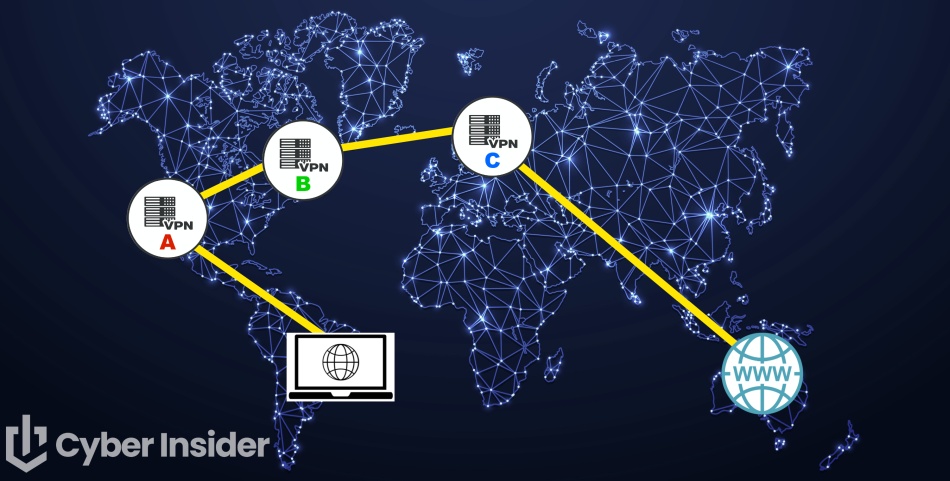
What if you want to add different VPN providers to the mix? Creating chains using more than one provider (sometimes called a “VPN within a VPN” or a nested chain) is an excellent strategy for maximum privacy. This setup ensures that even if one VPN server or provider is compromised, your real IP remains hidden behind a second, independent layer of encryption.
Recommended nested chain configurations
Here are a few ways to build these chains, ranging from simple to advanced:
- VPN 1 on router > VPN 2 on computer/device
This is the most common and stealthy setup. By running one VPN at the router level, all devices on your network are already protected. Adding a second VPN on your individual device creates a nested tunnel. To minimize the speed hit, choose servers that are geographically close to each other (like both in the same city or neighboring countries). - VPN 1 on computer (host) > VPN 2 on virtual machine (VM)
This method allows for compartmentalization. You run your primary VPN on your main operating system (the host) and then launch a virtual machine (using free tools like VirtualBox) with a second VPN active inside the VM. This setup is highly effective against browser fingerprinting because it spoofs a different operating system entirely from your host machine. - The triple chain (Router > host > VM)
For extreme cases, you can use three different services:- Hop 1: Router VPN (network-wide protection).
- Hop 2: Host VPN (personal device encryption).
- Hop 3: VM VPN (isolated environment).
Why use Linux for your virtual machines?
When setting up VMs, Linux is the gold standard for privacy and performance:
- Free and open source: No licensing fees and fully auditable code.
- User-friendly: Distributions like Ubuntu or Linux Mint are very easy to install and run in minutes.
- Resource-efficient: Linux often requires fewer system resources than Windows, which helps maintain higher speeds in a nested chain.
Critical security tweaks for 2026
- Disable WebGL in Firefox: To prevent graphics fingerprinting, you must disable WebGL in your VM browsers. Since multiple VMs might share the same host graphics driver, this prevents them from being linked.
- How-to: Type
about:configin the Firefox address bar and setwebgl.disabledto true.
- How-to: Type
- Kill switch management: Ensure each VPN layer has an active kill switch to prevent your real IP from leaking if any part of the chain drops.
Double VPN vs Onion over VPN
While both add extra layers of encryption, they serve very different purposes depending on whether you prioritize speed or stealth.
| Double VPN (multi-hop) | Onion over VPN (Tor) | |
| Privacy level | High (2 layers) | Extreme (3+ layers) |
| Speed | Fast (capable of 4K/HD) | Extremely slow (browsing only) |
| Anonymity | Protected by VPN provider | Decentralized via Tor network |
| Best use case | Secure browsing and streaming | Whistleblowing and total anonymity |
Double VPN setup routes your data through two separate VPN servers. It’s significantly faster than Tor because it uses high-speed VPN protocols like WireGuard. It protects you from a compromised VPN server, as no single server in the chain knows both your real IP and the destination you are visiting.
While it offers reliable speeds that work well for most apps and services, you are still ultimately relying on the VPN provider’s no-logs policy and the security of their internal network.
In Onion over VPN configuration, you first connect to a VPN server and then tunnel that connection through the Tor (the Onion router) network. This process adds at least three additional layers of encryption by bouncing your data through random global nodes.
This provides nearly absolute anonymity because even if the VPN provider were compromised, the Tor layers would still hide your final destination. However, the extreme latency and slow speeds make this setup unusable for video streaming, gaming, or large downloads. Also, too many websites frequently block traffic originating from Tor exit nodes.
Multi-hop vs obfuscated servers
Users trying to bypass VPN blocks in restrictive regions like China, Iran, or Turkey often confuse these two features. While both enhance your privacy, they solve very different problems when it comes to breaking through firewalls.
Multi-hop adds a second layer of encryption and an extra server hop. Its main job is to ensure that even if the exit server is monitored, your real IP remains hidden behind the entry server. However, it does not hide the fact that you are using a VPN. In censored countries, a firewall can still see the encrypted VPN “handshake” and block the connection instantly.
Obfuscation is the key to bypassing advanced firewalls. It changes the appearance of your traffic, stripping away VPN metadata and making it look like regular, unencrypted HTTPS browsing (like visiting a standard news site or web store). This is the most effective tool for users who need a VPN in censored countries where standard protocols are actively throttled or blocked via deep packet inspection.
When should you not use multi-hop?
If your top priority is speed and performance, I would recommend sticking with a high-quality single-hop VPN. While multi-hop offers superior privacy, the double encryption and extra routing distance will almost always result in slower speeds and higher latency.
| Multi-hop (double VPN) | Obfuscation (stealth VPN) | |
| Primary goal | Hiding your IP from the exit server | Hiding your VPN use from your ISP |
| Method | Routes data through two servers | Disguises VPN traffic as normal HTTPS |
| Best for | Maximum anonymity | Bypassing deep packet inspection (DPI) |
Here are a few situations where you should prioritize speed over multi-hop security:
- High-definition (HD) or 4K streaming: Routing through multiple servers often causes buffering and prevents smooth playback on high-bitrate content.
- Torrenting and P2P downloads: Large file transfers require maximum bandwidth. A single-hop connection with the WireGuard protocol will significantly reduce your download times.
- Streaming services: Many streaming platforms have strict VPN blocks; adding a second hop increases the chance that one of the servers in your chain is already flagged and blocked.
- Gaming: For online gaming, low ping (latency) is critical. Every extra hop your data takes adds milliseconds to your response time, which can make competitive gaming unplayable.
- Video calls: Multi-hop can cause “jitter” or audio/video lag during real-time communication, leading to dropped calls or poor sync.
How to troubleshoot slow speeds
If your multi-hop connection feels sluggish, use this checklist to optimize performance and reduce latency:
- Switch to a faster protocol: Use modern protocols like WireGuard or NordLynx. Older protocols like OpenVPN are often too resource-heavy for double encryption and can bottleneck your CPU.
- Optimize server distance: Pick an entry server close to your physical location and an exit server close to your target content. Shorter hops significantly lower your ping.
- Check for firewall conflicts: If using a nested chain (VPN on router + VPN on PC), having strict firewalls active on both can cause packet loss. Try disabling one layer’s firewall to improve throughput.
- Avoid overcrowded nodes: Check your VPN app for server load. Multi-hop adds overhead, so avoid servers at over 90% capacity to prevent buffering.
- Close background bandwidth hogs: Disable cloud backups or system updates while using multi-hop, as these compete for the limited bandwidth in your encrypted tunnel.
A well-optimized setup using WireGuard and nearby servers will provide enough speed for seamless browsing and standard HD streaming.
Conclusion on multi-hop VPNs in 2026
A multi-hop VPN configuration remains one of the most effective ways to boost your online privacy. By distributing your trust across multiple data centers and adding extra layers of encryption, you significantly reduce the risk of a single point of failure exposing your identity.
However, it is important to remember that even with multiple hops, you are still relying on a single VPN provider’s infrastructure. To achieve the highest level of security, you can use nested VPN chains (using two different providers at once) to ensure no single entity has total visibility into your traffic.
Top multi-hop recommendations for 2026:
- Surfshark: Best for flexibility with its Dynamic MultiHop, allowing you to create custom server-to-server routes directly in the app.
- Proton VPN: Best for high-security environments, routing traffic through physically hardened Secure Core servers.
- IVPN and OVPN: The gold standard for “privacy purists” who want manual control, self-owned hardware, and anonymous account systems.
While older services like Perfect Privacy have faded away, modern providers have surpassed them by offering much faster speeds through WireGuard and more user-friendly interfaces.
Multi-hop and double VPNs FAQs
Yes. A standard VPN only hides your IP from your ISP and the websites you visit. A double VPN (multi-hop) hides your real IP even from the exit server in the chain. This ensures that if the second server is ever compromised, the intruder still won’t know your true identity.
Yes, using a double VPN is perfectly legal in most countries, just like a standard VPN. While these tools provide advanced privacy, they do not grant immunity for illegal activities. Always check your local regulations, as some restrictive countries have specific laws regarding the use of encryption and VPN technology.
Yes, a double VPN completely encrypts your traffic so your ISP can only see that you are connected to a VPN server, not the websites you visit. Because of the second layer of encryption, it also makes “traffic correlation attacks”, where an ISP tries to match your data timing with a destination, exponentially more difficult to pull off.
While possible, it is not recommended. Double VPN significantly increases latency and reduces download speeds, which can lead to constant buffering in 4K or HD. For streaming, a high-speed single-hop VPN using the WireGuard protocol is usually the better choice.
Multi-hop and cascading VPNs are essentially the same thing, though cascading often refers to more complex chains of three or more servers. Most commercial providers use the term “multi-hop” to describe a two-server jump. Advanced users who manually chain multiple different providers (VPN within a VPN) typically refer to that setup as a nested cascade.
Yes, premium double VPN services include built-in DNS leak protection that routes your requests through the same encrypted tunnel as your data. This ensures your ISP cannot see which websites you are visiting by sniffing your DNS queries, providing a complete privacy shield from end to end.

Leave a Reply