

A growing number of ASUS ROG users are reporting that Windows Smart App Control is blocking the Armoury Crate software.
This is disrupting essential system functions, RGB controls, controller mappings, and firmware updates on a wide range of devices, including ROG desktops, laptops, and handhelds like the Ally X.
Armoury Crate is ASUS's central control software for ROG-branded systems and peripherals. It handles RGB lighting, fan curves, firmware updates, and device profiles. On devices like the ROG Ally and Ally X, it also governs controller functions and system modes. When blocked, users report broken RGB configurations, unresponsive buttons, and elevated temperatures due to non-functioning fan profiles.
The problem first emerged two days ago, with users reporting failed Armoury Crate updates accompanied by Windows Security notifications citing blocked components, such as ACSetup.exe. According to multiple posts on the Republic of Gamers forums and Reddit communities like r/XboxAlly and r/ASUSROG, Smart App Control has flagged parts of the Armoury Crate software as unverified or unsafe, effectively preventing the app from launching, updating, or even being uninstalled.
Affected users see messages like:
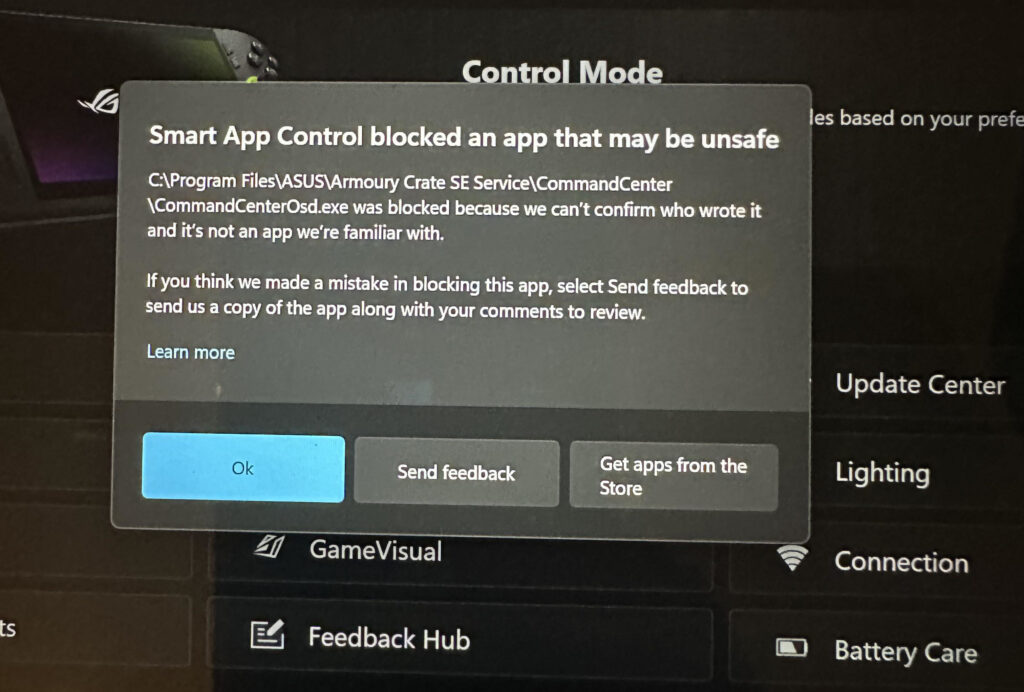
When attempting to update the software, Armoury Crate displays error code 0, while subsequent attempts to uninstall or reinstall using ASUS’s own tool are similarly blocked. Some users have also encountered secondary errors, such as Error Code 601, during reinstallation attempts.
Potential root cause and workarounds
The root of the issue appears to be Windows 11's Smart App Control (SAC), a security feature that blocks unsigned or potentially suspicious apps from running, even if they were preinstalled. SAC seems to no longer recognize the digital signature of key Armoury Crate components, possibly due to a recent Windows update or an expired signing certificate from ASUS.
Notably, SAC blocks even official ASUS tools like the Armoury Crate Uninstall Utility. This strict enforcement leaves users stuck, unable to update, remove, or reinstall the app.
Neither ASUS nor Microsoft has issued official guidance, leaving users to crowdsource solutions.
Common workarounds published online include:
- Disabling Smart App Control: This immediately resolves the issue for most users. Navigate to Windows Security > App & Browser Control > Smart App Control and set it to Off. However, this action is irreversible without a clean reinstall of Windows (except for those on Windows Insider builds, where toggling is allowed again).
- Registry Hack for Re-enabling SAC: Some users point to a registry key edit at HKEY_LOCAL_MACHINE\SYSTEM\CurrentControlSet\Control\CI\Policy by modifying VerifiedAndReputablePolicyState from 0 to 1. While this may restore SAC functionality without a reinstall, it's not officially documented and carries risk.
- Using Third-Party Alternatives: A few users have replaced Armoury Crate entirely with tools like GHelper, which offers lightweight fan, power, and RGB control without the bloat or update issues tied to Armoury Crate.
While disabling SAC resolves the immediate issue, it downgrades system security by removing one of the key features introduced in Windows 11 for blocking unsigned or potentially harmful software. Until ASUS or Microsoft issue official patches or statements, users should remain cautious. The safest course of action is to wait for a patch if reduced functionality can be tolerated.



Leave a Reply