
Brave has launched a built-in Email Aliases feature that lets users create disposable forwarding addresses directly from website sign-up forms, preventing sites from learning their primary email address.
The feature arrives with Brave desktop version 1.94 and is backed by a new Brave Accounts system designed so that account passwords are never transmitted to Brave’s servers.
Brave says the new feature targets a privacy problem that traditional browser protections cannot fully address: email addresses can function as durable cross-site identifiers. A retailer, for example, may collect an address during checkout and pass it server-side to an advertising platform for customer matching. Because this exchange occurs between servers, browser-based tracker blocking cannot prevent it.
Brave already partitions cookies, caches, and other browser state between sites. Email Aliases extends that isolation beyond the browser by giving websites different addresses that all forward mail to the user’s real inbox.
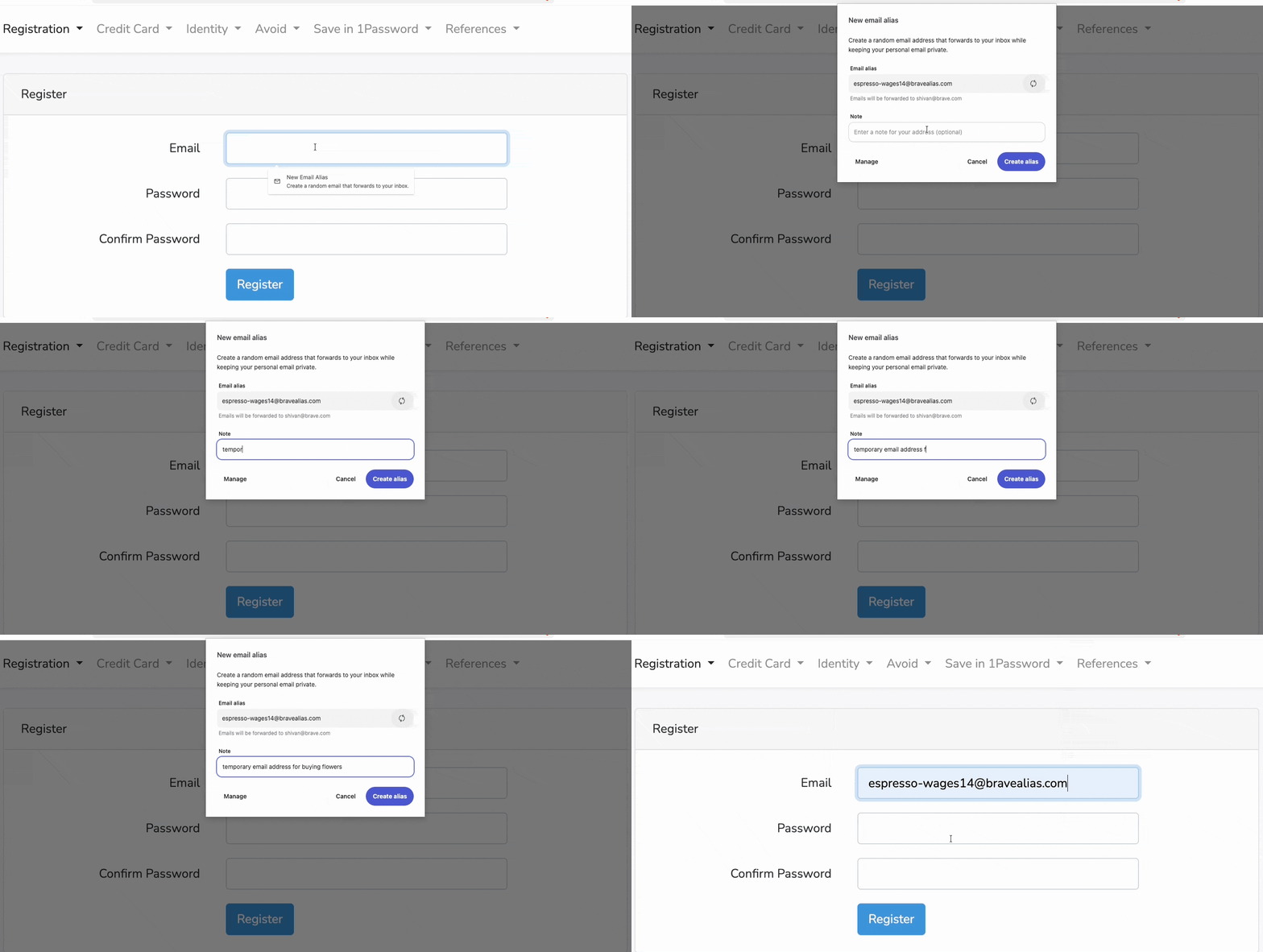
After creating a Brave Account, users can generate an alias by clicking an email field or selecting “New Email Alias” from the context menu. Aliases can be managed from Brave’s Autofill & Passwords settings, and individual addresses can be disabled if they begin receiving spam.
Brave is initially providing five aliases for free. The company says it plans a paid tier, along with mobile support.
Brave
The new Brave Accounts system underpinning the feature uses OPAQUE, an augmented password-authenticated key exchange standardized as RFC 9807 in July 2025. Unlike conventional authentication systems, the user’s password is never sent to the server, not even as a hash.
During registration and login, the client and server use an Oblivious Pseudorandom Function to derive authentication material without exposing the password. Brave additionally applies Argon2id to make offline password guessing more expensive. The server stores a public key, masking key, and authentication envelope rather than a conventional password hash.
OPAQUE reduces the value of a stolen credential database and prevents passwords from appearing in server memory or logs. Still, it does not eliminate phishing or protect weak passwords from online guessing.
For Email Aliases, Brave stores the account’s primary address and generated aliases encrypted at rest. It says forwarded messages are processed for spam and malware filtering, then deleted from its servers within seconds. Alias notes remain local unless Brave Sync is enabled, in which case they are end-to-end encrypted.
Users adopting the feature should still use a strong, unique Brave Account password and remain cautious of phishing pages, since OPAQUE cannot protect a password captured before authentication begins.



Leave a Reply