
I’ve tested dozens of VPNs on Apple TV over the years, and NordVPN consistently ranks among my favorites. Whether you’re trying to access international streaming libraries, avoid ISP throttling during 4K streaming, or add an extra layer of privacy to your viewing habits, NordVPN makes the process surprisingly easy.
Apple TV’s native VPN support has made secure streaming easier than ever. Instead of relying on complicated router setups or SmartDNS workarounds, you can now install NordVPN directly from the App Store and start streaming in minutes.
To see if it actually lives up to the hype, I spent hours thoroughly stress-testing its server speeds, evaluating its raw unblocking power on the big screen, and checking out how it handles crisp, buffer-free 4K Dolby Vision. My hands-on guide shows you how to set up NordVPN and get the most out of your Apple TV.
| Starting price and deal | $3.49/month (use the 75% off coupon) |
| tvOS native app | ✅ I installed the dedicated app on my Apple TV 4K in under a minute |
| Legacy compatibility | ✅ Easily hooked up older Apple TV generations using a home router |
| Unblocking power | ✅ Smashes right through geo-blocks across 126+ countries globally |
| Streaming quality | ✅ Custom NordLynx protocol gave me flawless, zero-buffer 4K playback |
| Data privacy | ✅ Secured my entire viewing history with heavy-duty AES-256 encryption |
NordVPN’s Cyber Deal is live:
Get 75% Off NordVPN with the coupon below + 3 months extra:
(Coupon is applied automatically; 30-day money-back guarantee.)
Why pair your Apple TV with NordVPN?
Apple TV is one of my favorite streaming devices, but a VPN makes it even better. Here’s why I recommend adding NordVPN to your setup:
1. Unlocking the global streaming buffet
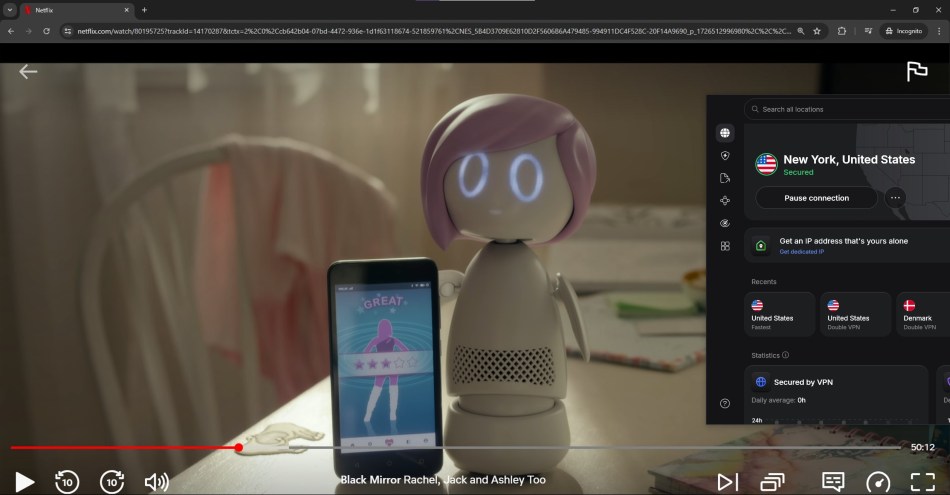
Ever get that annoying “This content is not available in your country” message? It is incredibly frustrating. Netflix, Prime Video, and Max change their libraries depending on where you live due to licensing loops.
By running NordVPN, you can virtually teleport your Apple TV to the UK, Japan, or anywhere else with a single click. Suddenly, you have thousands of new movies and shows available without ever leaving your couch.
2. Stopping ISP throttling in its tracks
Ever hit play on a movie only to watch it buffer endlessly during prime time? Your internet service provider (ISP) may be managing traffic on a crowded network. Meanwhile, ISPs are logging everything you do online, making privacy a growing concern for many streamers.
NordVPN helps by encrypting your connection and masking your activity from your ISP. The result is more privacy and potentially a smoother streaming experience. (See the best VPNs for streaming here.)
3. Privacy that works
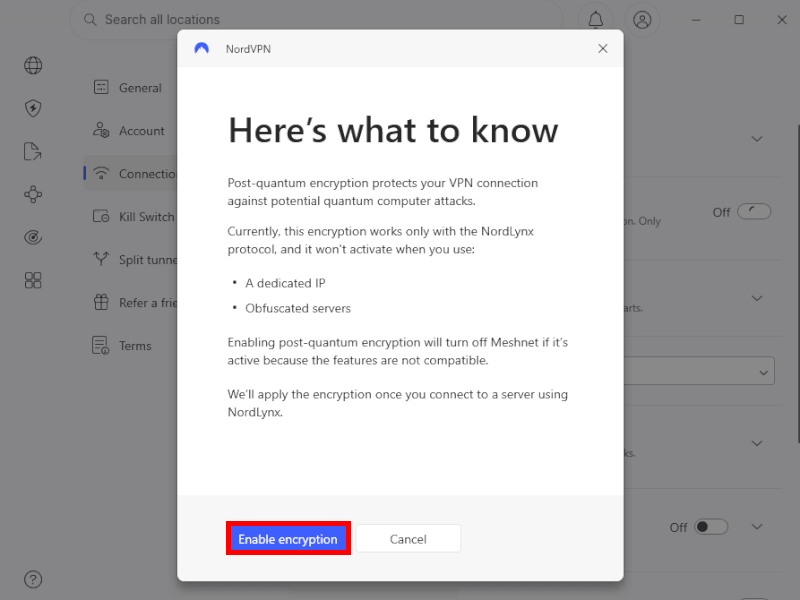
Your streaming habits are your business. Without a VPN, your ISP tracks every single show you watch, logs your active hours, and can even sell that data to advertisers. NordVPN wraps your Apple TV connection in military-grade encryption. Plus, since they are based in Panama and run a strictly audited no-logs policy, your viewing history completely vanishes the moment you stream.
4. tvOS 17 simplifies Apple TV VPNs
If you have a newer Apple TV running tvOS 17 or later, you are in luck. Apple finally allowed native VPN apps directly on the App Store. That means no more complex workarounds. You just download the official NordVPN app directly onto your Apple TV, log in, and connect.
Running an older Apple TV model? Don’t worry. You can still protect your stream by setting up NordVPN directly on your home router, which instantly covers every single device in your house.
The 3 ways to get NordVPN on your Apple TV
Depending on how old your Apple TV is, you have three paths to get NordVPN up and running:
- The native app method (easiest): If your Apple TV supports tvOS 17 or higher, you can download NordVPN straight from the built-in App Store. It takes two minutes.
- The SmartDNS method (best for older TVs): If you have an older Apple TV (Gen 1, 2, or 3) or just want to unblock content without full encryption, you can change your DNS settings in a flash.
- The router method (ultimate protection): By installing NordVPN directly onto your home Wi-Fi router, you automatically protect your Apple TV, smart fridge, laptops, and everything else in one go.
Method 1: Installing NordVPN directly on Apple TV (tvOS 17+)
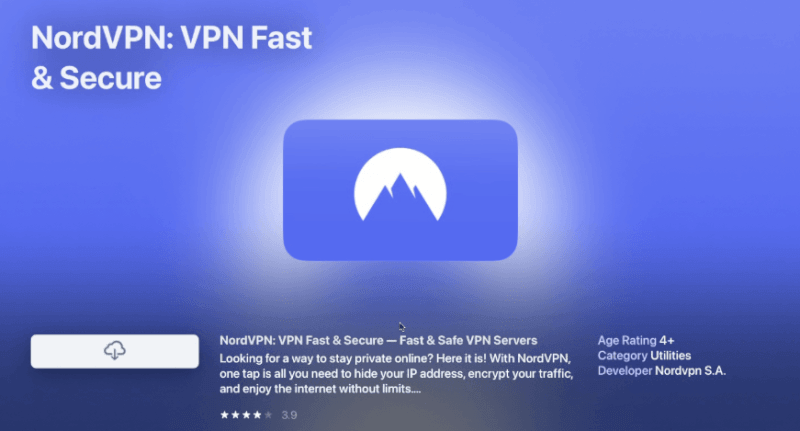
If you own a modern Apple TV running tvOS 17 or newer, you are in luck. Apple finally opened the gates to native VPN apps, meaning no more annoying workarounds!
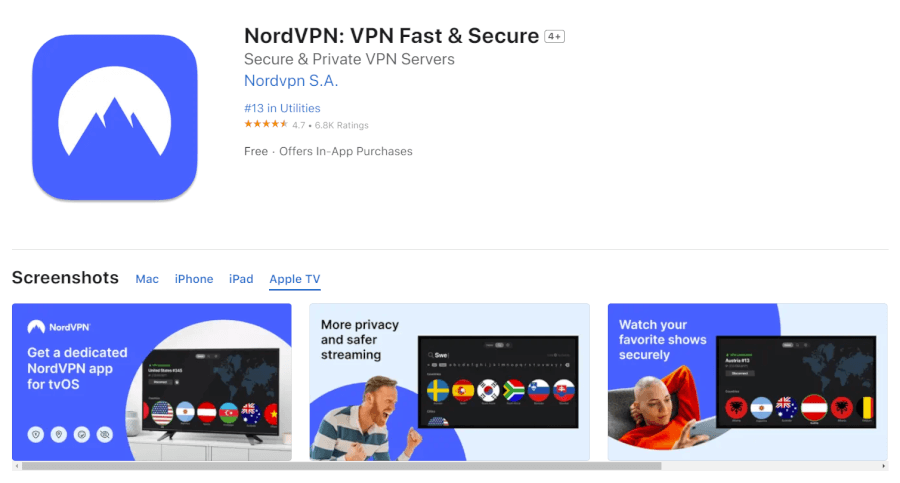
Here is exactly how to get it running on your screen in under two minutes:
- Open the app store: Grab your Siri remote and head over to the blue App Store icon on your Apple TV home screen.
- Search for NordVPN: Click the search tab at the top and type in NordVPN. Select the official app from the results.
- Hit install: Click the download button. The lightweight tvOS app will install onto your dashboard in just a few seconds.
- Launch and log in: Open the freshly installed app. You will see a clean, TV-friendly login screen. Enter the account details you set up with your coupon.
- Smash “Quick Connect”: For instant security, click Quick Connect. The app will automatically hook you up to the fastest, closest server available.
- Or, pick your country: Want to unlock UK BBC iPlayer or Japanese Netflix? Simply scroll through the visual country list, click your destination, and watch your Apple TV virtually teleport across the globe.
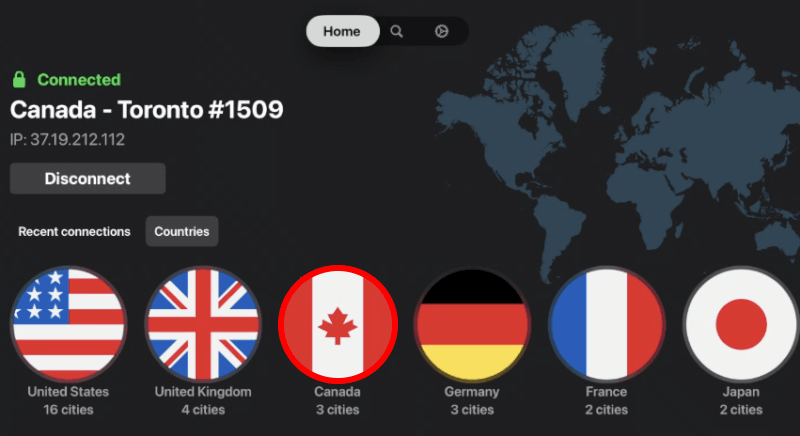
We put the native tvOS app through its paces, and it is a night-and-day difference compared to the old setup workarounds. Server switching is instantaneous, and because NordVPN utilizes its lightning-fast NordLynx protocol, we noticed zero drop in 4K Dolby Vision streaming quality. No buffering, no lag.
Method 2: The SmartDNS setup (older Apple TVs)
If you own an older Apple TV (Generation 1, 2, or 3) or an HD model that doesn’t have access to the modern App Store, you can’t download a native app. But don’t throw your streaming box out just yet! You can still access global streaming content using NordVPN’s SmartDNS feature.
Step-by-step SmartDNS configuration:
1. Whitelist your home IP address
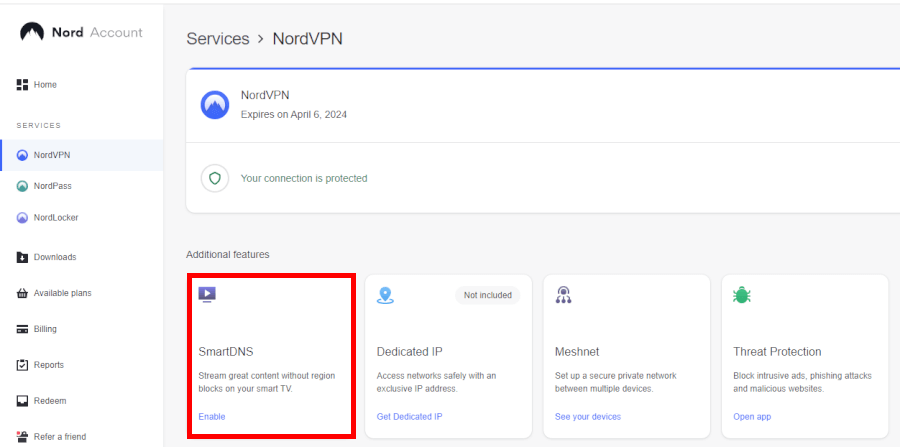
SmartDNS works by recognizing your home internet connection. Log in to your account dashboard on the NordVPN Account Page. Navigate to the Services section, click on NordVPN, find the SmartDNS tab, and click Enable.
2. Head to Apple TV network settings
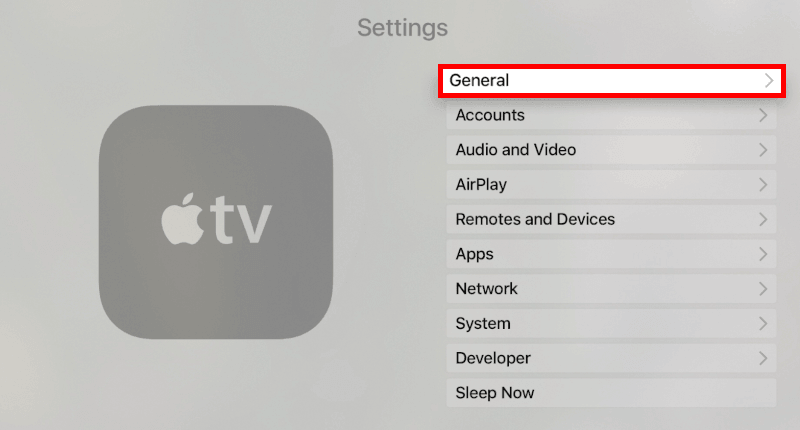
Turn on your Apple TV. From the main dashboard, go to Settings > General > Network.
3. Select your Wi-Fi connection
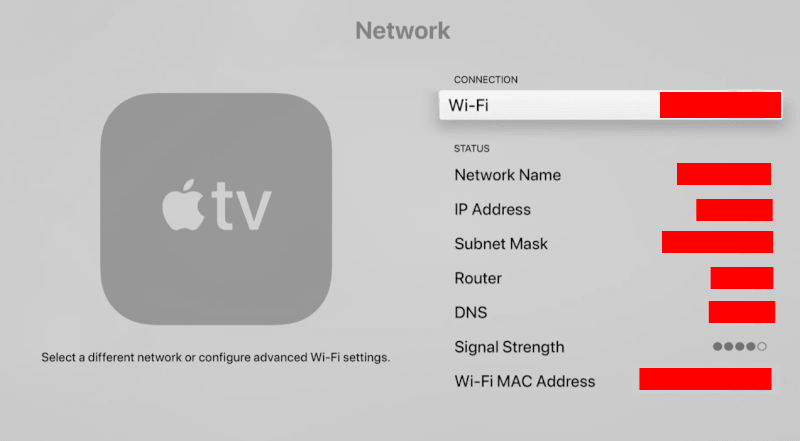
Click on Wi-Fi at the very top of the screen and select the exact home network connection that you just whitelisted on your NordVPN dashboard.
4. Manually configure your DNS
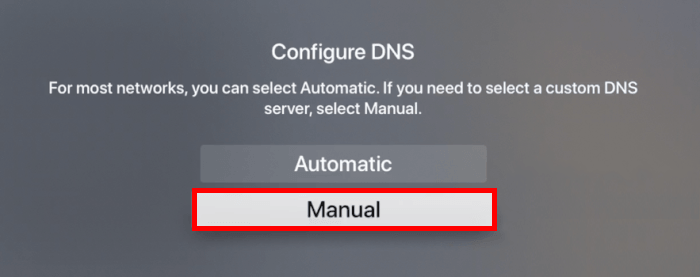
Scroll down the Wi-Fi settings menu and click on Configure DNS. Switch the setting from Automatic to Manual.
5. Input NordVPN’s SmartDNS servers
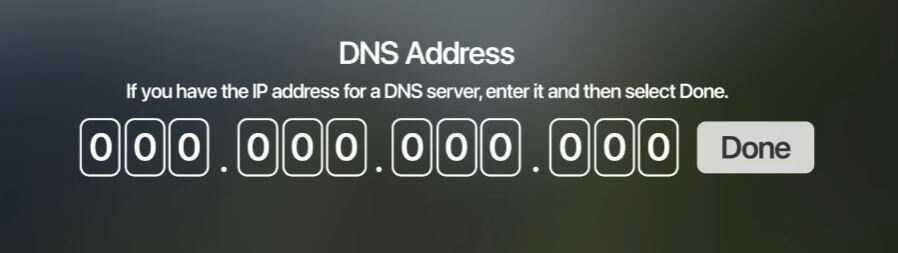
You will see a screen prompting you to type in an IP address. Carefully enter the official, up-to-date primary and secondary SmartDNS server addresses provided by NordVPN:
- Primary DNS: 103.86.96.103
- Secondary DNS: 103.86.99.103
6. Save and restart
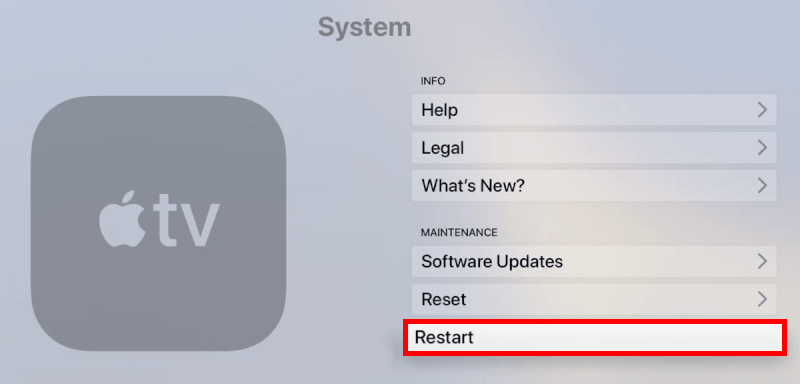
Click Done once the numbers are entered. To ensure your Apple TV registers the changes and flushes out any old location data, head back to your main menu and restart the device.
You’re all set! Your Apple TV can now access streaming libraries from around the world.
Method 3: The router setup
If you’re using an older Apple TV or want a set-it-and-forget-it solution, the router method is hard to beat. Installing NordVPN on your router protects every device connected to your Wi-Fi, from your Apple TV and laptop to your phone and smart home gadgets, all through a single VPN connection.
Because every router brand looks a little different, the exact steps vary. However, the core process for major VPN-compatible routers like Asus, TP-Link, or Netgear follows the same straightforward logic:
1. Check router compatibility
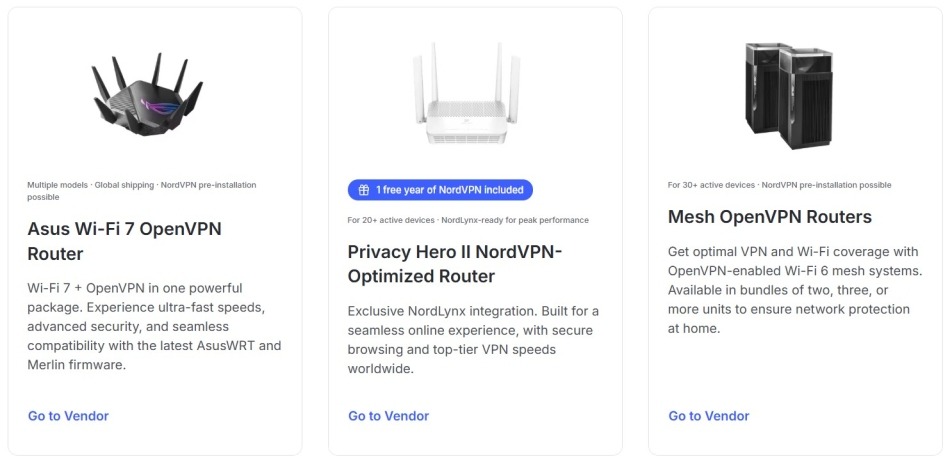
First things first: Make sure your router supports a VPN client (usually OpenVPN).
2. Grab your NordVPN service credentials
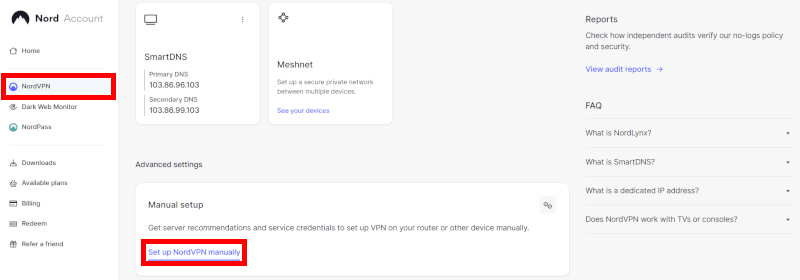
Do not use your standard email login info for this part. Log in to your NordVPN Account Dashboard using a web browser. Scroll down to Advanced Settings, click on Set up NordVPN manually, and copy your dedicated Service Username and Service Password. Keep this tab open!
3. Download the server configuration file
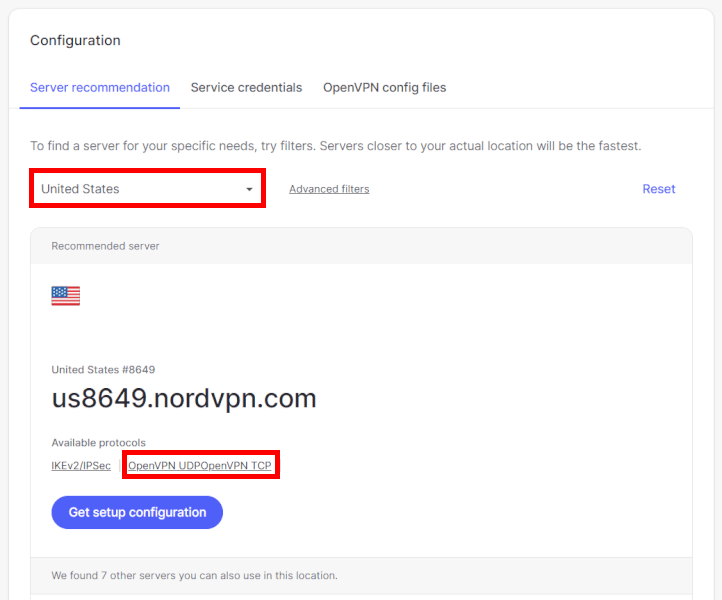
While still in your manual setup dashboard, select your desired streaming country (like the United States or the United Kingdom) and download the OpenVPN configuration file (.ovpn) for that server location.
4. Log into your router’s admin panel
Open a new browser tab and type your router’s local IP address into the URL bar (usually 192.168.1.1 or 192.168.0.1). Enter your admin username and password to access the control panel.
5. Program the VPN client
Navigate to the advanced settings area, usually labeled VPN, VPN Client, or VPN Fusion.
- Add a new profile and select OpenVPN as the connection type.
- Upload the .ovpn file you downloaded in Step 3.
- Paste your unique Service Credentials from Step 2 into the username and password fields.
6. Save, activate, and stream!
Click Save and toggle the newly created VPN client profile to Active.
Now, fire up your Apple TV, head over to Settings > Network, and connect to your home Wi-Fi. Your Apple TV will automatically route through NordVPN’s secure tunnel, bypassing geo-restrictions smoothly without any extra configuration on the TV itself.
Native app vs SmartDNS vs router
The best NordVPN setup depends on what you value most: Convenience, privacy, or speed. For most people, the native Apple TV app is the easiest choice, while router and SmartDNS setups each bring their own advantages.
Here’s how they compare:
| Native app (tvOS 17+) | SmartDNS | Router setup | |
| Encryption level | ✅ Full military-grade | ❌ Unencrypted | ✅ Full military-grade |
| Speed performance | Fast (NordLynx) | Maximum raw speed | Moderate (router-dependent) |
| Setup difficulty | Very easy | Medium (manual tweaking) | Advanced (admin panel) |
| Best for… | Quickest setup and total privacy | Older Apple TV hardware (gen 1-3) | Whole-home blanket security |
For newer Apple TVs, the native app is the obvious winner. But if you’re using an older model or want a different approach, there are a couple of solid alternatives worth considering.
How to fix “proxy detected” errors on Apple TV
You kick back, launch Netflix or Max, and click on a movie, only to get hit by an annoying “Proxy Detected” error screen.
Streaming platforms actively try to block VPNs to enforce licensing agreements, but don’t panic if NordVPN is suddenly not working on your Apple TV.
Here’s my go-to checklist for stubborn Netflix proxy errors:
- Force-close the app: Streaming apps remember your old location cache. Double-click the TV/Home button on your Siri remote, swipe over to the stubborn streaming app, swipe up to force-close it, and then reopen it.
- Cycle the server: Streaming platforms regularly blacklist known VPN IP addresses. Jump back into your NordVPN app, hit disconnect, and click Quick Connect again to instantly grab a brand-new IP address that hasn’t been blocked.
- Change countries: If a specific server is being stubborn, manually pick a different city or neighboring server location within the NordVPN app menu to bypass the block.
- Flush the DNS: Cached network settings can leak your real location. Clear them out completely by navigating to Settings > System > Restart on your Apple TV to completely refresh your connection data.
- Toggle SmartDNS: If you are using the older SmartDNS method, log back into your web dashboard to ensure your home internet service provider’s IP address hasn’t changed and needs a re-link.
Amazing alternatives to NordVPN for Apple TV
As much as I like NordVPN on Apple TV, it isn’t the only VPN worth your attention. Surfshark, ExpressVPN, and Proton VPN are all excellent choices that fully support Apple TV running tvOS 17 or later through their dedicated apps.
Surfshark stands out with unlimited simultaneous device connections, making it a great option for larger households. ExpressVPN is known for its fast and reliable Lightway protocol, which delivers excellent streaming performance with quick connection times. Meanwhile, Proton VPN is based in Switzerland, giving it the advantage of strong privacy protections backed by some of the world’s strictest privacy laws.
Each provider also offers solid streaming support, making them reliable alternatives if NordVPN doesn’t quite fit your needs.
1. Surfshark: The budget-friendly family champion
| Website | Surfshark.com |
| Based in | The Netherlands |
| Logs | No logs (audited) |
| Price | $2.49/mo. |
| Support | 24/7 live chat |
| Refund | 30 days |
| Deal | 87% Off Coupon |
If you want premium performance without paying premium prices, Surfshark is an absolute steal. They offer a gorgeous, native tvOS app that installs in seconds, giving you instant access to global streaming platforms.
A major selling point for this service is that it supports unlimited simultaneous connections, meaning you can secure every TV, phone, and tablet in your house under a single subscription.
The app relies on the ultra-fast WireGuard protocol, which delivers top-tier streaming speeds that can easily go toe-to-toe with heavier premium competitors. It also includes built-in CleanWeb tools to block intrusive trackers and malicious links directly at the network layer before they hit your television screen.
+ Pros
- Unlimited connections
- User-friendly apps for all devices and operating systems
- CleanWeb feature to block ads, trackers, and malware
- Works great with Netflix and many other streaming services
- 24/7 live chat support
- Strong encryption and security features (audited)
– Cons
- Limited support for VPN routers
- Above-average monthly prices
Surfshark VPN Coupon:
Get 87% Off Surfshark with the coupon below + 3 months extra:
(Coupon is applied automatically; 30-day money-back guarantee.)
2. ExpressVPN: The premium streaming powerhouse
| Website | ExpressVPN.com |
| Based in | British Virgin Islands |
| Logs | No logs (audited) |
| Price | $2.99/mo. |
| Support | 24/7 live chat |
| Refund | 30 days |
| Deal | 80% Off Coupon |
ExpressVPN is a massive name in the industry for a reason, and its native Apple TV app is incredibly polished and engineered entirely around high-speed, borderless streaming.
Instead of just using standard third-party options, they built their own custom connection protocol called Lightway. This proprietary tech allows the Apple TV app to connect almost instantaneously and maintain phenomenal, unhindered 4K streaming speeds.
If you happen to run a mix of a newer Apple TV alongside an older legacy box, ExpressVPN offers brilliant custom router firmware that makes setting up a whole-home blanket network incredibly simple. It effortlessly slices through the toughest proxy filters on Netflix, Hulu, BBC iPlayer, and Max without breaking a sweat.
+ Pros
- User-friendly and secure apps for virtually any operating system or device
- Proprietary Lightway VPN protocol for advanced performance
- Post-quantum version of the WireGuard protocol for enhanced privacy and security
- Split tunneling feature (for macOS, Windows, and routers)
- Works with Netflix and most streaming services
- 24/7 live chat support
- Passed independent third-party audits for security and no-logs
- Extensive network of diskless servers
– Cons
- Fewer features than other leading VPNs
ExpressVPN Coupon:
Sign up for the 2-year plan and get 4 months added to your subscription for free.
(Coupon is applied automatically)
3. Proton VPN: The privacy-first Swiss vault
| Website | ProtonVPN.com |
| Based in | Switzerland |
| Logs | No logs (audited) |
| Price | $2.99/mo. |
| Support | Email + Chat |
| Refund | 30 days |
| Deal | 70% Off Coupon |
If you want your streaming habits locked down under the world’s tightest privacy regulations, Proton VPN is your go-to option.
Based out of Switzerland, this service brings a heavy-duty focus on open-source transparency to your television screen and operates under a strictly audited, independent no-logs policy completely outside of US or EU surveillance networks.
The native tvOS app utilizes unique VPN Accelerator technology, which can boost performance and connection speeds on long-distance international servers by up to 400%, which is a true lifesaver for buffer-free global streaming. Their dedicated Apple TV interface is exceptionally clean, showing you live server load percentages so you can always pick the fastest, least congested lane for your movie night.
+ Pros
- Swiss-based privacy
- Open-source apps audited by independent security firms
- Secure Core servers route traffic through hardened nodes
- VPN Accelerator boosts long-distance US speeds
- Post-quantum encryption in the works
- Subscription plans bundle with Proton Mail, Proton Drive, Proton Sheets, and Proton Pass
- Linux CLI and refreshed GUI
- Smart TV and Apple TV apps now support NetShield
– Cons
- No 24/7 live chat
- Advanced tools have a steeper learning curve
Proton VPN Coupon:
Get 70% Off Proton VPN (drops the price to only $2.99/month) with the coupon below:
(Coupon is applied automatically; 30-day money-back guarantee)
Protect your online privacy beyond Apple TV
Beyond streaming and security, NordVPN includes a collection of powerful tools to help protect your privacy online:
The NordLynx and NordWhisper protocols
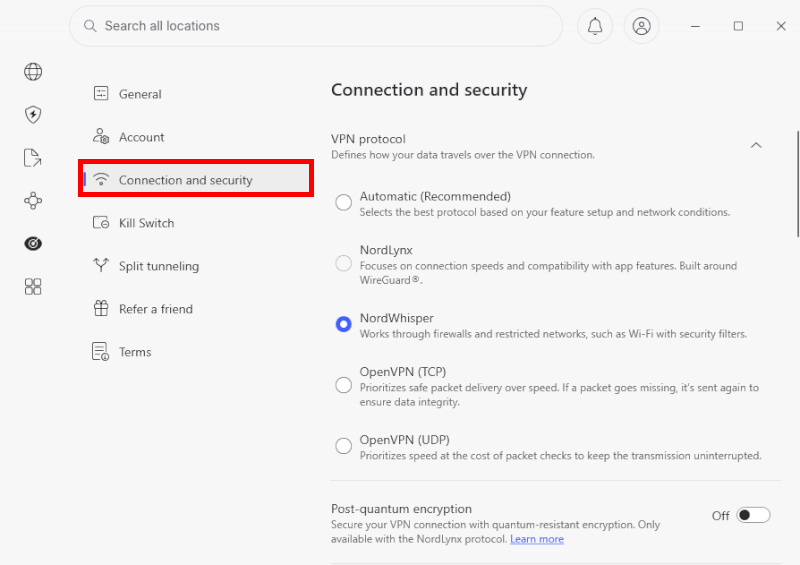
NordVPN leads the industry with NordLynx, a proprietary protocol built on the ultra-lightweight foundations of WireGuard. It delivers maximum data encryption while experiencing almost zero drop in connection speeds, making it the perfect choice for seamless 4K streaming and large file transfers.
For restrictive networks where VPN traffic is actively blocked, NordVPN features NordWhisper. This stealth protocol automatically obfuscates your connection, disguising your VPN tunnel as everyday web browsing traffic so you can browse freely.
Threat Protection Pro
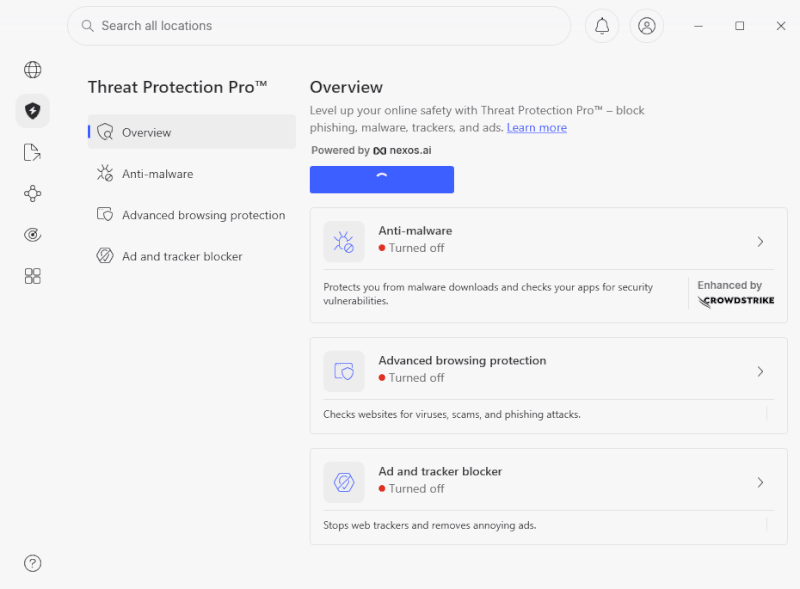
NordVPN goes beyond standard traffic encryption by integrating Threat Protection Pro directly into its desktop applications. This tool operates as an integrated, lightweight antivirus system that works in the background even when you aren’t connected to a VPN server. It actively scans your downloaded files and automatically deletes malware or suspicious executables before they can compromise your hard drive.
Furthermore, it blocks tracking scripts, strips out annoying pop-up ads, cleans tracking parameters from URLs, and flags phishing links inside your Gmail or Yahoo inbox to prevent scam attempts.
The internet kill switch
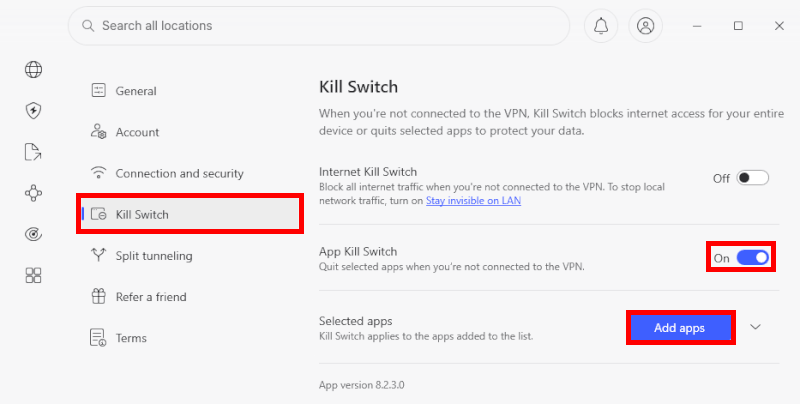
Your data should never be exposed, even for a split second. The VPN kill switch acts as an automated digital safety net. If your internet drops unexpectedly or your connection to the VPN server drops, the kill switch instantly severs your device’s entire internet access. By completely stopping all outbound traffic, it prevents your real IP address or unencrypted personal data from leaking onto public networks.
Advanced split tunneling
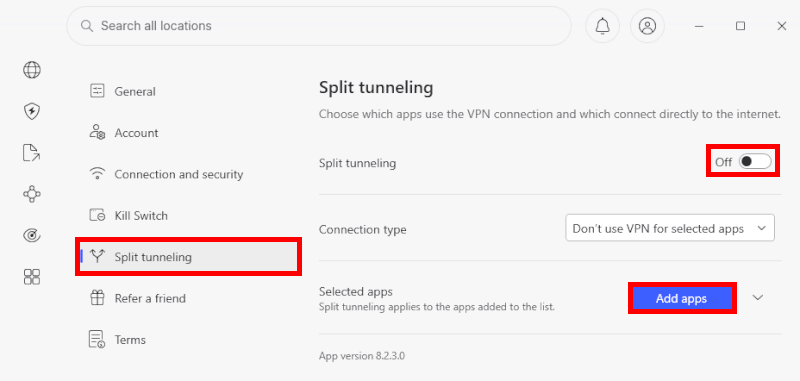
You don’t always want your entire device running through a VPN. Split tunneling gives you granular control over your network traffic. It allows you to select exactly which applications or websites route through the secure VPN tunnel and which ones connect directly to your local internet provider.
This means you can securely download files or check your mobile banking app under heavy encryption, while simultaneously browsing local news or playing low-latency video games on your regular home connection.
Specialty servers
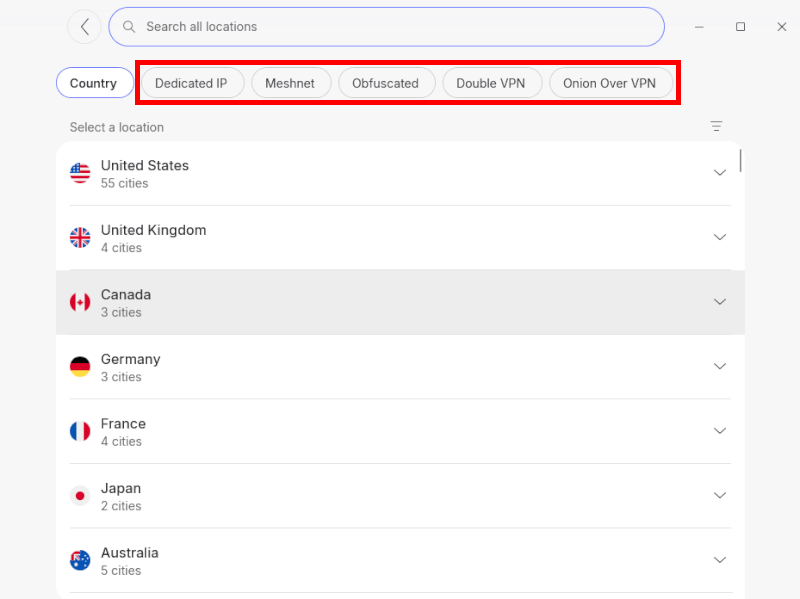
For scenarios requiring absolute anonymity, NordVPN features advanced specialty server categories. Double VPN routes your active web traffic through two separate secure servers instead of one, encrypting your data twice and chaining your privacy across multiple global locations.
If you want to access the decentralized Tor network, Onion over VPN merges the deep anonymity of Tor routing with the security of a VPN connection in a single click, completely removing the need to configure complex external browsers.
Dark web monitor
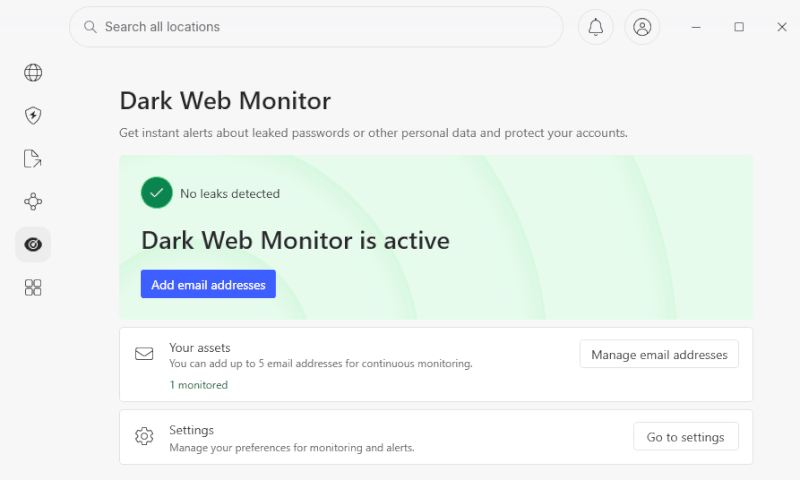
Identity theft often happens completely out of sight. NordVPN’s automated dark web monitor continuously scans underground forums, hacker databases, and hidden leak sites for your personal information.
The moment your registered email address, leaked usernames, or credential packets are discovered in a public data breach, the system fires a real-time alert to your device. This gives you an immediate head start to change your passwords and protect your accounts before bad actors can exploit them.
Encrypted browser proxy extensions
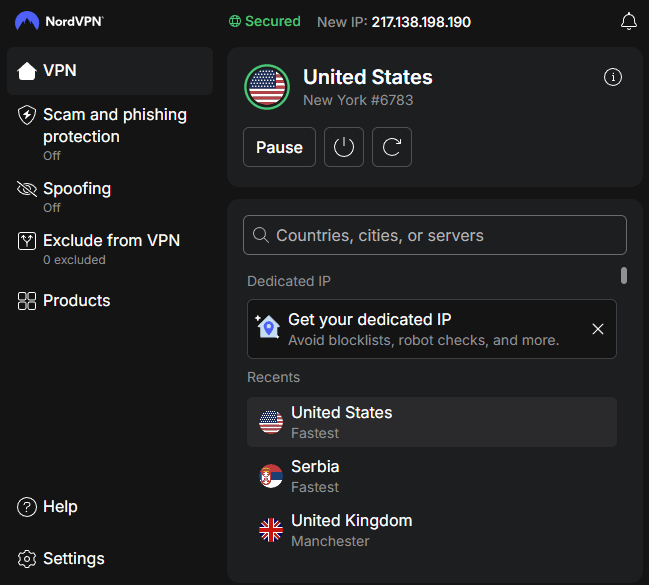
If you just want a lightweight privacy shield for casual web surfing on a laptop or desktop, NordVPN offers dedicated proxy extensions for major browsers like Google Chrome and Mozilla Firefox.
These extensions act as localized shields that encrypt your specific browser traffic without impacting the internet speeds of your background desktop applications. They mask your virtual location, block malicious domains, and stop web trackers instantly, making them ideal for quick, secure browsing on public Wi-Fi networks.
NordVPN and Apple TV: A perfect pairing?
Pairing NordVPN with your Apple TV is the ultimate upgrade for your home theater setup. This dynamic duo blends Apple’s premium user interface with NordVPN’s unstoppable unblocking power and lightning-fast speeds. Thanks to native tvOS integration, you no longer need complex technical workarounds.
The app integrates seamlessly with Apple’s ecosystem, featuring lightning-fast reconnection to servers and a sleek interface that automatically matches your Apple TV’s light or dark theme. It works quietly in the background to stop sneaky ISP throttling while keeping your viewing habits completely private.
Ready to stop leaving half of your streaming libraries on the table? Grab the exclusive deal below and completely unlock your Apple TV!
NordVPN’s Cyber Deal is live:
Get 75% Off NordVPN with the coupon below + 3 months extra:
(Coupon is applied automatically; 30-day money-back guarantee.)
NordVPN for Apple TV FAQs
Does Apple TV have a built-in VPN?
No, Apple TV does not have a built-in VPN service. However, if your Apple TV is updated to tvOS 17 or higher, the operating system supports native third-party VPN apps. This means you can download and install the official app directly onto your device through the tvOS App Store.
Can I use a free VPN on my Apple TV?
While a handful of free VPN services have populated the tvOS App Store, using them is highly discouraged. Free VPNs routinely impose strict data caps, throttle your streaming speeds, and offer a severely limited selection of server locations. Worse, many free providers monetize their platforms by tracking and selling your viewing habits to advertising networks, completely defeating the purpose of a privacy app.
Why is NordVPN not working with Netflix on Apple TV?
If Netflix displays a “Proxy Detected” error screen, it means the streaming platform has identified and blacklisted the specific IP address of the VPN server you are using. To fix this instantly, open your NordVPN app, hit Disconnect, and click Quick Connect to grab a brand-new IP address. If the error persists, clear your app’s location cache by force-closing Netflix (double-click the Home button on your Siri remote and swipe up).
Will a VPN change my Apple TV App Store region?
No, a VPN will not change the region of your Apple App Store or your billing country. The available apps on your dashboard are tied directly to the home country assigned to your Apple ID profile. While NordVPN completely alters your virtual location to unlock global content inside streaming apps like Netflix, Hulu, or YouTube, it will not change Apple’s core operating system store.
Does using NordVPN slow down 4K streaming?
With NordVPN, you will not notice any drop in 4K UHD streaming quality. Because the app utilizes the lightweight NordLynx protocol (built on WireGuard architecture), connection speeds remain incredibly fast and efficient. In many instances, if your internet service provider actively throttles heavy data streams during peak evening hours, turning on NordVPN will actually increase your streaming speeds.

Leave a Reply