
If you’re anything like me, sometimes only a marathon of Doctor Who or the gritty streets of Peaky Blinders will do. For that, BBC iPlayer is easily the best platform on the web. It’s a massive, high-quality library, and best of all, it’s completely free. The only real catch is the UK’s digital border.
From my testing, ExpressVPN is still the most reliable option for getting through without hassle. Not only is it incredibly easy to set up for iPlayer, but it also uses high-end encryption to keep your streaming habits private from your ISP. Plus, if you ever run into a hiccup, their round-the-clock support is surprisingly helpful.
In a bit, I’ll show you exactly which settings to tweak for a buffer-free experience and how to bypass those annoying “VPN detected” errors. If you’re ready to save, you can grab 73% off using this coupon.
| Based in | British Virgin Islands (privacy-friendly jurisdiction) |
| Security | AES-256 encryption, Lightway protocol, and RAM-only servers |
| Bonus tools | Threat Manager, Keys (password manager), and Stealth servers |
| Price range | $2.49 – $19.99/month (with current discounts) |
| Refund policy | 30-day money-back guarantee |
| Best for… | Easy BBC iPlayer access, low latency, and a no-fuss experience |
ExpressVPN Coupon:
Sign up for the 2-year plan and get 4 months added to your subscription for free.
(Coupon is applied automatically)
Setting up ExpressVPN for BBC iPlayer
While the tech behind VPNs is complex, I’ve found that ExpressVPN has one of the most streamlined setups in the industry. It boils down to three phases: Securing your account, activating the software, and choosing the right tunnel to the UK.
1. Secure your subscription
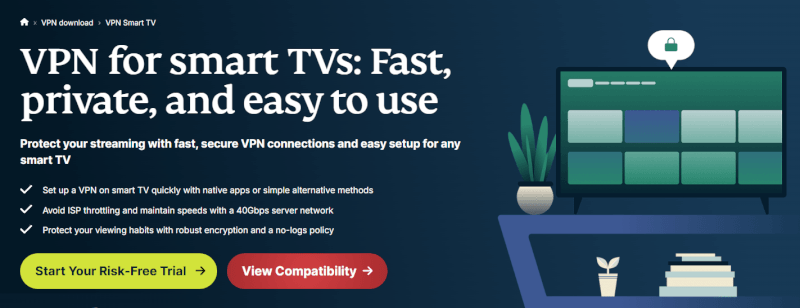
First, head over to the ExpressVPN website. You’ll see several tiers, but since every plan includes the same features and Lightway speed technology, the only difference is the price.
Go for the long-term plan. It’s significantly cheaper per month, and because there is a 30-day money-back guarantee, you aren’t actually locked in if the service doesn’t work for your specific device.
2. Choose your payment and privacy level
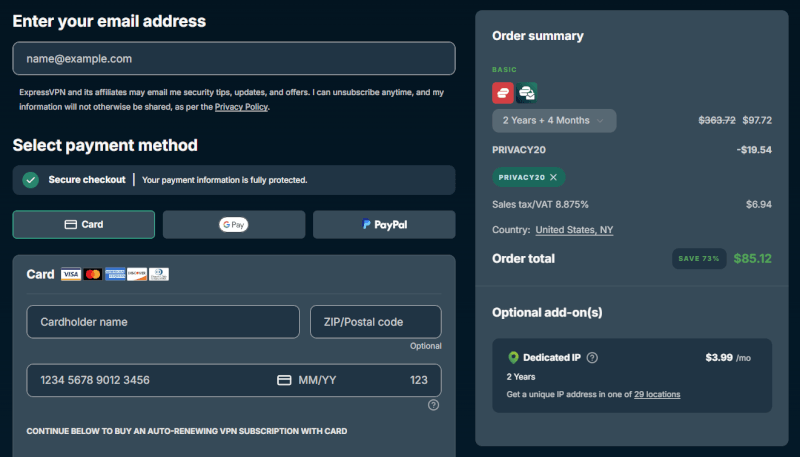
Once you’ve entered your email, you’ll pick a payment method. While most users stick to credit cards or PayPal, I appreciate that ExpressVPN still accepts Bitcoin. If you’re looking for maximum privacy, using crypto and a “burner” email is the way to go.
3. Installation and the “activation code” shortcut
Download the app for your specific device (Windows, Mac, or the APK for Android).
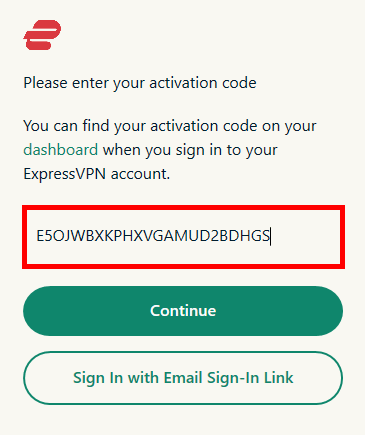
Instead of typing in your password every time, ExpressVPN uses a unique Activation Code found on your account dashboard. Copy this before you open the app for the first time. It saves you from having to deal with two-factor authentication on every single login.
4. Configuring for 4K streaming
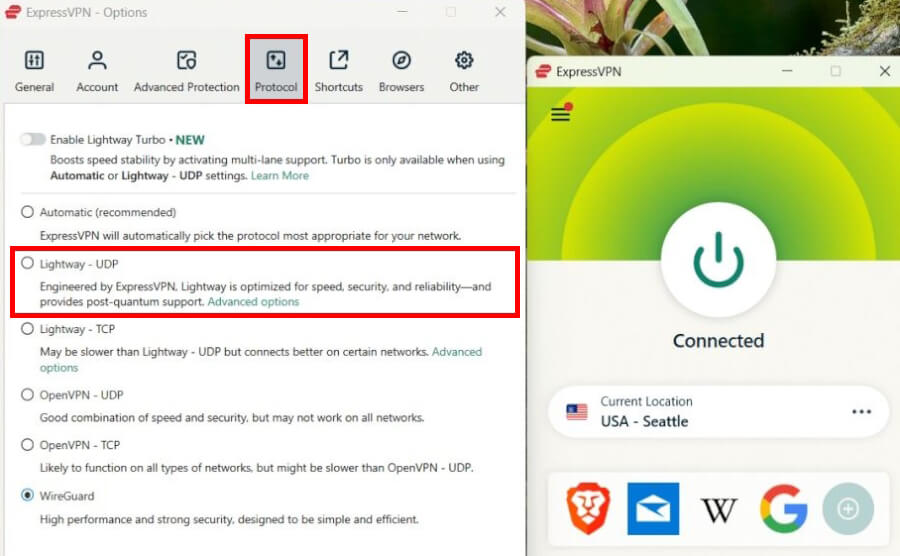
Before you connect, I suggest a quick tweak for better video quality. Go to Settings > Protocols and select Lightway (UDP). In my testing, Lightway connects almost instantly and handles high-definition BBC streams much better than the older OpenVPN standard.
5. Connecting to the UK server
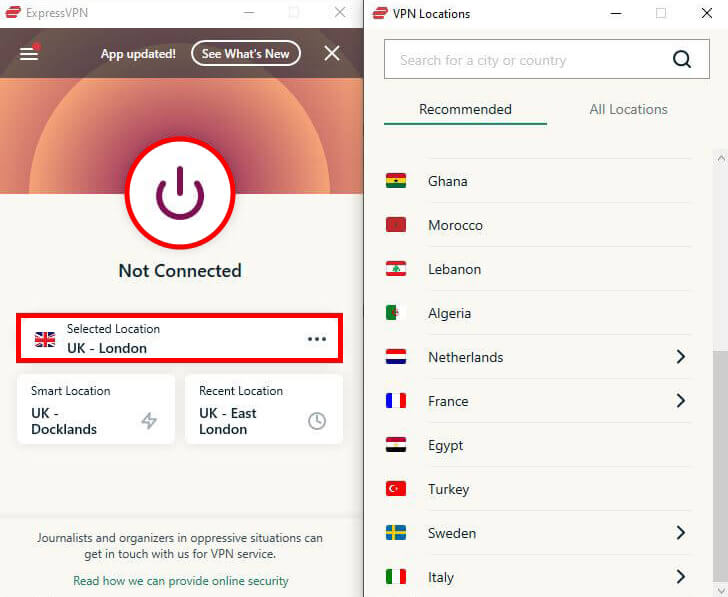
To watch BBC iPlayer, you must appear to be in the UK.
- Open the VPN locations menu.
- Search for “United Kingdom.”
- Don’t just pick the first one. I’ve found that the “UK – Docklands” and “UK – London” servers are often the least crowded, which means less buffering during live shows.
- Verify and stream.
Once the big power button turns green, your IP address is officially British. You can now head over to the BBC iPlayer site or app, sign in, and start watching.
How to create your BBC iPlayer account
Once your VPN is set to a UK server, the digital border is open. Now, you just need a BBC account to start streaming.
1. The registration process
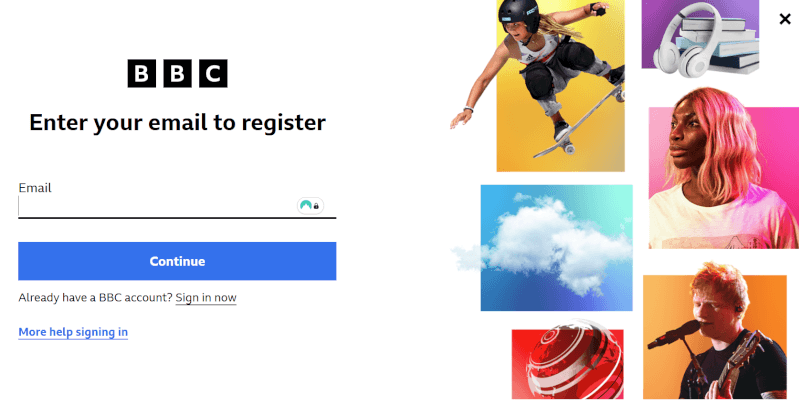
Head to the BBC iPlayer website and click “Sign In,” then select “Register Now.” You’ll be asked to provide some basic details like your birthdate and email address. Because you’re connected to ExpressVPN, the site will recognize you as being in the UK.
2. Handling the “TV License” prompt
During registration, a dialog box will ask if you have a valid UK TV license. While this sounds like a major hurdle, the BBC currently operates on an honor system for this prompt. To proceed to the content, you simply need to click “Yes, I have a TV license.” Just keep in mind that this is a self-declaration required by the platform to access its library.
3. Choosing a UK postcode
The final step is entering a UK postcode. This determines which local BBC news and programming you see.
- If you have one: Enter your UK-based postcode.
- If you don’t: You can use any valid UK postcode (for example, W1A 1AA for the BBC’s own London headquarters).
4. Verify and watch
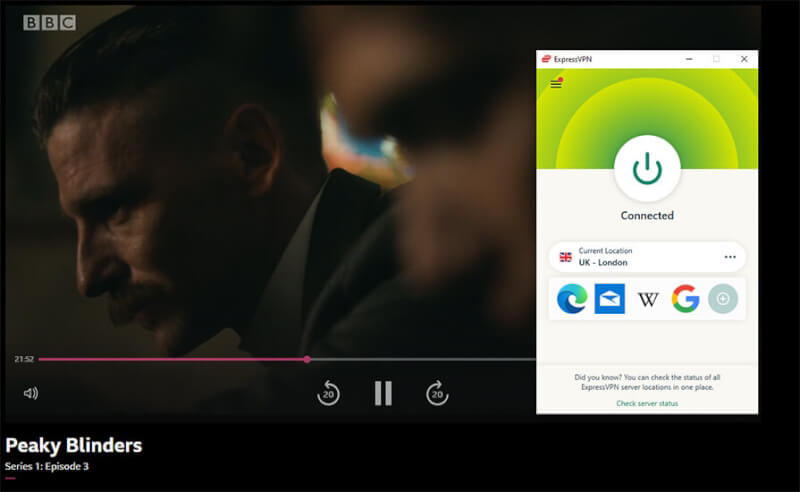
Check your inbox for a verification email, click the link, and you’re officially in. I recommend keeping your VPN active whenever you are logged into this account, as BBC iPlayer may flag the account if it detects a login from a non-UK IP address later on.
Fine-tuning ExpressVPN for 4K streaming
Even though ExpressVPN is built for speed, any VPN can slightly impact your bandwidth due to the encryption process. In my testing, ExpressVPN consistently delivers enough speed for buffer-free 4K streaming, but a few quick tweaks can make the difference between an acceptable and an excellent performance.
Use MediaStreamer for smart TVs and game consoles
One of the biggest hurdles with streaming is that devices like Apple TV, PlayStation, Xbox, and certain Smart TVs don’t allow you to install VPN apps directly. This is where ExpressVPN’s MediaStreamer (their version of Smart DNS) becomes a lifesaver.
MediaStreamer allows you to spoof your location without the heavy overhead of encryption. Because there’s no encryption tunnel, I’ve actually found that it can provide slightly faster speeds for 4K streaming than a standard VPN connection.
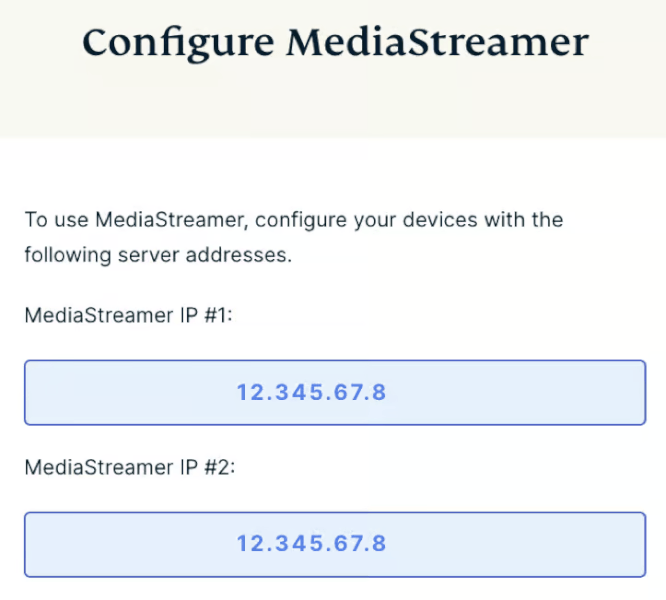
How to set it up:
- Register your IP: Log in to your ExpressVPN account on their website and look for “DNS Settings.” You’ll need to register your current IP address so ExpressVPN recognizes your device.
- Swap the DNS codes: Follow the specific setup guide for your device to swap your standard DNS addresses for the MediaStreamer ones provided by ExpressVPN.
- Restart and stream: Once you’ve updated the settings, give your device a quick restart. You should now be able to open the BBC iPlayer app and stream as if you were in the UK.
If you hit a snag during the manual setup, I highly recommend using ExpressVPN’s 24/7 live chat. In my experience, they can walk you through the DNS entry for almost any obscure TV model in minutes.
Boost your speed for 4K streaming
Nothing ruins a Peaky Blinders finale like a buffering wheel. While BBC iPlayer recommends at least 5.0 Mbps for HD, you’ll want at least 25 Mbps for a stable 4K UHD experience. ExpressVPN is more than capable of these speeds, but if your local connection is struggling, these experience-tested tweaks will help:
- Kill bandwidth-heavy background apps: Close anything running in the background that hogs your data. I’ve found that cloud backups (like Google Drive or OneDrive) and game launchers (like Steam) are the biggest culprits for secret background downloads.
- Force the Lightway protocol: I mentioned this earlier, but it’s worth repeating. If your speed feels sluggish, manually switch to Lightway (UDP) in your settings. It’s significantly more efficient than older protocols and is specifically designed for high-speed tasks like streaming.
- Ditch the Wi-Fi for Ethernet: If you’re streaming on a PC or a Smart TV, a physical Ethernet cable is a game-changer. Wi-Fi signals can be interrupted by walls or even your microwave; a wired connection removes that instability entirely.
- Reboot your router: It’s a cliché for a reason. Resetting your router clears its temporary memory and can often resolve speed throttling from your ISP. As they say, “Have you tried turning it off and on again?”
- Use a Wi-Fi Extender or Mesh System: If you can’t run a wire across your house, a Wi-Fi extender can help bridge the gap. Just ensure your streaming device is as close to the node as possible to maintain a strong signal.
The expert checklist: Fine-tuning for efficiency
Once you’re comfortable with the basics, I recommend spending two minutes under the hood. These small adjustments ensure that ExpressVPN works at peak efficiency without interfering with your other apps.
1. Lock in Lightway (UDP)
We’ve touched on this, but it’s the single most important setting for a buffer-free experience.
- Click the menu icon (top left) > Options > Protocol.
- Manually select Lightway – UDP. While “Automatic” is fine, forcing UDP ensures the app always prioritizes the fastest data transfer method available for video.
2. Enable the “network lock” (kill switch)
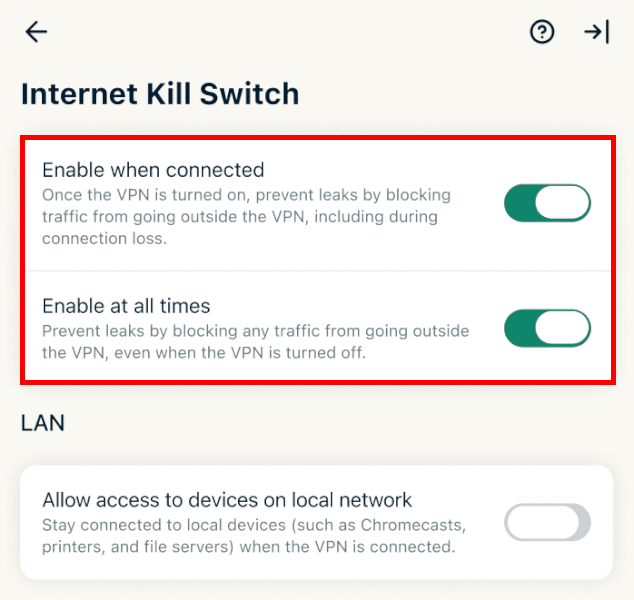
Streaming is great, but privacy is the priority. In the General settings, make sure Network Lock is enabled. If your Wi-Fi flickers and the VPN drops for even a second, this feature instantly cuts your internet. This prevents the BBC from seeing your real IP address and potentially flagging your account. We see similar kill switch features with Surfshark and NordVPN.
3. Activate Advanced Protection
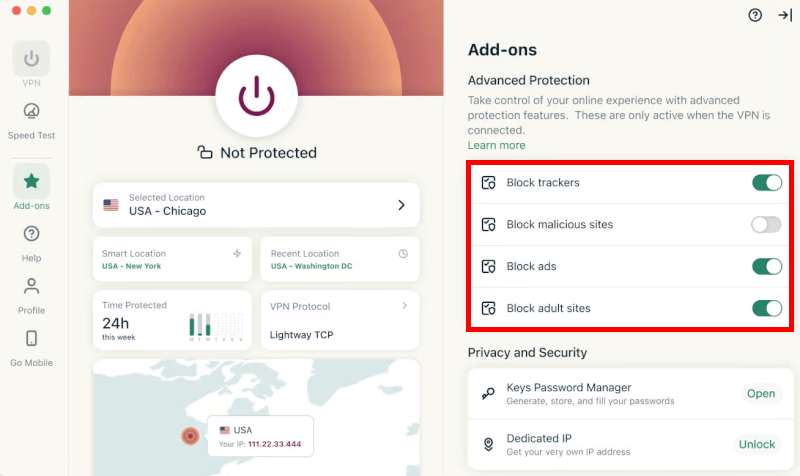
ExpressVPN recently added a suite of tools that make browsing much cleaner. Under the Advanced Protection tab, I always toggle on:
- Threat Manager: Stops trackers from following you across the web.
- Ad-Blocker: This is a nice extra that speeds up page loading times by stripping out heavy advertisements before they even reach your screen.
4. Use split tunneling for multi-tasking
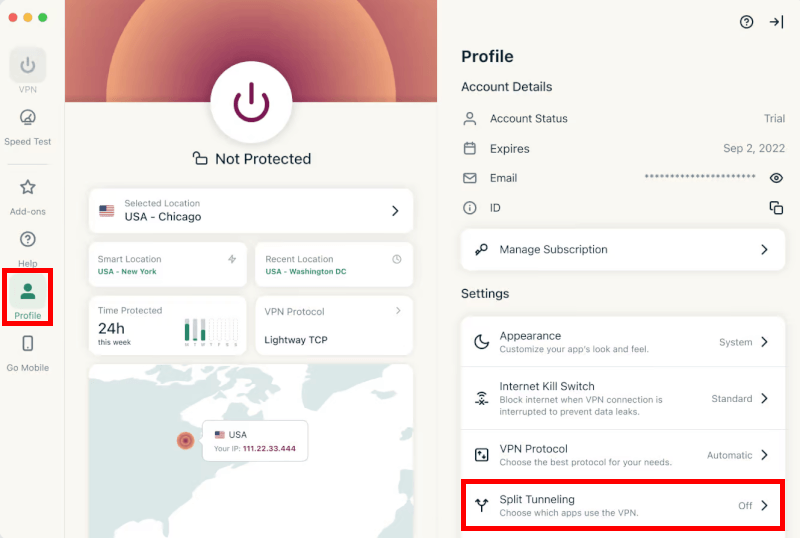
This is my favorite feature for everyday use. Split Tunneling allows you to choose exactly which apps use the VPN.
You can set it so only your browser (like Chrome or Firefox) uses the UK server for BBC iPlayer, while your banking app or work email stays on your “vanilla” local connection. This prevents you from getting those annoying “suspicious login” alerts from your bank while you’re virtually in London.
Common fixes
Even with a premium service like ExpressVPN, you might occasionally hit a digital roadblock. The BBC constantly updates its VPN detection blacklists, but in my experience, you can almost always get back to your show within 60 seconds using these fixes.
How to fix the proxy error
If you see a message saying “This content is not available in your location” or a specific proxy warning, it means the BBC has flagged your current IP address as a VPN.
- The quick fix: Clear your browser’s cache and cookies. Often, the site remembers your real location from a previous visit. Clearing this data gives you a fresh start.
- The fail-safe: Switch to a different UK server (like moving from London to East London). ExpressVPN rotates its IPs regularly, and switching servers usually gives you a clean address that isn’t on the BBC’s radar yet.
What to do if streaming quality drops
If your video starts buffering or drops from 4K to grainy SD, your connection might be throttled or congested.
- Check your speed: Use ExpressVPN’s built-in speed test tool. It allows you to see which UK locations currently have the lowest latency (ping) and highest download speeds.
- Refresh your protocol: If you’ve been watching for hours, sometimes a quick disconnect and reconnect using the Lightway (UDP) protocol will refresh your bandwidth and stabilize the stream.
Fixing connection failures (DNS flush)
If the app won’t connect at all, it’s often due to a clogged DNS cache on your computer. This happens when your device gets confused by old location data.
- The Windows Fix: Open your Command Prompt (search “cmd” in the start menu), type ipconfig /flushdns, and hit Enter.
- The Mac Fix: Open Terminal and type sudo killall -HUP mDNSResponder.
This flushes out the old data and allows your network to establish a clean, high-efficiency connection to the ExpressVPN servers.
Why choose ExpressVPN for BBC iPlayer?
While there are hundreds of VPNs on the market, ExpressVPN consistently lands at the top of my list for a few specific reasons. Here is why it’s worth the investment:
- Proprietary Lightway protocol: Unlike other VPNs that use generic tech, ExpressVPN built Lightway from the ground up. In my testing, it connects in under a second and is specifically optimized for high-bandwidth tasks like 4K streaming and gaming.
- Privacy-first jurisdiction: The company is based in the British Virgin Islands, which has no mandatory data retention laws. This puts them outside the reach of the 14-Eyes surveillance alliance, ensuring your browsing history stays private.
- RAM-only “TrustedServer” technology: Most VPNs use hard drives that could technically store data. ExpressVPN uses diskless, bare-metal servers that run entirely on RAM. Every time a server reboots, every bit of data is physically wiped.
- Audited no-logs policy: They don’t just say they don’t keep logs; they’ve had their systems independently audited by firms like PwC and KPMG. This means no one (not even ExpressVPN) knows what you’re watching on iPlayer.
- Up to 14 simultaneous connections: You can now protect up to 14 devices at once on a single account. So, you can stream Doctor Who on your TV while a family member uses the same subscription for a secure, low-lag experience in Call of Duty.
- Massive global network: With over 3,000 servers in 105 countries, you aren’t just limited to the UK. This same subscription can unlock Netflix libraries in Japan, US Hulu, or even help you find cheaper flights by browsing from different regions.
Is it legal to use a VPN for BBC iPlayer?
A common question is whether using a VPN to bypass geo-blocks is actually legal. In most countries (including the UK, US, and EU), using a VPN is perfectly legal. There are no laws that prohibit you from using encryption or changing your virtual location to browse the web.
However, there is a difference between the law and the BBC’s Terms of Use:
Accessing iPlayer from outside the UK technically goes against the BBC’s user agreement. Their goal is to protect broadcasting rights, which is why they invest in VPN detection technology.
If the BBC’s systems identify an IP address as belonging to a VPN, they won’t call the police but will simply block that specific connection. This is when you’ll see the “Proxy error” or “Content not available” message.
In my experience, the worst-case scenario is seldom a banned account; it’s simply a blocked IP. If you do get stuck, the fix is as simple as switching to a different ExpressVPN server or, if necessary, creating a fresh account with a different email.
You aren’t breaking the law by using ExpressVPN, but you are playing a game of cat and mouse with the BBC’s regional filters. Using a high-quality provider like ExpressVPN makes you much less likely to get caught in those filters.
BBC iPlayer VPN comparison
| NordVPN | Surfshark | Proton VPN | |
| BBC iPlayer feature | SmartPlay (automated streaming bypass) | NoBorders Mode (bypasses strict blocks) | VPN Accelerator (boosts 4K streaming) |
| UK servers | 440+ | 212+ | 900+ |
| Supported protocols | NordLynx, OpenVPN, IKEv2 | WireGuard, OpenVPN, IKEv2 | Stealth, WireGuard, OpenVPN |
| Device limit | 10 devices | Unlimited | 10 devices |
| Starting price | $3.49/month | $2.49/month | $2.99/month |
| Best deal | 75% off coupon > | 87% off coupon > | 70% off coupon > |
Which one should you choose?
If you want a VPN that works like a charm without ever touching a setting, ExpressVPN is the premium choice. Its MediaStreamer feature remains the best way to watch BBC iPlayer on devices like Apple TV or older Smart TVs that don’t allow standard VPN apps.
For most users, NordVPN offers the best balance of price and raw performance. It’s consistently the fastest VPN for streaming, and with hundreds of UK servers, you’ll rarely deal with server busy errors.
If you want to protect your entire household for the lowest price, Surfshark is unbeatable. It’s the only one on this list with unlimited simultaneous connections. Even with its low price, it still uses 10Gbps servers and the WireGuard protocol, ensuring your 4K streams stay “buttery smooth”.
Is ExpressVPN worth it for BBC iPlayer?
Based on hands-on testing, ExpressVPN delivers the most consistent, low-maintenance experience for British TV fans. Its ability to consistently bypass the BBC’s aggressive VPN filters while maintaining the speeds needed for 4K UHD makes it a rare breed in the privacy world. Whether you’re catching up on EastEnders or diving into a new nature doc, the Lightway protocol ensures you spend your time watching the show, not a buffering wheel.
Beyond just entertainment, you’re getting a massive upgrade to your digital privacy. Since ExpressVPN operates on a strict no-logs policy and uses RAM-only servers, your streaming habits remain your business alone.
Ready to start? Claim the best current deal below:
ExpressVPN Coupon:
Sign up for the 2-year plan and get 4 months added to your subscription for free.
(Coupon is applied automatically)
With support for up to 10–14 simultaneous devices (depending on your plan), you can secure your phone, tablet, and smart TV with a single account. For me, the peace of mind and the seamless access to the BBC library make it a must-have tool for any international viewer.
And for more information on the current top picks for BBC iPlayer, see our dedicated guide on the best VPNs for BBC iPlayer here.
ExpressVPN for BBC iPlayer FAQs
Does ExpressVPN still work with BBC iPlayer?
Yes, ExpressVPN is one of the most reliable services for accessing BBC iPlayer due to its constantly updated UK server network. While the BBC frequently blacklists VPN IP addresses, ExpressVPN counters this by cycling in fresh IPs, ensuring you can almost always find a working connection in London, Docklands, or the Midlands.
Why is BBC iPlayer not working with ExpressVPN?
If you’re seeing a proxy error, it’s usually because the BBC has flagged your specific IP address or has stored your real location in your browser cookies. To fix this, clear your browser’s cache, restart your browser, and switch to a different UK server location within the ExpressVPN app to get a fresh, unblocked identity.
How many devices can I use with one ExpressVPN account?
ExpressVPN supports between 10 and 14 simultaneous connections, depending on which plan you choose. This is a significant upgrade from their previous 8-device limit, allowing you to secure your phone, laptop, and smart TV while still having enough room to share the subscription with your household.
Which ExpressVPN server is best for BBC iPlayer?
I’ve found that the “UK – Docklands” and “UK – London” servers consistently offer the lowest latency and highest streaming speeds. If those feel crowded during peak UK viewing hours (like during a major football match), switching to the “UK – Midlands” server is a superb “secret” backup that is often less congested.
Is it free to watch BBC iPlayer with ExpressVPN?
BBC iPlayer itself is a completely free streaming service, but you still need a paid ExpressVPN subscription to access it from outside the UK. Think of ExpressVPN as the key to the library. Once you’re in, you have unlimited access to thousands of hours of British shows without any additional monthly fees from the BBC.

Leave a Reply