
I’ve spent years testing VPNs, and the ExpressVPN dedicated IP rollout is one of the most interesting shifts I’ve seen.
Most people think a dedicated IP means sacrificing privacy for convenience, but ExpressVPN does things differently. Using a clever blinded-token system, I can get a consistent, private IP address that even ExpressVPN can’t trace back to my account. I finally feel comfortable using a static IP for secure activities without worrying about tracking.
In this guide, I’m breaking down how the ExpressVPN dedicated IP performs in the real world this year. I’ll show you how it handles the latest anti-VPN blocks, whether the 14-device limit actually holds up under heavy use, and how it stacks up against the competition. Tired of CAPTCHA but want to stay anonymous? I’ll help you decide if this upgrade is right for you.
ExpressVPN Coupon:
Sign up for the 2-year plan and get 4 months added to your subscription for free.
(Coupon is applied automatically)
Quick look: ExpressVPN dedicated IP
| Price | Included in Pro ($5.99/month); add-on for other plans ($2.79–$3.59/month) |
| Locations | 29 locations across 22 countries (including the US, UK, Japan, Germany) |
| Device limit | Connect up to 14 devices simultaneously |
| Privacy tech | Zero-knowledge allocation with Blinded Tokens and AWS Nitro Enclaves |
| Platform compatibility | Windows, Android, iOS (macOS/Linux support expanding) |
Why ExpressVPN finally embraced dedicated IPs
For years, I watched ExpressVPN avoid dedicated IPs to prioritize anonymity. Their shared IP approach (mixing your traffic with thousands of others) is great for stealth, but leads to the “bad neighbor” effect. If someone else on your shared IP gets flagged, you’re stuck solving endless CAPTCHAs or getting blocked by your own bank.
The breakthrough recently was how they solved the privacy trade-off. By using AWS Nitro Enclaves and a blinded-token system, I can now use a consistent IP that ExpressVPN itself cannot trace back to my account. It bridges the gap perfectly: I get the stability I need for remote work and banking without leaving a permanent digital breadcrumb tied to my identity.
Why a dedicated IP is a smart upgrade
In my years of testing, I’ve found that the biggest frustration with a standard VPN isn’t speed but the so-called “bad neighbor” effect. When you share an IP with thousands of others, one person’s spammy behavior can get that IP blacklisted, leaving you stuck with endless CAPTCHAs or blocked from your own bank account. A dedicated IP solves this by giving you an exclusive digital footprint.

For me, the real win is that ExpressVPN now allows you to use your dedicated IP on up to 14 devices at once. Whether I’m on my laptop, phone, or tablet, I maintain a consistent identity that my office network and banking apps recognize and trust.
The major benefits I’ve noticed:
- Zero-knowledge privacy: Unlike other brands, ExpressVPN uses blinded tokens so they literally can’t link your dedicated IP back to your account.
- Goodbye CAPTCHAs: Since you aren’t sharing the IP with bots or spammers, you’ll rarely see those “prove you’re human” puzzles.
- Seamless remote work: I can whitelist my IP for my company’s secure servers, meaning I don’t have to keep re-authenticating every time I log in.
- Stable banking and shopping: Most financial sites flag frequent IP changes as suspicious. A static IP keeps your connection looking “normal,” preventing those annoying account freezes.
- Avoid “bad neighbors”: You are the only one using your address, so you’ll never be penalized for someone else’s online behavior.
Quick comparison: Shared vs dedicated IP
| Shared IP | ExpressVPN Dedicated IP | |
| Privacy | High (hidden in a crowd) | Elite (exclusive with zero-knowledge tech) |
| CAPTCHAs | Frequent | Rare |
| Reliability | Variable | High and predictable |
| Best for… | Casual browsing/stealth | Banking, work, and gaming |
Top 4 alternatives to ExpressVPN for dedicated IPs
ExpressVPN’s zero-knowledge tech is impressive, but it’s not the only game in town. Depending on your budget or specific location needs, I’ve found these four to be the best alternatives:
- NordVPN – The best all-rounder. I still recommend Nord for its massive network of 18+ dedicated IP countries, including harder-to-find spots like the UAE and South Korea.
- Surfshark – The top value pick. It’s significantly cheaper than ExpressVPN and recently expanded its dedicated IP support to over 15 global locations with a simple, one-click add-on.
- Proton VPN – The privacy-first choice. Based in Switzerland, Proton now offers a robust dedicated IP for its Visionary and Business tiers, backed by some of the world’s strictest privacy laws.
- OVPN – The power user’s dream. This Swedish provider is my go-to for public IPv4 addresses, making it the best choice if you need to host a home server or port forward while using a static IP.
1. NordVPN – The best all-rounder for dedicated IPs
| Website | NordVPN.com |
| Based in | Panama |
| Logs | No logs (audited) |
| Price | $3.49/mo. |
| Support | 24/7 live chat |
| Refund | 30 days |
| Deal | 75% Off Coupon |
In my testing, NordVPN consistently edges out the competition for sheer variety. While ExpressVPN is perfect for “invisible” privacy, NordVPN is my top pick for global flexibility. It currently offers dedicated IPs in 27 countries (significantly more than ExpressVPN) making it the best choice if you need a specific regional footprint for streaming or localized business data.
I’ve found their Meshnet feature to be a perfect companion to a dedicated IP; it allows me to create my own encrypted network across all my devices while maintaining that same static address. Plus, since Nord is one of the fastest providers I’ve benchmarked, you won’t see the speed drops that often plague cheaper static IP services.
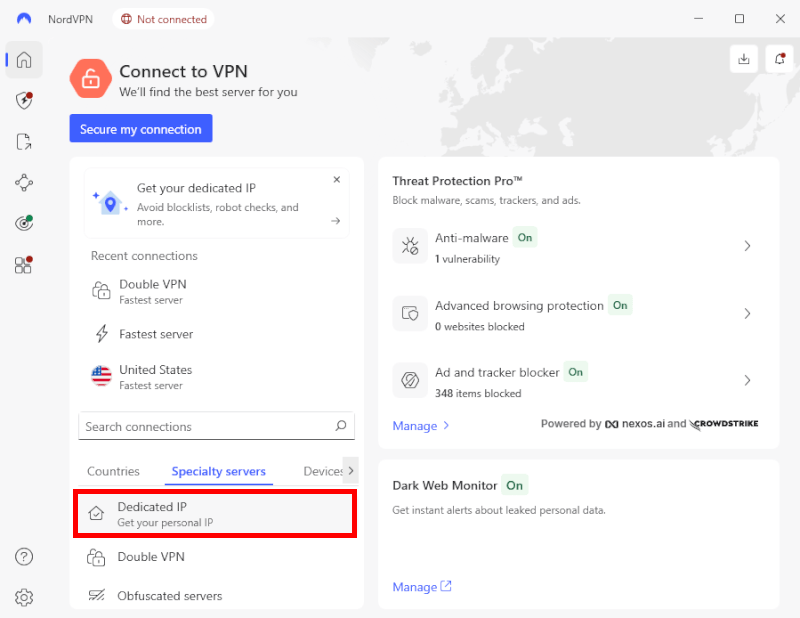
NordVPN doesn’t just give you a static address; they wrap it in high-end security. Every dedicated IP server is RAM-only (wiped upon reboot) and supports the NordLynx (WireGuard) protocol. Recently, they’ve even rolled out post-quantum encryption, ensuring your dedicated connection is protected against future decryption threats.
Beyond the usual hubs like the UK, Germany, and Japan, Nord has expanded its US footprint. I can now get a dedicated IP in cities like Buffalo, Los Angeles, Dallas, New York, Chicago, Seattle, and Miami.
NordVPN pros and cons
+ Pros
- User-friendly and reliable apps
- Double VPN and Onion Over VPN servers
- Passed numerous 3rd-party audits
- Strong encryption standards with full support for WireGuard
- Works with Netflix and many streaming sites
- Threat Protection feature to block ads, trackers, and malware
- Professional 24/7 live chat support
- Consistently fast speeds
- Dedicated RAM-only servers with 10 Gbps bandwidth channels
- Post-quantum encryption
– Cons
- Best discounts only available with 2-year plans
Check out the exclusive NordVPN coupon below to get the best deal available right now:
NordVPN’s Cyber Deal is live:
Get 75% Off NordVPN with the coupon below + 3 months extra:
(Coupon is applied automatically; 30-day money-back guarantee.)
2. Surfshark – The best value for unlimited devices
| Website | Surfshark.com |
| Based in | The Netherlands |
| Logs | No logs (audited) |
| Price | $2.49/mo. |
| Support | 24/7 live chat |
| Refund | 30 days |
| Deal | 87% Off Coupon |
If you’re looking for the best bang for your buck, Surfshark is my go-to recommendation. While most VPNs (including ExpressVPN) cap your device count, Surfshark allows unlimited simultaneous connections. This means you can use your dedicated IP on every phone, laptop, and smart TV in your household without hitting a wall.
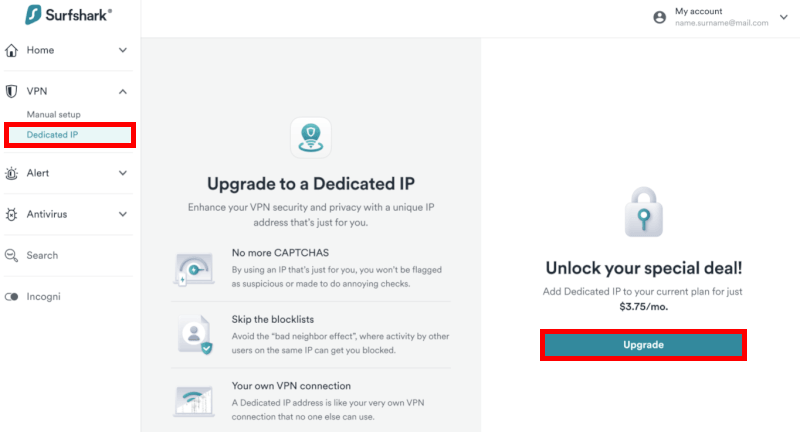
Surfshark’s interface is one of the cleanest I’ve tested. Their NoBorders mode is a lifesaver for my international travels, as it automatically kicks in to bypass heavy censorship in regions like China or the UAE. For gamers, I’ve found Surfshark consistently delivers some of the lowest ping rates, making it a top-tier choice for Warzone or League of Legends when you need a stable, static identity.
Every dedicated IP setup with Surfshark is backed by their RAM-only server network and the lightning-fast WireGuard protocol. I also rely heavily on their CleanWeb feature, which does an excellent job of stripping out ads, trackers, and malware at the source before they even hit my browser.
Over the past few years, Surfshark has expanded its dedicated IP footprint to over 15 countries. While it has fewer locations than NordVPN, its pricing is much more competitive, often landing at just a few dollars a month as an add-on to its standard plan.
Surfshark pros and cons
+ Pros
- Unlimited connections
- User-friendly apps for all devices and operating systems
- CleanWeb feature to block ads, trackers, and malware
- Works great with Netflix and many other streaming services
- 24/7 live chat support
- Strong encryption and security features (audited)
– Cons
- Limited support for VPN routers
- Above-average monthly prices
Don’t miss the Surfshark discount below for maximum savings:
Surfshark VPN Coupon:
Get 87% off Surfshark VPN plus an additional 3 months extra with the coupon below:
(Coupon is applied automatically; 30-day money-back guarantee)
3. Proton VPN – A powerhouse for privacy enthusiasts
| Website | ProtonVPN.com |
| Based in | Switzerland |
| Logs | No logs (audited) |
| Price | $2.99/mo. |
| Support | Email + Chat |
| Refund | 30 days |
| Deal | 70% Off Coupon |
If you value transparency above all else, Proton VPN is the provider I trust most. While competitors focus on flashy marketing, Proton (built by scientists from CERN) focuses on hardened security. They were the first to make every single one of their apps open-source, meaning the code is public and regularly audited by the community.
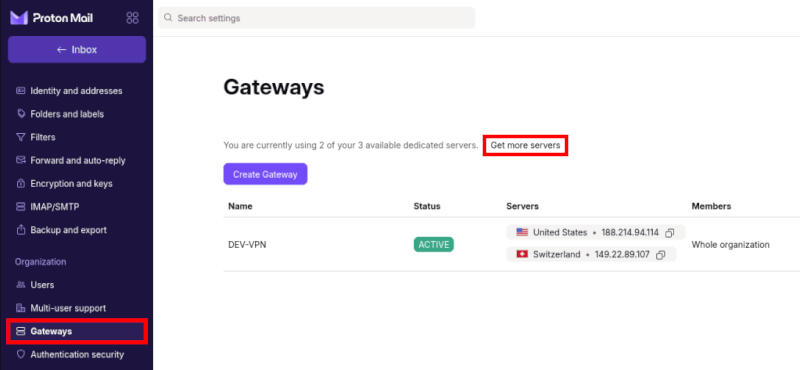
Proton doesn’t treat dedicated IPs as a cheap, one-click add-on. Instead, I get access to dedicated VPN servers through their Business and Visionary plans. This gives me a private gateway that isn’t just a static address, but an entirely isolated environment. It’s the pro-level choice if you’re running a small team or handling highly sensitive data that requires a consistent, untainted IP.
The real winner for me is Secure Core. This feature routes my traffic through privacy-hardened servers in Switzerland or Iceland before it ever hits my dedicated IP. This double-hop architecture makes it nearly impossible for anyone to trace my physical location, even if they manage to monitor the dedicated exit point.
Despite the heavy encryption, I’ve found their VPN Accelerator technology keeps speeds incredibly high. In my recent tests, I saw almost zero lag during 4K streaming or international Zoom calls, even when routing through their Swiss data centers.
Proton VPN pros and cons
+ Pros
- Swiss-based privacy
- Open-source apps audited by independent security firms
- Secure Core servers route traffic through hardened nodes
- VPN Accelerator boosts long-distance US speeds
- Post-quantum encryption in the works
- Subscription plans bundle with Proton Mail, Proton Drive, Proton Sheets, and Proton Pass
- Linux CLI and refreshed GUI
- Smart TV and Apple TV apps now support NetShield
– Cons
- No 24/7 live chat
- Advanced tools have a steeper learning curve
Unlock savings with the Proton VPN coupon listed below:
Proton VPN Coupon:
Get 70% Off Proton VPN (drops the price to only $2.99/month) with the coupon below:
(Coupon is applied automatically; 30-day money-back guarantee)
4. OVPN – The smart choice for self-hosting
| VPN | OVPN |
| Based in | Sweden |
| Logs | No logs |
| Price | $4.22/mo. |
| Support | Email & Chat |
| Refund | 10 days |
| Website | OVPN.com |
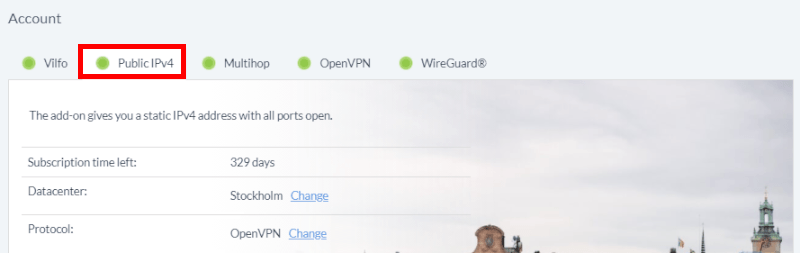
If privacy and technical control are your top priorities, OVPN is the provider I’d look at first. While they have a smaller network than NordVPN, they offer something most mainstream VPNs don’t: A public IPv4 address. This makes OVPN the best tool in my kit for hosting a home server, accessing a Plex library remotely, or ensuring a NAT type that actually works for high-stakes gaming.
I’ve found their commitment to transparency unmatched. Not only do they publish monthly reports, but they actually own all their hardware — no rented “VPS” servers here. In my latest tests, their dedicated IP servers in Sweden and the US showed nearly 100% uptime, providing the kind of rock-solid stability you need for whitelisting sensitive work credentials.
OVPN is built for those who like to tweak their settings. Their apps are clean but packed with configuration options, including full support for WireGuard and OpenVPN. Because they use RAM-only servers with no hard drives, your data (and the fact that you’re using a dedicated IP) is wiped the moment the server reboots.
Don’t let the smaller server count fool you. Because OVPN doesn’t oversell its bandwidth, I consistently get high speeds and low latency. It’s a specialized service that feels more like a private club than a mass-market utility.
OVPN pros and cons
+ Pros
- Designed for maximum user privacy and security
- Dedicated apps for Windows, macOS, Linux, Android, iOS, and support for other devices
- No IP address or DNS leaks detected
- Support for streaming and torrenting
- Lots of configuration options
- Monthly transparency reports
- Multiple payment methods including anonymous payments
– Cons
- Small server network with few locations
- Above average prices
What I look for in a dedicated IP VPN
Choosing a dedicated IP isn’t as simple as picking the fastest VPN on a chart. Because you are tying your online identity to a single address, the stakes for privacy and reliability are much higher. Here are the four factors I prioritize when testing these services:
- Zero-knowledge privacy: I only recommend providers like ExpressVPN or NordVPN that use blinded tokens or AWS Nitro Enclaves. You want a system where the VPN provider physically cannot link your dedicated IP back to your email or credit card.
- Connection speed and port quality: A dedicated IP is useless if it’s throttled. I look for providers that use 10 Gbps RAM-only servers. This ensures that even though your IP is static, your speeds remain high enough for 4K streaming or lag-free gaming.
- Strategic server locations: More isn’t always better; proximity is. If you need a dedicated IP for a US-based bank, you need a provider with multiple city-level options (like New York or Los Angeles) to keep your latency low.
- Device flexibility: With our lives spread across more screens than ever, I check if the dedicated IP works on all your devices. ExpressVPN’s jump to 14 simultaneous connections set a new bar here, making it much easier to stay “consistent” across your phone, tablet, and laptop.
VPNs I recommend avoiding for dedicated IPs
Not all dedicated IP services are created equal. Because a static IP ties your activity to a single digital fingerprint, using a provider with a shaky track record is a massive risk. Based on my research and past security incidents, I suggest steering clear of these four for your dedicated IP needs:
- PureVPN and Ivacy: These two have long shared the same infrastructure and have a troubled history regarding logs. Most notably, PureVPN handed over user data to authorities despite claiming a “no-logs” policy. There are simply too many audited, trustworthy alternatives to take this risk.
- VPN Unlimited (KeepSolid): While affordable, I’ve consistently found their speeds to be subpar for a dedicated connection. More importantly, their privacy policy is far more “data-heavy” than the gold standards like ExpressVPN or Proton.
- Windscribe: Although popular for its free tier, Windscribe has suffered significant security lapses in the past, including authorities seizing unencrypted servers. When you are paying extra for a “private” static IP, you deserve a provider that prioritizes top-tier server hardening.
Using these facts helps explain that avoiding Windscribe isn’t just about speed; it’s about consistent infrastructure security. The 2021 unencrypted server incident is a powerful example of why a “static identity” (dedicated IP) needs a provider with flawless server-hardening practices.
How to set up ExpressVPN dedicated IP
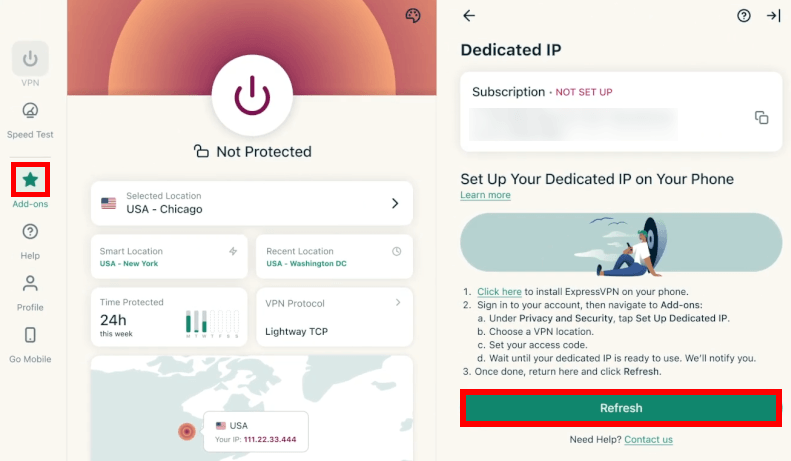
Setting up a dedicated IP with ExpressVPN is a bit different than other providers because of their commitment to anonymity. Instead of just clicking a button, you’ll use an access code system to ensure your new IP is never linked to your email or billing info.
Here is the exact process I followed to get up and running:
- Choose your plan: Log in to your ExpressVPN account dashboard. You can add a dedicated IP to any existing subscription, or choose the Pro Plan which now includes it.
- Purchase the add-on: Select your preferred location from the 29 available spots (like Los Angeles, London, or Tokyo).
- Generate your access code: This is the most important step. ExpressVPN will provide a unique code. Save this immediately. Because of their zero-knowledge tech, if you lose this code, they cannot recover it for you.
- Activate in the app: Open your ExpressVPN app on Windows, iOS, or Android. Go to the “Dedicated IP” tab, enter your code, and your new static address will appear as a permanent connection option.
Is ExpressVPN’s dedicated IP right for you?
ExpressVPN has finally bridged the gap between static stability and total anonymity. By using blinded-token technology and expanding to 14 simultaneous connections, they’ve made it possible to maintain a consistent online identity for banking and remote work without creating a traceable digital paper trail.
If you already value ExpressVPN’s performance and want to eliminate “bad neighbor” issues like constant CAPTCHAs, this is a no-brainer upgrade. You get the stability of a fixed IP with the same zero-knowledge privacy the brand is known for. For the best deal, make sure to use our coupon below when signing up. You can even test it risk-free with their 30-day money-back guarantee.
ExpressVPN Coupon:
Sign up for the 2-year plan and get 4 months added to your subscription for free.
(Coupon is applied automatically)
Who should look elsewhere?
- For the best value: Surfshark offers unlimited devices for a lower price.
- For more locations: NordVPN covers 27 countries.
- For self-hosting: OVPN provides the public IPv4 addresses power users need.
Ultimately, a dedicated IP is a powerful tool for your privacy toolkit. Just ensure your chosen provider backs their claims with a recent third-party audit to keep your static identity truly secure.
ExpressVPN dedicated IP address FAQs
The ExpressVPN dedicated IP is now included in the Pro Plan ($5.99/month), but it’s also available as an add-on for other tiers. If you are on the Basic or Advanced plans, expect to pay between $2.79 and $3.59 per month, depending on your subscription length. In my experience, committing to the 2-year Pro bundle is the best value if you want the full suite of identity protections alongside your static IP.
No, ExpressVPN uses a unique zero-knowledge allocation system that ensures even they cannot link your dedicated IP to your account. Unlike most providers who simply assign an IP to your user ID, ExpressVPN uses blinded tokens to decouple your payment info from the IP itself. All your configuration settings are processed in AWS Nitro Enclaves: Isolated, secure environments that prevent any internal data access.
You can now use your ExpressVPN dedicated IP on up to 14 devices simultaneously. This is a major jump from the previous 8-device limit, and it’s plenty for most households or power users with a full desk of gear. I’ve tested it across my phone, tablet, and laptop at the same time, and the static address remained consistent across every single one.
As of now, ExpressVPN offers dedicated IPs in 29 locations across 22 countries. You can choose from major hubs like the US (7 cities), UK, Japan, Germany, and Canada. While their standard shared network covers over 100 countries, they’ve focused these exclusive IPs in high-demand regions to ensure the best possible speeds for banking and remote work.
Currently, you cannot assign a dedicated IP directly through the ExpressVPN router app or Aircove firmware. You can set it up on individual devices like your PC, Mac, or phone, but if you need a static IP for your entire home network, you’ll need to wait for further firmware updates or stick to device-level apps.
It won’t stop 100% of them, but it significantly reduces annoying verification prompts. Because you aren’t sharing your IP with thousands of other users (some of whom might be bots), websites are less likely to flag your traffic as suspicious. I’ve found it especially helpful for smoother browsing on banking sites and Google Search.

Leave a Reply