
Reused or weak passwords across your family’s devices leave your household exposed every single day. Coordinating secure access for everyone from kids to grandparents adds layers of complexity that basic solutions simply cannot handle.
Family-specific password managers cut through this complexity with encrypted sharing, password generators, health checks, and multi-device support that make protection effortless. Our comparison of the top contenders highlights the differences in features, pricing, and usability to help you decide which one best matches your household’s security, convenience, and cost needs.
Before we jump in, you can skip straight to our top pick if you’re in a hurry — no judgment, we’ve all been there. But if you want the full story, we spent weeks testing the most popular family password managers across households, juggling shared vaults, evaluating emergency access, and stress-testing security tools to see which ones could truly make family life easier.
And why trust us? Because we actually live with these tools — not just spin up demo accounts. We tested them on iPhones, Androids, Chromebooks, desktops, and that one family tablet covered in mystery fingerprints.
We looked at everything: Security architecture, ease of onboarding less tech-savvy relatives, shared password workflows, pricing, and whether support actually helps when you inevitably click “Forgot Master Password.” The result? A clear, honest guide to the best family password managers of 2026. Let’s dive in.
2026’s best password managers for families
Keeping your family’s logins safe shouldn’t be complicated — so we tested the top picks and found five password managers that actually make digital life easier:
- NordPass – Fast, intuitive, and perfect for large or busy families.
- RoboForm – Simple, reliable, and budget-friendly.
- Proton Pass – Privacy-first protection for households that want total peace of mind.
- Bitwarden – A powerhouse at a price any family can afford.
- 1Password – Still the king of organized, secure family sharing.
Whether you want something sleek, something private, or something affordable, one of these picks will fit right into your household’s routine.
NordPass – Best for complete security and family-friendly simplicity
| Family plan price | $6.24/month (as low as $2.68/month with a coupon) |
| Number of users | 6 individual premium accounts per family |
| Platforms supported | iPhone, iPad, Android, Windows, macOS, Linux, and all major browsers |
| Family-friendly tools | Secure item sharing, password health reports for all members, data breach scanning, emergency access, and email masking |
| Setup difficulty | Extremely easy, ideal for mixed-skill households |
| Best deal | 57% Off Coupon > |
NordPass is one of the strongest all-around choices for families this year, thanks to its mix of rock-solid security, intuitive design, and an affordable plan that covers everyone in the house. Built by the cybersecurity team behind NordVPN, it brings serious tech under the hood — but keeps everything simple enough that even the least tech-savvy family member can use it without stress.
What makes NordPass shine for families is its next-gen XChaCha20 encryption and zero-knowledge architecture, meaning every login, note, and credit card stays fully private. Even NordPass can’t read your vault. Pair that with easy Face ID/Touch ID unlocking and smooth auto fill on every device, and you’ve got a password manager that quietly handles the hard stuff while your family just logs in and goes.
The Family Plan is where NordPass really hits its stride. You get six premium accounts, each with their own private vault — no awkward sharing, no mixed-up logins, no “Mom, what’s the Netflix password again?” Premium features like password health reports, a data breach scanner, secure item sharing, and email masking are available to every member. It’s a solid safety net for families who want extra protection without fiddling with settings all day.
If you’re wondering how it all stacks up cost-wise, the pricing table below lays it out clearly:
| NordPass plans | Premium | Family |
|---|---|---|
| 1-year | $1.99/month | $3.69/month |
| 2-year | $1.24/month | $2.39/month |
Exclusive Deal: Get 57% OFF NordPass here >
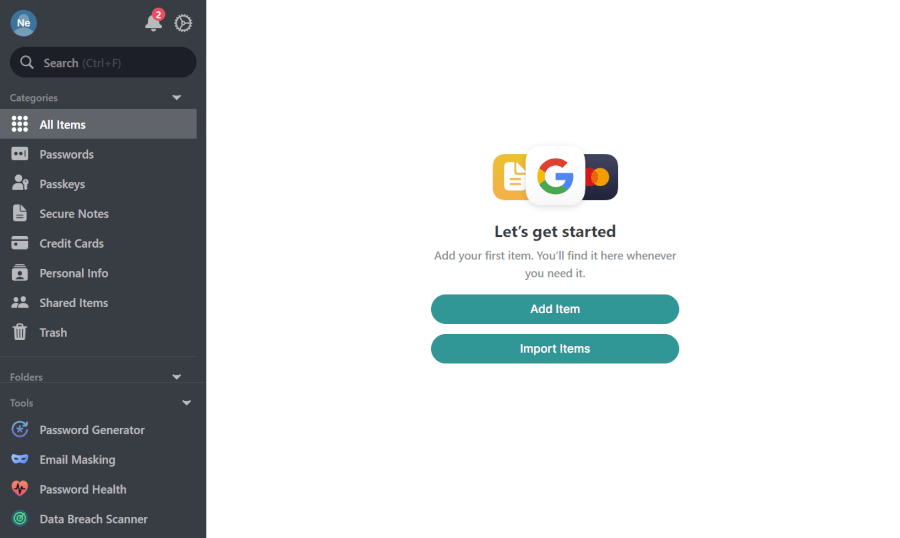
NordPass also scores bonus points for being incredibly easy to set up. The apps are clean and uncluttered, the onboarding is quick, and cross-platform syncing means every family member can use their preferred device — iPhone, iPad, Android, Windows, Mac, you name it. Even features like emergency access (a lifesaver for families) take just a minute to configure.
There are a few limitations to note: Sharing items can feel a bit clunky compared to 1Password’s smooth shared vaults, and the six-user cap won’t fit larger households. But for most families, the balance of price, privacy, and ease of use is hard to beat.
+ Pros
- 2FA support
- 30-day money-back guarantee
- All data stored in the cloud and on devices
- Biometric authentication available
- Cutting-edge XChaCha20 encryption
- Cross-platform support
- Full-featured free edition
- Intuitive, user-friendly UI
– Cons
- Poor password filtering options
- The free plan works on one device only
NordPass Exclusive Deal:
Get 55% Off NordPass plans plus 4 months extra with the coupon below:
(Coupon is applied automatically; 30-day money-back guarantee.)
RoboForm – Family Password protection that won’t break the bank
| Family plan price | $3.98/month (as low as $1.59/month with current 60% off deals) |
| Number of users | 5 individual premium accounts per family |
| Platforms supported | iPhone, iPad, Android, Windows, macOS, Linux, and all major browsers |
| Family-friendly tools | Secure shared folders, form-filling for logins and complex forms, password auditing, data breach monitoring, emergency access, and customizable permissions |
| Setup difficulty | Very easy, perfect for households with mixed tech comfort levels |
| Best deal | 60% Off Coupon > |
RoboForm has been around for over 20 years, but don’t let its age fool you — it’s still one of the most dependable, family-friendly password managers you can get for the price. It started life as a simple form-filler (and still absolutely crushes that job), but today it’s a full-fledged password manager that works on every major device without feeling complicated.
| RoboForm paid plans | Premium | Family | Business |
| Price | $2.49/month ($0.99 with our coupon) | $1.59/month | $3.33/user/month |
| Devices | Unlimited | 5 accounts | Multiple users |
| Support | Priority support with phone/live chat | Priority support | Admin controls and dedicated manager |
The Family plan covers up to five premium accounts, giving everyone — parents, kids, even tech-shy grandparents — their own private vault.
You get AES-256 encryption, a zero-knowledge security model, and more than two decades of clean security history (yep, no breaches in 25 years). Add in fast autofill, shared folders, and dark web monitoring, and the whole family stays organized and protected without having to do any extra work.
And since RoboForm still has the best form-filling engine in the game, it’s perfect for school portals, doctor forms, online shopping, and those endless address fields that nobody wants to type again.
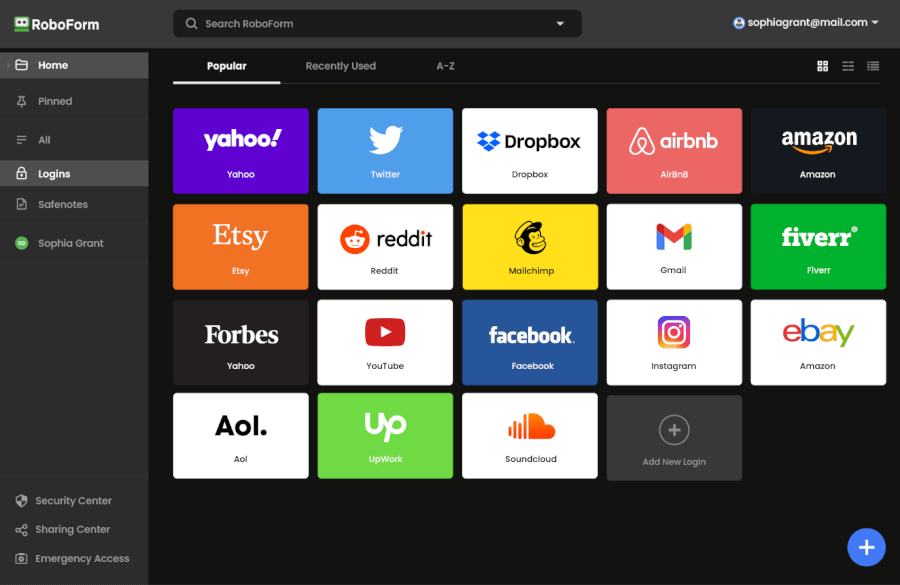
The interface gets the job done, but compared to the sleek dashboards of 1Password or NordPass, it can look a bit old-school. Some sharing features only work with other RoboForm users, so every family member needs their own account (the free tier works fine, though). And unlike premium competitors, you won’t find any extras like built-in VPNs or encrypted file storage here.
RoboForm is perfect for families who want dependable password protection without paying premium prices. If you care more about security, speed, and ease of use than having a flashy interface or extra bells and whistles, this is a fantastic pick.
It’s especially great if your household fills out a ton of online forms (shopping, school paperwork, sports registrations, the works). You’ll save time, stay secure, and spend way less than you would with most competitors.
+ Pros
- Advanced 2FA support, including email, SMS, authenticator app, passkey, trusted device, hardware security key
- 14-day free trials with the business plan (for up to 30 users)
- 24/7 customer support and knowledgebase
- 30-day free trial with the personal and the family plan
- 30-day money-back guarantee
- A free plan for life
- Best-in-class login automation
- Data encrypted in transit and at rest
- Data breach monitoring for 5 emails
- Individual, family, and business plans
- Passwords encrypted locally
- Pocket-friendly pricing
- Simple setup
- Supports all major platforms and apps
– Cons
- No monthly billing option
- No sync across all devices with the free plan
- No live chat support for free users
RoboForm Exclusive Coupon:
Get 60% Off RoboForm 1-year subscription plans using the coupon below.
(Coupon is applied automatically; 30-day money-back guarantee.)
Proton Pass – The privacy powerhouse for security-first families
| Family plan price | $4.99 /month (60% off currently) |
| Number of users | Up to 6 private premium accounts |
| Platforms supported | iPhone, iPad, Android, Windows, macOS, Linux, and all major browsers |
| Family-friendly tools | Shared vaults, secure item sharing, email aliases, 2FA, dark web monitoring, emergency access, passkeys, and Proton Sentinel threat protection |
| Setup difficulty | Easy enough for kids, grandparents, and everyone in between |
| Best deal | 60% Off Coupon > |
If your family treats online privacy like a team sport, Proton Pass is the MVP. Built by the makers of Proton Mail and Proton VPN, it delivers serious, audit-backed security wrapped in a clean, no-nonsense interface. It’s open-source, end-to-end encrypted, and designed for households that want maximum protection without sacrificing usability.
The real standout here? Email aliases. Each person can generate endless “fake” email addresses to block trackers, spam, and data breaches — a lifesaver for families with kids signing up for apps, games, and school portals.
Curious what you get for the price? Here’s a quick overview of the Proton Pass plans:
| Proton Pass plans | Proton Free | Pass Plus | Pass Family | Proton Unlimited |
|---|---|---|---|---|
| 1-month | $0/month | $4.99/month | $6.99/month | $12.99/month |
| 1-year | $0/month | $2.49/month | $4.99/month | $9.99/month |
Deal: Get 55% OFF on Proton Pass’ yearly plans >
Security-wise, Proton Pass goes above and beyond. There’s passkey support for passwordless logins, built-in 2FA so you don’t need a separate authenticator app, and Proton Sentinel, an AI-powered watchdog that monitors for suspicious activity and shuts it down in real time. Add dark web alerts on top, and you’ve got one of the safest setups available for family use.
All that power comes wrapped in a clean, simple interface — take a look at how Proton Pass looks on desktop:
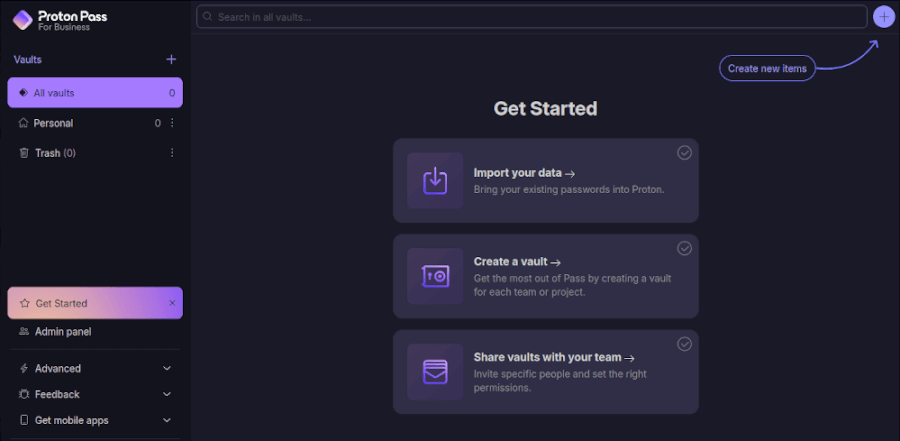
Shared vaults make organizing household logins a breeze, while each member retains full privacy over their personal credentials. The admin panel also makes managing your household fast and painless — adding or removing family members takes a few clicks. For privacy-minded homes or anyone already using Proton Mail or Proton VPN, this ecosystem feels like unlocking “expert mode” on digital security.
+ Pros
- End-to-end encryption for all stored data
- Open-source with regular security audits
- Integrated 2FA support
- Supports passkeys for passwordless logins
- Secure sharing feature for passwords and notes
- Cross-platform support (Windows, macOS, Linux, iOS, Android, and browsers)
- Includes a built-in email aliasing feature for privacy
- Free plan available with essential features
– Cons
- Less intuitive interface compared to competitors
Bitwarden – Best open-source option for privacy-focused families

| Family plan price | $3.33/month |
| Number of users | 6 premium accounts (shared and private vaults) |
| Platforms supported | iPhone, iPad, Android, Windows, macOS, Linux, and all major browsers |
| Family-friendly tools | Shared vaults via Collections, emergency access, password health reports, Passkeys, built-in 2FA, encrypted file attachments |
| Setup difficulty | Easy overall, though less tech-savvy users may want a quick walkthrough |
| Best deal | 7-day free trial |
If your family wants rock-solid security without the premium price tag, Bitwarden deserves a spot at the top of your shortlist. It’s open-source, endlessly customizable, and one of the most budget-friendly family password managers available — all while delivering the kind of transparency and control few competitors can match.
Bitwarden hits that rare sweet spot: It’s both powerful enough for tech-savvy parents and simple enough for kids and grandparents to use once everything is set up. The free plan alone is surprisingly generous — unlimited passwords, unlimited devices, and strong security right out of the box. But the Family plan is where things really take off.
Every family member gets their own private premium vault, plus access to shared Collections for things like streaming services, home Wi-Fi credentials, or school logins. You can set custom permissions, manage who can see what, and keep everyone organized without stepping on each other’s digital toes.
Security is classic Bitwarden: open-source, fully audited, AES-256 encrypted, and completely zero-knowledge. Whether you trust the cloud sync or prefer to self-host your own vault server (yes, really), Bitwarden gives you control that most managers simply can’t match.
Bitwarden supports everything: 2FA, passkeys, hardware keys like YubiKey, secure notes, password health reports, and even encrypted file attachments (up to 1GB total for the family plan). You also get Emergency Access, letting a trusted person retrieve your vault if something happens — a must-have for modern families. And with support for every major platform and browser, it fits perfectly into mixed-device households.
Here’s where you can explore the full Bitwarden Family pricing breakdown and decide whether the upgrade makes sense for your household:
| Bitwarden plans | Free | Premium | Families |
|---|---|---|---|
| 1-year | $0/month | $1.65/month | $3.99/month |
+ Pros
- Ability to use self-hosted server
- A free, open-source solution
- Excellent free forever edition
- Provides apps for all popular platforms
- Pocket-friendly pricing
- Securely syncs passwords between all your devices
- Solid password generator
– Cons
- Based in the USA (privacy issues)
- Customer support needs improvement
1Password – The security-first password manager families can actually enjoy using
| Family plan price | $3.59/month |
| Number of users | 6 premium accounts (each with private and shared vaults) |
| Platforms supported | iPhone, iPad, Android, Windows, macOS, Linux, and all major browsers |
| Family-friendly tools | Shared vaults via Collections, emergency account recovery, password health reports, Passkeys, built-in 2FA/TOTP, encrypted file attachments |
| Setup difficulty | Easy overall, beginners may need a quick walkthrough |
| Best deal | 14-day free trial > |
If your family wants rock-solid security without the confusing setup (or the “Wait, where do I click?” moments), 1Password is one of the best choices you can make in 2026. It’s clean, intuitive, and built with layers of protection that go far beyond your average password manager.
What makes it stand out for families is how much of the “tech stress” it removes. Instead of juggling endless logins or dealing with forgotten passwords, everyone gets a smooth onboarding experience thanks to 1Password’s guided setup. Even less tech-savvy family members (kids, parents, grandparents) can start saving and organizing their passwords confidently within minutes.
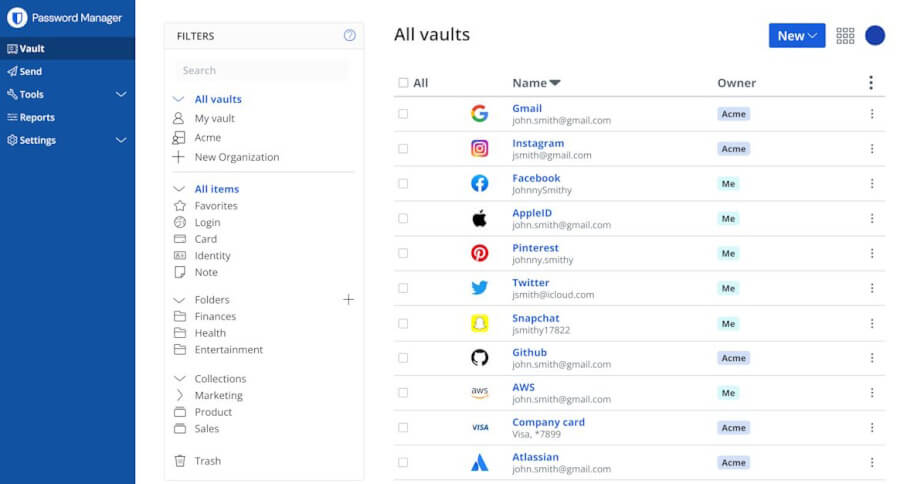
The moment you land in the dashboard, everything clicks — organized vaults, clear shortcuts, and a layout that feels instantly familiar to anyone in the family:
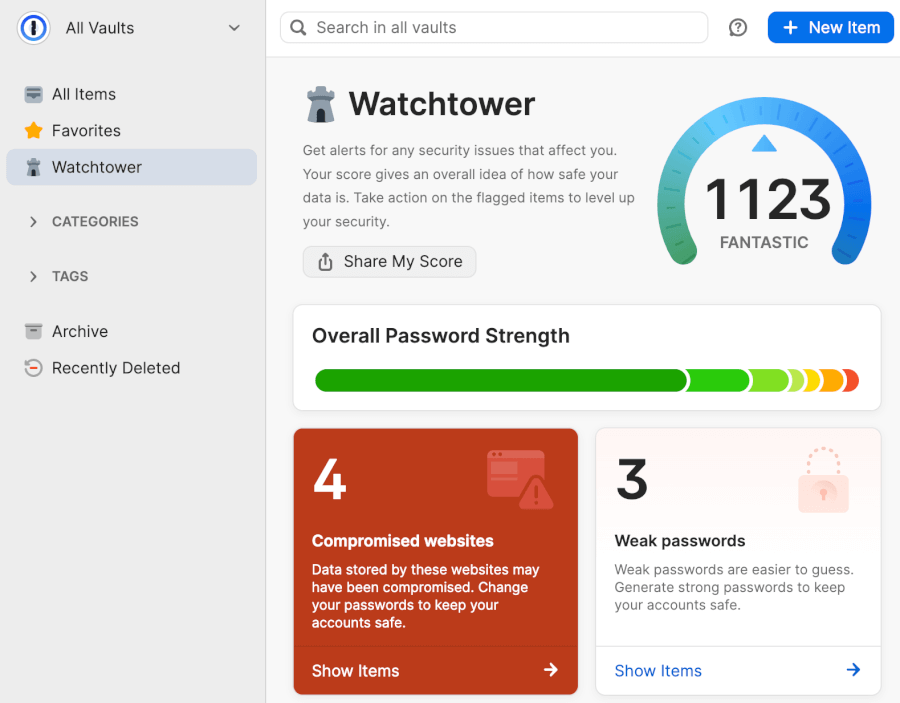
Security-wise, 1Password is fully loaded. It uses AES-256 encryption plus a unique Secret Key that adds an extra layer of protection on top of your master password. In simple terms: Even if someone got hold of your master password, they still couldn’t crack your vault. Add features like 2FA, Travel Mode, and the Watchtower health checker, and you’re getting protection that rivals what big businesses use.
The 1Password Family Plan keeps things simple by covering up to five people under one subscription, with the option to add extra members for just a bit more. Each person gets their own private vault plus access to shared spaces for the things everyone needs (Wi-Fi passwords, school logins, streaming accounts, you name it). All the good stuff is included too: Watchtower alerts for weak or breached passwords, built-in 2FA/TOTP, and the extra security boost of 1Password’s unique Secret Key.
Here’s a quick look at how the pricing breaks down:
| 1Password plans | Individual | Family | Teams Starter Pack (up to 10 users) | Business |
|---|---|---|---|---|
| 1-month | $4.99/month | $7.99/month | $24.95/month | $9.99/user/month |
| 1-year | $2.99/month | $4.49/month | $19.95/month | $7.99/user/month |
Deal: Get the best deal on 1Password’s yearly plans >
Parents will especially appreciate the Organizer tools. Instead of digging through anyone’s vault, you can help family members recover their accounts, set permissions for shared vaults, and keep an eye on overall password hygiene. It’s supportive, not snoopy.
Travel a lot? Travel Mode makes it effortless to temporarily hide sensitive vaults from your devices before crossing borders. Add in the clean, intuitive dashboard that works the same across phones, tablets, and desktops, and the Family Plan feels tailor-made for busy households.
+ Pros
- Advanced reports and analysis
- Alternative sync strategies are supported
- Simple to use
- Supports 2FA, MFA, and TOTP
- Features a handy travel mode
- “Secret Key” feature
- Watchtower password strength checker
– Cons
- Based in Canada (privacy issues)
- No free tier
- No telephone or live chat support
Why every family needs a password manager in 2026
Managing passwords for a household can quickly become chaotic. Using weak or repeated passwords across accounts puts your family at risk, and remembering dozens of logins is stressful. A password manager solves both problems, keeping every account secure, organized, and easy to access.
For families, the real value comes from the features designed to simplify life and enhance safety:
- Strong, unique passwords: Automatically generate complex passwords for every account, preventing reuse and cracking.
- Secure sharing: Share logins for streaming services, school accounts, or smart home devices without texting passwords.
- Autofill across devices: Fill credentials automatically on phones, tablets, and computers to save time.
- Dark web monitoring: Get alerts if any family member’s credentials appear in breaches.
- Emergency access: Allow a trusted relative to access vaults in case of an unexpected event.
- Private and shared vaults: Each member has a personal vault while shared vaults keep household logins organized.
- Biometric login: Fingerprint and Face ID support for quick, secure access, especially for kids.
- Encrypted storage: Safely store credit cards, software licenses, and secure notes in one place.
- Password health reports: Monitor weak, reused, or compromised passwords.
- Educational opportunity: Teach children and relatives about good cybersecurity practices in a hands-on way.
- Travel Mode: Hide sensitive info temporarily when crossing borders (if supported).
A good family password manager goes beyond security — it brings order, simplicity, and peace of mind to everyday digital life. With the right pick, everyone in your household can stay safe and log in stress-free.
How to set up a family password manager (step-by-step guide)
Getting your family on the same page with password management is one of those small changes that yields huge peace of mind. You’d be surprised how easy it is to securely organize all those logins.
Use our family-friendly guide for a smooth transition to secure passwords:
- Start by choosing a manager that fits your family’s needs. Look for strong security (zero-knowledge encryption, MFA), simple apps for all ages, secure sharing, and smooth syncing across every device in your home.
- Pick a family plan that covers everyone. Most support five to ten users and include shared vaults for joint accounts plus private vaults for personal logins. It keeps shared passwords organized without mixing them with personal stuff.
- Create and secure the primary account. The organizer sets the rules, so choose someone comfortable with the settings. Use a strong, memorable master password and enable two-factor authentication from the start.
- Invite your family members. Send invites from the dashboard and let each person create their own master password and private vault. You can help younger or less techy members with setup or recovery later.
- Organize your vaults early. Import existing passwords, then sort them into shared and private spaces. Shared vaults work great for things like Netflix, Wi-Fi, and household accounts, while personal logins stay separate.
- Turn on helpful features like autofill, autosave, breach monitoring, and password health checks. These tools keep everyone safer and make strong passwords effortless.
- Set up a recovery plan. Add a second organizer and store recovery codes or an emergency kit in a secure place. It’s a simple safety net if anyone forgets their master password.
With everything in place, your family gets one secure, organized system that makes online life simpler sailing.
Keeping your family password manager effective long-term
Once you have your password manager live across every device, turn it into lasting protection with easy routines. Gather everyone (ideally monthly) to scan password health reports together and fix weak or exposed entries before problems start.
Adjust sharing permissions as kids grow or household needs shift, and designate a trusted emergency administrator right away. These small habits ensure whichever solution you pick keeps delivering strong security and effortless convenience year after year.
Family password managers: What to choose and why
The trick to choosing the right family password manager this year is finding that sweet spot between staying super secure and keeping things easy to use. Thankfully, our top picks — NordPass, RoboForm, Proton Pass, 1Password, and Bitwarden — all bring something valuable to the table. Whether your family prioritizes strong protection, budget, or simple apps, you’ll find the perfect match here.
Understanding your household’s specific needs (like secure sharing, strong encryption, or emergency access) is what truly matters. Pinpointing those core features makes it much easier to choose confidently and avoid headaches later on.
The best part? Getting started is surprisingly easy. A quick setup helps your whole family ditch weak passwords, stay ahead of breaches, and enjoy safer, smoother logins everywhere. Pick your manager, set it up once, and enjoy the peace of mind.
Best family password manager FAQ
What is the best password manager for families in 2026?
NordPass is our top pick for families this year thanks to its combination of rock-solid security, easy setup, and family-focused features like shared and private vaults. Other excellent options include 1Password, Bitwarden, RoboForm, and Proton Pass, which shine for affordability, advanced security, or extra privacy controls depending on your family’s needs.
How many users can a family password manager support?
Most family plans cover five to six users, and many let you add extra members for a small fee. This ensures that every family member (from kids to grandparents) can have their own secure vault while still sharing necessary accounts safely.
Is a password manager safe for children and teens?
Yes. Family password managers are built with safety in mind, offering private vaults, secure sharing, two-factor authentication, and optional parental controls. These features help kids and teens navigate online accounts safely, while giving parents peace of mind.
Can I share passwords securely with family members?
Absolutely. Modern password managers let you share logins without revealing the actual passwords. You can set permissions for who can view or edit credentials, revoke access instantly, and trust that all shared data is encrypted end-to-end.
Can password managers protect against data breaches and hacking?
Most leading managers, including NordPass, provide breach alerts and dark web monitoring. When combined with strong, unique passwords for every account, these features make it far harder for hackers to compromise your family’s digital life.
Do I need a password manager if I already use browser-based password saving?
Yes. Built-in browser managers are convenient but often lack advanced security features, cross-device syncing, secure sharing, and breach alerts. A dedicated family password manager ensures stronger protection, better organization, and peace of mind for everyone in your household.

Leave a Reply