
The steady stream of new online accounts you sign up for makes managing strong passwords manually impractical. RoboForm and 1Password fix this by automatically generating complex unique credentials, encrypting them securely, and autofilling logins effortlessly across all your devices.
Their differences show up in form-filling precision, vault organization, extra tools such as breach alerts and sharing options, platform reach, and pricing plans. This side-by-side guide lays out the facts you need to select the password manager that matches your workflow and keeps your digital life protected without extra hassle.
That’s exactly why we put both password managers through our full hands-on testing process (see how we test password managers) to evaluate everything from day-to-day usability to long-term security and price-to-value ratios. And yes, we tested them on multiple devices, filled endless forms, and even intentionally “forgot” passwords to check recovery systems.
| RoboForm | 1Password | |
| Website | RoboForm.com | 1password.com |
| Platforms | Windows, macOS, Linux, Android, and iOS | Windows, macOS, Linux, Android, iOS |
| Browser extensions | Chrome, Firefox, Opera, Edge, and Safari | Chrome, Firefox, Safari, Brave, and Edge |
| Encryption | AES 256-bit | AES 256-bit |
| Support | Live chat, email, phone | Chatbot, email, knowledge base |
| Price | From $0.99/month | From $2.39/month |
| Best deal | 60% Off Coupon > | 14-day free trial > |
Here’s what we’ll dig into in this RoboForm vs NordPass comparison — all the stuff that actually matters when you’re picking a password manager:
- Background check: Who built them, where they’re based, and whether their reputation holds up under a microscope.
- Platform compatibility: Because a great password manager is useless if it skips your laptop, phone, or browser.
- Core and premium features: The essentials, the extras, and everything that makes each tool shine.
- Ease of use: How smoothly they slot into your daily routine without adding extra digital chaos.
- Security and encryption: The behind-the-scenes tech that keeps your vault locked tight.
- Privacy policy: The fine print that tells you who’s peeking — or not.
- Plans and pricing: Whether they’re wallet-friendly or secretly draining your subscription budget.
- Customer support: When trouble hits, who answers — and how fast?
Alright, let’s kick things off with a quick background check on both NordPass and RoboForm.
Background check: Company information and history of security incidents
Before we start comparing security tricks and premium perks, let’s quickly check who’s running RoboForm and 1Password — and whether their track records inspire real trust.
RoboForm: A veteran with a spotless track record
| Starting price | $0.99/month |
| Platforms supported | Windows, macOS, Linux, Android, and iOS |
| Encryption | 256-bit AES |
| Extra privacy and security tools | 2FA, password audit, shared folder, cloud backup |
| Best deal | 60% Off Coupon > |
RoboForm has been around longer than most of its competitors — and yes, even longer than 1Password. Launched back in 2000 by Siber Systems in Fairfax, Virginia, it originally started as a simple form-filling helper. But as passwords took over our digital lives, RoboForm evolved into a full-featured password manager with support for Windows, macOS, Linux, iOS, and Android.
Two decades later, RoboForm still holds its ground with strong AES-256 encryption, a true zero-knowledge model, and a reputation for reliability. Independent auditors have repeatedly verified its security (including a 2025 audit by Secfault Security), and importantly, RoboForm has never experienced a breach affecting customer vaults.
The only eyebrow-raiser is its US headquarters. Being under Five Eyes jurisdiction means the government can request data, though thanks to its zero-knowledge design, there’s nothing meaningful RoboForm could hand over even if asked. Still, strict-privacy users may take note.
But overall? RoboForm has a remarkably clean history for a tool with over 20 years on the front lines of cybersecurity.
RoboForm Exclusive Coupon:
Get 60% Off RoboForm 1-year subscription plans using the coupon below.
(Coupon is applied automatically; 30-day money-back guarantee.)
1Password: A modern powerhouse with impeccable security discipline
| Starting price | $2.39/month |
| Platforms supported | Windows, macOS, Linux, Android, and iOS |
| Encryption | AES-256 + Secret Key |
| Extra privacy and security tools | Secure password sharing, password and username generator, Watchtower password health checker, Travel Mode, and 2FA/TOTP support |
| Best deal | 14-day free trial > |
If RoboForm is the old reliable, 1Password is the polished industry leader that’s earned its reputation the hard way — by consistently getting privacy and security right.
Developed by AgileBits (founded in 2005) and headquartered in Toronto, Canada, 1Password quickly became a favorite among individuals and businesses alike. Today, it’s one of the most widely adopted password managers on the planet, trusted by millions and used across Fortune 500 companies.
Its security design goes beyond standard AES-256 encryption. The real star is the Secret Key — a locally generated code known only to you, never sent to 1Password, and required to decrypt your vault. Combined with a zero-knowledge model and optional biometrics, it makes 1Password’s vaults extremely resilient to attacks.
Like RoboForm, 1Password has never had a breach of user vaults. It has, however, faced a few indirect incidents — including fallout from the Okta breach in 2023 and a macOS vulnerability in 2024. In both cases, no user data was exposed, and fixes were issued almost immediately.
1Password also goes beyond the basics with SOC 2 Type II certification, continuous audits, and an active HackerOne bug bounty program — all signs of a company that takes security seriously.
Platform support: Which works on more devices, RoboForm or 1Password?
A password manager isn’t worth much if it can’t keep up with your daily routine, whether you’re hopping between laptops, juggling browsers, or tapping through logins on your phone. The good news?
Both RoboForm and 1Password cover all the major operating systems and browsers most people rely on, so you’re unlikely to run into compatibility headaches with either one.
| Platform / browser | RoboForm | 1Password |
| Windows | ✅ (Vista+) | ✅ (10+) |
| macOS | ✅ (10.13+) | ✅ (10.15+) |
| Linux | ⚠️ Extension only | ✅ |
| Chrome OS | ⚠️ Extension only | ⚠️ Extension only |
| Android | ✅ (5.0+) | ✅ (9.0+) |
| iOS | ✅ (13.0+) | ✅ (15.5+) |
| Browser extensions | Chrome, Firefox, Safari, Edge, Opera, Brave, IE, Tor | Chrome, Firefox, Safari, Edge, Brave |
The biggest difference shows up on Linux. 1Password goes all-in with a proper native Linux app (plus a full command-line tool), while RoboForm sticks to browser extensions only. On the flip side, RoboForm supports a wider range of niche or older browsers — including Opera, Internet Explorer, and even Tor — giving it a slight edge if you live outside the “big four” browsers.
On mobile, both offer polished apps for iOS and Android, and once you’re on a paid plan, you can sync across as many devices as you want. The only limit comes with RoboForm’s free tier, which is restricted to a single device, while 1Password skips the free-forever model altogether.
Features: RoboForm or 1Password, which has the strongest features?
Side-by-side, 1Password takes the lead on advanced tools and polish, while RoboForm keeps things simple, solid, and budget-friendly. Both are secure, but they cater to different needs.
Here’s how each one handles the key features you’ll use every day.
Importing/exporting passwords
Whether you’re jumping ship from another password manager or escaping your browser’s cluttered password list, both RoboForm and 1Password make migration pretty painless.
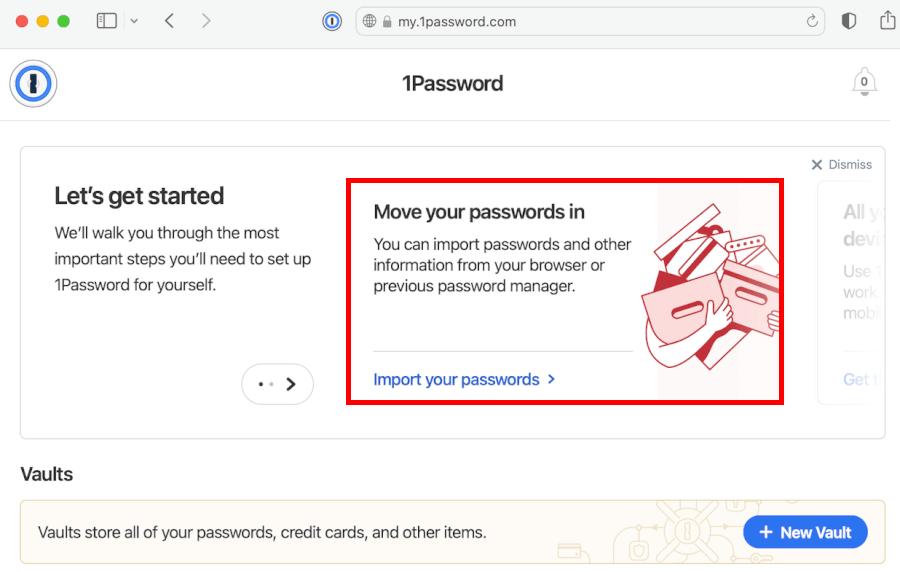
1Password gives you a smoother experience. Its import wizard supports a wide range of competitors (like LastPass, Bitwarden, Dashlane, and yes — RoboForm itself). During testing, we were able to pull in entire vaults in a couple of minutes, with 1Password neatly sorting everything into the right categories. Exporting is also polished, though limited to its desktop app. You can create secure 1Password-format backups or use a standard CSV if you need something universal.
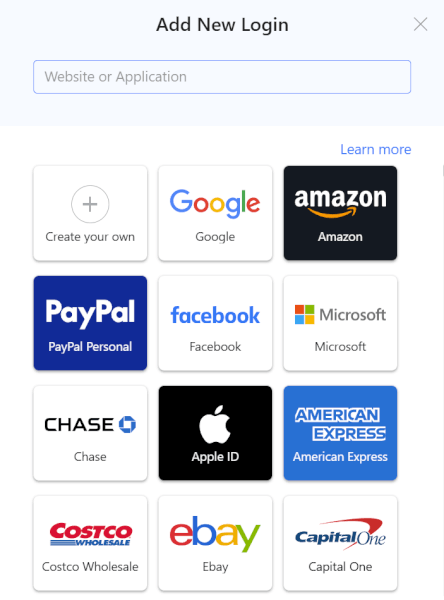
RoboForm, on the other hand, does exactly what you’d expect: It works quickly and supports every major platform. You can import from other managers (including 1Password) or from browsers like Chrome and Edge. It doesn’t feel as slick as 1Password’s setup, but it gets the job done with zero fuss. Exporting is similarly straightforward, and the app doesn’t hide it behind paywalls or complicated menus.
If you’re switching services often or managing multiple vaults, 1Password’s system feels more refined. For a one-time import, RoboForm is just as reliable — and a bit simpler.
Auto-filling and capturing login information
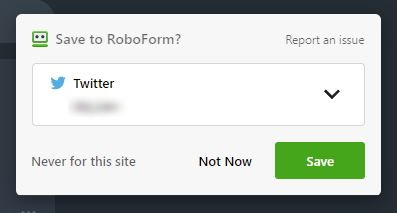
This is where RoboForm’s legacy really shows. RoboForm is still one of the best in the industry at auto-filling complex forms, especially long web forms with multiple fields. It detects login screens quickly, pops up in the right place, and fills everything in with almost eerie precision. Capturing new logins is equally smooth — anytime you sign in somewhere new, RoboForm immediately offers to save the credentials.
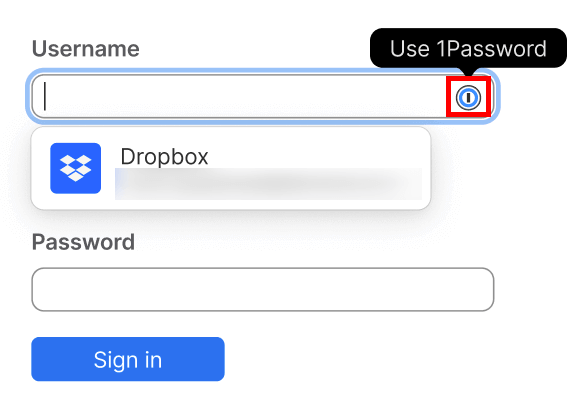
1Password takes a more modern approach. Its in-line suggestions are sleek, consistent, and work well across desktop, mobile, and browser extensions. During our testing, it recognized tricky login pages, handled password updates gracefully, and filled in personal info (like addresses and card details) better than RoboForm. However, for very long or unusual web forms, RoboForm still has the accuracy advantage.
Creating strong passwords
Both password managers can generate secure, uncrackable passwords, but they take different approaches.
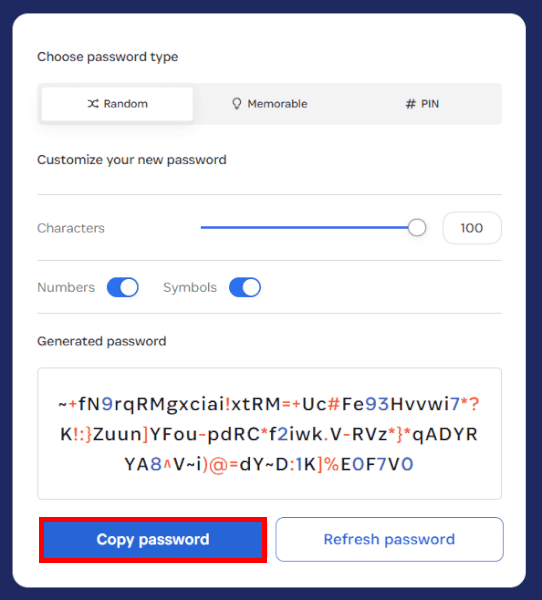
1Password gives you tons of flexibility. You can adjust length, toggle symbols, switch to passphrases, or let it automatically tailor passwords to a site’s specific rules (which saves everyone a lot of frustration). The generator works beautifully across browsers and mobile apps, and it’s smart enough to suggest stronger replacements whenever you create new accounts.
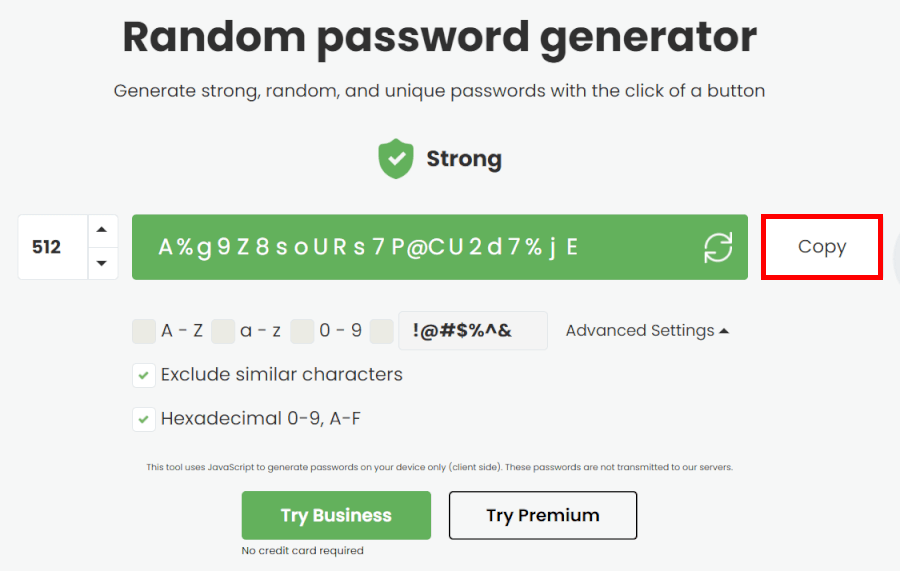
RoboForm keeps things simple — but powerful. Its generator can create extremely long passwords (far longer than you’ll ever need in real life), and it gives you useful toggles like excluding look-alike characters or generating hexadecimal strings. It’s fast, accessible wherever you are in the app, and doesn’t require a subscription to use.
1Password wins when you want flexibility and intelligent automation; RoboForm shines when you need straightforward strength without the fuss.
Next up, let’s see which one packs the better premium perks.
Premium features: Who’s got the real power-ups hidden inside?
Once you move past the basics, the real difference between RoboForm and 1Password shows up in their premium extras. This is where 1Password starts flexing with clever tools and layered security, while RoboForm sticks to practical upgrades that make everyday tasks faster and smoother. Both offer solid value — but they’re playing very different games.
Password audits: Who helps you clean up your vault?
Both apps help you spot weak or reused passwords, but the experience feels a little different.
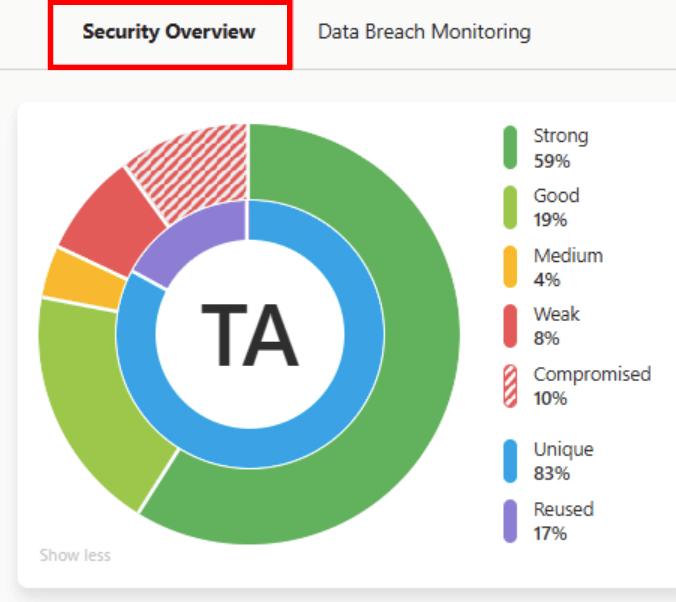
RoboForm keeps things simple. Head to the Security Center and it instantly scans your vault, calling out anything that needs attention — weak passwords, duplicates, or entries that might be compromised. It’s fast, direct, and perfect if you just want a quick health check without digging through menus.
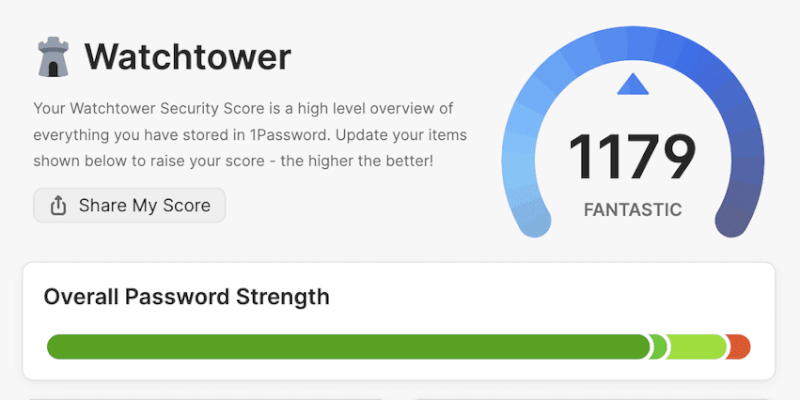
1Password, meanwhile, takes auditing to another level with its Watchtower dashboard. It checks for everything RoboForm does, plus extra details like exposed passwords, websites that now support 2FA, or accounts that could switch to passkeys. It’s more visual, more detailed, and more proactive.
If you like clean data and smart alerts, 1Password’s audit tools are the better power-up. If you want quick fixes without the fuss, RoboForm’s Security Center gets the job done.
1Password’s advanced toolkit: Where the magic happens
This is where 1Password pulls ahead. Its premium features weren’t just tacked on — they actually solve real problems:
- Travel Mode hides entire vaults on your device until you flip them back on. Perfect for crossing borders, lending a laptop, or anytime privacy matters most.
- Secret Key adds an extra barrier of encryption on top of your master password — essentially a lock inside a lock.
- Watchtower (mentioned above) constantly monitors your vault for issues and alerts you to new security options.
- Advanced sharing lets you send items securely to anyone — even people who don’t use 1Password — through time-limited links.
- Vault organization is beautifully polished, with tags, categories, and clean layouts that make even big vaults feel manageable.
These aren’t flashy gimmicks — they’re genuinely helpful tools that make 1Password feel premium.
RoboForm’s premium strengths: Practical, powerful, and budget-friendly
RoboForm’s premium perks are less about sparkle and more about convenience:
- The best form-filling in the business — still unmatched when it comes to long, complex web forms.
- Bookmark storage, which turns RoboForm into a central hub for frequently visited sites.
- Emergency Access, letting a trusted contact unlock your vault if something happens.
- Local storage options if you prefer keeping your data off the cloud.
- Windows app password capture, handy for people who live inside desktop apps rather than browsers.
It’s not as feature-rich as 1Password, but everything here is practical and genuinely helpful — especially at RoboForm’s lower price point.
User interface and ease of use: Which one feels more intuitive, RoboForm or 1Password?
Both 1Password and RoboForm are rock-solid in security, but daily usability is where a password manager really proves itself. So we tested each one from sign-up to autofill to see which feels smoother in real life.
Here’s how they stack up in three key areas.
Sign-up and installation
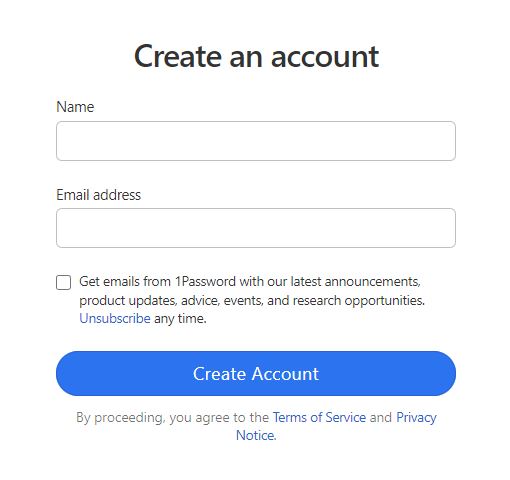
Getting started with 1Password feels polished but slightly more “formal.” You create your account on the website, start your trial, and then download the app or browser extension. The onboarding includes generating your Secret Key and saving the Emergency Kit, which adds a bit of setup time but also reinforces how seriously 1Password treats security. Once you’re in, everything syncs smoothly across devices.
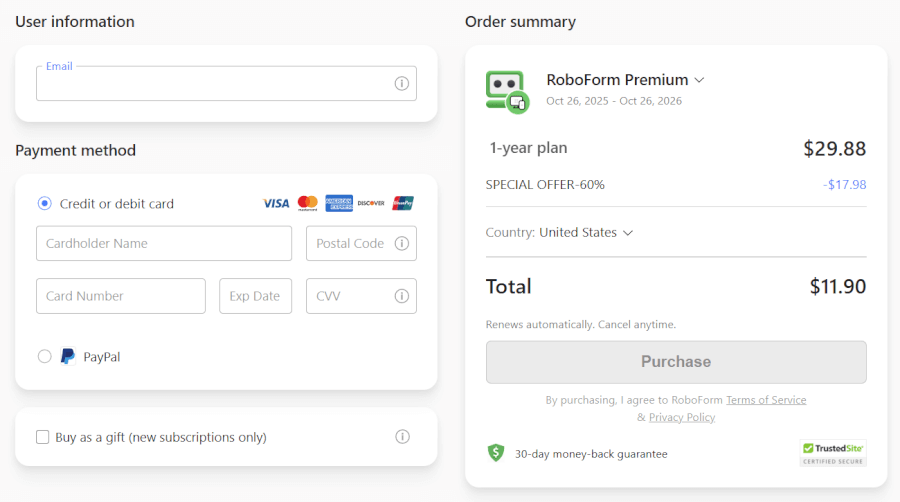
RoboForm is noticeably quicker to launch. You hit “Get RoboForm Free,” create an account, and you’re dropped straight into the app. The browser extension installs in seconds, and the system feels ready to use almost immediately. There’s no extra paperwork, just a short intro video that helps you get your bearings. If you just want to jump in and start saving passwords, RoboForm definitely gets you there faster.
User interface
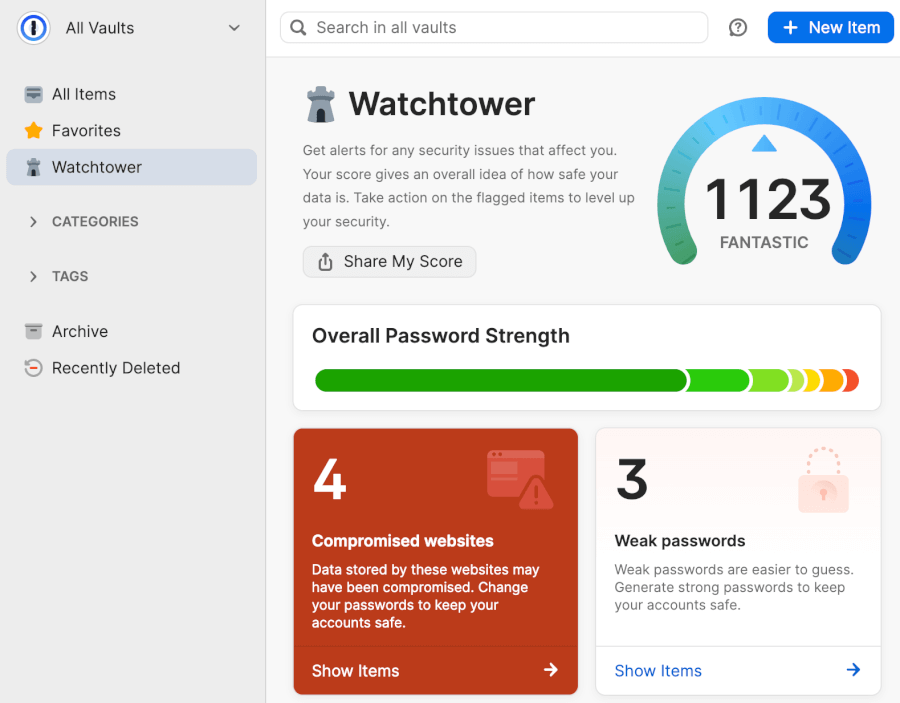
1Password presents itself like a modern, organized control center. Vaults, tags, categories, color coding — everything has its place, and the layout feels premium across most platforms. The design makes sense once you settle in, but it may feel a little busy at first, especially if you’re used to simpler tools.
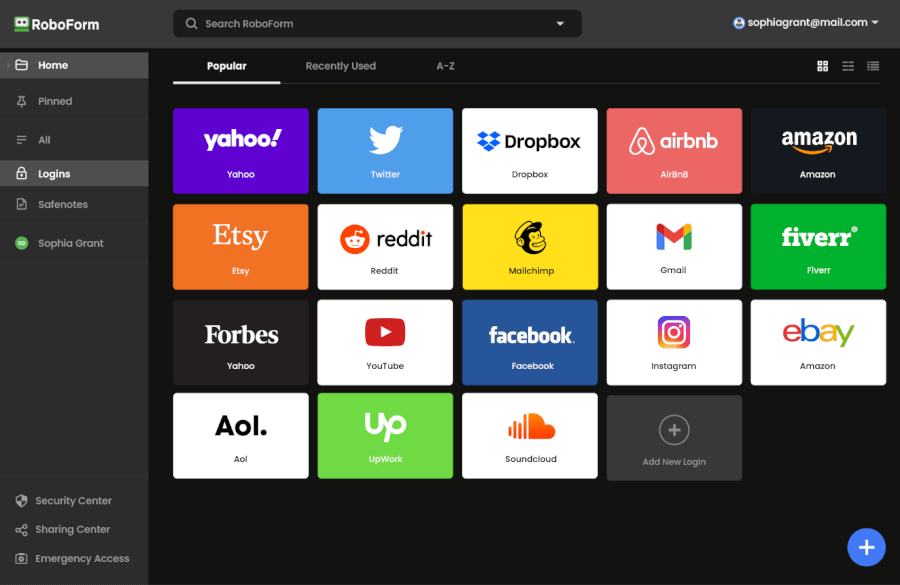
RoboForm keeps things stripped-down and straightforward. The interface isn’t flashy — some parts even feel a bit dated — but everything is exactly where you expect it to be. It loads fast, works well on older devices, and avoids clutter entirely. If you prefer pure practicality over visual polish, RoboForm’s UI lands better.
Password managers in action
Day to day, 1Password shines when it comes to stability and cross-platform consistency. Autofill is smooth, Watchtower nudges you about weak passwords instantly, and managing vaults feels effortless once you adjust to the layout. The only drawback is that some tasks take an extra click or rely on the web app.
RoboForm, on the other hand, is all about efficiency. It’s one of the fastest and most accurate form-fillers we’ve tested — especially with long forms like shipping info or tax fields. Login autofill is usually seamless too, though occasionally selecting the right account can feel slightly clunky. Still, the overall experience is quick, no-nonsense, and ideal if you value speed over extras.
Security showdown: Encryption, MFA, and more
Before diving into the details, here’s a quick snapshot of how RoboForm and 1Password stack up in core security features:
| Security feature | 1Password | RoboForm |
| Encryption | AES-256 + unique 128-bit Secret Key | AES-256 |
| Zero-knowledge architecture | ✅ | ✅ |
| Multi-factor authentication | Authenticator apps and hardware keys | Authenticator apps (paid plans only) |
| Local-only storage option | ❌ | ✅ |
| Security audits | ✅ Regular third-party audits | ✅ Regular third-party audits |
| Data breach history | ❌ No known breaches | ❌ No known breaches |
A great password manager doesn’t just store your logins — it guards them like a digital vault. The good news? Both RoboForm and 1Password use industry-standard AES-256 encryption, the same level trusted by banks, governments, and major tech platforms. Even if attackers somehow intercepted your encrypted vault, they’d be staring at unreadable noise.
Both tools also operate on a zero-knowledge foundation, meaning your vault can only be unlocked with your master password. Neither company can see, read, or recover your data — even if someone knocks on their door demanding access.
Where 1Password steps ahead
1Password layers on extra protection with its Secret Key, a locally generated 128-bit code that works alongside your master password. Think of it as a second lock on the vault — even if someone guessed or stole your master password, they still wouldn’t get in without this device-generated key.
Beyond that, 1Password has a strong track record of independent security audits, advanced login protections like Secure Remote Password (SRP), clipboard auto-clear, and security alerts through Watchtower. It’s built for people who want airtight protection with plenty of technical muscle behind the scenes.
Where RoboForm does things differently
RoboForm takes a more customizable path. Its standout security perk is the option for local-only storage, which keeps your passwords entirely on your own devices with no cloud sync at all. For privacy-first users — or anyone running their own secure environment — this is a powerful advantage.
Its encryption model is proven and solid, and it supports standard MFA options like authenticator apps and one-time passcodes. However, two-factor authentication is only available on paid plans, and RoboForm does not publish the results of any third-party security audits.
That said, RoboForm has no history of data breaches, and its zero-knowledge design keeps your vault inaccessible even if servers were ever compromised.
Privacy policy: Which password manager keeps your data safer?
| Privacy feature | RoboForm | 1Password |
| Open source | ❌ Closed source, relies on independent audits | ❌ Closed source, relies on independent audits |
| Jurisdiction | Based in the USA, part of the Five Eyes alliance | Based in Canada, also part of the Five Eyes alliance |
| Data collection | Collects account info like name, email, OS | Collects account info, email, usage, IP, and device info |
| Metadata encryption | ❌ Does not encrypt metadata | ❌ Does not encrypt metadata |
| Extra privacy tools | Local-only storage option, Emergency Access, Dark Web monitoring | Travel Mode, Privacy Cards (US only), Emergency Kit PDF, Watchtower password alerts |
Both RoboForm and 1Password take your security seriously. They use AES-256 encryption and zero-knowledge architecture, so your vault stays private no matter what. Both support multi-factor authentication, emergency access, and data breach alerts, keeping your passwords safe and your mind at ease.
The main differences come down to advanced privacy features. 1Password edges ahead with Travel Mode and Privacy Cards to shield your information during travel or online purchases. RoboForm, on the other hand, lets you go fully local-only, keeping everything on your device without touching the cloud — perfect for users who want maximum control over where their data lives.
Plans and pricing: Which service gives you more value, RoboForm or 1Password?
When choosing a password manager, price matters — but so does what you actually get for your money. RoboForm keeps things refreshingly affordable, with one of the cheapest premium plans in the industry and an excellent free option. 1Password, meanwhile, takes the premium route: no free tier, but a polished experience packed with advanced features.
Here’s a quick look at how both stack up:
| RoboForm | 1Password | |
| Free plan | ✅ Single device | ❌ 14-day free trial only |
| Individual plan | From $0.99/month | From $2.39/month |
| Family plan | From $1.42/month (5 users) | From $3.59/month (up to 6 users) |
| Business plans | From $3.33/user/month | Custom pricing depending on team size |
| Money-back guarantee | ✅ 30 days | ❌ |
If keeping costs low is your top priority, RoboForm is the easy winner. Its free plan covers unlimited passwords on a single device — a rarity today — and upgrading to Premium costs less than a cup of coffee each month (especially with RoboForm’s recurring coupon deals).
| RoboForm paid plans | Premium | Family | Business |
| Price | $2.49/month ($0.99 with our coupon) | $1.59/month | $3.33/user/month |
| Devices | Unlimited | 5 accounts | Multiple users |
| Support | Priority support with phone/live chat | Priority support | Admin controls and dedicated manager |
The paid plans unlock unlimited devices, advanced sharing, emergency access, and premium support. The Family Plan is especially great value, protecting up to five users for a very small monthly cost.
Businesses can choose between Business or Enterprise tiers, adding tools like admin controls, vault provisioning, and priority support.
1Password doesn’t try to win on price — and it doesn’t need to. Its plans cost more, but you’re paying for thoughtful design, a beautifully integrated security suite, and extras like the Secret Key, Watchtower insights, and Travel Mode.
| 1Password plans | Individual | Family | Teams Starter Pack (up to 10 users) | Business |
|---|---|---|---|---|
| 1-month | $4.99/month | $7.99/month | $24.95/month | $9.99/user/month |
| 1-year | $2.99/month | $4.49/month | $19.95/month | $7.99/user/month |
Deal: Get the best deal on 1Password's yearly plans >
There’s no free version, but the 14-day trial is enough to explore all features. The Family Plan covers up to six users and includes built-in account recovery tools, which can be a lifesaver. Businesses get advanced controls, custom roles, activity logs, and enterprise-level onboarding.
Customer support and resources: Is RoboForm or 1Password more reliable?
| Support feature | RoboForm | 1Password |
| Live chat | ✅ Weekdays, business hours | ❌ |
| Phone support | ✅ Limited, callback option | ❌ |
| Email/ticket support | ✅ Priority for paid users | ✅ Priority for paid users |
| Community forums | ⚠️ No, but there is RoboForm subreddit | ✅ Very active community |
| Knowledge base | ✅ Manuals and guides | ✅ Excellent, well-organized docs |
| AI assistant | ❌ | ✅ Basic chatbot for quick answers |
| Availability | Business hours | 24/7 email and chatbot |
Both RoboForm and 1Password offer solid assistance, but the way they deliver help — and how quickly you actually get it — sets them apart.
RoboForm takes a more traditional (and very human) approach. You get real live chat with real people, available Monday through Friday during business hours. When we tested it, the agents were quick, friendly, and clearly knew the product well enough to solve issues without bouncing us between departments. On top of that, RoboForm offers limited phone support and a callback option — something you seldom see among password managers.
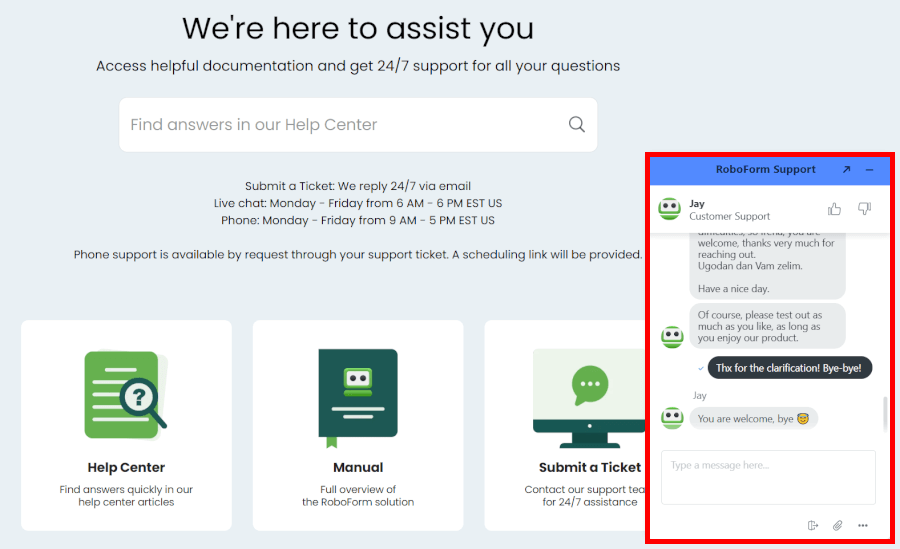
For self-help, RoboForm’s Help Center and RoboForm Manual walk you through everything from browser setup to form-filling quirks. The articles are simple, direct, and easy to follow. You won’t find a community forum, but in practice, their guides and chat make up for it.
1Password goes in a different direction. Instead of live chat or phones, everything funnels through email tickets and a very active community forum. The upside? Their responses are detailed and usually arrive within a few hours. Their documentation is also excellent — clean, visual, and deep enough to solve most everyday problems without contacting support at all.
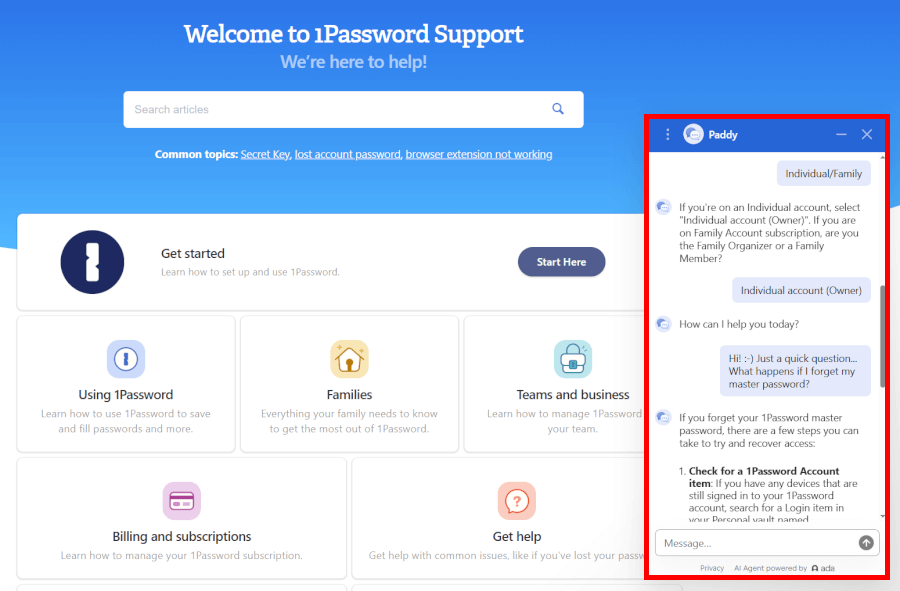
There’s also a built-in chatbot that can answer basic questions or escalate you to email support when needed. It doesn't replace human chat, but it does give you instant guidance for common issues, especially outside business hours.
Final comparison: Which password manager is worth your trust?
Both RoboForm and 1Password lock down your online world, but they’re cut from very different cloth. RoboForm is the steady, budget-friendly sidekick; 1Password is the sleek, feature-packed powerhouse.
Here’s how our showdown shakes out:
- Background and trust: RoboForm – This round goes to RoboForm. Its seasoned reputation and incident-free track record speak louder than any marketing promise.
- Platform availability: Tie – Whether you’re on Windows, macOS, iOS, Android, or bouncing between browsers, both managers follow you everywhere.
- Core and premium features: Tie – With 1Password flexing its high-tech muscle and RoboForm delivering powerful features for less, this one ends in a well-earned tie.
- User interface and ease of use: RoboForm – Design aside, RoboForm pulls ahead fast with an interface that simply feels quicker and more natural to use.
- Security and encryption: 1Password – Security is strong across the board, but 1Password pulls into the lead with its Secret Key and rigorous third-party audits.
- Privacy policy: Tie – They share AES-256 and zero-knowledge foundations. 1Password boosts trust with its Secret Key, while RoboForm wins points for offering full local storage.
- Plans and pricing: RoboForm – RoboForm offers more bang for your buck with free, affordable, and flexible plans, while 1Password commands a premium for its sleek features.
- Customer support: RoboForm – RoboForm makes support human and fast with live chat and phone options, while 1Password relies on slower, email-based help.
Final verdict: RoboForm vs 1Password
Both password managers are safe, polished, and reliable, but they’re built for different users:
- Choose 1Password if you want feature-rich apps, a beautifully refined interface, top-tier family tools, and advanced extras that make security feel effortless.
- Choose RoboForm if you want a fast, budget-friendly password manager that nails the essentials, fills forms better than anyone else, and even lets you store data locally.
When we weigh security, features, support, and price, the overall value crown lands on RoboForm’s head. It delivers everything most people need (and more), without the premium price tag.
And with RoboForm’s special coupon, you can unlock premium features for an unbeatable price:
RoboForm Exclusive Coupon:
Get 60% Off RoboForm 1-year subscription plans using the coupon below.
(Coupon is applied automatically; 30-day money-back guarantee.)
RoboForm quick start guide
You get RoboForm running in minutes with these simple steps on your main device.
- Download and install the app for your computer or grab it from the App Store or Google Play for mobile.
- Open the app and enter your account info.
- Add the browser extension for Chrome, Firefox, Edge, or Safari, then import passwords directly from your browser or another manager.
- Sign in on your phone or tablet so everything syncs automatically across devices.
Visit a couple of login pages to confirm autofill works instantly and new credentials save with one click. Run the built-in security audit to clean up weak or reused passwords right away. This hands-on test shows exactly how quickly RoboForm removes friction from your daily routine.
Other password manager guides:
- 1Password vs Bitwarden
- NordPass vs LastPass
- 1Password vs Dashlane
- RoboForm vs NordPass
- Bitwarden vs NordPass
- NordPass vs Dashlane
- Proton Pass vs NordPass
- Proton Pass vs 1Password
- Best Password Managers
RoboForm vs 1Password FAQ
Is RoboForm or 1Password more private and secure?
Both are secure, but 1Password edges ahead with extras like its Secret Key and advanced security controls, while RoboForm sticks to reliable, time-tested protection without the flashy add-ons. RoboForm still uses strong encryption and has a clean security history, but 1Password’s additional layers — like Travel Mode and detailed admin tools — make it feel a bit more future-proof for users who want maximum peace of mind.
Which has the better value for money, RoboForm or 1Password?
RoboForm offers better overall value, especially if you're looking for strong password management at a budget-friendly price. Its plans cost significantly less than 1Password, and you even get a free tier with unlimited passwords on one device. Meanwhile, 1Password delivers a more polished experience and powerful features — but you’ll pay premium prices for them.
Does RoboForm or 1Password support sharing passwords with family members?
Both support family sharing, but RoboForm makes it cheaper to get everyone on board. RoboForm’s Family plan covers up to five users at a lower monthly cost, while 1Password supports up to six users and adds extra goodies like account recovery and shared vault management. If budget matters, RoboForm wins; if you want more polished tools, 1Password has the edge.
Does RoboForm or 1Password offer a free plan or free trial?
RoboForm offers a free plan, whereas 1Password only gives you a 14-day free trial. With RoboForm Free, you can store unlimited passwords on one device at no cost. If you want to test 1Password, you’ll need to hop on the trial before committing to a paid plan.
Can I store data locally with RoboForm vs 1Password?
Yes, RoboForm supports local storage, while 1Password does not. RoboForm lets advanced users manage their data entirely on their own machines if they choose, giving more control over where vaults live. 1Password, on the other hand, requires cloud sync through its own infrastructure and doesn’t offer a true standalone local-only option.

Leave a Reply