
Your banking, email, and shopping accounts face daily attacks from hackers seeking weak or reused passwords. One breach can expose your entire digital life in moments. Proton Pass and RoboForm both provide impressive encryption, automatic strong password creation, and reliable autofill to secure your credentials and make them available instantly across every device.
This focused comparison examines their security standards, advanced form-filling capabilities, pricing structures, platform support, and distinctive tools like email aliases and security audit centers. Choosing between Proton Pass and RoboForm is like finding the perfect balance: One is a fortress for privacy purists, the other a powerhouse of slick, form-filling efficiency. Ready to find out which one actually wins in real-world use? Jump straight to the features comparison!
In this guide, we break down everything that matters: Security, ease of use, family features, pricing, dashboards, autofill performance, and those little quality-of-life tools that actually make a password manager worth using. No fluff, no jargon — just clear, hands-on insights to help you figure out which service truly deserves a place in your digital routine.
Here’s a side-by-side comparison of how Proton Pass and RoboForm stack up:
| Proton Pass | RoboForm | |
| Website | Proton.me/pass | RoboForm.com |
| Platforms | Windows, macOS, Linux, Android, iOS, web app | Windows, macOS, Linux, Android, and iOS |
| Browser extensions | Chrome, Firefox, Brave, Safari, and Edge | Chrome, Firefox, Opera, Edge, and Safari |
| Free version | ✅ | ✅ (1 device only) |
| Encryption | AES-GCM 256-bit | AES 256-bit |
| Support | Knowledge base, email, social media | Live chat, email, phone |
| Price | From $2.49/month | From $0.99month |
| Best deal | 50% Off Coupon > | 60% Off Coupon > |
Here’s what we’ll dig into in this Proton Pass vs RoboForm breakdown:
- Background check: Who built these tools, where they came from, and whether their track records look as clean as the marketing suggests.
- Platform availability: Because a password manager that doesn’t follow you across devices is basically a fancy notepad.
- Core and premium features: The essentials, the upgrades, and the little extras that make each service shine (or fall flat).
- User interface and ease of use: How smoothly they slip into your daily routine without becoming yet another digital annoyance.
- Security and encryption: The behind-the-scenes tech that keeps your passwords locked up tight.
- Privacy policy: What’s buried in the fine print — and whether anything there should worry you.
- Plans and pricing: Which service respects your wallet and which one creeps into “quiet subscription leak” territory.
- Customer support options: Who you turn to when something breaks, and how fast you can expect a real solution.
Now, let’s kick things off with a quick background check on Proton Pass and RoboForm — side by side.
Background check: Company information and history of security incidents
Every strong competitor has an origin story. Before the main event, we need to know who built Proton Pass from the ground up, and if its history of protecting user data lines up perfectly with the clean, minimalist image it projects.
Proton Pass: A true open source, privacy-first solution?
| Starting price | $2.49/month (with 50% off coupon) |
| Platforms supported | Windows, macOS, Linux, iOS, Android, Chrome, Firefox, Edge, Brave, Safari |
| Encryption | AES-256 |
| Extra privacy and security tools | Hide-my-email aliases, passkeys, Proton Sentinel, password health alerts, dark web monitoring |
| Best deal | 50% Off Coupon > |
Proton Pass comes from a team that’s practically built its brand on saying “nope” to data snooping. If the name sounds familiar, it’s because the same Swiss privacy powerhouse behind Proton Mail and Proton VPN makes it. The company’s story starts in 2014 at CERN, where a group of scientists and engineers decided the internet deserved tools that actually protect people. Today, they’re still headquartered in Geneva under some of the toughest privacy laws on the planet — and yes, that’s as reassuring as it sounds.
Proton Pass itself leans hard into transparency. Every line of code is open source, meaning anyone can inspect it, researchers can poke at it, and Proton regularly commissions third-party audits to prove they’re not hiding anything. Cure53’s 2023 audit didn’t uncover any critical issues — and whatever minor ones were found got fixed before launch. That alone puts Proton in a different league than most password managers.
As for security incidents? Proton Pass has kept a spotless record so far. No vault breaches, no “Oops, all your passwords are on the internet” moments. Their zero-knowledge design ensures everything is encrypted on your device, not their servers — even Proton employees can’t peek inside your vault. And when a potential weakness is spotted, like the clickjacking vector flagged in late 2025, they patch it fast.
Proton’s ecosystem ties everything together: Proton Mail, Proton VPN, their secure cloud tools, and now Proton Pass all follow the same end-to-end encryption philosophy. Throw in Proton Sentinel — their machine-learning security layer that blocks suspicious logins and phishing attempts, and you get a password manager that’s built like a digital bunker.
All in all, Proton Pass has the background, structure, and track record you want from a privacy-first password manager.
Now, let’s perform a quick background check on RoboForm.
RoboForm: Simple security on a budget?
| Starting price | $0.99/month (with 60% off coupon) |
| Platforms supported | Windows, macOS, Linux, Android, and iOS |
| Encryption | 256-bit AES |
| Extra privacy and security tools | 2FA, password audit, shared folder, cloud backup |
| Best deal | From $0.99/month (with 60% off coupon) |
RoboForm has been around longer than most of today’s tech giants, starting life in 1999 as a simple little form-filling helper. Think of it as the browser sidekick nobody asked for, but everyone secretly needed. Created by Siber Systems — a privately owned company founded in 1995 — it didn’t take long for RoboForm to level up.
By the early 2000s, it had reinvented itself as a password manager; by 2009, it was catering to businesses; and by the mid-2010s, it had fully embraced the cloud. Quite the glow-up for a tool that originally just typed your address for you.
Fast-forward to today, and RoboForm is a full-on multi-platform powerhouse. It runs on Windows, macOS, Linux, Android, and iOS, syncing your data smoothly and locking everything down with AES-256 encryption plus a strict zero-knowledge setup. That is, your Master Password stays locked inside your brain — RoboForm never sees it, stores it, or whispers it to anyone. And impressively, in all these years, it’s kept a spotless record: No data breaches, no leaked vaults, no embarrassing headlines.
Now, one quick note: RoboForm is headquartered in the US, which means it falls under Five Eyes jurisdiction (aka the world’s nosiest intelligence-sharing alliance). But even so, RoboForm’s zero-knowledge design means there’s nothing meaningful for anyone to ask for — no vault access, no Master Password, no secret copy on standby.
Where RoboForm really earns extra gold stars is transparency. Most companies say they’re secure; RoboForm actually hands its homework to experts for grading. It has undergone two full-scale independent audits from Secfault Security — one in 2023 and another, even more exhaustive one in 2025. The auditors poked at everything: Windows and macOS apps, iOS and Android versions, Chrome/Firefox/Edge extensions, the online portal, and even the password generator. Bugs were found (as they always are), RoboForm patched them fast, and Secfault confirmed every fix before signing off. That’s how responsible adults do it.
Security extras round out the package: Breach monitoring via Have I Been Pwned, 2FA options including hardware keys, and a built-in Security Center to identify weak or reused passwords lurking in your vault.
RoboForm Exclusive Coupon:
Get 60% Off RoboForm 1-year subscription plans using the coupon below.
(Coupon is applied automatically; 30-day money-back guarantee.)
Platform availability: Proton Pass or RoboForm?
A password manager is only as useful as the devices it follows you onto — from your laptop at work to the phone you dropped on the couch somewhere (again). Before we break down who covers what, here’s a quick look at how Proton Pass and RoboForm stack up across platforms:
| Platform / browser | Proton Pass | RoboForm |
| Windows | ✅ (10+) | ✅ (Vista+) |
| macOS | ✅ (10.14+) | ✅ (10.13+) |
| Linux | ✅ Native app | ⚠️ Extension only |
| Chrome OS | ❌ | ❌ |
| Android | ✅ (8.0+) | ✅ (5.0+) |
| iOS | ✅ (14.0+) | ✅ (13.0+) |
| All major browser extensions | ✅ Chrome, Firefox, Edge, Opera, Safari | ✅ Chrome, Firefox, Edge, Opera, Safari |
Luckily, both Proton Pass and RoboForm show up where it matters most, offering reliable apps for Windows, macOS, iOS, and Android, plus full coverage across the major browsers. Day-to-day, both tools sync smoothly between devices and work exactly where you’d expect.
The biggest split appears on Linux and Chrome OS. Proton Pass gives Linux users the royal treatment with a dedicated desktop app, while RoboForm stops at browser extensions. Chrome OS is another dividing line: Proton Pass doesn’t support it at all, whereas RoboForm at least offers extensions — not perfect, but usable if you live inside a browser.
Still, for the average family hopping between desktops, tablets, and phones, both services tick the crucial boxes without breaking a sweat.
Features: Which offers more, Proton Pass or RoboForm?
Proton Pass and RoboForm handle the basics well (secure vaults, autofill, etc.). The key differences emerge in real-world use. We tested everything (from imports to messy web forms) to show you where each app truly performs best.
Importing/exporting passwords
Switching to a new password manager shouldn’t feel like unpacking after a move, and thankfully both tools make the process pretty painless.
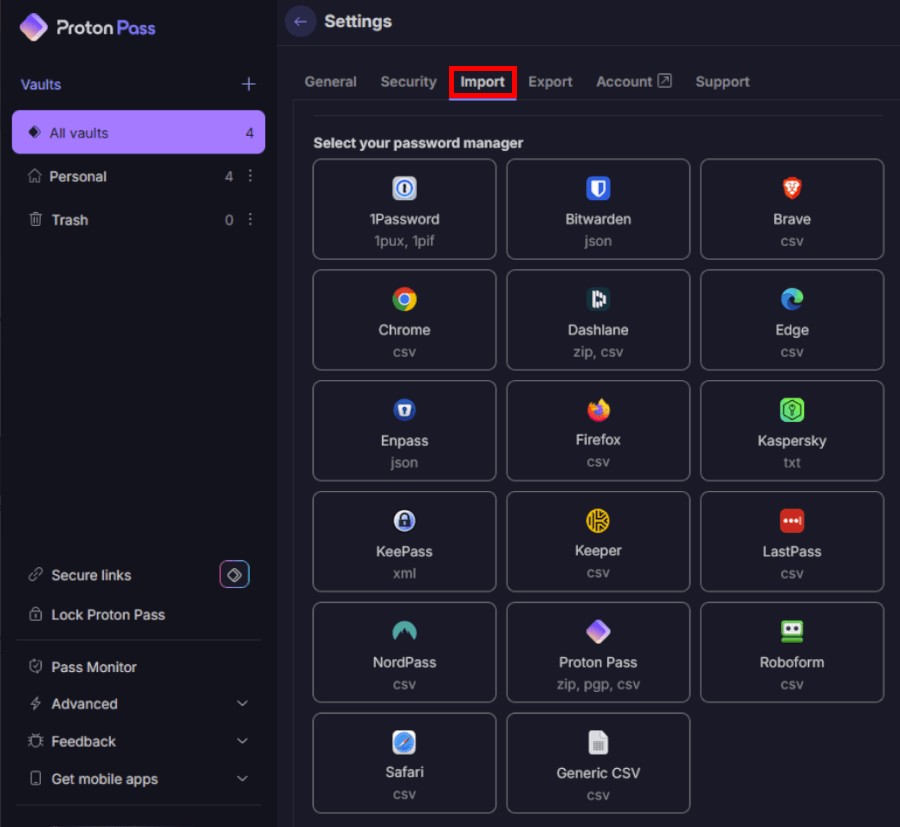
Proton Pass gives you wide-format support right out of the gate, including CSV, JSON, XML, and encrypted PGP exports if you want maximum safety. Imports were smooth in our tests, and Proton handled bulk uploads without choking. The only quirk? Exporting is more security-centric, so some formats are locked behind premium plans.
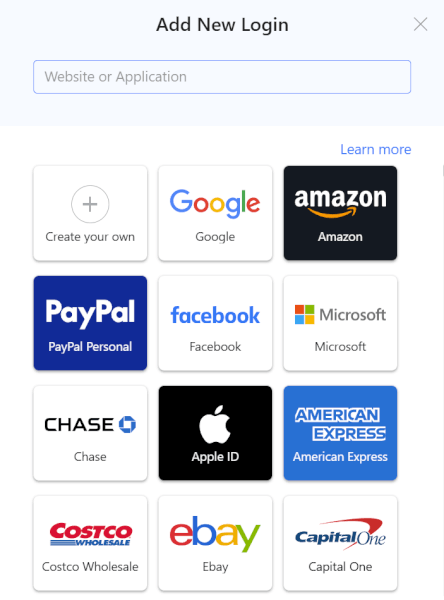
RoboForm is just as easygoing when it comes to migration. It imports from all major competitors and browsers with just a few clicks, and exporting is available for both free and paid users. If you’re jumping over from another password manager, RoboForm feels pleasantly familiar — almost everything just… works.
Autofill performance and form-filling
Here’s where things get interesting.
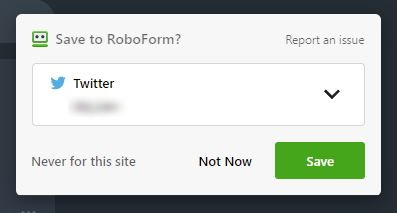
Proton Pass handles everyday logins beautifully. Browser extensions across Chrome, Firefox, Edge, and Safari grabbed new credentials instantly, and autofill was fast and accurate. It’s everything you expect from a modern password manager.
But RoboForm? This is its home turf. Remember, it started as a form-filling tool back in the day — and it shows. RoboForm handles multi-page forms, shipping/billing combos, and weird checkout fields with annoying precision. In our testing, it handled roughly over 90% of complex forms on the first try, which is better than most competitors.
If you fill out tons of forms every week, RoboForm is the one you’ll want doing the typing — though NordPass is a great all-rounder if you want a simpler, more modern feel.
Strong password generation and storage
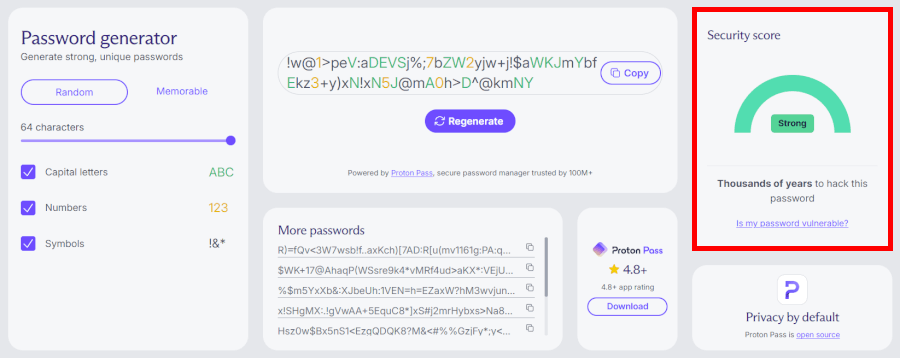
Proton Pass comes with a clean, flexible generator that creates long, complex passwords and passphrases. Everything you generate is saved automatically into your vault, and premium plans add password health checks plus dark-web monitoring for compromised credentials — a nice bonus for families or anyone juggling multiple accounts.
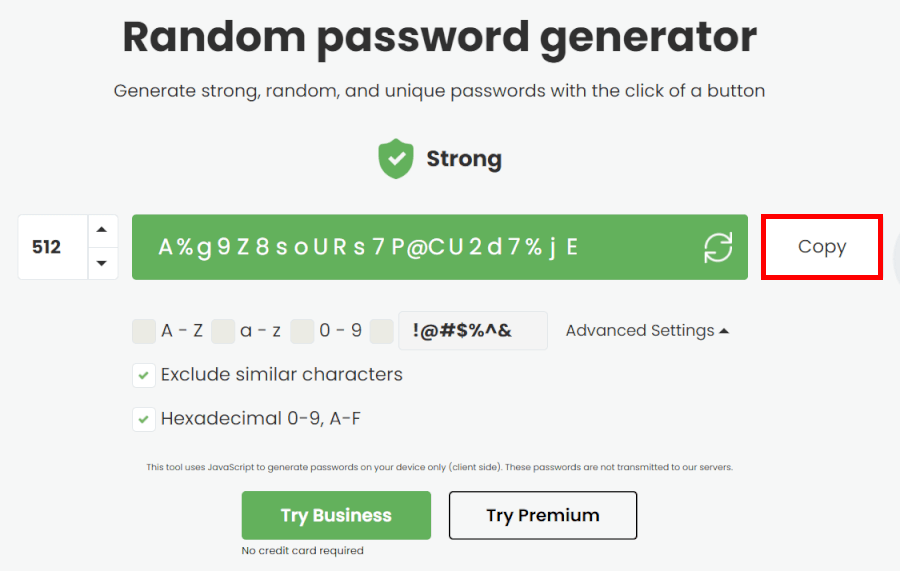
RoboForm’s generator is more customizable, letting you fine-tune character sets, length, and complexity. You can generate monstrously long passwords (think hundreds of characters) if you’re feeling dramatic. Both tools store unlimited logins, but RoboForm keeps its extra hygiene tools behind paid plans.
Password sharing and collaboration
If you’re planning to share logins with family or coworkers, here’s where their paths split a little.
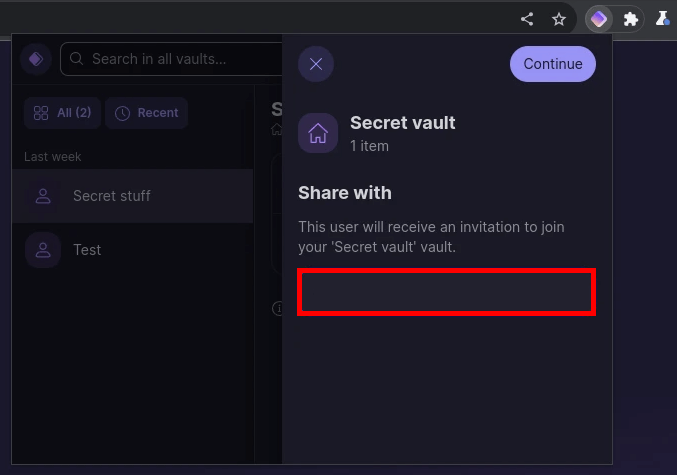
Proton Pass supports secure sharing of individual items and vaults, though the number of shared vaults depends on your plan. Sharing works well — especially for households already using Proton Mail or Proton VPN — but it’s more “simple and secure” than “feature-packed.”
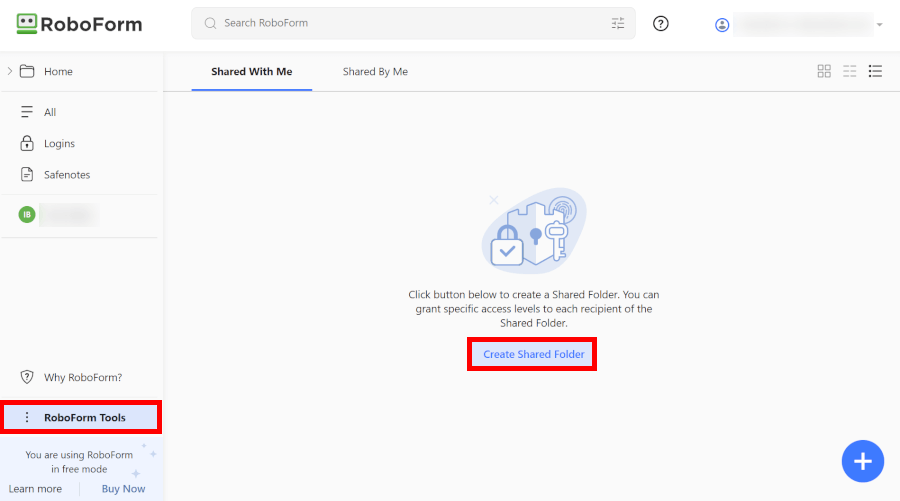
RoboForm offers more flexible sharing options. You can invite people to shared folders, share single items, and (in business plans) even use detailed access controls and activity logs. Families will be fine with either, but small teams will appreciate RoboForm’s extra collaboration power.
Cross-device synchronization
Proton Pass gives you unlimited device sync on both free and paid tiers, which is a huge value. Whether you’re switching between an iPhone, a Windows PC, and a Linux machine, Proton Pass keeps everything up to date without nagging you to upgrade.
RoboForm, on the other hand, limits syncing to one device on the free plan. To get true multi-device syncing, you’ll need Premium or Family. Once you do upgrade, syncing is fast and reliable — but it’s still a paywall Proton Pass doesn’t have.
Now that we’ve covered the core features, let’s dive into the premium perks that really take these password managers to the next level.
Premium features: What extra value do Proton Pass and RoboForm offer?
Once you’ve checked off the basics (saving passwords, autofill, syncing things so you don’t lose your mind), it’s the premium features that really show what a password manager is made of. Proton Pass and RoboForm both offer strong paid tiers — but their priorities couldn’t be more different.
Before we dive into the details, here’s a bird’s-eye view:
| Premium feature | Proton Pass Plus | RoboForm Premium |
| Unlimited passwords/items | ✅ | ✅ |
| Unlimited devices | ✅ | ✅ |
| Advanced form filling | ❌ Basic but works well | ✅ Extremely customizable |
| Built-in 2FA authenticator | ✅ | ❌ Supports external 2FA |
| Password health/security audits | ✅ Pass Monitor | ✅ Security Center |
| Dark web breach monitoring | ✅ | ✅ |
| Emergency access | ✅ | ✅ |
| Secure sharing | ✅ Vaults and items | ✅ Items and folders |
| Passkeys support | ✅ | ✅ |
| Hide-my-email aliases | ✅ Unlimited | ❌ |
| AI-powered login protection | ✅ Proton Sentinel | ❌ |
Proton Pass Premium: Privacy-first perks that pack a punch
Proton Pass Plus feels like a natural extension of the Proton universe: secure, privacy-obsessed, and surprisingly feature-rich once you unlock the paid tier. During testing, we found that its premium features mainly revolve around two things: better protection and a more private online identity.
Hide-My-Email: A standout Proton perk
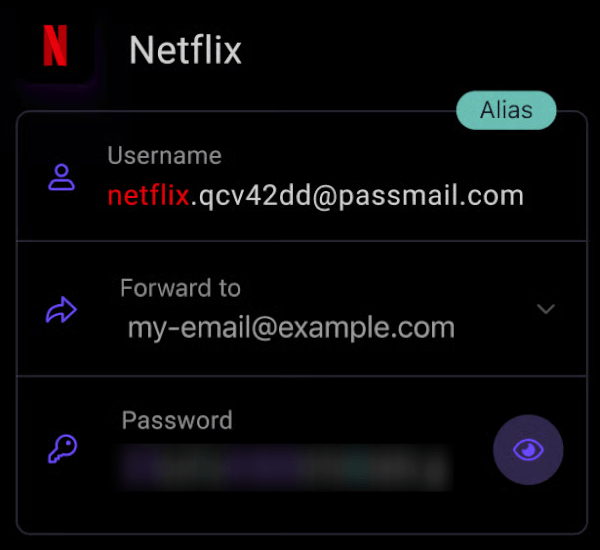
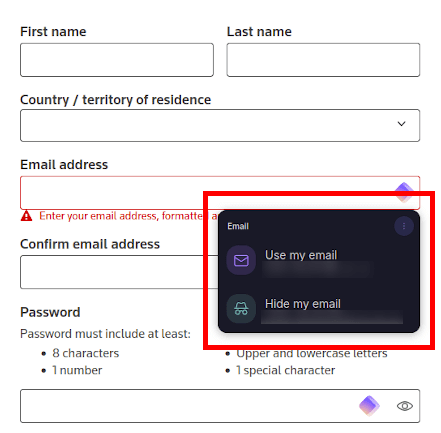
This is Proton Pass’ party trick — and honestly, one of the most useful premium features we’ve tested in any password manager. With unlimited email aliases, you can generate fresh, burner-style addresses for every service you sign up for. Perfect for dodging spam, trackers, and sketchy newsletters you swear you never subscribed to.
It’s seamless inside the Proton Pass app, and even smoother if you’re also using Proton Mail.
Proton Sentinel: AI that watches your back
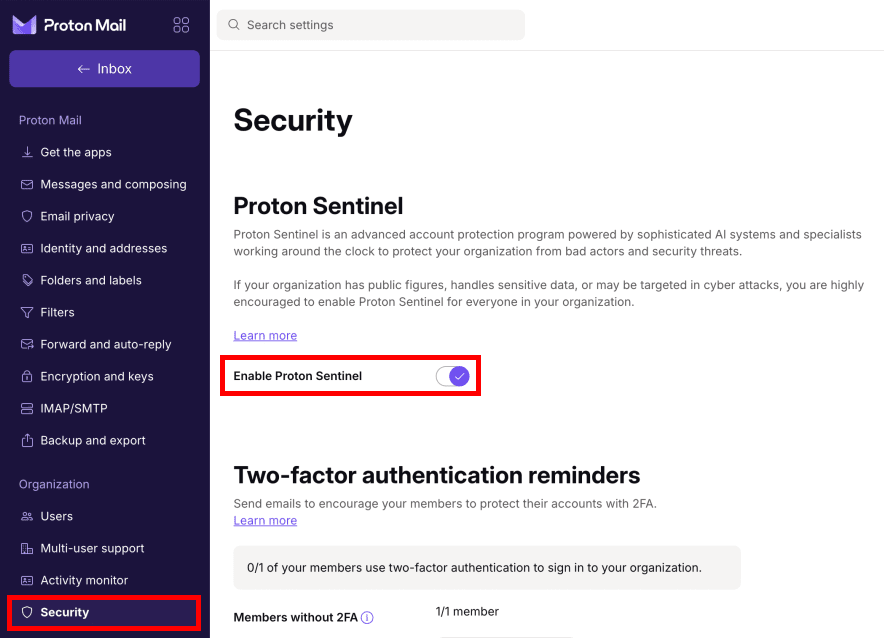
Proton’s AI-powered security layer analyzes login attempts and automatically blocks suspicious access. Think of it as a smart bouncer for your accounts. During testing, it flagged unusual activity instantly — without being annoying.
RoboForm has nothing like this, and it's one of the clearest premium differentiators between the two.
Built-in 2FA authenticator
Proton Pass pulls ahead again here with an integrated TOTP 2FA generator. This means your login codes live alongside the accounts they protect — but still encrypted. We found it a huge convenience upgrade compared to juggling separate authenticator apps.
Pass Monitor (security audit and breach alerts)
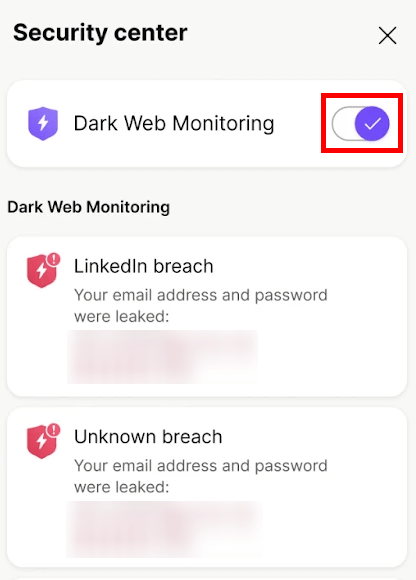
Proton Pass bundles everything into its Pass Monitor, which keeps an eye on weak or reused passwords, checks whether your email has shown up in a breach, and alerts you if anything from your vault hits the dark web. It feels modern and easy to navigate — more polished than RoboForm’s Security Center, even if it offers fewer knobs to tweak.
File attachments
One feature difference we really appreciated: You can attach files (up to 100MB each) to secure notes or items. RoboForm doesn’t support attachments at all.
Ecosystem synergy
If you already use Proton Mail, VPN, or Drive, Pass Plus integrates smoothly with everything. One subscription (Proton Unlimited) unlocks all premium tools — a huge value if you're already in their ecosystem.
Overall, Proton Pass Premium is ideal for privacy lovers, Proton ecosystem users, and anyone who wants stronger digital protection baked into their password manager.
That’s Proton Pass’s premium side — now let’s talk about RoboForm’s strengths.
RoboForm Premium: The customization king with unbeatable form-filling
RoboForm Premium feels like the veteran of the industry — not flashy, not trying to reinvent anything, but extremely good at what it does best. And that superpower is form-filling.
Legendary form-filling accuracy
RoboForm started as a form-filling tool long before most password managers even existed.
And honestly? You can tell.
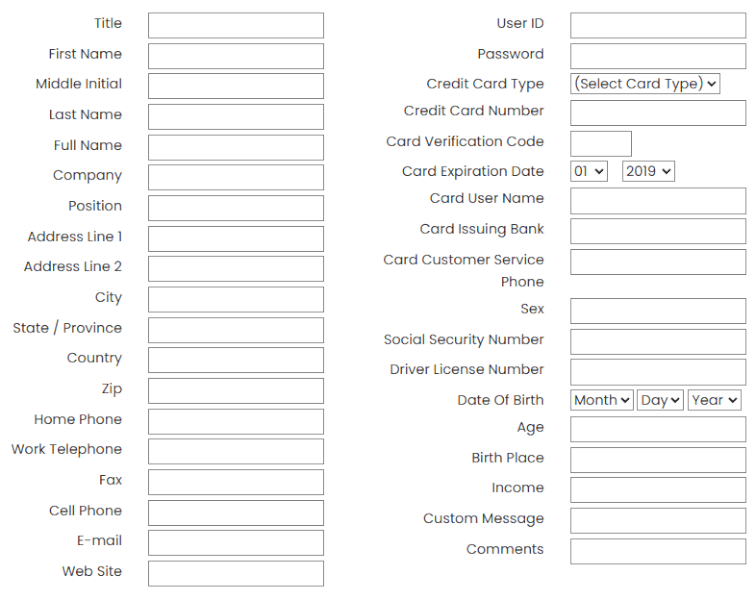
During testing, RoboForm consistently handled long, multi-step, messy online forms better than nearly any competitor. Address fields, payment info, and custom identities — it nails them with very few mistakes.
If you sign up for new accounts frequently or fill out online forms for work, this alone is worth the upgrade.
Security Center: Password hygiene in one place
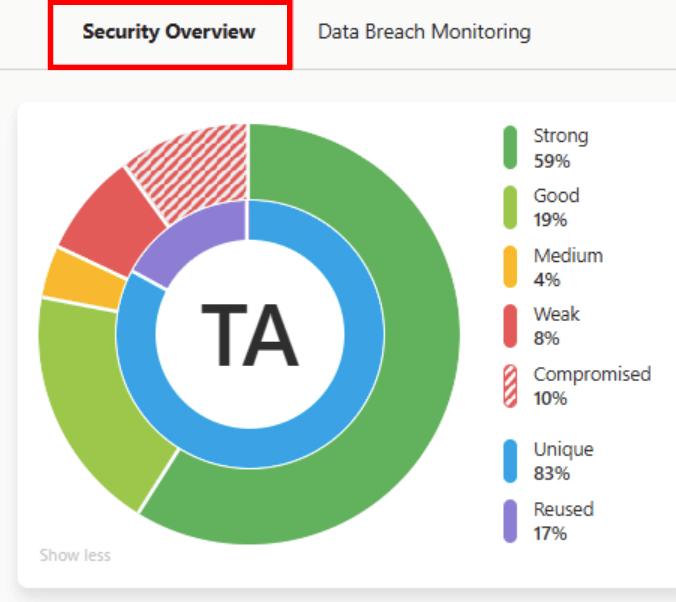
RoboForm’s Security Center jumps into action right away, scanning your vault for anything risky —weak logins, reused passwords, exposed accounts, or missing 2FA. It may not have Proton’s modern polish, but it makes up for it with incredibly detailed scoring. And for privacy purists, the local-only mode lets you keep your vault completely offline.
Local-only mode (offline vault)
This is a unique RoboForm advantage: You can store everything offline only, with zero cloud syncing.
If you want absolute control or work in a secure environment that forbids cloud services, RoboForm Premium is the clear winner.
Shared folders and advanced team features
Sharing is where RoboForm stretches its legs. You can pass along single items, build shared folders everyone can dip into, and, on business plans, even decide who gets to do what and keep an eye on all activity. Proton Pass does offer shared vaults, but it doesn’t quite reach the same “team captain” level of control.
Emergency access
RoboForm Premium includes breach alerts, just like Proton Pass, and during our tests the notifications arrived promptly.
User interface and ease of use: Which is easier to use, Proton Pass or RoboForm?
A password manager shouldn’t feel like another chore. It should slip neatly into your daily routine, save you from typing headaches, and stay out of the way unless you need it.
So we tested Proton Pass and RoboForm across desktop, mobile, and browser extensions to see which one actually makes life easier — and which one makes you want to throw your laptop out the window.
Sign-up and installation
Getting started with Proton Pass feels refreshingly modern. You download the app or browser extension, create your Proton account, and you’re in. The setup flow is quick, clean, and doesn’t bury you in unnecessary prompts. Importing your existing passwords also works incredibly well — Proton Pass managed to bring in everything from logins to 2FA codes with no drama.
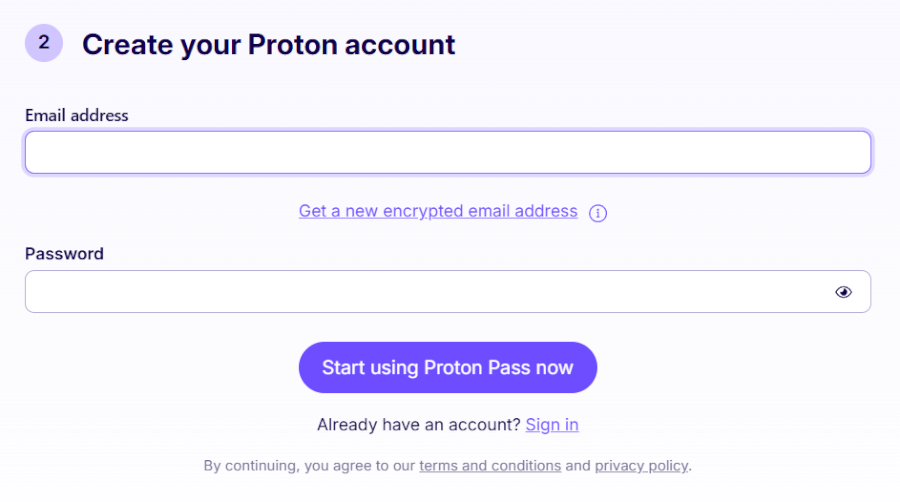
Whether you’re setting it up on a laptop or phone, everything syncs instantly in the background. It’s the kind of onboarding that makes you think, “Ah, finally… someone gets it.”
RoboForm’s setup is more old-school but still simple. Install the extension or desktop app, create your account, and you’re dropped straight onto your dashboard. From there, it’s worth taking a peek at the Settings panel, which hides most of the important tools — importing your passwords, enabling two-factor authentication, adjusting alerts, and deciding how aggressive you want RoboForm to be when it comes to saving forms and logins.
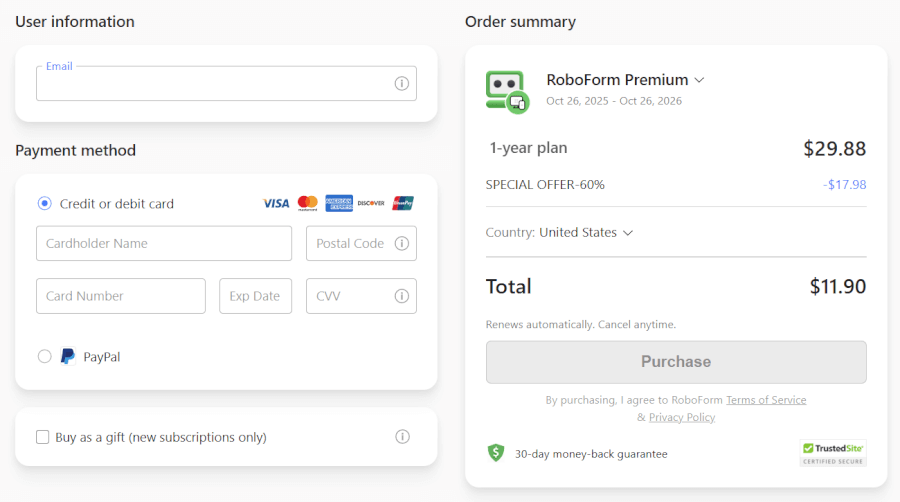
It doesn’t feel quite as sleek as Proton Pass, but everything works, and once your preferences are dialed in, RoboForm is perfectly happy to get out of your way.
User interface
If you’re into clean, calm, and modern design, Proton Pass is a delight. The interface is minimal without being empty, icons are easy to spot, and navigating between vaults, items, and aliases is effortless. The mobile apps deserve a gold star — fast, polished, and genuinely pleasant to use.
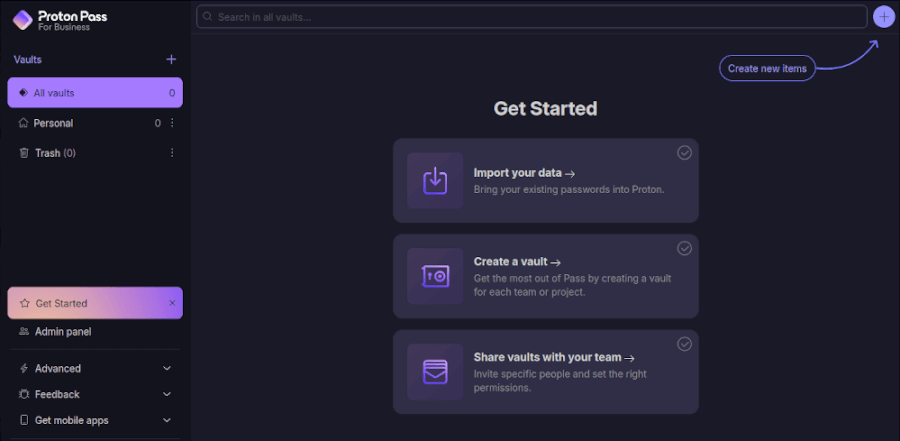
Search is lightning quick, vault organization is intuitive, and nothing feels clunky. It’s a password manager that actually feels built in 2025.
RoboForm’s interface is… functional. It’s not ugly, but it does have the unmistakable vibe of a tool that’s been around for a long time. Everything is labeled clearly, and once you’ve used it for a day or two, you know exactly where things are. Still, compared to Proton Pass, it looks dated and sometimes feels a little crowded.
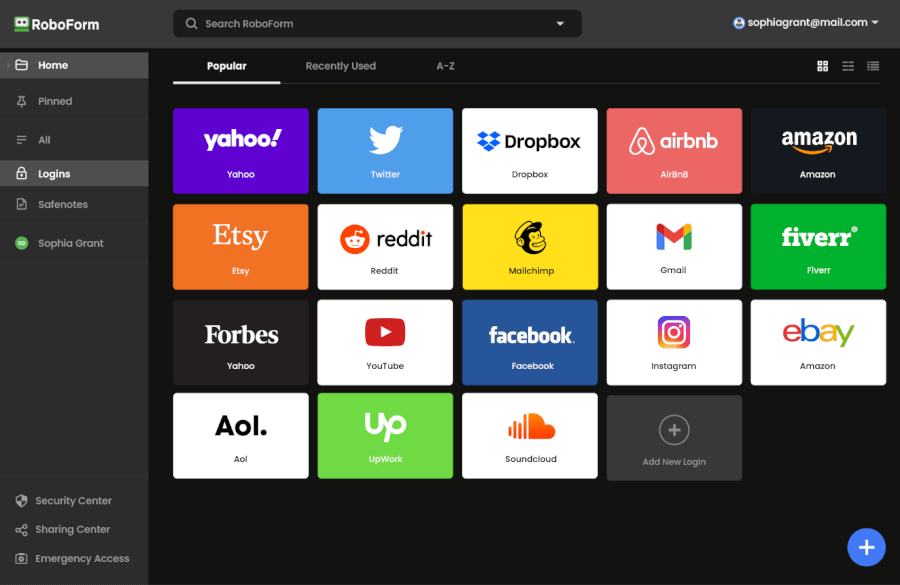
The good news? The organization is consistent and logical, and that reliability is part of RoboForm’s charm — what you see is exactly what you get.
Password managers in action
Using Proton Pass day-to-day feels smooth and effortless. Autofill kicks in quickly across browsers and mobile apps, login capture works reliably, and editing items takes only a few taps. Sign-ups are where Proton Pass gets extra points — its email alias feature makes creating new accounts genuinely fun.
When you’re juggling multiple devices, Proton Pass keeps everything perfectly in sync. No weird delays. No “Why isn’t this here yet?” moments. It all just works.
Once RoboForm is set up, it becomes a quiet workhorse. Autofill behaves well most of the time, and when you’re dealing with complicated forms — multi-step checkouts, tax forms, insurance portals — RoboForm absolutely shows off. Its form-filling engine has been refined for decades, and it shows.
During testing, we noticed it wasn’t always as quick or polished as Proton Pass, but when it comes to heavy-duty form automation, RoboForm still wins by a mile. If your life involves endless online paperwork, RoboForm is a lifesaver.
Security and encryption: Which one is more secure?
Before we dive into the nuts and bolts, here’s the quick snapshot:
| Security feature | Proton Pass | RoboForm |
| Encryption | AES-256 (everything encrypted, including metadata) | AES-256 (limited metadata encryption) |
| Key derivation | bcrypt and Argon2 (strong, modern) | PBKDF2-SHA256 (fewer iterations, older) |
| Open-source | ✅ | ❌ |
| Independent security audits | ✅ | ✅ |
| Jurisdiction | Switzerland (strong privacy laws) | The US (some privacy concerns) |
| Clean security track record | ✅ | ✅ |
Proton Pass goes all-in on modern security architecture. Everything (from your passwords to usernames, URLs, and notes) is locked behind full end-to-end encryption. Even Proton can’t tell which websites you use, thanks to its encrypted metadata (a rarity in password managers).
It also relies on bcrypt and Argon2 for key derivation, two highly respected algorithms built to withstand brute-force attacks long into the future. Add in Switzerland’s famously strict privacy laws, a fully open-source codebase, and regular public audits, and you get a service that doesn’t just talk about security — it shows its homework.
RoboForm, on the other hand, offers solid protection but sticks to a more traditional formula. Your passwords are encrypted locally, and the company can’t read your vault contents thanks to its zero-knowledge design. But some of its underlying cryptography (like PBKDF2 with comparatively fewer iterations) feels a bit dated compared to Proton Pass’s modern stack.
RoboForm keeps its code behind the curtain, but with more than twenty years of rock-solid security, it’s clearly doing something very right.
Both tools have avoided major breaches, but when it comes to pure privacy philosophy and future-proof cryptography, Proton Pass pulls ahead. It’s designed not just to store passwords securely today, but to stay secure even against the threats we haven’t met yet.
Privacy policy: Which one protects you better, Proton Pass or RoboForm?
Proton Pass and RoboForm take very different approaches to privacy — and if strong data protection is high on your list, the gap between them is hard to ignore.
RoboForm keeps data collection fairly light, mostly sticking to what’s needed for accounts and licenses. The real concern is its US jurisdiction, which places it under broad surveillance laws and the Five Eyes alliance. So if agencies request user information, RoboForm doesn’t have much legal room to refuse. Its zero-knowledge setup helps, but the closed-source code, heavier app permissions, and past user complaints mean you’re relying more on trust than verifiable transparency.
Proton Pass takes the opposite route, building everything around strict privacy. Being based in Switzerland gives it the protection of strong data laws, and its zero-access, end-to-end encryption covers not just passwords but all metadata: Usernames, URLs, entry titles, everything.
Even Proton can’t see what’s in your vault. Add open-source apps, independent audits, minimal data collection, and servers in privacy-friendly countries like Switzerland, Germany, and Norway, and you get a platform designed to keep outsiders out by default. Payment details stay with processors like Stripe or PayPal, so Proton never holds your card info.
Proton Pass vs RoboForm plans: Finding the best bang for your buck
When it comes to pricing and plans, both Proton Pass and RoboForm give you solid options — but they approach things a little differently:
| Pricing feature | Proton Pass | RoboForm |
| Free plan | Unlimited logins and notes on unlimited devices, 10 email aliases, passkeys, and security alerts | Unlimited passwords on a single device, basic form filler, and email support only |
| Individual plan | $2.49/month (with 50% off coupon) | $0.99/month (with 60% off coupon) |
| Family plan | $4.99/month (up to 6 users) | $1.59/month (with 60% off coupon) |
| Money-back guarantee | ✅ 30 days | ✅ 30 days |
Proton Pass is all about giving you more privacy from the start. Even the free plan lets you sync passwords across unlimited devices, generate passkeys, and create up to 10 email aliases to keep your inbox clutter-free. Upgrading to Pass Plus adds dark web monitoring and Proton Sentinel, an AI-powered security companion that keeps a watchful eye on your accounts. Family plans cover up to six users, but the $4.99/month price point is a bit higher than RoboForm’s bargain pricing. The real perk? Proton’s ecosystem integration, letting you tap into Mail, VPN, Drive, and Calendar — a nice bonus if you’re already a Proton user.
When you’re protecting a whole household, price per person and user-friendliness matter — and that’s where RoboForm’s Family plan really shines. For just $3.98/month (or $1.59/month if you catch a discount), you get five full premium accounts sharing one subscription. Every family member enjoys unlimited passwords, cross-device sync, and secure sharing — perfect for parents, kids, even grandparents.
With RoboForm Family, there’s no juggling multiple subscriptions, no risk of paying full price for just one user, and no compromise on core features: You still get secure vaults, encryption, shared folders, autofill, and emergency access. Everything you need — all wrapped in one affordable package.
By comparison, Proton Pass’s family tier covers more users (up to six) and offers strong privacy benefits — but at nearly $5/month, cost-conscious families might find RoboForm’s pricing hard to beat.
Customer support: Proton Pass vs RoboForm – Which one helps you faster?
Getting locked out is a pain, and waiting for help only makes it worse. Proton Pass and RoboForm take very different approaches to customer support. The one that works for you depends entirely on how quickly you need a resolution.
| Support channel | Proton Pass | RoboForm |
| Live chat | ❌ | ✅ Premium, Mon–Fri, 6 AM–6 PM EST |
| Phone support | ❌ Except B2B requests | ✅ Premium, Mon–Fri, 9 AM–5 PM EST via callback |
| Email/ticket | ✅ 24/7 | ✅ 24/7 |
| Knowledge base | ✅ Large library of step-by-step guides & FAQs | ✅ Extensive Help Center and full RoboForm Manual |
| Community support | ✅ Reddit community | ✅ Reddit community |
RoboForm is the more “hands-on” service here. Even free users get access to its email support and a surprisingly deep Help Center, complete with how-to guides, a detailed manual, and a clean search tool. During testing, we received a helpful and knowledgeable email reply in just 30 minutes — far quicker than we expected.
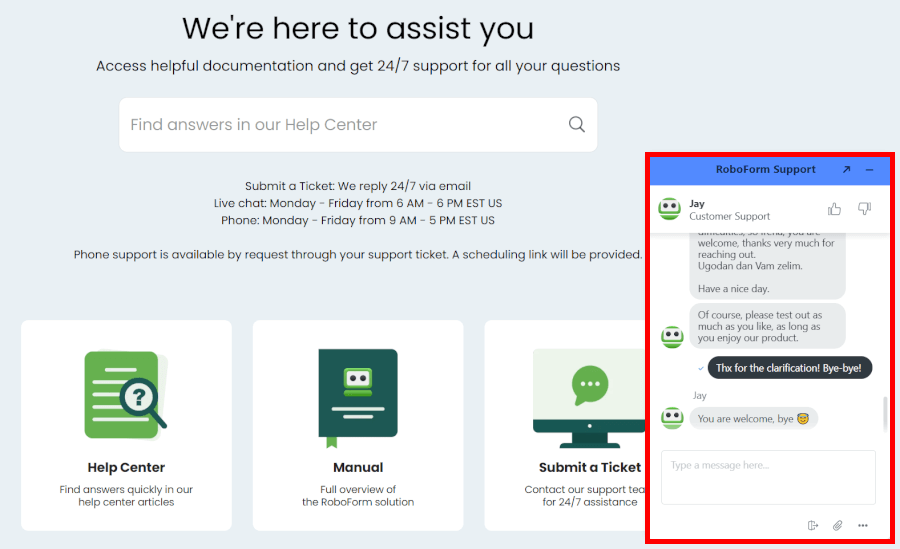
Where RoboForm really pulls ahead is with its Premium support. Paying users get live chat from 6 AM to 6 PM EST (Mon–Fri) and phone support via callback from 9 AM to 5 PM EST. If you like knowing that a real person can step in instantly when things go wrong, RoboForm delivers. And even outside chat hours, 24/7 email/ticket support keeps things moving.
Proton Pass takes a more self-service approach. There’s no live chat and no phone support for everyday users, but its Support Center makes up for a lot. It’s packed with clean, step-by-step guides that walk you through everything from importing passwords to setting up passkeys or email aliases. The search function actually works well too, which makes finding the right fix painless.
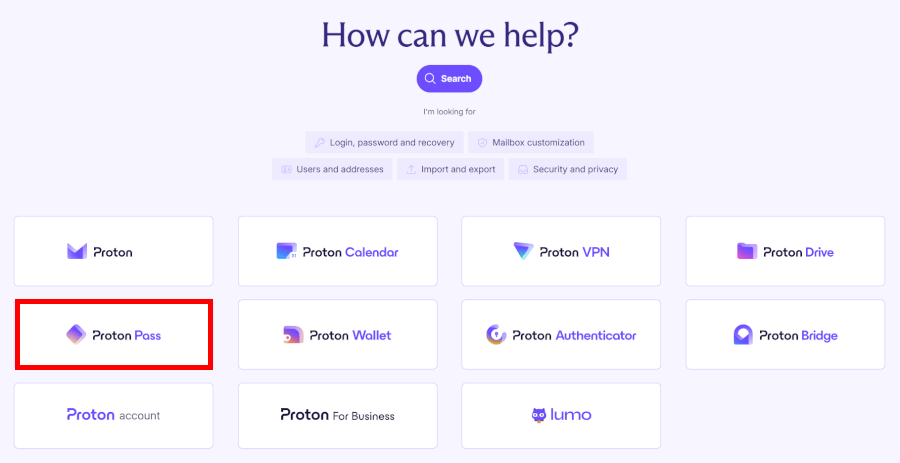
If the guides aren’t enough, Proton offers support through a ticket form or email. The form usually gets faster attention, but response times can still vary — anywhere from a few hours to the next day. Business customers and some premium plans occasionally get enhanced support (like scheduled calls), but for most users, email is the main channel.
While it’s not instant, the documentation is strong enough that you’ll often solve the problem before support even replies.
Final verdict: Proton Pass vs RoboForm – Which one truly wins?
After comparing both across privacy, features, ease of use, value, and customer support, it’s clear that Proton Pass and RoboForm shine in very different ways.
Proton Pass is the top pick for privacy-first users. Swiss jurisdiction, open-source apps, full metadata encryption, and a transparent security model make it one of the most privacy-respectful password managers. With modern design, smooth workflows, and strong protection across all devices — especially if you use Proton Mail or VPN — it’s the smarter choice.
That said, after weighing up every category, RoboForm edges ahead just slightly in practical day-to-day use, but both password managers excel in their own ways. Here’s a quick recap:
- Background check: Tie – Swiss-based Proton Pass combines strong privacy laws with open-source apps and audits. RoboForm is US-based with a clean record, though less publicly verified.
- Platform availability: Tie – Both Proton Pass and RoboForm support all major platforms, including Windows, Mac, Linux, iOS, and Android, plus browser extensions.
- Core and premium features: Proton Pass – Both handle unlimited passwords, syncing, and emergency access well, but Proton Pass edges ahead with innovative email aliases and AI-powered protections, offering more value than RoboForm’s form and offline strengths.
- User interface and ease of use: RoboForm – User-friendly either way, though RoboForm edges ahead for handling lots of forms or accounts.
- Security and encryption: Tie – Proton Pass leads on modern encryption and transparency, but RoboForm’s AES-256 and zero-knowledge approach still delivers excellent security.
- Privacy policy: Proton Pass – With Swiss protections and zero-knowledge design, Proton Pass offers stronger privacy than RoboForm’s US-based setup.
- Plans and pricing: RoboForm – With generous free and budget-friendly plans, RoboForm delivers great value; Proton Pass costs more but adds unique privacy features.
- Customer support options: RoboForm – With live chat, phone, and email support, RoboForm handles urgent issues faster; Proton Pass focuses on guides and ticketed email support.
Tie with a slight edge to RoboForm for everyday utility – Proton Pass wins on privacy and transparency, while RoboForm wins on affordability, speed, and form-filling prowess. Both are excellent choices depending on what matters most to you.
Don’t forget — RoboForm’s special coupon makes its already affordable plans even easier on the wallet.
RoboForm Exclusive Coupon:
Get 60% Off RoboForm 1-year subscription plans using the coupon below.
(Coupon is applied automatically; 30-day money-back guarantee.)
RoboForm quick start guide
You can activate full RoboForm protection in minutes. Visit the RoboForm website (assuming you aren't there already) to create your account, install the browser extension and apps on your phone, tablet, and computer, then set a strong master password you will remember.
Enable two-factor authentication and biometric unlock for extra speed and safety. Use the one-click import tool to pull passwords from Chrome, Firefox, or any previous manager, then run the Security Center scan to strengthen weak entries instantly.
Autofill and the advanced form filler kick in right away for every login and checkout. You are now set with faster access and stronger safeguards across all your accounts.
Other password manager comparison guides:
- 1Password vs Bitwarden
- NordPass vs LastPass
- 1Password vs Dashlane
- NordPass vs 1Password
- Bitwarden vs NordPass
- NordPass vs Dashlane
- Proton Pass vs NordPass
- NordPass vs RoboForm
- Best Password Managers
Proton Pass vs RoboForm FAQ
Is Proton Pass or RoboForm better for privacy and data protection?
Proton Pass takes the lead when it comes to privacy and data protection. Built in Switzerland, it benefits from strict privacy laws, zero-knowledge encryption, and end-to-end protection of all data — including metadata like usernames and website addresses.
The platform is fully open-source and regularly audited, giving users full transparency. RoboForm also uses zero-knowledge encryption and has a long history of secure operation, but being based in the US, it doesn’t offer the same level of jurisdictional privacy protections.
Which has the lowest price, Proton Pass or RoboForm?
RoboForm is generally more affordable, especially for individuals and families. Its Premium plan can be as low as $0.99/month with discounts, and the Family plan covers up to five users for just $2.39/month with a coupon. Proton Pass isn’t far off, but its paid plans start slightly higher, especially the Family plan at $4.99/month, which might be less budget-friendly for some households.
Does Proton Pass or RoboForm support sharing passwords securely with family members?
Yes, both platforms allow secure password sharing, but RoboForm makes it especially simple for families. Its Family plan lets you share vaults across up to five accounts with full access and control over permissions. Proton Pass also supports shared vaults and items, but it doesn’t provide the same detailed role-based or organizational controls that RoboForm does.
Do Proton Pass and RoboForm alert me if my passwords have been exposed in a data breach?
Yes, both Proton Pass and RoboForm include breach monitoring. Proton Pass’s Pass Monitor checks for weak, reused, or exposed passwords and notifies you of any breaches affecting your accounts. RoboForm’s Security Center does the same, scanning your vault and alerting you to compromised or reused credentials. Both help you stay ahead of hackers, though Proton Pass adds extra protection through AI-assisted monitoring.
What happens if I forget my master password – can I still recover my vault in Proton Pass or RoboForm?
Unfortunately, with both services, forgetting your master password is serious — it cannot be recovered by the company due to zero-knowledge encryption. RoboForm and Proton Pass are designed this way to ensure no one, not even the company, can access your vault. Your best options are to securely store your master password in a safe place or use any emergency access or recovery options you’ve set up in advance.

Leave a Reply