
Microsoft's January 2026 Patch Tuesday update, released under KB5074109, addresses 114 vulnerabilities across its product ecosystem, including an actively exploited zero-day in the Windows Desktop Window Manager (DWM).
The update is available for Windows 11 versions 24H2 and 25H2 and includes critical fixes, security hardening changes, and AI component updates.
The most notable issue resolved this month is CVE-2026-20805, a locally exploitable information disclosure vulnerability in Desktop Window Manager, which Microsoft confirmed has been actively exploited in the wild. This flaw allows attackers with local access and low privileges to extract sensitive memory data by leveraging DWM's interaction with Advanced Local Procedure Call (ALPC) ports. The vulnerability was discovered and reported by Microsoft's own Threat Intelligence Center and Security Response Center, though technical details remain limited.
In addition to the zero-day, Microsoft also patched several high-severity vulnerabilities marked as “exploitation more likely,” suggesting an elevated risk of threat actors targeting them in the near future. These include:
- CVE-2026-20816 – A privilege escalation vulnerability in Windows Installer
- CVE-2026-20817 – A flaw in Windows Error Reporting that could allow elevation of privilege
- CVE-2026-20840 – A vulnerability in Windows NTFS
- CVE-2026-20843 – A flaw in the Routing and Remote Access Service (RRAS) component
- CVE-2026-20860 – A vulnerability in the Ancillary Function Driver for WinSock
- CVE-2026-20871 – Another DWM vulnerability distinct from the exploited zero-day
These components, deeply integrated into core Windows 11 functions, represent attractive targets for attackers aiming to escalate privileges or move laterally within enterprise environments.
Beyond individual CVEs, the KB5074109 update also removes support for legacy modem drivers, including agrsm64.sys and smserial.sys, effectively deprecating hardware that depends on them. Microsoft's rationale appears to be rooted in reducing the attack surface by retiring unmaintained, low-use components.
Additionally, the update addresses reliability issues in Azure Virtual Desktop, particularly resolving RemoteApp connection failures observed after prior updates. Microsoft also fixed a WSL networking issue that had been breaking corporate VPN access under mirrored networking configurations introduced in earlier builds.
Power efficiency was also targeted. Devices equipped with Neural Processing Units (NPUs) will now enter idle states correctly. Previously, NPUs remained powered while idle, leading to unnecessary battery drain.
For organizations using Windows Deployment Services (WDS), hands-free deployment is now disabled by default. Admins must explicitly re-enable this functionality, following hardening guidelines to reduce attack vectors during operating system imaging and rollout.
Windows 11 users can install the latest security update through Settings > Windows Update > Check for updates > Install all.
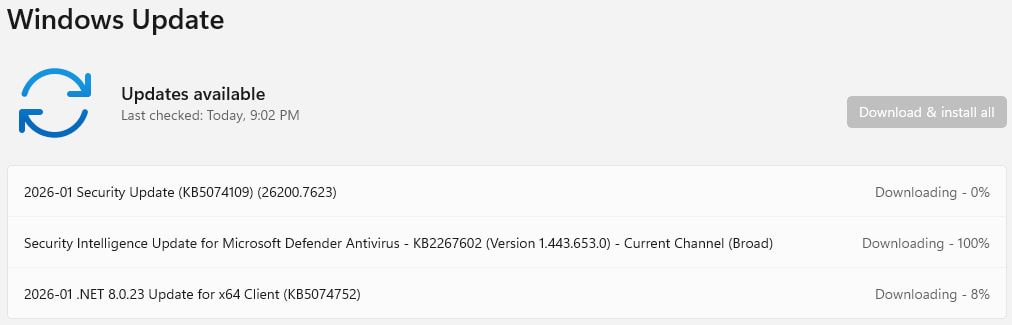
The updates will be automatically downloaded and installed, and a system reboot will be required for them to apply. It is recommended to back up important data before starting the process to prevent data loss.



Leave a Reply