

Modern parenting doesn’t come with a user manual, but Aura’s Parental Controls come pretty close. It promises smarter screen-time tools, AI-powered insights into your child’s well-being, and even gaming protection that spots bullying in real time. But how well does all of this actually work when you put it in the hands of a real family? That’s exactly what we set out to test, and if you want to skip straight to the results, you can jump to our full testing breakdown below.
We installed Aura on multiple devices, pushed every feature to its limits, and compared it to other top parental control apps. We tried everything from setting app-specific time limits to seeing how quickly Safe Gaming would flag toxic chat. Along the way, we also discovered a few gaps you should know about — like the missing location tracking and how surprisingly easy it is for tech-savvy kids to uninstall the app.
By the end of this review, you’ll know exactly where Aura shines, where it stumbles, and whether it’s worth bringing into your home in 2026. Our goal: Give you the same clear, honest insights we’d want if we were choosing protection for our own families. Let’s dive in.
| Website | Aura.com |
| Pricing | Kids plan: $8.33 – $13/month; Family plans: $25 – $50/month |
| Supported platforms | iOS & Android (kids) and Windows & macOS (parent dashboard and Safe Gaming) |
| Coverage | Unlimited children and devices on most plans |
| Core parental controls | Content filtering, app blocking, screen-time limits, instant internet pause |
| Standout feature | Safe Gaming alerts for cyberbullying and predators across 200+ popular games |
| Best deal | 68% Off Coupon > |
To give you a clear, real-world picture of how Aura performs, we tested it the same way most families would — across multiple devices, with different age settings, and in everyday scenarios kids actually run into online. Here’s what we focused on:
- Core parental controls: Screen-time limits, app blocking, content filtering, and the instant internet pause — what works well and what feels limited.
- Additional security and privacy features: Extras like Safe Gaming alerts, AI-powered insights, VPN access, and how well these tools actually add to family safety.
- Setup and onboarding: How easy it is to get Aura installed on kids’ devices and configured without tech headaches.
- Ease of use: Whether the parent dashboard feels intuitive and manageable, even if you’re not particularly tech-savvy.
- Privacy and data handling: What data Aura collects, how it’s used, and how transparent the policies are.
- Pricing and value: Whether Aura’s plans make sense for families in 2026 — and who gets the most value.
- Support and help resources: How easy it is to get help when something goes wrong.
- Aura parental control app alternatives: How Aura compares to other popular parental control apps parents often consider.
By the end, you’ll see exactly how Aura fits into real family life — not just how it looks on paper.
What is the Aura parental controls app? (Quick intro for parents)
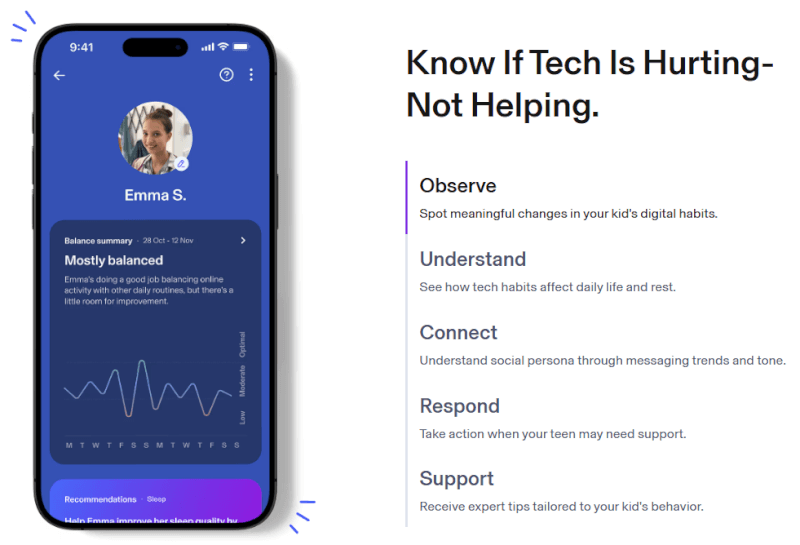
Aura Parental Controls is a family safety app built to help parents keep kids safer online — without hovering over their shoulders 24/7. It covers the basics you’d expect, like screen-time limits, app and website blocking, and age-appropriate content filtering, all managed from a simple parent dashboard.
Where Aura stands out is that parental controls aren’t treated as a standalone tool. They’re part of Aura’s wider family security platform, which means everything is designed to work quietly in the background while you get clear insights when something needs attention.
Instead of just slamming the brakes on screen time, Aura focuses on smarter guardrails. It keeps an eye on how kids use apps, games, and websites, helps enforce healthy limits, and adds extra protection in places many parents worry about most — like online gaming and social platforms.
In practice, Aura works like a quiet digital helper running in the background. Parents manage everything from one central dashboard, while Aura applies the rules on a child’s device automatically — no constant check-ins required. Once limits and filters are set, the app uses a secure background connection to make sure those rules stick, stepping in only when something crosses the line.
Aura parental controls pros and cons
+ Pros
- All-in-one family security bundle
- Strong identity theft protection included
- AI wellbeing insights, privacy-friendly
- Safe Gaming for popular PC games
- Swift, beginner-friendly setup
- Capable content and app filtering
- Unlimited kids and devices
- No data selling, privacy-first design
- Built-in VPN for safer browsing
- Spam call and phishing protection
- Helpful reports, not data overload
– Cons
- No real-time location tracking
- No direct message or DM viewing
- Android app removal can bypass controls
- Desktop controls more limited than mobile
- Pricier if used only for controls
Next, we’ll take a closer look at Aura’s core features and capabilities — what you actually get and how they work day to day.
Core features of Aura parental controls
Aura’s parental controls focus on the stuff parents actually care about: Blocking the wrong content, keeping screen time in check, and knowing when something feels off online. All of these tools live in one parent dashboard, so you’re not jumping between apps or digging through endless menus.
You can start with age-based presets, then fine-tune rules for each child — whether that means limiting YouTube, pausing the internet at bedtime, or keeping an eye on gaming and social apps. Aura also adds a few modern twists, like AI-powered wellbeing insights and gaming safety alerts, that go beyond basic filters.
Next, we’ll break down each core feature and see how well it holds up in real family life.
Web and content controls
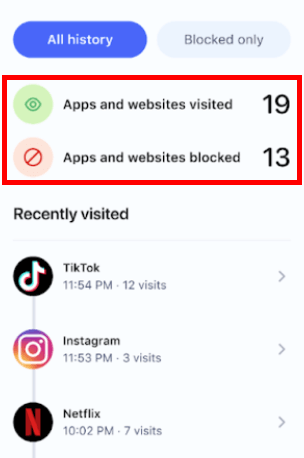
Aura’s content filtering covers the basics parents rely on most: Blocking inappropriate sites, limiting risky content, and keeping age-appropriate boundaries in place. During setup, Aura applies default filters based on your child’s age, which you can adjust at any time if they’re too strict or too loose.
What sets Aura apart is that its filtering works at the device level, not just inside a browser. That means blocked content stays blocked across apps and browsers, making it much harder for kids to get around the rules using alternative browsers or proxy sites.
Parents also get alerts when a child tries to access blocked content, giving enough visibility to adjust rules if needed — without turning the app into a constant surveillance tool.
Keeping screen time in check
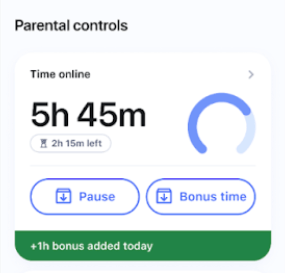
Aura’s screen time tools give parents flexible control without overcomplicating things. You can set daily limits for total internet use, apply different rules for weekdays and weekends, or put time caps on specific apps like YouTube or Roblox while leaving educational and communication apps unrestricted.
Schedules are easy to set up. Bedtime rules automatically cut internet access at night, and custom focus periods let you limit distractions during school hours while still allowing approved apps. When you need immediate control, the Pause button does exactly what it promises — one tap and the internet is off across that child’s devices.
Aura also includes a bonus time feature, which lets parents reward kids with extra minutes for chores, homework, or good behavior. It’s a small touch, but one that makes screen limits feel more cooperative than punitive.
That said, Aura controls internet access rather than fully locking down apps. Offline games, downloaded videos, or cached content can still be used once limits are reached, which may be a downside for parents looking for a complete device shutdown.
App management: Blocking, limits, and flexibility
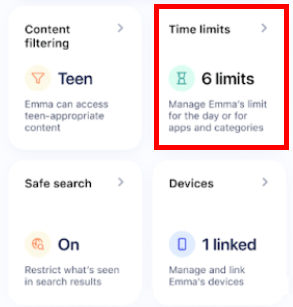
Aura’s app management tools give parents solid control over what apps kids can use and when. You can block individual apps like TikTok, Instagram, Discord, Snapchat, or YouTube, or take a broader approach by restricting entire categories such as social media, gaming, or dating apps.
During testing, switching between rules was straightforward. It was easy to block entertainment apps during study hours while keeping messaging or school-related apps available. Aura also shows how much time a child spends in each app, which makes it easier to spot habits that might need adjusting before they become a problem.
App controls work best on mobile devices, where monitoring is more detailed and consistent. On desktops, Aura focuses mainly on web activity and gaming-related protection, so app-level controls are more limited by comparison.
One downside worth noting is uninstall protection on Android. Kids can remove the Aura app without needing a parent’s permission, which immediately disables app restrictions until the device is reconnected. Parents do get notified, but there’s still a window where controls aren’t active — something to keep in mind for more tech-savvy kids.
Additional security and privacy features
In addition to parental controls, Aura offers extra security and privacy features aimed at protecting family data and devices.
Balance AI wellbeing monitoring
Balance AI is one of Aura’s more thoughtful features — and honestly, one of the reasons it feels different from standard parental controls. Instead of just blocking apps or tracking screen time, it looks at patterns in how kids use their devices to flag potential well-being concerns early.
During our testing, Balance focused on trends like shifts in online tone, changes in social activity, and late-night usage habits. Rather than showing parents actual messages or conversations, it summarizes behavior in a way that feels informative without crossing into invasive territory.
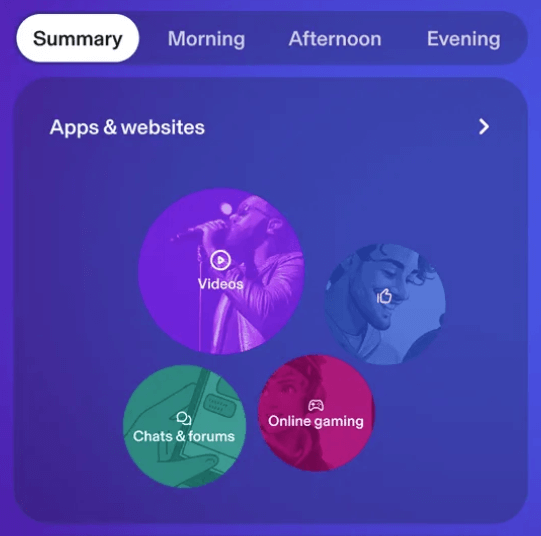
Aura also assigns light “digital personas,” such as a child being more socially active or more task-focused online. These labels aren’t meant to diagnose anything, but they do give parents a quick snapshot of how their child typically interacts with the digital world — and when something starts to change.
What we liked most were the weekly insights and conversation prompts. Instead of sounding alarmist, Balance highlights possible red flags and suggests calm, practical ways to check in with your child. It’s a more proactive, communication-first approach to digital wellbeing, which feels especially useful for older kids and teens.
Safe gaming protection
Safe Gaming is Aura’s answer to a problem most parental control apps struggle with: What actually happens inside online games. Available only on Windows PCs with Aura Antivirus installed, this feature monitors voice and text chats across 200+ popular games, including Fortnite, Roblox, Minecraft, and even Discord during gaming sessions.
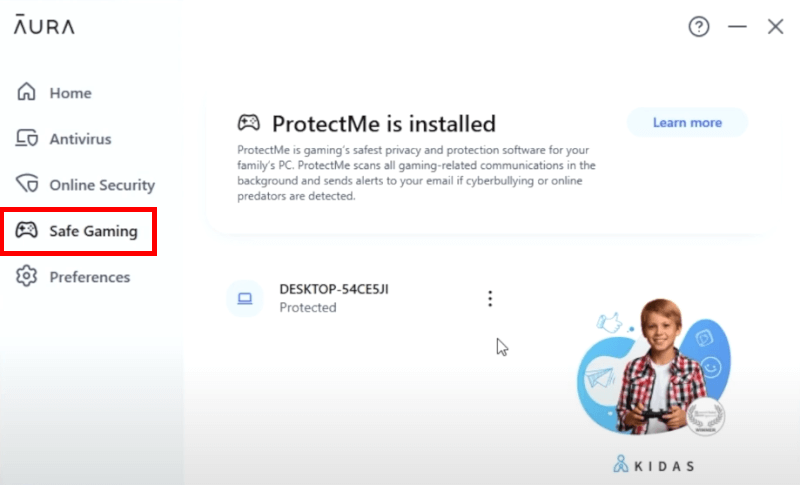
In practice, it runs quietly in the background and scans in-game communication for red flags like cyberbullying, harassment, predatory behavior, or inappropriate language. During testing, it didn’t interfere with gameplay or performance, which is important — kids won’t tolerate tools that slow things down or feel intrusive.
Instead of constant notifications, parents get clear weekly reports that summarize any concerning interactions, the games involved, and how serious the issue might be. The goal here isn’t micromanaging every chat, but giving parents enough context to step in when something feels off.
That said, Safe Gaming has a clear limitation: It’s Windows-only. There’s no equivalent protection for mobile gaming on iOS or Android, and Windows devices don’t get the same broader parental controls found on Aura’s mobile apps. If your child mostly games on a PC, it’s a genuinely useful extra — but it won’t cover every gaming scenario.
Identity theft protection for parents and kids
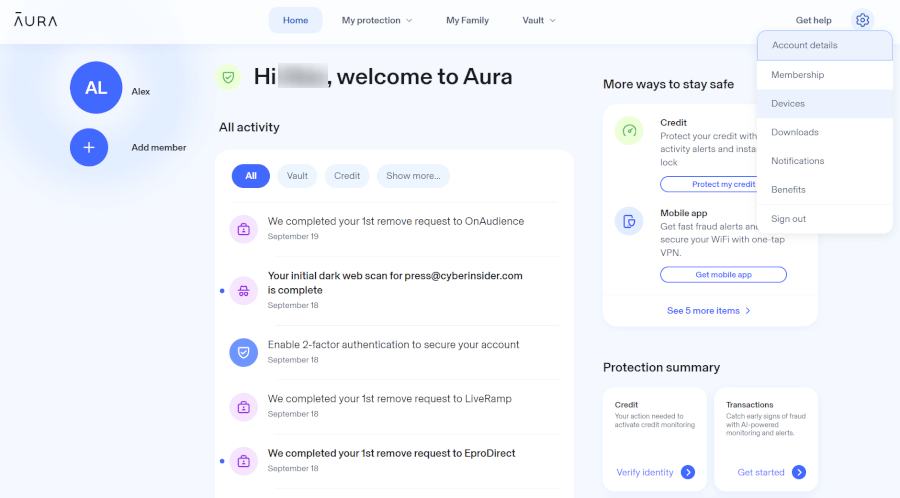
Aura stands out because its parental controls come bundled with identity theft protection, but how much you get depends on the plan. Even so, it’s a layer of security most parental control apps don’t offer at all.
With the Family plan, identity protection is fully baked in. It covers up to five adults and unlimited kids, with $1 million in insurance per adult (up to $5 million total). Kids also get dedicated protections, including monitoring for misuse of their Social Security number and tools to freeze a child’s credit if needed.
Smaller households can add unlimited kids to Individual or Couple plans, bringing many of those child-focused features along. Meanwhile, the Parental Controls (Solo) plan still includes up to $1 million in identity theft insurance for the household, even though it skips advanced tools like SSN monitoring.
It’s not something you check daily, but it matters. Child identity theft often goes unnoticed for years, and during testing, Aura surfaced old data exposures we’d long forgotten about. Having this protection quietly running in the background adds real peace of mind for families.
Built-in digital security tools for the whole family
Aura also bundles several everyday security tools that quietly support safer online habits across your household:
- Antivirus protection: Helps protect family devices from malware, ransomware, and malicious downloads, whether kids are gaming, downloading apps, or clicking the wrong link.
- VPN: Encrypts internet traffic on public and home Wi-Fi, reducing the risk of tracking, snooping, or location exposure while kids browse or use apps.
- Spam call and phishing text detection: Automatically flags scam calls and suspicious messages, which is especially useful as kids start using phones more independently.
- Password manager: Stores and generates strong passwords for shared family accounts, cutting down on reused or weak passwords that are easy to compromise.
These aren’t parental controls on their own, but together they reduce the chances of kids (and parents) being exposed to scams, malicious links, or reused passwords.
Personal data removal and privacy cleanup
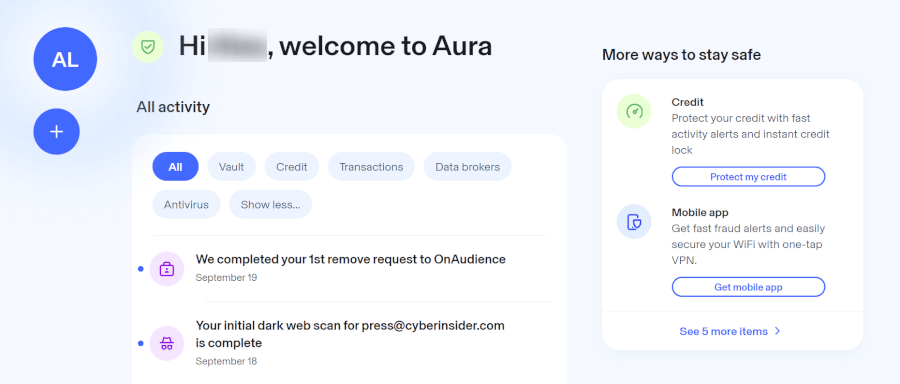
Finally, Aura tackles the less obvious side of online safety: How much of your family’s personal info is quietly floating around the internet. It automatically scans 140+ data brokers and people-search sites and sends removal requests for you, saving parents hours of frustrating opt-out forms and follow-ups.
What I like is that this isn’t a one-and-done cleanup. Aura keeps monitoring those sites daily and resubmits requests if your data pops back up. There’s also help with removing sensitive info from Google search results and spotting forgotten online accounts that could turn into future data leaks.
Over time, this makes it much harder for strangers to look up names, addresses, or other personal details — adding a low-effort but genuinely useful layer of privacy protection for the whole family.
Pricing, plans, and overall value
Aura is not just a parental control app, but a full family digital safety bundle. Instead of stacking add-ons, Aura wraps parental controls, cybersecurity tools, and identity theft protection into a single subscription — which can feel pricey at first glance, but makes more sense once you look at what’s included.
| Plan | Monthly price | Annual price (per month) | Who’s covered |
| Kids (parental controls) | $13.00 | $10.00 | One adult and unlimited kids |
| Family (all-in-one) | $50.00 | $32.00 | Up to five adults and unlimited kids |
Kids plan: Parental controls without the extras
The Kids Plan is Aura’s most affordable option and focuses squarely on parental controls. It includes all the core tools most parents care about — content filtering, app blocking, screen time limits, activity reports, and the one-tap “Pause the Internet” button. You also get Safe Gaming alerts on Windows PCs and basic antivirus protection.
This plan works well if your goal is managing screen habits and online content, not identity or financial protection. That said, compared to dedicated parental control apps like Qustodio or Bark, Aura’s Kids Plan is still on the higher end price-wise.
Family plan: Where Aura’s value really shows
The Family plan is Aura’s flagship offering, and where the pricing starts to make more sense. Along with all parental control features, it layers in identity theft protection and digital security tools for the entire household.
This includes:
- Up to $1 million in identity theft insurance per adult (up to $5 million total)
- Child identity protection, including SSN monitoring and credit freeze tools
- Credit and financial monitoring for adults
- Dark web monitoring
- VPN, password manager, and data broker removal
If you were to subscribe to these services separately, the cost would add up quickly. Aura’s appeal is that everything lives under one dashboard, which is especially useful for families juggling multiple subscriptions already.
Free trials, refunds, and renewals
Aura offers a 14-day free trial on both plans, which is enough time to test filters, screen time rules, and dashboards across your kids’ devices. On top of that, there’s a 60-day money-back guarantee (usually tied to annual plans), so you’re not locked in if it’s not the right fit.
One thing to watch: Introductory pricing doesn’t always last forever. Like many subscription services, Aura’s renewal rates can jump after the first year, so it’s worth checking your renewal price before committing long-term.
Is Aura worth the price?
Aura isn’t chasing the “cheapest parental control app” crown — and honestly, that’s kind of the point. If all you need is a basic screen-time timer, you’ll find cheaper tools. But if you want parental controls plus identity theft protection, privacy cleanup, and built-in security for the whole family, Aura starts to look like a smart bundle rather than a splurge.
The real value is convenience and coverage. Instead of juggling separate apps for screen limits, antivirus, VPNs, and identity protection, Aura wraps everything into one subscription. So while the price is higher than standalone parental controls, it makes sense for families who want fewer tools, less hassle, and stronger all-around protection.
Aura installation and setup: What getting started looks like
Setting up Aura is refreshingly quick, especially if you’re used to parental control apps that feel like IT projects. In testing, most families can get everything up and running in under 10 minutes, even with multiple devices in the mix.
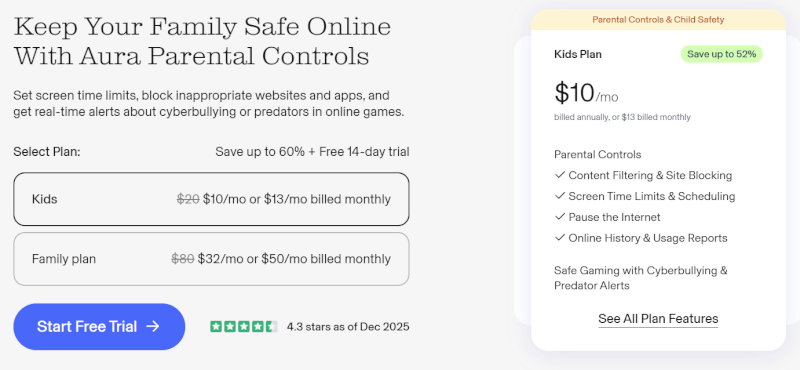
Aura uses a single app for both parents and kids. Parents control everything from their own phone, while children’s devices switch into a dedicated “Child Mode.” The setup is clearly designed for non-technical parents, with simple prompts and explanations along the way. That said, a few permissions — especially the VPN — are essential and worth paying attention to during installation.
Once those are approved, Aura quietly does its job in the background.
Mobile setup on iOS and Android (where Aura shines)
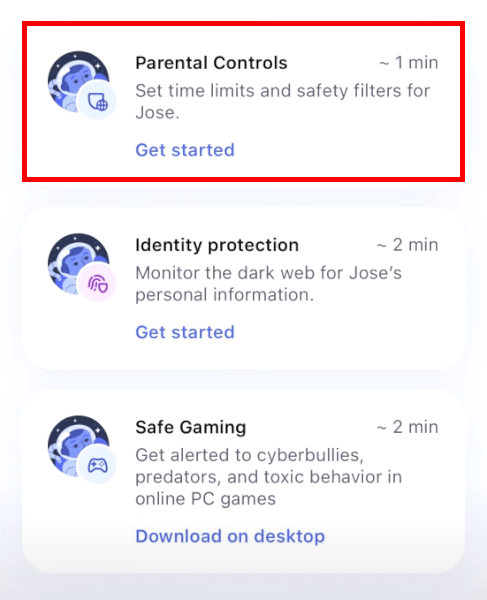
Parents start by downloading the Aura app and creating child profiles with names and birthdays. Aura then automatically applies age-based filters, which saves time and avoids overthinking settings right out of the gate.
Linking a child’s device is easy. You can either log in directly or use a QR code to connect devices in seconds — especially handy if you’re setting up multiple phones or tablets at once.
To enable full content filtering, Aura asks for VPN permission on the child’s device. This isn’t about hiding IP addresses — it’s what allows Aura to filter traffic across apps and browsers, not just the web. Skip this step, and filtering won’t work properly, so it’s an important one.
On iOS, Aura integrates smoothly with Apple’s Screen Time, stacking its controls on top of existing limits rather than fighting them. It also does a better job of preventing kids from removing the app. Android works well too, but tech-savvy kids may find ways around uninstall protections with enough determination.
From the parent app, everything is controlled through a clean, real-time dashboard. You can pause internet access, adjust screen time, block apps, or grant bonus time in just a few taps — no digging through menus.
Desktop setup on Windows and Mac (more limited, more specialized)
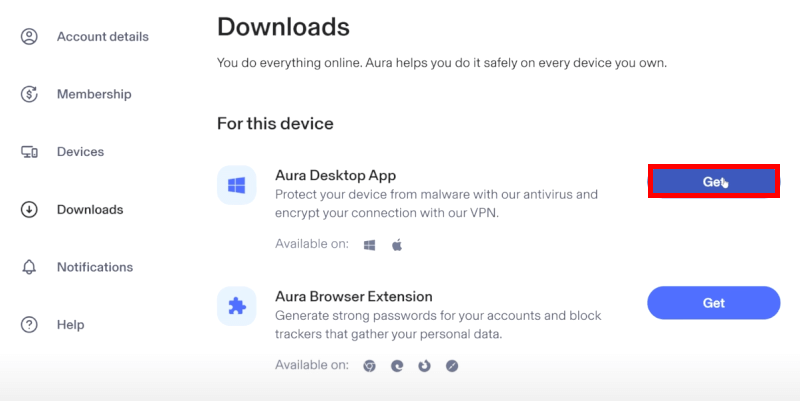
Parents manage desktop-related settings through Aura’s web dashboard, which gets the job done but isn’t quite as smooth as the mobile app. It works best for checking reports or adjusting high-level settings rather than day-to-day control.
On Windows, Aura’s standout desktop feature is Safe Gaming. This requires installing Aura Antivirus, which runs quietly in the background and monitors in-game chats across hundreds of popular PC games. Parents don’t need to understand the games themselves — they just receive alerts or weekly summaries if something concerning pops up.
Mac support is lighter. Desktop parental controls focus mostly on web filtering via browser-based tools, with fewer system-wide restrictions than on mobile devices.
Overall, desktop setup takes a bit longer due to antivirus installation and system permissions, but once it’s done, there’s very little ongoing maintenance required.
In everyday use, Aura shines on mobile, where setup is quick and parental controls feel immediate and easy to manage. Desktop features are lighter by design, which works well since most screen time now happens on phones and tablets anyway.
Privacy and data protection: Safety without snooping
| Privacy and security feature | What it does | Why it matters |
| Behavior-based monitoring | Tracks patterns like late-night activity or sudden usage spikes | Helps spot potential issues without reading private messages |
| Strong encryption | AES-256 encryption for data at rest and in transit | Protects sensitive information from hackers |
| VPN-based content filtering | Filters online activity locally on the device | Shields browsing activity from outside eyes |
| On-device processing | Some analysis happens entirely on your child’s device | Minimizes personal data leaving the device |
| Data collection limits | Only collects info necessary for safety insights | Reduces data exposure |
| No data selling | Family info is never sold or shared | Keeps your household data private |
| Parental control over data | Parents can choose what is monitored and request deletion | Gives you ultimate control and peace of mind |
Aura takes a refreshingly balanced approach to privacy, especially when it comes to parental controls. Instead of reading kids’ private messages or logging every word they type, the platform focuses on patterns and behavior — things like sudden late-night activity or shifts in online habits that may signal a problem.
From a data-handling perspective, Aura keeps things reassuringly strict. Family data isn’t sold, shared, or monetized, and only the information needed to deliver safety insights is collected in the first place. Parents stay in control, too, with the ability to limit what’s monitored and request data deletion at any time.
On the security side, Aura uses strong encryption to protect data both in transit and at rest, and its local VPN-based filtering keeps browsing activity shielded from outside eyes. Some features even process information directly on the device, reducing how much personal data ever leaves it.
Overall, Aura’s privacy model feels designed for trust: Protective without being intrusive, and secure without turning family life into constant surveillance.
Customer support and resources: Real help, when you actually need it
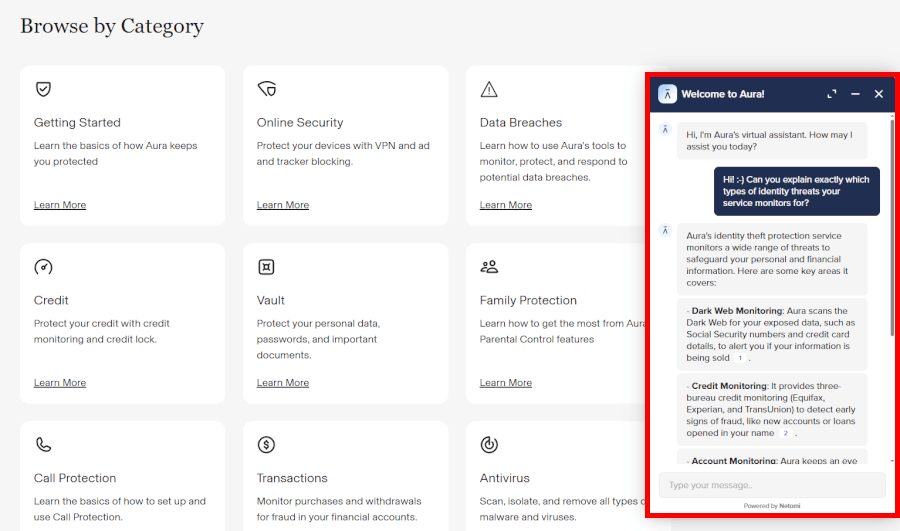
Aura backs up its parental controls with solid, human-first support — a refreshing change in a world of chatbots and canned replies. Parents can reach real support specialists by phone 24/7, which is especially helpful when dealing with setup hiccups, VPN permissions, or anything that feels too important to leave to email tickets.
Live chat is also available during the day for quicker questions, and for families on higher-tier plans, Aura offers hands-on help if identity-related issues ever arise. While non-urgent questions can occasionally take a bit longer to resolve, urgent security concerns are clearly treated as a priority.
If you prefer solving things on your own, Aura’s help center is genuinely useful. It’s packed with clear setup guides, troubleshooting articles, and feature explanations that make managing parental controls much less intimidating. Beyond that, Aura also shares educational resources for parents who want to stay ahead of digital safety trends — not just react to them.
Overall, Aura’s support feels knowledgeable, approachable, and refreshingly honest, with a clear focus on helping families get the most out of the platform rather than just pushing features.
Aura Parental Control app alternatives: Quick comparison
| Aura | Qustodio | Norton Family | |
| Location tracking | ❌ | ✅ GPS & Geofencing | ✅ GPS & Geofencing |
| Social media monitoring | ❌ | ⚠️ Basic alerts | ⚠️ Basic alerts |
| Screen time controls | ✅ | ✅ | ✅ |
| Windows gaming alerts | ✅ (Safe Gaming) | ❌ | ❌ |
| Identity theft protection | ✅ (Family plan) | ❌ | ❌ |
| Starting price | $10/month | $4.58/month | ~$4.15/month |
| Best for | All‑in‑one safety | Classic parental controls | Location and school focus |
Qustodio is one of the most full‑featured standalone parental control apps. It lets you set detailed screen time rules, block categories or individual apps/sites, and includes real‑time GPS tracking and geofencing, which Aura doesn’t offer. There’s even a limited free tier for a single device — great for families on a budget. If your priority is traditional parental controls and location awareness, Qustodio is a strong alternative.
Bark stands out by focusing on what your kids are saying online rather than just how long they’re online. It uses AI to scan messages, emails, and 30+ social platforms for signs of cyberbullying, self‑harm, predatory behavior, and other risks. Instead of showing every message, Bark sends alerts when something seems concerning — which many parents prefer for a balance between safety and privacy.
Norton Family is especially appealing for families with younger kids and school routines. Its School Time mode blocks distractions during homework hours, and it includes real‑time GPS location and geofencing. It also integrates well with Norton 360 bundles, so you can get antivirus and VPN protection alongside parental controls — though it doesn’t have gaming‑specific monitoring like Aura.
Built‑in options: Best free choices for basic limits
If you just want simple controls without extra cost:
- Apple Screen Time works seamlessly on iPhones and iPads for app limits and downtime.
- Google Family Link gives Android parents basic app management and location tracking.
- Microsoft Family Safety helps with Windows PCs and Xbox time limits.
These don’t offer the layered features of paid services, but they’re solid starter options.
Final verdict: Is Aura Parental Controls worth it in 2026?
Aura isn’t trying to be a bargain-bin screen-time app — and that’s kind of the point. It feels much more like a full-on family safety net than a simple parental control tool, blending screen limits, content filters, gaming protection, and identity theft coverage into one tidy package.
Setup is quick (especially on phones and tablets), the dashboard stays clean and unintimidating, and everything works quietly in the background without constant babysitting from parents. The real standout, though, is the identity protection layer. It’s the kind of feature you hope you’ll never need — but when kids’ data can resurface years after a breach, having that protection baked in brings genuine peace of mind.
Of course, Aura isn’t flawless. Families who want real-time location tracking or hyper-detailed app scheduling may feel a bit underwhelmed, and desktop controls still play second fiddle to the mobile experience. And yes, if you’re only shopping for basic parental controls, Aura can feel pricier than necessary.
Still, if you want screen time, safety, and identity protection all in one, Aura delivers smart, stress-free digital protection for your family.
Aura parental controls app FAQ
What is the Aura parental controls app and how does it work?
Aura is an all-in-one family safety app that combines parental controls with digital security and identity protection. It works by installing the Aura app on both the parents’ and child’s devices, where parents manage screen time, block apps and websites, and monitor online activity from a single dashboard. Behind the scenes, Aura uses a local VPN and AI-driven analysis to spot risky behavior patterns without turning into a full-on surveillance tool.
How many devices and children can Aura monitor?
Aura can monitor unlimited children and unlimited devices on a single subscription. This makes it especially appealing for larger families or households with lots of phones, tablets, and computers. Instead of juggling multiple plans or device limits, everything runs under one account, which keeps setup and ongoing management refreshingly simple.
Does Aura monitor text messages or social media?
Aura does not read or display your child’s private messages or social media conversations. Instead, it looks at broader behavior signals (like tone changes, late-night activity, or sudden spikes in messaging) to flag potential concerns. The idea is to give parents meaningful insights while still respecting a child’s privacy, rather than letting you scroll through every message.
Does Aura monitor online gaming chats?
Yes, Aura monitors online gaming chats, but only on Windows PCs through its Safe Gaming feature. Safe Gaming scans voice and text chats in over 200 popular PC games for signs of cyberbullying, harassment, or predatory behavior. It runs quietly in the background and sends parents alerts and weekly summaries, so you stay informed without hovering over every gaming session.
Does Aura protect kids on Discord?
Aura can flag risky Discord interactions during PC gaming sessions, but it doesn’t fully monitor Discord across all devices. When Discord is used alongside supported Windows games, Safe Gaming can detect concerning language or behavior. Outside of that (especially on mobile), Aura focuses more on screen time, app usage, and overall behavior trends rather than direct Discord message monitoring.
Is Aura identity theft insurance worth it?
Yes, Aura’s identity theft insurance is genuinely valuable, especially for families with kids. Child identity theft often goes unnoticed for years, and Aura helps catch misuse early while backing it up with up to $1 million in coverage per adult (and up to $5 million total on family plans). It’s not flashy day to day, but if something ever goes wrong, having monitoring, recovery support, and insurance under one roof can save a lot of stress, time, and money.

Leave a Reply