
You’re tired of password resets and the constant anxiety of password reuse. RoboForm and LastPass remove that burden by generating unique strong passwords for every site, protecting them with encryption, and providing quick access on every device you own.
Their differences stand out in pricing structures, ease of use, security and encryption, platform compatibility, sharing features, and customer support. This side-by-side comparison provides the straight facts you need to choose the password manager that aligns with your daily needs and security priorities. And yes, LastPass is still worth considering despite its headline-making 2022 breach.
Both services offer essentials like unlimited storage and zero-knowledge encryption, but RoboForm’s long-standing clean security record sets a very different tone compared to LastPass’s ongoing trust issues, audits, and recovery efforts.
In this complete RoboForm vs LastPass guide, we cover everything that matters now — core features, security, pricing, and how each tool performs in real life. If you’re here for the quick breakdown, hop over to the core features comparison section.
| RoboForm | LastPass | |
| Website | RoboForm.com | LastPass.com |
| Platforms | Windows, macOS, Linux, Android, and iOS | Windows, macOS, Android, iOS |
| Browser extensions | Chrome, Firefox, Opera, Edge, and Safari | Chrome, Firefox, Opera, Safari, and Edge |
| Encryption | AES 256-bit | AES 256-bit |
| Support | Live chat, email, phone | Chatbot, email, knowledge base |
| Price | From $0.99/month | From $3.00/month |
| Best deal | 60% Off Coupon > | 30-day free trial > |
Here’s what we’ll dig into in this RoboForm vs LastPass comparison — all the practical stuff that actually matters when you’re choosing a password manager:
- Background check: Who built them, where they’re based, and whether their reputations still hold up.
- Platform compatibility: Because even the best password manager is useless if it doesn’t work on your favorite devices.
- Core and premium features: The everyday essentials, the power-user perks, and the extras that make each one shine.
- Ease of use: How smoothly each tool fits into your routine without adding extra friction.
- Security and encryption: The behind-the-scenes tech (plus the history) that determines how safe your vault really is.
- Privacy policy: The fine print that tells you who can see what (and who absolutely can’t).
- Plans and pricing: Which one respects your budget — and which one might sneak in a surprise fee.
- Customer support: When something breaks, who actually helps — and how fast?
Alright, let’s kick things off with a quick background check on both RoboForm and LastPass.
Background check: Company information and history of security incidents
Before we compare features, pricing, and all the bells and whistles, it’s worth asking a simple question: Who exactly are you trusting with the keys to your digital kingdom?
RoboForm and LastPass may look similar on paper, but their histories couldn’t be more different — one has kept a spotless record for decades, the other has been rebuilding trust after one of the biggest breaches in the industry.
RoboForm: The long-running veteran with a clean record

| Starting price | $0.99/month |
| Platforms supported | Windows, macOS, Linux, Android, and iOS |
| Encryption | 256-bit AES |
| Extra privacy and security tools | 2FA, password audit, shared folder, cloud backup |
| Best deal | 60% off coupon |
RoboForm comes from Siber Systems, a US-based company that’s been around since the mid-’90s — practically ancient history in the password-manager world. What began as a clever little form-filling tool back in 1999 eventually grew into the fully fledged password manager we know today. And despite being over 20 years old, RoboForm has managed what many younger competitors can’t claim: A flawless security record.
That’s thanks to its zero-knowledge design (your data stays encrypted on your device), solid AES-256 encryption, and regular third-party audits — including a fresh round from Secfault Security in 2025. Even though it operates under US jurisdiction (FVEY), RoboForm can’t hand over anything meaningful because it simply doesn’t have access to your master password or decrypted data.
And here’s the part that stands out most in a comparison like this: RoboForm has never experienced a breach of customer vaults — not once. In an industry where “security incident” headlines pop up far too often, that’s a big deal.
LastPass: A major name still recovering from trust issues
| Starting price | $3.00/month |
| Platforms supported | Windows, macOS, Android, iOS, Chrome, Firefox, Opera, Safari, and Edge |
| Encryption | AES 256-bit |
| Extra privacy and security tools | Security dashboard, dark web monitoring, and emergency access |
| Best deal | 30-day free trial > |
LastPass, owned by GoTo (formerly LogMeIn), has been one of the biggest names in password management for years — but also one of the most scrutinized. Its high-profile 2022 breach exposed encrypted vaults, metadata, and other sensitive customer information when an attacker gained access to cloud backups.
To LastPass’s credit, the company has tightened security since then, improved its infrastructure, and pushed out more transparency updates. But the damage lingers: Many users left after the breach, and even today, LastPass is still working to rebuild the trust it once enjoyed.
This history doesn’t make LastPass unsafe today, but it does make its past an unavoidable part of the comparison — especially next to RoboForm’s clean slate.
Platform support: Which works on more devices, RoboForm or LastPass?
If your digital life spans multiple devices (and whose doesn’t these days?), your password manager needs to keep pace. RoboForm and LastPass try to be everywhere you are, from shiny new phones to dusty old desktops, but their reach differs.
Here’s the breakdown:
| Platform / browser | RoboForm | LastPass |
| Windows | ✅ (Vista+) | ✅ (8.1+) |
| macOS | ✅ (10.13+) | ✅ (latest two versions) |
| Linux | ⚠️ Browser extension only | ⚠️ Browser extension only |
| Chrome OS | ⚠️ Extension only | ❌ |
| Android | ✅ (5.0+) | ✅ (12+) |
| iOS | ✅ (13.0+) | ✅ (16.0+) |
| Browser extensions | Chrome, Firefox, Safari, Edge, Opera, Brave, IE, Tor | Chrome, Firefox, Edge, Opera, Safari |
RoboForm covers almost everything — and we really mean everything. It works on major operating systems, offers polished iOS and Android apps, and supports more browsers than most competitors even attempt. If you rely on niche browsers (Opera, IE, Tor) or older systems, RoboForm quietly becomes the hero of your setup.
LastPass still delivers strong cross-platform support, especially on desktop and mobile, and its extensions work smoothly on all mainstream browsers. But it hasn’t brought back a native Linux app, and its ChromeOS support remains limited, which might be a dealbreaker if you live outside the Windows–macOS bubble.
Mobile users get near-identical experiences in both apps: Biometric login, autofill that actually works, and syncing that kicks in seamlessly once you’re on a paid plan. The big difference? RoboForm’s free plan is limited to one device, while LastPass forces you to choose between “all mobile” or “all desktop” devices — an annoying restriction for anyone who switches often.
Features face-off: RoboForm or LastPass, which one brings the most tools?
Features are where RoboForm and LastPass start to show their true colors. Both handle the basics flawlessly, but once you dig into the tools you’ll use every day, the differences become impossible to miss. Here’s what stood out in our hands-on testing.
Importing/exporting passwords
Switching password managers shouldn’t require a PhD in CSV files, and thankfully, both RoboForm and LastPass keep the process fairly painless — though one is definitely smoother.
RoboForm keeps it simple. You can import from pretty much anything — Chrome, Edge, Firefox, password manager exports, even LastPass itself. In our tests, we had a full vault imported in a few minutes, and everything landed in the correct folders without any cleanup needed.
Exporting is equally easy. One click, choose CSV, done. No paywalls, no special desktop-only steps, no “premium-only export” nonsense.
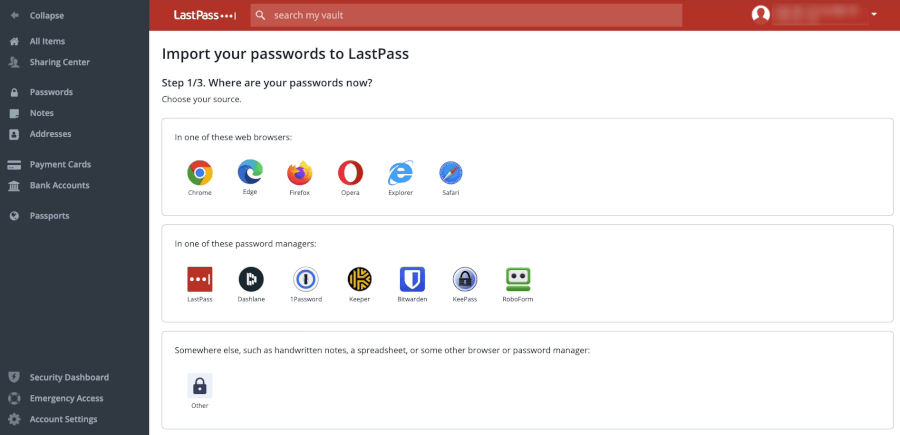
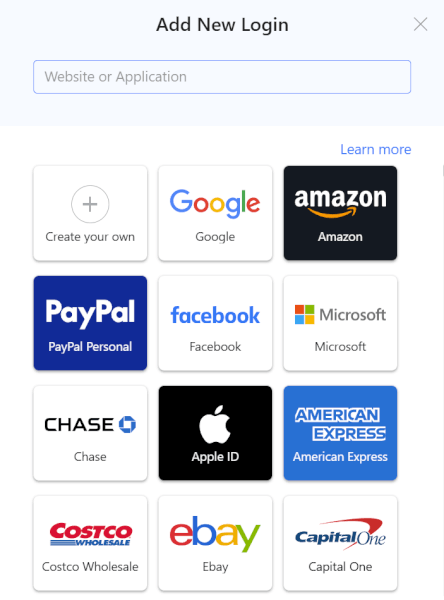
LastPass offers a wider variety of supported imports, especially if you’re coming from competitors like Bitwarden, 1Password, or Keeper. It uses a guided import tool, which is a bit more modern but still requires manual file selection and the occasional CSV adjustment.
Exporting works fine but feels dated, and the encrypted backup option only works inside LastPass — not ideal if your goal is flexibility.
Auto-filling and capturing login information
Autofill is where password managers either feel magical… or make you want to throw your laptop across the room. Good news: Both RoboForm and LastPass are solid — but RoboForm has the edge in precision.
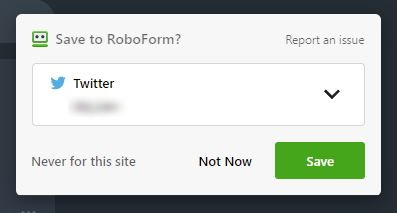
This is RoboForm’s territory. Whether it was a standard login box, a multi-page tax form, or a weirdly coded checkout field, RoboForm filled everything perfectly in our tests.
It recognizes new logins instantly, pops up right where you need it, and captures passwords with zero fuss. Even long, messy web forms were handled with impressive accuracy.
If you fill a lot of forms, RoboForm feels like a cheat code.
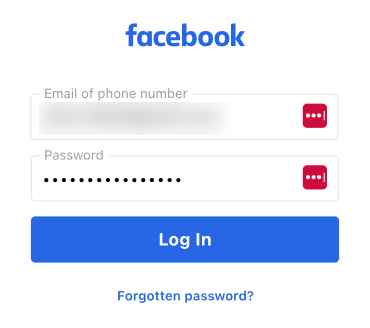
LastPass offers a more modern autofill experience. Its in-line suggestions look clean, and it handles everyday login pages extremely well.
It’s especially strong on mobile — autofill on both iOS and Android is smooth, consistent, and rarely misses a beat.
Where it falls slightly short is complexity. Long forms, old websites, or unusual field layouts sometimes tripped it up in ways RoboForm handled easily.
Creating strong passwords
No password manager is complete without a generator that can crank out iron-clad logins. Both tools do the job well, but their approaches differ.
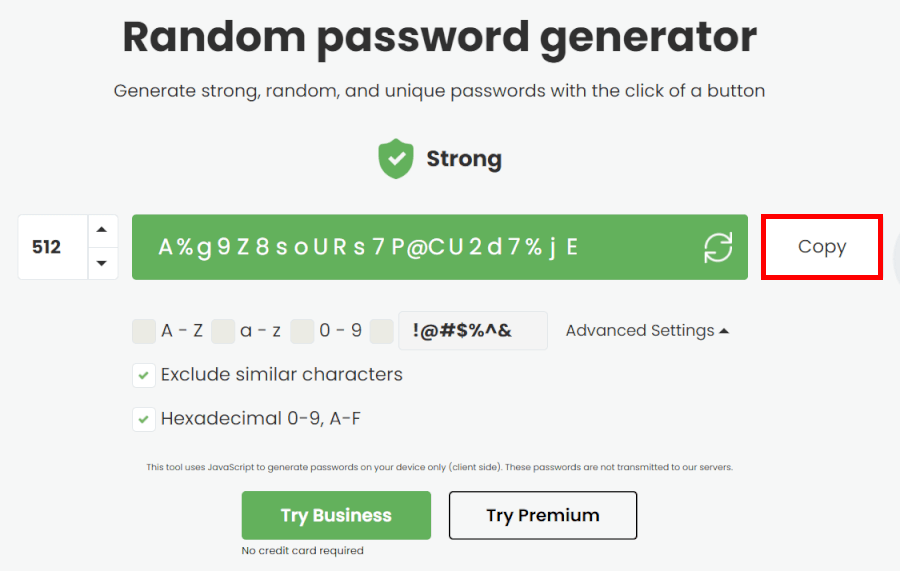
RoboForm takes the “raw power” approach. Its generator can spit out incredibly long passwords (far longer than you’ll ever realistically need), and it lets you fine-tune the details by adjusting symbols, numbers, uppercase characters, or filtering out look-alike characters.
You can even create hex strings or other highly random formats. Everything loads instantly, works from any corner of the app, and remains fully available on the free plan…
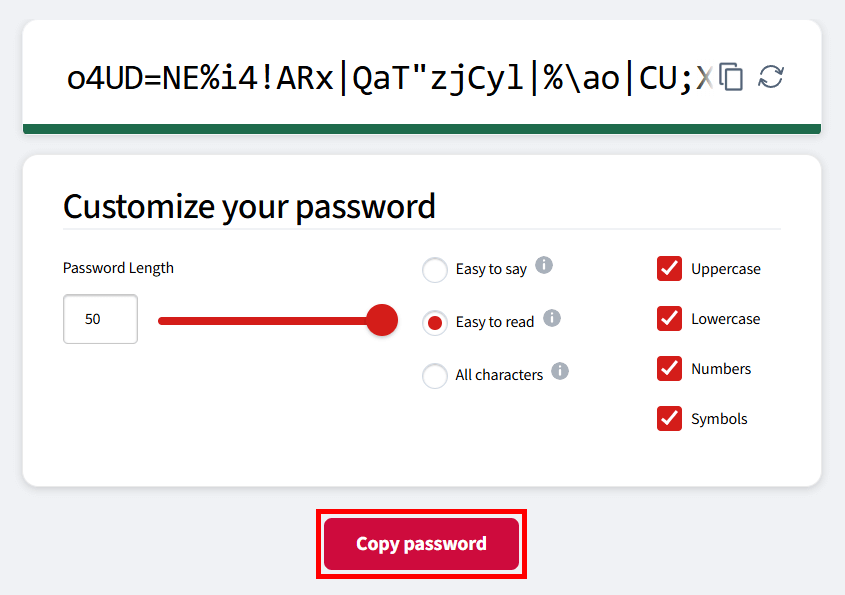
LastPass, meanwhile, leans into customization and convenience. You can set the exact length, tweak which characters it uses, or switch to pronounceable passwords if you want something easier to remember.
It also adapts to each website’s specific password rules automatically — a small touch that saves a lot of frustration. The generator feels polished across both browser extensions and mobile apps, blending seamlessly into its autofill tools.
Next up, let’s check which one packs the better premium perks.
Premium perks: Which password manager hides the better power-ups?
Premium features are where things get exciting — LastPass dazzles with sleek security tools, while RoboForm sticks to practical perks that actually make life easier.
RoboForm premium perks
RoboForm shines in reliability, control, and efficiency. Its premium perks are all about making your life easier and keeping your data exactly where you want it:
- Superior form-filling: Master of complex, multi-page forms — RoboForm fills them accurately when LastPass struggles.
- Local storage option: Keep your encrypted vault on your device rather than in the cloud.
- Cleaner security record: No major public breaches, giving extra peace of mind.
- One-time purchase option: Grab a lifetime license instead of a recurring subscription.
- Desktop app logins: Store and auto-fill passwords for applications, not just websites.
- Versatile password generator: Create strong passwords up to 512 characters, giving maximum flexibility.
If you prioritize accuracy, control, and long-term value, RoboForm’s premium perks feel immediately useful.
LastPass premium perks
LastPass focuses on advanced security monitoring, sleek usability, and convenience features that make it feel polished and modern:
- Dark web monitoring: Get alerts if your credentials appear in a breach or on shady forums.
- Security dashboard/password health score: See how strong your vault is and get actionable improvement tips.
- Encrypted file storage: Up to 1GB of cloud storage for sensitive files.
- Dedicated emergency access: Set trusted contacts to access your vault after a waiting period.
- Polished mobile experience: Smooth, consistent apps across platforms.
For users who love integrated security tools, monitoring, and a modern interface, LastPass Premium has plenty to offer.
Ease of use: Which password manager feels right?
A password manager can be bulletproof in security, but if it slows you down or makes you hunt for features, it’s more hassle than help. We put RoboForm and LastPass to the test, from sign-up to daily autofill, to see which one feels smoother in real life.
Sign-up and installation
RoboForm keeps things fast and friction-free. Hit “Get RoboForm Free,” create an account, and you’re in. The browser extension installs in seconds, and a short intro video gets you oriented.
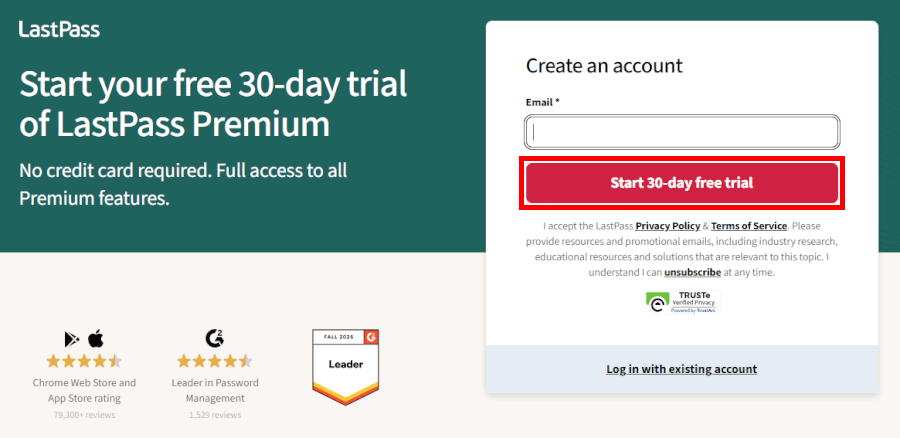
LastPass is polished but slightly more formal. You create an account, start a trial, download apps, generate your emergency kit, and sync across devices. It’s smooth — just a bit longer before you’re fully up and running.
User interface
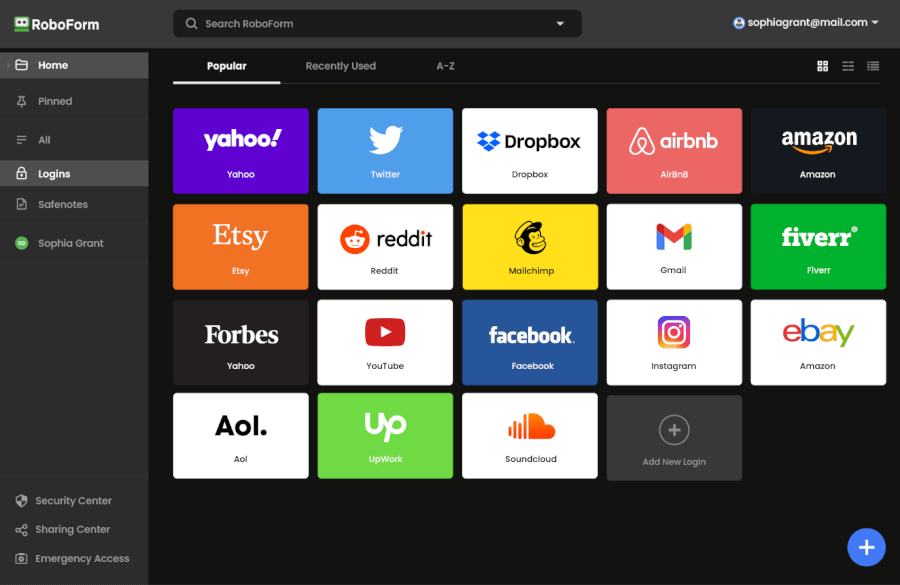
RoboForm sticks to a functional, stripped-down design. Everything is exactly where you expect it to be, which makes managing vaults simple and fast — even on older devices.
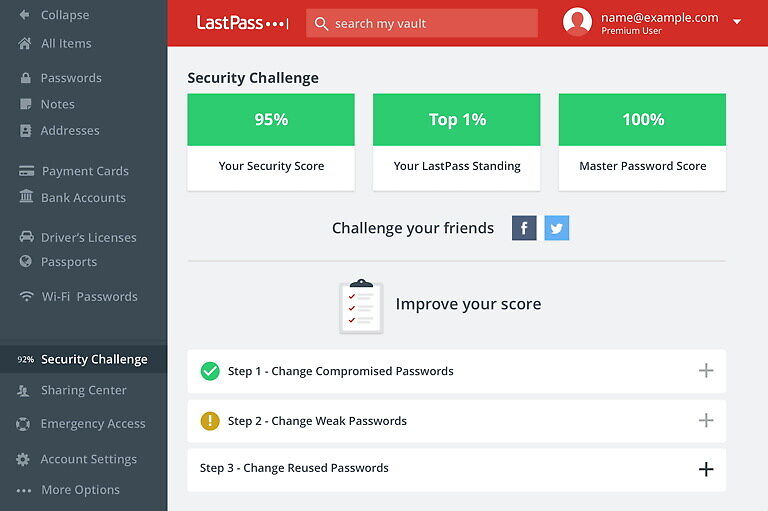
LastPass takes a modern approach, with color coding, tags, and sleek menus. It looks great and is intuitive for new users, but sometimes the extra polish adds a few clicks for everyday tasks.
Password managers in action
RoboForm easily takes the lead in day-to-day usability thanks to its lightning-fast, highly accurate autofill — especially on complex, multi-page forms like checkout flows or tax documents, where it almost never stumbles.
LastPass, meanwhile, delivers a smoother, more modern experience across devices, with reliable cloud sync and polished mobile apps that feel great to use. Its autofill works well for standard logins, but when it comes to precision on tricky forms, RoboForm simply does it better.
RoboForm vs LastPass security: Who locks down your data better?
Before we dig into the details, here’s a quick look at how RoboForm and LastPass stack up on the security fundamentals:
| Security feature | RoboForm | LastPass |
| Encryption | AES-256 | AES-256 |
| Zero-knowledge architecture | ✅ | ✅ |
| MFA options | Authenticator apps, SMS, email (paid plans) | Authenticator apps, hardware keys, biometrics |
| Local-only storage | ✅ | ❌ |
| Password hashing (PBKDF2) | ~8 million iterations | ~100,100 iterations |
| Third-party audits | ✅ 2023 and 2025 | ✅ ISO 27701, but less transparent |
| Data breach history | ❌ No known breaches | ✅ Multiple breaches (notably 2022) |
A password manager’s first job is simple: Protect your data like a digital fortress. The good news is that both RoboForm and LastPass start with the right foundation — strong AES-256 encryption and a zero-knowledge design. That means your vault is encrypted before it ever leaves your device, and no one (not your provider, not a hacker, not a rogue employee) can see your logins.
But once you go beyond the basics, the two services take very different paths.
Where RoboForm stands strong
RoboForm leans into stability, transparency, and control. It uses AES-256 encryption backed by a massively high PBKDF2 iteration count — around 8 million rounds, one of the strongest implementations among mainstream password managers. That makes brute-forcing your master password far more difficult, even if someone ever got hold of an encrypted vault.
And unlike cloud-only managers, RoboForm also offers local-only storage, meaning you can keep your vault completely offline and fully under your control. Combine that with clean independent audits and a spotless breach history, and you get a service that’s extremely reliable from a security standpoint.
Where LastPass takes the lead
LastPass counters with more advanced MFA options and a smoother, more modern security experience. It supports authenticator apps, biometrics, and hardware keys — including FIDO2 devices like YubiKeys — which gives you more flexibility if you want stronger logins.
It also offers dark web monitoring on premium plans and a polished login experience across devices.
However… the elephant in the room is LastPass’s breach history. Most notably in 2022, attackers gained access to encrypted customer vaults and unencrypted metadata. While your passwords remained encrypted, weak master passwords became vulnerable to offline cracking attempts — and the fallout still affects user trust today.
Privacy policy: Which password manager keeps your data safer?
First up, a simple comparison to see how their privacy policies stack up:
| Privacy feature | RoboForm | LastPass |
| Data collection | Basic account info (email, OS, device) | Broader metadata (IP, device IDs, usage data) |
| Jurisdiction | USA (Five Eyes) | USA (Five Eyes) |
| Metadata encryption | ❌ Not encrypted | ❌ Not encrypted |
| Privacy policy clarity | Product-specific, easy to parse | Shared with GoTo (harder to pinpoint what applies) |
Both RoboForm and LastPass use zero-knowledge encryption, so your vault stays locked down even if someone demanded access from the companies themselves. But when you look at what each service collects — and how transparent they are about it — the gap widens quickly.
RoboForm keeps things refreshingly minimal. It only gathers the basics needed to run your account, and if you want maximum privacy, you can flip on local-only storage so your data never touches the cloud. Its privacy policy is also clear and product-specific, making it easy to understand exactly what’s collected and why.
LastPass, on the other hand, collects a noticeably wider range of metadata, including IP addresses and device identifiers. Because its policy is bundled under GoTo’s broader corporate umbrella, it takes more digging to understand what applies specifically to LastPass. Combine that with its past breach — where unencrypted metadata was exposed — and privacy-focused users have good reason to be cautious.
Both tools keep your vault encrypted and inaccessible to employees, but RoboForm’s lighter data footprint and optional offline mode give it a meaningful edge for anyone who values quiet, private, low-exposure password management.
Plans and pricing: RoboForm or LastPass, which is the smarter buy?
When we compared RoboForm and LastPass side-by-side, one thing became clear fast: Both offer flexible plans for solo users, families, and businesses — but the way they structure value is very different. RoboForm keeps things simple and budget-friendly, while LastPass leans into a slightly pricier ecosystem with a few more built-in security perks.
Before we dive into the details, here’s a quick side-by-side snapshot to set the scene:
| RoboForm | LastPass | |
| Free plan | ✅ Unlimited passwords on one device | ✅ Unlimited passwords on one device type |
| Premium (single user) | From $0.99/month | From $3.00/month |
| Family plan | From $1.59/month (5 users) | From $4.00/month (6 users) |
| Premium trial | ✅ 30 days | ✅ 30 days |
| Money-back guarantee | ✅ 30 days | ❌ Subscription continues until expiry |
RoboForm: The budget champion that doesn’t cut corners
RoboForm has always positioned itself as one of the best-value password managers around, and honestly, after testing it again for this guide, it’s still hard to argue with.
The free plan covers the basics, offering unlimited password storage and autofill, but it’s limited to use on a single device. It can be useful for getting a feel for the service before committing.
| RoboForm paid plans | Premium | Family | Business |
| Price | $2.49/month ($0.99 with our coupon) | $1.59/month | $3.33/user/month |
| Devices | Unlimited | 5 accounts | Multiple users |
| Support | Priority support with phone/live chat | Priority support | Admin controls and dedicated manager |
Once you jump to RoboForm Premium, things get even better. For less than a dollar a month with recurring discounts, you unlock unlimited devices, secure sharing, emergency access, and priority support. We’ve tried a lot of paid password managers over the years, and RoboForm consistently delivers outsized value for the price.
The Family Plan continues the trend: Up to five users for barely more than the cost of the single-user plan. If you want to secure your partner, roommate, or small family without turning budgeting into a math problem, this one is an easy win.
Businesses also get clean, simple pricing and helpful admin tools — not the most advanced suite on the market, but very capable for small teams on a budget.
LastPass: A more premium ecosystem (and priced like it)
LastPass takes a different approach. Its free plan mirrors RoboForm in some ways, but there’s a catch: You can only use it on one device type — either computer or mobile. When we tested this setup, it felt limiting fast, especially if you bounce between phone and laptop throughout the day.
| LastPass plans | Price (billed annually) | Highlights |
| Premium | $3.00/month | 1GB encrypted file storage, dark web monitoring, advanced MFA |
| Families | $4.00/month | Up to 6 users, all “Premium” features |
| Teams | $4.25/user/month | Admin console, shared folders, security policies |
| Business | $7.00/user/month | Enhanced admin controls, group management |
| Business Max | $9.00/user/month | Advanced MFA, SaaS monitoring, top-tier security |
The Premium plan lands at about double the cost of RoboForm’s, but to LastPass’s credit, you get a more feature-rich experience. Dark web monitoring, advanced MFA options, and encrypted file storage give it a “security suite” feel rather than a basic password vault.
The Families plan bumps that up to six users and adds easier sharing and account recovery. It’s more expensive than RoboForm’s, but you do get a bit more structure for managing multiple people.
For businesses, LastPass offers more granular admin policies and advanced controls — though it also comes with higher per-user pricing. And unlike RoboForm, there’s no money-back guarantee once you’ve paid.
So… which is the smarter buy?
Customer support: RoboForm vs LastPass – who’s easier to reach?
Getting a password manager is one thing — making sure help is at hand when you need it is another. Here’s a quick snapshot of how RoboForm and LastPass stack up on support:
| Support feature | RoboForm | LastPass |
| Live chat | ✅ Weekdays, business hours | ✅ For paid users |
| Phone support | ✅ Limited, callback option | ✅ Limited, callback option for paid users |
| Email/ticket support | ✅ Priority for paid users | ✅ For paid users |
| Community forums | ⚠️ No, but there is RoboForm subreddit | ✅ LastPass Community is available |
| Knowledge base | ✅ Manuals and guides | ✅ Articles and videos |
| AI assistant | ❌ | ✅ 24/7 support chatbot |
| Availability | Business hours | 24/7 for most premium support |
RoboForm keeps it personal. Need help? Hop into live chat with a real human Monday through Friday during business hours. In our testing, agents were fast, friendly, and actually knew what they were talking about — no endless email ping-pong. There’s also limited phone support and a callback option, which is a rare treat among password managers.
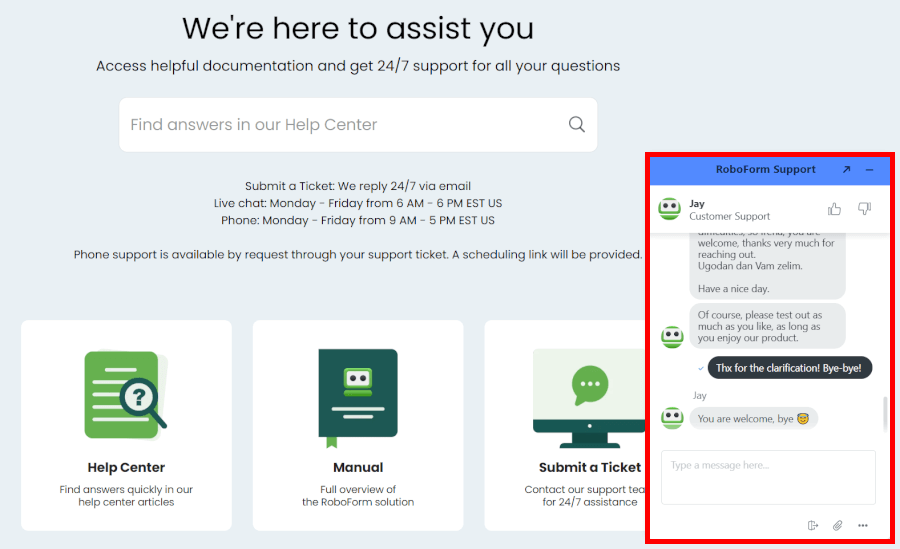
On the self-help side, RoboForm’s Help Center and manuals are crystal clear, guiding you from browser setup to fancy form-filling tricks. No forum? Honestly, you probably won’t miss it — the guides and live chat cover almost everything.
LastPass plays it cool. Most of your support comes via email tickets, with priority responses for paid users. Answers are detailed and usually arrive within a few hours, but if you like instant human help, it’s a bit slower.
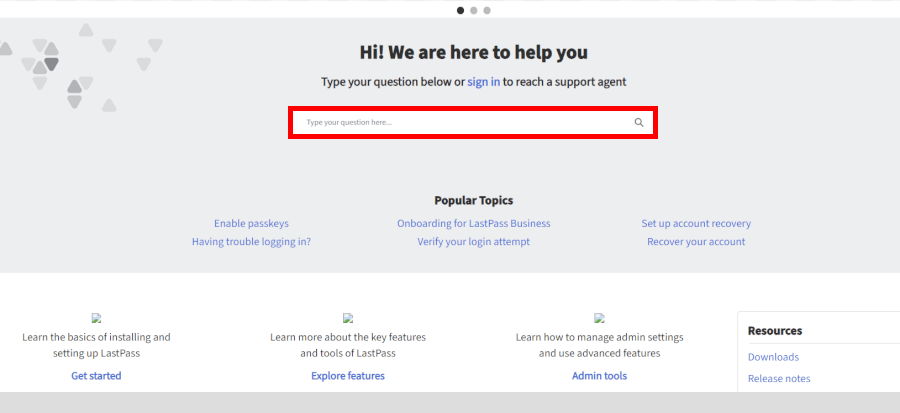
For DIY troubleshooting, their community forum is active, and their knowledge base is solid. Bonus: A 24/7 AI chatbot can tackle basic questions on the fly, which is handy outside office hours — though don’t expect it to replace a real person for tricky issues.
Keeping your password manager secure long-term
Regardless of which password manager you decide to use, you can keep it working strong for years ahead with these straightforward habits.
- Create a master password at least 20 characters long with no dictionary words, and never reuse it anywhere else.
- Turn on two-factor authentication immediately and use an authenticator app instead of SMS.
- Update the desktop app, mobile apps, and browser extensions the same day a new version appears.
- Run the built-in password audit every month to replace weak or duplicated credentials.
- Review shared items quarterly and revoke access the moment someone no longer needs it.
- Enable dark-web monitoring alerts and act on any breach notification within 24 hours.
Follow these six steps and your password manager stays a fortress, no matter how many new accounts you add each year.
The ultimate verdict: Which password manager wins?
RoboForm and LastPass are both popular password managers, but our tests show clear differences in security, privacy, and value. In most categories, RoboForm comes out ahead.
Here’s how they stack up across the key areas we examined:
- Background check: RoboForm – clean security history with no major breaches.
- Platform availability: RoboForm – broader and more consistent support across major operating systems and browsers gives it a slight advantage.
- Core and premium features: Tie – both offer a well-rounded set of essentials like autofill, unlimited password storage, and useful premium extras, with no clear overall winner.
- User interface and ease of use: RoboForm – both are intuitive, but RoboForm wins slightly for everyday efficiency.
- Security and encryption: RoboForm – stronger password-hashing, optional local storage, and zero-knowledge architecture make it a safer bet.
- Privacy policy: RoboForm – minimal data collection, clear policy, and optional offline storage.
- Plans and pricing: RoboForm – usable free plan and very affordable paid options.
- Customer support options: RoboForm – live chat, limited phone support, and clear self-help resources make getting help easy.
RoboForm combines strong security, practical features, user-friendly design, budget-friendly plans, and responsive support — making it the smarter choice for most users in 2026.
Unlock RoboForm Premium without breaking the bank with our hand-picked coupon!
RoboForm Exclusive Coupon:
Get 60% Off RoboForm 1-year subscription plans using the coupon below.
(Coupon is applied automatically; 30-day money-back guarantee.)
Other password manager guides:
- 1Password vs Bitwarden
- NordPass vs LastPass
- 1Password vs Dashlane
- NordPass vs 1Password
- Bitwarden vs NordPass
- NordPass vs Dashlane
- 1Password vs LastPass
- RoboForm vs NordPass
- Proton Pass vs NordPass
- Proton Pass vs 1Password
- Proton Pass vs Bitwarden
- LastPass vs Proton Pass
- RoboForm vs 1Password
RoboForm vs LastPass FAQ
Is RoboForm or LastPass safer for storing sensitive information?
RoboForm is generally safer. Both use top-notch AES-256 encryption and zero-knowledge architecture, so no one — not even the company — can peek inside your vault. But RoboForm goes the extra mile with stronger password-hashing, a spotless security record, and the option to store everything locally if you want your data completely offline. LastPass is solid, too, but its history of breaches and broader data collection makes privacy-focused users tip toward RoboForm.
RoboForm or LastPass, which offers better value for money?
RoboForm takes the win on value. Its free plan actually works, paid plans are wallet-friendly, and there are no restrictions on device types. LastPass is pricier, but you do get some extra security features baked into your subscription. Bottom line: If you want a password manager that delivers the essentials without draining your bank account, RoboForm is your champ.
RoboForm or LastPass, which is better for families and teams?
RoboForm is the smarter pick for most families and small teams. Its Family Plan protects up to five users at a tiny monthly cost, and business plans come with handy admin controls and easy sharing. LastPass covers more users per family plan and offers advanced business tools, but at a higher price. If you want coverage that’s simple, practical, and affordable, RoboForm gets the nod.
Which password manager should I choose in 2026?
For everyday users, families, and small teams, RoboForm is the clear choice. It combines strong security, ease of use, and affordability. LastPass might appeal if you crave extra security features and don’t mind spending more. But for most people who want reliable protection without fuss or high costs, RoboForm is the one to go with.

Leave a Reply