
Aura vs LifeLock is a major matchup in identity theft protection. Both services offer extensive monitoring and hands-on fraud recovery, but they take different approaches to overall security. Aura includes antivirus, a VPN, and a password manager in every plan at no extra cost, while LifeLock keeps device security out of its core plans and charges more for family coverage.
We put both services through real-world testing to see which offers better identity theft protection for the money. Below, we break down how they compare on credit bureau monitoring, identity theft insurance limits, family plans, and everyday usability. Our findings draw on hands-on testing and feedback from real users, including discussions on forums like Reddit.
| Aura | LifeLock | |
|---|---|---|
| Website | Aura.com | LifeLock.Norton.com |
| Pricing | $9 – $25/month (with coupon) | $10.42 – $62.50/month |
| Free trial | 14 days (card required; skipped with coupons) | 30 days (card required) |
| Money-back guarantee | 60 days (annual plans) | 60 days (annual plans) |
| 3-bureau credit monitoring | Yes (across all plans) | 2 bureaus (3 bureaus with premium plans) |
| 24/7 customer support | Yes (US-based) | Yes (US-based) |
| Identity theft insurance | $1M per adult (up to $5M for families) | $1.05M – $3M per adult (plus up to $10K scam cover) |
How we test
Before comparing the results, here’s what we looked at when testing Aura and LifeLock side by side to see how they perform in everyday use:
- Monitoring depth: We checked how thoroughly each service monitors the dark web, public records, financial accounts, and credit files across Experian, Equifax, and TransUnion. We also compared how many credit bureaus are covered by entry-level plans.
- Extra security tools: We tested the extras that come with each plan, including antivirus software, VPNs, password managers, spam call blockers, and data broker removal. We also checked which features are included and which cost extra.
- Alert speed and usability: We compared setup times, dashboard clarity, and app usability, along with how quickly each service sends alerts about suspicious activity.
- Fraud resolution and insurance: We reviewed each provider’s identity theft insurance limits, stolen funds reimbursement, and access to 24/7 recovery specialists.
Side-by-side comparison
Two big names, one tough choice. This quick comparison should make it a little easier to pick your winner:
| Aura | LifeLock | |
|---|---|---|
| Pricing | $9 – $25/month (with coupon) | $10.42 – $62.50/month |
| Family-focused plans and features | ✅ | ✅ |
| 3-bureau credit monitoring and reports | Yes (Experian, TransUnion, and Equifax) | 1-bureau (Equifax) or 3-bureau (Experian, TransUnion, and Equifax) |
| Dark web monitoring and alerts | ✅ | ✅ |
| Identity theft insurance | $1M per adult (up to $5M for families) | $1.05M – $3M per adult (plus up to $10K scam cover) |
| Social media account alerts | ❌ | ✅ |
| Credit lock | ✅ | ✅ Credit and payday loan lock |
| Lost wallet remediation | ✅ | ✅ |
| Antivirus and VPN | ✅ Included in all plans | ❌ Requires separate Norton 360 bundle |
| Password manager | ✅ Included in all plans | ❌ |
| 24/7 customer support | ✅ US-based | ✅ US-based |
| Best Deal | 68% Off Coupon > | 52% Off Coupon > |
Track record and reputation
Trusting a company with your most sensitive info isn’t something you do lightly. Before you pick a service, it’s worth digging into their track record, how many people rely on them, and whether they actually walk the walk when it comes to security.
Aura overview

| Starting price | $12/month ($9 with a coupon) |
| Supported platforms | Windows, macOS, Android, and iOS |
| Three-bureau credit monitoring | Yes (across all plans) |
| Identity theft insurance | $1M – $5M ($1M per adult) |
| Best deal | 68% off coupon > |
Aura kicked off in 2014, when founder Hari Ravichandran had his own credit info stolen — a harsh wake-up call that sparked a mission to make the internet a safer place. Fast forward to today, and over a million people trust Aura to help protect their digital lives.
Aura’s no stranger to the spotlight either. With nods from Inc. Magazine, Forbes, and even the Mom’s Choice Awards, it’s clear they’re doing something right. Their 4.3 TrustScore on Trustpilot (based on 850+ reviews) doesn’t hurt either — that’s a lot of happy, protected users.
After acquiring Identity Guard, Aura expanded its offerings to fit different lifestyles, with flexible plans for individuals, couples, and families. All plans come with powerful tools, including antivirus, a VPN, and a password manager, ensuring your devices and data stay secure.
And they’re still leveling up — like with the new Online Balance feature (“Family” and “Kids” plans), which helps parents keep an eye on their child’s digital well-being with insights and conversation starters.
Aura pros and cons
+ Pros
- Antivirus software across all plans
- Dark web monitoring
- Fraud call protection
- Up to $1 million in insurance coverage
- Plans for individuals, couples, and families
- Useful parental control app
- Password manager and VPN included
- 24/7 customer support and fraud resolution
- Transparent pricing
- 3-bureau credit monitoring included in all plans
– Cons
More expensive than some competitors
LifeLock overview
| Starting price | $10.42/month (billed annually) |
| Supported platforms | Windows, macOS, Android, and iOS |
| Three-bureau credit monitoring | 2 bureaus on Core; 3 bureaus on Advanced and Total |
| Identity theft insurance | $1.05M – $3M per adult (plus up to $10K scam cover) |
| Best deal | 52% Off Coupon > |
LifeLock has been in the identity protection game since 2005, and it’s had quite the journey — including a rebrand in 2022 when it officially became part of Gen Digital Inc. (formerly NortonLifeLock). Over the years, it’s weathered a few storms, from a $12 million FTC fine for misleading ads to a high-profile founder exit that added a dash of drama to its story.
But LifeLock didn’t just dust itself off — it leveled up. Merging with Norton 360 helped beef up its security offerings, and today, it’s still one of the most recognized names in identity theft protection.
Its 4.9 rating on Trustpilot suggests plenty of satisfied customers, but it’s not all smooth sailing. Around 9% of users gave it the lowest score, pointing to false alarms, glitchy alerts, and mixed experiences with customer support. So while LifeLock’s reputation remains solid, there are a few bumps in the road you’ll want to know about before signing up.
LifeLock pros and cons
+ Pros
30-day free trial period
Full-service identity theft protection
Integration with Norton 360 antivirus for enhanced security
Insures up to $1 million in costs stemming from identity theft incidents
Intuitive user interface and straightforward setup process
Protection for lost wallets
- Easy-to-use mobile applications
– Cons
Monitoring from all three credit bureaus is reserved for the more premium plans
- The structure of the paid plans may be perplexing
Price increase after the first year
Steeper pricing compared to competitors
Availability and insurance coverage
From lost funds to legal fees, recovery costs add up fast. Here’s how Aura and LifeLock compare when it comes to insurance protection.
| Aura | LifeLock | |
| Total identity theft coverage | $1M per adult (up to $2M on Couple, $5M on Family) | $1.05M on Core, $1.2M on Advanced, and up to $3M per adult on Total |
| Lawyers and experts coverage | Included within $1M per adult | Up to $1M across all plans |
| Stolen funds and expense reimbursement | Up to $1M per adult | Up to $25K (Core), $100K (Advanced), or $1M per adult (Total) |
| Scam reimbursement | ❌ | Up to $5K (Advanced) or $10K (Total) |
Aura keeps things simple and generous. Every adult on a plan gets up to $1 million in identity theft insurance, no matter the tier. Couples get $2 million total, and families enjoy a whopping $5 million in total coverage, giving you plenty of cushion to recover from stolen funds, legal fees, and out-of-pocket expenses.
See all Aura price plans here >
LifeLock also offers strong insurance, though the details depend heavily on which tier you pick. Every plan includes up to $1 million for lawyers and experts, while total combined coverage starts at $1.05 million on Core, climbs to $1.2 million on Advanced, and reaches $3 million per adult on Total. Higher tiers also add $5,000 to $10,000 in scam reimbursement, which is a nice bonus if you’re worried about phishing or payment scams.
See all LifeLock price plans here >
As for platform support and system compatibility, both services cover all the bases:
- Aura works smoothly across Windows, macOS, iOS, and Android, with browser extensions for Chrome, Firefox, and Edge. It pairs that device coverage with continuous dark web, public record, and new account monitoring.
- LifeLock also supports Windows, macOS, iOS, and Android, plus Norton’s Safe Web extension for Chrome, Firefox, and Edge. You get reliable alerts across every device, though without the built-in VPN and antivirus that Aura includes out of the box.
Core identity monitoring
Aura and LifeLock both monitor your identity, but they don’t do it quite the same way. Here’s how they compare on credit checks, dark web scans, and bank account alerts.
Credit monitoring
Aura includes three-bureau credit monitoring, even on its base plan — a significant win compared to LifeLock, which covers two bureaus on its entry-level Core plan and reserves full three-bureau coverage for its Advanced and Total tiers. Keeping tabs on all three credit bureaus (Experian, Equifax, and TransUnion) is important since they don’t always show the same data, and missing one could mean missing a red flag.
Both Aura and LifeLock alert you to new accounts or inquiries on your credit file — a common sign of fraud. But Aura gets bonus points for its direct connection to the credit bureaus, which means faster alerts and quicker action when something suspicious pops up. LifeLock’s setup, on the other hand, can take a few days to kick in.
Since speed matters in stopping identity theft early, Aura’s real-time alerts and full credit monitoring from the start make it a stronger choice here.
Dark web surveillance
The dark web might sound mysterious, but in reality, it’s where a lot of illegal activity happens — and where stolen personal data often ends up for sale. Here’s a glimpse at what goes on behind the scenes:
Your data, up for grabs: Hackers sell sensitive info like SSNs, passwords, and credit card numbers.
Underground markets: Everything from narcotics to weapons is available if you know where to look.
Hacker hangouts: It’s a breeding ground for cyber attacks and ransomware schemes.
Illegal content: From pirated content to banned material, it’s all there.
Because of all this, dark web surveillance isn’t just helpful — it’s essential. It acts like an early warning system, letting you know if your information has been compromised before bigger problems hit.
| Aura | LifeLock | |
| Where does it monitor for signs of fraud? | The dark web, data broker sites, public records, bank and investment accounts, online sites and discussion forums, payday loans, criminal and court records | The dark web, data broker registries, public records, bank and investment accounts, online sites and forums, payday loans, criminal and court records, and social media platforms |
| What can you add to your watchlist? | Your name, date of birth, address, up to 10 email addresses, 40 credit/debit card numbers, 5 phone numbers, 3 health insurance IDs, and more | Your name, date of birth, address, up to 5 email addresses, 10 credit/debit card numbers, 5 phone numbers, 5 health insurance IDs, and more |
| You’ll receive alerts for any suspicious activity? | ✅ | ✅ |
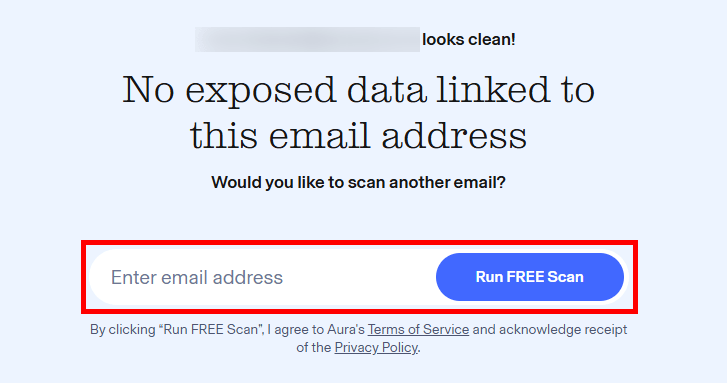
Aura takes identity monitoring seriously, scanning everything from the dark web and public records to financial accounts and data broker sites. If it finds anything off, you’ll get a detailed alert and guidance on what to do next, plus free dark web scans to see if your info has already been leaked.
LifeLock covers similar ground, watching for threats like criminal record misuse, payday loan fraud, and banking irregularities. But while it does offer solid protection, it’s a bit less clear on how fast those alerts come through. With Aura’s reputation for speed, you’re more likely to catch a threat before it spirals out of control.
Bank and investment monitoring
Let’s see who does a better job of guarding your bank accounts and keeping your finances fraud-free — Aura or LifeLock?
| Aura | LifeLock | |
| Account monitoring? | Yes, complete account monitoring (credit cards, checking accounts, savings accounts, investment accounts, 401(k)s, and any changes to banking information) with all plans | Depends on the plan: Up to 2 accounts on Core, up to 5 accounts on Advanced, and unlimited accounts plus 401(k)/investment alerts on Total |
| High-risk transaction alerts? | ✅ | ✅ |
| Lost wallet remediation | ✅ | ✅ |
Aura doesn’t mess around when it comes to watching your money. Every plan includes monitoring for bank accounts, credit cards, 401(k)s, and investment accounts — plus alerts for anything suspicious, from weird transactions to payday loans you didn’t sign up for. It’s solid protection across the board, no upgrade required.
LifeLock, meanwhile, offers similar tools — but caps how much you can track unless you pay more. Their entry-level Core plan limits bank and credit alerts to two accounts, while unlimited account monitoring and 401(k)/investment alerts are reserved for their pricier Total tier.
So while both services do a good job of flagging high-risk transactions and guarding your wallet, Aura makes it easier (and cheaper) to protect your finances from day one.
Extra security tools
While both Aura and LifeLock shine at identity theft protection, they also throw in some great bonus tools. Think VPNs, antivirus programs, and password managers that help round out your overall digital security.
Keeping kids safe
When you’re a parent, identity protection isn’t just about your credit score — it’s about making sure your kids are safe from digital dangers too. That’s why features like parental controls and child identity monitoring deserve a top spot on your must-have list.
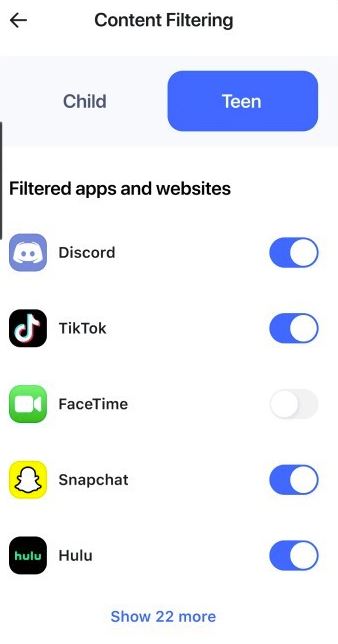
Aura steps up for families with powerful tools to help keep kids safe online. Think of its parental controls as your digital sidekick — helping you block harmful content, manage screen time, and stay in the loop with alerts about cyberbullying or online predators. All of this comes wrapped in Aura’s “Family” plan — a one-stop safety kit for your kids’ digital lives.
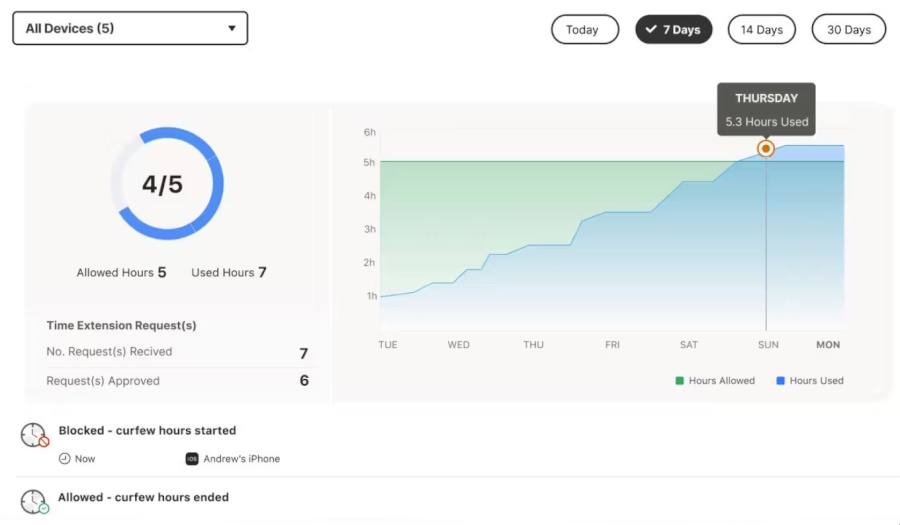
LifeLock comes through with strong child identity monitoring and social media alerts, keeping an eye out for fraud. But if you’re hoping for full-on parental controls, like content filters or screen time tools, LifeLock leaves those to other apps.
Antivirus and VPN
In the digital wild west, you’ll want some serious armor, and Aura delivers with built-in antivirus and VPN protection. Here’s what their secure VPN setup looks like behind the scenes.
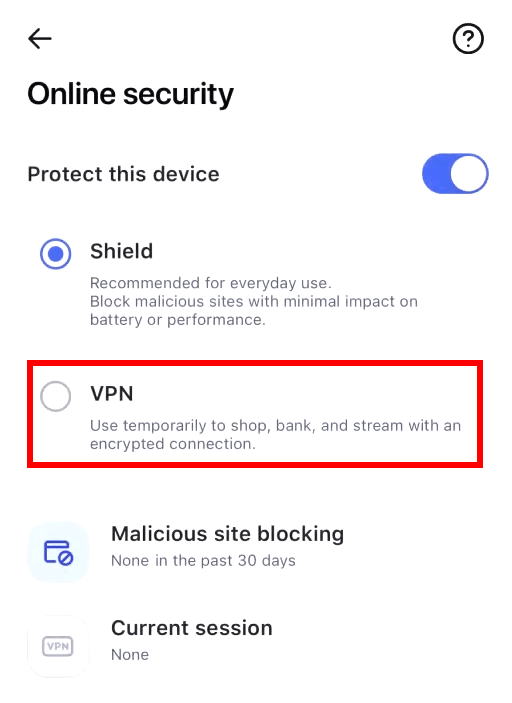
So, Aura doesn’t make you jump through hoops for solid digital security. Antivirus and VPN protection come built into every plan, giving you peace of mind whether you’re shopping online, checking your bank account, or just browsing memes. You’re covered right out of the box.
LifeLock, meanwhile, takes a different route. It offers Norton 360’s antivirus and VPN, but only as a separate add-on. That means you can beef up your protection, but it’ll cost extra. So while LifeLock gives you options, Aura gives you everything upfront — no upsells needed.
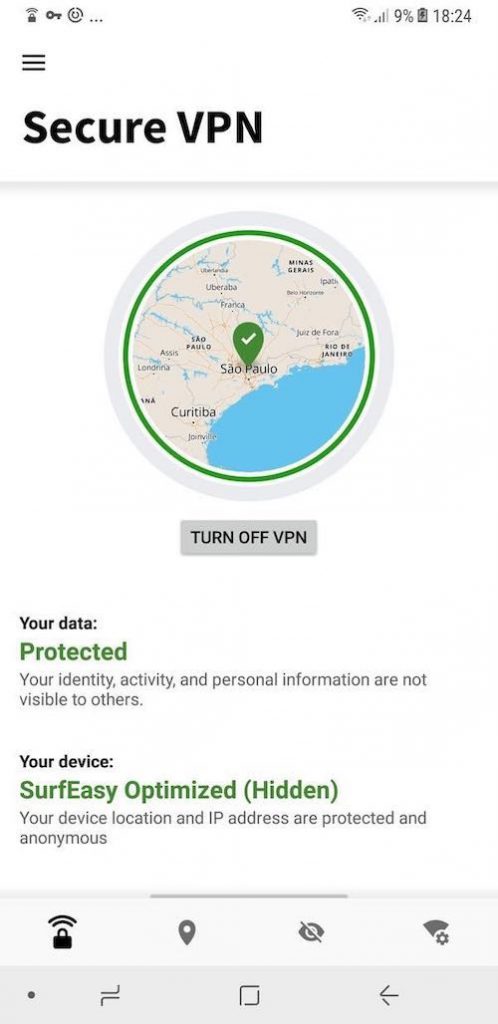
All things considered, Aura takes the crown for antivirus and solid VPN protection. By including these essentials in every plan, it offers solid, built-in security without the extra price tag.
Ad and tracker blocking
Aura’s browser extension takes care of more than just annoying ads. It blocks trackers, helps pages load faster, and even includes tools like a password manager and email masking — all designed to keep your digital footprint private.
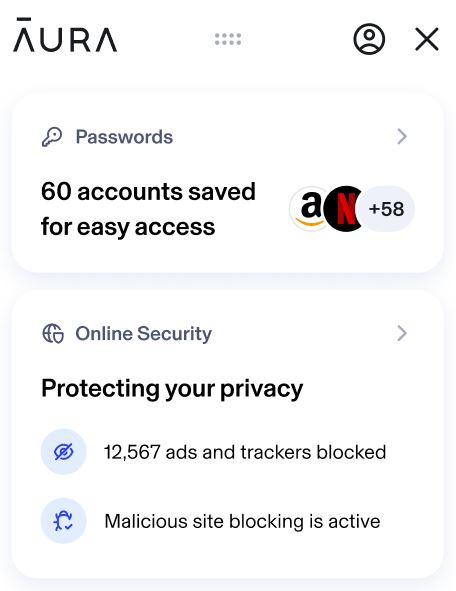
Want an even stronger shield? Team it up with Aura’s built-in VPN for broader protection across all your devices. Just a heads-up: you might hit a few extra verification screens here and there (hello, Google), but it’s a small trade-off for keeping your personal info locked down.
Over on the LifeLock side, ad blocking isn’t a core feature. Norton’s add-on only offers ad blocking for iOS, which leaves users on other platforms in the dust. So, if you’re looking for privacy features that work across the board without needing extra purchases, Aura is the clear winner.
Password manager
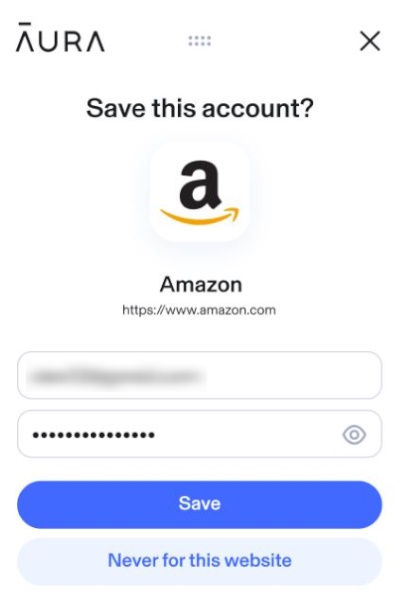
Aura packs a solid password manager into every plan — it stores your logins, flags weak or leaked passwords, and can even update them for you on supported sites. It’s a simple way to tighten security without the usual hassle.
LifeLock skips the built-in password manager, but Norton does offer one as a free add-on. The catch? It doesn’t connect with LifeLock’s other tools, so switching between apps can feel a bit disjointed.
Social media monitoring
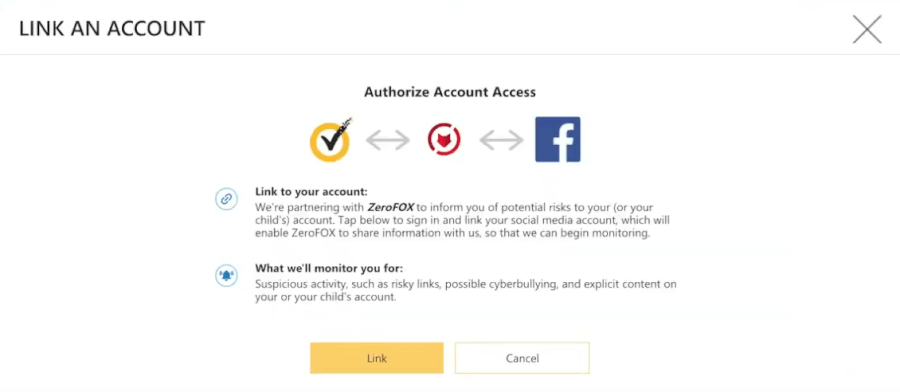
LifeLock takes social media safety seriously, scanning for suspicious activity like hacked posts, sketchy links, or sudden changes to your account settings. It doesn’t stop with adults either — LifeLock also keeps an eye on your kids’ profiles, flagging signs of cyberbullying or risky viral trends before they spiral out of control.
Aura, on the other hand, skips dedicated social media monitoring, but makes up for it with powerful parental controls and full-family protection. Its tools even let you manage or block access to certain social media platforms like Facebook. From shielding your info to guarding against financial fraud, Aura covers more ground — even if it doesn’t scroll through your feed.
Ease of use and support
Identity protection doesn’t have to be complicated. Aura and LifeLock both offer help when you need it, but which one makes managing your security a breeze? Stick around as we explore which service keeps things simple and straightforward.
Setting up your protection
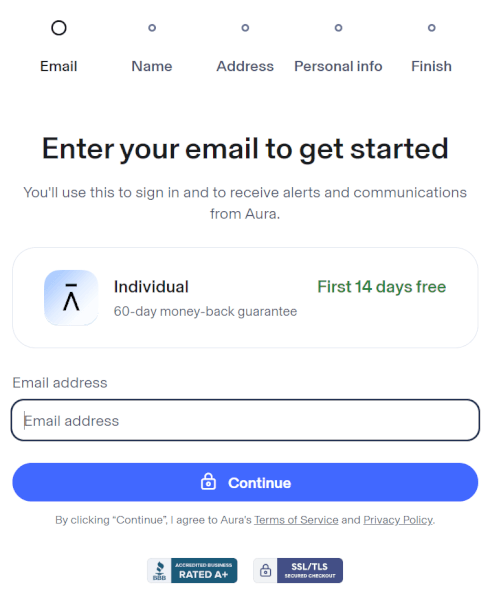
Signing up is a key first step when picking an identity theft protection service. Aura keeps it simple on its website, smoothly guiding you through choosing a plan and entering basics like your name, email, and phone number.
Aura’s user-friendly interface guides you effortlessly through registration, quickly activating security features like VPN, antivirus, and handy browser extensions with password management and ad blocking to keep you safe online.
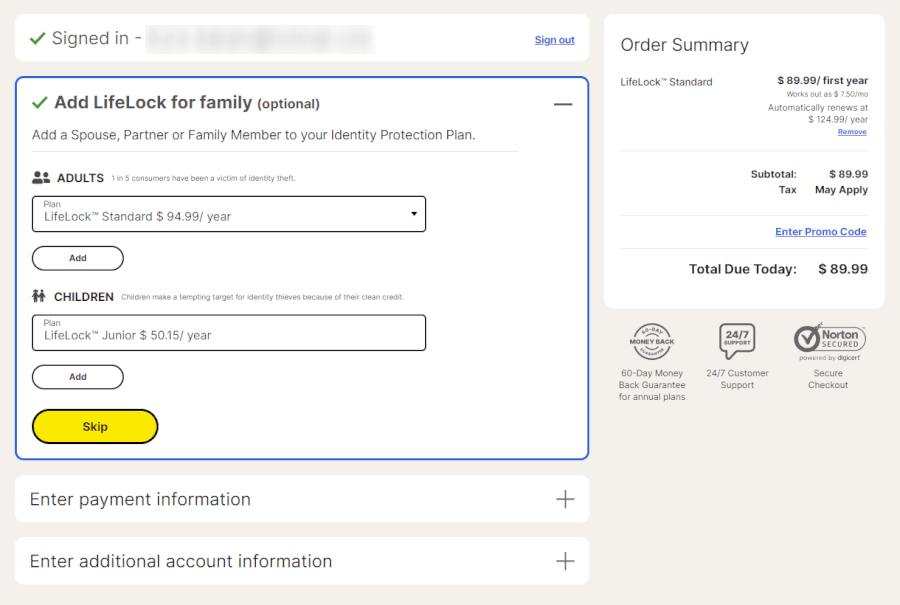
Signing up for LifeLock takes a bit more time, requiring thorough personal and financial details to tailor protection just for you. Once billing info is in, you land on the LifeLock dashboard — your hub for managing settings and keeping tabs on alerts about your identity.
Aura scores high praise for its clean, user-friendly interface that works smoothly across Windows, Mac, iOS, and Android. LifeLock covers the same platforms but tends to feel a bit clunkier, with users noting it takes a bit more clicking and digging to find what you need compared to Aura’s slicker experience.
Navigating the apps
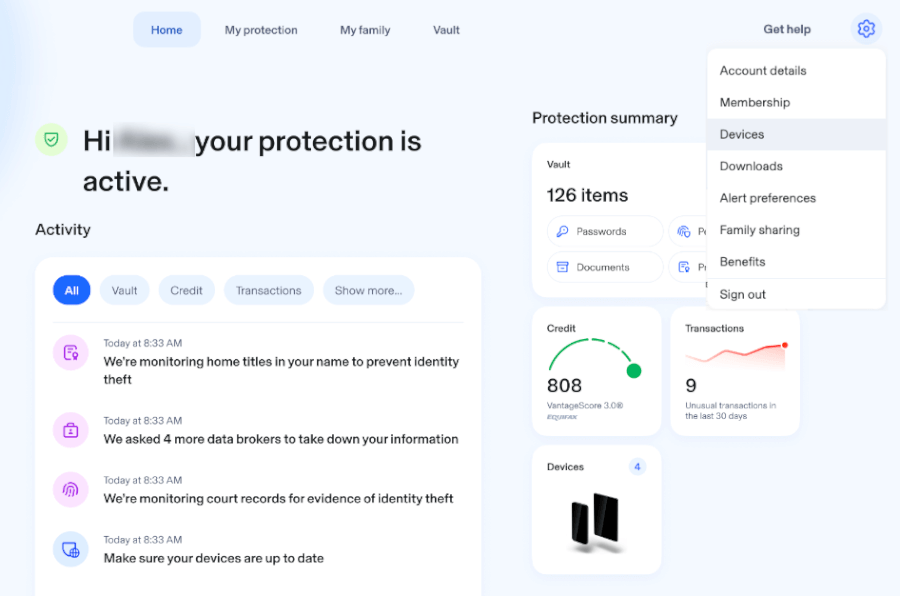
Aura’s app keeps things simple and smart. Whether you’re on iPhone, Android, or desktop, you get a clean dashboard that lets you track your finances, manage alerts, and stay on top of your digital security — all in one place.
LifeLock’s dashboard is clean and easy to navigate, but don’t expect instant access to everything — credit monitoring can take a few days to kick in after sign-up, so there’s a bit of a waiting game before you get the full scoop. Their mobile apps are slick and user-friendly, but having two different apps might leave you scratching your head at first, wondering which one you need to download.
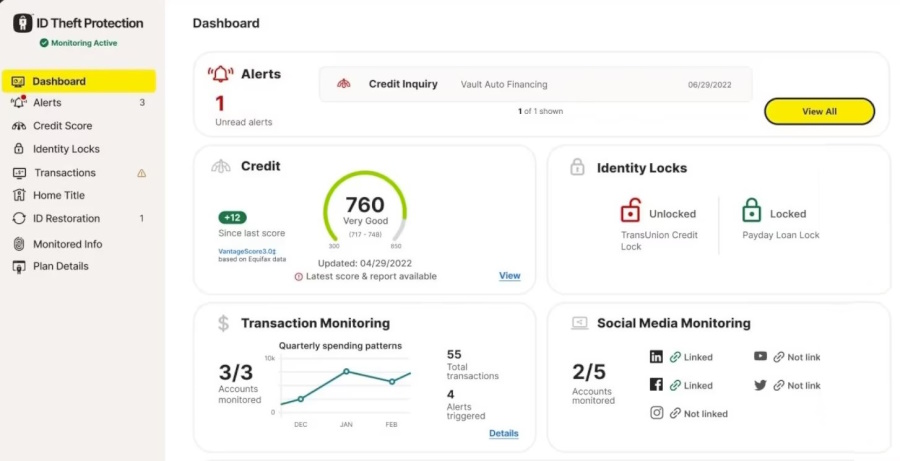
Aura’s clean, easy-to-use interface makes managing your identity protection a breeze — giving LifeLock a run for its money in user-friendliness.
Customer support
When things go wrong, who do you call? In the world of identity theft protection, solid customer support can be a real lifesaver — and both Aura and LifeLock are on call 24/7/365 to lend a hand.
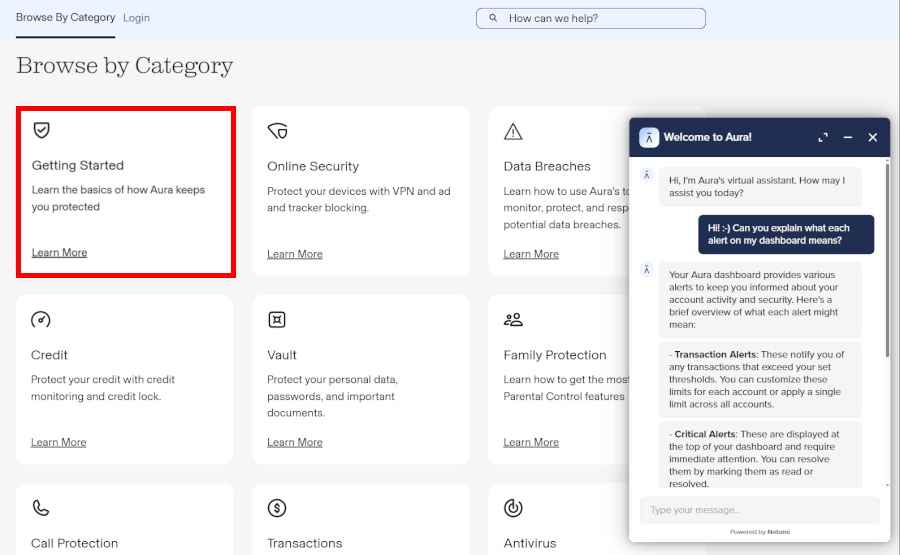
Aura stands out with its all-US-based support team that’s available every hour of every day — even on holidays (because hackers don’t take time off). Whether you prefer calling, emailing, or chatting live, Aura makes it easy to reach someone who actually knows what they’re talking about. We especially liked their AI assistant, which handled basic questions surprisingly well, fast, friendly, and right on the money.
And if you ever do fall victim to identity theft, Aura goes beyond just sympathy and sends in the pros. Each customer gets a dedicated case manager, often with years of experience in fraud resolution, to walk them through every step of recovering their identity. It’s personalized, patient, and — based on our experience — pretty reassuring during a stressful time.
Aura also caters to the DIY crowd with a helpful support center packed full of how-to guides and articles. Whether you’re curious about how something works or trying to fix a minor issue, there’s plenty of info to dig through without having to wait on hold.
LifeLock also promises 24/7 support, though the experience is a bit more of a mixed bag. While their case managers are also US-based and ready to help you through an identity theft crisis, their general support team is largely overseas. They’re available around the clock, but we noticed that many reps seemed more versed in Norton’s antivirus tools than LifeLock’s identity protection features. This can make troubleshooting more complex issues a little frustrating.
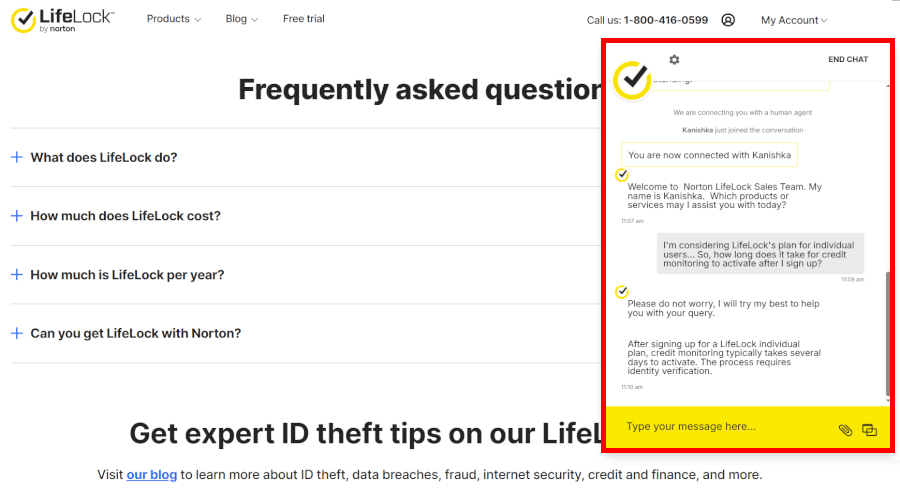
One perk for those on LifeLock’s Total plan is “priority support,” which bumps you up in the queue — handy if you don’t love waiting. However, you won’t find direct email support or a dedicated customer portal. And while there is a blog and an FAQ section, it’s not quite as comprehensive as Aura’s resource library.
Credit and financial tools
Aura keeps it simple but solid, offering three-bureau credit monitoring on every plan. You’ll get monthly credit score updates and one annual credit report to check in on your financial standing. It’s great for staying in the loop, but Aura doesn’t go the extra mile with tools like credit score simulators or budgeting calculators — so you’ll have to do the math yourself.
LifeLock, especially if you go for the “Total” plan, turns things up a notch with daily credit score updates and monthly credit reports from all three bureaus. You also get the power to lock and unlock your TransUnion credit file, which can be a lifesaver when applying for loans or stopping fraud in its tracks. Just keep in mind: entry-level Core plan only monitors two bureaus and may skip the full reports, meaning less visibility and more DIY work for complete protection.
Security and privacy
When it comes to keeping your personal info under lock and key, both Aura and LifeLock are in the spotlight, but they’ve taken different paths to safeguard your data.
Let’s start with a quick head-to-head:
| Security features | Aura | LifeLock |
| Bank-level AES-256 encryption | ✅ | ✅ |
| Real-time threat and fraud alerts | ✅ | ✅ |
| Two-factor authentication | ✅ | ✅ |
| Dedicated privacy tools (VPN, ad block) | ✅ | ❌ Separate Norton bundle |
Aura uses military-grade AES-256 encryption — the gold standard for digital security — to guard your personal info. It’s the same level of protection trusted by banks and government agencies. Combine that with Aura’s high-profile partnerships (including Walmart and Bank of America), and you get the sense they’re doing something right.
Plus, Aura includes extras like a secure VPN, ad blocker, safe browsing tools, and even password management — all built right in.
LifeLock covers the basics, though its track record has a few dents. According to the Federal Trade Commission (FTC), LifeLock paid $12 million in 2010 and a $100 million contempt settlement (with refunds issued in 2019) over data security and advertising failures. Parent company Gen Digital also reached a $9.95 million class-action settlement in 2026 over unsolicited robocalls, leaving a history that still casts a shadow despite recent improvements.
Also, LifeLock does use strong encryption, and you can add Norton’s antivirus and VPN tools through a separate bundle. But unlike Aura, those features aren’t fully integrated and can feel like an afterthought. You’ll need to toggle between apps and dashboards, which isn’t exactly seamless.
Plans and pricing
When it comes to protecting your identity, the features matter — but so does the price tag. Aura and LifeLock both offer a range of plans, but how much value do you actually get for your money?
| Aura plans | Price per month (paid monthly) | Price per month (paid yearly) |
| Individual | $12/month | $9/month |
| Couple | $20/month | $17/month |
| Family | $30/month | $25/month |
Aura keeps pricing simple, all-inclusive, and refreshingly free of hidden fees. The “Individual” plan covers one adult with $1 million in identity theft insurance, 1GB of secure cloud storage, and protection for up to 10 devices — all for $12/month (or just $9/month with a discount).
The “Couple” plan covers two adults, bumps cloud storage up to 2GB, and secures up to 20 devices for $20/month (or $17/month with a discount).
The “Family” plan is the best deal if you’re protecting the whole household. For $30/month ($25/month with a discount), you get $1 million in insurance per adult, 5GB of storage, coverage for up to 50 devices, and extra features like child identity protection and parental controls.
And the best part? No upsells, no add-ons — Aura gives you the full package right out of the gate.
| LifeLock plans | Price per month (paid monthly) | Price per month (paid yearly) |
| Core | $12.49/month | $10.42/month |
| Advantage | $19.99/month | $16.67/month |
| Total | $34.99/month | $29.17/month |
LifeLock takes a more complicated path when it comes to pricing. You’ve got three main tiers — Core, Advanced, and Total — and prices climb steeply if you cover a partner or children (with the Total family plan reaching $62.50/month billed annually, or $74.99/month billed monthly).
They do match Aura’s 60-day money-back guarantee on annual plans, which is great. But if you want Norton’s antivirus and VPN (something Aura includes by default), you’ll need to pay extra for a separate Norton 360 bundle.
For context: LifeLock’s individual Total plan runs $349.99/year billed annually — more than Aura’s entire Family plan ($300/year with our discount) — and that’s still without Norton 360 device security baked in.
See all LifeLock prices here >
2026 identity theft statistics
Identity theft continues to surge in 2026, making reliable protection more essential than ever. Here are the most recent figures showing why monitoring services like Aura or LifeLock deserve serious consideration:
- Fraud losses reach $15.9 billion: The FTC reports that consumer fraud losses rose to $15.9 billion in 2025 compared to $12.5 billion the previous year, alongside over 1.13 million identity theft filings.
- Record-breaking data breaches in 2026: According to the ITRC, the first half of 2026 alone logged 1,803 data compromises and 471.2 million victim notices, surpassing the full-year totals of prior cycles.
- Surging FBI cybercrime complaints: Data tracked by the Triple-I indicates total cybercrime losses climbed to $20.9 billion in 2025, while FBI identity theft complaints jumped 48% to 31,675.
These numbers highlight the real danger: one breach or stolen detail can quickly spiral into major headaches. Strong monitoring, fast alerts, and recovery support give you the best defense—and bundling extras like antivirus helps cover modern threats without added costs.
Final verdict
When it comes down to choosing between Aura and LifeLock, here is how they stack up across every category we tested:
| Category | Winner | Key takeaway |
| Track record and reputation | Aura | Clean regulatory history compared to LifeLock’s past FTC fines |
| Insurance and platform coverage | Tie | Aura offers higher family limits ($5M); LifeLock adds $10K scam cover on higher tiers |
| Core identity monitoring | Aura | Full 3-bureau credit monitoring and unlimited bank alerts on every plan |
| Extra security tools | Aura | Built-in antivirus, VPN, ad blocker, and password manager at no extra cost |
| Ease of use and support | Aura | Cleaner all-in-one dashboard and 100% US-based 24/7 support |
| Credit and financial tools | Tie | Aura covers 3 bureaus upfront; LifeLock offers daily scores on its Total plan |
| Security and privacy | Aura | Strong AES-256 encryption with native privacy tools instead of separate add-ons |
| Plans and pricing | Aura | Lower, transparent pricing with zero upsells |
In the end, both Aura and LifeLock put up a good fight — but Aura pulls ahead where it really counts. With stronger credit monitoring across the board, built-in security tools, and a smoother experience from sign-up to support, Aura gives you more without the hidden costs. If you’re looking for a smarter, simpler way to stay protected, Aura is the clear winner.
Save 68% on your Aura plan when you sign up through our link:
Exclusive Aura Coupon:
Get 68% Off Aura subscription plans with the coupon below:
(Coupon is applied automatically; 60-day money-back guarantee.)
Not sure about Aura? Try it out — and if it’s not your thing, there’s a 60-day money-back promise. Then give LifeLock a try.
Aura vs LifeLock FAQ
Aura is the better overall choice for most people in 2026, winning on credit monitoring, built-in security tools, and overall value. Every Aura plan includes three-bureau credit monitoring, antivirus software, a VPN, and a password manager at one flat price, while LifeLock limits full bureau tracking and device security to higher tiers or paid Norton 360 add-ons.
Aura bundles identity protection, credit monitoring, and device security into one simple app, while LifeLock separates its identity plans from Norton 360’s antivirus and VPN tools. Aura also provides 100% US-based customer support across all tiers, whereas LifeLock relies on overseas reps for general support and reserves priority support for its top-tier Total plan.
Aura has no hidden fees or upsells. Every feature is included upfront, with annual plans running $9 to $25/month (with our 68% off coupon). LifeLock is noticeably pricier ($10.42 to $62.50/month billed annually across its Core, Advanced, and Total tiers) and requires a separate Norton 360 bundle if you want antivirus and VPN protection.
Aura includes both a VPN and antivirus software on every single plan at no extra cost, along with a password manager and ad blocker. LifeLock does not include a VPN or antivirus by default. You have to pay extra for a separate Norton 360 bundle, which also runs through separate apps rather than a single dashboard.
Aura offers better credit monitoring out of the box because it covers all three major bureaus (Experian, Equifax, and TransUnion) on every plan with fast, direct alerts. LifeLock only monitors two bureaus on its entry-level Core plan, reserving full three-bureau coverage and monthly credit reports for its pricier Advanced and Total tiers.
Aura is the better value for families, covering up to five adults and unlimited children for $25/month (billed annually with our coupon), complete with parental controls, cyberbullying alerts, and up to $5 million in combined insurance ($1M per adult). LifeLock’s family plans cost significantly more—up to $62.50/month annually on the Total tier—and lack built-in screen time and content-filtering parental controls.
It depends on your household size and coverage needs. Aura gives every adult $1 million in coverage (up to $2M for couples and $5M for families) that applies directly to stolen funds, legal fees, and recovery expenses on every tier.
LifeLock includes up to $1 million for lawyers and experts on all plans, while stolen funds reimbursement starts at $25,000 on Core and scales up to $3 million per adult (plus $10,000 in scam reimbursement) on its top-tier Total plan.

LifeLock used to be the top contender for identity theft services. But Aura has taken the lead. It offers a more comprehensive service, better features, and is a much better value than LifeLock, especially when you look at the coverage that each service provides.
It is now August 1st 2026. Does this still hold true? Is Aura still better than Lifelock?
Thank you
Yep, still holds true based on our tests.