
Microsoft’s February 2026 Patch Tuesday rollout includes security updates for 59 Windows 11 vulnerabilities, six of which are confirmed to be actively exploited in the wild.
The updates address vulnerabilities discovered by Microsoft’s internal teams, including the Microsoft Threat Intelligence Center (MSTIC), the Microsoft Security Response Center (MSRC), and researchers from Google’s Threat Intelligence Group and 0patch. The six zero-days span multiple Windows components and have been confirmed to have functional exploits in circulation, elevating their urgency for patching.
Zero-days under active exploitation
The most severe of the zero-days, CVE-2026-21510, is a Windows Shell security feature bypass rated 8.8 on the CVSS scale. The vulnerability allows attackers to circumvent SmartScreen and Windows Shell warnings by tricking users into opening malicious .lnk files or URLs. Exploitation requires user interaction but can be initiated over the network.
Similarly, CVE-2026-21513, a security feature bypass in MSHTML, is being used in active attacks. This vulnerability enables remote attackers to bypass execution prompts by embedding malicious code in HTML or shortcut files. This vulnerability also carries a CVSS score of 8.8 and is triggered through phishing vectors or crafted documents.
CVE-2026-21514 affects Microsoft Word and represents another security feature bypass with exploitation detected. The flaw allows adversaries to disable OLE mitigations. While it is exploitable only locally, it poses risks through document-based attacks when users are tricked into opening crafted Office files.
Two local privilege escalation bugs round out the exploited list:
CVE-2026-21519 in Desktop Window Manager, stemming from a type confusion bug, allows attackers with low privileges to gain SYSTEM-level access.
CVE-2026-21533 affects Windows Remote Desktop Services and has a CVSS score of 7.8. It leverages improper privilege management (CWE-269) to elevate local user privileges to SYSTEM.
Lastly, CVE-2026-21525, a denial-of-service vulnerability in Remote Access Connection Manager, has also been observed in attacks. It results from a NULL pointer dereference and allows unauthenticated local users to crash the service.
Broader patch scope
Beyond the six zero-days, this month’s update addresses 53 vulnerabilities across the full Microsoft ecosystem, including
- Windows Kernel, GDI+, HTTP.sys, LDAP, WinSock, and Remote Desktop.
- Applications such as Microsoft Word, Excel, Outlook, Visual Studio, and Power BI.
- Cloud services like Azure DevOps, Azure Front Door, Azure Arc, Azure SDK, and Azure Function.
- Third-party integrations, including GitHub Copilot and Microsoft Defender for Linux.
A notable fix is CVE-2026-21531, a critical remote code execution flaw in Azure SDK, carrying a CVSS score of 9.8. While Microsoft reports no exploitation of this vulnerability, it is network-exploitable without authentication, making it particularly dangerous in unpatched cloud environments.
Similarly, CVE-2026-20841, affecting the Windows Notepad app, was patched for a potential code-execution issue rated at 8.8. Exploitation requires a user to open a malicious file, but given the ubiquity of the Notepad app, the attack surface is considerable.
Microsoft’s Windows 11 cumulative update (KB5077181) for versions 25H2 and 24H2 includes these security fixes along with prior quality-of-life improvements. Notably, this release updates key AI components, including Image Search and Semantic Analysis, and addresses WPA3 Wi-Fi connectivity bugs introduced in earlier builds.
Alongside the fixes, Microsoft issued a reminder about the June 2026 expiration of Secure Boot certificates. This upcoming deadline could prevent devices from booting securely if certificates are not updated in time. Windows 11 devices receiving this month’s updates will include new targeting logic to begin rolling out updated certificates in a phased and safe manner.
Windows 11 users can install the latest security update by opening Settings > Windows Update > Check for updates, then selecting Download & install all.
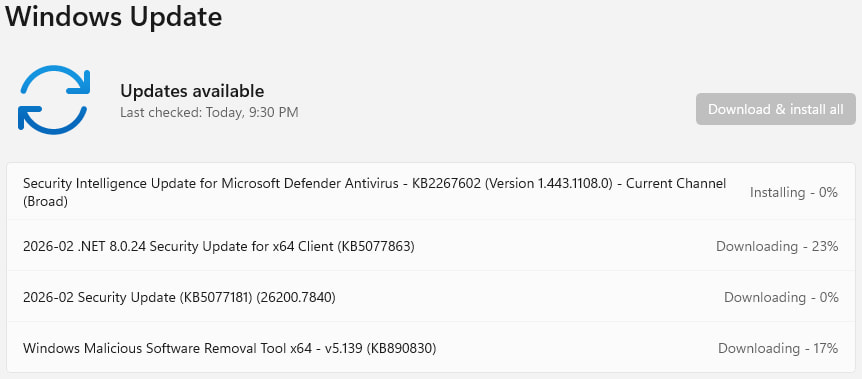
The updates will be automatically downloaded and installed, and a system reboot will be required for them to apply. It is recommended to back up important files before starting the process to prevent data loss.



Leave a Reply